Logs analysis using Fluentd and BigQuery
Grzesiek Miklaszewski

Logs? Why do I care?
free source of information, set up by default
debugging
business analitics
statistics
performance and benchmarking
trends
big data
security
Started GET "/" for 127.0.0.1 at 2012-03-10 14:28:14 +0100
Processing by HomeController#index as HTML
  Rendered text template within layouts/application (0.0ms)
  Rendered layouts/_assets.html.erb (2.0ms)
  Rendered layouts/_top.html.erb (2.6ms)
  Rendered layouts/_about.html.erb (0.3ms)
  Rendered layouts/_google_analytics.html.erb (0.4ms)
Completed 200 OK in 79ms (Views: 78.8ms | ActiveRecord: 0.0ms)
method=GET path=/jobs/833552.json format=json controller=jobs
action=show status=200 duration=58.33 view=40.43 db=15.26Using lograge
Rails default
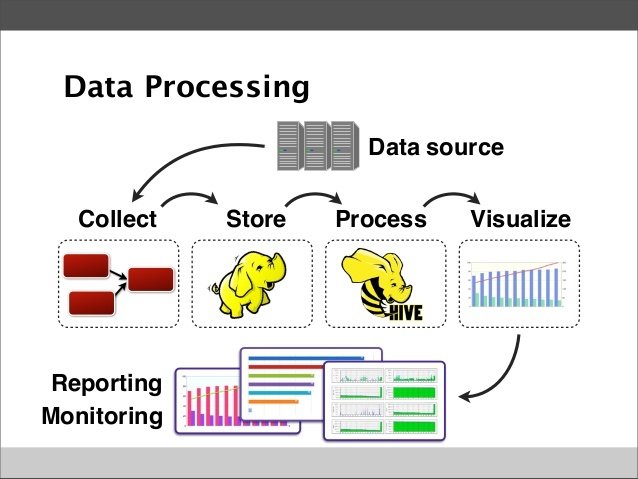
Treat logs as event streams
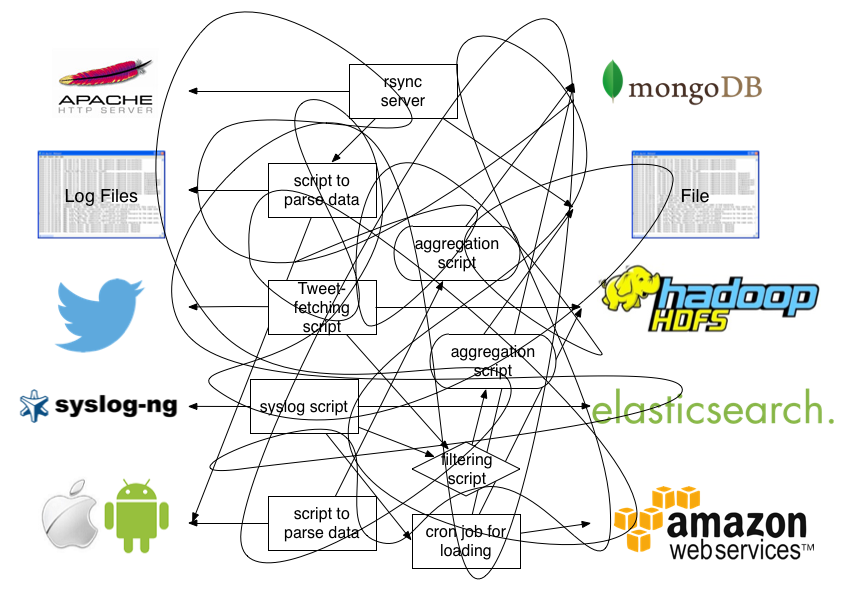
Reality
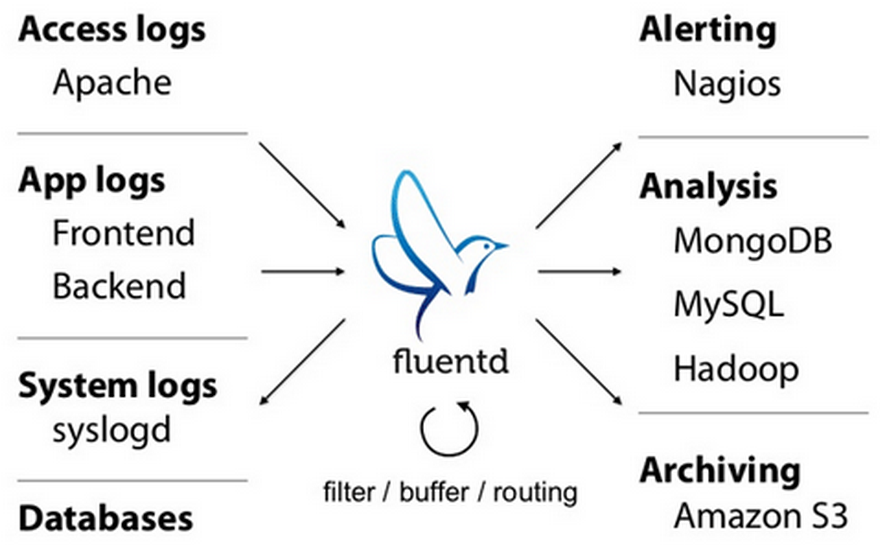
Using log aggregator
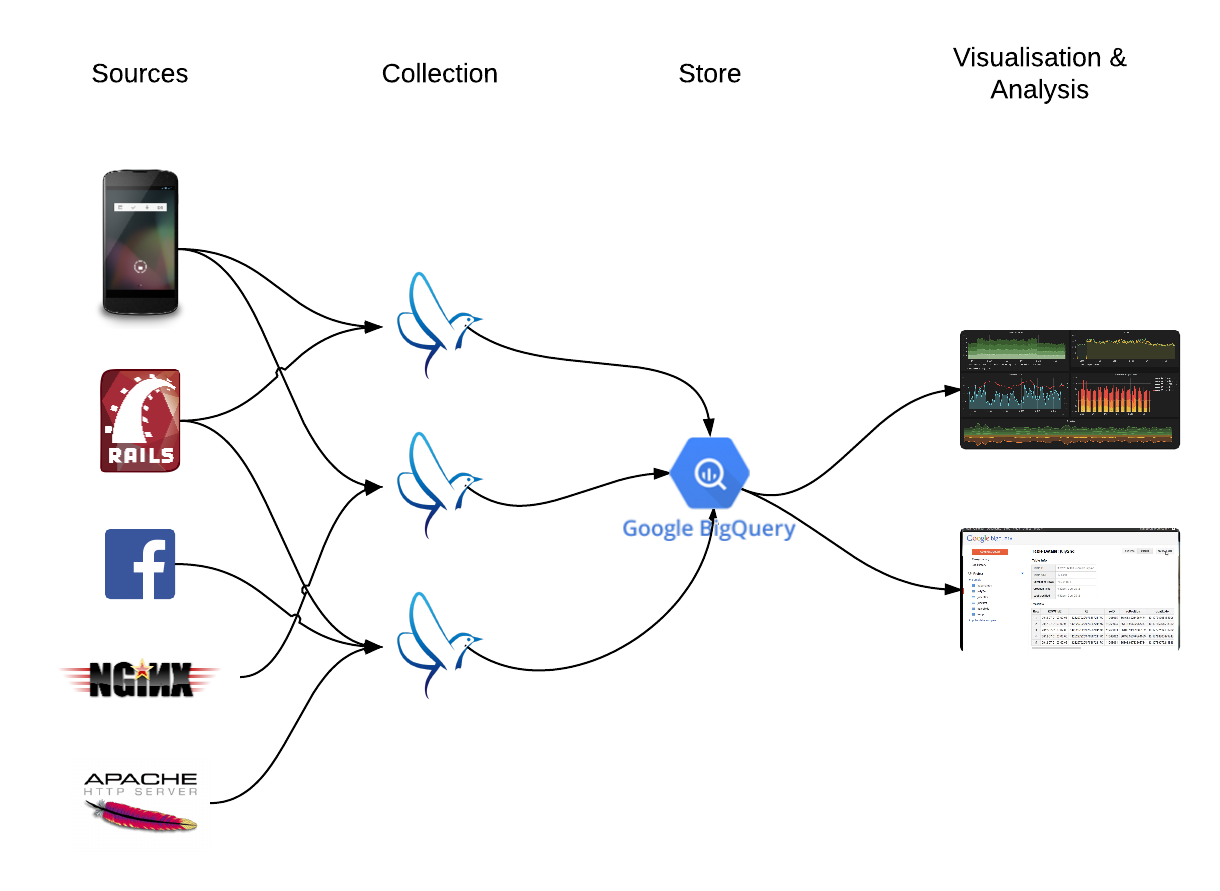
Example
What is Fluentd?
Fluentd is an open source data collector for unified logging layer
filtering/processing
open source gem
written in Ruby and C
plugin architecture
300+ plugins available as gems
JSON objects
memory and file-based buffering
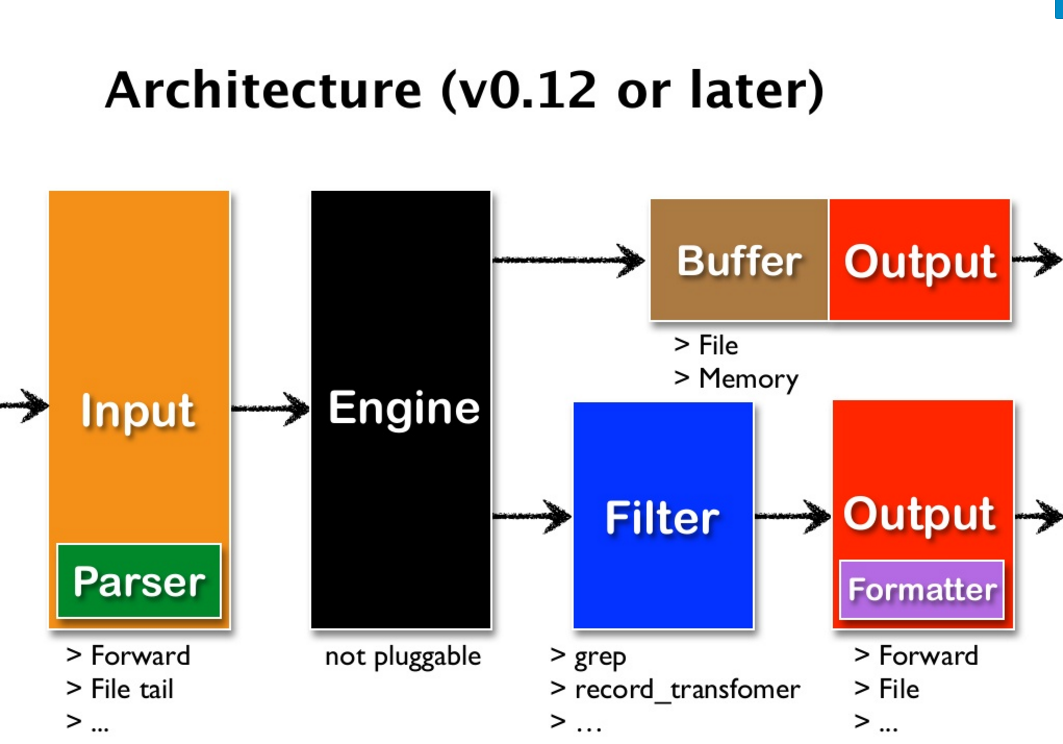
Fluentd architecture
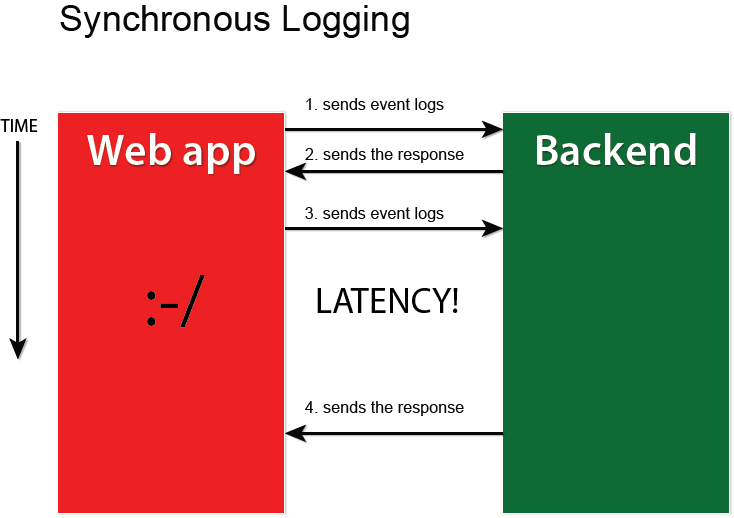
Collect
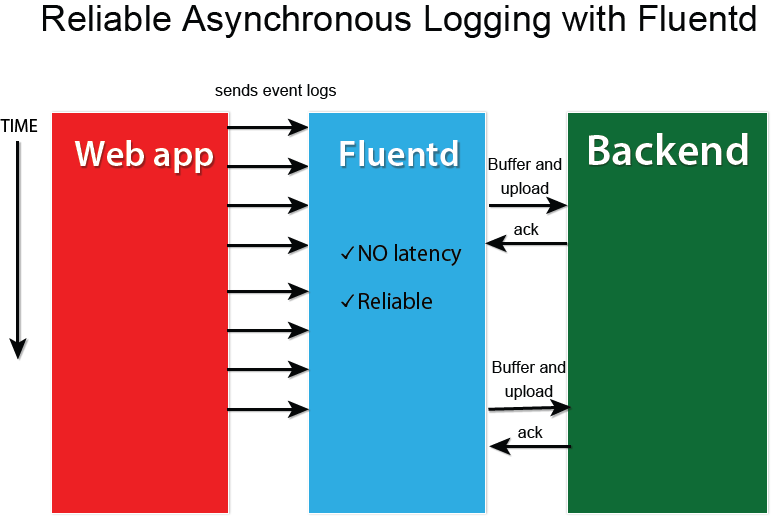
Collect
What is an event?
Where an event comes from. For message routing.
Tag
Time
When an event happens. Epoch time.
Record
Actual log content. JSON object.
Tags
apache
apache.info
apache.info.mobile
rails.info.mobile
Configuration
# Receive events from 24224/tcp
# This is used by log forwarding and the fluent-cat command
<source>
  @type forward
  port 24224
</source>

# http://this.host:9880/myapp.access?json={"event":"data"}
<source>
  @type http
  port 9880
</source>

# Match events tagged with "myapp.access" and
# store them to /var/log/fluent/access.%Y-%m-%d
# Of course, you can control how you partition your data
# with the time_slice_format option.
<match myapp.access>
  @type file
  path /var/log/fluent/access
</match>
Filters
# http://this.host:9880/myapp.access?json={"event":"data"}
<source>
  @type http
  port 9880
</source>

<filter myapp.access>
  @type record_transformer
  <record>
    host_param "#{Socket.gethostname}"
  </record>
</filter>

<match myapp.access>
  @type file
  path /var/log/fluent/access
</match>
Fluentd + Rails
<source>
  @type forward
  port 24224
</source>

<match **>
  @type stdout
</match>
Fluentd config
gem 'act-fluent-logger-rails'
gem 'lograge'
Gems
config.log_level = :info
config.logger = ActFluentLoggerRails::Logger.new
config.lograge.enabled = true
config.lograge.formatter = Lograge::Formatters::Json.new
config/environments/production.rb
production:
  fluent_host:   '127.0.0.1'
  fluent_port:   24224
  tag:           'foo'
  messages_type: 'string'
config/fluent-logger.yml
Fluentd + Rails
Fluentd output:
Fluentd + Rails
2014-07-07 19:39:01 +0000 foo: {"messages":"{\"method\":\"GET\",
\"path\":\"/\",\"format\":\"*/*\",\"controller\":\"static_pages\",
\"action\":\"home\",\"status\":200,\"duration\":550.14,
\"view\":462.89,\"db\":1.2}","level":"INFO"}
2014-07-07 19:39:01 +0000 rails: {"method":"GET","path":"/",
"format":"*/*","controller":"static_pages","action":"home",
"status":200,"duration":550.14,"view":462.89,"db":1.2}After using fluent-plugin-parser:
Fluentd + Nginx
<source>
  @type tail
  format nginx
  tag nginx.access
  path /var/log/nginx/access.log
</source>

<match nginx.access>
  @type stdout
</match>
Fluentd config
Logs parsers
apache2
apache_error
nginx
csv/tsv
ltsv (Labeled Tab-Separated Value)
JSON
multiline
custom
Custom plugins
module Fluent
  class SomeInput < Input
    Fluent::Plugin.register_input('NAME', self)

    config_param :port, :integer, :default => 8888

    def configure(conf)
      super

      @port = conf['port']
      ...
    end

    def start
      super
      ...
    end

    def shutdown
      ...
    end
  end
end
Plugins types
Input
Parser
Filter
Formatter
Output
Buffer
Filter example
# Configuration
<match app.message>
  @type rewrite_tag_filter
  rewriterule1 message ^\[(\w+)\] $1.${tag}
</match>
+----------------------------------------+
| original record |
|----------------------------------------|
| app.message {"message":"[info]: ..."} |
| app.message {"message":"[warn]: ..."} |
| app.message {"message":"[crit]: ..."} |
| app.message {"message":"[alert]: ..."} |
+----------------------------------------++----------------------------------------------+
| rewrited tag record |
|----------------------------------------------|
| info.app.message {"message":"[info]: ..."} |
| warn.app.message {"message":"[warn]: ..."} |
| crit.app.message {"message":"[crit]: ..."} |
| alert.app.message {"message":"[alert]: ..."} |
+----------------------------------------------+300+ plugins
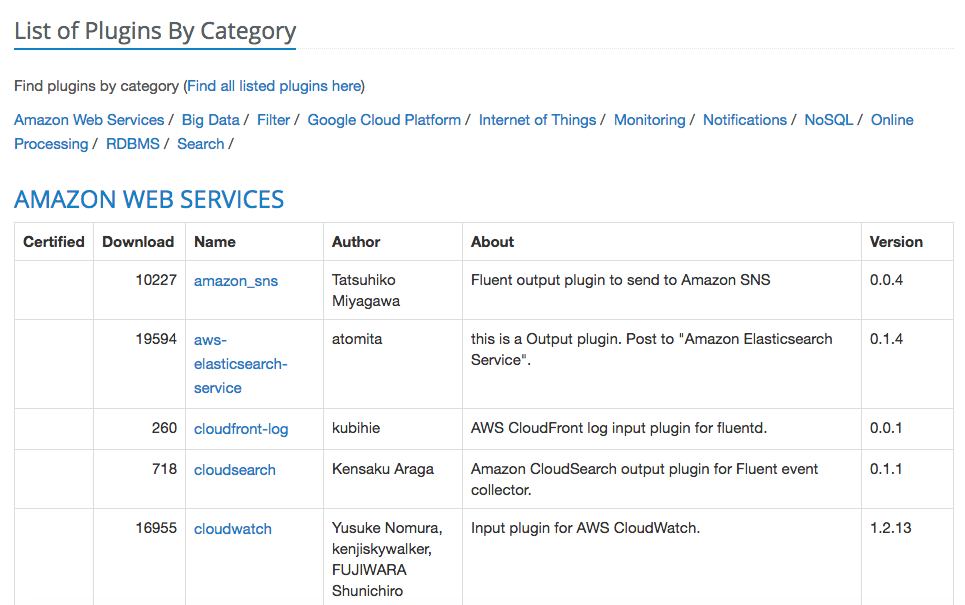
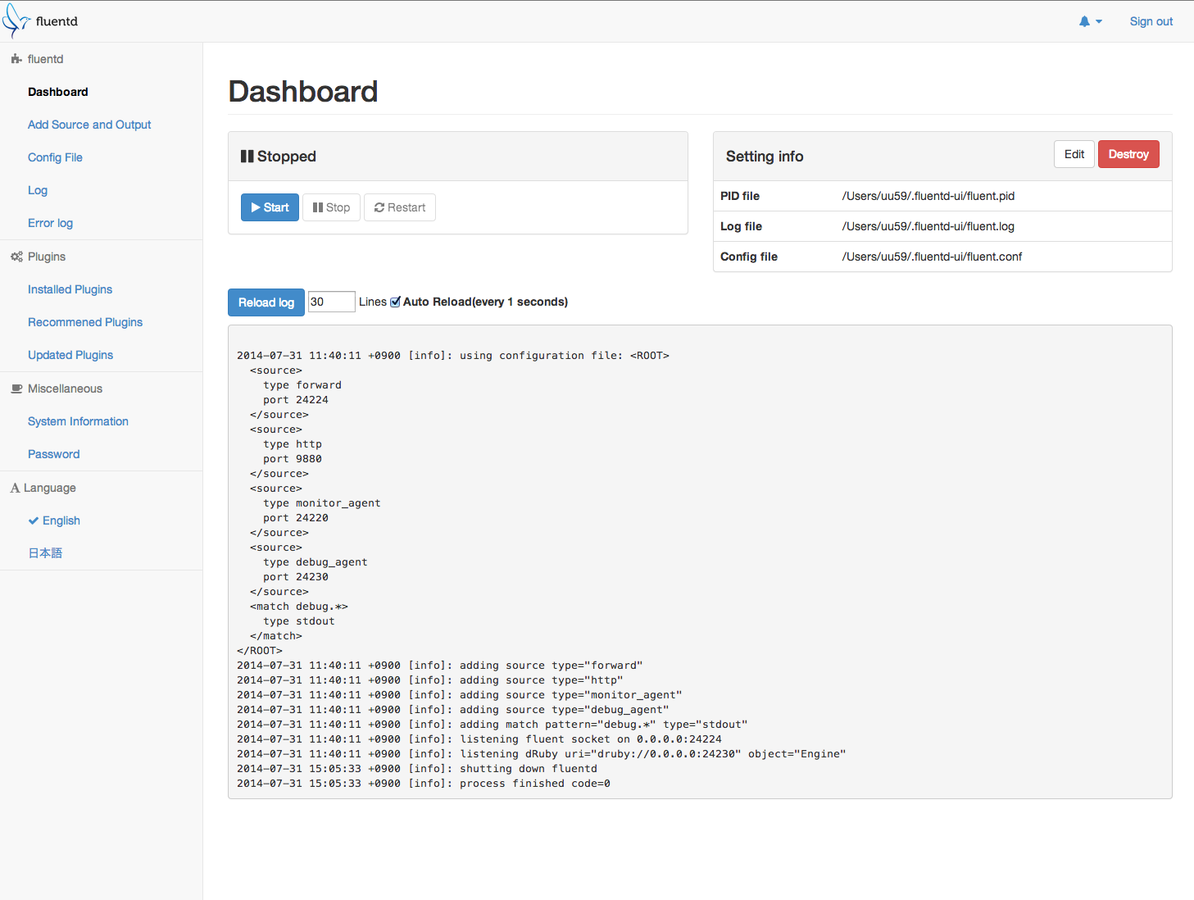
Fluentd-UI
Hosting
Google Compute Engine
Docker
BigQuery API
Performance
Google Compute Engine
n1-highcpu-4 instance, 4 cores, 3.6 GB RAM
https, 10 events in JSON batch
750 requests/sec
4 Puma processes, 4 threads each
7500 events/sec
Performance
Can we squeeze more from one instance?
More cores?
More Puma processes?
Engine is a bottleneck, uses single core
fluent-plugin-multiprocess
Other solutions?
Runs multiple fluentd processes
BigQuery
BigQuery is a RESTful web service that enables interactive analysis of massively large datasets working in conjunction with Google Storage. It is an Infrastructure as a Service (IaaS) that may be used complementarily with MapReduce.
BigQuery
Super-fast SQL queries
Google App Engine
REST API
SQL-style query syntax
JSON schemas
Nested fields
Datasets and tables
Example schema
[
  {
    "name": "fullName",
    "type": "string",
    "mode": "required"
  },
  {
    "name": "age",
    "type": "integer",
    "mode": "nullable"
  },
  { "name": "phoneNumber",
    "type": "record",
    "mode": "nullable",
    "fields": [
    {
       "name": "areaCode",
       "type": "integer",
       "mode": "nullable"
    },
    {
       "name": "number",
       "type": "integer",
       "mode": "nullable"
    }
   ]
  }
]
Flexible schema
Store JSON as string
SELECT JSON_EXTRACT('{"a": 1, "b": [4, 5]}', '$.b') AS str;[4,5]Use EXTRACT_JSON
Streaming to BigQuery
<match **>
  @type bigquery
  auth_method compute_engine

  method insert # stream events

  project "logs-beta"
  dataset log
  tables events

  fetch_schema true
</match>
Running queries
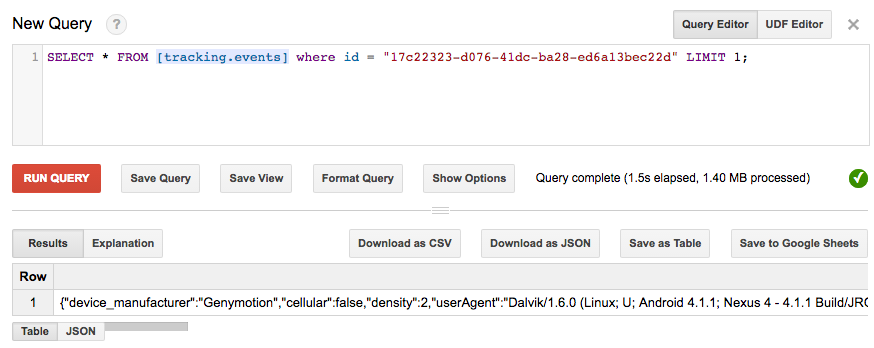
You can use R for complex reports
Other usecases
Centralised App Logging
IoT Data Logger
Data Archiving
Data Analytics
Google uses it!
Alternatives to Fluentd
Apache Flume
Logstash
Flowgger (Rust!)
Heka
Fluentd-forwarder (written in Go!)
Rsyslog
NXLOG
Graylog2
More processing
Google Pub/Sub
Google Dataflow
Google BigQuery
Fluentd
Resources
http://www.slideshare.net/treasure-data/the-basics-of-fluentd-35681111
https://github.com/actindi/act-fluent-logger-rails
https://github.com/fluent/fluentd-docker-image
http://jasonwilder.com/blog/2013/07/16/centralized-logging-architecture/
https://en.wikipedia.org/wiki/Extract,_transform,_load
https://cloud.google.com/bigquery/loading-data-into-bigquery
https://cloud.google.com/solutions/real-time/fluentd-bigquery

We are hiring!
RoR
QA
Scrum Master
Thank you
gmiklaszewski@gmail.com