Git and Gitflow
Design Section 9 Crash Course Basics
What do you need?
Github account
Cloud9 (c9.io) account
Github
Create an account (if you haven't)
Create a repo (for practice session)
Github - Things you should know by now
$ git init
# Start a git... no need to do if cloned

$ git remote add origin git@github.com:tjmonsi/repo.git
# Add a remote repo named "origin" and set its url to git@github.com:tjmonsi/repo.git
# (uses ssh, would need public key to be set up at github)

$ git remote add origin https://github.com/tjmonsi/repo.git
# Add a remote repo named "origin" and set its url to https://github.com/tjmonsi/repo.git
# (uses https, would need username and password)


$ git remote set-url origin git@github.com:tjmonsi/repo.git
# Sets a remote repo named "origin" to its new url git@github.com:tjmonsi/repo.git
Github - Things you should know by now
$ git add --all
# Stage files for git

$ git commit -m "Description of commit"
# Add a description of the commit

$ git push -u origin branch-name
# Push / upstream the commit to a specific branch named "branch-name" in the repo named "origin"
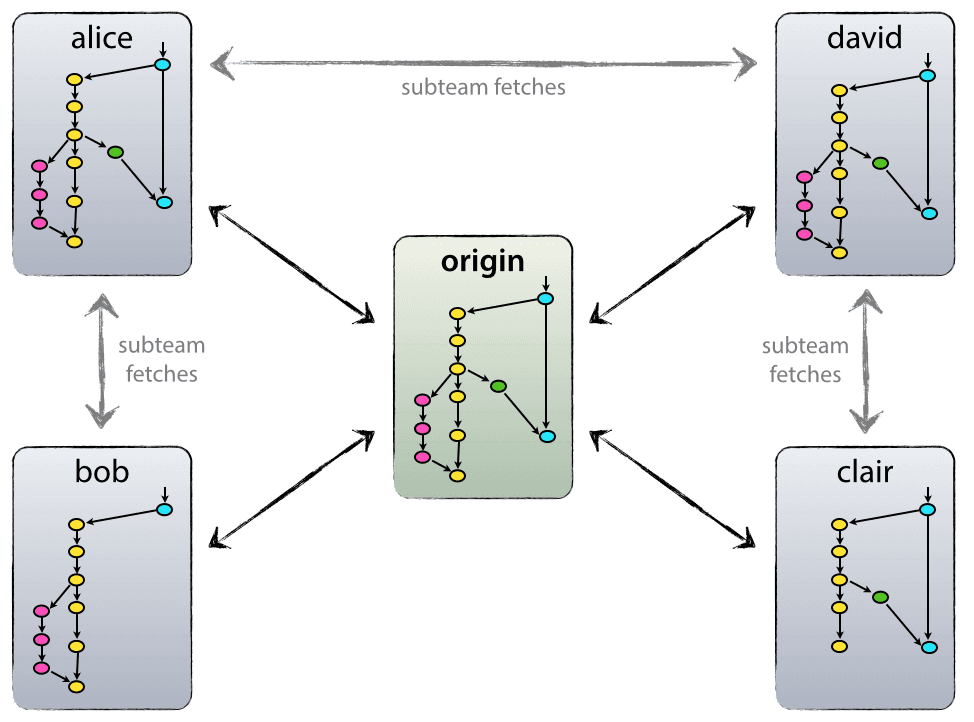
GITFLOW

source: http://nvie.com/posts/a-successful-git-branching-model/
GITFLOW
source: http://nvie.com/posts/a-successful-git-branching-model/
GITFLOW - main branches
source: http://nvie.com/posts/a-successful-git-branching-model/
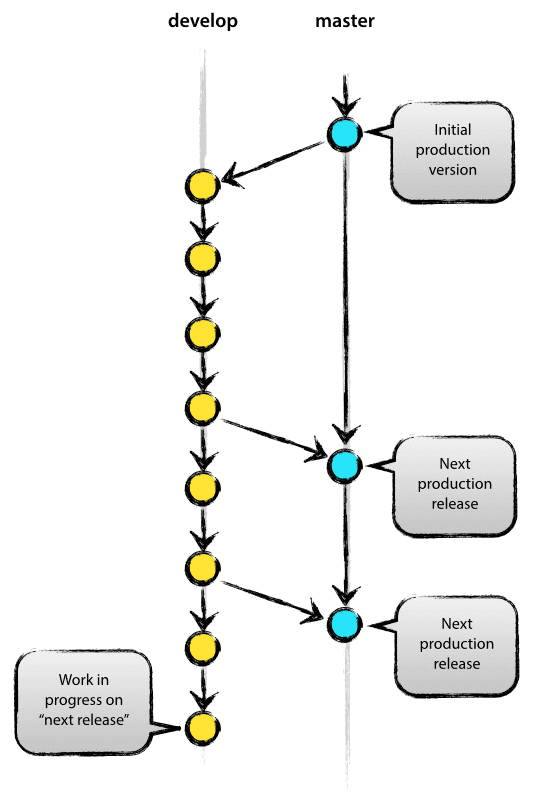
develop
master
GITFLOW - supporting branches
source: http://nvie.com/posts/a-successful-git-branching-model/
release
feature
hotfix
GITFLOW - Feature branches
source: http://nvie.com/posts/a-successful-git-branching-model/
develop
may branch from:
may merge to:
develop
name-conventions:
as long as it's not master, develop, release-*, & hotfix-*
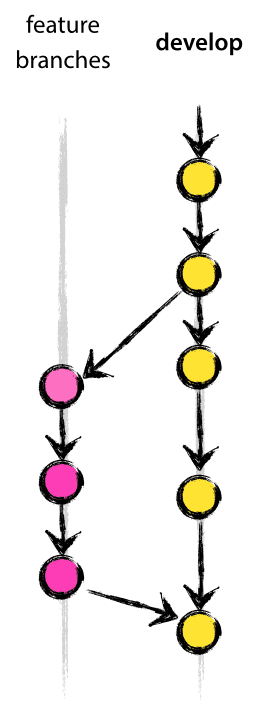
GITFLOW - Feature branches
source: http://nvie.com/posts/a-successful-git-branching-model/
creating a branch
$ git checkout -b myfeature develop
# Switched to a new branch "myfeature"

# After changes, staged files and committed

$ git push -u origin myfeature
# Pushed upstream to create myfeature branch to your
# forked remote
GITFLOW - Feature branches
source: http://nvie.com/posts/a-successful-git-branching-model/
Incorporating a finished feature on develop - on local and forked remote
$ git checkout develop
# Switched to branch 'develop'

$ git merge --no-ff myfeature
# Updating ea1b82a..05e9557
# (Summary of changes)

$ git push origin develop
GITFLOW - Feature branches
source: http://nvie.com/posts/a-successful-git-branching-model/
Incorporating a finished feature on develop - on main repo
Ask a pull request on develop branch
GITFLOW - Release branches
source: http://nvie.com/posts/a-successful-git-branching-model/
develop
may branch from:
must merge to:
develop AND master
name-conventions:
release-*
GITFLOW - ReLEase branches
source: http://nvie.com/posts/a-successful-git-branching-model/
creating a branch
$ git checkout -b release-1.2 develop
# Switched to a new branch "release-1.2"

# Let's just say you did your tests, made some fixes...

$ git commit -a -m "Bumped version number to 1.2"
# [release-1.2 74d9424] Bumped version number to 1.2
# 1 files changed, 1 insertions(+), 1 deletions(-)

$ git push -u origin release-1.2
# save to your remote forked repo
GITFLOW - ReLEase branches
source: http://nvie.com/posts/a-successful-git-branching-model/
merging...
$ git checkout master
# Switched to branch 'master'

$ git merge --no-ff release-1.2
# Merge made by recursive.
# (Summary of changes)

$ git tag -a 1.2
# Add a tag
GITFLOW - ReLEase branches
source: http://nvie.com/posts/a-successful-git-branching-model/
merging...
$ git checkout develop
# Switched to branch 'develop'

$ git merge --no-ff release-1.2
# Merge made by recursive.
# (Summary of changes)
GITFLOW - ReLEase branches
source: http://nvie.com/posts/a-successful-git-branching-model/
This is only done by project-leaders / module-leaders (aka people who have access to main repo)
GITFLOW - hotfix branches
source: http://nvie.com/posts/a-successful-git-branching-model/
master
may branch from:
must merge to:
develop AND master
name-conventions:
hotfix-*
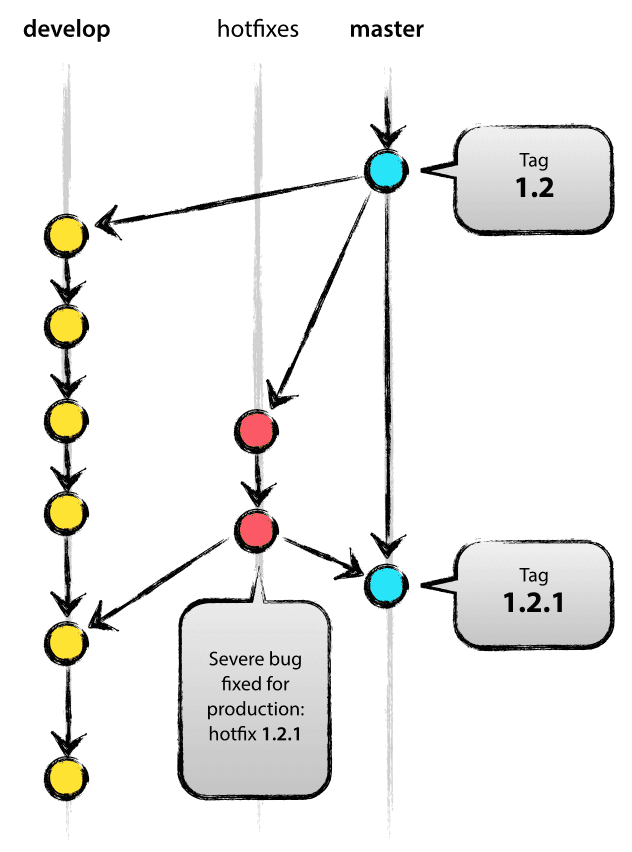
GITFLOW - hotfix branches
source: http://nvie.com/posts/a-successful-git-branching-model/
creating a branch
$ git checkout -b hotfix-1.2.1 master
# Switched to a new branch "hotfix-1.2.1"

# Files modified successfully, version bumped to 1.2.1.

$ git commit -a -m "Fixed to 1.2.1"
# [hotfix-1.2.1 41e61bb] Bumped version number to 1.2.1
# 1 files changed, 1 insertions(+), 1 deletions(-)
GITFLOW - Hotfix branches
source: http://nvie.com/posts/a-successful-git-branching-model/
merging...
$ git checkout master
# Switched to branch 'master'

$ git merge --no-ff hotfix-1.2.1
# Merge made by recursive.
# (Summary of changes)

$ git tag -a 1.2.1
# Add a tag
GITFLOW - Hotfix branches
source: http://nvie.com/posts/a-successful-git-branching-model/
merging...
$ git checkout develop
# Switched to branch 'develop'

$ git merge --no-ff hotfix-1.2.1
# Merge made by recursive.
# (Summary of changes)
GITFLOW - Always remember
You would need two repos
$ git remote set-url origin git@github.com:tjmonsi/forked_repo.git
# Sets a remote repo named "origin" to its new url git@github.com:tjmonsi/forked_repo.git

$ git remote add -t master -t develop upstream git@github.com:tjmonsi/original_repo.git
# Sets a remote repo named "origin" to its new url git@github.com:tjmonsi/original_repo-.git
# This only tracks the master and develop branches
GITFLOW - Always remember
Always check updates from origin (if you have a collab on your own forked repo) and upstream
$ git pull
# Always get updates from your own repo branch, especially
# if your collab is working on the same repo
# you might want to merge/fix conflicts as well if your collab
# is working on the same file as you are

$ git fetch upstream
# Fetch all the branches of that remote into remote-tracking branches,
# such as upstream/master

$ git checkout master
# Make sure that you're on your master branch:
GITFLOW - Always remember
Always check updates from origin (if you have a collab on your own forked repo) and upstream
$ git rebase upstream/master
# Rewrite your master branch so that any commits of yours that
# aren't already in upstream/master are replayed on top of that
# other branch...
# rebase is used rather than merge for making further pull requests that
# are as clean as possible
Let's Try