Loading

Intro Measurement, Marketing and GA

Yvonne

This is a live streamed presentation. You will automatically follow the presenter and see the slide they're currently on.

Measurement and Marketing!

Intro To Google Analytics

We ARE what we SEARCH?

Check out Google Trends...

https://www.google.com/trends/


What do people search for?

https://www.youtube.com/watch?v=zMmeAs9-IQs


Measurement and Marketing


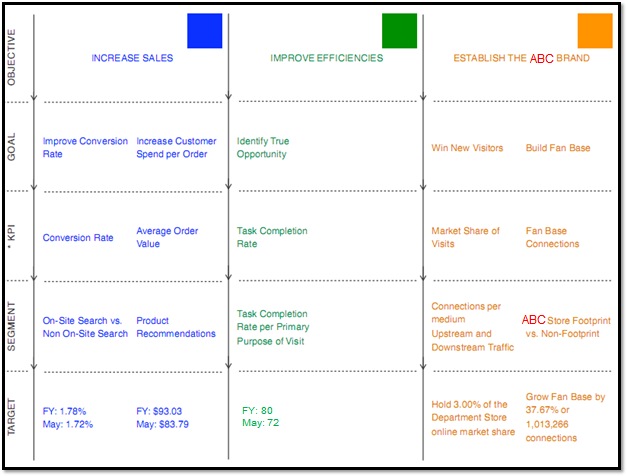
  • campaign with a purpose and identify metrics
    • objectives in terms of the business
    • goals in terms of the objectives
    • key performance indicators associated with goals
    • targets for KPIs
    • segments of people / behaviour to analyze!

Example (better one? :) )

http://www.kaushik.net/avinash/digital-marketing-and-measurement-model/

Building on the Basics...

  • awesome mindmaps!!!
  • basic web pages HTML, CSS, JavaScript
    • JavaScript used by Google Analytics in <head>
      • note, different for mobile!  must be on each page
    • use local libraries (chart.js)
    • services (Google maps)
  • we can build ANYTHING we want to...


  • how do search engines see your content?
    • Google
    • Yahoo
    • Bing
    • ...

Digital Marketing

  • analytics 
    • what is the traffic to the site like?
  • organic (not paid for, "earned") SEO
    • what can we do to make it better?
    • how does mobile fit in?
  • case study with local company next week (Jan 27)!
    • Hot Mama Fitness
      • social media
      • campaigns  
      • email
  • Light House Labs the following week (Feb 3)!

ABCs...

  • Acquisition
    • how do people get to your website?
      • search, email, affiliate deals, facebook 


  • Behaviour

    • what do you hope they do as a new visitor?
      • watch a video
      • visit certain pages


  • Conversions

    • what actions align with your goals/objectives?
      • download a form
      • contact you 

Google Analytics 

  • 4 key pieces to go from tracking code to reports
  • collection
    • tracking code bundled as "hits"
  • configuration
    • settings for your measurement plan
    • eg: filter from your employees
    • can import other data
  • processing 
    • raw hits to tables in the database
  • reporting
    • what is going on, visualizing information
    • can use API instead, customize the dashboard

Data Model

Google Analytics Academy, Platform Fundamentals (certification!)

Data Model

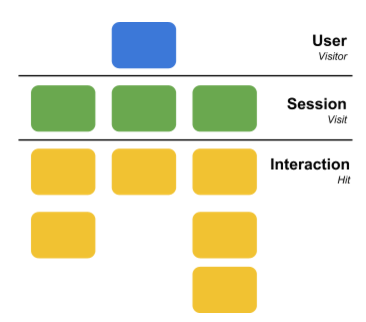
  • users 
    • first party "cookie"
      • stored in the browser
        • Developer View -> Resources -> Cookies!
      • can be cleared!
    • or can be customized
    • browser information, service provider 
  • sessions
    • default cut off after 30 mins of inactivity
  • interactions
    • page views
    • and more!

The Hit!

  • processing at the Google server makes transformations that can be customized
    • many Google systems
      • Ad words, WebMaster Tools 
    • and others!
  • a hit is a bunch of "parameters"
    • URL of the current page
    • elapsed time
    • referring source page
    • browser
    • language
    • user id (randomly generated)
    • browser

    • device and OS

DEMO

  • Google Chrome Extension
    • GA debug
    • watch the results in the Console...
    • can see things like pageviews happening!

Configuration Settings

  • filters, goals and groups
  • filters modify data in view
    • exclude or change looks for reports
    • convert urls into text
    • hit matches a filter?  modified data!
    • permanent
  • goals specify what hits make up conversions
    • newsletter signups
    • purchases
  • groups or segments
    • channel: email marketing, rollup of marketing
    • content: analyze a collection of content...
      • product pages vs content pages

Google analytics account

  • don't need to sign up if you don't want to!
  • interesting to set up configuration settings
  • can set up many different views 
    • track which channels for marketing are reaching the target KPIs!


DEMO


Made with Slides.com