Learning Data Science
Lecture 2
Python Crash Course Pt. 1
Defining Data Science
A skill-based view
Communication
Experimental Data
Input
Output
Domain Expertise
Math and Statistics
Programming
Data
Science
Machine Learning
Traditional Research
Danger
Zone!
The Focus of this course
Communication
Experimental Data
Input
Output
Domain Expertise
Math and Statistics
Programming
Data
Science
Machine Learning
Traditional Research
Danger
Zone!
VS Code

Our IDE of choice
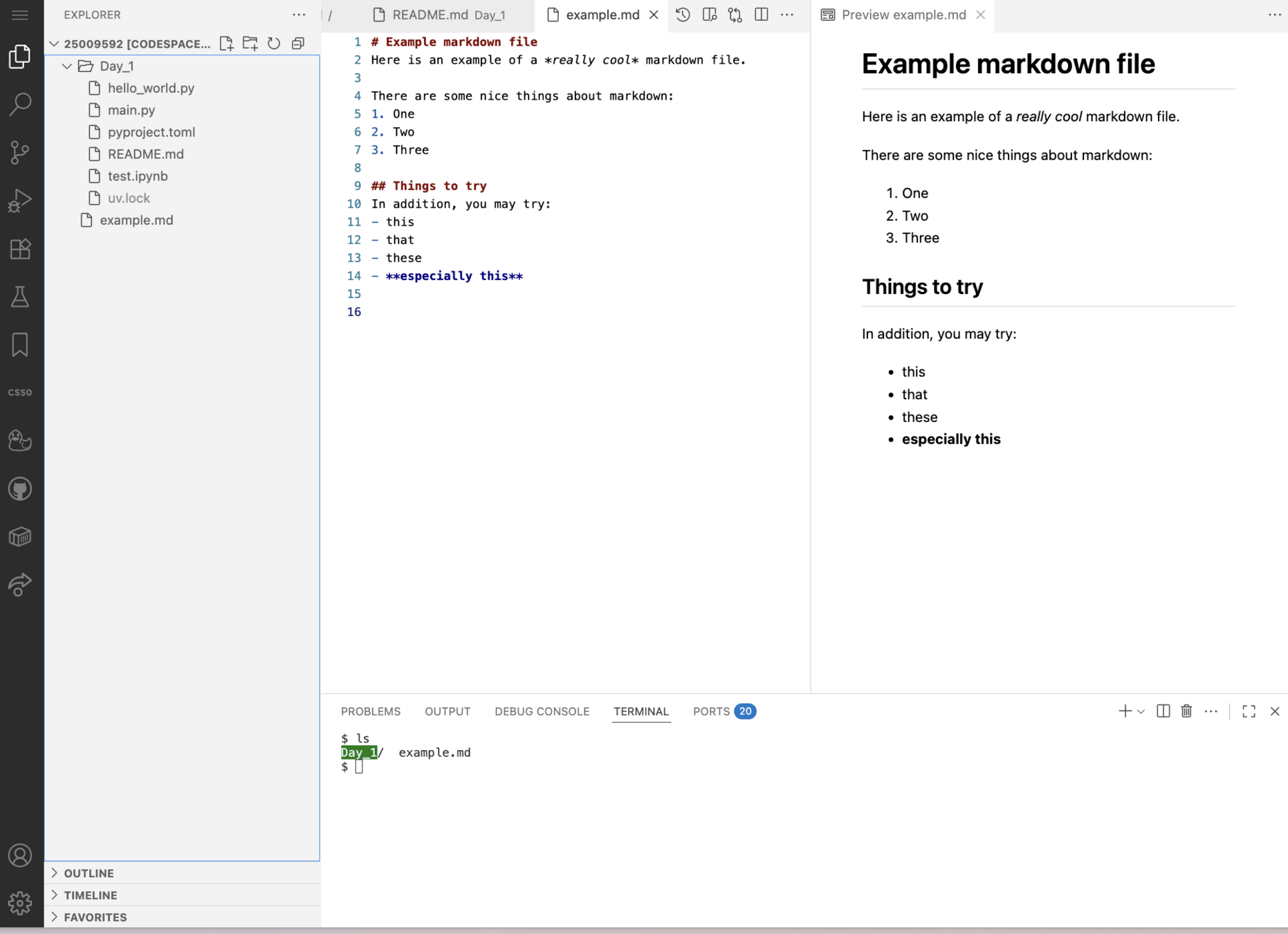
file browser
file editor
multiple tabs
terminal
# Example markdown file
Here is an example of a *really cool* markdown file.

There are some nice things about markdown:
1. One
2. Two
3. Three

## Things to try
In addition, you may try:
- this
- that
- these
- **especially this**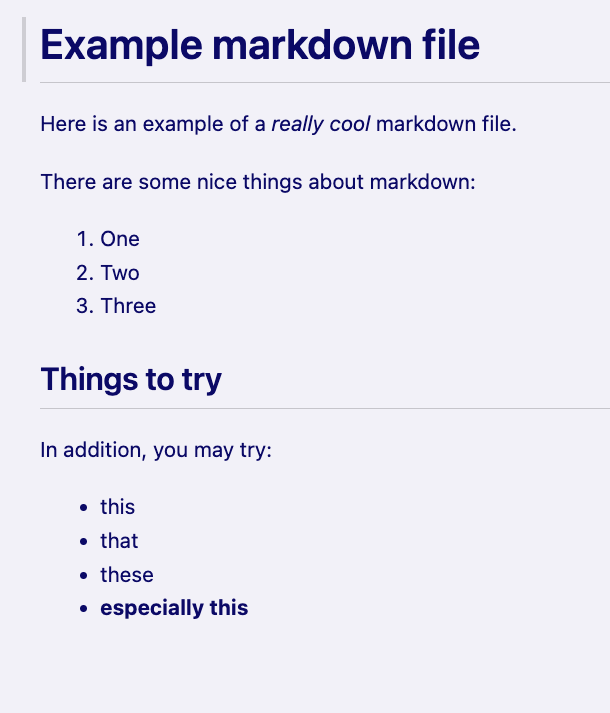
Markdown


pwd
ls
cd
man
mkdir
touch
mv
cp
rm
nano
cat
head
tail
Computing without a GUI
Commands
Skills
.     current directory
..    parent directory
~     home directory
/     filesystem root
-     command options
#     comments
$     variables
|     pipes
*     wildcards
?     wildcards
#!    shebangs
.sh   scripts
Meet
The Mental Model
main
💡 a new idea
idea1
main
🤝 Merge your code into the main branch
🌳 Create a new branch of the code
💻 Edit your code
💾 Commit your code

A free online git service that backs up your full code history
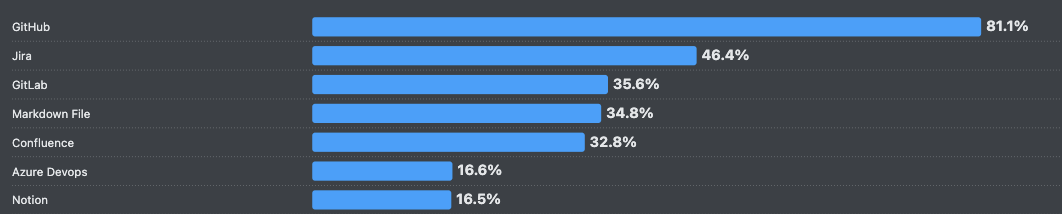
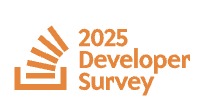
More than 4/5 developers use GitHub
Lecture 2
- Recap
- What is Python?
- Installing Python
- Environments with uv
- Python Crash Course
What is Python?
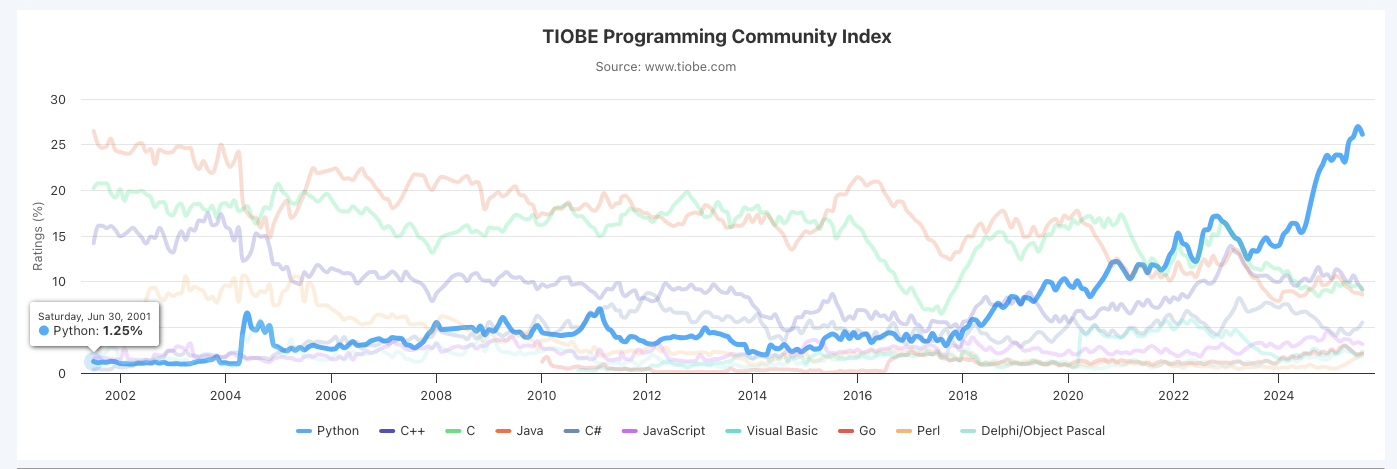
The de-facto choice for
- Many science fields
- Data science
- AI
- Scripting
What is Python?
The logo
The creator
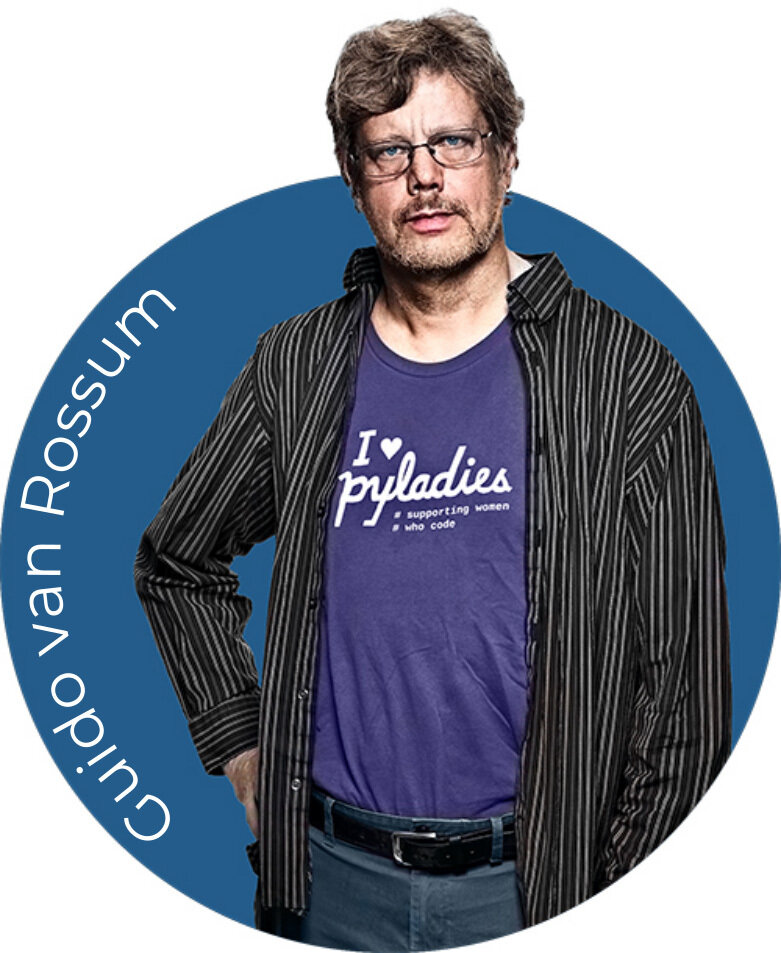
Created in 1991!
The namesake

What it looks like
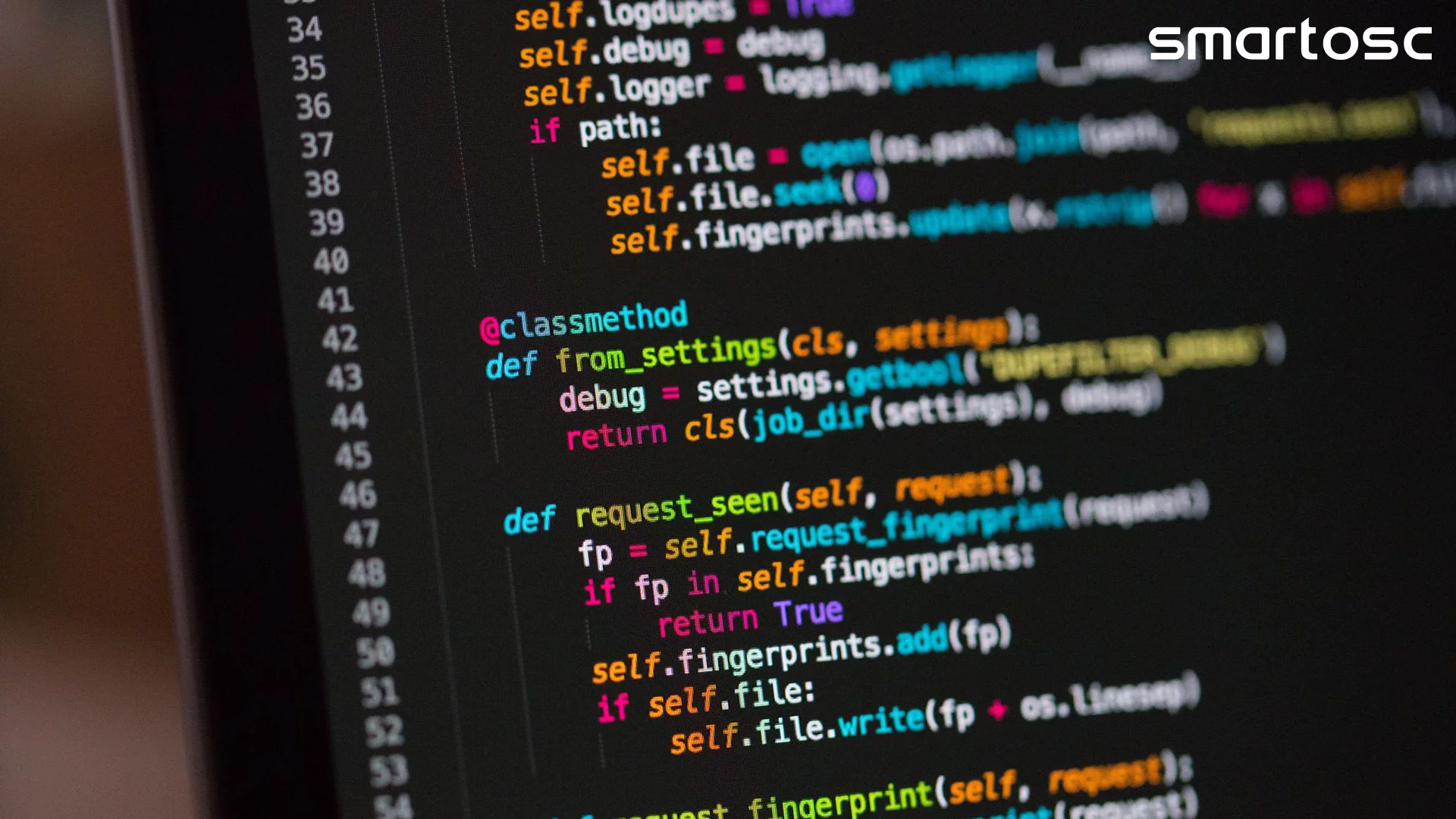
What is Python?
- Open-source programming language
- High level
- Highly readable
- Object oriented
- Open-source programming language
- High level
- Highly readable
- Object oriented
- Open-source programming language
- High level
- Highly readable
- Object oriented
Hardware

Machine Code
h0000000: 01111111 01000101 01001100 01000110 00000010 00000001  .ELF..
0000006: 00000001 00000000 00000000 00000000 00000000 00000000  ......
000000c: 00000000 00000000 00000000 00000000 00000010 00000000  ......
0000012: 00111110 00000000 00000001 00000000 00000000 00000000  >.....
0000018: 01000000 00000100 01000000 00000000 00000000 00000000  @.@...
000001e: 00000000 00000000 01000000 00000000 00000000 00000000  ..@...
0000024: 00000000 00000000 00000000 00000000 01110000 00010001  ....p.
000002a: 00000000 00000000 00000000 00000000 00000000 00000000  ......
0000030: 00000000 00000000 00000000 00000000 01000000 00000000  ....@.
0000036: 00111000 00000000 00001001 00000000 01000000 00000000  8...@.
000003c: 00011100 00000000 00011011 00000000 00000110 00000000  ......
0000042: 00000000 00000000 00000101 00000000 00000000 00000000  ......
0000048: 01000000 00000000 00000000 00000000 00000000 00000000  @.....
000004e: 00000000 00000000 01000000 00000000 01000000 00000000  ..@.@.
0000054: 00000000 00000000 00000000 00000000 01000000 00000000  ....@.
000005a: 01000000 00000000 00000000 00000000 00000000 00000000  @.....
0000060: 11111000 00000001 00000000 00000000 00000000 00000000  ......
0000066: 00000000 00000000 11111000 00000001 00000000 00000000  ......
000006c: 00000000 00000000 00000000 00000000 00001000 00000000  ......
0000072: 00000000 00000000 00000000 00000000 00000000 00000000  ......
0000078: 00000011 00000000 00000000 00000000 00000100 00000000  ......
000007e: 00000000 00000000 00111000 00000010 00000000 00000000  ..8...
0000084: 00000000 00000000 00000000 00000000 00111000 00000010  ....8.
000008a: 01000000 00000000 00000000 00000000 00000000 00000000  @.....
0000090: 00111000 00000010 01000000 00000000 00000000 00000000  8.@...
0000096: 00000000 00000000 00011100 00000000 00000000 00000000  ......
000009c: 00000000 00000000 00000000 00000000 00011100 00000000  ......
00000a2: 00000000 00000000 00000000 00000000 00000000 00000000  ......
00000a8: 00000001 00000000 00000000 00000000 00000000 00000000  ......
00000ae: 00000000 00000000 00000001 00000000 00000000 00000000  ......
00000b4: 00000101 00000000 00000000 00000000 00000000 00000000  ......
00000ba: 00000000 00000000 00000000 00000000 00000000 00000000  ......
00000c0: 00000000 00000000 01000000 00000000 00000000 00000000  ..@...
00000c6: 00000000 00000000 00000000 00000000 01000000 00000000  ....@.
00000cc: 00000000 00000000 00000000 00000000 11010100 00000110  ......
00000d2: 00000000 00000000 00000000 00000000 00000000 00000000  ......
00000d8: 11010100 00000110 00000000 00000000 00000000 00000000  ......
00000de: 00000000 00000000 00000000 00000000 00100000 00000000 .... .- Open-source programming language
- High level
- Highly readable
- Object oriented
Hardware
Machine Code
section	.text
   global _start

_start:
   mov	edx,len     ; length of string, third argument to write()
   mov	ecx,msg     ; address of string, second argument to write()
   mov	ebx,1       ; file descriptor (standard output), first argument to write()
   mov	eax,4       ; system call number for write()
   int	0x80        ; system call trap

   mov	ebx,0       ; exit code, first argument to exit()
   mov	eax,1       ; system call number for exit()
   int	0x80        ; system call trap

section	.data
msg db 'Hello, world!', 0xa
len equ $ - msg
section .text
global _start
_start:
mov edx,len
mov ecx,msg
mov ebx,1
mov eax,4
int 0x80
mov ebx,0
mov eax,1
int 0x80
section .data
msg db 'Hello, world!', 0xa
len equ $ - msgHello world script in Assembly
now with comments
Very low-level lang.

- Open-source programming language
- High level
- Highly readable
- Object oriented
Hardware
Machine Code
Very low-level lang.

Low-level languages
#include <iostream>
using namespace std;

// main() function: where the execution of
// C++ program begins
int main() {

    // This statement prints "Hello World"
    cout << "Hello World";

    return 0;
}
Hello world script in C++
- Open-source programming language
- High level
- Highly readable
- Object oriented
Hardware
Machine Code

High-level languages
print('Hello World')Hello world script in Python
Very low-level lang.
Low-level languages
- Open-source programming language
- High level
- Highly readable
- Object oriented
Hardware
Machine Code
High-level languages
Closer to hardware
More abstractions
Very low-level lang.
Low-level languages
- Open-source programming language
- High level
- Highly readable
- Object oriented
temperature = 18

if temperature < 20:
    print("It's a bit chilly today.")
else:
    print("Nice and warm outside!")
Part of why Python is so popular is it's often easy to quickly look at code and understand what it is doing
Sometimes called "expressivity"
- Open-source programming language
- High level
- Highly readable
- Object oriented
Everything is python is an object and every object has a type
attributes
methods
- Open-source programming language
- High level
- Highly readable
- Object oriented
Everything is python is an object and every object has a type
attributes
methods
class Dog:
    def __init__(self, name):
        self.name = name

    def bark(self):
        print(f"{self.name} says woof!")


my_dog = Dog("Luna")

print(my_dog.name)

my_dog.bark()
~nouns
~verbs
Let's watch the first minute of this documentary
Now that you know a bit about Python...
let's get started!!

Lecture 2
- Recap
- What is Python?
- Installing Python
- Environments with uv
- Python Crash Course
Installing Python
- Most computers come with some version of Python installed
- For the most control, we will always install it ourselves
What can uv do?
- Install and manages different versions of python
- Package management
- Runs scripts
- 10-100x faster than industry standards
Do it!
Let's install uv
Do it!
curl -LsSf https://astral.sh/uv/install.sh | sh- Open your VS Code (cs50.dev)
- Open the documentation and find the installation instructions
- Copy the installation command to your terminal
Check installation
Do it!
# see where in your filesystem the uv program was saved
which uv


# check the default help text
uv help
Check installation
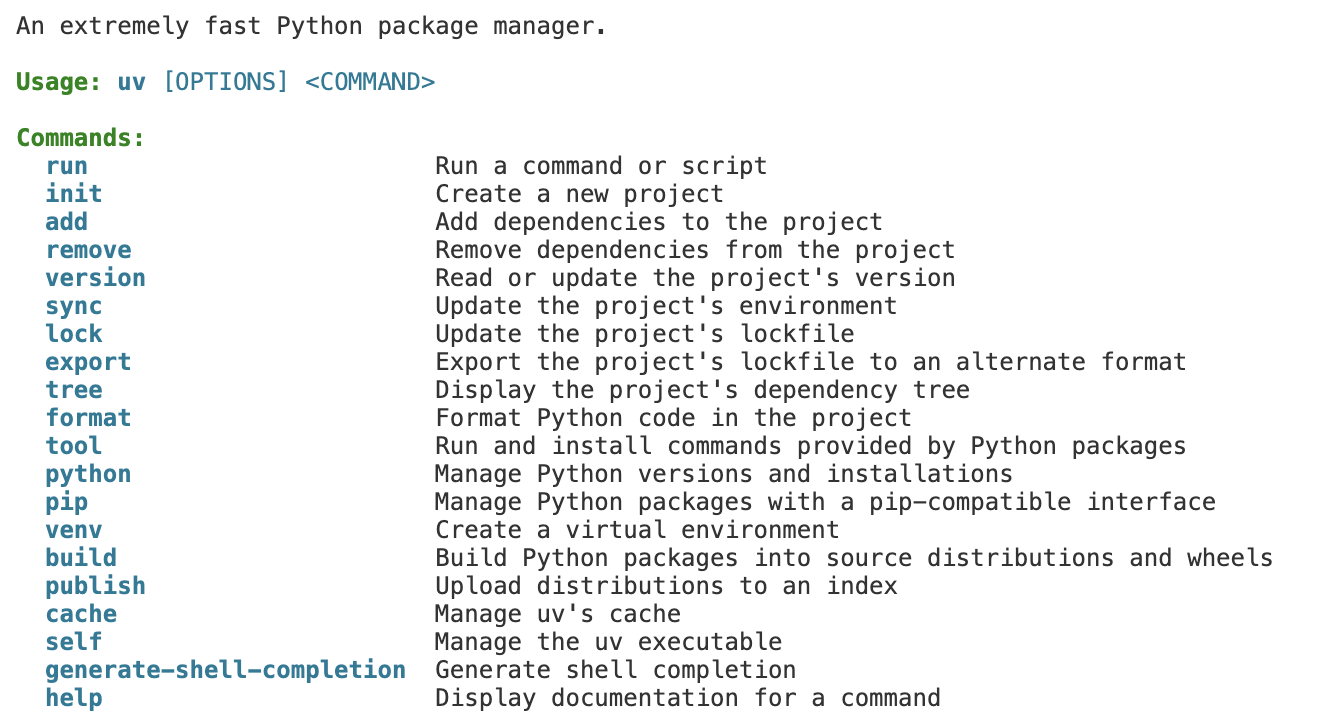
uv helpLet's install some Python versions
Do it!
# install a couple versions of python
uv python install 3.11
uv python install 3.13


# see the python installations on your machine
uv python list --only-installed
Lecture 2
- Recap
- What is Python?
- Installing Python
- Environments with uv
- Python Crash Course
Environments in Python
- All the software you will want to use is not built into Python
- You will almost always be installing extensions
packages
Packages rely on other packages which rely on other packages





Environments in Python
- All the software you will want to use is not built into Python
- You will almost always be installing extensions
packages
Every project you work on will require different combinations of packages
We need a way to isolate our installed packages from project to project
Environments with uv
We need a way to isolate our installed packages from project to project
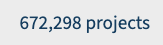
Check out how many packages there are available to install:

Environments with uv
We need a way to isolate our installed packages from project to project
If you tried to do everything on the default Python, all the packages would conflict!
my computer
Default python included with Mac (v3.8)
Biology Project
Needs
- Python 3.11
- biolopy
- numpy v2
Astro Project
Needs
- Python 3.11
- astropy needs numpy v3
Personal Project
Needs
- Python 3.3
- fastapi
- requests
Alternatives to uv

Anaconda (aka Conda) is the main package manager in STEM fields
- slow
- takes lots of storage space

Mamba is a drop-in replacement for Conda
- much faster
- use this instead if you ever have to use Conda


Poetry
Others you might see
Environments with uv
We need a way to isolate our installed packages from project to project
uv strikes again
Let's create our first isolated project:
- Open your VS Code
- Make a new directory:
- cd into the new directory
- Open new folder in VS Code
- Initialize a new uv project
- Check out the files created
/workspaces/projects/day2uv initshift+MOD+P then select "File: Open Folder"
Do it!
Environments with uv
When you want to use your isolated environment, all commands start with
uv run
For example, compare the outputs from the following two commands:
which python

uv run which python
Do it!
Set the environment for VS Code
We also have to tell VS Code to use this same Python environment
Do it!
-
shift+MOD+P then select "Python: Select Interpreter"
-
Select the one starting with "./.venv"
-
Now when you run a script from VS Code, it knows which Python environment to use
Python REPL
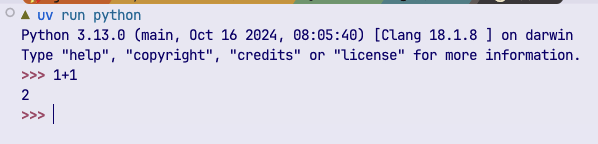
read–eval–print loop (REPL)
Do it!
-
Run `uv run python` from the to open the Python REPL
-
Type `1+1` and then enter
-
Type `print("I love python")`
Think of it like a Terminal but for Python instead of Bash
Let's get coding!
Lecture 2
- Recap
- What is Python?
- Installing Python
- Environments with uv
- Python Crash Course
Topics we will cover today
- Types
- Output and printing
- Variables
- User Input
- Arithmetic Operators
- String methods
- f-strings
- Conditional Operators
- Chained Conditionals
- If/else
- match/case
- Lists
- Tuples
- For loops
- While loops
- Slice operator
- Sets
- Dicts
Video Review
- These topics will be covered with live-coding during the lecture
- If you missed the lecture, or want to review the topics, check out this YouTube video
- Try to follow along each topic together with the slides, and pause to complete the challenges
Hello World
Hello World
print("Hello World")- print function prints to the display
- you need the parenthesis
- similar to echo in bash
Running Hello World
print("Hello World")- Make a new python file: 'helloworld.py'
- Add the above text
Two ways to run the code:
-
From the Terminal: uv run helloworld.py
- Click the 'Play' button in VS Code
Do it!
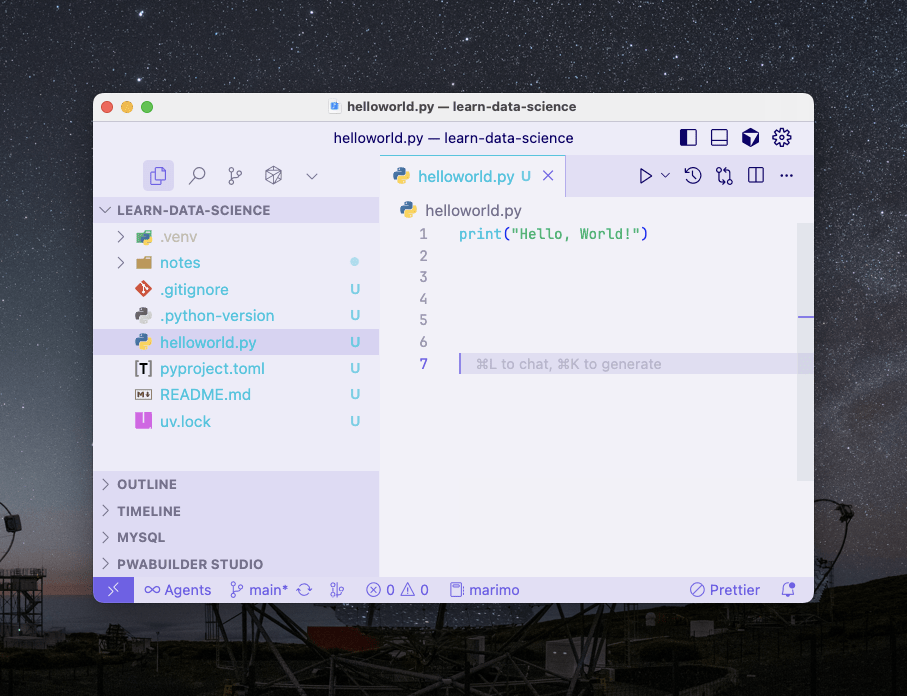
Make sure you selected your uv environment in VS Code with "select interpreter" (see a few slides ago)
Core Data Types
Core Data Types
-
int: integer
- no decimal places
- can be +, -, or 0
-
float
- any number with decimal places
-
bool: boolean
- True or False
-
str: string
- letters/numbers/symbols inside quotes
- single or double quotes both okay
-
None
- A placeholder that represents the absence of data
Core Data Types
Use the type() function to examine the types of different objects
print(type(5))
print(type(5.5))
print(type(True))
print(type('hello'))
print(type(None))
Output and Printing
Output and Printing
- You can usually print any object of any type with the print() function
print("Hello World")
print("4.5")           # looks like a float but is a string
print(Hello World)     # -> gives an error, not in quotes
print(4.5)             # is OK
print(4.4, "hello")    # is OK, automatically add spaces

print("Hello\nFriend")  # \n is the 'newline' character
Output and Printing
- You can change what is printed between adjacent items
# example
print("Hello", 55, True)

# use comma and space instead of just space
print("Hello", 55, True, sep=", ")

 # default end is \n
print("Hello", 55, True, sep=", ", end="\n")

# Here we set the end to be nothing
# No newline is printed between these two
print("Hello", 55, True, end="")
print("Hello", 55, True)
Variables
Variables
- Variables are buckets that can store some (any) data
word = 'hello'

print(word)

# will print 'hello'
Variables
- Variables are mutable
- This means they can get replaced/changed
word = 'hello'
last_word = 'world'

print(word, last_word)

# 'hello world'

word = 'bye bye'

print(word, last_word)
# 'bye bye world'
Variables
- Naming conventions
- No special characters
- No spaces
- Cannot start with a number (but can contain numbers)
- We usually use underscores for spaces '_'
- Try to name your variables something clear and descriptive
✅ variable = 1
✅ special_variable = 1
✅ variable1 = 1


❌ 1variable = 1
❌ special variable = 1
❌ spet❌l_variable = 1

⚠️ specialVariable = 1
# allowed but not 'pythonic'
User Input
User Input
- Ask the user to type in information
- Code waits until the input is received and the 'return' key is pressed
- ⚠️ Variable is always a string no matter what is typed
input("Name: ")

# we put the space after to create buffer between the text and the user input
User Input
- Can save the input to a variable
name = input("Name: ")

print('Hello', name)
User Input
- Remember to convert numbers from strings if that's what your asking for
age = input("Your age: ")

age = float(age)

# OR do it all at once
age = float(input("Your age: "))
Challenge #1
Challenge #1
- Ask the user for their name and age
- Print a sentence that contains both the given name and age
Do it!
Arithmetic Operators
Arithmetic Operators
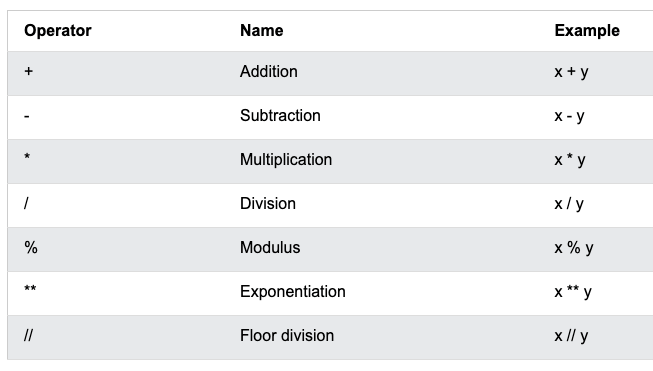
Order of Operations in Python
BEDMAS
- Brackets
- Exponents
- Division/Multiplication
- Addition/Subtraction
Challenge #2
Challenge #2
Do it!
- ask the user for their age
- print their age squared
String Methods
String Methods
- Recall: methods are functions that belong to an object
- Always have the format:
-
dot + name of method + parenthesis
-
word = "hello"

word.upper()
Useful String Methods
word = "hello"

print(word.upper())
# HELLO

# OR
word = "hello".upper()
print(word)
# SAME THING!

word = 'HeLLO'
print(word.lower())
# hello

word = 'hEllO'
print(word.capitalize())
# Hello
word = 'hello'
print(word.replace('h', 'H'))
# Hello
word = 'HELLO WORLD'
print(word.count('ll'))
# 0
# (there are no
# lower case Ls)
# first convert the
# whole thing to lowercase
# can chain methods
print(word.lower().count('ll'))
# 2
String Multiplication and Addition
word = "hello"
y = 3

print(word * y)
# hellohellohello

x = "hello"
y = "world"

print(x + y)
# helloworld
f-Strings
f-Strings
- Easiest way to insert variables into strings!
name = "Susie"
age = 3

print(f"{name} is {age} years old")
# Susie is 3 years old
f-Strings
- You can also perform functions/actions directly inside the curly brackets
name = "Susie"
age = 3

print(f"{name.upper()} is {age+20} years old")
# SUSIE is 23 years old
Comparison Operators
Comparison Operators
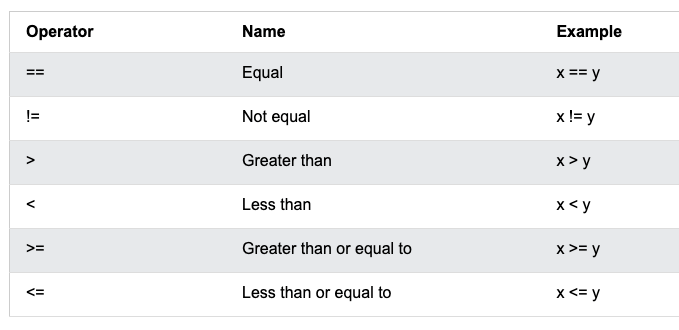
= is 'equals', for setting variables
== asks 'is it equal to?'
Comparison Operators
x = 'hello'
y = 'hello'

print(x == y)
# True

print(x != y)
# False

y = 'Hello'

print(x == y)
# False
- Always return a boolean
True or False
Comparison Operators
x = 'hello'
y = 'hello'

print(x == y)
# True

print(x != y)
# False

y = 'Hello'

print(x == y)
# False
- Always return a boolean
True or False
Comparison Operators
print(2 > 1)
# True

print(2 == 2.0)
# True

result = 4 == 4
print(result)
# True

result = 4 == 3
print(result)
# False
- Python can properly compare ints and floats
- You can set variables using them
Boolean Algebra
Boolean Algebra
Keywords are
- and
- or
- not
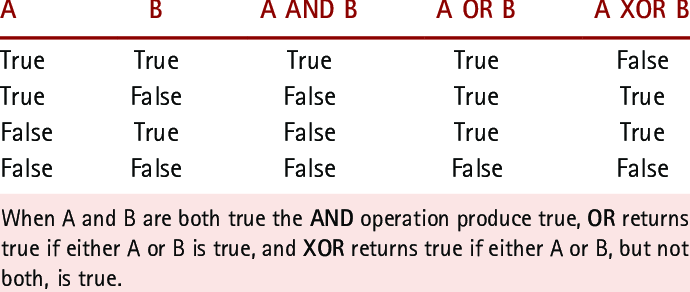
A
B
A AND B
A OR B
You don't need to memorize these!
Just learn how to recalculate them in your head
Boolean Algebra Examples
x = 3
y = 4

result1 = x == y
result2 = y > x
result3 = x**2 > y

print(result1, result2, result3)
# False True True

# OR
print(True or False)
print(result1 or result2)
# True
# True
# NOT
print(not True)
print(result2, not result2)
print(result1 or not result2)
# False
# True False
# False
# AND
print(True and False)
print(result1 and result2)
print(result2 and result3)
# False
# False
# TrueNote about naming variables
age = 20
is_adult = age > 18
was_child_five_years_ago = age - 5 < 18

print(is_adult and was_child_five_years_ago)- Naming your variables intentionally can make code much easier to read!
Challenge #3
Challenge #3
Try to guess the output of the following three print statements without running the code
x = 4
y = 8
z = 3

a = x != z
b = z**2 > y
c = z**2 - y == 0

# 1
print(a and b and not c)

# 2
print(not a or not b or c)

# 3
print(not (a and b))
If / Else Statements
If / Else Statements
- We're now arriving to the core concepts of programming
- We will now control the logical flow of our code
x = float(input("Enter a number: "))

if x > 0:
    print("x is positive")

print("thanks for playing!")
If / Else Statements
- We're now arriving to the core concepts of programming
- We will now control the logical flow of our code
- If statements should always be followed by a boolean
- Or an expression that creates a boolean
x = float(input("Enter a number: "))

if x > 0:
    print("x is positive")

print("thanks for playing!")
If / Else Statements
- If the expression after if is False, it skips the code under it
- Else catches everything that doesn't match the above conditions
x = float(input("Enter a number: "))

if x > 0:
    print("x is positive")
else:
    print("x is negative")

print("thanks for playing!")
If / Else Statements
- elif is short for Else If
- If is always goes first
- use elif if you want to check further conditions
- else may go at the end if you want catch everything else
x = float(input("Enter a number: "))

if x > 0:
    print("x is positive")
elif x == 0:
    print("x is zero, you are clever!")
else:
    print("x is negative")

print("thanks for playing!")
pass keyword
- can use the special keyword pass
- It literally means 'do not do anything at all'
- in this case, it's useful if we want nothing to print only in the case of x==0
x = float(input("Enter a number: "))

if x > 0:
    print("x is positive")
elif x == 0:
    pass
else:
    print("x is negative")

print("thanks for playing!")
Challenge #4
x = float(input("Enter a number: "))

# note we need to rearrange!!!

if x > 0:
    print("x is positive")
elif x == 0:
    print("x is zero, you are clever!")
elif x == 42:
    print("x is the answer to the universe!")
else:
    print("x is negative")

print("thanks for playing!")
Something is wrong with this code, can you fix it?
Hint: try entering 42
Challenge #4
Match/Case Statements
Match/Case Statements
- Similar logic to if/else statements
- A bit easier to read when you have tons of options
x = input("Please enter your favorite color: ")

if x == 'red':
    print("That is a warm color!")
elif x == 'blue':
    print("That is a cool color!")
elif x == 'green':
    print("That is also my favorite color!")
elif x == 'gold':
    print("You are rich!")
elif x == 'black':
    print("Go to Berlin.")
elif x == 'purple':
    print("That is a nice color!")
elif x == 'orange':
    print("That is a fruit!")
elif x == 'yellow':
    print("That is a choice!")
elif x == 'pink':
    print("That is a strawberry!")
else:
    print("I don't know that color")
Match/Case Statements
- Things are a bit easier to read
- Much faster, especially with many cases
x = input("Please enter your favorite color: ")

match x:
    case 'red':
        print("That is a warm color!")
    case 'blue':
        print("That is a cool color!")
    case 'green':
        print("That is also my favorite color!")
    case 'gold':
        print("You are rich!")
    case 'black' | 'silver':
        print("Go to Berlin.")
    case _:
        print("I don't know that color")
Challenge #5
Challenge #5
x = input("Please enter your favorite color: ")

match x:
    case 'red':
        print("That is a warm color!")
    case 'blue':
        print("That is a cool color!")
    case 'green':
        print("That is also my favorite color!")
    case 'gold':
        print("You are rich!")
    case 'black' | 'silver':
        print("Go to Berlin.")
    case _:
print("I don't know that color")- Make it so that this logic is not case sensitive
- ie 'green' or 'GREEN' or 'gReEN' will all work ok
Ordered Collections: Lists and Tuples
- When you need to store multiple things and the order is important
- Just like lots of data!
- It's ordered in time, space etc
- Items written between square brackets
# square brackets to make a list
x = [1, 2, 3]

# you can check the length
print(len(x))

# you can add items to the end with append
x.append(4)
print(x)

print(len(x))
Ordered Collections: Lists
- Extending one list with another
x = [1, 2, 3]

x.extend([4, 5, 6])
print(x)
Ordered Collections: Lists
- Getting specific items from a list
- NOTE: indices start from zero!
- Negative indices start from the end of the list
# indexing in list
# start counting at 0

x = ['hello', 'world', 'how', 'are', 'you']

print(x[0])
print(x[1])
print(x[2])
print(x[3])
print(x[4])

# negative indexing
print(x[-1])
print(x[-2])
print(x[-3])
print(x[-4])
Ordered Collections: Lists
- Lists may contain any combination of datatypes
- You can change values in lists after they are created
x = [1, 'friend', 3.5, True]

print(x[1])

# set the value of an item in the list
x[1] = 'best'
print(x)
Ordered Collections: Lists
- .pop() removes the last item from a list
- you can also pass it an index
# removing last item from list

x = [1, 2, 3, 4, 5]
print(x.pop())
print(x)

print(x.pop(0))
print(x)
Ordered Collections: Lists
Ordered Collections: Lists
- Nested lists
- Lists can contain lists
# nested lists
x = [[1, 2, 3], [4, 5, 6], [7, 8, 9]]

print(x[0])
print(x[2][1])

# can also rewrite to read it more clearly
x = [
    [1, 2, 3],
    [4, 5, 6],
    [7, 8, 9]
]
Nested Lists
- Nested lists
- Lists can contain lists
- In this case, think of it like a 3x3 matrix (if you've taken linear algebra already)
# nested lists
x = [[1, 2, 3], [4, 5, 6], [7, 8, 9]]

print(x[0])
print(x[2][1])

# can also rewrite to read it more clearly
x = [
    [1, 2, 3],
    [4, 5, 6],
    [7, 8, 9]
]
Tuples
- Tuples are like lists, but immutable
- This means you cannot edit their internals once they are created
- Written between parenthesis with commas
- Later we'll see where these are useful (eg functions)
# tuples are immutable
# to change, you need to simply create a new tuple
x = (1, 2, 3)

print(x[0])

x[0] = 4
# raises and error, you cannot edit!
Checking Membership
x = [1, 2, 3, 4, 5]

print(1 in x)

if 3 in x:
    print("3 is in the list")
else:
    print("3 is not in the list")

if 6 not in x:
print("6 is not in the list")- You can use the in keyword to check if a certain object is contained inside your list/tuple
For Loops
Iterables
For Loops
x = [1, 2, 3, 4, 5]

for i in x:
print(i)- One of the most useful (and fun) parts of programming
- Use the for keyword to 'loop' over each item in a list and perform the same action repeatedly
- NOTE: the variable 'i' here is being defined on the spot. You could name it anything else!
For Loops
# it also works with a tuple!
x = (1, 2, 3, 4, 5)

for i in x:
print(i)- Work on anything that is an iterable
- ie any type that contains multiple other objects inside
- eg lists, tuples, dictionaries, sets, etc.
For Loops
# strings are also iterable!
for letter in 'Hello World':
print(letter)- Pro tip: strings are also iterable!
Range function
for num in range(10):
    print(num)

# range(start, stop, step)
# default (start=0, step=1)- Range gives you sequential integers to loop over
- e.g. range(10) will loop over the numbers 0-9
Range function
# Go from 0 to 10, but only
# every two numbers
for num in range(10, step=2):
    print(num)

# Can go backwards with negative step
for num in range(10, -1, -1):
    print(num)
# Go from 10 to -1, stepping down -1
# each time- You can also control the step size
- Or go backwards!
Nested Loops
names = ["Susie", "Jenny", "Tim"]
fruits = ["bananas", "oranges", "avocados"]

for name in names:
    for fruit in fruits:
        print(f"{name} eats {fruit}. Yum!")
print("---")- You can be loops inside of loops
- This is generally not a recommended pattern
- can quickly get confusing!
- there's usually a better way to do it, but sometimes you gotta!
Enumerate function
x = ['hello', 'class', 'how', 'are', 'you?']

for word in x:
    print(word)

for i, word in enumerate(x):
    print(i, word)

for i, word in enumerate(x):
    print(f"The {i+1}° word is {word}")
- Keep track of your position inside the list
- Extremely useful!
- You'll be surprised how often you need to know the index while you're looping over something
Challenge #6
Challenge #6
x = ['Pikachu', 'I', 'choose', 'you']

for i, word in enumerate(x):
    # CHALLENGE: insert some code here
print(f"The {i+1}° word is {word}")- Make the code:
- print "FIRST" if the word is the first word
- print "LAST" if the word is the last word
FIRST
The 1° word is Pikachu
The 2° word is I
The 3° word is choose
LAST
The 4° word is you
Expected Output
While Loops
While Loops
- While loops keep doing something until a certain condition is met
- Then they stop automatically
- This code stops when the condition i<10 is no longer True
i = 0
while i < 10:
    print(f'run {i}')
    i = i + 1
While Loops
- You can also have something loop forever and ever
- Until you manually stop loops with the break keyword
# can also use a break statement
i = 0
while True:  # ALWAYS GOES UNTIL YOU BREAK
    print('run')
    i += 1  # same as i = i + 1   :D
    if i > 10:
        break
While Loops
- But maybe sometimes you never want to break
while True:
    new_emails = check_for_new_emails()

    important_people = ["mom", "dad", "Angela Dorothea Merkel"]

    for email in new_emails:
    	if email.sender in important_people:
        	call_me_on_my_cellphone()
            break

    # wait 5 seconds
    time.sleep(5)
Careful of Infinite Loops
- Be careful when you don't unintentionally make a program that runs forever!
x = 10
while x > 0:
	print("hello")
    x += 1
Slicing
Slicing
- Allows you to access specific subsets of lists / iterables

[
]
1
2
3
4
5
6
7
8
Slicing
- Allows you to access specific subsets of lists / iterables
- Use colons to slice
x = [0, 1, 2, 3, 4, 5, 6, 7, 8, 9]

sliced = x[0]
print(sliced)
# 0

sliced = x[:3]
print(sliced)
# [0, 1, 2]

sliced = x[3:]
print(sliced)
# [3, 4, 5, 6, 7, 8, 9]
Slicing
-
Format: list[start:stop:step]
- where start and stop are indices in the list
- NOTE: the 'stop' parameter does not include that index
x = [0, 1, 2, 3, 4, 5, 6, 7, 8, 9]

sliced = x[0:6:2]
print(sliced)
# [0, 2, 4]

# takes every number from 0 up to 6
# but not including 6
# with a step size of 2
Slicing
-
Format: list[start:stop:step]
- but you don't have to fill all three!
- Default start is 0
- Default stop is the last index
- Default step is 1
sliced = x[:4]  # from the start to the 4th item
print(sliced)
# [0, 1, 2, 3]

sliced = x[4:]  # from the 4th item to the end
print(sliced)
# [4, 5, 6, 7, 8, 9]

sliced = x[::2]  # every second item
print(sliced)
# [0, 2, 4, 6, 8]

sliced = x[::-1]  # reverse the list
print(sliced)
# [9, 8, 7, 6, 5, 4, 3, 2, 1, 0]
Slicing
-
Works on strings and tuples of course!
# works on strings!

s = 'hello world'

print(s[0:5])
# hello

print(s[6:])
# world

print(s[::2])
# hlowrd

print(s[::-1])
# dlrow olleh


# works on tuples too
(1,2,3,4,5)[2:]
Sets
Sets
- Unordered collection of unique items
- Extremely fast to use when you don't care about the ordering
- So, most useful when you have a very huge collection
x = set()  # start with empty set

# add some values
x.add(1)
x.add(2)
x.add(3)
x.add(4)
x.add(5)


print(x)

print(type(x))
Sets
- Unordered collection of unique items
- Extremely fast to use when you don't care about the ordering
x = set()  # start with empty set

# add some values
x.add(1)
x.add(2)
x.add(3)
x.add(4)
x.add(5)


print(x)

print(type(x))
Sets
- You can remove items from a set
x.remove(4)

print(x)
# {1, 2, 3, 5}
Sets
- You can remove items from a set
x.remove(4)

print(x)
# {1, 2, 3, 5}
Sets
- Easy to check memebership
x = {1, 2, 6, 7}

print(4 in x)
# False

print(2 in x)
# True
Sets
- You can do set theory magic on them
- Recall:
- Union: Combine the two sets, removing duplicates
- Intersection: Include only elements they have in common
# set theory
x = {1, 2, 3, 4, 5}
y = {4, 5, 6, 7, 8}

print(x | y)  # union
print(x & y)  # intersection
Challenge #7
Challenge #7
Use sets to find the exact number of unique letters in the following two sentences:
sentences = [
    "hello world",
    "the quick brown fox jumps over the lazy dog",
]
Dictionaries
Dictionaries
- So-called "key-value pairs"
- Keys must be unique
- Values don't have to be
- Use curly brackets, colons, and commas
x = {
    123456: "Susie",
    234567: "Jenny",
    345678: "Tim",
}

print(x.get(123456))
# Susie

# same as:
print(x[123456])

print(x[495])
# raises Error
# (key does not exist)
Dictionaries
- You can add new pairs even after the dictionary is created
- You can also update old entries
x = {"key": 42}

print(type(x))

print(x["key"])
# 42

# adding a new key-value pair
x["new_key"] = "hello"
x["fun"] = "python"

print(x)

# update a key
x["key"] = 66

print(x)
# {'key': 66, 'new_key': 'hello', 'fun': 'python'}
Dictionaries
- Easily check if a certain key exists in the dictionary
x = {
    123456: "Susie",
    234567: "Jenny",
    345678: "Tim",
}

print(123456 in x)
# True
Dictionaries
- Can also get the full list of keys or values
- Returns a special object dict_keys or dict_values
- Usually you need to convert them to lists
x = {
    123456: "Susie",
    234567: "Jenny",
    345678: "Tim",
}

# can get the dictionary keys and values

print(x.keys())
# dict_keys([123456, 234567, 345678])

print(x.values())
# dict_values(['Susie', 'Jenny', 'Tim'])

keys = list(x.keys())
print(keys)
# [123456, 234567, 345678]
Dictionaries
- Can also get the full list of keys or values
- Returns a special object dict_keys or dict_values
- Usually you need to convert them to lists
x = {
    123456: "Susie",
    234567: "Jenny",
    345678: "Tim",
}

# can get the dictionary keys and values

print(x.keys())
# dict_keys([123456, 234567, 345678])

print(x.values())
# dict_values(['Susie', 'Jenny', 'Tim'])

keys = list(x.keys())
print(keys)
# [123456, 234567, 345678]
Dictionaries
- Delete a pair from a dictionary
# delete values

del x["key"]

print(x)
Dictionaries
- You can loop over keys or values
- Or loop over both simultaneously!
# looping over keys, values or items

for key in x.keys():
    print(key)

print("---")

for value in x.values():
    print(value)

print("---")

for key, value in x.items():
    print(key, value)
123456
234567
345678
---
Susie
Jenny
Tim
---
123456 Susie
234567 Jenny
345678 Tim
Challenge #8
Challenge #8
address_book = {
    "Susie": {
        "address": "123 Main St",
        "phone": "+49 123 456 7890",
    },
    "Jenny": {
        "address": "456 Maple Ave",
        "phone": "+41 123 333 3333",
    },
    "Tim": {
        "address": "789 Oak St",
        "phone": "+39 123 400 4040",
    },
}
Print the name and phone number of each person in the dictionary. Use a for loop.
"Susie can be reached at +49 123 456 7890"
Lecture 2
The End
- Recap
- What is Python?
- Installing Python
- Environments with uv
- Python Crash Course