Learning Data Science
Lecture 3
Advanced Python Programming
Python is a
- Open-source
- High level
- Highly expressive
- Object oriented
programming language
Hardware

Machine Code





High-level languages
Closer to hardware
More abstractions
Very low-level lang.

Low-level languages
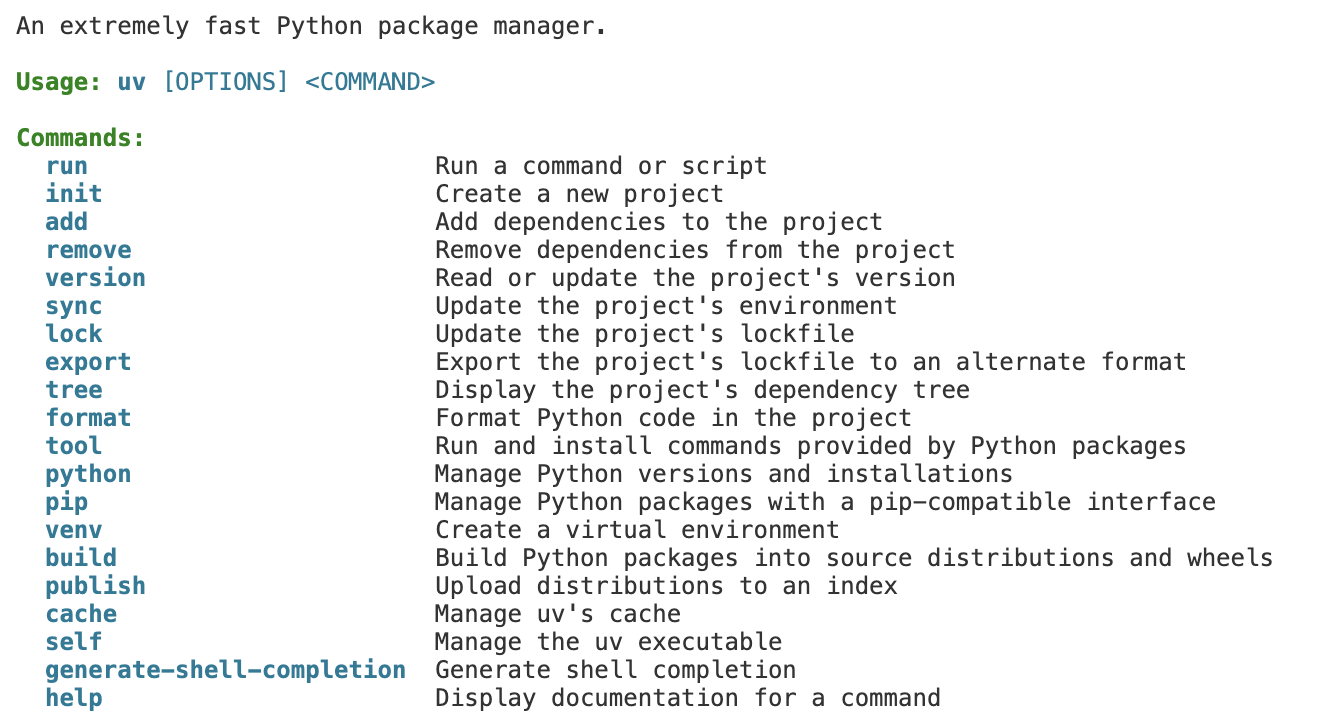
uv helpInstalling Python with uv
Environments with uv
- Environments isolate the Python version you're using from the rest of your computer
- This way, if you make changes (ie install lots of extensions/packages), it doesn't interfere with other projects
my computer
Biology Project
Needs
- Python 3.11
- biolopy
- numpy v2
Astro Project
Needs
- Python 3.11
- astropy needs numpy v3
Personal Project
Needs
- Python 3.3
- fastapi
- requests
Default python included with Mac (v3.8)


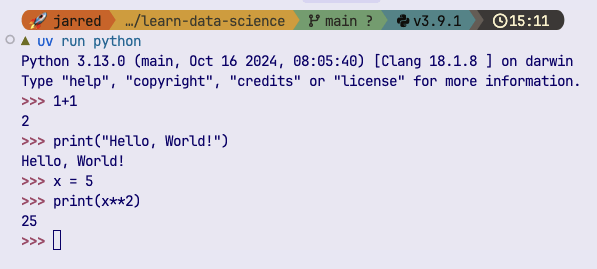
Python REPL
read–eval–print loop (REPL)
Think of it like a Terminal but for Python instead of Bash
Python Crash Course
- Types
- Output and printing
- Variables
- User Input
- Arithmetic Operators
- String methods
- f-strings
- Conditional Operators
- Chained Conditionals
- If/else
- match/case
- Lists
- Tuples
- For loops
- While loops
- Slice operator
- Sets
- Dicts
Any lingering questions?
Lecture 3
- Recap
- Functions in Python
- Builtin Modules
- Exceptions
- Advanced Concepts
- Objects and Classes
- Debugging and Logging
- Formatting Code
Functions
f
Inputs
Outputs
Functions
c = [0, 20, 100]  # Celcius values

c0 = c[0]
f0 = (c0 * 9/5) + 32
print(c0, "°C =", f0, "°F")

c1 = 20
f1 = (c1 * 9/5) + 32
print(c1, "°C =", f1, "°F")

c2 = 100
f2 = (c2 * 9/5) + 32
print(c2, "°C =", f2, "°F")
def c_to_f(celsius):
    return (celsius * 9/5) + 32

for temp in [0, 20, 100]:
print(temp, "°C =", c_to_f(temp), "°F")-
Always use def to define a function
-
Use return to 'give back' result(s)
Pure vs Impure Functions
def area(width, height):
	return width * height
Pure: Same input always gives the same output
def call_mom():
	phone.call("+49 123456890")
Impure: Have non-deterministic "side effects"
def write_to_file(text):
	with open("my_file.txt") as file:
file.write(text)- They somehow affect the world outside your program:
- Updating a file
- Writing to a database
- Checking the internet
Procedures and Nullary Functions
def say_hello():
	print("Hello.")
Procedures: Do not return anything at all.
Often for printing/logging text.
def say_hello(name):
	print(f"Hello {name}.")
def wait_5_seconds():
time.sleep(5)Nullary: Do not take inputs
def current_time():
	return datetime.now()
You don't need to memorize this!
It's just good to know that functions can serve many different purposes
Functions in Python
- Can accept multiple inputs
- Can return multiple outputs
def say_hello(name):
	print(f"Hello {name}.")

result = say_hello("Susie")

print(type(result))
If you don't use return, None is returned by default
def square_cube(n):
	return n**2, n**3

result = square_cube(2)

print(result)
If you return multiple objects, you get a tuple
Functions in Python
- Can accept multiple inputs
- Can return multiple outputs
def square_cube(n):
	return n**2, n**3

squared, cubed = square_cube(3)

print(squared)
print(cubed)
You can directly unpack the tuple as well
Challenge #1
Challenge #1
Write a function that takes in a list, and returns the mean.
numbers = [1, 1, 2, 3, 5, 8, 13]Hint: the sum() function gives you the sum of a list
Typehints
Typehints
- If only there was an easy way to see that it only works with certain types
- Help other users (and your future self) know the inputs and outputs
def scream(word, times):
    saying = word * times
    return saying.upper() + "!"

# Try these two examples
scream('ha', 4)

scream(4, 3)  # raises error!
Typehints
- Use typehints!
- Available since Python v3.10 (in 2021)
- For this reason, we always recommend v3.10+
- Help other users (and your future self) know the inputs and outputs
def scream(word: str, times: int) -> str:
    saying = word * times
    return saying.upper() + "!"
Typehint Examples
- Here we give a list of integers
- Then we multiply each element by a float OR an integer (notated by the | symbol)
- You can typehint lists, dicts, etc
def scale_numbers(numbers: list[int], factor: int | float) -> list[float]:
    result = []
    for n in numbers:
        result.append(n * factor)
    return result
Enabling typehint help in VS Code
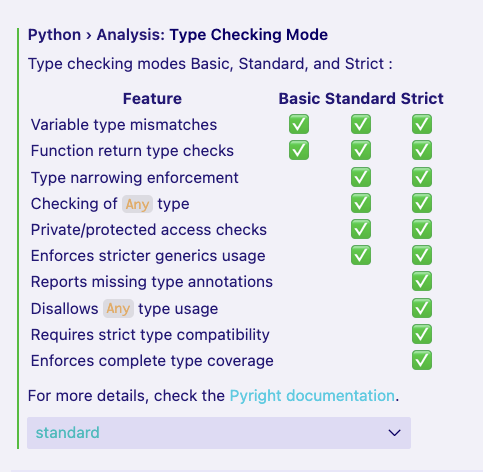
- Open VS Code settings (MOD+comma)
- Search for 'type checking'
- Set Type Checking Mode to standard

Check the problems tab to see all your errors and type errors
Docstrings
- Another way to help future you
- And especially others, if you are collaborating
def scream(word: str, times: int) -> str:
    """
    Repeat a word several times and return it in uppercase with an exclamation mark.

    Parameters
    ----------
    word : str
        The word to repeat.
    times : int
        How many times to repeat the word.

    Returns
    -------
    str
        The repeated word in uppercase, followed by an exclamation mark.

    Examples
    --------
    >>> scream("ha", 3)
    'HAHAHA!'
    """

    saying = word * times
    return saying.upper() + "!"
There are many ways to format docstrings
This one is called the numpy style
Challenge #2
Challenge #2
Add type hints and a docstring to the following function.
- The inputs should work with both integers and floats.
def area(width, height):
	return width * height
Function Arguments
Function Arguments
def greet(name: str, greeting: str = "hello", exclaim: bool = True):
    """
    Create a greeting message.

    Parameters
    ----------
    name : str
        The name of the person to greet (required).
    greeting : str, default="hello"
        The punctuation mark to end the greeting with.
    exclaim : bool, default=True
        Whether to use an exclaimation mark instead of a period.
    """

    punctuation = "!"

    if not exclaim:
        punctuation = "."

print(f"{greeting.capitalize()}, {name}{punctuation}")- args = positional arguments. They are required.
- Must always be passed in order
- kwargs = Keyword arguments.
- Optional, and must have a default
Function Arguments
greet("Alice", "good evening")

greet(name="Alice", greeting="good evening")

# does not work!
greet("Alice", False)

# because arguments are no longer in order
# you need to explicitly write the keyword
greet("Alice", exclaim=False)- In both cases, you can explicitly write the argument names for clarity
- Can make code easier to read, but optional
- Required if you are calling kwargs out of order
Advanced Function Arguments
def greet_everyone(greeting: str, *args, exclaim: bool = False):

	print(args)

    punctuation = "."
    if exclaim:
        punctuation = "!"

    for name in args:
print(f"{greeting}, {name}{punctuation}")- Use *args to allow an unlimited number of arguments
# extra args get expanded into a tuple

greet_everyone("Hello", "Alice", "Bob", "Charlie", exclaim=True)

# ('Alice', 'Bob', 'Charlie')
# Hello, Alice.
# Hello, Bob.
# Hello, Charlie.
Advanced Keyword Arguments
def contact_card(name, student_id: int, **kwargs):

    print(kwargs)


    print("Contact Card")
    print(f"Name: {name}")
    print(f"Student ID: {student_id}")

    for key, value in kwargs.items():
print(f"{key.capitalize()}: {value}")- Use *kwargs to allow an unlimited number of arguments
- Automatically expanded into a dictionary
contact_card(
	"Alice",
    student_id=123456,
    email="alice@tum.net",
    phone="0123456789"
)

# {'email': 'alice@tum.net', 'phone': '0123456789'}

# Contact Card
# Name: Alice
# Student ID: 123456
# Email: alice@tum.net
# Phone: 0123456789
Lecture 3
- Recap
- Functions in Python
- Exceptions
- Builtin Modules
- Advanced Concepts
- Objects and Classes
- Debugging and Logging
- Formatting Code
Exceptions
- Python's way of telling us something is wrong
- They will stop your program

print(5 / 0)

### Raises the error:
---------------------------------------------------------------------------
ZeroDivisionError                         Traceback (most recent call last)
Cell In[31], line 1
----> 1 print(5 / 0)

ZeroDivisionError: division by zero
Exceptions
- Probably you've already run into a few 😉
- Errors have types:
| Error Type | |
|---|---|
FileNotFoundError |
Opening a missing file |
TypeError |
Using the wrong type |
ValueError |
Passing the wrong kind of value |
ZeroDivisionError |
Dividing by zero |
| ...and many, many more! |
Exceptions
ValueError |
Passing the wrong kind of value |
def circle_area(radius: float) -> float:

    if radius < 0:
        raise ValueError("Radius cannot be negative.")

    return 3.1415 * radius ** 2
Raising your own exceptions:
keep yourself from making mistakes
Do not silently return nonsense!
Catching Exceptions
# intuitive try/catch example

daily_apples_sold = [5, 10, "15", 20, 4, 11, 0]

def total_apples_sold(apples: list[int]) -> int:
    total = 0
    for count in apples:
        try:
            total += count
        except TypeError:
            print(f"Warning: Could not convert {count} (type: {type(count)}) to an integer. Skipping.")

    return total

print(total_apples_sold(daily_apples_sold))
- Sometimes you don't want a program to stop
- e.g. skipping values that are the wrong type
- Prevent your program from crashing and give friendly error messages
Lecture 3
- Recap
- Functions in Python
- Builtin Modules
- Exceptions
- Advanced Concepts
- Objects and Classes
- Debugging and Logging
- Formatting Code
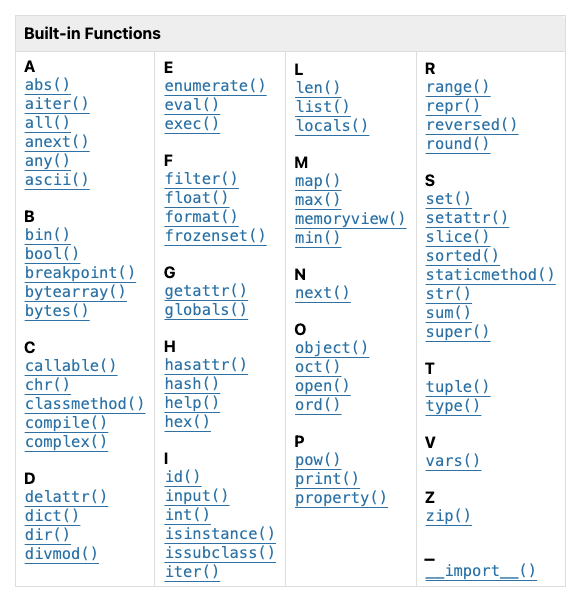
Python Builtin Functions
✅
✅
✅
✅
✅
✅
✅
✅ Already seen
⏩️ Types
🔢 Math
Python Builtin Functions
✅
✅
✅
✅
⏩️
⏩️
⏩️
⏩️
⏩️
⏩️
⏩️
⏩️
✅
Can use this to convert something from one type to another
int("44")✅
✅
⏩️
⏩️
⏩️
⏩️
⏩️
✅ Already seen
⏩️ Types
Python Builtin Functions
✅
✅
✅
✅
⏩️
⏩️
⏩️
⏩️
⏩️
⏩️
⏩️
⏩️
✅
✅ Already seen
⏩️ Types
🔢 Math
🔢
🔢
🔢
🔢
🔢
🔢
✅
✅
⏩️
⏩️
⏩️
⏩️
⏩️
Python Builtin Functions
✅
✅
✅
✅
⏩️
⏩️
⏩️
⏩️
⏩️
⏩️
⏩️
⏩️
✅
✅ Already seen
⏩️ Types
🔢 Math
🅾️ Also useful!
You might see these around or later in the course
🔢
🔢
🔢
🔢
🔢
🔢
✅
✅
⏩️
⏩️
⏩️
⏩️
⏩️
🅾️🅾️🅾️🅾️🅾️🅾️🅾️Python Builtin Modules
The Python team has incorporated a large number of useful tools into the default installation
"Batteries included"
time
- Acts as a stopwatch for your program
- Gives you a current timestamp
- Pauses your program
import time

# current timestamp
print(time.time())

# pause program for 5 seconds
time.sleep(5)
Timestamp is in UNIX timestamp format: see here
time
- Acts as a stopwatch for your program
- Gives you a current timestamp
- Pauses your program
Timestamp is in UNIX timestamp format: see here
time
- You can manually time how long a program takes
import time

# current timestamp
start = time.time()

# pause program for 5 seconds
time.sleep(5)

end = time.time()
print(end - start)
importing modules
import time

time.sleep(5)

# or you can import just one function
from time import sleep

sleep(5)

# nickname a module/function
import time as t

t.sleep(5)
You only need to remember three keywords
-
import
-
from
-
as
datetime
- Like a calendar built into Python
- Works with human dates and times instead of UNIX timestamps
from datetime import datetime

now = datetime.now()

print(now)

print(now.year)
print(now.month)
datetime
- Like a calendar built into Python
- Works with human dates and times instead of UNIX timestamps
# create a specific date and time

susie_birthday = datetime(2018, 5, 21)
print(susie_birthday)  # time defaults to midnight

# add the time
susie_birthday = datetime(2018, 5, 21, 10, 30, 0)
print(susie_birthday)

# get the weekday as an integer
print(susie_birthday.weekday())
datetime
- Timedeltas
- Can do easy math with dates and times
# timedeltas
# represent a duration of time
from datetime import datetime, timedelta

now = datetime.now()
print("now:", now)

one_week = timedelta(weeks=1)
print("one week:", one_week)

last_week = now - one_week
print("last week:", last_week)
Challenge #3
Challenge #3
Find which weekday your birthday is on for the next 10 years.
Hint: use range()
math
- A scientific calculator built into Python
- Common functions
- Important constants
- Trigonometry
import math

# constants
print(math.pi, math.e)

print(math.sqrt(16))

print(math.factorial(5))

print(math.log(100))

print(math.log(100, 10))

print(math.sin(math.pi / 2))
Watch out for the log function!
Challenge #4
Challenge #4
- Create a function called safe_sqrt:
- Takes one numerical input
- Use the math module
- If the user gives a negative number
- catch the error
- warn the user
- flip it to positive and return the result
random
- A fancy "dice roller" for Python
- Useful for:
- Simulations
- Games
- Sampling data
import random

for i in range(10):
	# gives a number in [0,1)
    print(random.random())

for i in range(10):
	# gives a integer in [a, b]
    print(random.randint(10, 20))

# randomly pick from a list
pets = ["cat", "dog", "elephant"]

for i in range(5):
	print(random.choice(pets))
Challenge #5
Challenge #5
-
Create a function called roll_n_dice
-
Use random to roll that number of dice
-
Return the sum of the rolled dice
def roll_n_dice(n: int) -> int:
	# etc
Lecture 3
- Recap
- Functions in Python
- Exceptions
- Builtin Modules
- Advanced Concepts
- Objects and Classes
- Debugging and Logging
- Formatting Code
List Comprehensions
List Comprehensions
- Allows you to do a For Loop in one line
- Really tricky to get started with
- Once you master them, you will feel very powerful

n = [1, 2, 3, 4]

squared = []
for number in n:
    squared.append(number ** 2)

print(squared)
squared = [number ** 2 for number in n]
print(squared)List Comprehensions
Format is: [function() for i in iterable]
squared = [number ** 2 for number in n]
print(squared)def square(number: int | float):
return number ** 2
squared = [squared(number) for number in n]
print(squared)Challenge #6
Challenge #6
- Write a function that:
- accepts a single string as input
- returns a list of upper case words as a list
- use a list comprehension
Input: "Data science is tough sometimes."
Output: ['DATA', 'SCIENCE', 'IS', 'TOUGH', 'SOMETIMES.']Hint: try using this string method "hello world".split(" ")Lambdas
Lambdas
- Mini-functions to define on the fly
- A shortcut to something you already know
- You will see some concrete examples of where they are useful later in the course
For now, just keep in mind that lambdas exist!
# Normal function
def square(x: int) -> int:
    return x ** 2

# Same thing but with a lambda
square = lambda x: x ** 2
print(square(4))   # 16
Lecture 3
- Recap
- Functions in Python
- Exceptions
- Builtin Modules
- Advanced Concepts
- Objects and Classes
- Debugging and Logging
- Formatting Code
Objects
e.g. let's study human height over time
Person
These are attributes that each person has
- name
- age
- nationality
- measurement
- In data science, we often model things from real life (people, places, scientific sources)
- We can represent these concepts as objects
- Each thing has both data and behaviors
Objects
- In data science, we often model things from real life (people, places, scientific sources)
- We can represent these concepts as objects
- Each thing has both data and behaviors
Person
These are attributes that each person has
add_measurement()
We can also add functions ("methods") that apply to a Person
e.g. let's study human height over time
- name
- age
- nationality
- measurement
"nouns"
"verbs"
Objects
Let's make a video game!
class Character:
    """A character in our video game."""

    def __init__(self, name: str, health: int):
        """
        Args:
            name (str): Name of the character
            health (int): Starting health points
        """
        self.name = name
        self.health = health
__init__() is a special function that always runs when you create the object
self is used to reference the object, and update it's state internally
Character
-
name
-
health
Objects
class Character:
    """A character in our video game."""

    def __init__(self, name: str, health: int):
        # ...

	def take_damage(self, amount: int):
		"""
        Reduce health when taking damage

        Parameters
        ----------
            amount : int
            	Amount of health lost
        """
        self.health -= amount
warrior = Character("Jacob", 100)
print(warrior.health)
warrior.take_damage(20)
print(warrior.health)Let's create our first character!
Character
-
name
-
health
Objects
class Character:
    """A character in our video game."""

    def __init__(self, name: str, base_health: int):
        """
        Args:
            name (str): Name of the character
            base_health (int): Base health points
        """
        self.name = name
        self.base_health = base_health
warrior = Character("Lisa", 100)
print(warrior)
print(warrior.name)Let's allow the character to take damage:
Character
-
name
-
health
Objects
class Character:
    """A character in our video game."""

    def __init__(self, name: str, base_health: int):
        # ...
        self.name = name
        self.base_health = base_health
        self.items: list[str] = []

    def pickup_item(self, item: str):
        """
        Add an item to the character's inventory.

        Parameters
        ----------
            item : str
                The item to pick up
        """
        self.items.append(item)
Let's allow the character to hold items
Character
-
name
-
health
-
items
warrior = Character(name="Hodor", health=100)

print(warrior.items)

warrior.pickup_item("sword")

print(warrior.items)
Challenge #7
Challenge #7
- Add a function called use_item() to our Character class
- You should pass the name of the item you want to use and it should remove it from the list
Hint: Play around with the .remove() method of lists
Inheritance
- You can create new objects based off of already-existing ones
- Change functionality or add custom methods
class ShoutingString(str):

    def shout(self):
        return self.upper() + "!!!"
s = ShoutingString("hello")

print(type(s))

# has all the same functionality
# as a normal string
print(s.lower())
print(s * 3)

# but also has our new method!
print(s.shout())
Inheritance
Let's create a special class of Character who takes half as much damage
class Dragon(Character):

    def take_damage(self, amount: int):
        """
        Dragons take half damage from attacks.

        Parameters
        ----------
            amount : int
                Amount of health lost
        """
        reduced_amount = int(amount * 0.5)
        print(f"{self.name} takes 1/2 damage because it is a dragon!")
self.health -= reduced_amount- We do not have to rewrite the __init__() function
- We just redefine the methods that we want to overwrite
warrior = Character("Warrior", 100)
dragon = Dragon("Smaug", 100)

print("Warrior health:", warrior.health)
print("Dragon health:", dragon.health)

warrior.take_damage(30)
dragon.take_damage(30)

print("Warrior health:", warrior.health)
print("Dragon health:", dragon.health)
Dunder methods
- Dunder ("double underscore") methods
- Hook you into the default features of Python
- Allow your classes to "speak fluent Python"
__init__
__repr__
__len__
__eq__
...
Examples:
✅ You have already seen __init__
__repr__
- repr stands for "representation"
- What your class looks like when you print it
warrior = Character("Warrior", 100)
dragon = Dragon("Smaug", 100)

print(warrior)
print(dragon)
<__main__.Character object at 0x10430dfd0>
<__main__.Dragon object at 0x10430f770>ew!
class Character:
	# ...

	def __repr__(self):
          return f"Character(name={self.name}, health={self.health}, items={len(self.items)})"
warrior = Character("Warrior", 100)
dragon = Dragon("Smaug", 100)
dragon.pickup_item("fire")
print(warrior)
print(dragon)Character(name=Warrior, health=100, items=0)
Character(name=Smaug, health=100, items=1)gorgeous!
__len__
- Allows you to define the length of your object
- Works with the built in len() function
- Let's make length the number of items held
warrior = Character("Warrior", 100)
dragon = Dragon("Smaug", 100)
dragon.pickup_item("fire")

print(len(dragon))
print(len(warrior))
---------------------------------------------------------------------------
TypeError Traceback (most recent call last)
Cell In[138], line 5
2 dragon = Dragon("Smaug", 100)
3 dragon.pickup_item("fire")
----> 5 print(len(dragon))
TypeError: object of type 'Dragon' has no len()ew!
class Character:
	# ...

	def __len__(self):
        return len(self.items)
warrior = Character("Warrior", 100)
dragon = Dragon("Smaug", 100)
dragon.pickup_item("fire")
print(len(dragon))
print(len(warrior))1
0gorgeous!
__eq__
- Allows you to use your object with the = operator
- Let's define: if two characters have the same name and health, they are equal
class Character:
	# ...

    def __eq__(self, other):
        if self.name == other.name and self.health == other.health:
            return True
        return False
warrior = Character("Warrior", 100)
warrior2 = Character("Warrior", 100)
if warrior == warrior2:
print("They are the same!")They are the same!gorgeous!
Lecture 3
- Recap
- Functions in Python
- Exceptions
- Builtin Modules
- Advanced Concepts
- Objects and Classes
- Debugging and Logging
- Formatting Code
Debugging in Python
What is Debugging?
The process of finding and fixing mistakes in your code
Debugging recipe:
- Observe what the program is doing
- Compare it with what you expect
- Isolate the problematic part of code
- Fix the problem
- Verify the results
More than just fixing, you have to understand your code

Print debugging
- One method of debugging
- Add print() statements into your code
- Print the values of variables at different steps in your program
def find_max(nums: list[int]) -> int:

    max_value = 0

    for n in nums:
        if n > max_value:
            max_value = n
    return max_value

print(find_max([1, 3, 2, 8, 4, 5]))
# returns 8: OK!

print(find_max([-3, -2, -8, -4, -5]))
# returns 0: wrong!
def find_max(nums: list[int]) -> int:
max_value = 0
print(f"Starting value: {max_value}")
for n in nums:
print(f"Comparing {n} to {max_value}")
if n > max_value:
print(f"Updating max_value to {n}")
max_value = n
return max_valuePrint debugging
Starting value: 0
Comparing 1 to 0
Updating max_value to 1
Comparing -3 to 1
Comparing 2 to 1
Updating max_value to 2
Comparing 8 to 2
Updating max_value to 8
Comparing 4 to 8
Comparing -5 to 8
8

=====
Starting value: 0
Comparing -3 to 0
Comparing -2 to 0
Comparing -8 to 0
Comparing -4 to 0
Comparing -5 to 0
0
def find_max(nums: list[int]) -> int:
max_value = 0
print(f"Starting value: {max_value}")
for n in nums:
print(f"Comparing {n} to {max_value}")
if n > max_value:
print(f"Updating max_value to {n}")
max_value = n
return max_value
# run our test cases with the print statements
print(find_max([1, -3, 2, 8, 4, -5]))
print("=====")
print(find_max([-3, -2, -8, -4, -5]))Breakpoint debugging
- Allows you pause code in the middle
- You can inspect variables at each point
- You can walk through the code line-by-line

Breakpoint debugging in VS Code
- Allows you pause code in the middle
- You can inspect variables at each point
- You can walk through the code line-by-line
Breakpoint debugging in VS Code
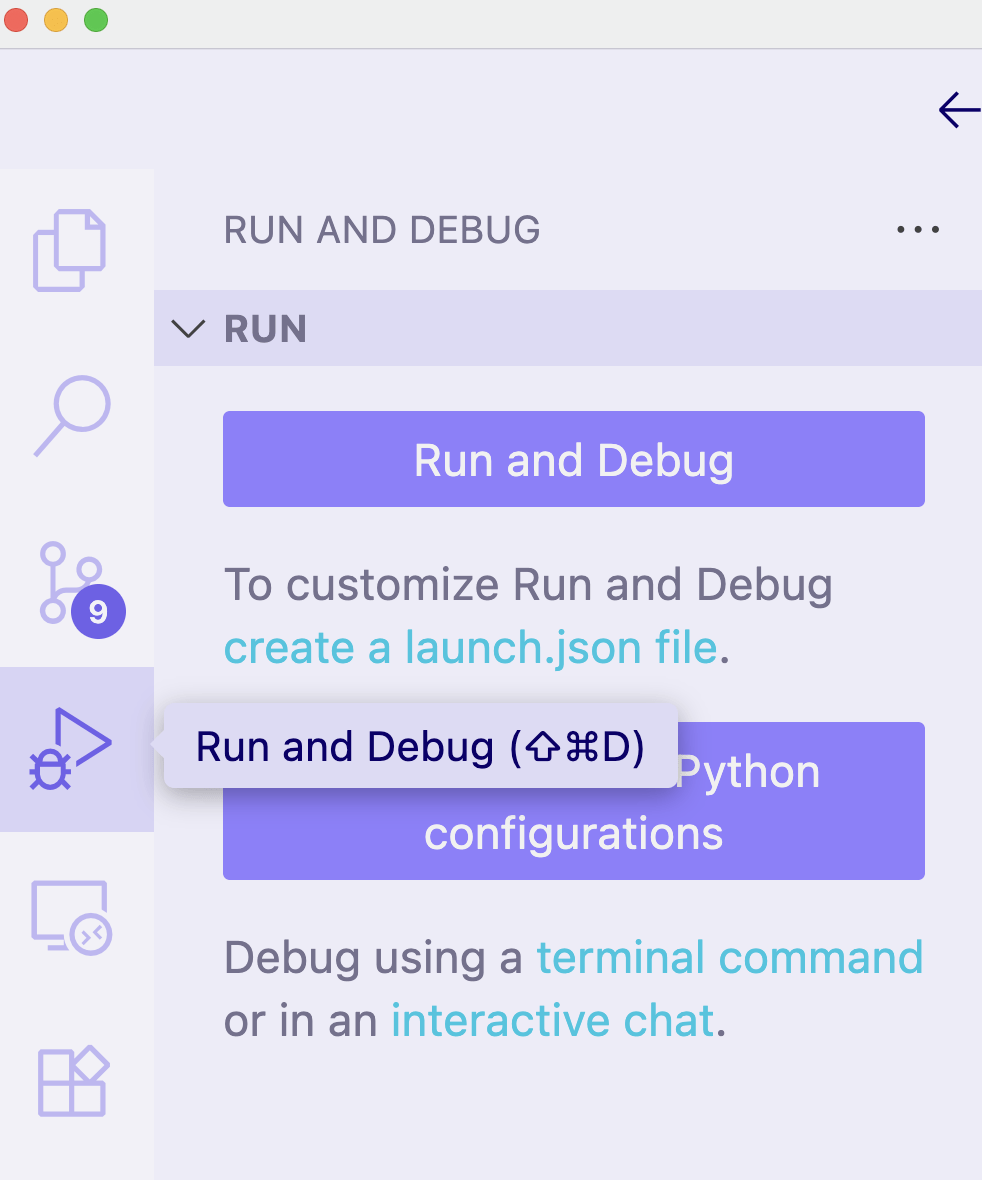
1. Click into the "Run and Debug" panel
Breakpoint debugging in VS Code
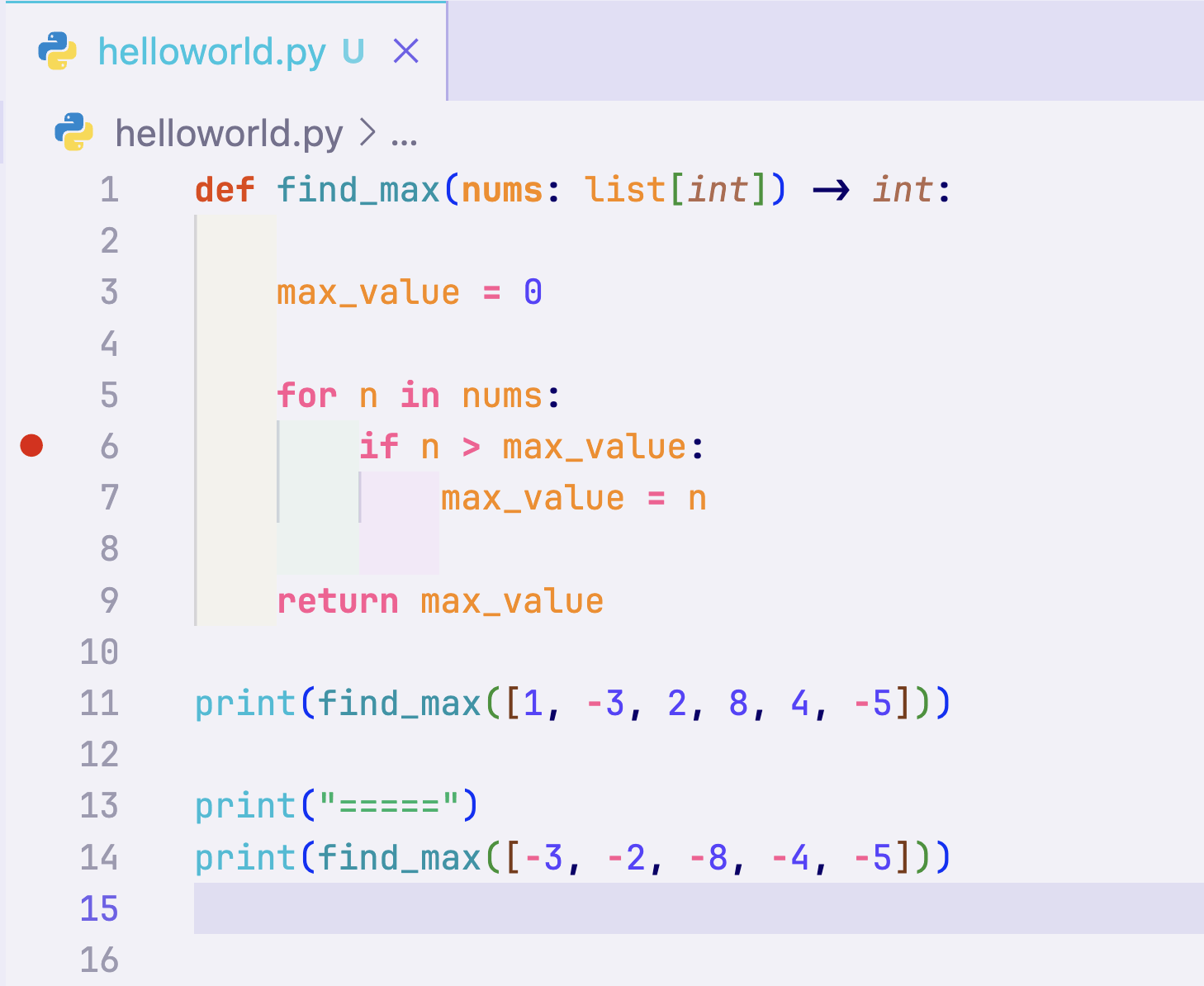
2. Click the red dot next to any line of code to add a breakpoint
Breakpoint debugging in VS Code
3. Click "Run and Debug" in the side bar
- The code will run and then pause when it gets to a red dot
- On the left panel you can see the current values for each variable
- In the text, you can also see the current variable values
- Press the continue ▶️ button in the control bar to advance to the next breakpoint
- Press the step over ⤵️ button to advance one line at a time
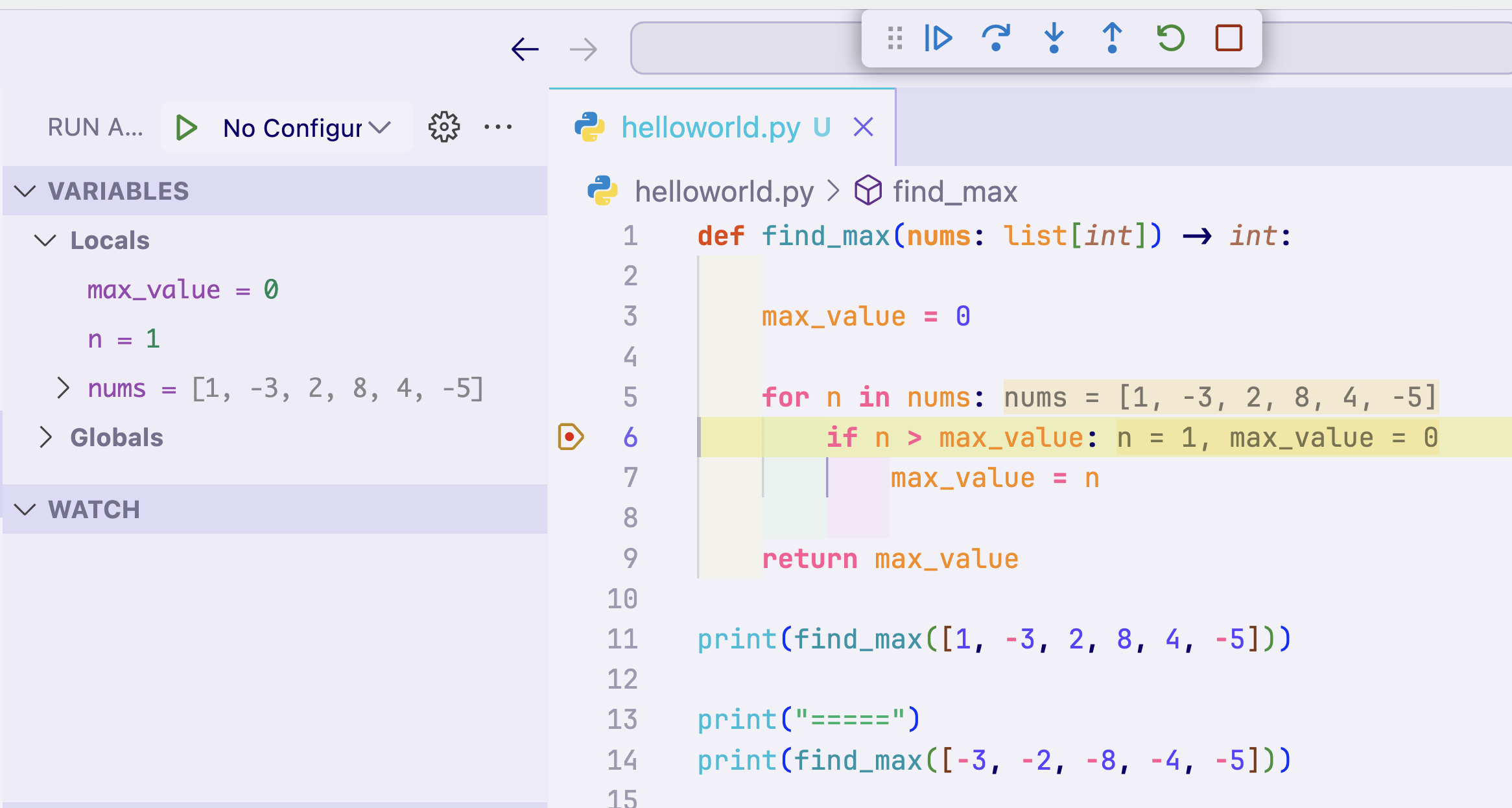
control bar
Challenge #8
Challenge #8
"""
Buggy checkout example for VS Code Run and Debug.
"""

def add_tax(subtotal: float, tax_percent: float):
    return subtotal * tax_percent

def checkout(items: list[dict[str, float]], tax_percent: float):

    # add the price of each item to get subtotal
    subtotal = sum(item["price"] for item in items)

    # calculate tax amount
    tax_amount = add_tax(subtotal, tax_percent)

    # calculate total
    total = subtotal + tax_amount

    # print receipt
    print(f"Subtotal: ${subtotal:.2f}")
    print(f"Tax ({tax_percent}%): ${tax_amount:.2f}")
    print(f"Total: ${total:.2f}")

# example usage
cart = [
    {"name": "Notebook", "price": 4.50},
    {"name": "Pen", "price": 1.25},
    {"name": "Sticker", "price": 0.75},
]
vat_percent = 8.5
checkout(items=cart, tax_percent=vat_percent)
- Copy and run the following code
- You will see that something looks suspicious
- Even if you can see the problem by eye, use the VS Code debugger to locate and fix the error
Logging in Python
Logging in Python
- Logging is fancy printing in Python
- Lets you set 'urgency' levels to each message
- Lets you/users silence all printing completely
- Adds timestamps automatically
- Can write logs to a file automatically
- Can copy/paste the code below into anything you write
import logging


logging.basicConfig(
	level=logging.INFO,
	format="%(asctime)s %(levelname)s %(name)s:%(lineno)d — %(message)s",
  	datefmt="%Y-%m-%d %H:%M:%S",
	filename="test.log",
)

logger = logging.getLogger(__name__)
Boilerplate setup code
Logging in Python
- There are five logging levels:
| Logging Level | Usage |
|---|---|
| CRITICAL | Very serious issue |
| ERROR | Serios issue |
| WARNING | Warn of potentially unwanted state |
| INFO | Provide information |
| DEBUG | Messages for yourself, hidden by default |
# cont. from above

logger = logging.getLogger(__name__)

logger.debug("This is a debug message")
logger.warn("Be careful!")
Example
import logging


logging.basicConfig(
	level=logging.DEBUG,  # also save debug logs
	format="%(asctime)s %(levelname)s %(name)s:%(lineno)d — %(message)s",
	datefmt="%Y-%m-%d %H:%M:%S",
	filename="sqrt.log",
)

logger = logging.getLogger(__name__)

def safe_sqrt(x: float) -> float:
    try:
      	logger.debug(f"Got {x}")
        return math.sqrt(x)
    except ValueError:
        logger.warning(f"{x} is negative, flipping sign.")
        return math.sqrt(-x)
Example
print(safe_sqrt(16))
print(safe_sqrt(-16))

### sqrt.log
# 2025-09-02 19:37:13 DEBUG __main__:16 — Got 16
# 2025-09-02 19:37:13 DEBUG __main__:16 — Got -16
# 2025-09-02 19:37:13 WARNING __main__:19 — -16 is negative, flipping sign.
Lecture 3
- Recap
- Functions in Python
- Exceptions
- Builtin Modules
- Advanced Concepts
- Objects and Classes
- Debugging and Logging
- Formatting Code
Styling in Python
- Code styling means formatting your code in a consistent way, following a set of pre-defined rules
- It's very advantageous:
- Allows for clear and consistent reading of code
- Makes collaboration easier
- Formatting tools can do it all for you!
- Consistency across different projects
# ugly code:
def checkout_cart(username:str,email:str,user_id:int,country_code:str,payment_method:str,tax_percentage:float,cart:list[dict])->bool:
    user_details={"username":username,"email":email,"user_id":user_id,"country_code":country_code,"payment_method":payment_method}
    print("User details: ",user_details)
    if country_code not in ["US","CA","UK","AU","DE","FR","IT","ES","NL","BE","SE"]:
        print(f"Sorry, we do not ship to {country_code} yet.")
        return False
    for item in cart: print(f"Purchasing {item['name']} for ${item['price']}")
    total=sum(item['price'] for item in cart)
    total_with_tax=total*(1+tax_percentage/100)
    print(f"Total with tax: ${total_with_tax:.2f}")
    print(f"Charging {payment_method}...")
    print(f"Thank you {username} for your purchase!")
    return True

items=[{"name":"Notebook","price": 4.50},{"name":"Pen","price": 1.25},{"name": "Sticker", "price": 0.75},{"name":"Backpack","price": 29.99},{"name":"Water Bottle","price": 14.99}]
checkout_cart(username="johndoe",email="johnny@germany.de",user_id=12345,country_code="DE",payment_method="meistercard",tax_percentage=19.0,cart=items)
Styling in Python
# prettier code:
def checkout_cart(
    username: str,
    email: str,
    user_id: int,
    country_code: str,
    payment_method: str,
    tax_percentage: float,
    cart: list[dict],
) -> bool:

    user_details = {
        "username": username,
        "email": email,
        "user_id": user_id,
        "country_code": country_code,
        "payment_method": payment_method,
    }
    print("User details: ", user_details)

    if country_code not in [
        "US",
        "CA",
        "UK",
        "AU",
        "DE",
        "FR",
        "IT",
        "ES",
        "NL",
        "BE",
        "SE",
    ]:
        print(f"Sorry, we do not ship to {country_code} yet.")
        return False

    for item in cart:
        print(f"Purchasing {item['name']} for ${item['price']}")

    total = sum(item["price"] for item in cart)
    total_with_tax = total * (1 + tax_percentage / 100)

    print(f"Total with tax: ${total_with_tax:.2f}")
    print(f"Charging {payment_method}...")
    print(f"Thank you {username} for your purchase!")

    return True


items = [
    {"name": "Notebook", "price": 4.50},
    {"name": "Pen", "price": 1.25},
    {"name": "Sticker", "price": 0.75},
    {"name": "Backpack", "price": 29.99},
    {"name": "Water Bottle", "price": 14.99},
]

checkout_cart(
    username="johndoe",
    email="johnny@germany.de",
    user_id=12345,
    country_code="DE",
    payment_method="meistercard",
    tax_percentage=19.0,
    cart=items,
)
Automatic Styling with Ruff
Install me in VS Code!
- Open the command palette (shift+MOD+P)
- Copy the 'ugly code' on the left
- Search for "Riff: Format Document"
- Press Enter and voila!
Do it!
# ugly code:
def checkout_cart(username:str,email:str,user_id:int,country_code:str,payment_method:str,tax_percentage:float,cart:list[dict])->bool:
    user_details={"username":username,"email":email,"user_id":user_id,"country_code":country_code,"payment_method":payment_method}
    print("User details: ",user_details)
    if country_code not in ["US","CA","UK","AU","DE","FR","IT","ES","NL","BE","SE"]:
        print(f"Sorry, we do not ship to {country_code} yet.")
        return False
    for item in cart: print(f"Purchasing {item['name']} for ${item['price']}")
    total=sum(item['price'] for item in cart)
    total_with_tax=total*(1+tax_percentage/100)
    print(f"Total with tax: ${total_with_tax:.2f}")
    print(f"Charging {payment_method}...")
    print(f"Thank you {username} for your purchase!")
    return True

items=[{"name":"Notebook","price": 4.50},{"name":"Pen","price": 1.25},{"name": "Sticker", "price": 0.75},{"name":"Backpack","price": 29.99},{"name":"Water Bottle","price": 14.99}]
checkout_cart(username="johndoe",email="johnny@germany.de",user_id=12345,country_code="DE",payment_method="meistercard",tax_percentage=19.0,cart=items)
🎉 Congrats on finishing this Python introduction!
Check out how much intuition you've gained:
Check out this Go code:
func ProjectileY(x, v0, theta, g float64) float64 {
	t := x / (v0 * math.Cos(theta))
	return v0*math.Sin(theta)*t - 0.5*g*t*t
}
Check out this JavaScript code:
function decayN(n0, t, halfLife){
  return n0 * Math.pow(0.5, t/halfLife);
}
Check out this C++ code:
#include <cmath>
#include <utility>
#include <optional>

// 3rd law
inline double Period(double a, double mu){
  return 2*M_PI*std::sqrt(a*a*a/mu);
}

// 1st law geometry
inline double RadiusAtNu(double a,double e,double nu){
  return a*(1 - e*e)/(1 + e*std::cos(nu));
}

// 2nd law: areal rate = h/2, h = √(μ a (1−e²))
inline double ArealRate(double mu,double a,double e){
  return 0.5*std::sqrt(mu*a*(1 - e*e));
}

// Vis-viva speed
inline double SpeedVisViva(double r,double a,double mu){
  return std::sqrt(mu*(2.0/r - 1.0/a));
}
Lecture 3
- Recap
- Functions in Python
- Exceptions
- Builtin Modules
- Advanced Concepts
- Objects and Classes
- Debugging and Logging
- Formatting Code
The End