Intro to Git
From crash course to fearless development

Git is...
- A version control system
- Decentralized / Distributed
- There is no "central" repository
- Each repo is a fully functional, full copy of all changes*
- There are, however, remote repos
- Yes, you *can* use remote repos as the 1 central repo
- Able to work completely offline
- Helpful to think in terms of graph theory (DAG)

Git is not...
- SVN or TFVC
- Git offers many more operations than SVN of TFVC does
- Some of the terminology and concepts aren't exactly analogous
!=

||

More differences...
- A git repo is cloned to your local machine
- You check out a SVN/TFS location to your local machine
- In Git, you check out certain commits or branches
- This is a branch switch in SVN/TFS
- A SVN/TFS commit increments the revision and the changes are automatically in the central repo
- A commit in Git creates a hash, and not necessarily pushed to a remote
- Git: local branches can be created without a corresponding remote branch
- In fact, this is encouraged!
- SVN commits track changes
- Each git commit has a snapshot of all files
The basic workflow
- Clone (or init)
- Stage
- Commit
- Pull
- Differences with fetch
- Push

Remote repositories
- Cloned repos have a reference to the parent remote repo (origin) under assumption you'll sync with it
- These are what commits are pushed to
- Generally, remote repositories are used so that teams can collaborate on code
- But a remote repo is just another repo, but on a different machine/server
- Your locally repo is completely independent from a remote repo, but usually has references to 1+ remotes

Branching


Branching
- Branching should be part of your everyday workflow
- When in doubt, branch
- Commit and push without fear into branches
-
Git allows for different development "contexts" (or topics, or streams)
- new features
- bug fixes
- experimental development
-
Consider remote branches when
- multiple devs are working on the same feature, etc.
- managing releases (dev, test, prod)

Merging
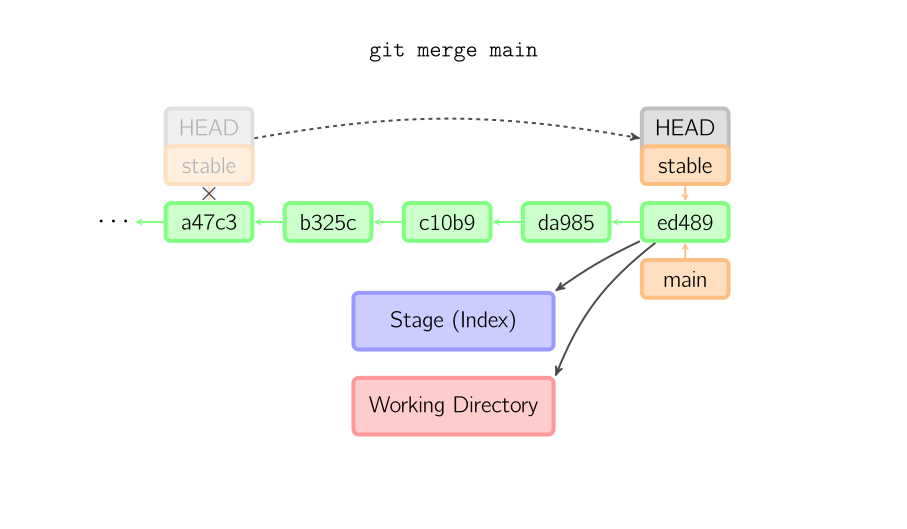
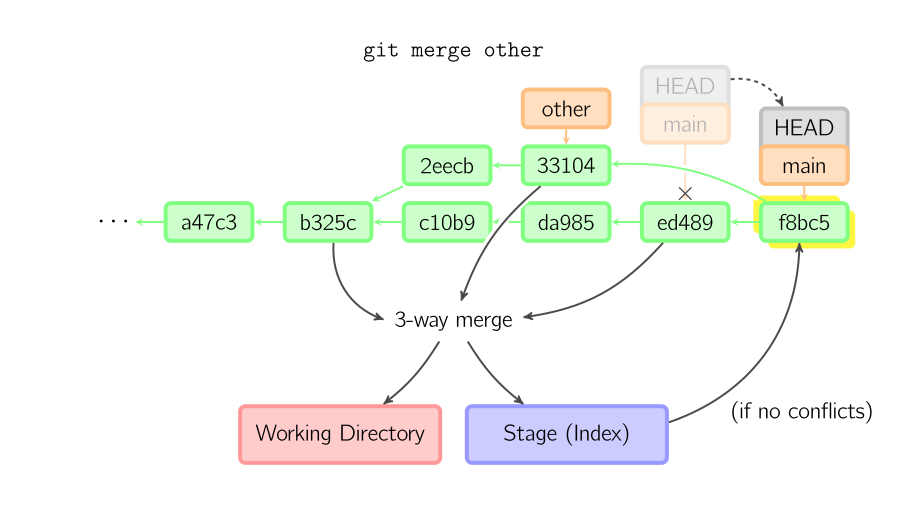
- Git merges an entire branch into another
- Git figures out which commits needs to be "copied" into a branch - easy merge
- Many times it will need to do a 3-way merge to consolidate multiple changes (a merge commit). Usually happens when commits have been made to both branches after the branch had been created
- In fact, a pull is just a fetch and then a merge


Merging
Plain (easy, fast forward)
Merging
Merge commit / 3-way merge
Stashing
- Not to be confused with Atlassian Stash, a managed, enterprise Git solution
- Useful for saving pending changes without committing anything
- Useful for getting back to a clean working copy
- For many operations you may want to have a clean working copy, such as checking out a different branch
- I like to use it to save a local debug/development state
- When stashes are reapplied, the changes will show as changes in your working copy as before

Undoing changes
- git reset
- "Discard" in some GUIs
- This will revert (be careful of this word) modified files back to its clean working copy state
- no new commits are created
- git revert
- Will create a commit that reverses the changes of another commit
- It will not delete a commit as you should not change history once it has been pushed to a remote repo

The team workflow - a possible solution
Scenario: Feature101 needs to built. 2 devs are assigned.
- Dev1 and Dev2 clone the repo, if they haven't already
- Feature101 branch created on remote repo
- Dev1 and Dev2 create local feature branch and checkout Feature101 branch, or push to a newly created feature branch if it doesn't already exist
- Both devs work on Feature 101, committing and pushing changes
- Once done, they send pull request to project manager/tech lead/release management
-
Changes are reviewed
- Can be accepted
- or more changes needed
- Pull request accepted. Feature101 branch merged into master (or production or whatever) branch.
The team workflow continued

The team workflow continued
More thoughts
- Should be working with a local development branch by default
- Minimizes code conflicts or changes being inadvertently merged/overwritten when pulling commits
- Allows you to stick to the "commit early and often" practice without fear
- If more than one dev are working in the same development/feature branch, you can even branch from that
- Informative commit messages are important for discussions around pull requests
The team workflow continued
With VSO
- Devs can make comments on pull requests, commits, or even lines of code
- A tool for code reviews and discussions
- Security can be at the branch level
- We can manage our own release process (for example: only build admins have access to merge code into Prod branch)
- We can use VSO to track development tasks
- Commits can be associated with work items, like you can with TFVC
Other topics
- Git - under the hood
- Rebasing, an alternative branching strategy
- Forking
- Pull requests
- Cherry picking
-
Differences between reset, checkout, and revert
- Great for understanding what git is doing at the commit and file levels
- Refs and reflog
- Managed workflows
- Other topics
Client Tools
- Built-in GUI (gitk)
- TortoiseGit
- Sourcetree (my current recommendation)
- Visual Studio (currently doesn't support as many operations as other clients)
- many others
Web tools/services
- Visual Studio Team Services (formerly Visual Studio Online)
- GitHub
- Bitbucket
- many others
Sources / Suggested reading
- Git course
- Git documentation
- Atlassian git glossary
- Git Tower: From subversion to git
- Atlassian git resources
- Atlassian: comparing workflows
- GarageGames: Cloning the repo and working with Git
- nvie.com: a successful git branching model
- Git: the simple guide
- Visual git guide
- Differences between reset, checkout, revert