HealthAPI Project Initiation & REST API Fundamentals

Business Scenario
Welcome!
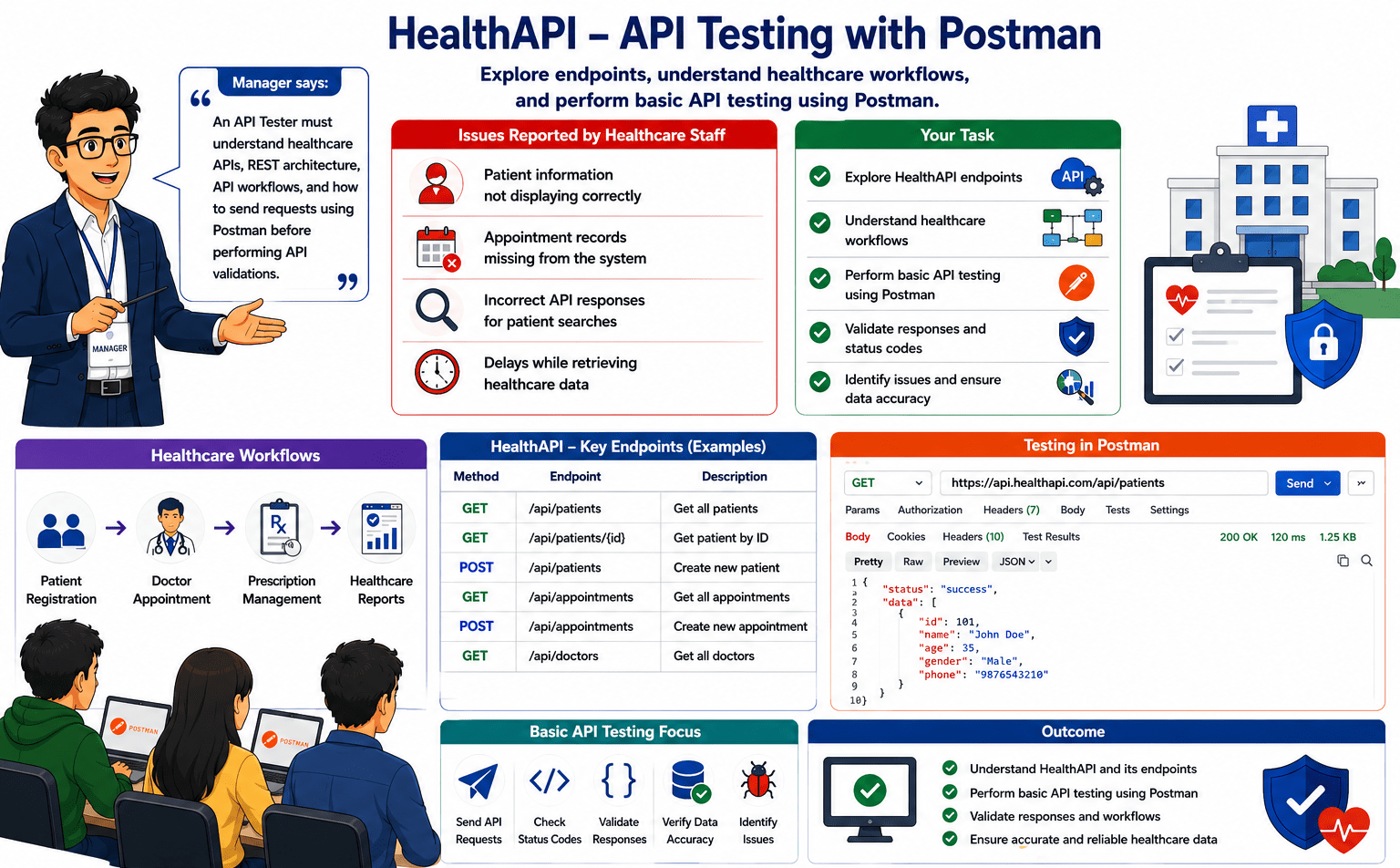
After joining the HealthAPI project as an API Tester, your manager assigns you to understand the system and perform basic API testing. The application has reported issues such as incorrect patient information, missing appointment records, inaccurate patient search results, and slow data retrieval.

Pre-Lab Preparation
Your task is to use Postman to explore HealthAPI endpoints, understand healthcare workflows, and perform basic API testing.
git pull origin branchNameGit Pull

Topic: HealthAPI Project Initiation & REST API Fundamentals
1)HTTP Methods, Headers, Params
2)Writing Assertions in Postman 3)Using Environment Variables
Task 1: Understand Healthcare System APIs
What is a Healthcare API?
A Healthcare API allows different healthcare applications to communicate and exchange patient, appointment, doctor, and medical information securely.
API Testers use Healthcare APIs to verify whether healthcare systems are sending and receiving accurate information between applications.
Types of Healthcare APIs
-
Patients API
-
Appointments API
-
Doctors API
-
Medical Records API
How it Works
When a user performs an action :-
-
User sends a request from the healthcare application.
-
Application sends an API request.
-
Server processes the request.
-
Required information is retrieved.
-
API response is returned to the application.
Real Life Example
A receptionist wants to retrieve patient information before booking an appointment.
The healthcare application sends a request to the Patients API.
The Patients API returns patient information to the application.
What is a Healthcare API?
A Healthcare API allows different healthcare applications to communicate and exchange patient, appointment, doctor, and medical information securely.
API Testers use Healthcare APIs to verify whether healthcare systems are sending and receiving accurate information between applications.
Types of Healthcare APIs
-
Patients API
-
Appointments API
-
Doctors API
-
Medical Records API
How it Works
When a user performs an action :-
-
User sends a request from the healthcare application.
-
Application sends an API request.
-
Server processes the request.
-
Required information is retrieved.
-
API response is returned to the application.
Real Life Example:
A receptionist wants to retrieve patient information before booking an appointment.
The healthcare application sends a request to the Patients API.
The Patients API returns patient information to the application.
Task 2: Study REST Architecture Concepts
What is REST?
REST (Representational State Transfer) is an architectural style used to build APIs that allow different applications to communicate with each other over the internet.
REST provides a standardized way for client applications and servers to exchange information. Most modern web applications, mobile applications, and healthcare systems use REST APIs because they are simple, scalable, and easy to maintain.
In healthcare applications, REST helps users retrieve patient information, schedule appointments, access doctor details, and manage healthcare records efficiently.
API Testers must understand REST because most modern APIs are built using REST architecture.
Why REST is Used?
REST is widely used because it :-
-
Provides a simple communication mechanism
-
Supports different types of applications
-
Improves system scalability
-
Enables easy integration between systems
-
Allows efficient data exchange
Real Life Example
A patient wants to view available doctors.
The healthcare application sends a request to the server.
The server retrieves doctor information and sends the response back to the application.
The patient can then view the available doctors and schedule an appointment.
-
The required resource is identified.
-
A response is generated.
-
The response is returned to the client.
How REST Works
The client sends a request.
The server receives the request.
The server processes the information.
What is REST?
REST (Representational State Transfer) is an architectural style used to build APIs that allow different applications to communicate with each other over the internet.
REST provides a standardized way for client applications and servers to exchange information. Most modern web applications, mobile applications, and healthcare systems use REST APIs because they are simple, scalable, and easy to maintain.
In healthcare applications, REST helps users retrieve patient information, schedule appointments, access doctor details, and manage healthcare records efficiently.
API Testers must understand REST because most modern APIs are built using REST architecture.
Why REST is Used?
REST is widely used because it :-
-
Provides a simple communication mechanism
-
Supports different types of applications
-
Improves system scalability
-
Enables easy integration between systems
-
Allows efficient data exchange
Real Life Example
A patient wants to view available doctors.
The healthcare application sends a request to the server.
The server retrieves doctor information and sends the response back to the application.
The patient can then view the available doctors and schedule an appointment.
-
The required resource is identified.
-
A response is generated.
-
The response is returned to the client.
How REST Works
The client sends a request.
The server receives the request.
The server processes the information.
What is REST?
REST (Representational State Transfer) is an architectural style used to build APIs that allow different applications to communicate with each other over the internet.
REST provides a standardized way for client applications and servers to exchange information. Most modern web applications, mobile applications, and healthcare systems use REST APIs because they are simple, scalable, and easy to maintain.
In healthcare applications, REST helps users retrieve patient information, schedule appointments, access doctor details, and manage healthcare records efficiently.
API Testers must understand REST because most modern APIs are built using REST architecture.
Why REST is Used?
REST is widely used because it :-
-
Provides a simple communication mechanism
-
Supports different types of applications
-
Improves system scalability
-
Enables easy integration between systems
-
Allows efficient data exchange
Real Life Example:
A patient wants to view available doctors.
The healthcare application sends a request to the server.
The server retrieves doctor information and sends the response back to the application.
The patient can then view the available doctors and schedule an appointment.
-
The required resource is identified.
-
A response is generated.
-
The response is returned to the client.
How REST Works
The client sends a request.
The server receives the request.
The server processes the information.
Task 3: Identify API Endpoints and Workflows
What is an API Endpoint?
An API Endpoint is a specific address through which a client application communicates with a server to access information or perform an operation.
Every API contains one or more endpoints, and each endpoint is responsible for a particular resource or functionality.
For example, a healthcare application may have separate endpoints for patients, appointments, doctors, and prescriptions.
API Testers must understand endpoints because every API request is sent to an endpoint and every API response is received from an endpoint.
Why API Endpoints are Important?
API Endpoints help applications:
-
Access specific resources.
-
Retrieve information from the server.
-
Perform business operations.
-
Exchange information between systems.
-
Support application functionality.
Endpoint Structure
A typical API Endpoint consists of :- Base URL + Resource Path + Parameters
Example :- https://healthapi.com/patients
Base URL :- https://healthapi.com
Resource path :- /patients
The Base URL identifies the application, while the Resource Path identifies the resource being accessed.
Real World Example:
https://www.healthapi.com/api/doctors?specialization=Cardiology&status=active
Base URL :- https://www.healthapi.com
Resource Path :- /doctors
Query Parameter :- specialization=Cardiology
What is an API Endpoint?
An API Endpoint is a specific address through which a client application communicates with a server to access information or perform an operation.
Every API contains one or more endpoints, and each endpoint is responsible for a particular resource or functionality.
For example, a healthcare application may have separate endpoints for patients, appointments, doctors, and prescriptions.
API Testers must understand endpoints because every API request is sent to an endpoint and every API response is received from an endpoint.
Why API Endpoints are Important?
API Endpoints help applications:
-
Access specific resources.
-
Retrieve information from the server.
-
Perform business operations.
-
Exchange information between systems.
-
Support application functionality.
Endpoint Structure
A typical API Endpoint consists of :- Base URL + Resource Path + Parameters
Example :- https://healthapi.com/patients
Base URL :- https://healthapi.com
Resource path :- /patients
The Base URL identifies the application, while the Resource Path identifies the resource being accessed.
Real World Example:
https://www.healthapi.com/api/doctors?specialization=Cardiology&status=active
Base URL :- https://www.healthapi.com
Resource Path :- /doctors
Query Parameter :- specialization=Cardiology
What is an API Endpoint?
An API Endpoint is a specific address through which a client application communicates with a server to access information or perform an operation.
Every API contains one or more endpoints, and each endpoint is responsible for a particular resource or functionality.
For example, a healthcare application may have separate endpoints for patients, appointments, doctors, and prescriptions.
API Testers must understand endpoints because every API request is sent to an endpoint and every API response is received from an endpoint.
Why API Endpoints are Important?
API Endpoints help applications:
-
Access specific resources.
-
Retrieve information from the server.
-
Perform business operations.
-
Exchange information between systems.
-
Support application functionality.
Endpoint Structure
A typical API Endpoint consists of :- Base URL + Resource Path + Parameters
Example :- https://healthapi.com/patients
Base URL :- https://healthapi.com
Resource path :- /patients
The Base URL identifies the application, while the Resource Path identifies the resource being accessed.
Real World Example:
https://www.healthapi.com/api/doctors?specialization=Cardiology&status=active
Base URL :- https://www.healthapi.com
Resource Path :- /doctors
Query Parameter :- specialization=Cardiology
Task 4: Postman Environment Setup
Real Life Example
A receptionist searches for a patient named Rahul Sharma in the healthcare application.
The application sends a request to retrieve the patient's information.
The server returns details such as :-
-
Patient ID
-
Patient Name
-
Age
-
Gender
-
Contact Number
The API Tester must verify :-
-
The response is received successfully.
-
Correct patient information is returned
-
All required fields are present
-
The returned values are accurate
-
The response format is valid
If incorrect information is returned or mandatory fields are missing, the tester should report the issue for further investigation.
Activity
-
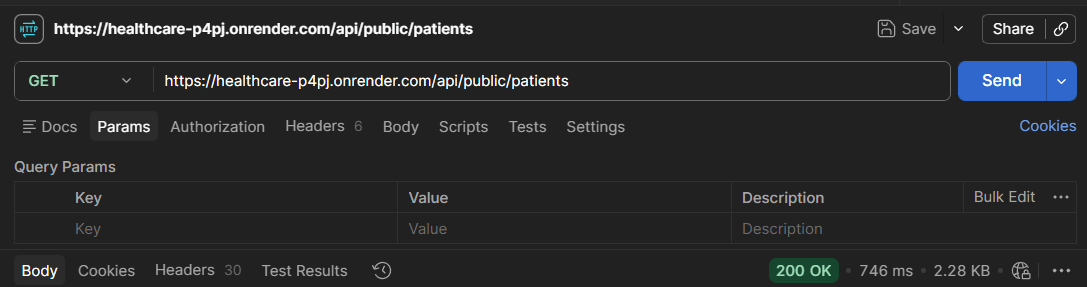
Validate API Response for Patient Information Retrieval
GET /api/public/patient
-
Verify that the API response is received successfully
-
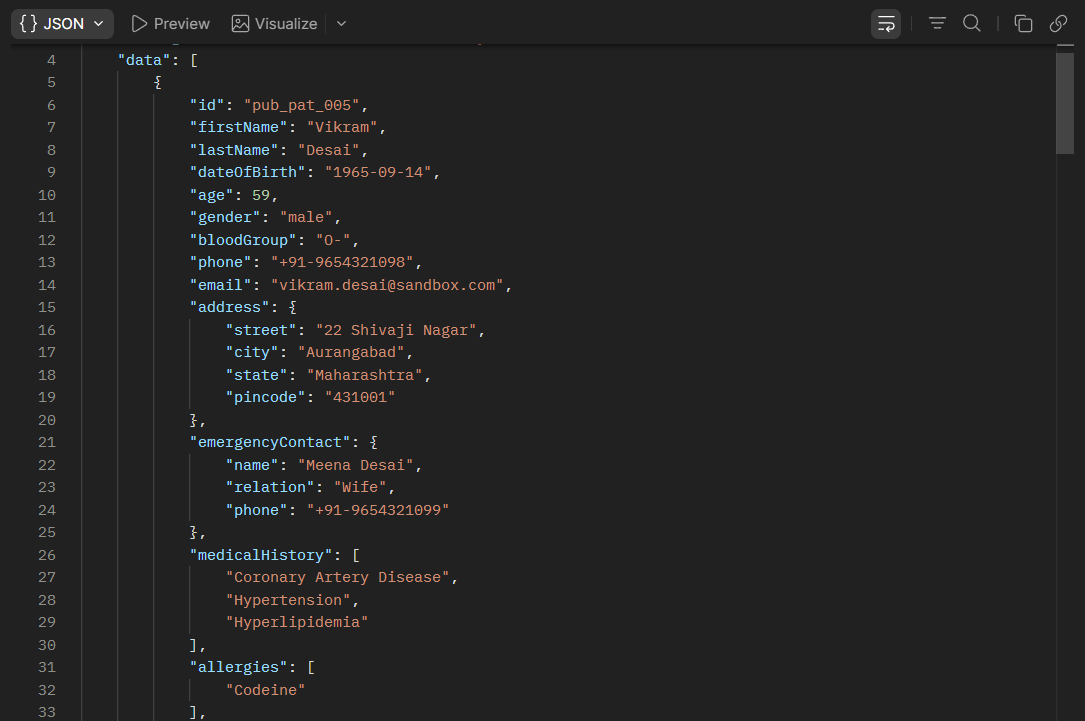
Verify the response body contains patient information
-
Verify mandatory fields are present in the response
-
Verify response data is returned in JSON format
-
Verify returned values match the requested information
Activity
-
Validate API Response for Appointment Information Retrieval
-
Verify mandatory fields are present.
-
Verify field values are accurate.
-
Verify response format is JSON.
-
Verify response data matches the request operation.
Task 3: Verify API Status Codes
Real Life Example :
A healthcare application sends requests to retrieve, create, update, or delete patient information.
Depending on the outcome of the request, the server returns different status codes.
For example:-
-
Successful patient retrieval → 200 OK
-
Successful patient creation → 201 Created
-
Invalid patient information → 400 Bad Request
API Testers must verify that the correct status code is returned for each scenario.
-
Unauthorized access → 401 Unauthorized
-
Patient not found → 404 Not Found
-
Server failure → 500 Internal Server Error
-
Real Life Example
A healthcare application sends requests to retrieve, create, update, or delete patient information.
Depending on the request outcome, the server returns different status codes.
For example :-
-
Successful patient retrieval → 200 OK
-
Successful patient creation → 201 Created
-
Invalid patient information → 400 Bad Request
API Testers must verify that the correct status code is returned for each scenario.
-
Unauthorized access → 401 Unauthorized
-
Patient not found → 404 Not Found
-
Server failure → 500 Internal Server Error
Activity
-
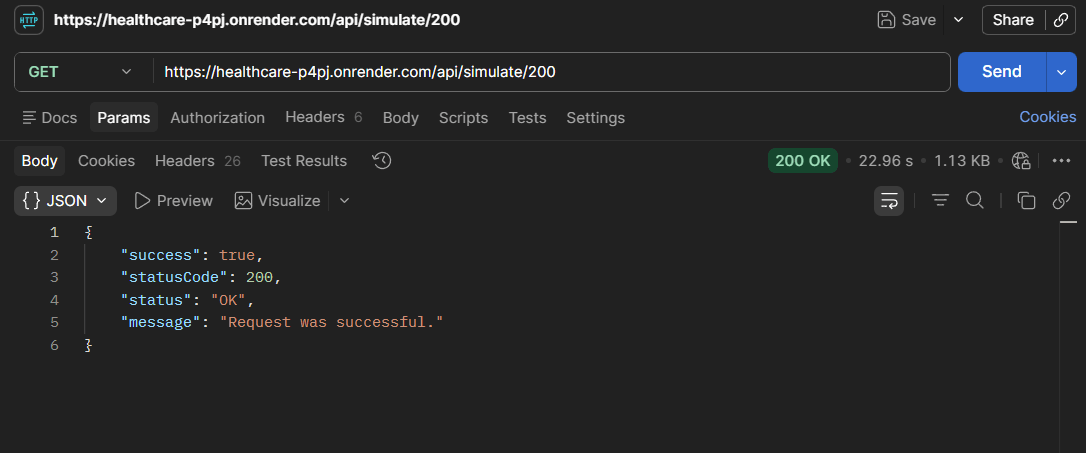
Verify 200 OK Status Code
GET /api/simulate/200
-
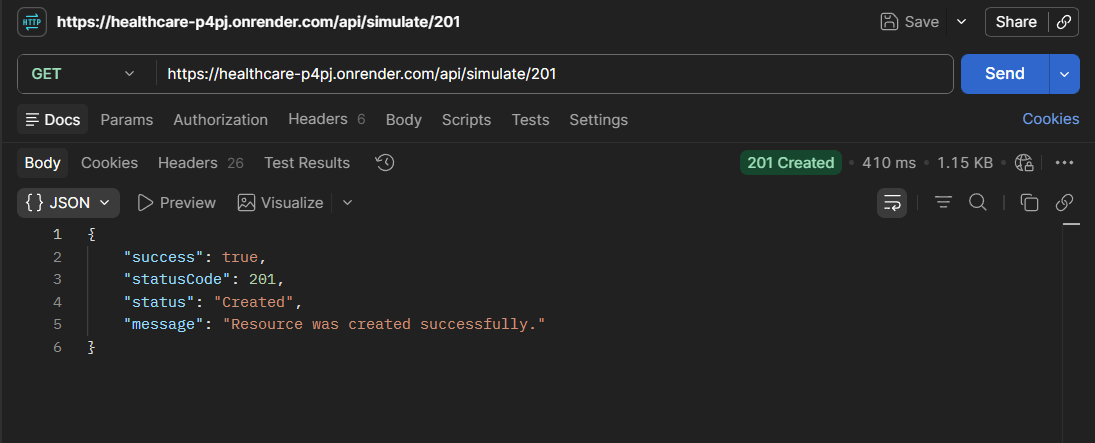
Verify 201 Created Status Code
GET /api/simulate/201
-
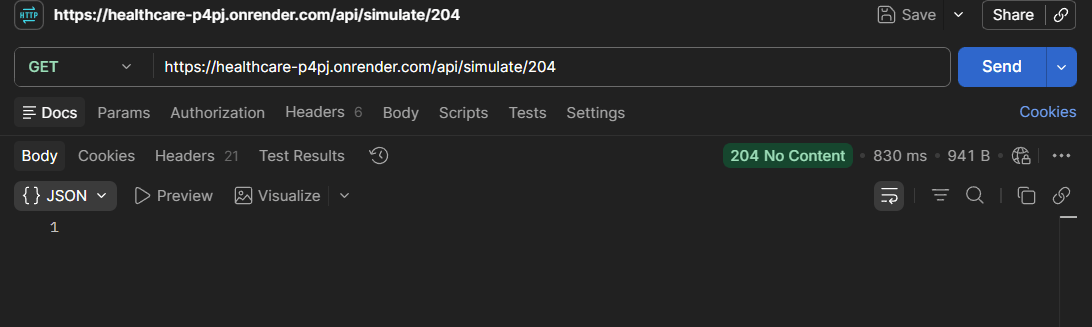
Verify 204 No Content Status Code
GET /api/simulate/204
-
Verify 400 Bad Request Status Code
GET /api/simulate/400
-
Verify 401 Unauthorized Status Code
GET /api/simulate/401
-
Verify 403 Forbidden Status Code
GET /api/simulate/403
-
Verify 404 Not Found Status Code
GET /api/simulate/404
-
Verify 429 Rate Limited Status Code
GET /api/simulate/429
-
Verify 500 Internal Server Error Status Code
GET /api/simulate/500
-
Verify 503 Service Unavailable Status Code
GET /api/simulate/503
Activity
-
Verify 400 Bad Request Status Code
GET /api/simulate/400
-
Verify 401 Unauthorized Status Code
GET /api/simulate/401
-
Verify 403 Forbidden Status Code
GET /api/simulate/403
-
Verify 404 Not Found Status Code
GET /api/simulate/404
-
Verify 429 Rate Limited Status Code
GET /api/simulate/429
-
Verify 500 Internal Server Error Status Code
GET /api/simulate/500
-
Verify 503 Service Unavailable Status Code
GET /api/simulate/503
Task 4: Analyze Response Time & Response Structure
Real Life Example :
A patient searches for available doctors in a healthcare application.
The application sends a request to the server.
If the response is returned within a few milliseconds, the application feels fast and responsive.
If the response takes several seconds, users may experience delays and poor application performance.
API Testers must verify that APIs respond within acceptable time limits.
Understand Response Time
1
1
Real Life Example :
A receptionist searches for patient information in the healthcare application.
The application sends a request to retrieve patient details.
The server returns the following information :-
{
"id": 101,
"firstName": "Rahul",
"lastName": "Sharma",
"gender": "Male",
"phone": "9876543210",
"email": "rahul@gmail.com"
}
The API Tester must verify :-
-
Patient ID is returned.
-
First Name and Last Name are displayed correctly.
-
Gender information is available.
-
Contact details are returned successfully.
-
Response format is valid JSON.
-
Required fields are present in the response.
If mandatory fields are missing or incorrect information is returned, the tester should report the issue as an API defect.
Understand Response Structure
1
2
Real Life Example :
A receptionist searches for patient information in the healthcare application.
The application sends a request to retrieve patient details.
The server returns the following information :-
{
"id": 101,
"firstName": "Rahul",
"lastName": "Sharma",
"gender": "Male",
"phone": "9876543210",
"email": "rahul@gmail.com"
}
The API Tester must verify :-
-
Patient ID is returned.
-
First Name and Last Name are displayed correctly.
-
Gender information is available.
-
Contact details are returned successfully.
-
Response format is valid JSON.
-
Required fields are present in the response.
If mandatory fields are missing or incorrect information is returned, the tester should report the issue as an API defect.
Real Life Example :
A receptionist searches for patient information in the healthcare application.
The application sends a request to retrieve patient details.
The server returns the following information :-
{
"id": 101,
"firstName": "Rahul",
"lastName": "Sharma",
"gender": "Male",
"phone": "9876543210",
"email": "rahul@gmail.com"
}
The API Tester must verify :-
-
Patient ID is returned.
-
First Name and Last Name are displayed correctly.
-
Gender information is available.
-
Contact details are returned successfully.
-
Response format is valid JSON.
-
Required fields are present in the response.
If mandatory fields are missing or incorrect information is returned, the tester should report the issue as an API defect.
Activity
-
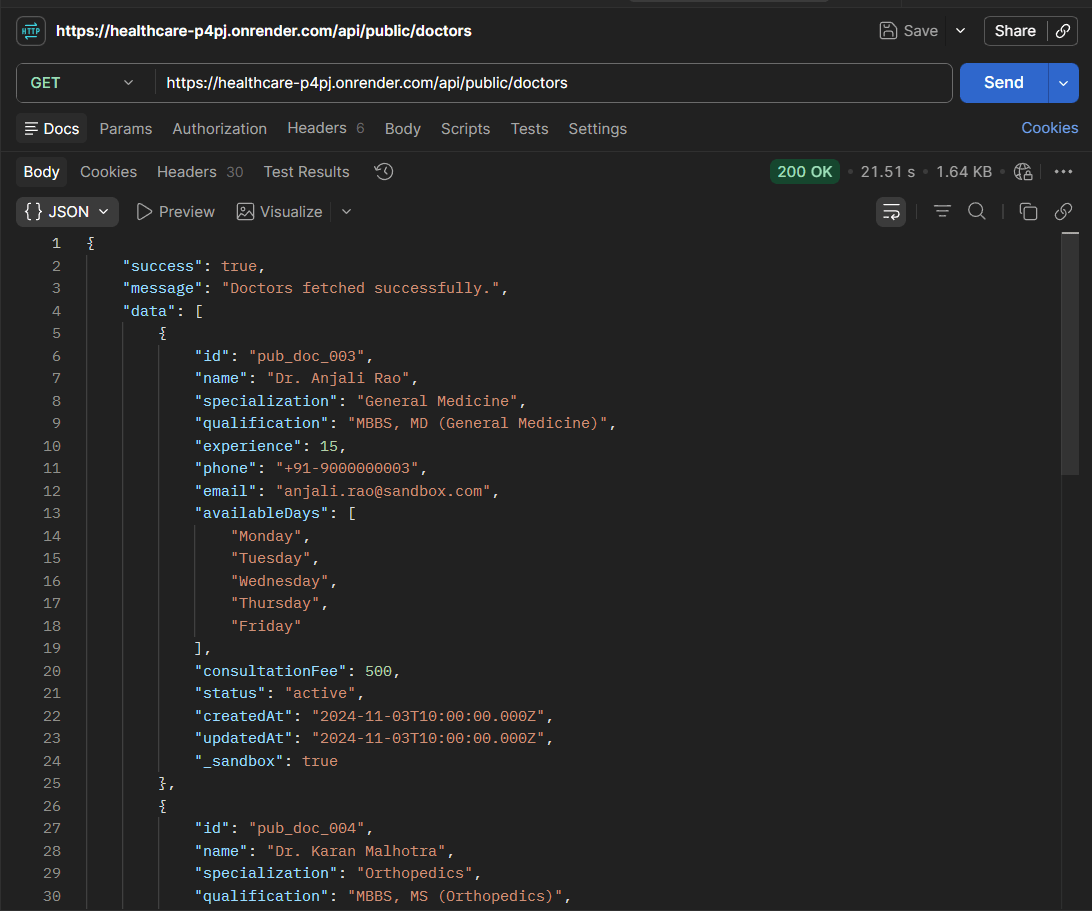
Analyse API Response Time for Doctor Information Retrieval
GET /api/public/doctors
Activity
-
Analyse Delayed API Response
GET /api/simulate/delay?ms=2000
-
Verify JSON Response Structure for Doctor Records
GET /api/public/doctors
Great job!
In this lab, API testing was performed using Postman by executing GET, POST, PUT, PATCH, and DELETE HTTP requests and validating the server's responses. HTTP status codes were verified, response time was analysed, JSON response structures were validated, and the response was checked to ensure it contained the required fields and accurate data. This lab provided a clear understanding of the purpose of different HTTP methods, how APIs communicate with servers, and how to validate API behaviour effectively. Overall, it strengthened the fundamental API testing skills required to test healthcare applications and other RESTful API-based systems.
Checkpoint
Next-Lab Preparation
Git Push
git push origin branchNameTopic: API Automation with Rest Assured
1)Setup and Configuration
2)Writing GET, POST, PUT, DELETE Tests 3)Validating Response Codes & Body