HealthAPI JSON Handling & Data Validation

Business Scenario
Welcome!
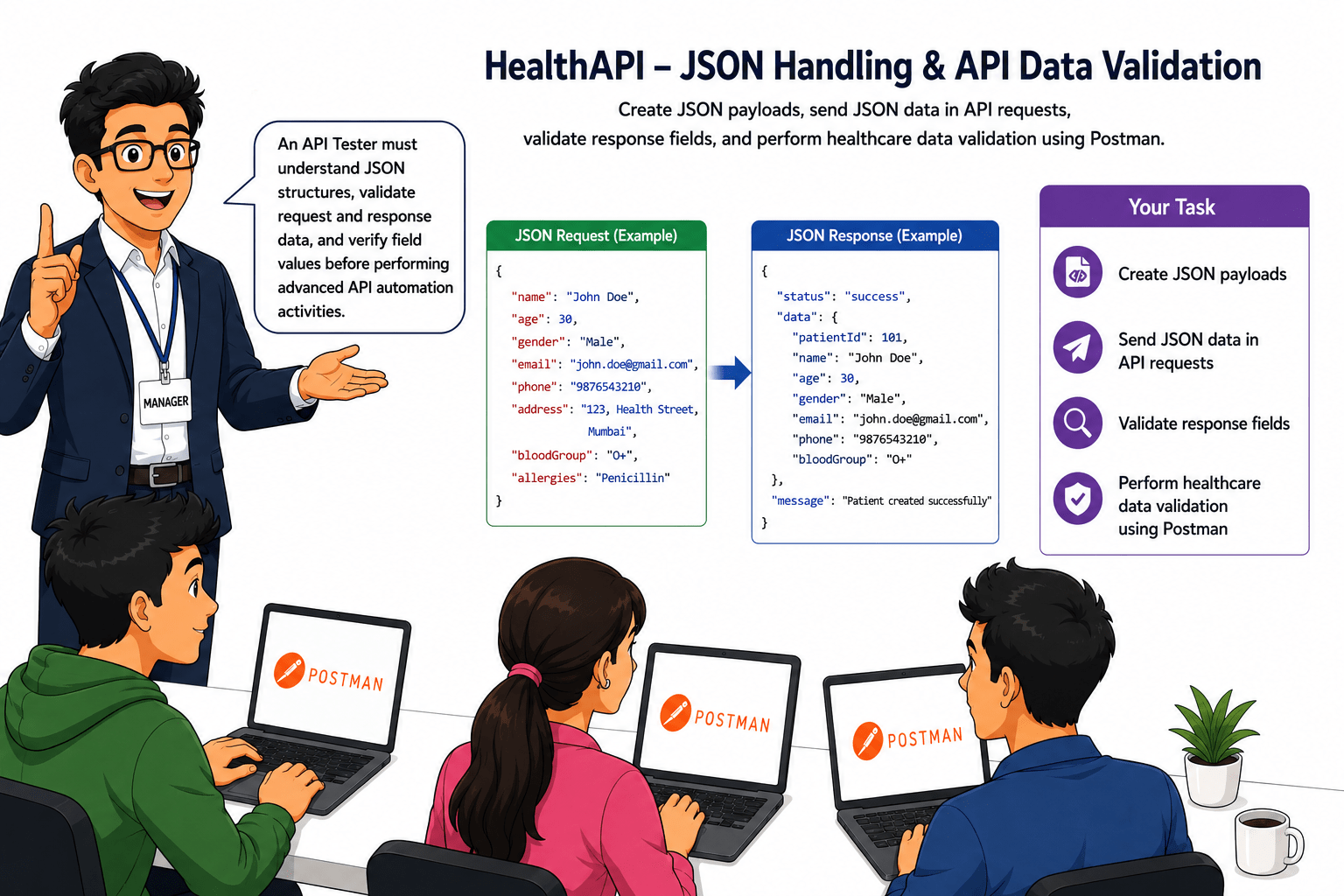
After successfully performing API requests, validating responses, verifying status codes, and analysing response structures, your manager assigns you JSON-handling and API data-validation tasks for the HealthAPI system, which exchanges healthcare information in JSON. The application has reported issues such as incorrect patient information, missing mandatory fields in API requests, invalid JSON payloads, and unexpected response values. cancellation failures.

Pre-Lab Preparation
information, missing mandatory fields in API requests, invalid JSON payloads, and unexpected response values.
Additionally, healthcare data does not match business requirements, resulting in incorrect patient records being stored. Your task is to use Postman to create JSON payloads, send JSON data in API requests, validate response fields, and verify the accuracy of healthcare data.
Topic: API Automation with Rest Assured
1)Setup and Configuration
2)Writing GET, POST, PUT, DELETE Tests 3)Validating Response Codes & Body
git pull origin branchNameGit Pull

git pull origin branchNameGit Pull
Task 1: Understand JSON Request & Response Format
What is JSON?
JSON (JavaScript Object Notation) is a lightweight data format used to exchange information between applications and servers.
Most REST APIs use JSON because it is simple, readable, and easy to process.
Healthcare applications use JSON to exchange patient information, doctor details, and appointment records.
Example JSON Object :
{
"patientId": 101,
"firstName": "Rahul",
"lastName": "Sharma",
"gender": "Male"
}
What is JSON?
JSON (JavaScript Object Notation) is a lightweight data format used to exchange information between applications and servers.
Most REST APIs use JSON because it is simple, readable, and easy to process.
Healthcare applications use JSON to exchange patient information, doctor details, and appointment records.
Example JSON Object :
{
"patientId": 101,
"firstName": "Rahul",
"lastName": "Sharma",
"gender": "Male"
}
Components of JSON
-
Key
A key represents the name of a field.
Examples:
-
patientId
-
firstName
-
lastName
-
gender
Value
A value represents the information stored inside a field.
Examples:
-
101
-
Rahul
-
Sharma
-
Male
Real Life Example:
When a new patient registers in the healthcare system, the application sends patient information to the server using JSON format.
The server processes the JSON data and stores the patient record in the system.
What is JSON?
JSON (JavaScript Object Notation) is a lightweight data format used to exchange information between applications and servers.
Most REST APIs use JSON because it is simple, readable, and easy to process.
Healthcare applications use JSON to exchange patient information, doctor details, and appointment records.
Example JSON Object :
{
"patientId": 101,
"firstName": "Rahul",
"lastName": "Sharma",
"gender": "Male"
}
Components of JSON
-
Key
A key represents the name of a field.
Examples:
-
patientId
-
firstName
-
lastName
-
gender
Value
A value represents the information stored inside a field.
Examples:
-
101
-
Rahul
-
Sharma
-
Male
Real Life Example:
When a new patient registers in the healthcare system, the application sends patient information to the server using JSON format.
The server processes the JSON data and stores the patient record in the system.
Activity
-
Demonstrate JSON Structure for Patient Information
{
    "success": true,
    "message": "Patient fetched successfully.",
    "data": {
        "id": "pub_pat_005",
        "firstName": "Vikram",
        "lastName": "Desai",
        "dateOfBirth": "1965-09-14",
        "age": 59,
        "gender": "male",
        "bloodGroup": "O-",
        "phone": "+91-9654321098",
        "email": "vikram.desai@sandbox.com",
        "address": {
            "street": "22 Shivaji Nagar",
            "city": "Aurangabad",
            "state": "Maharashtra",
            "pincode": "431001"
        },
        "emergencyContact": {
            "name": "Meena Desai",
            "relation": "Wife",
            "phone": "+91-9654321099"
        },
        "medicalHistory": [
            "Coronary Artery Disease",
            "Hypertension",
            "Hyperlipidemia"
        ],
        "allergies": [
            "Codeine"
        ],
        "currentMedications": [
            "Atorvastatin 40mg",
            "Aspirin 75mg",
            "Bisoprolol 5mg"
        ],
        "insuranceId": "INS-SANDBOX-005",
        "status": "active",
        "admittedAt": "2025-01-18T07:30:00.000Z",
        "createdAt": "2024-12-05T12:00:00.000Z",
        "updatedAt": "2024-12-05T12:00:00.000Z",
        "_sandbox": true
    }
}
{
    "success": true,
    "message": "Patient fetched successfully.",
    "data": {
        "id": "pub_pat_005",
        "firstName": "Vikram",
        "lastName": "Desai",
        "dateOfBirth": "1965-09-14",
        "age": 59,
        "gender": "male",
        "bloodGroup": "O-",
        "phone": "+91-9654321098",
        "email": "vikram.desai@sandbox.com",
        "address": {
            "street": "22 Shivaji Nagar",
            "city": "Aurangabad",
            "state": "Maharashtra",
            "pincode": "431001"
        },
        "emergencyContact": {
            "name": "Meena Desai",
            "relation": "Wife",
            "phone": "+91-9654321099"
        },
        "medicalHistory": [
            "Coronary Artery Disease",
            "Hypertension",
            "Hyperlipidemia"
        ],
        "allergies": [
            "Codeine"
        ],
        "currentMedications": [
            "Atorvastatin 40mg",
            "Aspirin 75mg",
            "Bisoprolol 5mg"
        ],
        "insuranceId": "INS-SANDBOX-005",
        "status": "active",
        "admittedAt": "2025-01-18T07:30:00.000Z",
        "createdAt": "2024-12-05T12:00:00.000Z",
        "updatedAt": "2024-12-05T12:00:00.000Z",
        "_sandbox": true
    }
}
{
    "success": true,
    "message": "Patient fetched successfully.",
    "data": {
        "id": "pub_pat_005",
        "firstName": "Vikram",
        "lastName": "Desai",
        "dateOfBirth": "1965-09-14",
        "age": 59,
        "gender": "male",
        "bloodGroup": "O-",
        "phone": "+91-9654321098",
        "email": "vikram.desai@sandbox.com",
        "address": {
            "street": "22 Shivaji Nagar",
            "city": "Aurangabad",
            "state": "Maharashtra",
            "pincode": "431001"
        },
        "emergencyContact": {
            "name": "Meena Desai",
            "relation": "Wife",
            "phone": "+91-9654321099"
        },
        "medicalHistory": [
            "Coronary Artery Disease",
            "Hypertension",
            "Hyperlipidemia"
        ],
        "allergies": [
            "Codeine"
        ],
        "currentMedications": [
            "Atorvastatin 40mg",
            "Aspirin 75mg",
            "Bisoprolol 5mg"
        ],
        "insuranceId": "INS-SANDBOX-005",
        "status": "active",
        "admittedAt": "2025-01-18T07:30:00.000Z",
        "createdAt": "2024-12-05T12:00:00.000Z",
        "updatedAt": "2024-12-05T12:00:00.000Z",
        "_sandbox": true
    }
}
Task 2: Send JSON Payloads in Requests
What is a JSON Payload?
A JSON Payload is the data sent from a client application to the server within an API request.
JSON Payloads are commonly used in POST, PUT, and PATCH requests to create or update information in the system.
Healthcare applications use JSON Payloads to send patient information, appointment details, and doctor information to the server.
Types of payload
-
Request payload
-
Response payload
Example JSON Payload:
{
"firstName": "Rahul",
"lastName": "Sharma",
"dateOfBirth": "1995-05-10",
"gender": "Male",
"bloodGroup": "O+",
"phone": "9876543210",
"email": "rahul.sharma@gmail.com"
}
Why JSON Payloads are Important?
JSON Payloads help applications:-
-
Send information to the server.
-
Create new records.
-
Update existing records.
-
Transfer structured data.
-
Maintain data consistency.
Real Life Example:
A new patient visits a hospital for registration.
The receptionist enters the patient's information into the healthcare application.
The application converts the information into a JSON Payload and sends it to the server.
The server validates the data and creates a new patient record.
What is a JSON Payload?
A JSON Payload is the data sent from a client application to the server within an API request.
JSON Payloads are commonly used in POST, PUT, and PATCH requests to create or update information in the system.
Healthcare applications use JSON Payloads to send patient information, appointment details, and doctor information to the server.
Types of payload
-
Request payload
-
Response payload
Example JSON Payload:
{
"firstName": "Rahul",
"lastName": "Sharma",
"dateOfBirth": "1995-05-10",
"gender": "Male",
"bloodGroup": "O+",
"phone": "9876543210",
"email": "rahul.sharma@gmail.com"
}
Why JSON Payloads are Important?
JSON Payloads help applications:-
-
Send information to the server.
-
Create new records.
-
Update existing records.
-
Transfer structured data.
-
Maintain data consistency.
Real Life Example:
A new patient visits a hospital for registration.
The receptionist enters the patient's information into the healthcare application.
The application converts the information into a JSON Payload and sends it to the server.
The server validates the data and creates a new patient record.
What is a JSON Payload?
A JSON Payload is the data sent from a client application to the server within an API request.
JSON Payloads are commonly used in POST, PUT, and PATCH requests to create or update information in the system.
Healthcare applications use JSON Payloads to send patient information, appointment details, and doctor information to the server.
Types of payload
-
Request payload
-
Response payload
Example JSON Payload:
{
"firstName": "Rahul",
"lastName": "Sharma",
"dateOfBirth": "1995-05-10",
"gender": "Male",
"bloodGroup": "O+",
"phone": "9876543210",
"email": "rahul.sharma@gmail.com"
}
Why JSON Payloads are Important?
JSON Payloads help applications:-
-
Send information to the server.
-
Create new records.
-
Update existing records.
-
Transfer structured data.
-
Maintain data consistency.
Real Life Example:
A new patient visits a hospital for registration.
The receptionist enters the patient's information into the healthcare application.
The application converts the information into a JSON Payload and sends it to the server.
The server validates the data and creates a new patient record.
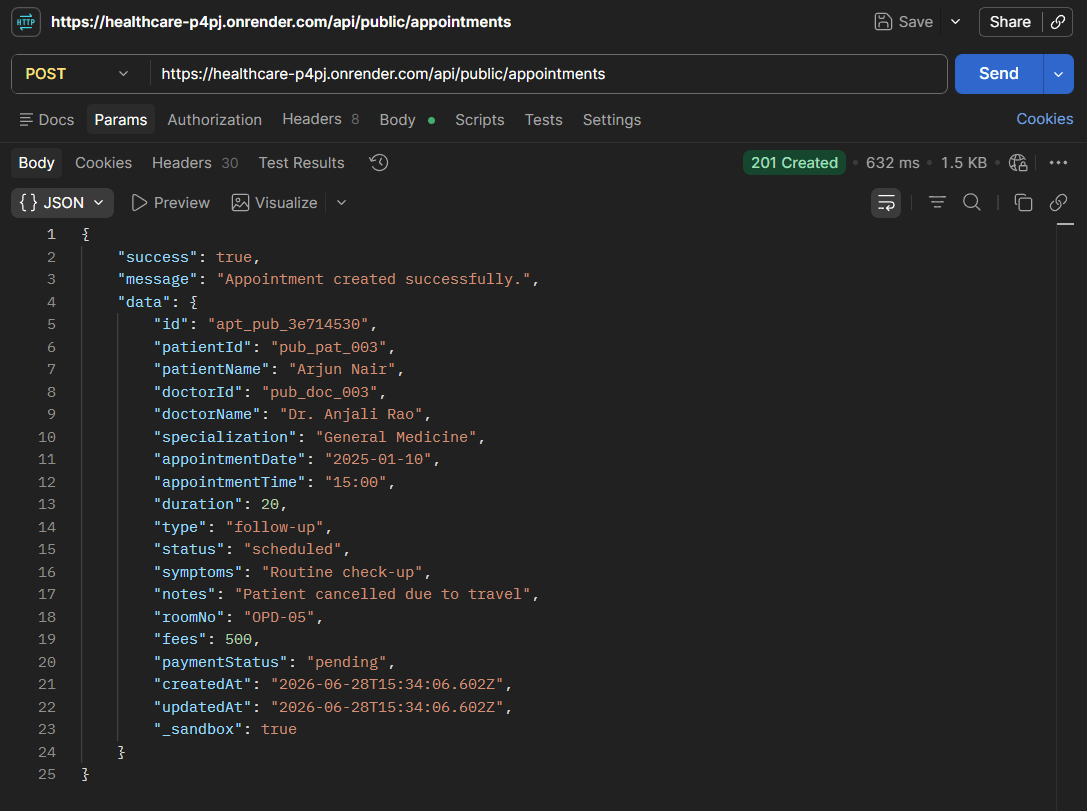
Activity
-
Create and send a JSON Payload for a new appointment registration for a patient
POST /api/public/appointments
Task 3: Validate Response Fields and Values
What is Response Field and Value Validation?
Response Field and Value Validation is the process of verifying that the API response contains all required fields and that the values returned in those fields are accurate.
API Testers perform this validation to ensure the response structure is complete and the returned information matches the expected business requirements.
Why is Response Field and Value Validation Important?
It helps testers:-
-
Verify API response completeness.
-
Verify data accuracy.
-
Identify missing fields.
-
Identify incorrect values.
-
Ensure business requirements are satisfied.
-
Improve application reliability.
Real Life Example:
A patient cancels an appointment through the healthcare application.
The application retrieves the updated appointment information from the server.
The API Tester must verify:
-
Required fields such as patientName, doctorName, appointmentDate, status, and paymentStatus are present in the response.
-
The values returned by these fields are correct.
For example:
-
patientName = Rajesh Sharma
-
doctorName = Dr. Anjali Rao
-
status = cancelled
-
paymentStatus = refunded
If a required field is missing or an incorrect value is returned, the issue should be reported as a defect.
What is Response Field and Value Validation?
Response Field and Value Validation is the process of verifying that the API response contains all required fields and that the values returned in those fields are accurate.
API Testers perform this validation to ensure the response structure is complete and the returned information matches the expected business requirements.
Why is Response Field and Value Validation Important?
It helps testers:-
-
Verify API response completeness.
-
Verify data accuracy.
-
Identify missing fields.
-
Identify incorrect values.
-
Ensure business requirements are satisfied.
-
Improve application reliability.
Real Life Example:
A patient cancels an appointment through the healthcare application.
The application retrieves the updated appointment information from the server.
The API Tester must verify:
-
Required fields such as patientName, doctorName, appointmentDate, status, and paymentStatus are present in the response.
-
The values returned by these fields are correct.
For example:
-
patientName = Rajesh Sharma
-
doctorName = Dr. Anjali Rao
-
status = cancelled
-
paymentStatus = refunded
If a required field is missing or an incorrect value is returned, the issue should be reported as a defect.
What is Response Field and Value Validation?
Response Field and Value Validation is the process of verifying that the API response contains all required fields and that the values returned in those fields are accurate.
API Testers perform this validation to ensure the response structure is complete and the returned information matches the expected business requirements.
Why is Response Field and Value Validation Important?
It helps testers:-
-
Verify API response completeness.
-
Verify data accuracy.
-
Identify missing fields.
-
Identify incorrect values.
-
Ensure business requirements are satisfied.
-
Improve application reliability.
Real Life Example:
A patient cancels an appointment through the healthcare application.
The application retrieves the updated appointment information from the server.
The API Tester must verify:
-
Required fields such as patientName, doctorName, appointmentDate, status, and paymentStatus are present in the response.
-
The values returned by these fields are correct.
For example:
-
patientName = Rajesh Sharma
-
doctorName = Dr. Anjali Rao
-
status = cancelled
-
paymentStatus = refunded
If a required field is missing or an incorrect value is returned, the issue should be reported as a defect.
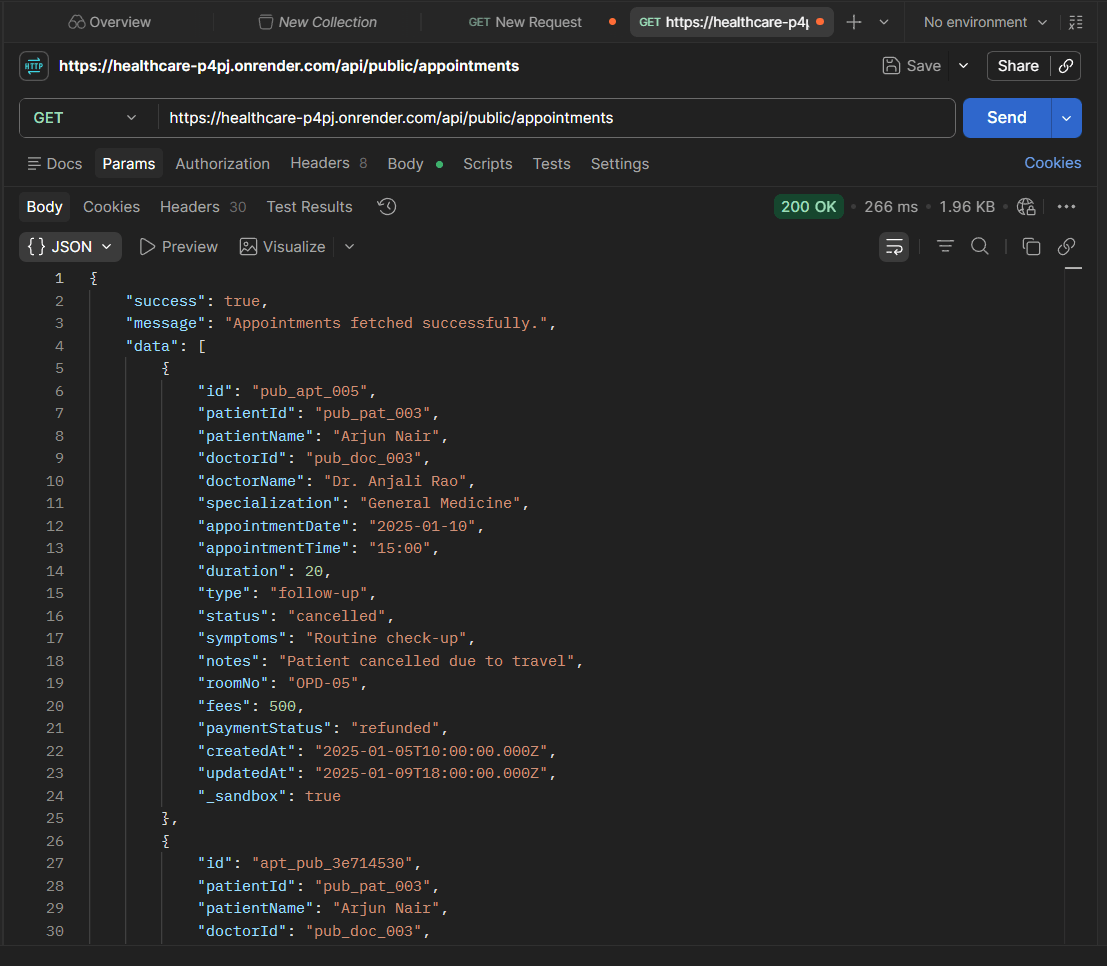
Activity
-
Validate Appointment Response Fields
GET /api/public/appointments
Task 4: Perform API Data Validation Checks
What is API Data Validation?
API Data Validation is the process of verifying that the information submitted to the API is stored, processed, and returned correctly.
It also verifies that invalid or incomplete information is handled properly according to business requirements.
API Testers perform data validation to ensure data accuracy, consistency, completeness, and reliability.
Real Life Example:
A patient registers through the healthcare application.
The application sends patient information to the server using a JSON request payload.
The API Tester must verify:
-
Submitted patient information is stored correctly.
-
Returned information matches the submitted information.
-
Mandatory fields are validated properly.
-
Invalid information is rejected by the system.
-
Appropriate validation messages are returned.
If incorrect information is stored or invalid information is accepted, the issue should be reported as a defect.
What is API Data Validation?
API Data Validation is the process of verifying that the information submitted to the API is stored, processed, and returned correctly.
It also verifies that invalid or incomplete information is handled properly according to business requirements.
API Testers perform data validation to ensure data accuracy, consistency, completeness, and reliability.
Real Life Example:
A patient registers through the healthcare application.
The application sends patient information to the server using a JSON request payload.
The API Tester must verify:
-
Submitted patient information is stored correctly.
-
Returned information matches the submitted information.
-
Mandatory fields are validated properly.
-
Invalid information is rejected by the system.
-
Appropriate validation messages are returned.
If incorrect information is stored or invalid information is accepted, the issue should be reported as a defect.
Activity
-
Validate Patient Personal Information
POST /api/public/patients
-
Verify:-
firstName matches the request data.
lastName matches request data.
dateOfBirth matches request data.
gender matches request data.
bloodGroup matches request data.
-
Verify:-
firstName matches the request data.
lastName matches request data.
dateOfBirth matches request data.
gender matches request data.
bloodGroup matches request data.
-
Validate patient appointment
POST /api/public/appointments
Verify:-
-
appointmentDate matches request data.
-
doctorId matches the request data
-
patientName matches request data
-
Symptoms match the request data
-
notes matches request data
Activity
Great job!
In this lab, API testing was performed using Postman by executing GET, POST, PUT, PATCH, and DELETE HTTP requests and validating the server's responses. HTTP status codes were verified, response time was analysed, JSON response structures were validated, and the response was checked to ensure it contained the required fields and accurate data. This lab provided a clear understanding of the purpose of different HTTP methods, how APIs communicate with servers, and how to validate API behaviour effectively. Overall, it strengthened the fundamental API testing skills required to test healthcare applications and other RESTful API-based systems.
Checkpoint
Great job!
In this lab, JSON data was used to create and validate API requests and responses using Postman. JSON request and response structures, including objects, arrays, keys, and values, were explored to understand how healthcare information is exchanged between applications and servers. JSON payloads were created and sent to APIs, while response fields and values were validated to ensure data accuracy, completeness, and consistency. Patient, doctor, and appointment information were verified against the expected results, and data validation techniques were applied to identify invalid or incomplete information. Overall, this lab strengthened understanding of API data validation and provided a solid foundation for advanced topics, including API authentication testing, query and path parameter validation, secure API access testing, API automation testing, and advanced API validation techniques.
Checkpoint
Git Push
git push origin branchNameNext-Lab Preparation
Topic: API Testing with Postman
1)Setup and Configuration
2)Writing GET, POST, PUT, DELETE Tests 3)Validating Response Codes & Body