HealthAPI AI-Assisted Testing & Debugging

Business Scenario
Welcome!
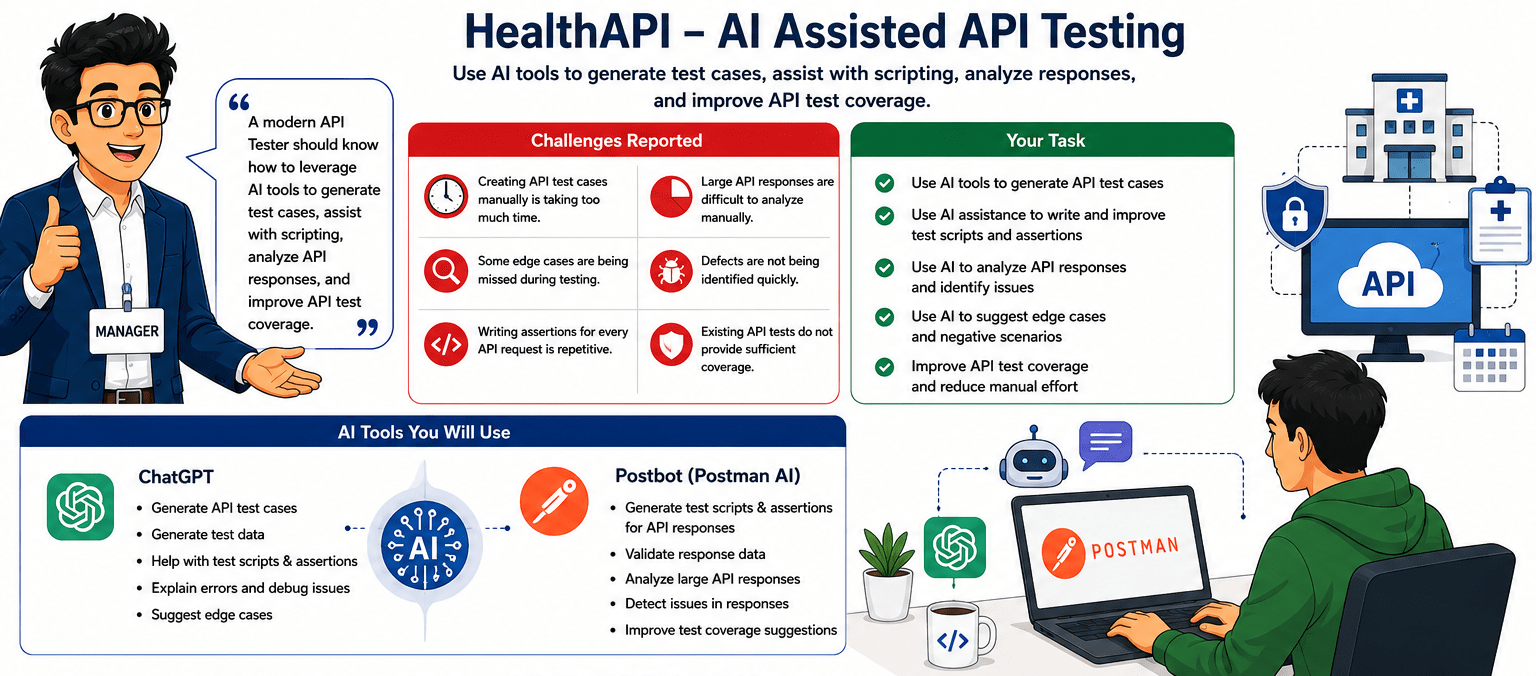
After learning API fundamentals, HTTP methods, JSON handling, authentication, parameterisation, and API automation, your manager assigns you AI-assisted API testing tasks for the HealthAPI system. The application has reported challenges such as time-consuming manual test case creation, missed edge cases, repetitive assertion writing, difficult response analysis, and insufficient test coverage.e.

Pre-Lab Preparation
creation, missed edge cases, repetitive assertion writing, difficult response analysis, and insufficient test coverage.
Your task is to use ChatGPT and Postbot (Postman AI) to generate API test cases, assist with test scripts, analyse API responses, identify defects, and improve API test coverage.
git pull origin branchNameGit Pull

Topic: API Automation with Rest Assured
1)Setup and Configuration
2)Writing GET, POST, PUT, DELETE Tests 3)Validating Response Codes & Body
git pull origin branchNameGit Pull
Task 1: Use ChatGPT for Test Case Generation
What is AI-Assisted Test Case Generation?
AI-Assisted Test Case Generation is the process of using AI tools such as ChatGPT to automatically generate API test scenarios and test cases.
Instead of creating all test cases manually, testers can use AI to generate positive, negative, boundary, and validation test scenarios.
Why AI-Assisted Test Case Generation is Important?
AI helps testers:
-
Generate test cases quickly.
-
Discover missing scenarios.
-
Identify edge cases.
-
Improve test coverage.
-
Reduce manual effort.
Real Life Example:
A Patient Registration API contains fields such as :-
-
firstName
-
lastName
-
email
-
phone
-
bloodGroup
-
insuranceId
Instead of manually creating test cases, the tester asks ChatGPT:-
Generate API test cases for Patient Registration API. “”
ChatGPT generates :-
-
Positive Test Cases
-
Negative Test Cases
-
Boundary Test Cases
-
Validation Test Cases
This helps improve testing efficiency.
What is AI-Assisted Test Case Generation?
AI-Assisted Test Case Generation is the process of using AI tools such as ChatGPT to automatically generate API test scenarios and test cases.
Instead of creating all test cases manually, testers can use AI to generate positive, negative, boundary, and validation test scenarios.
Why AI-Assisted Test Case Generation is Important?
AI helps testers:
-
Generate test cases quickly.
-
Discover missing scenarios.
-
Identify edge cases.
-
Improve test coverage.
-
Reduce manual effort.
Real Life Example:
A Patient Registration API contains fields such as :-
-
firstName
-
lastName
-
email
-
phone
-
bloodGroup
-
insuranceId
Instead of manually creating test cases, the tester asks ChatGPT:-
Generate API test cases for Patient Registration API. “”
ChatGPT generates :-
-
Positive Test Cases
-
Negative Test Cases
-
Boundary Test Cases
-
Validation Test Cases
This helps improve testing efficiency.
What is AI-Assisted Test Case Generation?
AI-Assisted Test Case Generation is the process of using AI tools such as ChatGPT to automatically generate API test scenarios and test cases.
Instead of creating all test cases manually, testers can use AI to generate positive, negative, boundary, and validation test scenarios.
Why AI-Assisted Test Case Generation is Important?
AI helps testers:
-
Generate test cases quickly.
-
Discover missing scenarios.
-
Identify edge cases.
-
Improve test coverage.
-
Reduce manual effort.
Real Life Example:
A Patient Registration API contains fields such as :-
-
firstName
-
lastName
-
email
-
phone
-
bloodGroup
-
insuranceId
Instead of manually creating test cases, the tester asks ChatGPT:-
Generate API test cases for Patient Registration API. “”
ChatGPT generates :-
-
Positive Test Cases
-
Negative Test Cases
-
Boundary Test Cases
-
Validation Test Cases
This helps improve testing efficiency.
Activity
-
Generate Test Cases Using ChatGPT
-
Generate Test Cases for Doctor API
-
Generate Negative Test Scenarios for Appointment
Activity
Task 2: Use Postbot (Postman AI) for Scripting Help
What is Postbot?
Postbot is an AI-powered assistant available in Postman that helps testers create test scripts, assertions, request bodies, and API documentation.
Postbot can automatically generate validations based on API requests and responses.
Why is Postbot important?
Postbot helps testers:-
-
Generate assertions automatically.
-
Create test scripts quickly.
-
Understand API responses.
-
Reduce scripting effort.
-
Improve testing productivity.
Real Life Example
A tester executes:-
GET /api/public/patients
Instead of manually writing assertions, the tester asks Postbot:-
Generate validation scripts for this response.
Postbot generates:
-
Status Code Validation
-
Response Time Validation
-
Response Structure Validation
-
Data Validation
What is Postbot?
Postbot is an AI-powered assistant available in Postman that helps testers create test scripts, assertions, request bodies, and API documentation.
Postbot can automatically generate validations based on API requests and responses.
Why is Postbot important?
Postbot helps testers:-
-
Generate assertions automatically.
-
Create test scripts quickly.
-
Understand API responses.
-
Reduce scripting effort.
-
Improve testing productivity.
Real Life Example
A tester executes:-
GET /api/public/patients
Instead of manually writing assertions, the tester asks Postbot:-
Generate validation scripts for this response.
Postbot generates:
-
Status Code Validation
-
Response Time Validation
-
Response Structure Validation
-
Data Validation
Activity
-
Generate Assertions Using Postbot For Response code
-
Review Generated Test Scripts
-
Generate an assertion using PostBot for response time
-
Generate an assertion using PostBot for the response code
Activity
Task 3: Analyze API Responses Using AI
What is AI-Based Response Analysis?
AI-Based Response Analysis is the process of using AI tools to review API responses, identify inconsistencies, detect defects, and understand response structures.
Why AI-Based Response Analysis is Important?
AI helps testers :
-
Analyse large responses quickly.
-
Identify missing fields.
-
Detect incorrect values.
-
Discover unexpected data.
-
Improve debugging efficiency.
Real Life Example
An Appointment API returns a large JSON response containing:-
-
Appointment Information
-
Patient Information
-
Doctor Information
-
Payment Information
The tester asks AI :-
“”Analyze this API response and identify possible validation points. “”
AI suggests :-
-
Required field validations.
-
Value validations.
-
Nested object validations.
-
Business rule validations.
What is AI-Based Response Analysis?
AI-Based Response Analysis is the process of using AI tools to review API responses, identify inconsistencies, detect defects, and understand response structures.
Why AI-Based Response Analysis is Important?
AI helps testers :
-
Analyse large responses quickly.
-
Identify missing fields.
-
Detect incorrect values.
-
Discover unexpected data.
-
Improve debugging efficiency.
Real Life Example
An Appointment API returns a large JSON response containing:-
-
Appointment Information
-
Patient Information
-
Doctor Information
-
Payment Information
The tester asks AI :-
“”Analyze this API response and identify possible validation points. “”
AI suggests :-
-
Required field validations.
-
Value validations.
-
Nested object validations.
-
Business rule validations.
What is AI-Based Response Analysis?
AI-Based Response Analysis is the process of using AI tools to review API responses, identify inconsistencies, detect defects, and understand response structures.
Why AI-Based Response Analysis is Important?
AI helps testers :
-
Analyse large responses quickly.
-
Identify missing fields.
-
Detect incorrect values.
-
Discover unexpected data.
-
Improve debugging efficiency.
Real Life Example
An Appointment API returns a large JSON response containing:-
-
Appointment Information
-
Patient Information
-
Doctor Information
-
Payment Information
The tester asks AI :-
“”Analyze this API response and identify possible validation points. “”
AI suggests :-
-
Required field validations.
-
Value validations.
-
Nested object validations.
-
Business rule validations.
Activity
-
Analyze Appointment API Response Using AI
-
Analyse patients' API Response Using AI
-
Analyse doctor API Response Using AI
Activity
Task 4: Improve API Test Coverage Using AI
What is Test Coverage?
Test Coverage measures how much of the application functionality is being tested.
Higher test coverage increases confidence in application quality.
Why Improve Test Coverage?
Improved test coverage helps testers :-
-
Reduce missed defects.
-
Validate more scenarios.
-
Improve application quality.
-
Strengthen regression testing.
-
Increase testing effectiveness.
This helps improve overall test coverage.
AI recommends :-
Invalid Appointment ID
Missing Required Fields
Invalid Date Formats
Unauthorized Access
Boundary Value Scenarios
Negative Test Cases
Real Life Example
A tester has created only positive test cases for Appointment APIs.
The tester asks ChatGPT :-
“”Suggest additional test scenarios for Appointment API. “”
What is Test Coverage?
Test Coverage measures how much of the application functionality is being tested.
Higher test coverage increases confidence in application quality.
Why Improve Test Coverage?
Improved test coverage helps testers :-
-
Reduce missed defects.
-
Validate more scenarios.
-
Improve application quality.
-
Strengthen regression testing.
-
Increase testing effectiveness.
This helps improve overall test coverage.
AI recommends :-
Invalid Appointment ID
Missing Required Fields
Invalid Date Formats
Unauthorized Access
Boundary Value Scenarios
Negative Test Cases
Real Life Example
A tester has created only positive test cases for Appointment APIs.
The tester asks ChatGPT :-
“”Suggest additional test scenarios for Appointment API. “”
What is Test Coverage?
Test Coverage measures how much of the application functionality is being tested.
Higher test coverage increases confidence in application quality.
Why Improve Test Coverage?
Improved test coverage helps testers :-
-
Reduce missed defects.
-
Validate more scenarios.
-
Improve application quality.
-
Strengthen regression testing.
-
Increase testing effectiveness.
This helps improve overall test coverage.
AI recommends :-
Invalid Appointment ID
Missing Required Fields
Invalid Date Formats
Unauthorized Access
Boundary Value Scenarios
Negative Test Cases
Real Life Example
A tester has created only positive test cases for Appointment APIs.
The tester asks ChatGPT :-
“”Suggest additional test scenarios for Appointment API. “”
Activity
-
Improve Appointment API Coverage Using AI
Don't add this one in labs; use this for understanding purposes
Scenario Generation
Edge Case Identification
Negative Testing Suggestions
Great job!
In this lab, you learned how Artificial Intelligence supports API testing by assisting with test case generation, test design, assertions, script generation, API response analysis, debugging, and test coverage improvement. You explored using ChatGPT and Postbot to automate testing tasks, identify defects, and improve API validation. By completing this lab, you can generate API test cases and scenarios, create assertions and test scripts, analyse API responses, identify potential issues, improve test coverage, and perform AI-assisted API testing efficiently.
Checkpoint
Git Push
git push origin branchNameNext-Lab Preparation
Topic: API Automation with Rest Assured
1)Setup and Configuration
2)Writing GET, POST, PUT, DELETE Tests 3)Validating Response Codes & Body