

Writing to and Reading from Files
File Handling and Exception Handling


Learning Outcome
5
Connect try-except with the with statement.
4
Apply the right read or write method to real tasks.
3
Recognize why catching specific errors matters.
2
Identify the common errors file operations raise.
1
Understand how Python reads and writes file data.
The Courier
A courier delivers parcels,

Sometimes a whole sack, sometimes one letter.
Some addresses don’t exist; some buildings are locked.
A panicked courier abandons the van. A trained one returns the parcel with a note and keeps going.
Expected Answer: The panicked courier. Without error handling, one failed operation crashes the whole program.
Exactly! But before training the courier, let’s look at the normal delivery work: reading and writing.

A program opens “marks.csv”, but the file name has a typo. It stops instantly and shows a technical error. Which courier is this?
Reading Data from a File
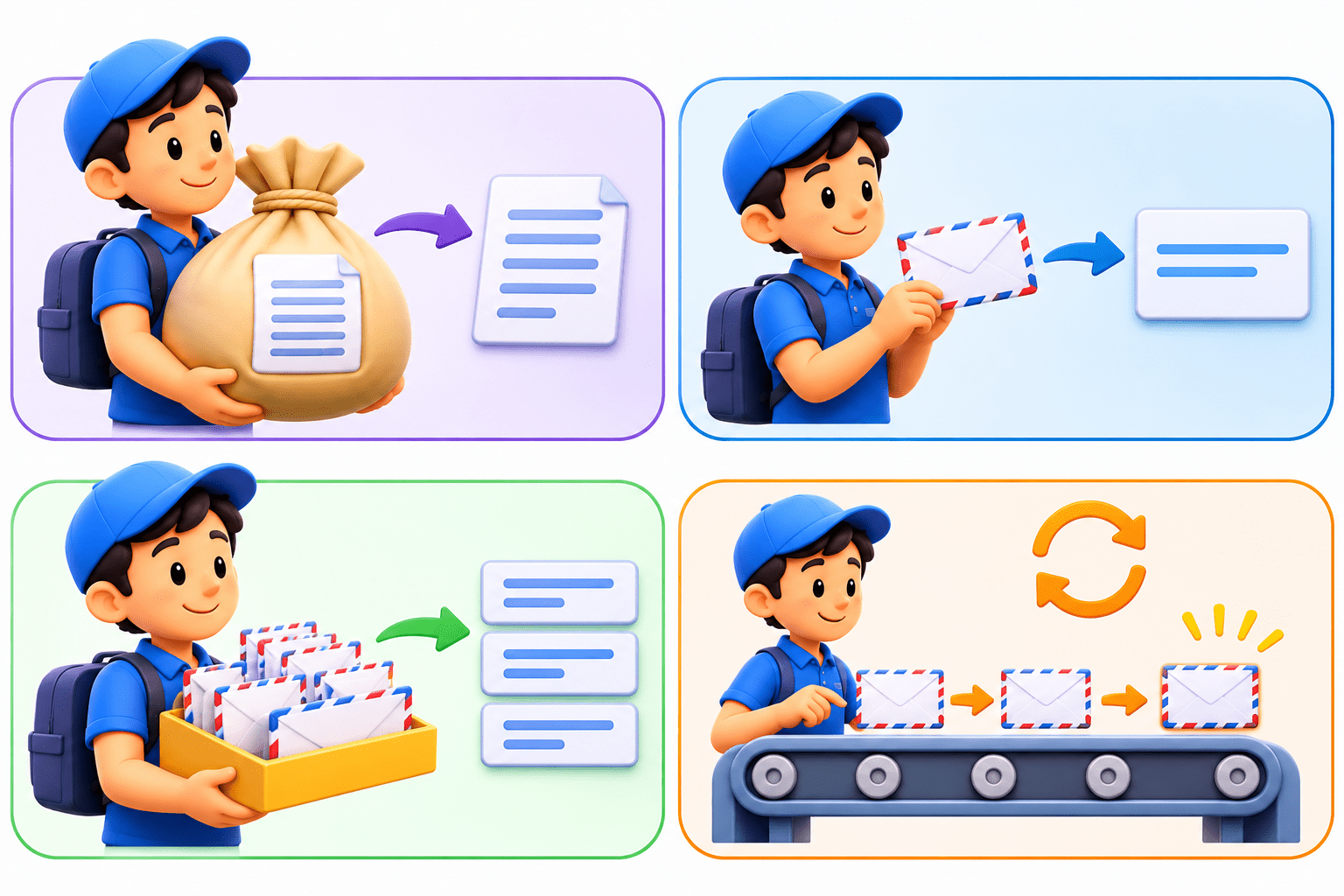
read() returns the whole file as one string; read(100) reads only 100 characters.
readline() reads one line, including its \n, and returns an empty string at the end.
Reading Data from a File
readlines() returns all lines as a list, each still ending in \n.
for line in f: reads one line at a time and holds only that line in memory.
Code: for line in f:
Why it matters: Use read() for small files. For large files, loop line by line so a 5 GB file never loads into memory at once.
Clean Data and the File Pointer

-
Lines read from a file carry a trailing \n. line.strip() removes it along with extra spaces.
-
Every read method moves an invisible file pointer forward.
-
Once read() reaches the end, calling it again returns an empty string, because nothing is left.
-
f.seek(0) moves the pointer back to the start so you can read again.
Code: line.strip()
Writing Data to a File

- write() writes one string and returns the number of characters written.
- writelines() writes a list of strings one after another.
- Neither adds newlines, so put \n yourself, e.g. f.write("Rahul\n").
- Both accept only strings. f.write(95) raises a TypeError; use str(95) or "\n".join(items).
Core Mechanism: What Can Go Wrong?
File operations depend on things outside the program’s control: folders, permissions, and file contents.
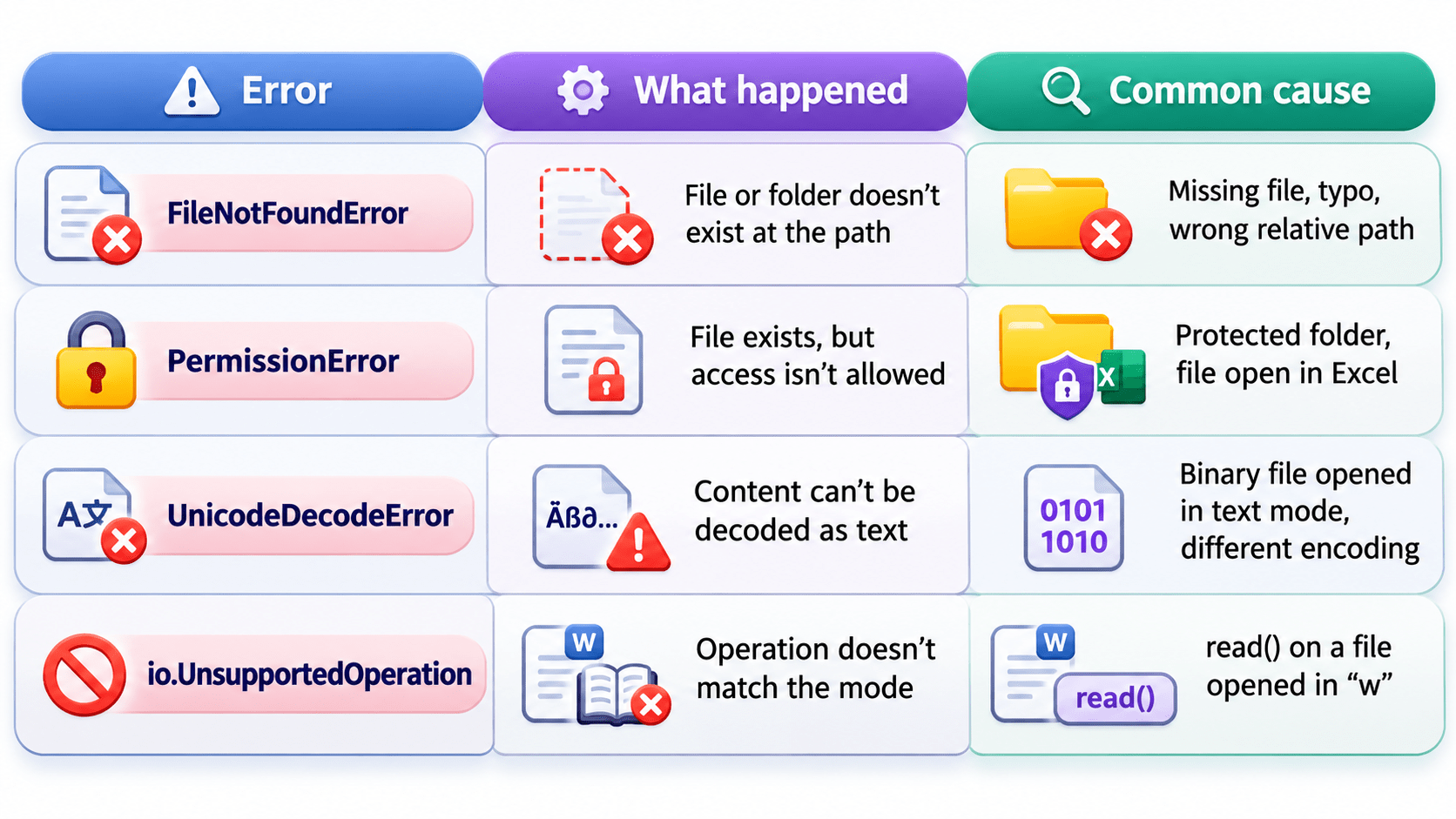
Key Points: Without error handling, any of these stops the program with a technical error message.
Core Concepts (Slide 7)
Core Concepts (.....Slide N-3)
Summary
5
Build strong branding
4
Use different marketing channels
3
Target the right audience
2
Create and communicate value
1
Understand customer needs
Choose cool, soft colors instead of vibrant colors
Max 5 Points for Summary & Min 2
Quiz
Which platform is mainly used for professional networking and B2B marketing ?
A. Facebook
B. Instagram
C. LinkedIn
D. Snapchat

Quiz-Answer
Which platform is mainly used for professional networking and B2B marketing ?
A. Facebook
B. Instagram
C. LinkedIn
D. Snapchat