CartSure Testing Strategy & STLC Setup

Business Scenario
Today is the 3rd day of our project development journey.
We are working on a real-time client project to design a complete Testing Strategy & STLC Setup for an eCommerce web application called CartSure.
Our focus is on testing critical features like user registration, product search, cart management, checkout, payment processing, and order tracking.

Pre-Lab Preparation
The goal is to ensure the application is secure, reliable, and delivers a high-quality user experience.
Testing Techniques
Black Box vs White Box
Equivalence Partitioning
Boundary Value Analysis
Decision Table & State Transition
git pull origin branchName
Git Pull
Task 1: Identify STLC Phases
The Software Testing Life Cycle (STLC) for CartSure includes:
Example for CartSure:
Requirements: Users should be able to login, browse products, add to cart, and checkout.
Testable scenarios:
-
Login with valid credentials
-
Login with invalid credentials
-
Browse by category or search
-
Add product to cart
-
Remove product from cart
-
Checkout with valid payment
Requirement Analysis
a
Entry Criteria: Requirements document available
Exit Criteria: Test scenarios and RTM prepared
Example for CartSure:
Scope: Test all modules (Login, Browsing, Cart, Checkout)
Testing types: Functional, Integration, Regression, UAT
Resources: 2 QA testers, 1 automation tester
Timeline: 2 weeks for functional testing, 1 week for regression
Entry Criteria: Approved requirement document
Exit Criteria: Test plan ready and approved
Test Case Development
c
Test Planning
b
| Test Case ID | Module | Scenario | Test Data | Expected Result |
|---|---|---|---|---|
| TC_001 | Login | Valid Login | Username: User1, Password: Pass123 | User logged in successfully |
| TC_002 | Login | Invalid Login | Username: User1, Password: Wrong123 | Error Message Displayed |
| TC_003 | Cart | Add to Cart | Product: iPhone 14 | Item added to cart |
Entry Criteria: Test plan approved
Exit Criteria: Test cases and test data ready
d
Test Environment Setup
Example for CartSure:
-
Setup QA server with CartSure app installed
-
Database seeded with products and test users
-
Browsers: Chrome, Firefox
-
Devices: Desktop and Mobile
Entry Criteria: Test cases ready
Exit Criteria: Environment ready
d
Test Execution
Example for CartSure:
-
Execute TC_001 → Login successful → Pass
-
Execute TC_002 → Error message appears → Pass
-
Execute TC_007 → Item added to cart → Pass
-
If a bug occurs (e.g., product price not updating in cart), log in Jira
Entry Criteria: Stable build available
Exit Criteria: All test cases executed; defects logged & retested
Test Closure
e
Example for CartSure:
-
Prepare Test Summary Report:
-
Total test cases: 50
-
Passed: 47
-
Failed: 3
-
-
Lessons learned: Checkout module needs additional performance testing
Sign-off: Stakeholders approve testing completion
Entry Criteria: Test execution completed
Exit Criteria: Testing closure report ready and signed off
Task 2: Define Entry & Exit Criteria
Entry Criteria
-
Requirements approved
-
Test plan ready
Exit Criteria
-
All test cases executed
-
Critical defects fixed
-
Test summary report completed
-
Stakeholder approval received
-
Test environment available
-
Test data prepared
Task 3:Identify Testing Types
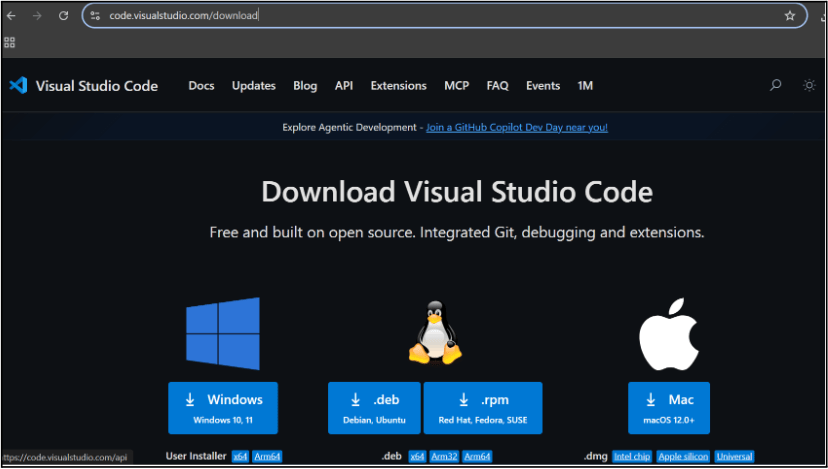
Choose your operating system(windows / Mac) and download the installation file.
Double click on the download app and Accept the agreement and click next
2
It is a long established fact that a reader will be distracted
b
Sub Steps
a
Double click on the download app and Accept the agreement and click next
public class MathSample {
    public static void main(String[] args) {
        int x = 10;
        int y = 20;
        int sum = x + y;

        System.out.println("The sum is: " + sum);
    }
}
public class MathSample {
public static void main(String[] args) {
int x = 10;
int y = 20;
int sum = x + y;
System.out.println("The sum is: " + sum);
}
}
public class MathSample {
public static void main(String[] args) {
int x = 10;
int y = 20;
int sum = x + y;
System.out.println("The sum is: " + sum);
}
}
Great job!
You have successfully completed your first lab on BiteBox Project Onboarding.
In this lab, you have: Understood the BRD, Created a wireframe, Set up your development environment, Organised your project structure, Run your first program
You are now ready to move to the next stage of development
Checkpoint
Next-Lab Preparation
Git Push
git push origin branchNameTopic : Working with a Text and Listin HTML
1) Power of HTML text tags
2) Customizing your style with CSS
3) Listing it right using HTML
4) HTML Link up , attributes of tag, block vs inline elements
Text box Width : 887
Business Scenario, Pre-lab Preparation, Next-lab Preparation, Task, Activity, Checkpoint : 90%.
Steps : 1,2,3 [Sub Steps - a,b,c]
Normal Text, Topic Name : 80%
Subtopic : 70%
Code Box font Size : 16px