Topic name


IP and MAC Addressing



Learning Outcome
5
Gateway and Its Role in Networks.
4
Learn how subnetting and CIDR help manage networks.
3
Understand the role of NIC in communication.
2
Identify when IP addressing and MAC addressing are used.
1
Difference between IP address and MAC address.


MAC Addressing
What is a MAC Address?
A MAC (Media Access Control) address is a unique hardware identifier assigned to the network interface card (NIC) of a device. It is used to identify a device within a local network and helps in delivering data to the correct device.
-
It is a unique physical address for a device’s network card
-
Used by switches to forward data to the correct device
-
Usually written in hexadecimal format like: 00:1A:2B:3C:4D:5E

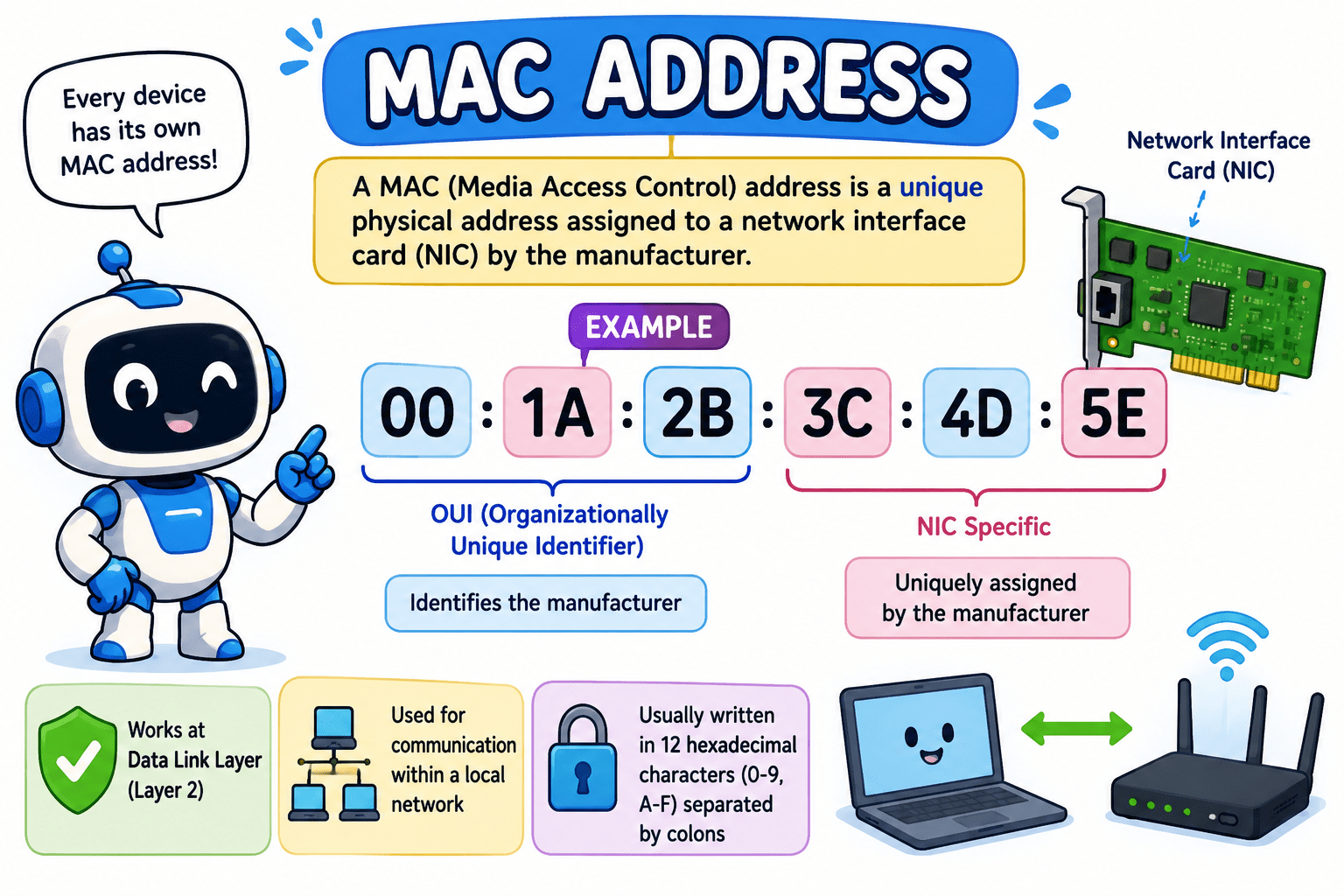

A MAC address is a unique physical identifier used to identify a device within a local network, while an IP address is a logical address used to locate and enable communication with that device across networks.
What is the Use
Identifies devices globally
Helps route data across networks
Enables internet communication
Real World Networking Example
You want to send a photo to your friend sitting in the same classroom.
First, you call out your friend’s name
→ That’s like using an IP address (finding the right person/location)
Now you walk to them and recognize their face
→ That’s like using a MAC address (confirming the exact device)
Then you give them the photo
Hook/Story/Analogy(Slide 4)


How IP Actually Works
You send data → using IP
Your device uses the IP address to decide where the data should go (the destination location).
Device checks → “same network or not?”
It compares its own IP with the destination IP to see if both are in the same network.
If not → send to router (gateway)
If the destination is outside, the data is sent to the router, which acts as the exit point of your network.
Routers forward using IP
Routers read the IP address and pass the data through the best path across different networks.

At destination → ARP finds MAC
Once the data reaches the correct network, ARP is used to find the MAC address of the exact device.
Switch delivers using MAC
Finally, the switch uses the MAC address to send the data to the correct device.

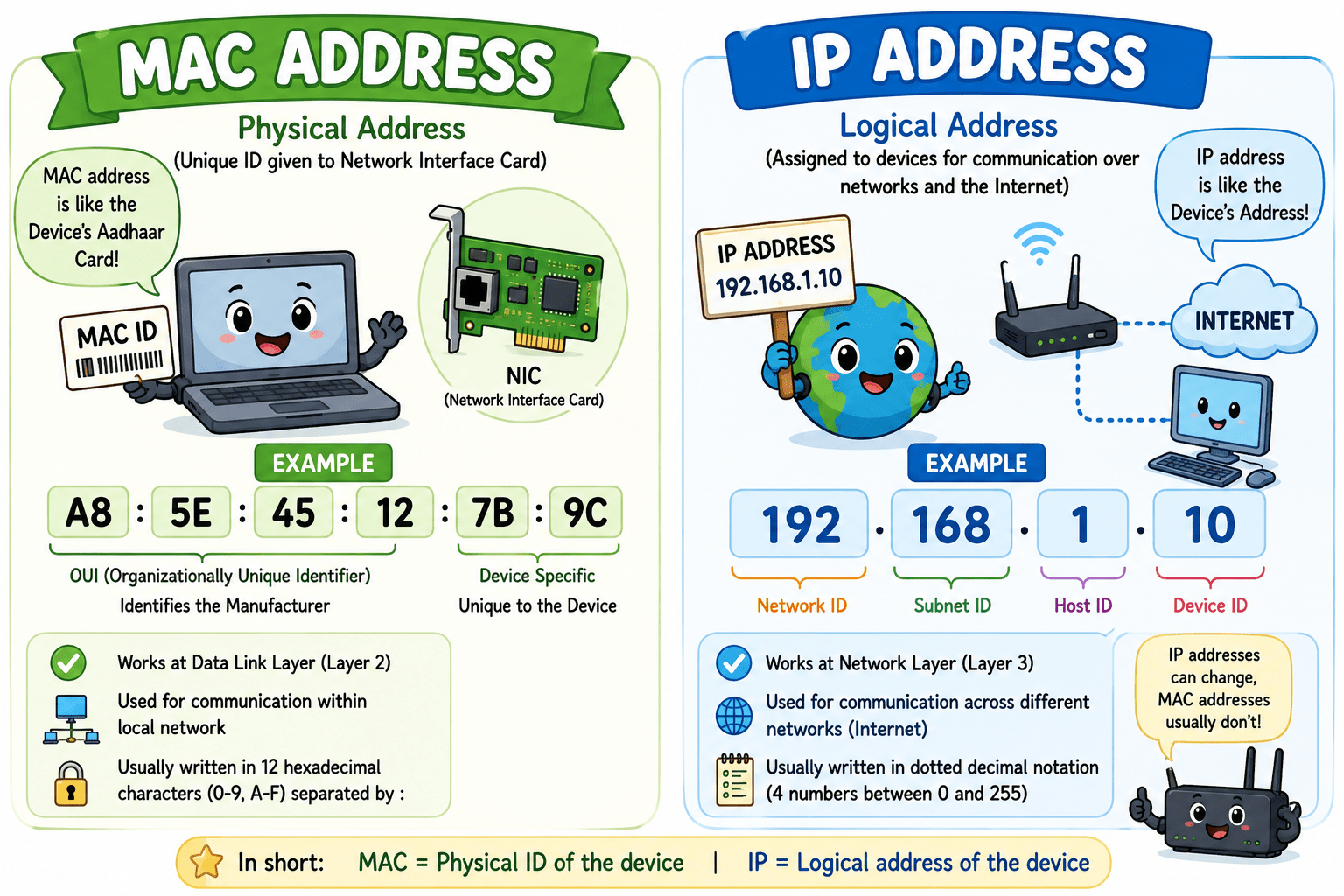
How it works in networking
When data is sent in a local network:
-
The network first uses the IP address to find the correct network
-
Then it uses the MAC address to deliver data to the exact device
-
Switches rely heavily on MAC addresses to forward data efficiently
What is a NIC Card?
A Network Interface Card (NIC) is a physical or built-in hardware component that enables a device to communicate over a network. It acts as the bridge between your device and the network, allowing data to be sent and received.
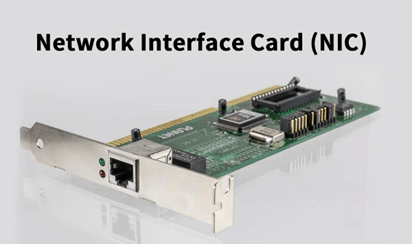
Types of NIC :-
Wired NIC: Uses Ethernet cables for connection
Wireless NIC: Connects using Wi-Fi signals


A MAC address is a 12-digit hexadecimal number (uses 0–9 and A–F), usually written like this: 00:1A:2B:3C:4D:5E
MAC addresses can be manually changed (spoofed)
It is divided into two main parts:
First 3 Bytes (First 6 Digits) → OUI (Organizationally Unique Identifier)
Example: 00:1A:2B
Assigned to the manufacturer (company)
Identifies which company made the device’s network card
Each company has its own unique OUI
This tells Who made this device?



Structure of a MAC Address

Last 3 Bytes (Last 6 Digits) → Device Identifier
Example: 3C:4D:5E
Assigned by the manufacturer
Unique for each device they produce
Ensures no two devices from the same company
have the same MAC
This tells Which exact device is this?
Example :- MAC: 00:1A:2B:3C:4D:5E
00:1A:2B → Manufacturer (e.g., Intel, Dell, etc.)
3C:4D:5E → Unique device number
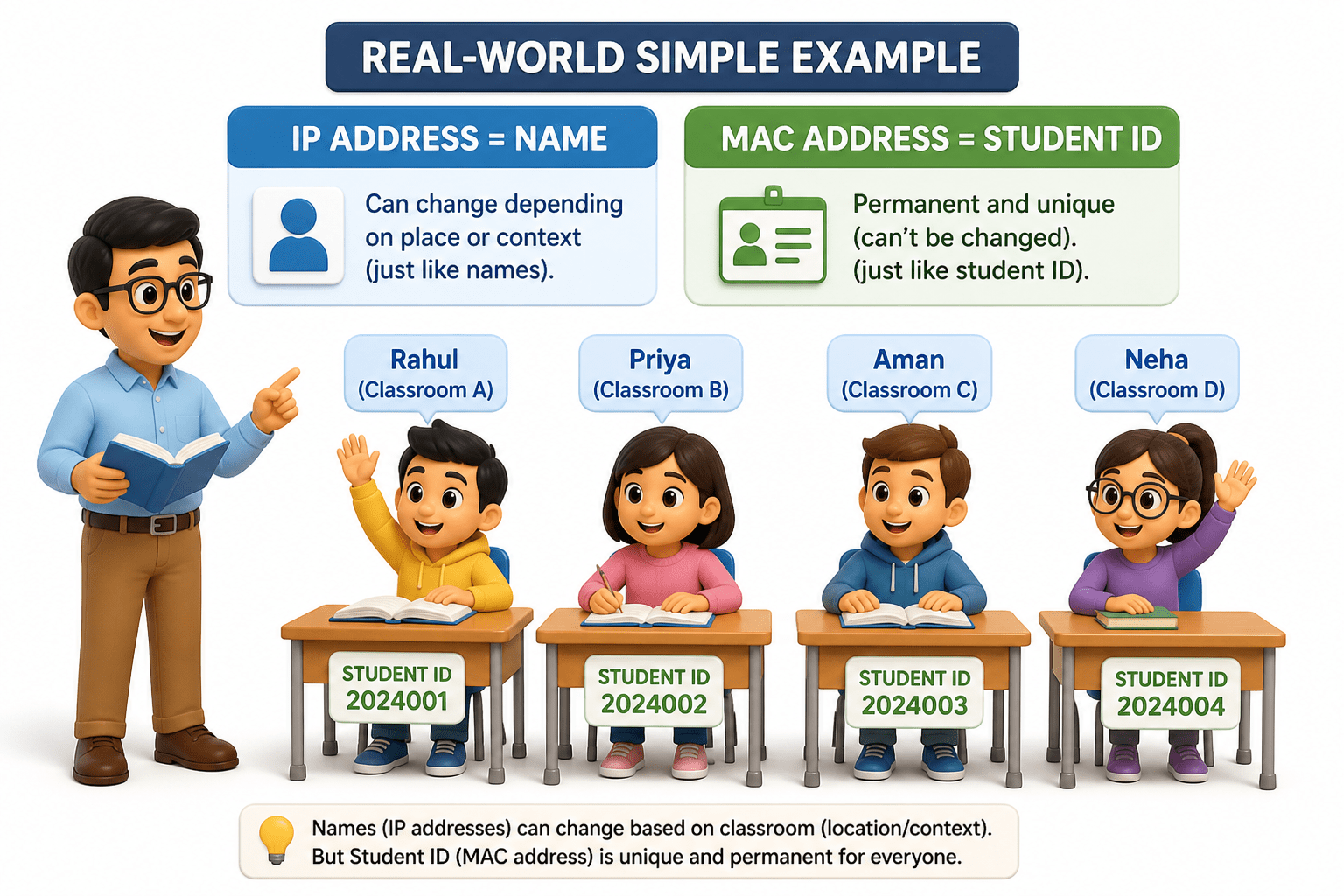
Real-World Simple Example
Imagine you’re in a college classroom:
Everyone has a name → that’s like an IP address
(can change depending on place or context)
But everyone also has a unique
student ID → that’s like a MAC address (permanent andunique)
What is an IP Address?
An IP address is a unique number assigned to each device on a network so it can be identified and communicate with other devices. It works like an address for your device, helping data reach the correct destination.
Uses numbers separated by dots (e.g., 192.168.1.1) Uniquely identify each device on a network
Allow communication between different systems
Enable data to be sent and received reliably
Most commonly used
It uses decimal numbers (0–9) It is divided into 4 groups (octets) separated by dots (.)
Each group ranges from 0 to 255
IPV4 :-
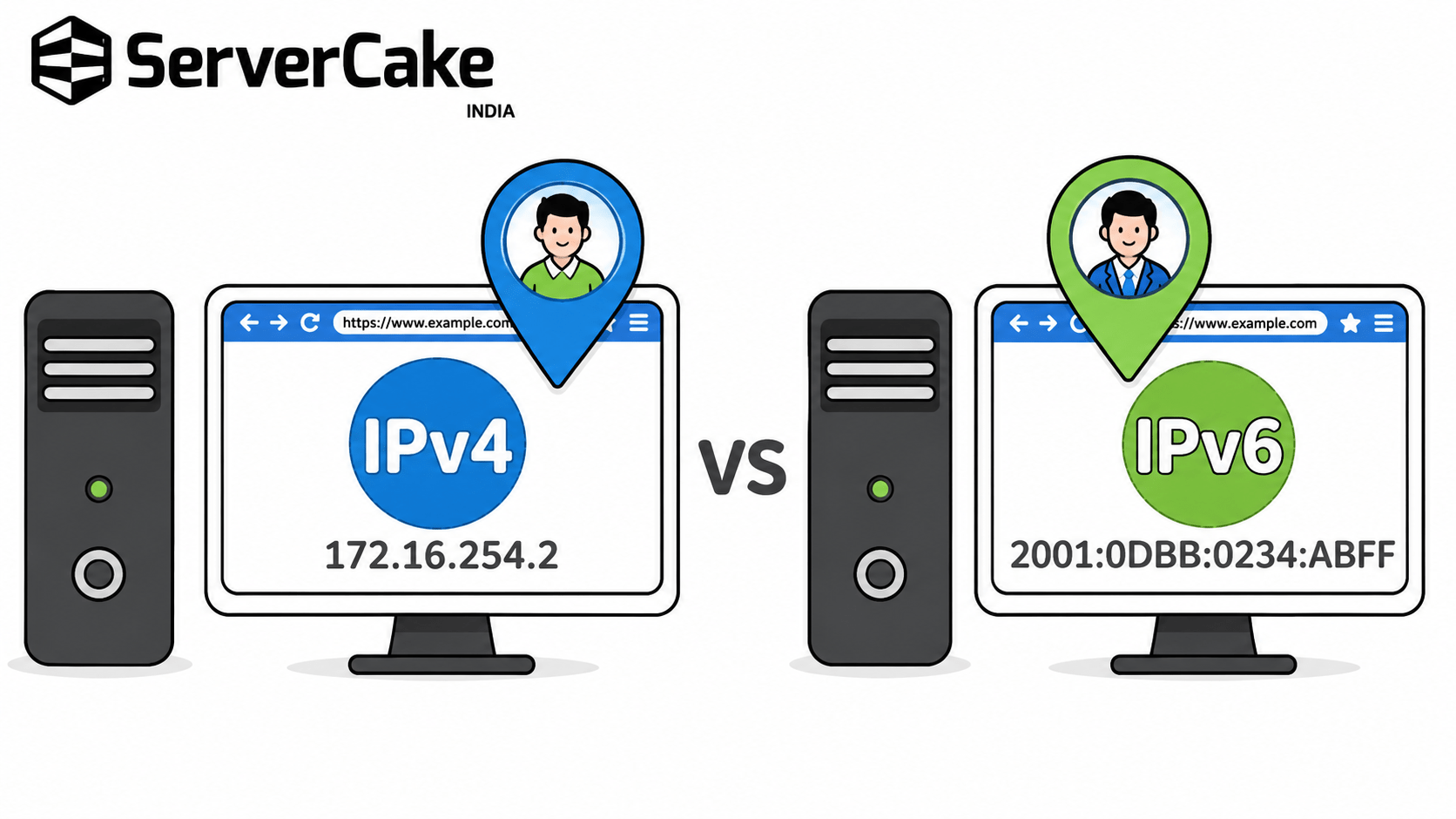
Provide a huge number of IP addresses (basically future-proofing)
Support the growing internet (more devices, more users)
Improve efficiency and routing
Enhance built-in security features
IPv6 example : 2001:0db8:85a3:0000:0000:8a2e:0370:7334
It uses Hexadecimal and It is divided into 8 groups separated by colons (:)
Structure of IPv4 Address (Octets & Binary)
An IPv4 address is made of 4 parts (octets)
Each octet ranges from 0 to 255
Internally, it is stored in binary (0s and 1s)
Example format: 192.168.1.1
In simple terms:
It looks simple in numbers, but machines read it in binary.
IPV6 :-
IP Classes (Basic Understanding)
1. IP classes were created to divide networks based on size and usage
2. Helped organizations get IP ranges suitable for their needs
3. Each class splits the IP into network Bits and host (device) Bits differently
4. Earlier, this system was the main way to design networks
5. Today, it is mostly replaced by CIDR, which is more flexible

IP Classes are Divided in following way:-
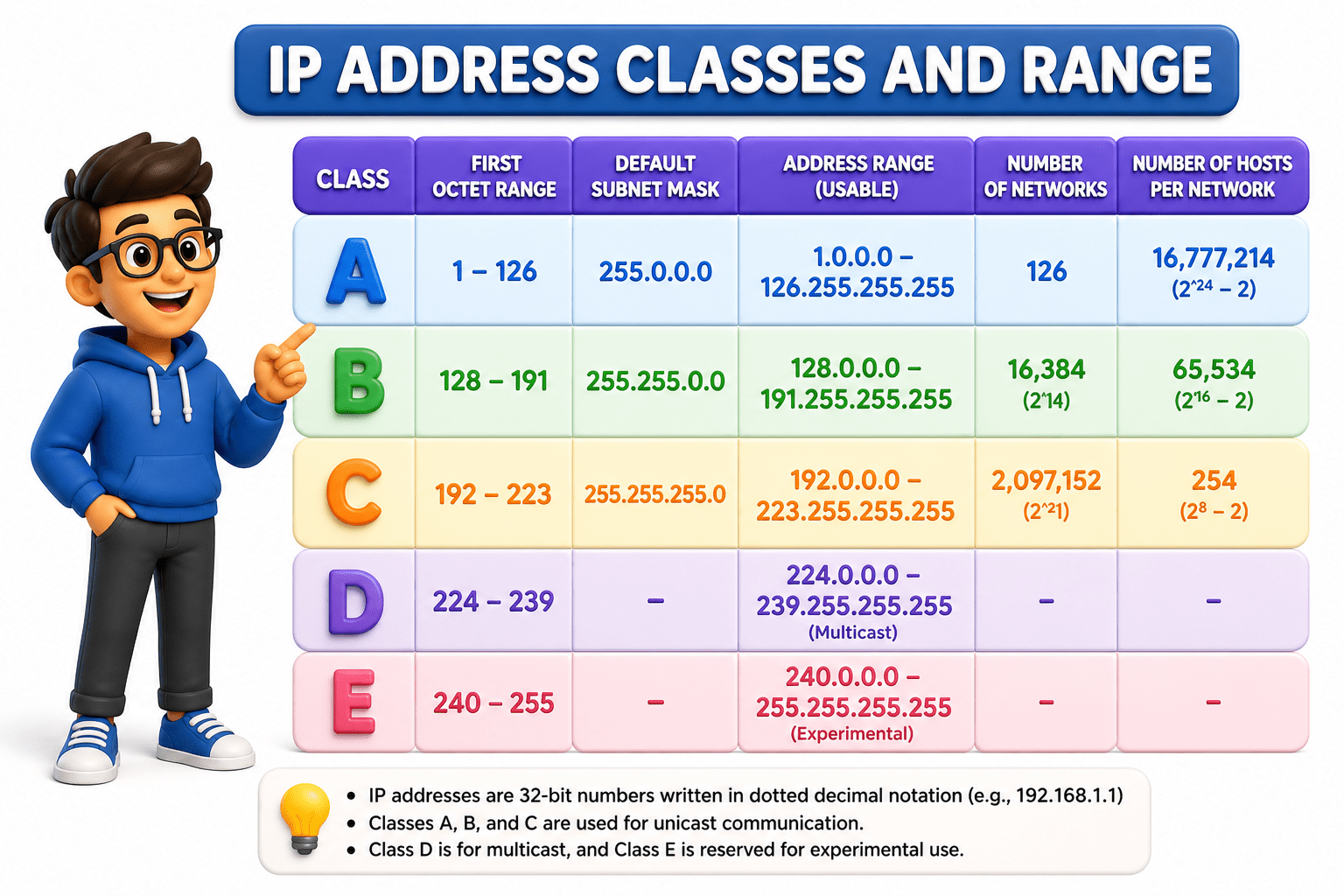
1. Used for very large networks with a huge number of devices
2 Range: 1.0.0.0 – 126.255.255.255
3. Default subnet mask: 255.0.0.0 (/8)
4. First part is the network, rest is for devices (hosts)
5. Used by large organizations and ISPs
Class A :-
Class B:-
1. Used for medium-sized networks.
2. Range: 128.0.0.0 – 191.255.255.255
3. Default subnet mask: 255.255.0.0 (/16)
4. Balanced split between network and host portion.
5. Used by universities and mid-sized companies.
1. Used for small networks like homes and offices.
2. Range: 192.0.0.0 – 223.255.255.255
3. Default subnet mask: 255.255.255.0 (/24)
4. Smaller number of devices per network.
5. Most commonly used in everyday networking.
Class C :-
1. Used for multicast communication. (one-to-many transmission)
2. Not assigned to individual devices like normal IPs.
3. Range: 224.0.0.0 – 239.255.255.255
4.Commonly used in streaming, online meetings, and broadcasting data to multiple devices.
Class D:-

1.Reserved for experimental and research purposes
2. Not used in normal networking or by the public
3. Range: 240.0.0.0 – 255.255.255.255
4. Mostly unused, but kept for future or special use cases
Class E :-
➔ Used to identify your network or device on the internet, so other systems can find and communicate with you.
➔ Must be globally unique, meaning no two devices on the internet can have the same public IP at the same time.
➔ Assigned by Internet Service Providers (ISP) and can be either static (fixed) or dynamic (changes over time).
➔ Public IP Range: Any IP outside private ranges (generally from 1.0.0.0 to 223.255.255.255, excluding reserved ranges)
Public vs Private IP Address
Public IP Address
Private IP Address
Used within local networks like homes, schools, or offices to connect devices internally.
Can be reused in different networks since they are not visible on the internet.
Assigned by routers to devices inside the network, helping them communicate with each other easily.
Private IP Ranges:
10.0.0.0 – 10.255.255.255 (Class A)
172.16.0.0 – 172.31.255.255 (Class B)
Static vs Dynamic IP Address
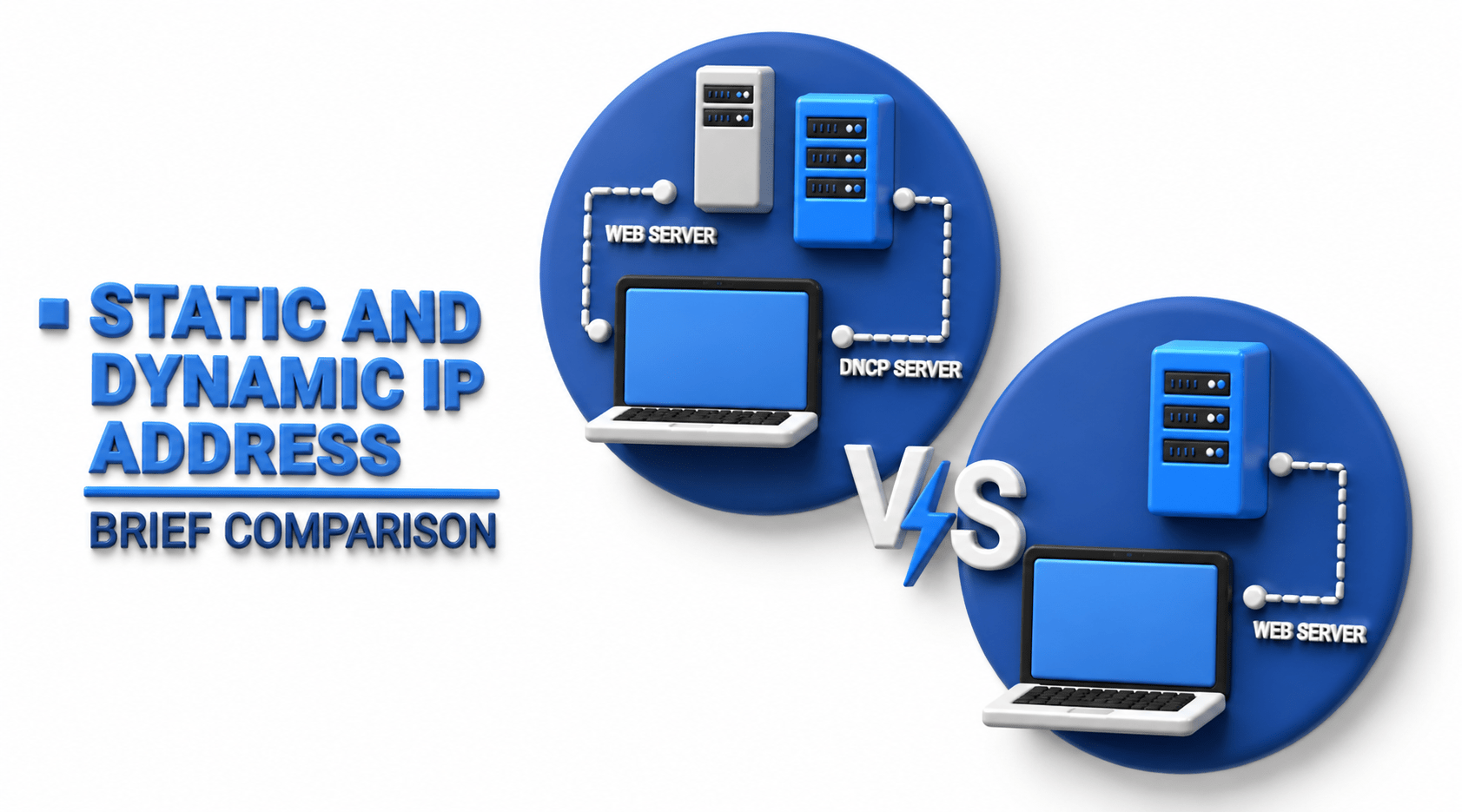
Static IP Address
Dynamic IP Address
A static IP address stays the same and does not change over time, making it reliable for consistent access.
Commonly used for servers, websites, or systems that need to be accessed regularly from the same address.
Easier to track and manage, but usually costs more and requires manual setup.
A dynamic IP address changes automatically over time, usually assigned by the network.
More common for everyday users like home internet because it requires no manual configuration.
More flexible and cost-effective, but the changing address can make direct access slightly less consistent.
Subnetting Basics (Subnet Mask)
Subnetting Basics (Subnet Mask)
Divides a large network into smaller, manageable networks called subnets.
Helps reduce network traffic by limiting how much data flows across the entire network.
Makes networks easier to manage, especially in offices or large organizations.
Why Subnetting is Useful:
Organizes networks: Different departments or groups can have their own subnet, making management cleaner.
Improves performance: Less unnecessary traffic means faster communication within each subnet.
Enhances security: Limits access between different parts of the network, reducing risk.

Subnet Mask (What it does):
Identifies which part of an IP address represents the network and which part represents the device.
Helps devices determine whether communication should stay within the local network or go outside.
Works alongside the IP address to correctly route data to its destination.
A Subnet Mask is a number that works with an IP address to divide it into two parts:
Network part (identifies the network)
Host part (identifies the device)

Example
IP Address: 192.168.1.10
Subnet Mask: 255.255.255.0
This means:
192.168.1 → Network
10 → Host (device)



How to calculate a subnet mask with the host's formula
We have IP 192.168.1.0/24

Step 1:- Write the prefix number
Your prefix is /24. This means the first 24 bits are 1s and the remaining 8 bits are 0s. Total is always 32 bits
Step 2 :- Write all 32 bits in Split of 4 groups of 8 octets
Fill 24 ones, then 8 zeros: 11111111.11111111.11111111.00000000
Step 3 :- Convert each octet from binary to decimal Eight 1s = 255, eight 0s = 0, mixed = somewhere between.
Octet 1: 11111111 = 255 Octet 2: 11111111 = 255 Octet 3: 11111111 = 255 Octet 4: 00000000 = 0
Step 4 :- Write the subnet mask Join the four decimals with dots: 255.255.255.0
What is CIDR
CIDR (Classless Inter-Domain Routing) is a way of assigning and managing IP addresses without using fixed classes like A, B, or C.
It uses a prefix number (like /24) to show how much of the IP address is for the network and how much is for devices.
How CIDR Actually Works
CIDR writes IP addresses like this: 192.168.1.0/24
192.168.1.0 → Network part
/24 → First 24 bits are for the network
Remaining bits → Used for devices (hosts)
Why CIDR Was Introduced
CIDR was introduced because the old IP class system wasted many IP addresses and was too rigid for real-world needs. It allows flexible network sizes by using a prefix (like /24) instead of fixed classes. This makes IP allocation more efficient and improves routing on the internet.
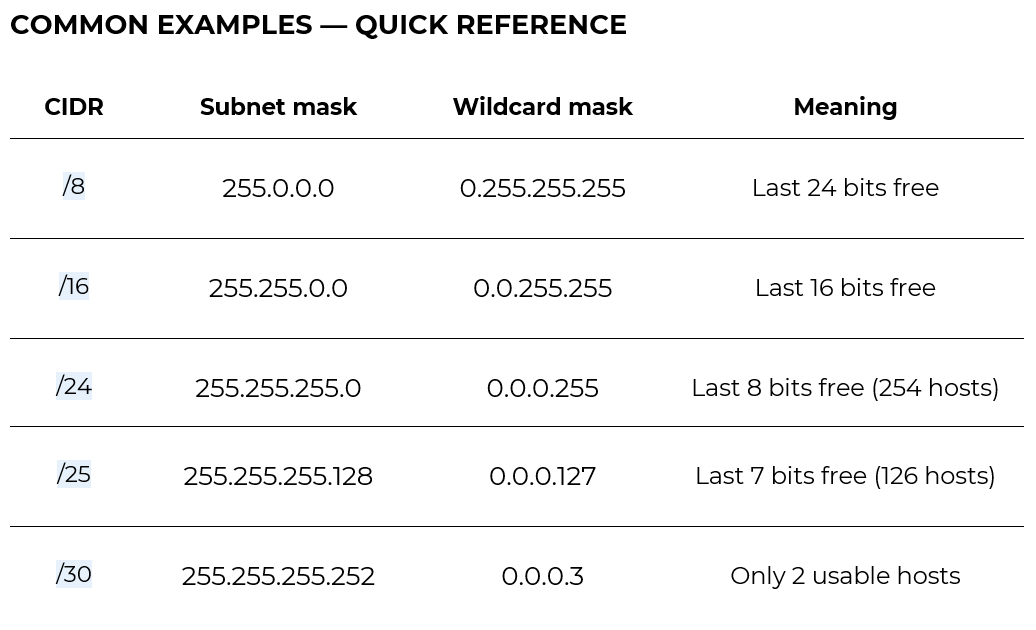
Common Examples
/8 → Large network (many devices)
/16 → Medium network
/24 → Small network (most common in homes)
Why CIDR is Used
Uses IP addresses more efficiently (no waste like class system)
Gives flexibility in network design
Replaced old IP class system




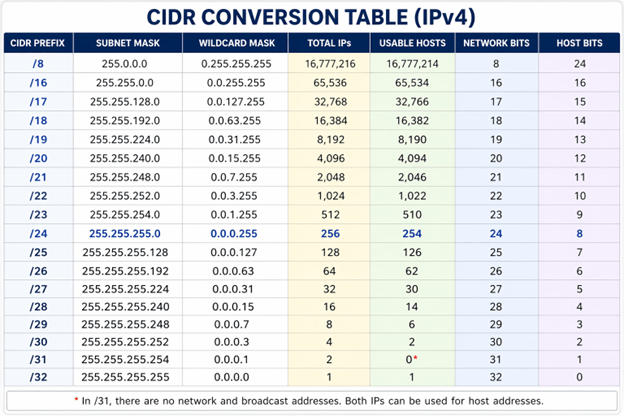
WHAT IS A WILDCARD MASK?
A wildcard mask is the exact opposite of a subnet mask.
Where a subnet mask uses 1s to mean "this bit must match" (network), a wildcard mask uses 1s to mean "this bit can be anything — ignore it" (host).
It is mainly used in routers and firewalls (like Cisco ACLs and OSPF) to define which IP addresses should be matched or permitted

HOW TO CALCULATE Wildcard mask
Wildcard mask = 255.255.255.255 minus the Subnet Mask
Formula: 255.255.255.255 – [subnet mask] = wildcard mask
Example (using 192.168.1.0 / 24):
255.255.255.255
– 255.255.255.0← subnet mask
= 0. 0. 0.255 ← wildcard mask
What is VLSM (Variable Length Subnet Mask)?
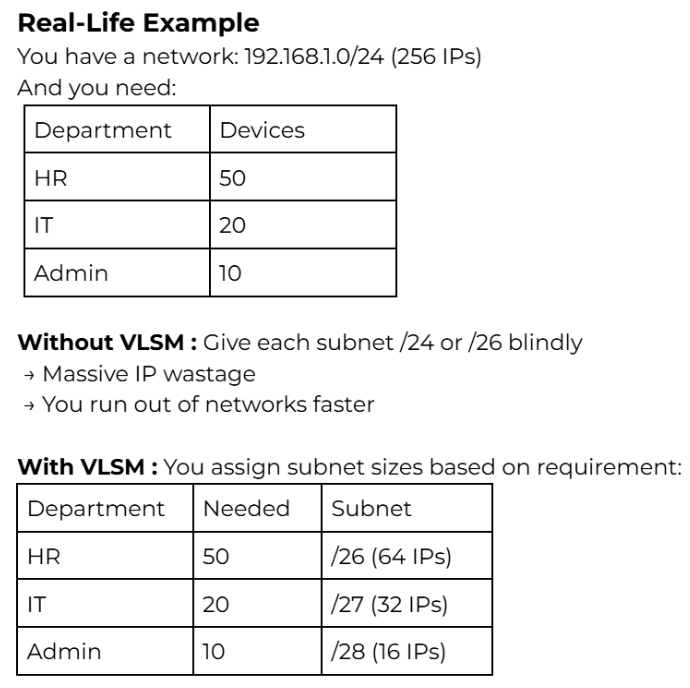
VLSM allows you to create subnets of different sizes within the same network.
Why VLSM is Used
Because networks in real life are messy and uneven. Not every department needs 254 IPs.
Without VLSM:
Every subnet is same size
Huge waste of IP addresses
Inefficient design
With VLSM:
Small networks get small subnets
Large networks get larger subnets
IP space is used efficiently
How to Calculate VLSM
We have been given the network address 192.168.1.0 / 24.
This gives us 254 usable IP addresses to distribute across our organisation.
Network: 192.168.1.0 / 24 Available:
192.168.1.1 → 192.168.1.254 (254 usable hosts)
Broadcast: 192.168.1.255
REQUIREMENTS — 5 SUBNETS NEEDED
-
Department A — Sales 100 hosts needed (Largest department. Needs the biggest subnet — allocated first.)
-
Department B — HR 50 hosts needed (Second largest. Allocated after Sales.)
-
Department C — IT 20 hosts needed (Medium department. Allocated third.)
-
Department D — Management 5 hosts needed (Small team. Allocated fourth.)
-
Router Link 2 hosts needed (Point-to-point router connection. Needs only 2 IPs — allocated last.)
1. Department A — Sales (100 hosts)
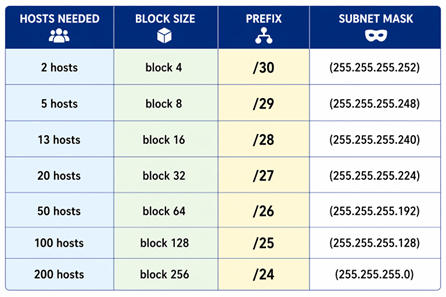
100 + 2 = 102 → next power of 2 = 128 → block size 128 → prefix /25
Start: 192.168.1.0 | End: 192.168.1.127
Network: 192.168.1.0 /25 Usable: 192.168.1.1 → 192.168.1.126 Broadcast: 192.168.1.127 Mask: 255.255.255.128 Hosts: 126 usable
2. Department B — HR (50 hosts)
50 + 2 = 52 → next power of 2 = 64 → block size 64 → prefix /26
Start where A ended: 192.168.1.128
Network: 192.168.1.128 /26 Usable: 192.168.1.129 → 192.168.1.190 Broadcast: 192.168.1.191 Mask: 255.255.255.192 Hosts: 62 usable
3. Department C — IT (20 hosts)
20 + 2 = 22 → next power of 2 = 32 → block size 32 → prefix /27
Start: 192.168.1.192
Network: 192.168.1.192 /27 Usable: 192.168.1.193 → 192.168.1.222 Broadcast: 192.168.1.223 Mask: 255.255.255.224 Hosts: 30 usable
4 . Department D — Management (5 hosts)
5 + 2 = 7 → next power of 2 = 8 → block size 8 → prefix /29
Start: 192.168.1.224
Network: 192.168.1.224 /29 Usable: 192.168.1.225 → 192.168.1.230 Broadcast:192.168.1.231 Mask: 255.255.255.248 Hosts: 6 usable
5. Router Link (2 hosts)
2 + 2 = 4 → next power of 2 = 4 → block size 4 → prefix /30
Start: 192.168.1.232
Network: 192.168.1.232 /30 Usable: 192.168.1.233 → 192.168.1.234 Broadcast: 192.168.1.235 Mask: 255.255.255.252 Hosts: 2 usable
THE BLOCK SIZE CHEAT SHEET
Default Gateway Concept
What is a Default Gateway:
A default gateway is usually your router that connects your local network to external networks like the internet. It acts as the main path for data when your device needs to communicate outside your local network. Every device on a network is configured with a default gateway so it knows where to send outgoing data when the destination is not within the same network.
The default gateway is the node that forwards the packet from the source to other networks when there is no routing information about the destination i.e. host (or router) does not know where the destination is present.
Why Default Gateway is Important:
Connects to the outside world: Without it, your device can only talk to devices inside the same network.
Routes traffic correctly: It decides where your data should go when the destination is outside your network.
Essential for internet access: No default gateway means no browsing, no apps, just you staring at a very useless “connected” icon.
Practical
Q 1. Convert CIDR /26 into subnet mask
Q 2. Given subnet mask 255.255.255.224
What is the CIDR notation?
Q 3. Find wildcard mask for:
255.255.255.192
Q 4. If wildcard mask is 0.0.0.31
What is the subnet mask?
Q 5. You have network: 192.168.1.0/24
Requirements:
Dept A → 50 hosts
Dept B → 20 hosts
Dept C → 10 hosts
Assign subnets using VLSM
Q 6. Network: 172.16.0.0/24
Requirements: 60 hosts 30 hosts Assign IP Ranges

FAQs
What replaced the IP class system ?
CIDR (Classless Inter-Domain Routing) replaced the class-based system because it is more flexible and efficient in allocating IP address ranges.
Why was IPv6 Introduced ?
IPv6 was introduced because IPv4 started running out of addresses. IPv6 also improves routing efficiency, adds better built-in security, and provides a vastly larger address space for the growing internet.
What happens if two devices have the same IP address?
It causes an IP conflict, leading to network errors where devices may lose connectivity or behave unpredictably.

Summary
5
Gateway: Device that connects your network to other networks
4
CIDR: Flexible method for allocating IP addresses using subnet
3
Subnetting: Dividing a large network into smaller networks,
2
IP Address: Logical address used to identify a device.
1
MAC Address: Unique physical ID of a device.


Quiz
What is the range of Class D IP addresses?
A. 1.0.0.0 – 126.255.255.255
B. 192.0.0.0 – 223.255.255.255
C. 224.0.0.0 – 239.255.255.255
D. 240.0.0.0 – 255.255.255.255

Quiz-Answer
What is the range of Class D IP addresses?
A. 1.0.0.0 – 126.255.255.255
C. 224.0.0.0 – 239.255.255.255
B. 192.0.0.0 – 223.255.255.255
D. 240.0.0.0 – 255.255.255.255

Quiz
Which IP type is used inside a local network?
A. Public IP
B. Private IP
C. Static IP
D. IPv6
Quiz
Which IP type is used inside a local network?
A. Public IP
C. Static IP
D. IPv6
B. Private IP

Quiz
Which of the following is an example of IPv4?
A. 2001:db8::1
B. 192.168.1.1
C. FE80::1
D. 0x1A2B
Quiz
Which of the following is an example of IPv4?
A. 2001:db8::1
C. FE80::1
D. 0x1A2B
B. 192.168.1.1