Extracting Web Data

Business Scenario
Welcome!

Today is your 17th day as a Junior Data Analyst at the Indian Railways Reservation Department
Previously you used Regular Expressions to validate and extract patterns to automatically detect invalid PNR numbers, seat codes, and fare entries
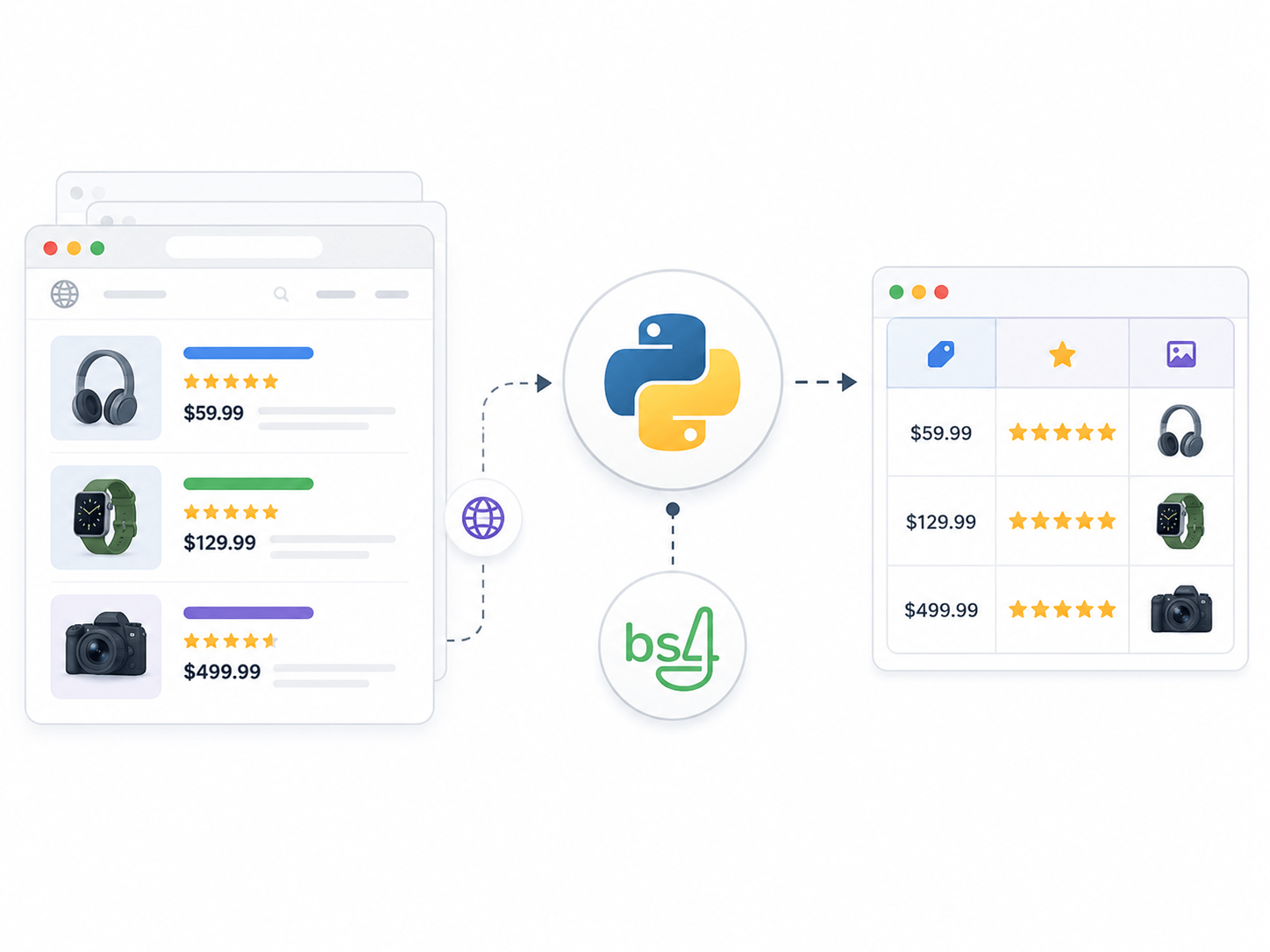
Today, your manager has given you a new task. The department needs to pull live train schedules, passenger records, and seat availability data directly from the website. Instead of copying data manually, your job is to write Python programs that automatically fetch and extract this data from web pages.
To complete this task successfully, you must use Python to :
-
Fetch train schedule data from a Train Booking System webpage
-
Extract passenger records
-
Read seat availability
-
Automate data collection from web pages
Pre-Lab Preparation
Topic: Extract Web Data for Railway Information
1) Use requests
2) Parse HTML with BeautifulSoup

Git Pull
Click here for previous lab : Python Lab 16
git pull origin branchName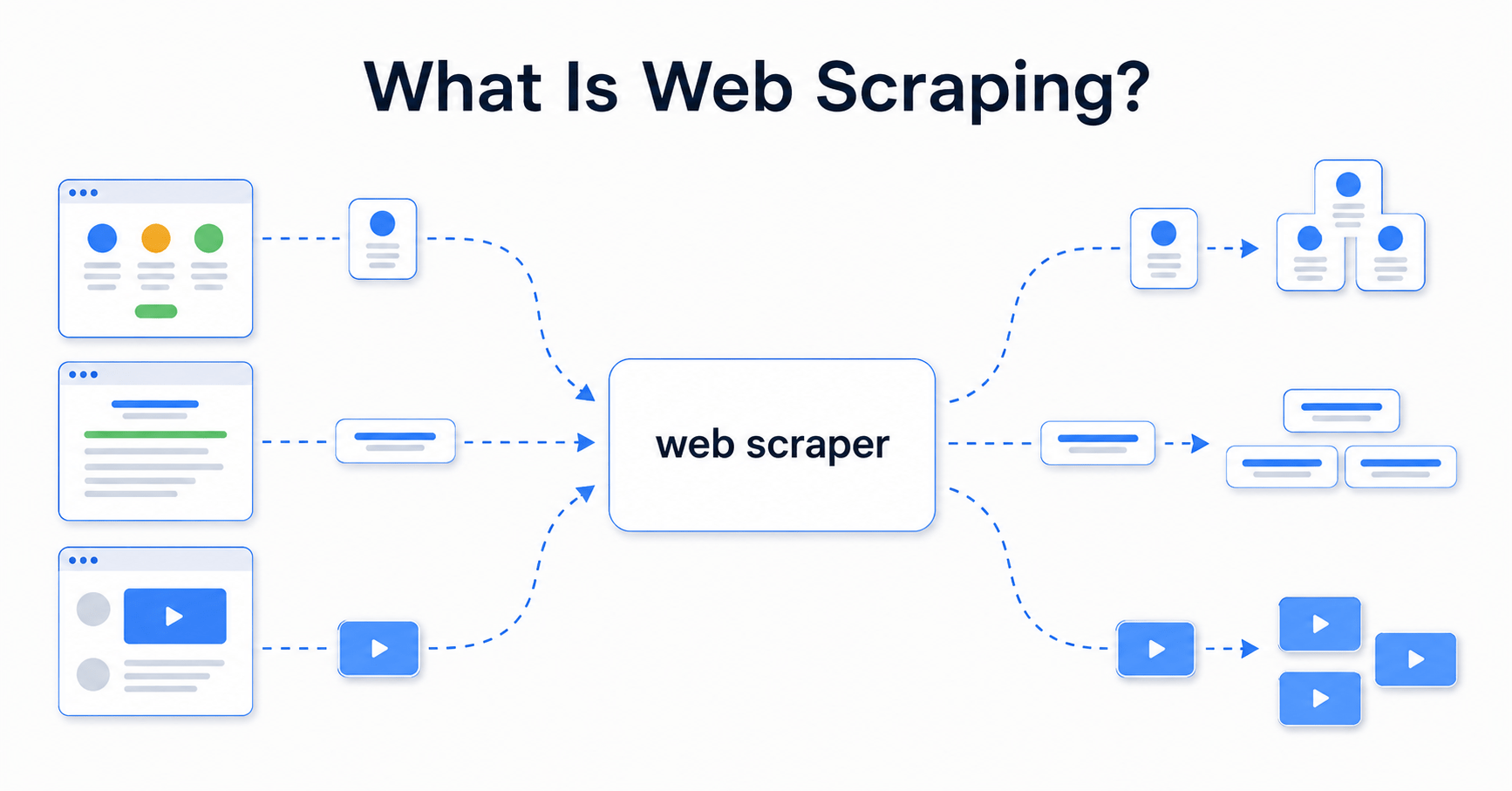
-
Automatically extracting data from websites
-
Reading the HTML content of a web page using Python
-
Useful when data is displayed on a website but not available as a file
The BeautifulSoup Library
-
Used to parse and navigate HTML content
-
Imported from the bs4 package
-
Converts raw HTML into a searchable Python object
Key BeautifulSoup Methods
-
soup.find(tag) — find the first matching tag
-
soup.find_all(tag) — find all matching tags
-
soup.find(id="...") — find element by id
-
soup.find_all(class_="...") — find all elements by class name
-
.get_text() — extract visible text from a tag
-
tag["attribute"] — read an attribute value from a tag
Website for Webscrapping
Task 1: Fetch the Web Page
import requests
from bs4 import BeautifulSoup

url = "https://contentitvedant.github.io/Railway_Booking/index.html"

response = requests.get(url)

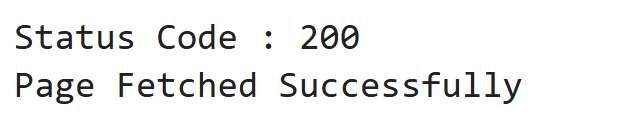
print("Status Code :", response.status_code)
print("Page Fetched Successfully")
Output
Task 2: Extract all Train Numbers
import requests
from bs4 import BeautifulSoup

url = "https://contentitvedant.github.io/Railway_Booking/trains.html"

response = requests.get(url)
soup     = BeautifulSoup(response.text, "html.parser")

train_numbers = soup.find_all(class_="train-number")

print("Train Numbers on IndRail:")
print("=" * 30)
for item in train_numbers:
    print(item.get_text())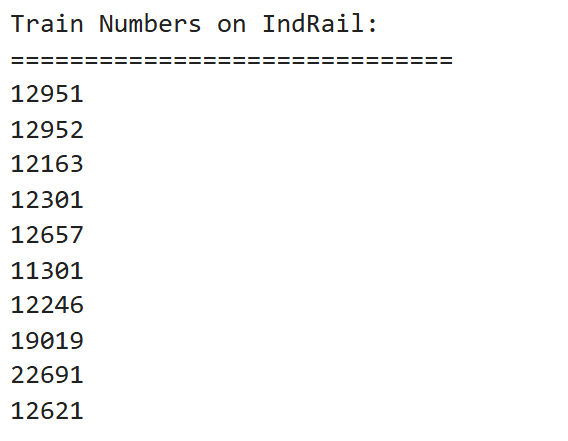
Output
Only first 4 outputs displayed
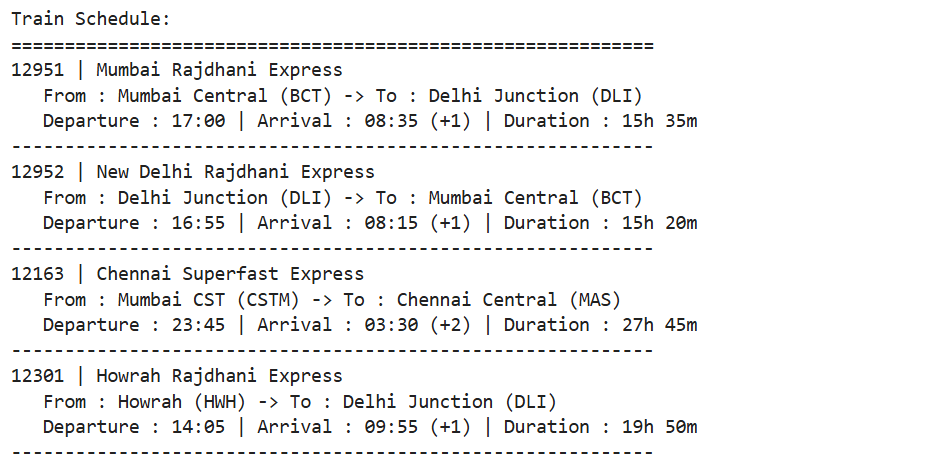
Task 3: Extract Full Train Schedule as a Table
import requests
from bs4 import BeautifulSoup

url = "https://contentitvedant.github.io/Railway_Booking/trains.html"

response = requests.get(url)
soup     = BeautifulSoup(response.text, "html.parser")

table = soup.find(id="train-schedule-table")
rows  = table.find("tbody").find_all("tr")

print("Train Schedule:")
print("=" * 60)

for row in rows:
    cells      = row.find_all("td")
    train_no   = cells[0].get_text()
    train_name = cells[1].get_text()
    from_stn   = cells[2].get_text()
    to_stn     = cells[3].get_text()
    departure  = cells[4].get_text()
    arrival    = cells[5].get_text()
    duration   = cells[6].get_text()
import requests
from bs4 import BeautifulSoup
url = "https://tathagat-pagare.github.io/Railway_Booking/trains.html"
response = requests.get(url)
soup = BeautifulSoup(response.text, "html.parser")
table = soup.find(id="train-schedule-table")
rows = table.find("tbody").find_all("tr")
print("Train Schedule:")
print("=" * 60)
for row in rows:
cells = row.find_all("td")
train_no = cells[0].get_text()
train_name = cells[1].get_text()
from_stn = cells[2].get_text()
to_stn = cells[3].get_text()
departure = cells[4].get_text()
arrival = cells[5].get_text()
duration = cells[6].get_text()
print(train_no, "|", train_name)
print(" From :", from_stn, "-> To :", to_stn)
print(" Departure :", departure, "| Arrival :", arrival, "| Duration :", duration)
print("-" * 60)Output
Only first 4 outputs displayed
Task 4: Extract Passenger Records from the Passengers Page
import requests
from bs4 import BeautifulSoup

url = "https://contentitvedant.github.io/Railway_Booking/passengers.html"

response = requests.get(url)
soup     = BeautifulSoup(response.text, "html.parser")

table = soup.find(id="passenger-records-table")
rows  = table.find("tbody").find_all("tr")

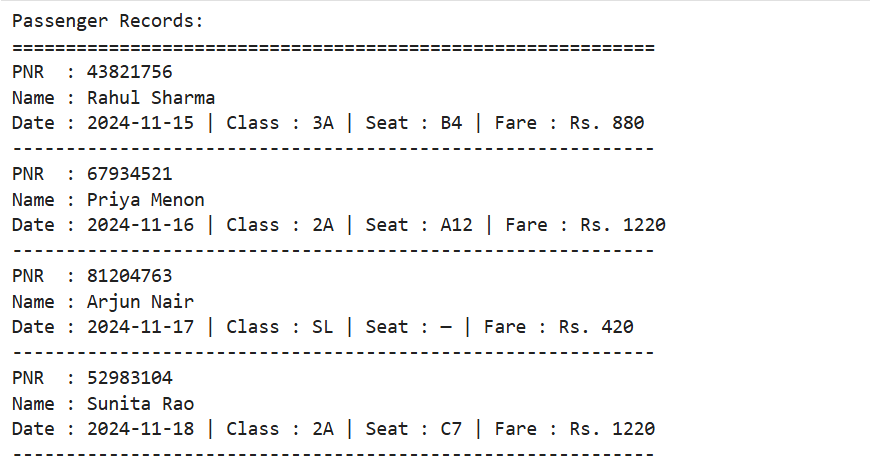
print("Passenger Records:")
print("=" * 60)

for row in rows:
    pnr  = row["data-pnr"]
    name = row.find(class_="passenger-name").get_text()
    date = row.find(class_="journey-date").get_text()
    cls  = row.find(class_="travel-class").get_text()
    seat = row.find(class_="seat-number").get_text()
    fare = row.find(class_="fare").get_text()
import requests
from bs4 import BeautifulSoup

url = "https://tathagat-pagare.github.io/Railway_Booking/passengers.html"

response = requests.get(url)
soup     = BeautifulSoup(response.text, "html.parser")

table = soup.find(id="passenger-records-table")
rows  = table.find("tbody").find_all("tr")

print("Passenger Records:")
print("=" * 60)

for row in rows:
    pnr  = row["data-pnr"]
    name = row.find(class_="passenger-name").get_text()
    date = row.find(class_="journey-date").get_text()
    cls  = row.find(class_="travel-class").get_text()
    seat = row.find(class_="seat-number").get_text()
    fare = row.find(class_="fare").get_text()

    print("PNR  :", pnr)
    print("Name :", name)
    print("Date :", date, "| Class :", cls, "| Seat :", seat, "| Fare : Rs.", fare)
    print("-" * 60)
Output
Only first 4 outputs displayed
Task 5: Extract Seat Availability Data
import requests
from bs4 import BeautifulSoup
url = "https://contentitvedant.github.io/Railway_Booking/seat-availability.html"

response = requests.get(url)
soup     = BeautifulSoup(response.text, "html.parser")

table = soup.find(id="seat-availability-table")
rows  = table.find("tbody").find_all("tr")

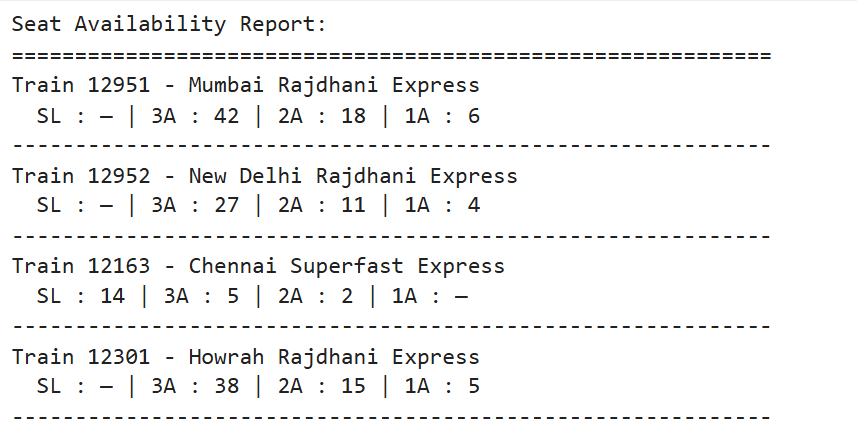
print("Seat Availability Report:")
print("=" * 60)

for row in rows:
    train_no   = row["data-train"]
    train_name = row.find(class_="train-name").get_text()
    seats_sl   = row.find(class_="seats-sl").get_text()
    seats_3a   = row.find(class_="seats-3a").get_text()
    seats_2a   = row.find(class_="seats-2a").get_text()
    seats_1a   = row.find(class_="seats-1a").get_text()

    print("Train", train_no, "-", train_name)
    print("  SL :", seats_sl, "| 3A :", seats_3a, "| 2A :", seats_2a, "| 1A :", seats_1a)
    print("-" * 60)
Output
Only first 4 outputs displayed
Task 6: Build Final Railway Data Scraper
Combine everything into one final scraper class that can fetch data page by just passing the page name.
Create the final RailwayScraper class.
1
import requests
from bs4 import BeautifulSoup

class RailwayScraper:

    def __init__(self):
        self.base_url = "https://contentitvedant.github.io/Railway_Booking/"

    def get_soup(self, page):
        url      = self.base_url + page
        response = requests.get(url)
        soup     = BeautifulSoup(response.text, "html.parser")
        print("Fetched :", url, "| Status :", response.status_code)
        return soup

    def get_train_schedule(self):
        soup   = self.get_soup("trains.html")
        table  = soup.find(id="train-schedule-table")
        rows   = table.find("tbody").find_all("tr")
        trains = []

        for row in rows:
            cells = row.find_all("td")
            trains.append({
import requests
from bs4 import BeautifulSoup

class RailwayScraper:

    def __init__(self):
        self.base_url = "https://tathagat-pagare.github.io/Railway_Booking/"

    def get_soup(self, page):
        url      = self.base_url + page
        response = requests.get(url)
        soup     = BeautifulSoup(response.text, "html.parser")
        print("Fetched :", url, "| Status :", response.status_code)
        return soup

    def get_train_schedule(self):
        soup   = self.get_soup("trains.html")
        table  = soup.find(id="train-schedule-table")
        rows   = table.find("tbody").find_all("tr")
        trains = []
        for row in rows:
            cells = row.find_all("td")
            trains.append({
                "train_no"   : cells[0].get_text(),
                "train_name" : cells[1].get_text(),
                "from"       : cells[2].get_text(),
                "to"         : cells[3].get_text(),
                "departure"  : cells[4].get_text(),
                "arrival"    : cells[5].get_text(),
                "duration"   : cells[6].get_text(),
            })
        return trains

    def get_passengers(self):
        soup       = self.get_soup("passengers.html")
        table      = soup.find(id="passenger-records-table")
        rows       = table.find("tbody").find_all("tr")
        passengers = []
        for row in rows:
            passengers.append({
                "pnr"  : row["data-pnr"],
                "name" : row.find(class_="passenger-name").get_text(),
                "date" : row.find(class_="journey-date").get_text(),
                "class": row.find(class_="travel-class").get_text(),
                "seat" : row.find(class_="seat-number").get_text(),
                "fare" : row.find(class_="fare").get_text(),
            })
        return passengers
import requests
from bs4 import BeautifulSoup

class RailwayScraper:

    def __init__(self):
        self.base_url = "https://tathagat-pagare.github.io/Railway_Booking/"

    def get_soup(self, page):
        url      = self.base_url + page
        response = requests.get(url)
        soup     = BeautifulSoup(response.text, "html.parser")
        print("Fetched :", url, "| Status :", response.status_code)
        return soup

    def get_train_schedule(self):
        soup   = self.get_soup("trains.html")
        table  = soup.find(id="train-schedule-table")
        rows   = table.find("tbody").find_all("tr")
        trains = []
        for row in rows:
            cells = row.find_all("td")
            trains.append({
                "train_no"   : cells[0].get_text(),
                "train_name" : cells[1].get_text(),
                "from"       : cells[2].get_text(),
                "to"         : cells[3].get_text(),
                "departure"  : cells[4].get_text(),
                "arrival"    : cells[5].get_text(),
                "duration"   : cells[6].get_text(),
            })
        return trains

    def get_passengers(self):
        soup       = self.get_soup("passengers.html")
        table      = soup.find(id="passenger-records-table")
        rows       = table.find("tbody").find_all("tr")
        passengers = []
        for row in rows:
            passengers.append({
                "pnr"  : row["data-pnr"],
                "name" : row.find(class_="passenger-name").get_text(),
                "date" : row.find(class_="journey-date").get_text(),
                "class": row.find(class_="travel-class").get_text(),
                "seat" : row.find(class_="seat-number").get_text(),
                "fare" : row.find(class_="fare").get_text(),
            })
        return passengers

    def get_seat_availability(self):
        soup      = self.get_soup("seat-availability.html")
        table     = soup.find(id="seat-availability-table")
        rows      = table.find("tbody").find_all("tr")
        available = []
        for row in rows:
            available.append({
                "train_no"   : row["data-train"],
                "train_name" : row.find(class_="train-name").get_text(),
                "seats_sl"   : row.find(class_="seats-sl").get_text(),
                "seats_3a"   : row.find(class_="seats-3a").get_text(),
                "seats_2a"   : row.find(class_="seats-2a").get_text(),
                "seats_1a"   : row.find(class_="seats-1a").get_text(),
            })
        return available
Create Object and call all 3 Methods
2
scraper = RailwayScraper()
print("\n--- TRAIN SCHEDULE ---")
for train in scraper.get_train_schedule():
    print(
        train["train_no"], "|",
        train["train_name"], "|",
        train["from"], "->", train["to"], "|",
        train["duration"])
scraper = RailwayScraper()
print("\n--- TRAIN SCHEDULE ---")
for train in scraper.get_train_schedule():
print(
train["train_no"], "|",
train["train_name"], "|",
train["from"], "->", train["to"], "|",
train["duration"])
print("\n--- PASSENGER RECORDS ---")
for passenger in scraper.get_passengers():
print(
"PNR:", passenger["pnr"], "|",
"Name:", passenger["name"], "|",
"Class:", passenger["class"], "|",
"Seat:", passenger["seat"]
)
print("\n--- SEAT AVAILABILITY ---")
for seat in scraper.get_seat_availability():
print(
"Train", seat["train_no"], "-",
seat["train_name"], "|",
"SL:", seat["seats_sl"], "|",
"3A:", seat["seats_3a"], "|",
"2A:", seat["seats_2a"]
)Output
Only first 4 outputs displayed
Great job!
You have successfully used Web Scraping to fetch live web pages using the requests library from a real booking website and Parsed HTML structure using BeautifulSoup to locate tables, rows, and cells
Checkpoint



Next-Lab Preparation
Topic: Building Complete Railway Reservation System
1) Combine all modules
2) Build full system
Git Push
git push origin branchName