Shopkart Pagination and Sorting

Business Scenario
Hello talented developers!

In the previous lab, Lab 8 — ShopKart Product Details & Dynamic Routing, you enhanced the ShopKart application by allowing users to navigate from the Product Page to individual Product Details pages. Users could view detailed product information, specifications, reviews, select quantities, and add products to the cart.
As the ShopKart product catalog grows, displaying a large number of products on a single page can make it difficult for users to find and compare products. To improve product discovery and navigation, Lab 9 will enhance the existing Product Page by introducing sorting and pagination.
In this lab, students will implement sorting options that allow users to organize products based on criteria such as price, rating, and popularity.
Pagination will divide the products into multiple pages and display only a specific number of products on each page.

Next-Lab Preparation
Module:
1) useState , Array Methods
2) Event handling , Conditional Rendering, List Rendering
git pull origin branchName
Git Pull
Task 1 : Add Sorting Functionality
Create Sorting State
1
const [sortOption, setSortOption] = useState("");- Open: Add
useStateif it is not already imported and inside the Products component, add
Add the Sort Dropdown
2
<div className="sort-section">

  <label htmlFor="sort">Sort By:</label>

  <select id="sort" value={sortOption} onChange={(e) => setSortOption(e.target.value)}>
    <option value="">Default</option>
    <option value="price-low">Price: Low to High</option>
    <option value="price-high">Price: High to Low</option>
    <option value="rating-high">Rating: High to Low</option>
    <option value="rating-low">Rating: Low to High</option>
    <option value="popular">Most Popular</option>
  </select>

</div>- Create a dropdown that allows users to select how products should be sorted. The dropdown will provide options for price, rating, and popularity.
Create a Copy of Filtered Products
3
- Before sorting the products, create a copy of the filtered product list. This prevents the original product array from being directly modified by
sort().
- After your existing
filteredProductslogic, add:
let sortedProducts = [...filteredProducts];Implement Price Sorting
4
- Use JavaScript's
sort()method to arrange products according to their price.
if (sortOption === "price-low") {
  sortedProducts.sort(
    (a, b) =>
      Number(String(a.price).replace(/,/g, "")) -
      Number(String(b.price).replace(/,/g, ""))
  );
}


if (sortOption === "price-high") {
  sortedProducts.sort(
    (a, b) =>
      Number(String(b.price).replace(/,/g, "")) -
      Number(String(a.price).replace(/,/g, ""))
  );
}- if (sortOption === "price-low") { --> Checks whether the user selected Price: Low to High or Price: High to Low.
.sort((a, b) => ...)compares two products at a time.
String()and.replace()remove commas from prices like"12,499".
Number()converts the price into a number for proper comparison.
a - bsorts low to high, whileb - asorts high to low.
Implement Rating Sorting
5
- Allow users to arrange products according to their customer rating.
if (sortOption === "rating-high") {
  sortedProducts.sort( (a, b) => b.rating - a.rating );
}

if (sortOption === "rating-low") {
  sortedProducts.sort( (a, b) => a.rating - b.rating );
}
Implement Rating Sorting
6
- Use the number of reviews as the popularity indicator. Products with more reviews will be considered more popular and will appear first.
if (sortOption === "popular") {
  sortedProducts.sort(
    (a, b) => b.reviews - a.reviews
  );
}
Display the Sorted List
7
- Replace the existing
filteredProducts.map()withsortedProducts.map()so the Product Page displays the products according to the selected sorting option.
filteredProducts.map((product) => (- Change :
sortedProducts.map((product) => (- To :
sortedProducts.length > 0- Also change the condition to :
Style the Sort drop-down
8
Task 2 : Add Pagination
const product = productDetails.find(
  (item) => item.id === Number(id)
);
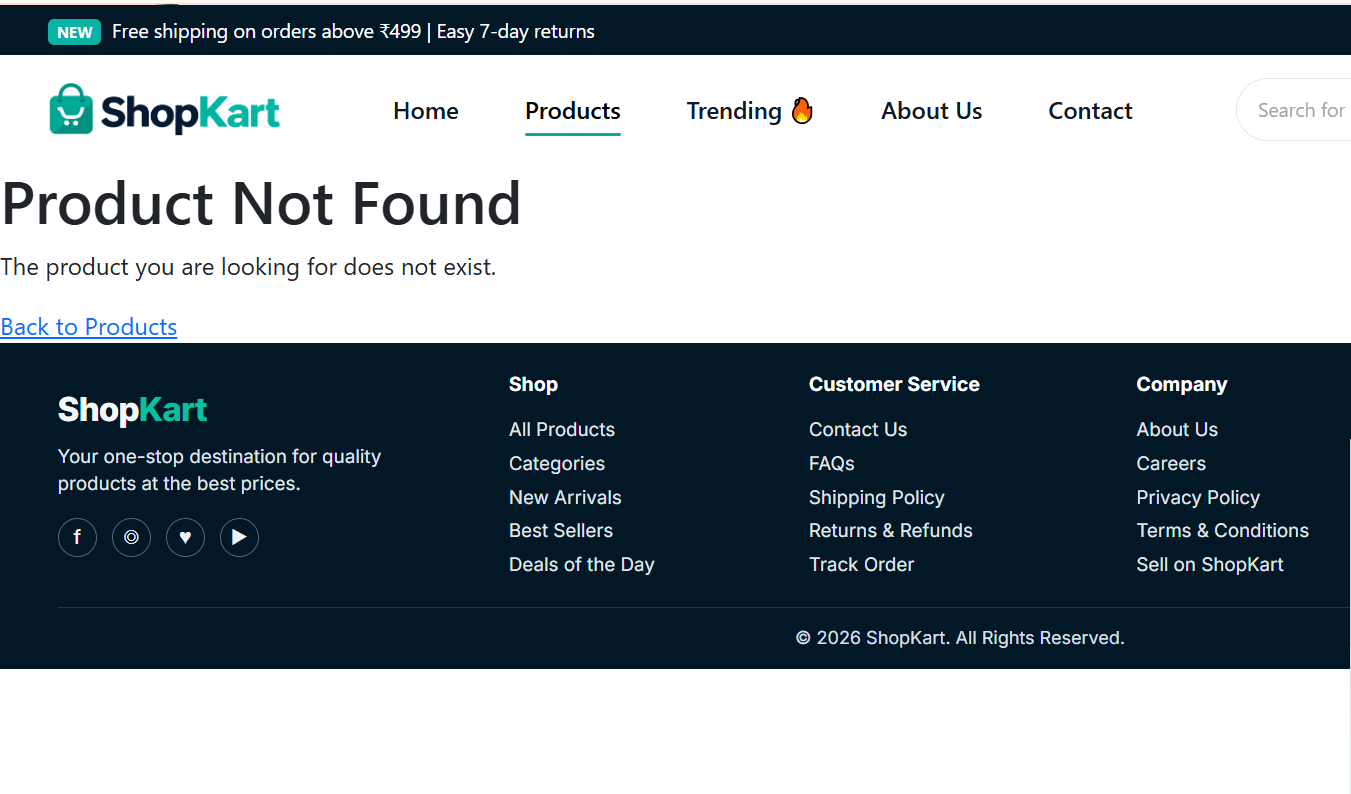
Handle an Invalid Product ID
8
useParams()gives the product ID from the URL as a string, such as"3".- Our product data stores IDs as numbers, such as
3. Number(id)converts"3"into the number3..find()searches theproductDetailsarray for the product whose ID matches
that number.- The matching product is stored in
product, which we then use to display its details.
- In
ProductDetails.jsx, immediately after the previous code add :
if (!product) {
  return (
    <main className="product-not-found">

      <h1>Product Not Found</h1>
      <p> The product you are looking for does not exist. </p>

      <Link to="/products">
        Back to Products
      </Link>

    </main>
  );
}
Add the Dynamic Route in App.jsx
9
- Now we need to tell React Router that
/products/:idshould openProductDetails.jsx.
- Immediately after the Products route, add:
<Route
  path="/products/:id"
  element={
    <ProductDetails dispatch={dispatch} />
  }
/>
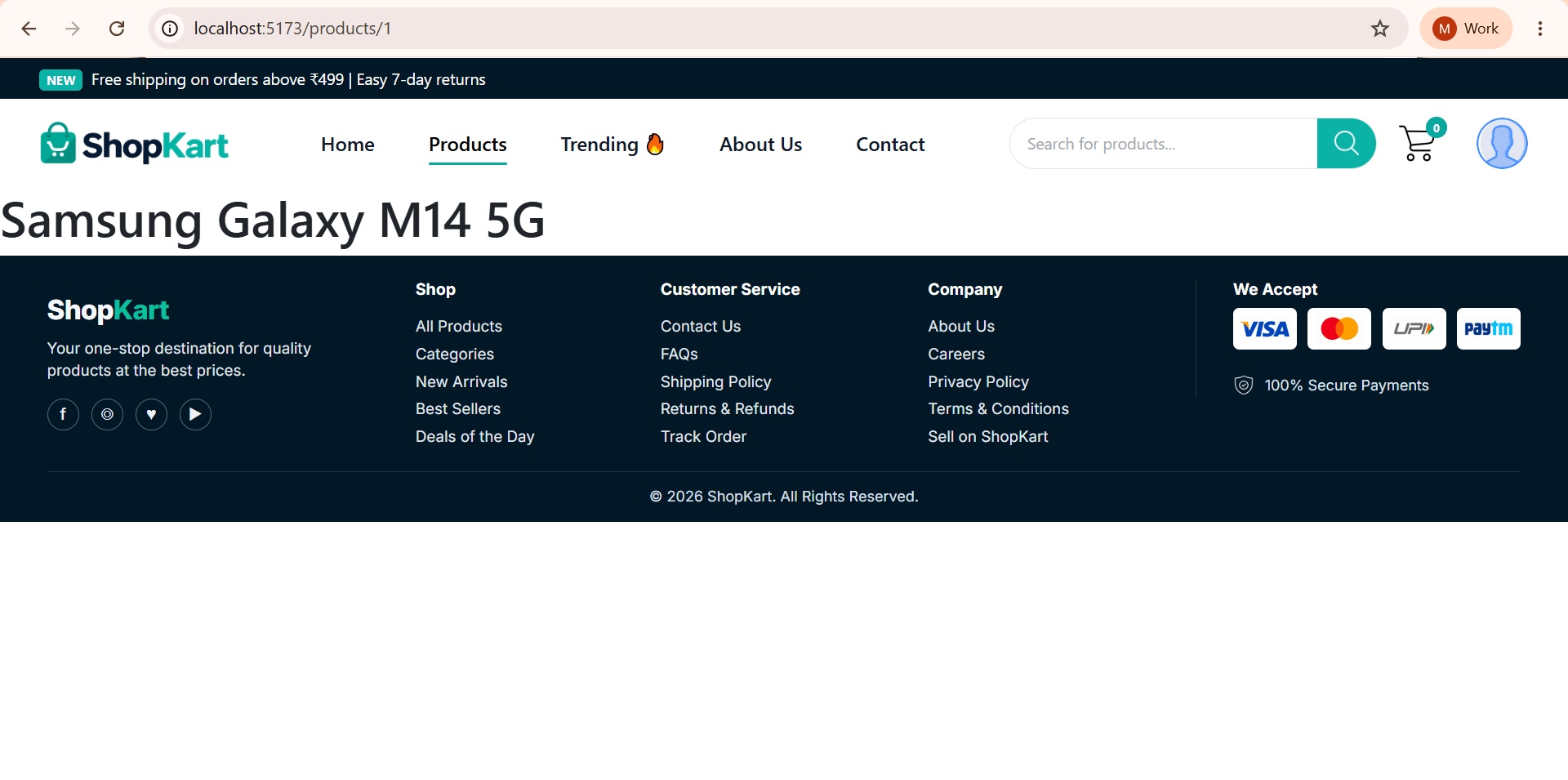
Test the Route Before Building the UI
10
- Inside
ProductDetails.jsx, after the product check, add:
return (
  <main>
    <h1>{product.name}</h1>
  </main>
);-
Open:
/products/1
-
Try opening a product ID that is not present in the product details data.
Task 2 : Create the Complete Product Details UI
- Now replace the temporary:
return (
<main>
<h1>{product.name}</h1>
</main>
);
with the complete Product Details page.
Add Product Overview
1
<section className="product-overview">
  <div className="product-image-section">
    <img src={product.image} alt={product.name} />
  </div>

  <div className="product-info-section">
    <p className="product-category">{product.category}</p>
    <h1>{product.name}</h1>
    <p className="product-brand">Brand: {product.brand}</p>

    <div className="product-rating">
      ⭐ {product.rating}
      <span>({product.reviews} reviews)</span>
    </div>
    <p className="product-short-description">{product.shortDescription}</p>
  </div>
</section>
Add Pricing
2
- Add this inside the
product-info-sectiondiv, after the short description.
<div className="product-pricing">
  <span className="current-price">₹{product.price.toLocaleString("en-IN")}</span>
  <span className="original-price">₹{product.originalPrice.toLocaleString("en-IN")}
  </span>
  <span className="discount">{product.discount} OFF</span>
</div>- Immediately after the pricing section add:
<div className="product-availability">

  <strong> {product.availability} </strong>
  <p>  Free delivery available on eligible orders. </p>

</div>
<div className="purchase-section">
<div className="quantity-section">
<span>Quantity</span>
<div className="quantity-control">
<button type="button" onClick={() =>
setQuantity((previous) => Math.max(1, previous - 1))}>−</button>
<span>{quantity}</span>
<button type="button" onClick={() =>
setQuantity((previous) => previous + 1)}>+</button>
</div>
</div>
<div className="purchase-buttons">
<button className="add-cart-btn" onClick={handleAddToCart}>Add to Cart</button>
<button className="buy-now-btn" onClick={handleBuyNow}>Buy Now</button>
</div>
</div>Add Quantity and Purchase Buttons
3
const handleAddToCart = () => {

  for (let i = 0; i < quantity; i++) {

    dispatch({
      type: "ADD_ITEM",
      payload: product
    });

  }

};
Create the Add to Cart Handler
4
- After the
if (!product)block, add:
Create the Buy Now Handler
5
const handleBuyNow = () => {

  for (let i = 0; i < quantity; i++) {
    dispatch({
      type: "ADD_ITEM",
      payload: product
    });

  }

  navigate("/cart");
};
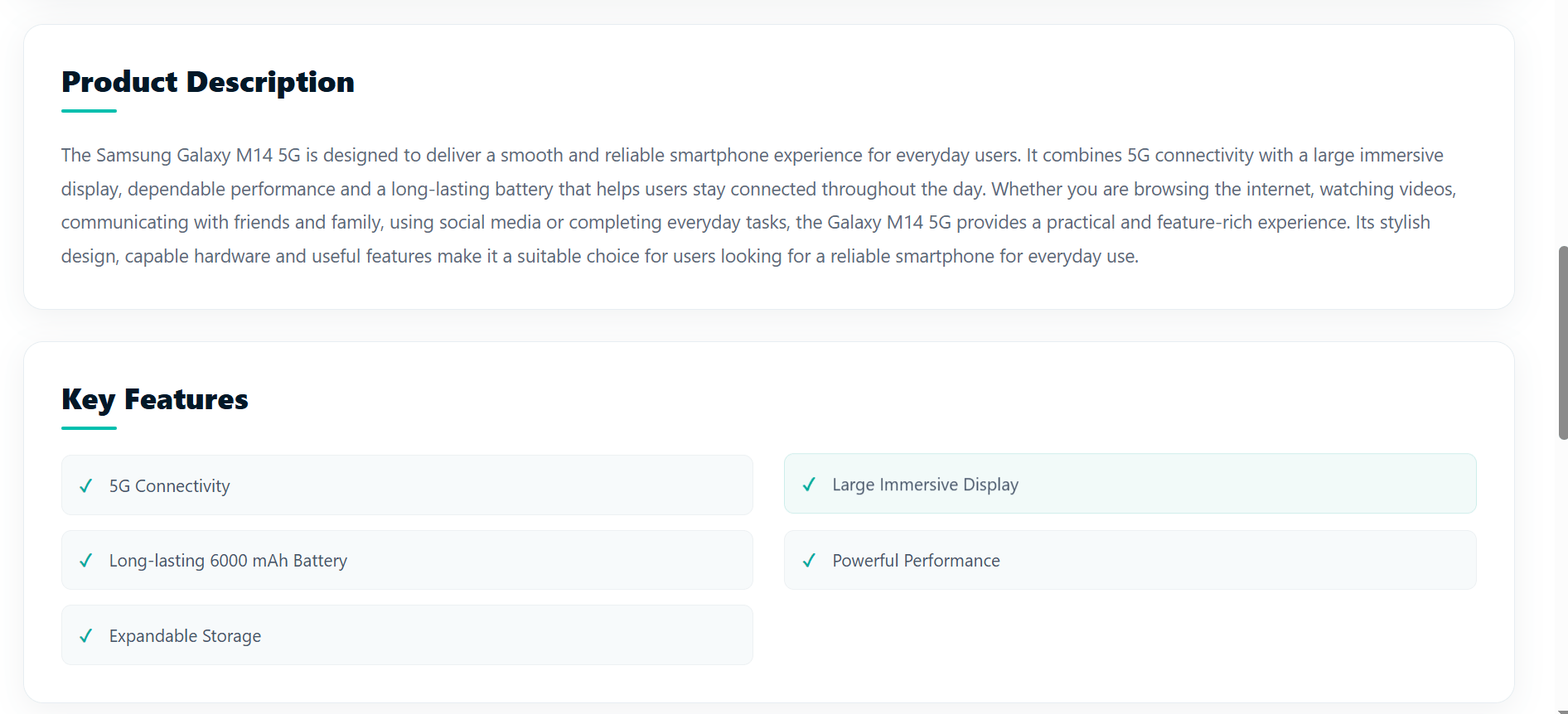
Add Product Description
6
- Now we move outside the Product Overview.
- Immediately after:
</section>of.product-overview, add:
<section className="product-description-section">
        <h2>Product Description</h2>
        <p> {product.description} </p>
</section>
Add Key Features
7
- Immediately after the Product Description section:
<section className="product-features-section">

  <h2>Key Features</h2>

  <ul>
    {product.keyFeatures.map(
      (feature, index) => (
        <li key={index}> {feature} </li>
      )
    )}
</ul>
</section>Add Specifications
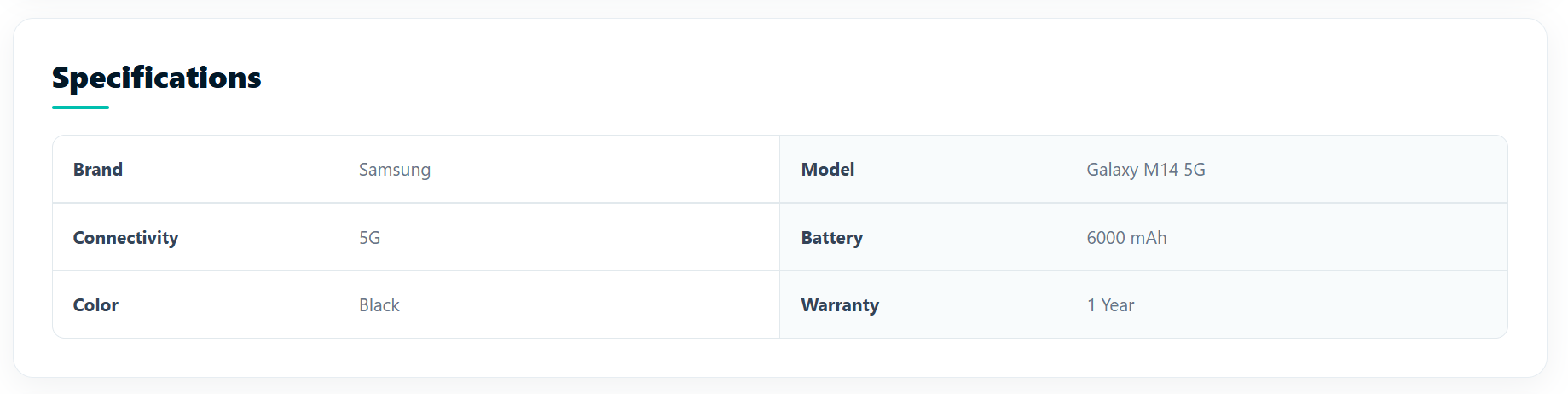
8
- Immediately after the Key Features section:
<section className="specifications-section">

  <h2>Specifications</h2>

  <div className="specifications-grid">
    {Object.entries(product.specifications).map(([key, value]) => (
      <div key={key}>
        <strong>{formatKey(key)}</strong>
        <span>{value}</span>
      </div>
    ))}
  </div>
</section>
Add FormatKey()
9
- Immediately after the buy now handler :
const formatKey = (key) => {

  return key
    .replace(/([A-Z])/g, " $1")
    .replace(/^./, (letter) =>
      letter.toUpperCase()
    );

};-
Object.entries() is used to convert the
product.specificationsobject into an array of key-value pairs, so we can easily loop through it using.map().
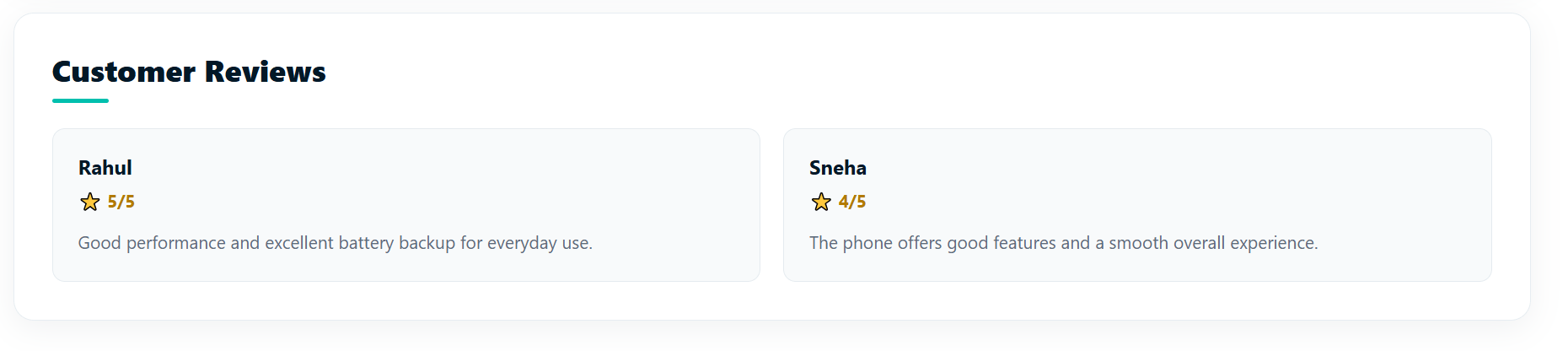
Add Customer reviews
10
- Immediately after the specification section add :
<section className="product-reviews-section">
  <h2>Customer Reviews</h2>
  <div className="reviews-list">
    {product.customerReviews.map((review, index) => (
      <article className="review-card" key={index}>
        <h3>{review.name}</h3>
        <p className="review-rating">⭐ {review.rating}/5</p>
        <p>{review.comment}</p>
      </article>
    ))}
  </div>
</section>- This converts keys such as:
wheelType
Wheel Type
Style the entire product details page
10

Task 2 : Make Product Cards Open Product Details
- Now we connect the existing Products page to the new Product Details page.
- When the user clicks a specific product card, the application should use that product's ID to open its corresponding Product Details page.
- Each product card is connected to its own product ID, ensuring that the details displayed
belong to the product selected by the user.
- For example :
User clicks Samsung Galaxy M14 5G
↓
Product ID = 1
↓
/products/1
↓
Product Details page opens
↓
Samsung Galaxy M14 5G details are displayed
Open Products.jsx At the top, find your existing imports add:
1
import { useNavigate } from "react-router-dom";- Then inside the Products component add :
const navigate = useNavigate();
Add the Dynamic Link
2
- Find the existing product card inside your
.map().
- You currently have something similar to:
<div className="products-grid">
              {filteredProducts.length > 0 ? (
                filteredProducts.map((product) => (
                  <div className="product-card" key={product.id}>
                  .....
....- Change the card so that it navigates to the selected product:
<div className="products-grid">
  {filteredProducts.length > 0 ? (
    filteredProducts.map((product) => (
      <div className="product-card" key={product.id}>

        <div
          className="product-image"
          onClick={() => navigate(`/products/${product.id}`)} >
          {product.discount && (
            <span className="discount-badge"> -{product.discount} </span>
          )}
<button className="wishlist-button" onClick={(e) => e.stopPropagation()} >
♡
</button>
<img src={product.image} alt={product.name} />
</div>
<div className="product-info" onClick={() => navigate(`/products/${product.id}`)}>
<small>{product.category}</small>
<h3>{product.name}</h3>
<div className="rating">
⭐ {product.rating} <span>({product.reviews})</span>
</div>
<div className="product-price">
₹{product.price} <del>₹{product.originalPrice}</del>
</div>
<button
className="add-cart-button"
onClick={(e) => {
e.stopPropagation();
dispatch({
type: "ADD_ITEM",
payload: product
}); setAddedProductId(product.id);
setTimeout(() => {
setAddedProductId(null);
}, 2000);
}}
>
{addedProductId === product.id ? (
<>✓ Added to Cart</>
) : (
<>🛒 Add to Cart</>
)}
</button>
</div>
</div>
))
) : (
<div className="no-products">
<h3>No Products Found !</h3>
<p>Try changing your filters.</p>
</div>
)}
</div>Add Product Card Tooltip on hover
3
<div className="product-card" key={product.id} title="Click for more info">- Just add
title="Click for more info"to your.product-card:
Task 3 : Create Not Found Page for Invalid Routes
- We build a Not Found page to handle situations where a user visits a URL or route that does not exist in the ShopKart application.
/about, /contact, /login, /register
- Suppose ShopKart has these valid routes:
- Now imagine a user enters:
/offer, /shop, /abc123
- These routes do not exist in ShopKart.
- So, instead of showing a blank page and making the user confused about what went wrong, the 404 Not Found page clearly informs them that the requested page or route does not exist and provides an option to navigate back to a valid page.
- This makes the application more user-friendly and provides proper error handling for invalid routes.
Create NotFound.jsx in pages folder
1
import React from "react";
import { Link } from "react-router-dom";
import "./NotFound.css";

function NotFound() {
  return (
    <div className="not-found-page">
      <div className="not-found-container">

        {/* 404 Illustration */}
        <div className="not-found-illustration">
          <img src="/images/not-found-cart.png" alt="Shopping cart"
           className="not-found-cart" />
        </div>

        {/* 404 Message */}
        <h1>Oops! Page Not Found</h1>

        <p className="not-found-description">
          Looks like this page went shopping and never came back.
        </p>

        <p className="not-found-subtext">
          The page you're looking for doesn't exist or may have been moved.
        </p>
{/* Buttons */}
<div className="error-buttons">
<Link to="/" className="home-button">
Back to Home
</Link>
<Link to="/products" className="products-button">
Explore Products
</Link>
</div>
</div>
</div>
);
}
export default NotFound;Style the NotFound page
2
Add NotFound.jsx route in App.jsx
3
<Route path="*" element={<NotFound />} />*is a wildcard
- The
*symbol means any path. - It allows the route to match URLs that don't have a specific route.
We are done with this lab. The latest source code has been uploaded to GitHub. You can access the latest commit using the link below:
Great job!
You successfully implemented dynamic product details, routing, cart actions, and a 404 page in ShopKart.
Checkpoint
Git Push
git push origin branchNameNext-Lab Preparation
Module:
1) useState , Array Methods
2) Event handling , Conditional Rendering, List Rendering