Meta Ad Manager & its Objective

Business Scenario
The Spice Garden Restaurant has successfully set up its Meta Business Account and configured conversion tracking. The next step is understanding Meta Ads Manager, where businesses create, manage, and optimize advertising campaigns. In this activity, you will explore the Meta Ads Manager interface, understand campaign objectives, and learn how Meta's auction and bidding system delivers advertisements to the target audience.

Pre-Lab Preparation
Topic : Inorganic Marketing (Paid Ads)
1) Ad Manager Overview & Ad Objectives
2) Auction & Bidding Strategies
3) Awareness Ad Setup on Meta
4) Traffic Ad Setup on Meta
5) Lead Generation Ad Setup on Meta
6) Engagement Ad Setup on Meta
7) AB Testing on Meta
8) Campaign Budget Optimizatin/ Advantage Campaign Budget
9) Commerce Manager | Catalogue Creation
10) Sales Ad Setup on Meta
11) Payment Setup on Meta and Automation Rules
12) Awarness Ad Setup on LinkedIn
13) Lead Generation Ad Setup on LinkedIn
Task : Decide the Objective, Budget and Bidding Strategies of Spice Garden Restaurant.
Objective:
To explore Meta Ads Manager, understand campaign objectives, and learn how auction and bidding strategies influence ad delivery.
Access Meta Ads Manager
1
- Log in to Meta Business Suite.
- Navigate to Ads Manager.
- Explore the Ads Manager dashboard.
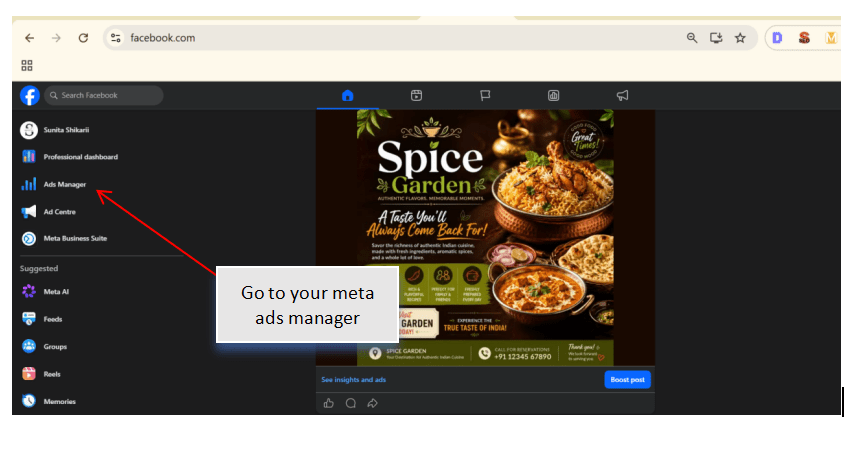
Explore the Ads Manager Interface
2
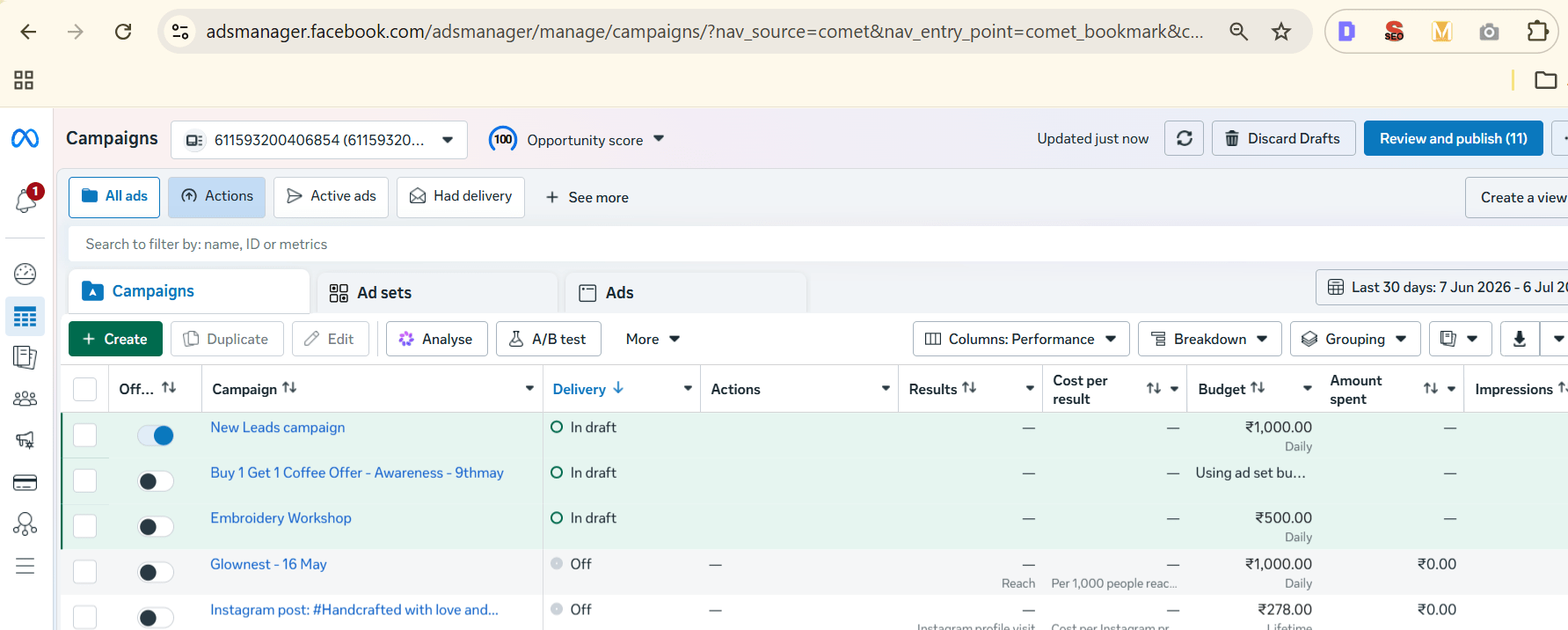
Identify the major sections of Ads Manager.
Review:
-
Campaigns
-
Ad Sets
-
Ads
-
Reporting Dashboard
-
Account Overview
Understand the purpose of each section.
Review Meta Campaign Objectives
3
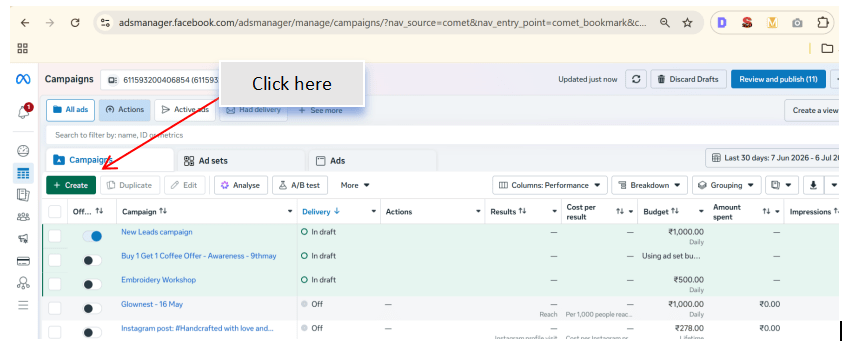
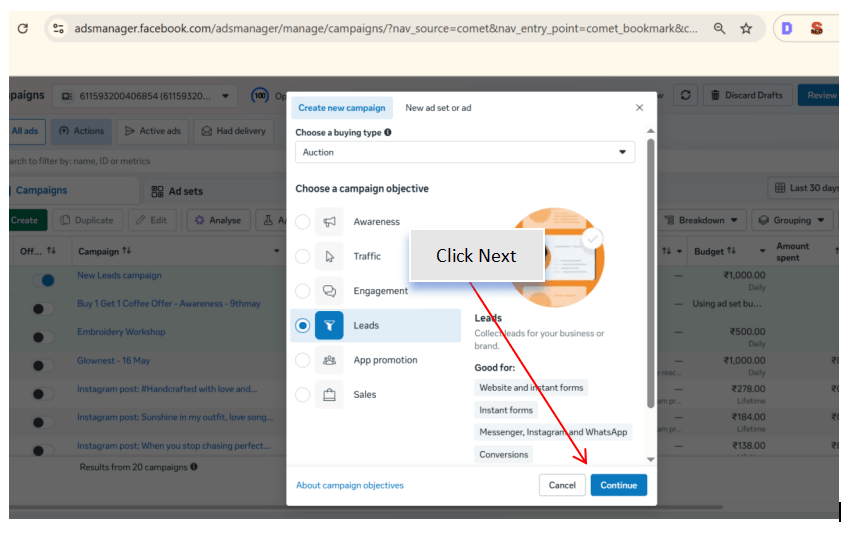
Click Create Campaign.
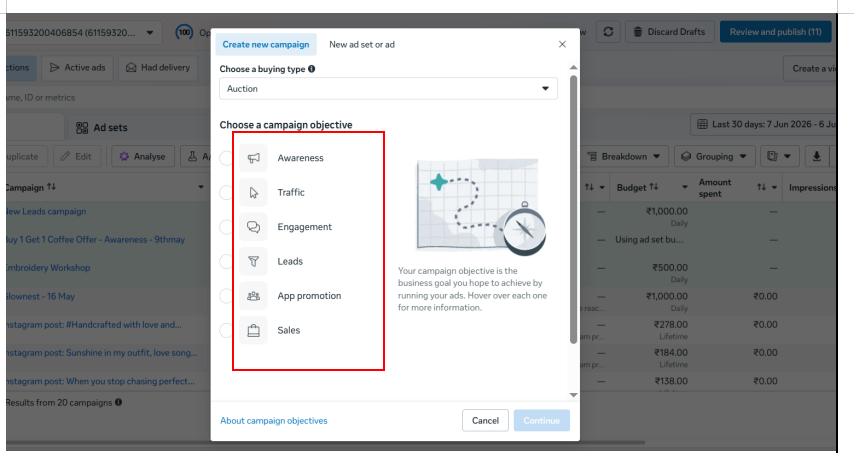
Observe the available campaign objectives.
Identify objectives such as:
-
Awareness
-
Traffic
-
Engagement
-
Leads
-
App Promotion
-
Sales
Discuss when each objective should be selected for different marketing goals.
Match Objectives with Business Goals
4
For the Spice Garden Restaurant, identify the most suitable objective for the
following scenarios:
-
Increase restaurant awareness
-
Drive visitors to the website
-
Generate table reservations
-
Promote a festive offer
-
Increase online food orders
Record the appropriate campaign objective for each scenario.
Explore the Campaign Structure
5
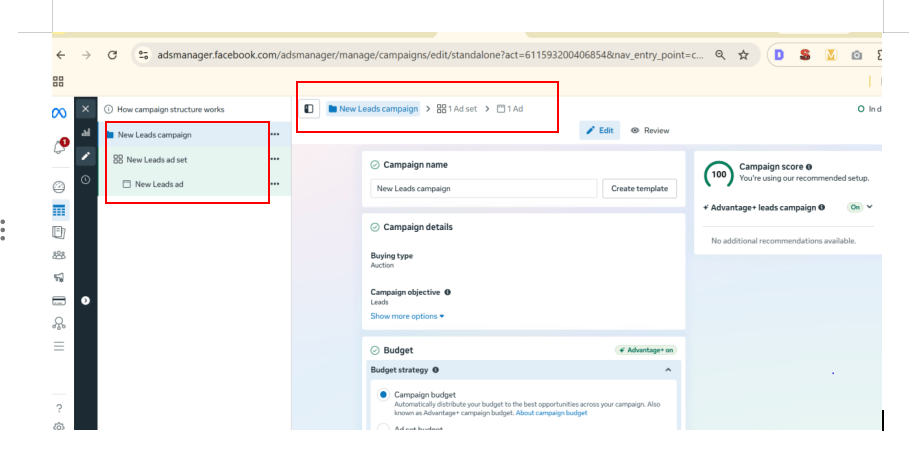
Review the three levels of a Meta advertising campaign:
-
Campaign
-
Ad Set
-
Ad
Identify the settings configured at each level.
Understand how these levels work together during campaign creation.
Understand the Meta Auction System
6
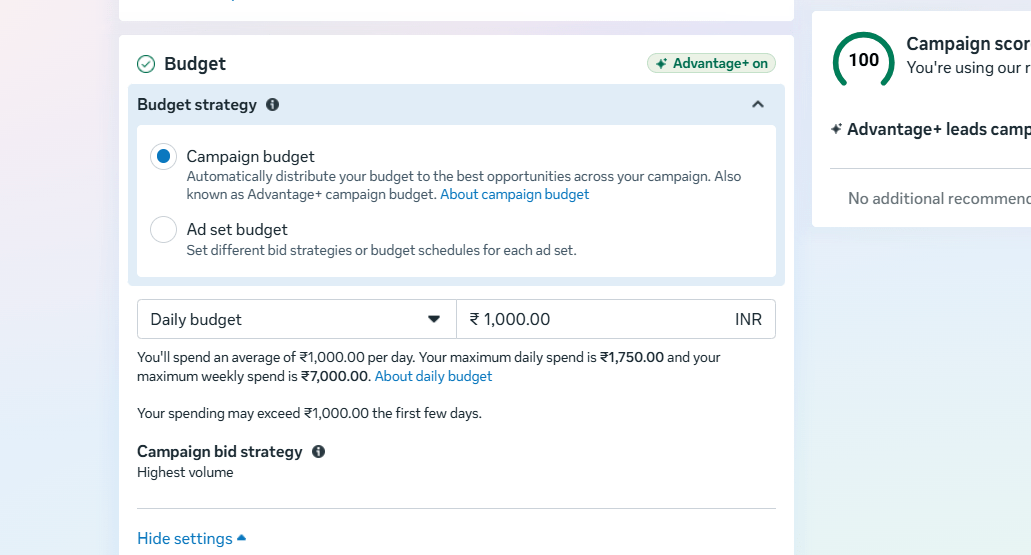
Review how Meta determines which advertisement is shown to users.
Observe the factors considered during the auction process:
-
Bid Amount
-
Estimated Action Rate
-
Ad Quality and Relevance
Discuss how these factors affect campaign performance.
Explore Bidding Strategies
7
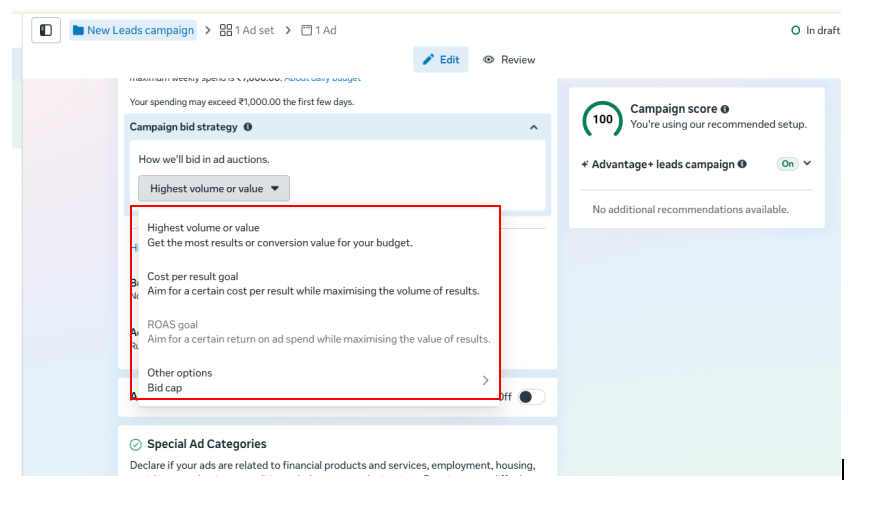
Navigate to the campaign settings and review the available bidding options.
Identify strategies such as:
-
Highest Volume
-
Cost per Result Goal
-
Bid Cap (if available)
Discuss situations where each strategy may be used.
Analyze Sample Campaign Scenarios
8
Review different advertising goals for Spice Garden.
Select an appropriate:
-
Campaign Objective
-
Bidding Strategy
For scenarios such as:
-
Launching a new menu
-
Promoting a weekend discount
-
Increasing website traffic
-
Generating reservations
Record your selections with reasons.
Prepare a Campaign Planning Sheet
9
Create a planning sheet containing:
-
Campaign Goal
-
Recommended Objective
-
Target Audience
-
Suggested Bidding Strategy
-
Expected Outcome
Review the completed plan before creating campaigns in future labs.
Activity
Now it's your turn!
Explore Meta Ads Manager and plan advertising objectives for Spice Garden Restaurant.
You need to:
-
Access Meta Ads Manager
-
Explore the Ads Manager interface
-
Identify Meta campaign objectives
-
Match objectives with business goals
-
Understand the campaign structure
-
Explore the Meta auction system
-
Review bidding strategies
-
Prepare a campaign planning sheet
Congratulations!
You have successfully completed Meta Ad Manager & its Objective LAB for Spice Garden.
In this LAB, you learned how to:
-
How to navigate Meta Ads Manager
-
How Meta advertising campaigns are structured
-
How to select the appropriate campaign objective
-
How Meta's auction system determines ad delivery
-
How bidding strategies influence campaign performance
-
How to align campaign objectives with business goals
Checkpoint