Building Reusable Automation using Ansible Roles

Pre-Lab Preparation
-
Ansible is installed on the Control Node.
-
Managed Nodes are available.
-
Passwordless SSH is configured.
-
Inventory file is configured.
-
Internet connectivity is available.
-
Nginx package repository is accessible.

Task 1: Verify Inventory and Connectivity
Task 1: Verify Inventory and Connectivity
Task 1: Verify Inventory and Connectivity
Task 1: Verify Inventory and Connectivity
2
Navigate to the Ansible working directory.
cd ~/ansible-lab1
1
1
1
Verify managed node connectivity
ansible all -i inventory -m ping
Task 2: Create Ansible Roles
Create a role for web server configuration.
ansible-galaxy init webserver

3
2
Create a role for application server configuration
ansible-galaxy init appserver

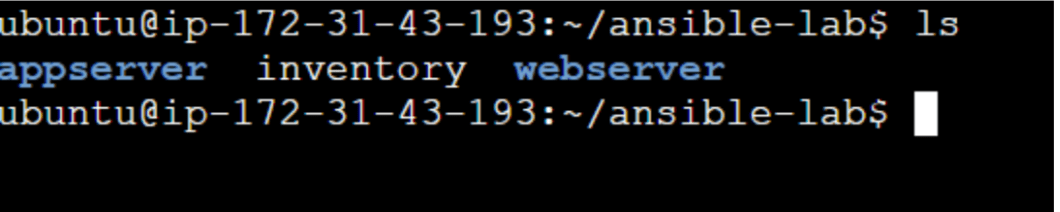
Verify created roles
ls
Task 3: Configure Web Server Role
1
Open the tasks file.
vi webserver/tasks/main.yml2
Add the following tasks.
name: Install Nginx
apt:name: nginx
state: present
update_cache: yes
name: Start Nginx Service
service:
name: nginx
state: started
enabled: yes
Save the file.
Task 4: Configure Application Server Role
2
1
Open the tasks file
vi appserver/tasks/main.ymlAdd the following task
name: Install Apache
apt: name: apache2
state: present
update_cache: yes
- name: Start and enable Apache
service: name: apache2
Task 5: Create Role-Based Playbook
2
1
Create a playbook
vi site.ymlAdd the following content.
name: Configure ContentSphere Servers
hosts: all
become: yes
roles:
- webserver
- appserver
Save the file.
Task 6 : Execute Roles
2
1
1
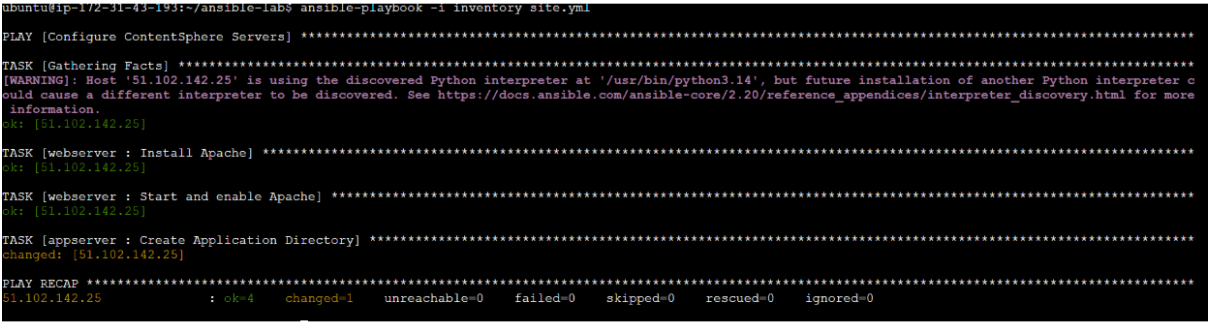
Run the playbook.
ansible-playbook -i inventory site.ymlVerify successful execution.
Task 7: Verify Web Server Configuration
Verify Nginx installation
ansible all -i inventory -m command -a "nginx -v"

2
Verify Nginx service.
ansible all -i inventory -m command -a "systemctl is-active apache2"
Task 8: Verify Application Configuration
1
Verify application directory.
ansible all -i inventory -m command -a "ls /opt"

Great job!
-
Created Ansible Roles.
-
Configured a Web Server Role.
-
Configured an Application Server Role.
-
Integrated multiple roles into a playbook.
-
Executed roles across managed nodes.
-
Verified server configurations.
-
Observed reusable and scalable automation.
Checkpoint
Next-Lab Preparation
-
Creating Variables in Ansible
-
Using Variables in Playbooks
-
Creating Templates
-
Automating Nginx Configuration
-
Deploying Configurations Across Managed Nodes