
AG-UI: When an agent is interacting with your Frontend

Sylvain DEDIEU
Frontend engineer – #ui-foundations 🛸

Sylvain DEDIEU
Frontend engineer – #ui-foundation 🛸

s.dedieu@criteo.com


@sdedieu.bsky.social
s.dedieu@criteo.com


Sylvain Dedieu

Agenda
1
2
3
4
What is and why AG-UI ?
How does it work under the hood ?
Live coding demo
Real use case example in Criteo

Get the presentation slides
🤳


1
2
3
4
What is and why AG-UI ?
How does it work under the hood ?
Live coding demo
Real use case example in Criteo

What is and why AG-UI ?
The AG-UI protocol
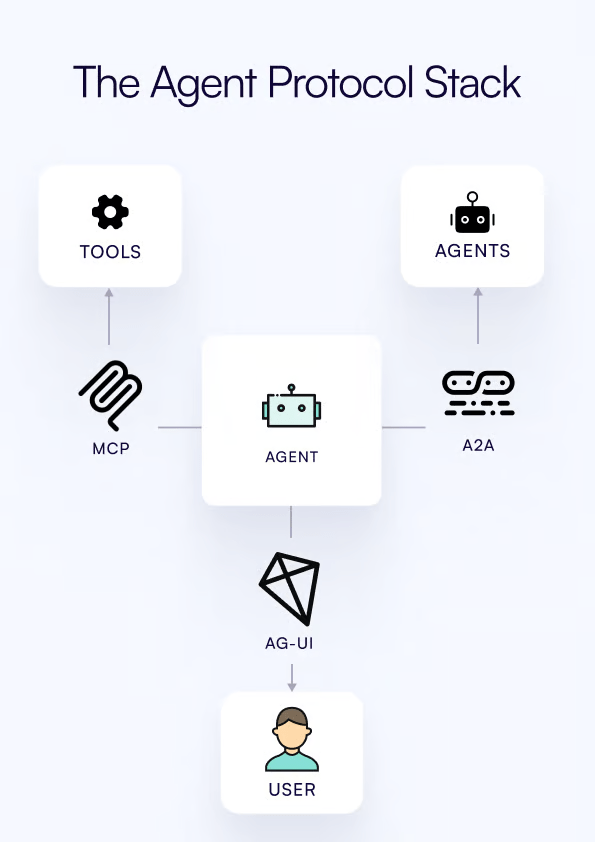
AG-UI is an open, lightweight, event-based protocol that standardizes how AI agents connect to user-facing applications.
Concepts

- Application: User-facing apps (i.e. chat or any AI-enabled application).
- AG-UI Client: Generic communication clients like
HttpAgentor specialized clients for connecting to existing protocols. - Agents: Backend AI agents that process requests and generate streaming responses.
- Secure Proxy: Backend services that provide additional capabilities and act as a secure proxy.
Demo time !
1
2
3
4

What is and why AG-UI ?
How does it work under the hood ?
Live coding demo
Real use case example in Criteo
How does it work under the hood ?
Core principles
- Event-Driven Communication: Agents need to emit standardized event types during execution, creating a stream of updates that clients can process.
- Bidirectional Interaction: Agents accept input from users, enabling collaborative workflows where humans and AI work together seamlessly.
- Flexible Event Structure: Events don’t need to match AG-UI’s format exactly—they just need to be AG-UI-compatible.
- Transport Agnostic: AG-UI supports various transport mechanisms including Server-Sent Events (SSE), webhooks, WebSockets, and more.
Protocol Flexibility
Built-in Middlewares
Events
| Category | Description |
|---|---|
| Lifecycle Events | Monitor the progression of agent runs |
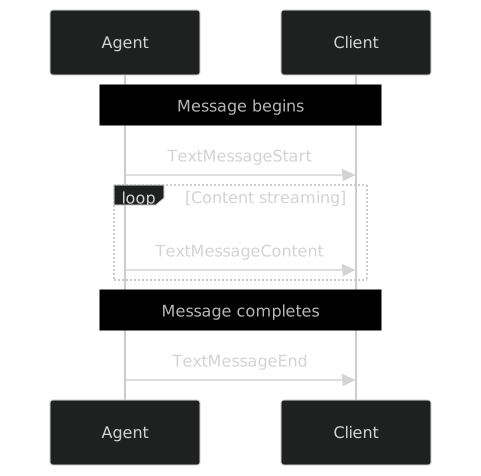
| Text Message Events | Handle streaming textual content |
| Tool Call Events | Manage tool executions by agents |
| State management Events | Synchronize state between agents and UI |
| Activity Events | Represent ongoing activity progress |
| Subagent Events | Track subagents and attribute their output |
| Special Events | Support custom functionality |
| Draft Events | Proposed events under development |
Lifecycle Events
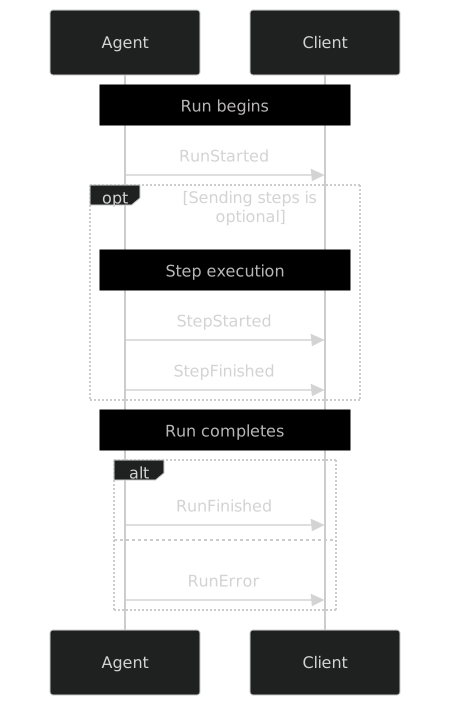
Lifecycle events provide crucial structure to agent runs, enabling frontends to track progress, manage UI states appropriately, and handle errors gracefully.
This streaming approach enables real-time display of message content as it’s generated, creating a more responsive user experience compared to waiting for the entire message to be complete before showing anything.
Text Message Events
Middleware implementation
io.on('connection', (socket) => {
  console.log('✅ Client connected');
  socket.on('chat-message', async (message: Message) => {

  // 1. Formalize input message, create run ids

  // 2. Emit RUN_STARTED event

  // 3. Call openai chat stream mode

  // 4. For every chunk reponses send the right event

  // 4-a. If chunk has content text, emit TEXT_MESSAGE_CHUNK event

  // 4-b. If chunk has toolCalls, emit TOOL_CALL_CHUNK event

  // 5. Emit RUN_FINISHED event

  // 6. On error emit RUN_ERROR event
  });

  socket.on('disconnect', () => {
    console.log('❌ Client disconnected');
  });
});
Middleware implementation
io.on('connection', (socket) => {
  console.log('✅ Client connected');
  socket.on('chat-message', async (message: Message) => {
    console.log('📩 User:', message);

    // 1. Formalize input message, create run ids
    const input: RunAgentInput = {
      threadId: generateUUID(),
      runId: generateUUID(),
      messages: [
        {
          content: message.content,
          role: message.role,
          id: message.messageId,
        },
      ],
      tools: [...],
      context: [],
    };

    // 2. Emit RUN_STARTED event
    socket.emit('event', {
      type: EventType.RUN_STARTED,
      threadId: input.threadId,
      runId: input.runId,
    });

    try {
      // 3. Call openai chat stream mode
      const completions = await openai.chat.completions.create({
        model: 'gpt-4o',
        tools: input.tools.map((tool) => ({
          type: 'function',
          function: {
            name: tool.name,
            description: tool.description,
            parameters: tool.parameters,
          },
        })),
        messages: input.messages.map((msg) => ({
          role: msg.role as 'user' | 'system' | 'assistant' | 'developer',
          content: (msg.content as string) ?? '',
        })),
        stream: true,
      });

      const messageId = generateUUID();
      let toolCallId: string | undefined = undefined;

      for await (const chunk of completions) {
        // 4. For every chunk reponses send the right event
        const content = chunk.choices[0]?.delta?.content;
        const toolCalls = chunk.choices[0]?.delta?.tool_calls;

        if (content) {
          // 4-a. If chunk has content text, emit TEXT_MESSAGE_CHUNK event
          socket.emit('event', {
            type: EventType.TEXT_MESSAGE_CHUNK,
            messageId,
            delta: chunk.choices[0]?.delta?.content || '',
          });
        } else if (toolCalls) {
          // 4-b. If chunk has toolCalls, emit TOOL_CALL_CHUNK event
          const toolCall = toolCalls[0];
          if (toolCall?.id) toolCallId = toolCall.id;
          socket.emit('event', {
            type: EventType.TOOL_CALL_CHUNK,
            parentMessageId: messageId,
            toolCallId,
            toolCallName: toolCall?.function?.name,
            delta: toolCall.function?.arguments,
          } as ToolCallChunkEvent);
        }
      }

      // 5. ✅ Emit RUN_FINISHED event
      socket.emit('event', {
        type: EventType.RUN_FINISHED,
        threadId: input.threadId,
        runId: input.runId,
      });
    } catch (error: any) {
      // 6. ❌ On error emit RUN_ERROR event
      console.error('❌ OpenAI Error:', error);
      socket.emit('event', {
        type: EventType.RUN_ERROR,
        message: error?.message,
      });
    }
  });

  socket.on('disconnect', () => {
    console.log('❌ Client disconnected');
  });
});
1
2
3
4

What is and why AG-UI ?
How does it work under the hood ?
Live coding demo
Real use case example in Criteo
Live coding demo
With SSR
Easier as there is no need to duplicate the state
STATE
FORM
CHAT SERVER
Demo time !
With CSR
Need to duplicate and sync the state both in the Frontend and the Backend
STATE
FORM
CHAT SERVER
BACKEND STATE
Demo time !
1
2
3
4
What is and why AG-UI ?
How does it work under the hood ?
Live coding demo
Real use case example in Criteo
Real use case example in Criteo

Thank You !
Sylvain DEDIEU
Frontend engineer – #ui-foundation 🛸
s.dedieu@criteo.com
@sdedieu.bsky.social
s.dedieu@criteo.com
Sylvain Dedieu