The C♯ Language
You can find a copy on GitHub
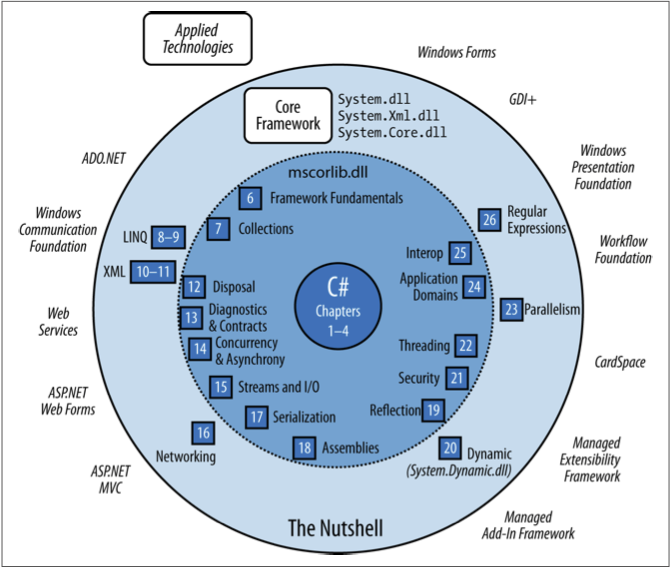
Tutorial Playlists
Language Basics
- C, C++,Java inspired/based -- general purpose
- Traditional compiled language, but to an intermediate language (like Java) with garbage collection
- Object-oriented, imperative/procedural, with functional programming features
- Statically typed, strongly typed
- Originally developed by Microsoft with .NET, now internationally standardized
- Native on Windows, Mono on Linux, now cross-platform via .NET Core
- Big, expressive language
Data and Types
Numeric Types
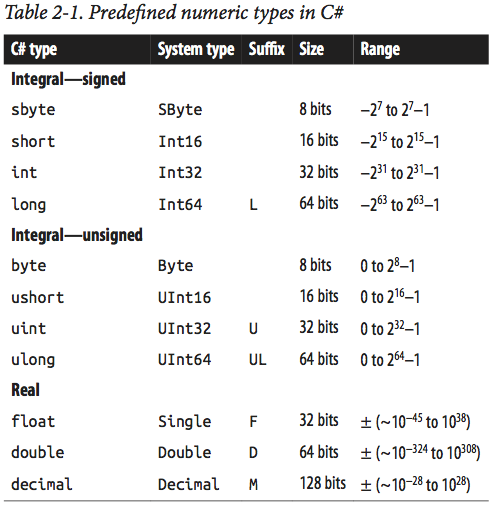
Other Value Types
- char (System.Char)
- bool (System.Boolean)
- struct
- enum
Reference Types
- object (System.Object)
- string (System.String)
- interface
- array (System.Array)
- delegate
int    a = 5;
double b = 30.43;
bool   c = false;
char   d = 'Z';
string e = "Welcome to C#";
ArrayList f = new ArrayList();
Array and Struct
char[] vowels  = new char[5];
char[] vowels2 = new char[] {'a','e','i','o','u'};
char[] vowels3 = {'a','e','i','o','u'};

for(int i = 0; i < vowels.Length; i++)
{
    Console.Write(vowels[i]);
}

public struct Point
{
    public int X, Y;
    public Point(int x, int y) { X = x; Y = y; }
}

Point p = new Point(4,5);
Basic Program Structure
using System;

namespace MyConsoleAppName
{
    class Program
    {
        static void Main(string[] args)
        {
            Console.WriteLine("Hello World!");
        }
    }
}
using System;
namespace MyConsoleAppName
{
enum BallType
{
Basketball,
Baseball,
Soccerball,
Volleyball
}
class Ball
{
private double radius;
private BallType type;
public Ball(double radius, BallType type)
{
this.radius = radius;
this.type = type;
}
}
} Control Structures
All the usual
- if-else
- while, do-while
- for, foreach
- continue, break
- switch-case
- try-catch-finally
int x = 10;

// Argument must be a boolean
if(x < 20)
{
    Console.WriteLine("Less than");
}
else
{
    Console.WriteLine("Greater than or equal to");
}
Expressions and Operators
No surprises here. All the usual expression operators. See later slides for unusual operators.
Methods
- Base syntax is exactly as C, C++ and Java
- No "naked" functions allowed; all functions go inside classes and are called methods
-
staticmethods can be called like functions without an instance of the class. - Program entry point is a static method
- Can pass methods to methods as parameters (see Function delegates later)
Parameter Passing
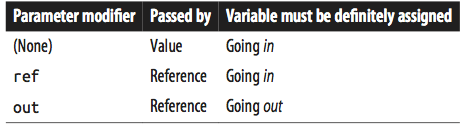
using System;

// "Normal" scenario
class Test
{
    static void Foo(int p)
    {
        Console.WriteLine(p);
    }

    static void Main()
    {
        Foo(8);
    }
}
using System;
class Test // ref modifier
{
static void Foo(ref int p)
{
Console.WriteLine(p);
p = p + 1;
}
static void Main()
{
int x = 8;
Foo(ref x);
Console.WriteLine(x); // x is now 9
}
}using System;
class Test // out modifier
{
static void Split (string name, out string firstNames, out string lastName)
{
int i = name.LastIndexOf (' ');
firstNames = name.Substring (0, i);
lastName = name.Substring (i + 1);
}
static void Main()
{
string a, b;
Split ("Stevie Ray Vaughan", out a, out b);
Console.WriteLine (a);
Console.WriteLine (b);
}
}
// outputs:
// Stevie Ray
// Vaughanusing System;
class Test // params modifier
{
static int Sum (params int[] ints)
{
int sum = 0;
for (int i = 0; i < ints.Length; i++)
sum += ints[i];
return sum;
}
static void Main()
{
int total = Sum (1, 2, 3, 4);
Console.WriteLine (total);
}
}using System;
class Test // Optional parameters
{
static string JoinWith(char a, char b, string del = ",")
{
// C# 6 "interpolated string literal
return $"{a}{del}{b}";
}
static void Main()
{
Console.WriteLine( JoinWith('u','v') );
Console.WriteLine( JoinWith('u','v',"___") );
}
}
// outputs:
// u,v
// u___vusing System;
class Test // Named arguments
{
static void Foo(int x, int y)
{
Console.WriteLine(x + ", " + y);
}
static void Main()
{
Foo(x:1, y:2);
Foo(y:4, x:9);
}
}
// outputs:
// 1, 2
// 9, 4// Expression-bodied function members
public int AddTwo(int a, int b) => a + b;Var and Nulls
// Implicitly typed local variables

var i = 5;

var adj = "a superlative";

var arr = new[] {1,2,3};

var expr =
    from c in customers
    where c.City == "London"
    select c;
Null-Coalescing Operator
string s = null;
string s1 = s ?? "something else";
Null-Conditional Operator
// "Elvis" operator (?:), prevents NullReferenceException
// AKA: Safe navigation operator
System.Text.StringBuilder sb = null;
string s = sb?.ToString();

// equivalent to
string s = (sb == null ? null : sb.ToString());

// short circuits and is safe
x?.y?.z;

System.Text.StringBuilder sb = null;
string s = sb?.ToString() ?? "something else";
Nullable Types
string s = null;    // just fine
int a = null;       // does not compile

int? id = null;     // OK
System.Nullable<int> id = null;

// common MVC pattern
public ActionResult Details(int? id)
{
    if(id == null)        // or !id.HasValue
    {
        return new HttpStatusCodeResult(400, "Missing user identifier in request");
    }
    User user = db.Users.Find(id);
    // ...
}
Operator Lifting with Nullable Types
int? x = 8;
int? y = 100;
int? z = null;      // i.e. System.Nullable<int> z

// operators are lifted from int
// Normal:
x == y
x + y
x < y

// But must worry about effect of null
x == z     // False
x + z      // null
x < z      // False
x > z      // False
Naming Conventions
Namespaces
namespace SomeNameSpaceName
{
    class Class1 {}
    // other members
}

namespace Outer {
    namespace Middle {
        namespace Inner {
            class Class2{}
        }
    }
}

using SomeNameSpaceName;
using Outer.Middle.Inner;
// Auto generated code in: file1.cs
namespace MyApp
{
partial class MyClass { public void MyMethod(){} }
// other members
}
// Your code in: file2.cs
namespace MyApp
{
partial class MyClass { public void OtherMember(){} }
}Classes
using System;

public class Wolf : Canine, IEquatable<Wolf>
{
    public string Name = "Wolfie";
    public string Owner;
    public int Legs;
    private static int totalCount;
    private DateTime birthday;

    public Wolf() {}
    public Wolf(string name)
    {
        this.name = name;
    }
    //...
}
Object Initializers
Wolf w1 = new Wolf("Sharp Teeth") { Owner="Me", Legs=4 };
Wolf w2 = new Wolf { Name="Ghost", Owner="John Snow", Legs=4 };
Properties
public class Stock
{
    decimal maxPrice;        // private "backing field"

    public decimal MaxPrice
    {
        get { return maxPrice; }
        set { maxPrice = value; }
    }

    // Automatic property
    public decimal CurrentPrice { get; set; }
}
var s = new Stock();
s.MaxPrice = 99.99M;
Console.WriteLine(s.CurrentPrice);// Read-only property
string symbol; // set in the constructor
public string Symbol
{
get { return symbol; }
}
// Expression-bodied property (also read-only)
public decimal Worth => currentPrice * sharesOwned;
// Initializer
public int Volume { get; set; } = 100;Finalizers
class Class1
{
    ~Class1()
    {
        // release resources?
    }
}
Typical Class in MVC
public partial class Comment
{
    public Comment(){}

    public int ID { get; set; }

    public DateTime SubmissionDate { get; set; }

    public string Body { get; set; }
}
Overriding Inherited Methods
public class Asset
{
    public string Name;
    public virtual decimal Liability => 0;
}

public class Stock : Asset
{
    public long SharesOwned;
}

public class House : Asset
{
    public decimal Mortgage;
    public override decimal Liability => Mortgage;
    public override string ToString() { return "A House"; }
}
Inheritance & Constructors
public class SubClass : BaseClass
{
    public SubClass( int x ) : base (x) { }
}

    // Can also use base like this (no super)
    int a = base.someNum;
Object and Boxing/Unboxing
// System.Object or object is the base of the object hierarchy
object o = new House();

// C# has boxing and unboxing
int age = 32;
object obj = age;

int myAge = (int)obj;
Delegates
// Declare a new type
public delegate double BinaryOperator( double a, double b );

// Create methods we want to use
public static double Add( double a, double b ) => a + b;
public static double Sub( double a, double b ) => a - b;
public static double Div( double a, double b ) => a / b;
public static double Mul( double a, double b ) => a * b;

    // Create an instance of the delegate type
    BinaryOperator bop = Sub;

    // Use it
Console.WriteLine( "7 - 9.3 = " + bop(7,9.3) );- Similar to "pointer to function" in C, C++
- Is type safe
- Used to create callback functions
- Integral to implementing Observer-Observable pattern
- Used in lambda functions (expressions) and LINQ
- Useful in MVC and with testing
- Has other features
- Multi-cast
- Integrates with events
- Can use generics
Lambda Functions
// Expression Lambdas
// (input parameters) => expression

x => x * x
(x,y) => x == y
(int x, string s) => s.Length > x
// Statement Lambdas
// (input parameters) => { statement1; statement2; statement3; }
() => {Console.WriteLine("Hello Lambda!");}
(x,y) => { return x == y; } // weird way to write that!Consider Generic Delegates
// C# 3.0 defined
namespace System
{
    public delegate TResult Func<out TResult>();
    public delegate TResult Func<in T, out TResult>(T arg);
    public delegate TResult Func<in T1, in T2, out TResult>(T1 arg1, T2 arg2);
}Func<double, double, double> sum = (x,y) => x + y;
public static IEnumerable<U> Map(Func<T, U> fn, IEnumerable<T> list)
{
//apply fn to list and return resulting new list
}
var output = Map( x => x * x, nums );Extension Methods
- Extend an existing type whith new methods
- Doesn't alter original type
- Need to add a
usingstatement for extension class in order to use it (i.e.using System.Linq;for LINQ operators) - Needs to be a static method in a static class
-
thismodifier as first parameter - Works for interface types too
// "Add" to string class
public static class StringHelper
{
    public static bool IsCapitalized (this string s)
    {
        if (string.IsNullOrEmpty(s))
            return false;
        return char.IsUpper (s[0]);
    }
}
// Call it as a built-in method
"Perth".IsCapitalized();
// or as a static method
StringHelper.IsCapitalized("Perth");

// How it's translated:
arg0.Method(arg1, arg2, ...);              // Extension method call
StaticClass.Method(arg0, arg1, arg2, ...); // Static method call
// Map example from previous slide
// written as an extension method
Func<double, double, double> sum = (x,y) => x + y;
public static IEnumerable<U> Map(this IEnumerable<T> list, Func<T, U> fn)
{
//apply fn to list and return resulting new list
}
var output = nums.Map( x => x * x );Chaining
Look at some definitions in IEnumerable<T>
int[] ints = { 10, 45, 15, 39, 21, 26 };
var result = ints.OrderBy(g => g).Take(4).Average();

// Versus
var result = Average(Take(OrderBy(ints, g=>g),4));
Anonymous Types
- Simple un-named reference type; inherits directly from
object - Compiler generates code using a template to create the class
- Must use a
varkeyword to create new objects of this type - You automatically get an
.Equals()that compares members for equality - NOT dynamic like Javascript object types
- Access by name (property), i.e. like Name/Value pairs
var obj = new {Name = "Jane", Age = 28, CellNumber = "555-555-1111" };

 // or

var obj2 = new {
    Store = "ShoesForLess",
    Categories = new String[]{"Running","Leisure","Dress","Sandals"},
    Date = DateTime.Now
    }

Console.WriteLine(obj2.Store);
Useful in LINQ select queries
var categories = db.ProductCategories
                   .OrderBy( pc => pc.Name )
                   .Select( pc => new { Name = pc.Name,
                                        Id   = pc.ProductCategoryID } );
Attributes
“Attributes are an extensible mechanism for adding custom information to code elements (assemblies, types, members, return values, parameters and generic type parameters).”
i.e. decorating code elements with metadata
Used extensively in ASP.NET MVC
// For specifying SQL attributes
public partial class SomeClass
{
    [Key]
    [StringLength(4)]
    public string GuID { get; set; }

    [Required, StringLength(64)]
    public string ModelName { get; set; }

    [Required]
    [Phone]
    [Display(Name = "Phone Number")]
    public string Number { get; set; }
}
Used extensively in ASP.NET MVC
// For specifying behavior in controller action methods
[HttpPost]
[Authorize]
[ValidateAntiForgeryToken]
public ActionResult Apply(MemberInfoViewModel newMember)
{
    if (ModelState.IsValid)
    {
        //...
        return RedirectToAction("Index", "Manage", new { success = true });
    }

    return View(newMember);
}
Adding an attribute causes an instance of the attribute class to be created and attached to the element. At runtime, code can use reflection to inquire about available attribute objects and use them accordingly.
// Creating an attribute to manage HTTP's Basic Authentication
// https://developer.mozilla.org/en-US/docs/Web/HTTP/Authentication
public class BasicAuthenticationAttribute : ActionFilterAttribute
{
    public string BasicRealm { get; set; }
    protected string Username { get; set; }
    protected string Password { get; set; }

    public BasicAuthenticationAttribute(string username)
    {
        //...
    }

    public override void OnActionExecuting(ActionExecutingContext filterContext)
    {
        //...
    }
}
Collections
Built-in data structures of both generic and non-generic types
- List, ArrayList, LinkedList, ImmutableList, ...
- Queue, Stack
- HashSet, SortedSet, Dictionary, OrderedDictionary, ...
- Generic versions: LinkedList<T>
Yup, the usual:
using System;
using System.Collections;
public class SamplesArrayList
{
   public static void Main()
   {
      // Creates and initializes a new ArrayList.
      ArrayList myAL = new ArrayList();
      myAL.Add("Hello");
      myAL.Add("World");
      myAL.Add("!");

      // Displays the properties and values of the ArrayList.
      Console.WriteLine( "myAL" );
      Console.WriteLine( "    Count:    {0}", myAL.Count );
      Console.WriteLine( "    Capacity: {0}", myAL.Capacity );
      Console.Write( "    Values:" );
      PrintValues( myAL );
   }

   public static void PrintValues( IEnumerable myList )
   {
      foreach ( object obj in myList )
         Console.Write( "   {0}", obj );
      Console.WriteLine();
   }
}
And in generic form
// using System.Collections.Generic
List<string> dinosaurs = new List<string>();

Console.WriteLine("\nCapacity: {0}", dinosaurs.Capacity);

dinosaurs.Add("Tyrannosaurus");
dinosaurs.Add("Amargasaurus");
dinosaurs.Add("Mamenchisaurus");
dinosaurs.Add("Deinonychus");
dinosaurs.Add("Compsognathus");
Console.WriteLine();
foreach(string dinosaur in dinosaurs)
{
    Console.WriteLine(dinosaur);
}
We frequently use objects of these types:
and should look closely at these interfaces
LINQ
Language Integrated Query
- Built-in to the language
- Supported by the framework for local objects and remote data connections
- Type safe
- Operate on
IEnumerable<T>and/orIQueryable<T> - Found in
System.LinqandSystem.Linq.Expressions - LINQ-to-Objects
- LINQ-to-SQL
- LINQ-to-XML, even LINQ-to-JSON
Sequences and Operators
 string[] names = { "Tom", "Dick", "Harry" };

 IEnumerable<string> out = names.Where(n => n.Length >= 4);

 foreach (string name in out)
    Console.WriteLine (name);

// Dick
// Harry
Using Fluent Syntax
Chaining Query Operators
string[] names = { "Tom", "Dick", "Harry", "Mary", "Jay" };

IEnumerable<string> out = names.Where(n => n.Contains("a"))
                               .OrderBy(n => n.Length)
                               .Select(n => n.ToUpper());
foreach (string name in out)
    Console.WriteLine (name);

// JAY
// MARY
// HARRY
| Classification | Operators |
|---|---|
| Filtering | Where, OfType |
| Sorting | OrderBy, OrderByDescending, ThenBy, ThenByDescending, Reverse |
| Grouping | GroupBy, ToLookup |
| Classification | Operators |
|---|---|
| Join | GroupJoin, Join |
| Projection | Select, SelectMany |
| Aggregation | Aggregate, Average, Count, LongCount, Max, Min, Sum |
| Classification | Operators |
|---|---|
| Quantifiers | All, Any, Contains |
| Elements | ElementAt, ElementAtOrDefault, First, FirstOrDefault, Last, LastOrDefault, Single, SingleOrDefault |
| Set | Distinct, Except, Intersect, Union |
| Partitioning | Skip, SkipWhile, Take, TakeWhile |
| Classification | Operators |
|---|---|
| Concatenation | Concat |
| Equality | SequenceEqual |
| Generation | DefaultEmpty, Empty, Range, Repeat |
| Conversion | AsEnumerable, AsQueryable, Cast, ToArray, ToDictionary, ToList |
// Pagination

public ViewResult List(int page = 1)
{
    return View(db.Products.OrderBy(p => p.ProductID)
                           .Skip((page - 1) * PageSize)
                           .Take(PageSize));
}
Types
- Lambda expressions
- IEnumerable<T> (local queries)
- IQueryable<T> (interpreted queries)
Things to pay attention to:
- Deferred execution (See here)
- Captured variables
- Subqueries
- Fluent (dot) or query syntax?
- Returning anonymous types
Query syntax (DO NOT USE!)
var query = from c in db.Customers
            where c.State == "Oregon"
            select st.FirstName;
Loading of Navigation Properties
- Eager loading (the default in EF Core)
- Explicit loading
- Lazy loading (the default in EF 6)