DevOps
Workshop
$ ~ whoami
👋 I'm Durgadas


👨💻 Principal Architect @ Persistent Systems
Let's connect!
durgadas.in (blog)
@imdurgadas (twitter)
@durgadaskamath (youtube)
kamathdurgadas (linkedin)
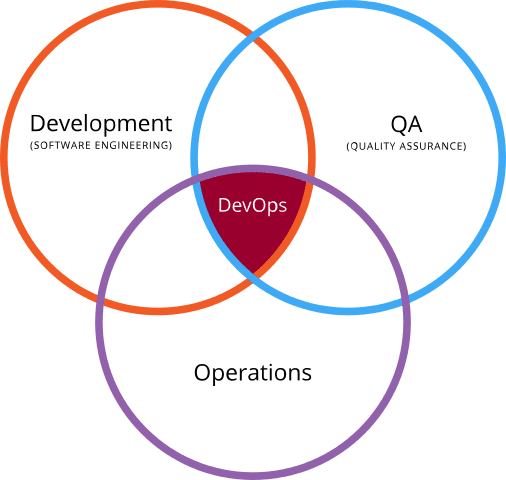
What is DevOps?
-
Breaks silos between developers (building software) and operations (deploying/maintaining it).
-
Shared Goals: Faster delivery, fewer failures, quicker recovery.
-
Examples:
-
Developers write infrastructure-as-code (IaC) scripts.
-
Ops teams use CI/CD pipelines to automate testing/deployment.
-
DevOps Practices
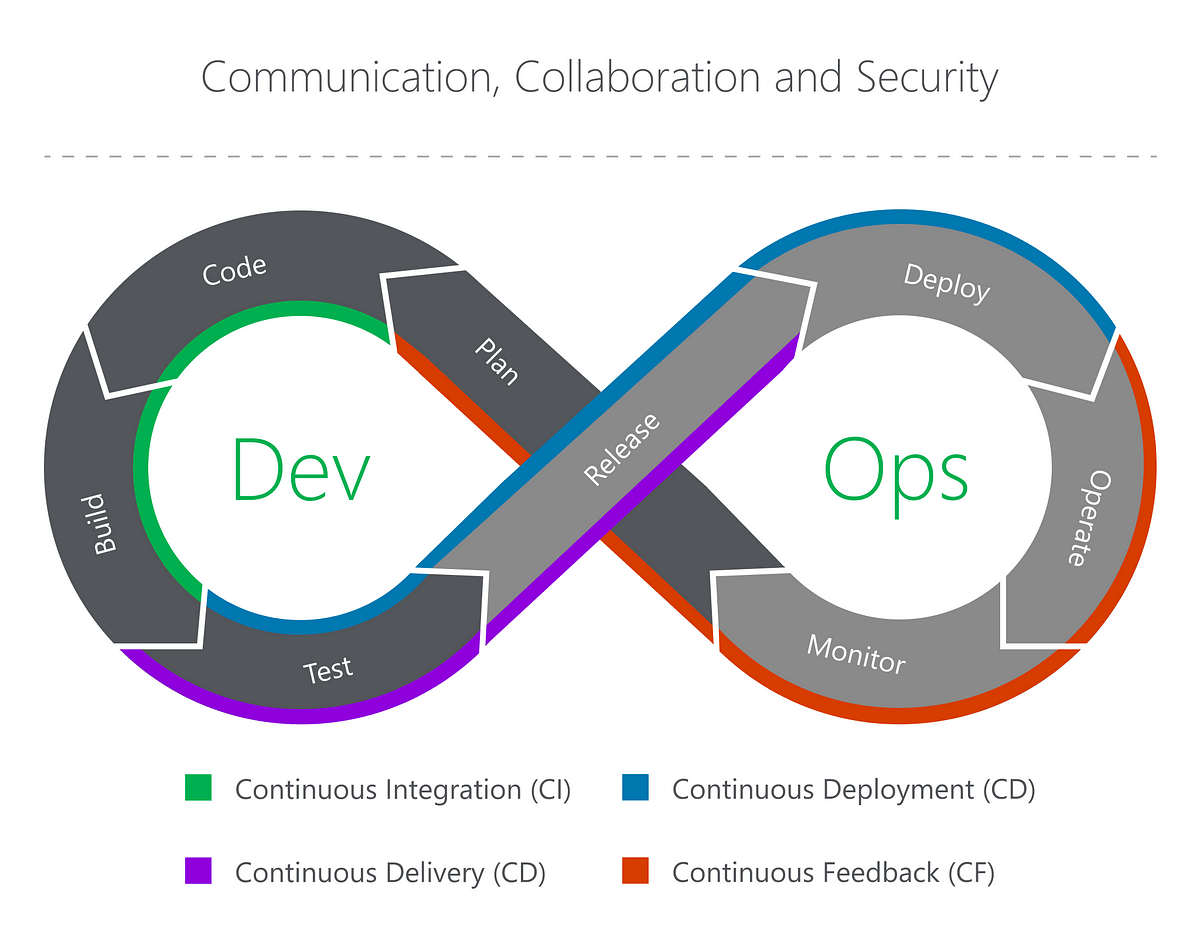
Key Practices:
-
CI/CD:
-
Continuous Integration: Automatically test code changes.
-
Continuous Deployment: Automatically ship code to production.
-
-
Infrastructure as Code (IaC): Manage servers/networks via code (e.g., Terraform).
-
Monitoring: Track performance and errors in real-time.
VMs and Containers
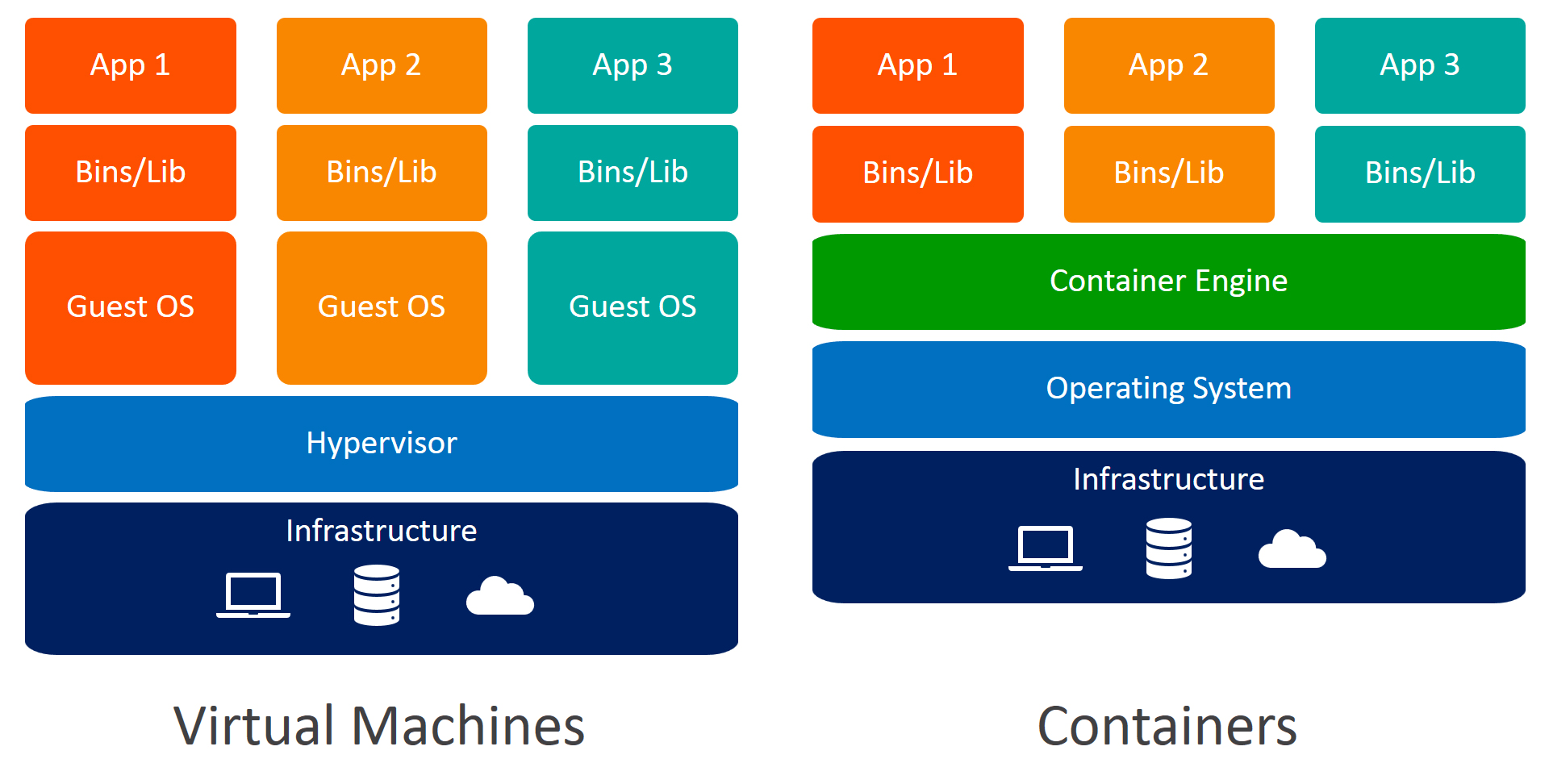
Ideal for microservices -- Docker
Ideal for monoliths -- VMware
Observability
-
Metrics: Quantitative data (e.g., CPU usage, request rate).
-
Logs: Timestamped records of events.
-
Traces: Follow a request’s journey across services.
Why It Matters: Detect issues before users do!
Practical
Step1: Create React App
npx create-react-app frontend
cd frontend
import React, { useState } from 'react';
import './App.css';
function App() {
// Create a state variable to store the API response
const [apiResponse, setApiResponse] = useState('');
const callAPI = async () => {
try {
const response = await fetch('/api');
const data = await response.text();
// Update the state with the API response
setApiResponse(data);
} catch (error) {
console.error('Error calling API:', error);
setApiResponse('Error calling API');
}
};
return (
<div className="App">
<button onClick={callAPI}>Call API</button>
{/* Render the API response on the UI */}
<div className="response">
{apiResponse}
</div>
</div>
);
}
export default App;
Modify src/App.js to call an API endpoint
Step1: Create Backend App
mkdir backend && cd backend
npm init -y
npm install express cors
const express = require('express');
const cors = require('cors');
const app = express();
app.use(cors());
app.get('/api', (req, res) => {
res.send('Hello from backend!');
});
app.listen(5000, () => {
console.log('Backend running on port 5000');
});Create server.js
Step3: Dockerize React
# Build Stage
FROM node:22-alpine
WORKDIR /app
COPY package.json ./
RUN npm install
COPY . .
RUN npm run build

# Serve Stage
FROM nginx:alpine
COPY --from=build /app/build /usr/share/nginx/html
# No custom Nginx config here – just serve static files
Create frontend/Dockerfile
Step4: Dockerize Backend
# Use a modern Node.js version
FROM node:22-alpine

# Set working directory
WORKDIR /app

# Copy package files first for caching
COPY package.json ./

# Install dependencies
RUN npm install

# Copy the rest of the app
COPY . .

# Start the app
CMD ["node", "server.js"]
Create backend/Dockerfile
Step5: Configure Ngnix
server {
  listen 80;
  server_name localhost;

  # Route all requests to the frontend service
  location / {
    proxy_pass http://frontend:80;  # Frontend service
    proxy_set_header Host $host;
    proxy_set_header X-Real-IP $remote_addr;
    proxy_set_header X-Forwarded-For $proxy_add_x_forwarded_for;
  }

  # Route /api requests to the backend service
  location /api {
    proxy_pass http://backend:5000;  # Backend service
    proxy_set_header Host $host;
    proxy_set_header X-Real-IP $remote_addr;
    proxy_set_header X-Forwarded-For $proxy_add_x_forwarded_for;
  }
}
Create new folder nginx in root and add nginx.conf
Step6: Setup Docker Compose
version: '3.8'
services:
  frontend:
    build: ./frontend
    ports:
      - "3000:80"  # Expose frontend on port 3000 (optional)
    depends_on:
      - backend

  backend:
    build: ./backend
    ports:
      - "5000:5000"  # Expose backend on port 5000 (optional)

  nginx:
    image: nginx:alpine
    ports:
      - "80:80"  # Expose Nginx on port 80 (main entry point)
    volumes:
      - ./nginx/nginx.conf:/etc/nginx/conf.d/default.conf
    depends_on:
      - frontend
      - backend
Create docker-compose.yml at the root:
Step 7: Deploy via Docker Compose
docker-compose up -d
docker-compose ps
Verification
-
Check Containers:
docker-compose ps
Ensure all services (
frontend,backend,nginx,signoz) are running.
-
Test API Call:
Open browser dev tools → Network tab → Verify/apireturns 200 status.
http://localhost
-
Check SigNoz Dashboard:
Look for traces from the React app and backend.
http://localhost:3301
Observability using
Signoz
Instrument React App
cd frontend
npm install @opentelemetry/api @opentelemetry/sdk-trace-web @opentelemetry/exporter-trace-otlp-http
Install Telemetry packages
import { WebTracerProvider } from '@opentelemetry/sdk-trace-web';
import { OTLPTraceExporter } from '@opentelemetry/exporter-trace-otlp-http';
import { SimpleSpanProcessor } from '@opentelemetry/sdk-trace-base';

const exporter = new OTLPTraceExporter({
  url: 'http://signoz:4318/v1/traces',
});

const provider = new WebTracerProvider();
provider.addSpanProcessor(new SimpleSpanProcessor(exporter));
provider.register();
Create src/tracing.js
Import tracing.js in src/index.js
import './tracing';Instrument Backend App
cd backend
npm install @opentelemetry/api @opentelemetry/sdk-trace-node @opentelemetry/exporter-trace-otlp-http
Install Telemetry packages
const { NodeTracerProvider } = require('@opentelemetry/sdk-trace-node');
const { OTLPTraceExporter } = require('@opentelemetry/exporter-trace-otlp-http');
const { SimpleSpanProcessor } = require('@opentelemetry/sdk-trace-base');

const exporter = new OTLPTraceExporter({
  url: 'http://signoz:4318/v1/traces',
});

const provider = new NodeTracerProvider();
provider.addSpanProcessor(new SimpleSpanProcessor(exporter));
provider.register();
Create tracing.js
Require tracing.js in server.js
require('./tracing');