Introduction to Sitecore JavaScript Services (JSS)





Saad Ansari
by
UI/UX, Full Stack & Sitecore Developer

Introduction
- SDK (Software Development Kit) for JavaScript developers
- Build solutions using Sitecore and modern JavaScript frameworks.
- Get started without the Sitecore Instance
- Select from the working modes
- Disconnected
- Connected
- Integrated
Support for latest JavaScript Frameworks



JSS for Developes
- JavaScript-based apps for frontend developers
- Frontend integration with Sitecore backend
- Freedom to use any JavaScript frameworks, IDE, any OS and dev workflow
- Decoupled from Sitecore
- Headless Deployment
- Code first approach
- Deployment as simple as 1,2,3.
Consumption License is required for JSS

Why JSS
- Empower and not burden JavaScript developers
- Options to choose from latest JS Frameworks (React, Vue, Angular)
- Component-centric architecture, Similar to SXA
- More role for frontend developers in Sitecore Development
- More ways to execute the projects

What is Headless
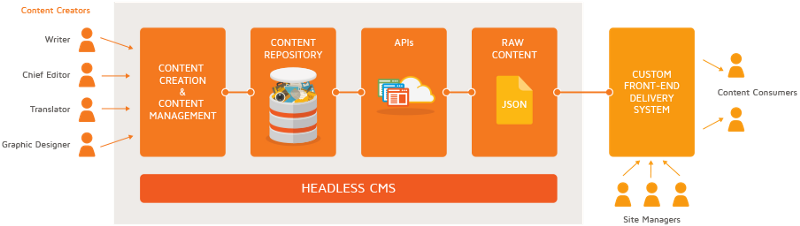
Learn more at Headless Vs. Traditional CMS
Headless allows the web apps to run independent of the backend. Headless CMS delivers content through an API independent to any device.
In Sitecore. Decoupled Headless Platform from allows you to create web apps independent of the Sitecore XP.
Understanding
The and
Sitecore Architecture
Templates Content Presentation
Sitecore Platform Architecture is based on three major parts
1
2
3
How JSS works
- Based on the template in mind create the fields (Templates)
- Create the modules/components based on Angular or React. (Data or Content)
- Assignment of Datasource, and how you present your data with your generated markup. (Presentation)
- Style the modules/components completely.
- Inject the solution into the Sitecore.

Getting Started
with
npm install -g @sitecore-jss/sitecore-jss-cli
jss create my-first-jss-app react
cd my-first-jss-app
jss start

# Create the component
jss scaffold TheStory
You need any OS supported by Node (Mac, Windows, Linux) and sitecore-jss-cli installed
Definitions Data
Rendering
Sitecore Javascript Services follows same, but you can better understand with these.
1
2
3
Definitions
import {
  CommonFieldTypes,
  SitecoreIcon,
  Manifest
} from "@sitecore-jss/sitecore-jss-manifest";
export default function(manifest) {
  manifest.addComponent({
    name: "TheStory",
    icon: SitecoreIcon.DocumentTag,
    fields: [
      { name: "storyHeading", type: CommonFieldTypes.SingleLineText },
      { name: "storyContent", type: CommonFieldTypes.RichText },
      { name: "storyImage", type: CommonFieldTypes.Image }
    ]
  });
}
[my-first-jss-app]\sitecore\definitions\components
Data
fields:
  pageTitle: Sitecore JSS
placeholders:
  jss-main:
  - componentName: TheStory
    fields:
      storyHeading: Give the gift of shopping
      storyContent:
          Lorem ipsum dolor sit amet, consectetur adipiscing elit, sed do eiusmod tempor incididunt
      storyImage:
        src: data/media/img/card-img.png
        alt: story Logo
[my-first-jss-app]\data\routes\
Rendering
import React from 'react';
import { Text, RichText, Image} from '@sitecore-jss/sitecore-jss-react';

const TheStory = (props) => (

    <div>
    <p>TheStory Component</p>
    <Text field={props.fields.storyHeading} />
     <RichText field={props.fields.storyContent} />
    <Image field={props.fields.storyImage} />
  </div>
);

export default TheStory;
[my-first-jss-app]\src\components\TheStory
THANK YOU
Saad Ansari
UI/UX, Full Stack & Sitecore Developer