Joel Ross
Winter 2017
TypeScript
Structure of the Day
-
Admin & Readings
-
TypeScript Basics
-
Variable Scoping
-
Arrow Functions
-
TypeScript & Modules
You can follow along at:
https://slides.com/joelross/arch-w17-typescript/live
https://github.com/info498e-w17/lec02-typescript

https://www.flickr.com/photos/littlehaulic/
Reading Review
Questions or thoughts on the reading?
Items of note:
-
Software architectures evolve over time
(Ch 1.2 - 1.3) -
The whats, whys, and whens of software architecture
(Ch 2.1 - 2.3)
Loose (Weak) Typing
JavaScript variables are dynamically typed, so they take on the type (Number, String, Array, etc) of their current value.
/* JavaScript */

var x = 42; //value is a Number

x = 'forty-two'; //value is now a String

function sayHello(name) {
  console.log("Hello, " + name);
}

//can pass any variable type we want
sayHello( "Ada" );
sayHello( [1,2,3] );
Strong Typing
Java variables are statically typed, so their type is declared ahead of time.
/* Java */

int x = 42; //value is a Number

x = "forty-two"; //Compile error: incompatible types
What are the benefits of this?
Static Analysis
Strongly typed languages allow for additional static testing: testing a program without actually running it!
Static analysis tools (i.e., linters) analyze the source code for errors through complex pattern matching.
This allows you to catch errors at compile-time (easier to fix!) rather than at run-time.
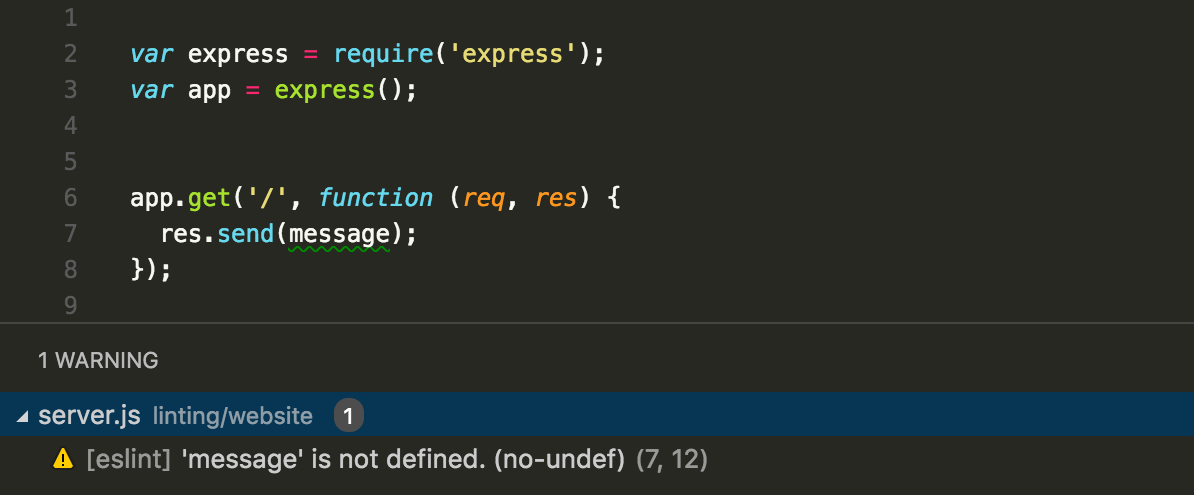
Can have some interesting (social) limitations: see here

TypeScript
A typed superset of JavaScript that compiles to plain JavaScript.
- Developed and maintained by Microsoft
- First released in Oct 2012; v2.0 released in Sep 2016
Install TypeScript
npm install -g typescript
install globally so can
run from command-line
Install via npm
TypeScript Code
Write TypeScript code in
.ts files
//index.ts
function sayHello(name) {
  console.log("Hello, "+name);
}

sayHello("y'all");
Can be normal
JavaScript!
Use
tsc to
compile code into normal
.js files
## In Terminal

# produces index.js (in same folder)
tsc index.ts

# run normally
node index.js
## In Terminal
# produces index.js (in same folder)
tsc index.ts
# run normally
node index.js
# watch for changes
tsc --watch index.tsauto-recompile on file save
TypeScript Code
Can include TypeScript specific syntax. Compiling will report any type-based errors! (Also seen in VS Code)
//index.ts


function sayHello(name: string) {
  console.log("Hello, "+name);
}

sayHello("y'all");
Type Annotation:
parameter must be a String
//index.ts


function sayHello(name: string) {
  console.log("Hello, "+name);
}

sayHello("y'all");
sayHello(1); //compile error!
Compiler Options
There are many compiler options you can give to
tsc, but it's easiest to define a
tsconfig.json file to save the options:
{
  "compilerOptions": {
     "target": "es5",         //compile to ES5 code
     "module": "commonjs",    //use commonjs style modules
     "sourceMap": true,       //include sourcemaps (for debugging)
     "outDir": "build/",      //where to save .js files
     "alwaysStrict": true,    //auto add "use strict" (2.1+)
     "removeComments": true,  //remove comments!
   },
   "include": [
     "src/**/*"               //which .ts files to compile (src/)
   ],                         //leave off for "all in folder"
   "exclude": [
     "node_modules",          //files NOT to compile
   ]
}
# run `tsc` with no arguments to use the tsconfig options
tscType Annotations
We add type information to variables by putting a colon
: and the type after the variable name:
// a variable that is a Number
var age: number = 23

// a variable that is a String
var firstName: string = "Ada"

// a variable that is a Boolean
var isTired : boolean = true;
The compiler will report an error if we violate the type.
//cannot change type
age = "old";

//illegal operation
firstName = "Beetlejuice"*3;

//no such property
console.log( isTired.length );
Will still compile to .js,
just reports errors!
white space ignored
Type Inference
Typing is inferred (automatically determined) even if we don't explicitly type variables!
// a variable that is a Number (inferred)
var age = 23

age = "old"; //error, type mismatch
TypeScript uses a "type matching algorithm", but it can be wrong: use explicit types when needed!
Arrays
A list of ordered elements like in Java... mostly
var letters = ['a', 'b', 'c'];
var numbers = [1, 2, 3];
var things = ['raindrops', 2.5, true, [5, 9, 8]];
var empty = [];
var blank5 = new Array(5); //empty array with 5 items

//access using [] notation like Java
console.log( letters[1] ); //=> "b"
console.log( things[3][2] ); //=> 8

//assign using [] notation like Java
letters[0] = 'z';
console.log( letters ); //=> ['z', 'b', 'c']

//assigning out of bounds automatically grows the array
letters[10] = 'g';
console.log( letters);
    //=> [ 'z', 'b', 'c', , , , , , , , 'g' ]
console.log( letters.length ); //=> 11
Array Types
We can declare
arrays as containing elements of (only) a particular type by annotating them with the element type followed by square brackets
[]
//an array of strings (a `string[]`)
var letters: string[] = ['a', 'b', 'c'];

//an array of numbers (a `number[]`)
var luggageCombo: number[] = [1, 2, 3, 4, 5];

//arrays can only have a single type
letters.push(12); //Error!Tuples
We can also define tuples, which are arrays with multiple types of elements in a particular order:
//declare variable with a tuple type
var nameAge: [string, number];

//initialize it
nameAge = ["Ada", 23]; // OK

//all in one line
var nameAge2: [string, number] = ["Bob", 34];


//tuples are ordered!
nameAge = [23, "Ada"]; // Error!
Objects
An unordered set of " key & value" pairs.
-
Like a dictionary: have the word (the key) and the definition (the value). Use the key to "look up" the value.
-
a.k.a a Map or a Hash (or HashMap in Java)
-
a.k.a. an associative array
ages = {ada:23, bob:34, charles:13}
extensions = {'joel':1622, 'ischool':9937}
num_words = {1:'one', 2:'two', 3:'three'}
things = {num:12, dog:'woof', list:[1,2,3]}
empty = {}
empty = new Object(); //empty object

//access values
console.log( ages['ada'] ); //=> 23
console.log( ages['fred']); //=> undefined

//assign values
ages['alice'] = 41;
console.log( ages['alice'] ); //=> 41

ages['fred'] = 19; //adds the key and assigns a value to it
Object Types
We can declare object types somewhat like tuples, by giving a "template" with the keys and their types:
//declare an object with a specific structure
var student: {first:string, last:string, age:number};

//initialize it
student = {
   first: 'Ada',
   last: 'Wong',
   age: 23
}

//all in one line!
var student: {first:string, last:string, age:number} = {first:'Bob', last:'Smith', age:34};
It is cleaner to do this with an interface , which we will talk about next week
Functions
Functions in JavaScript are like
static methods in Java
//plain JavaScript
function greet(name){ //named function
    return "Hello, "+name;
}

var msg = greet("Joel"); //call and assign result
//named function
function sayHello(person){
console.log("Hello, "+person);
}
//anonymous function (no name!)
function(person) {
console.log("Hello, "+person);
}
//anonymous function (value) assigned to variable
var sayHello = function(person) {
console.log("Hello, "+person);
}Function Types
When declaring functions, we use the same colon : syntax to denote the types of the parameters and the return type
function greet(name:string, loud:boolean) : string {
   if(loud) {
     return ("Hello, "+name).toUpperCase();
   }
   return "Hello, "+name;
}


//anonymous function assigned to variable
var hail = function(name:string, loud:boolean):string {
  //...
}
parameters include types
like other variables
return type after param list, before block
param types
return type
Function Parameters
In TypeScript all parameters are required.
function fullName(firstName: string, lastName: string) {
   return firstName + " " + lastName;
}

//Error, too few parameters!
var name1:string = fullName("Bob");

//Error, too many parameters!
var name2 = buildName("Bob", "Adams", "Sr.");

//works!
var name3 = buildName("Bob", "Adams");
return type is inferred!
Optional Parameters
We can make a parameter
optional by adding a
? to it. Optional parameters must be the last one(s).
function sayHello(name?:string) : void {
   if(name) {
     console.log("Hi "+name+"!");
   }
   else {
     console.log("Hello");
   }
}

sayHello();        //=> Hello
sayHello("world"); //=> Hi world!
does not return anything!
Default Parameters
We can give a parameter a default value as well by assigning it a value in the parameter list.
function walk(animal = "dog") {
   console.log("Walk the "+animal);
}

walk();               //=> Walk the dog
walk("hippopotamus"); //=> Walk the hippopotamus
This feature is awesome
Class Types
Finally, just like in Java, we can define classes that introduce their own type for variables. MORE ON THIS NEXT WEEK!
class Square {
  private size: number;

  constructor(size: number) { this.size = size; }
}

class Circle {
  private radius: number;

  constructor(radius: number) { this.radius = radius; }

  getDiameter(): number {
    return Math.PI*this.radius;
  }
}

var shape:Circle = new Circle(5);
shape.getDiameter();
ES 6 Features
TypeScript includes many "modern" JavaScript features, such as those introduced in ES 6. These features are compiled into "older" compatible JavaScript code.
ES 5 (2011) supported by most browsers
ES 6 (2015)
mostly supported by
some
browsers
ES 7 (June 2016) not reliably supported
Lexical Scope
Normally JavaScript variables are scoped lexically (where you write them at authoring time). That is, they are scoped to functions, not to control structures or other blocks!
/*scoping is ONLY to functions, not to blocks! */
function guess(num) {
  if(num == 12){
    var secretMessage = "You guessed my number!";
  }
  console.log(secretMessage); //access outside block
}

guess(12);
console.log(secretMessage); //ReferenceErrorScoping Quirks
Lexical scoping introduces a few quirks, particularly with asynchronous functions.
//What does this output?
for(var i=0; i<5; i++){
   setTimeout(function() { console.log(i); }, 500);
}
executes a function
after a delay
an
anonymous
callback function
to execute
run function
after 500ms
(second param)
Each time through the loop it "queues" a function to run. But when that function is executed, it refers to the same
i variable, which has increased to 5!
Closures
A closure is a coding pattern for associating lexically scoped variables with functions. It "encloses" a variable's value in a function.
for(var i=0; i<5; i++){
   //                      anonymous function
   setTimeout(function() { console.log(i); }, 500);
}
for(var i=0; i<5; i++){
   //name the anonymous function
   var myFunc = function() { console.log(i); };

   setTimeout(myFunc, 500);
}
//define a function
function makeNumPrinter(num) {
var localNum = num; //save the variable (function scope)
//define a NEW function that references that variable
var printFunc = function() { console.log(localNum) };
return printFunc; //return that function!
}
for(var i=0; i<5; i++){
//name the anonymous function
var myFunc = function() { console.log(i); };
setTimeout(myFunc, 500);
}//define a function
function makeNumPrinter(num) {
var localNum = num; //save the variable (function scope)
//define a NEW function that references that variable
var printFunc = function() { console.log(localNum) };
return printFunc; //return that function!
}
for(var i=0; i<5; i++){
//create closure instead of anonymous function
var myFunc = makeNumPrinter(i);
setTimeout(myFunc, 500);
}//define a function
function makeNumPrinter(num) {
var localNum = num; //save the variable (function scope)
//define a NEW function that references that variable
var printFunc = function() { console.log(localNum) };
return printFunc; //return that function!
}
for(var i=0; i<5; i++){
//create closure instead of anonymous function
setTimeout(makeNumPrinter(i), 500);
}the closure
Design Pattern
A description of a common problem and a solution to that problem.
Note: not "plug-and-play" solutions!

Block Scoping
ES 6 introduces two new keywords that can be used
in place of
var when declaring variables.
let provides block scoping
function guess(num) {
  if(num == 12){
    let secretMessage = "You guessed my number!";
  }
  console.log(secretMessage); //ReferenceError !!
}
function guess(num) {
if(num == 12){
var secretMessage = "You guessed my number!";
}
console.log(secretMessage); //logs message
}
const defines constants (block scoped)
const PI = 3.1415;
PI = 21/7; // TypeError: Assignment to constant variable
always use this!
Let and Loops
When used in a for loop, let creates a new lexical scope at each iteration. This makes things work normally (no need for closures here!)
//Works as intended
for(let i=0; i<5; i++){
   setTimeout(function() { console.log(i); }, 500);
}
Template Strings
You can declare multi-line Strings in backticks (
``), and use
${} to inject variables into the String (without needing to concatenate!)
//provide a name, an animal, and a verb
function excuse(name:string, animal:string, verb:string) {
  let email = `Hello Professor ${name},

Please excuse my missing assignment,
as my ${animal} ate it.

${verb} you later,
A Student`;

  console.log(email);
}

excuse('Joel', 'Lemur', 'Smell');
Arrow Functions
ES 6 provides a
shortcut syntax for declaring functions using
=>
//normal function declaration
let foo = function(params:any):string {
  return 'foo '+param;
}
//arrow function declaration (block body)
let foo = (params:any):string => {
return 'foo '+params;
}//arrow function declaration (concise body)
let foo = (params:any):string => 'foo '+params;single expression implies return
//arrow function declaration (concise body)
let sayHi = (name:string) => console.log('Hi '+name);
anonymous function assigned to a variable
Arrow Functions
ES 6 provides a
shortcut syntax for declaring functions using
=>
//normal function declaration
let array:number[] = [1,2,3];
array.map(function(num) {
  return num*2; //multiply each item by 2
});
//arrow function declaration (block body)
let array:number[] = [1,2,3];
array.map(num => {
return num*2; //multiply each item by 2
});//arrow function declaration (concise body)
let array:number[] = [1,2,3];
array.map(num => num*2);Arrow Functions
ES 6 provides a
shortcut syntax for declaring functions using
=>
//normal function declaration
let array = [1,2,3];
array.map(function() { //no params! (for reasons)
  return 12; //map everything to 12
});
//arrow function declaration (block body)
let array = [1,2,3];
array.map(() => {
return 12; //map everything to 12
});//assign function to a name
let make12 = () => 12;
//arrow function declaration (concise body)
//assign function to a name
let make12 = function() {
  return 12;
};
Syntactic Sugar causes cancer of the semicolon
TypeScript and Modules
Modules
One way to follow the Principle of Separation of Concerns in an architecture is to separate the implementation (code) into modules. Each module is responsible for a distinct set of functionality.
Modules provide a code-based view of an architecture.
In TypeScript (as well as in Node and ES6), each file is treated as a separate module of code. We can then explicitly import (load) functionality from one module into another in order to connect them.
TypeScript Modules
Requiring Modules
We "import" modules in Node by using the built-in
require() function. This gives us access to the
other module within ours!
CommonJS (used by Node.js)
ES 6 Modules (used by Browsers and TypeScript)
var random = require('random');node version of "import"
global to refer to the library
module library name
import random from 'random';global to refer to the library
module library name
Export / Import
We can make our own usable modules (files representing separate units of code) by exporting values from one file and importing them into another.
/*** my-module.ts ***/

export let joke = "Why'd the chicken cross the road?"
/*** index.ts ***/

import { joke } from './my-module';


console.log(joke); // prints the joke
./ indicates file in same folder
File extension optional
name of specific variable in {}
Named Exports
/***my-module.ts***/
export function foo() { return 'foo'; } //make available

function bar() { return 'bar'; }
export bar; //export previously defined variable

export { bar as barFunction }; //provide consumer name

//will not be available (a "private" function)
function baz() { return 'baz'; }
/***index.ts***/
import {foo, barFunction} from './my-module'; //multiple vars
foo() //=> 'foo'
barFunction() //=> 'bar'
import {foo as myFoo} from './my-module'; //rename import
myFoo(); //=> 'foo'
import * as module from './my-module'; //import everything
module.bar(); //=> 'bar'
module.baz(); //Error [private function]We can
export multiple variables with specific names.
Default Exports
A module can export a single default variable, which provides a slight shortcut for importing the variable (and makes modules easier to consume).
/***my-module.ts***/
export default function bark() { return 'Woof!'; }
/***index.ts***/
import speak from './my-module';
speak(); //=> 'Woof!'name to refer to default by
default exports can also be anonymous.
/***animal-module.ts***/
export default ["dog","cat","bird"];
Exports Object
The pattern used in Node's module system (CommonJS) is to export a single object containing all the relevant variables and functions. This is similar to but incompatible with default exports. Typescript does support this pattern:
/***utils.ts***/
export = { //export a single object
 favoriteNumber: 12, //property
 foo: function() { return 'foo'; }, //property
 square: (n) => n*n, //property (arrow function!)
}
/***index.ts***/
import utilObj = require('./utils');
utilObj.square(4); //=> 16
use `export =` syntax
use `import = require()` syntax
NOT Node's require() function!
Node Modules and TS
The import = require() syntax is how we would import Node modules that are not written in TypeScript (such as Node's built-in readline module for user input).
//***index.js***/
//use Node's require() function
var readline = require('readline');

var rl = readline.createInterface({
  input: process.stdin,
  output: process.stdout
});

rl.question('Where do you want to go?', function(answer) {
  console.log('You said "'+answer.toUpperCase()+'"!');

  rl.close(); //close the whole interface once
              //completely done asking questions
});
Normal JavaScript version
//***index.ts***/
//use TypeScript's import = require() syntax
import readline = require('readline');

var rl = readline.createInterface({
  input: process.stdin,
  output: process.stdout
});

rl.question('Where do you want to go?', function(answer) {
  console.log('You said "'+answer.toUpperCase()+'"!');

  rl.close(); //close the whole interface once
              //completely done asking questions
});
TypeScript version
Declaration Files
In order to have type annotations on non-TypeScript modules, we need to provide type declarations (that the TS compiler can use) for those modules.
These are usually stored in
.d.ts files.
A repository of these can be managed by the Typings application, and they can also installed via npm:
# install type definitions for node
npm install --save @types/node
package to install types of
Using Package.json
We can use
npm to
automatically install all the libraries we depend on (listed in
package.json).
Install dependencies in project
# change to current project directory
# e.g., cd lec02-typescript
cd path/to/project

# install dependencies (may take a few minutes)
npm install
important!
install all the things!
TypeScript & Libraries
We can install Type Definition files in order to be able to use external libraries in TypeScript just like with Node.
# install module (e.g., lodash)
npm install --save lodash

# install type definitions
npm install --save @types/lodash
/***index.ts***/
import * as _ from 'lodash';
_.times(5, console.log); //count
For libraries without type definitions, fall back to the Node require() function.
/***index.ts***/
const dogNames = require('dog-names'); //Node require()
dogNames.femaleRandom();
ACTION ITEMS!
For Tuesday
-
Do the reading and "quiz" for Tuesday!
-
Homework 0 due Sunday night
-
Check out Homework 1 once available (~Friday)