Alumni Bootcamp - Class 01
This is a live streamed presentation. You will automatically follow the presenter and see the slide they're currently on.
This is a live streamed presentation. You will automatically follow the presenter and see the slide they're currently on.
NEVER lost a thumb war.
Happiest Career:
Ticketmaster Office
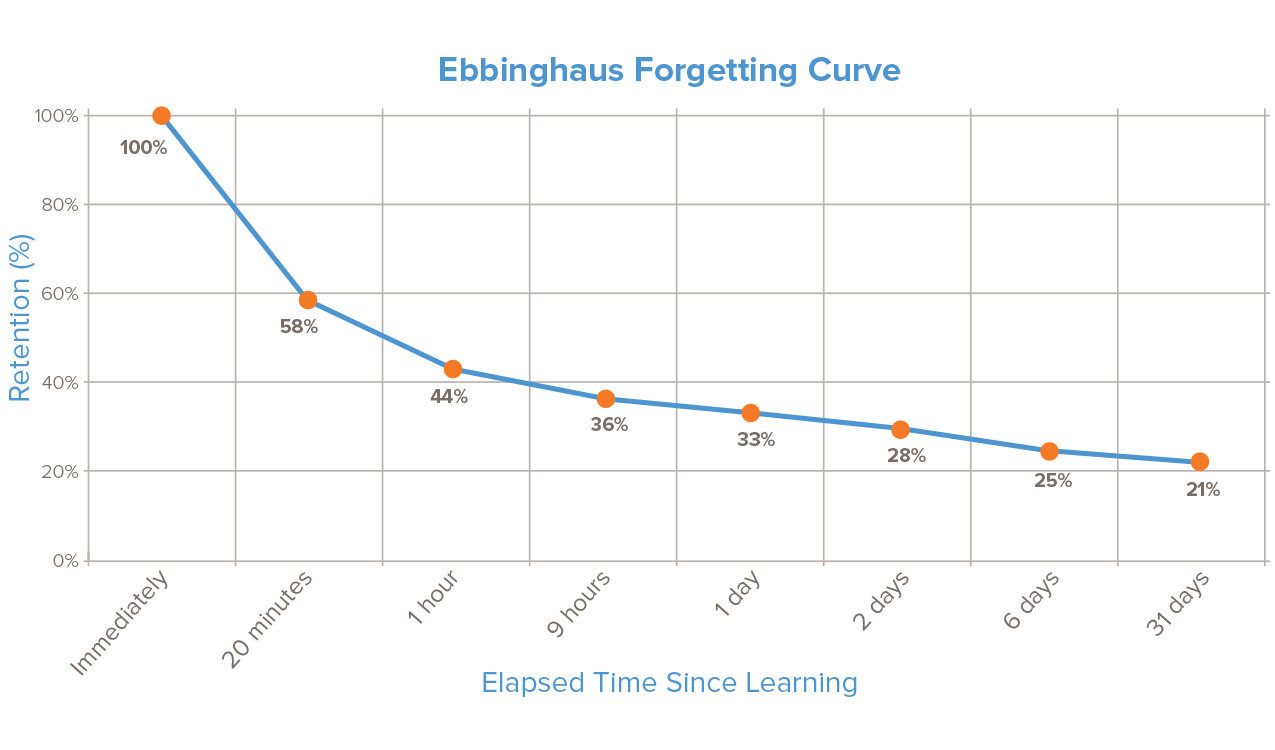
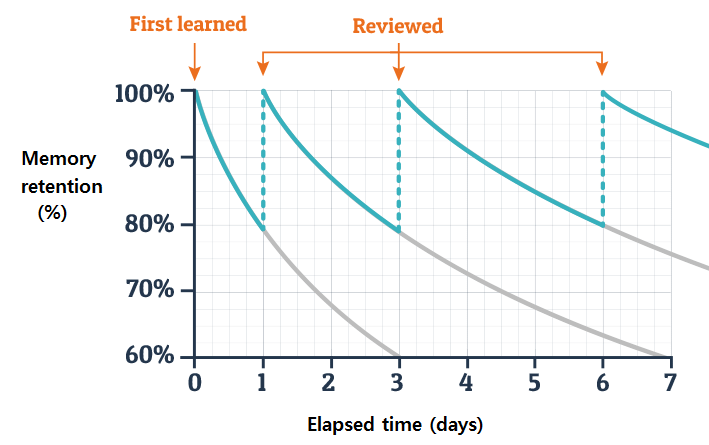
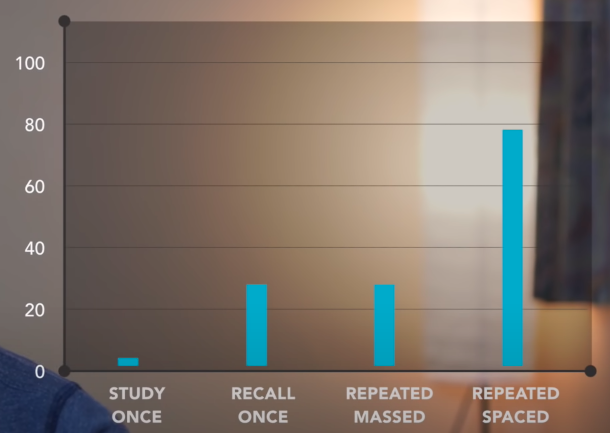
Ali Abdaal: https://youtu.be/ukLnPbIffxE
https://intelalearning.wordpress.com
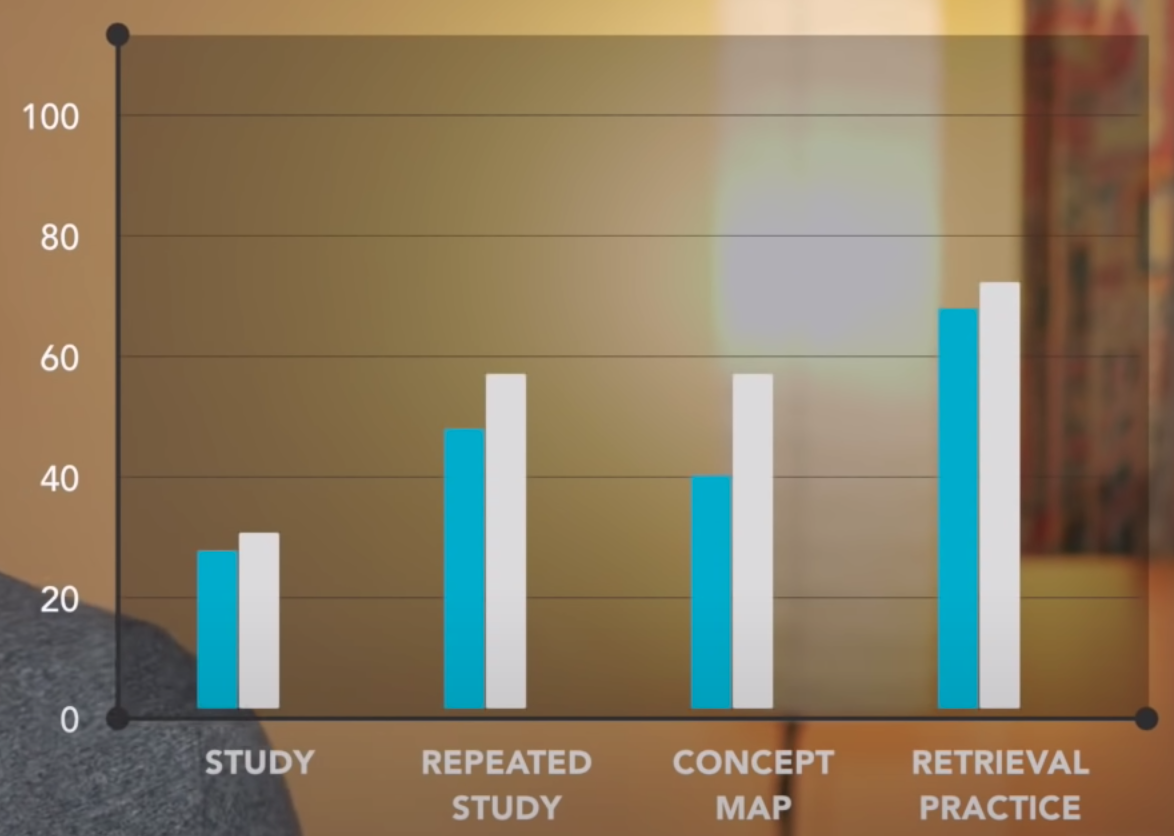
https://www.pearsoned.com/three-simple-research-based-ways-to-ace-a-test
Ali Abdaal: https://youtu.be/Z-zNHHpXoMM
Materials based on
Robert C. Martin: Clean Code
Ryan McDermott: Clean Code Javascript
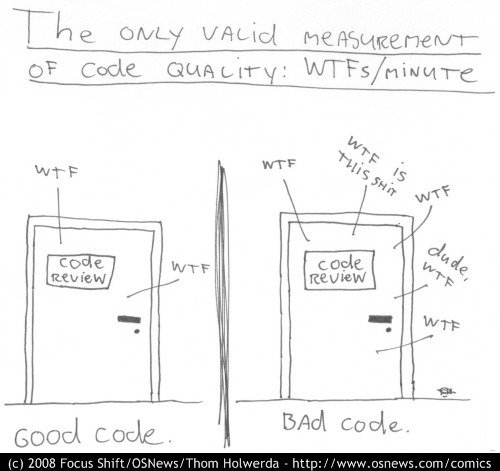
Code can be measured with either "good" or "bad" in the code review or by how many minutes it takes you to talk about it
Bad:
const yyyymmdstr = moment().format("YYYY/MM/DD");
Good:
const currentDate = moment().format("YYYY/MM/DD");Bad:
// What the heck is 86400000 for?
setTimeout(blastOff, 86400000);
Good:
// Declare them as capitalized named constants.
const MILLISECONDS_IN_A_DAY = 86400000;

setTimeout(blastOff, MILLISECONDS_IN_A_DAY);Bad:
const locations = ["Austin", "New York", "San Francisco"];
locations.forEach(l => {
  doStuff();
  doSomeOtherStuff();
  // ...
  // ...
  // ...
  // Wait, what is `l` for again?
  dispatch(l);
});
Good:
const locations = ["Austin", "New York", "San Francisco"];
locations.forEach(location => {
  doStuff();
  doSomeOtherStuff();
  // ...
  // ...
  // ...
  dispatch(location);
});Bad:
const Car = {
  carMake: "Honda",
  carModel: "Accord",
  carColor: "Blue"
};

function paintCar(car) {
  car.carColor = "Red";
}
Good:
const Car = {
  make: "Honda",
  model: "Accord",
  color: "Blue"
};

function paintCar(car) {
  car.color = "Red";
}
If your class/object name tells you something, don't repeat that in your variable name.
Bad:
function createMicrobrewery(name) {
  const breweryName = name || "Hipster Brew Co.";
  // ...
}
Good:
function createMicrobrewery(name = "Hipster Brew Co.") {
  // ...
}Bad:
function createMenu(title, body, buttonText, cancellable) {
  // ...
}
Good:
function createMenu({ title, body, buttonText, cancellable }) {
  // ...
}

createMenu({
  title: "Foo",
  body: "Bar",
  buttonText: "Baz",
  cancellable: true
});Bad:
function emailClients(clients) {
  clients.forEach(client => {
    const clientRecord = database.lookup(client);
    if (clientRecord.isActive()) {
      email(client);
    }
  });
}
Good:
function emailActiveClients(clients) {
  clients.filter(isActiveClient).forEach(email);
}

function isActiveClient(client) {
  const clientRecord = database.lookup(client);
  return clientRecord.isActive();
}
This is by far the most important rule in software engineering. When functions do more than one thing, they are harder to compose, test, and reason about.
Bad:
function addToDate(date, month) {
  // ...
}

const date = new Date();

// It's hard to tell from the function name what is added
addToDate(date, 1);
Good:
function addMonthToDate(month, date) {
  // ...
}

const date = new Date();
addMonthToDate(1, date);
Bad:
function createFile(name, temp) {
  if (temp) {
    fs.create(`./temp/${name}`);
  } else {
    fs.create(name);
  }
}
Good:
function createFile(name) {
  fs.create(name);
}

function createTempFile(name) {
  createFile(`./temp/${name}`);
}
Flags tell your user that this function does more than one thing. Functions should do one thing. Split out your functions if they are following different code paths based on a boolean.
Bad:
Array.prototype.diff = function diff(comparisonArray) {
  const hash = new Set(comparisonArray);
  return this.filter(elem => !hash.has(elem));
};
Good:
class SuperArray extends Array {
  diff(comparisonArray) {
    const hash = new Set(comparisonArray);
    return this.filter(elem => !hash.has(elem));
  }
}
Polluting globals is a bad practice in JavaScript because you could clash with another library and the user of your API would be none-the-wiser until they get an exception in production.
Bad:
if (fsm.state === "fetching" && isEmpty(listNode)) {
  // ...
}
Good:
function shouldShowSpinner(fsm, listNode) {
  return fsm.state === "fetching" && isEmpty(listNode);
}

if (shouldShowSpinner(fsmInstance, listNodeInstance)) {
  // ...
}Bad:
function isDOMNodeNotPresent(node) {
  // ...
}

if (!isDOMNodeNotPresent(node)) {
  // ...
}
Good:
function isDOMNodePresent(node) {
  // ...
}

if (isDOMNodePresent(node)) {
  // ...
}Bad:
class Airplane {
  // ...
  getCruisingAltitude() {
    switch (this.type) {
      case "777":
        return this.getMaxAltitude() - this.getPassengerCount();
      case "Air Force One":
        return this.getMaxAltitude();
      case "Cessna":
        return this.getMaxAltitude() - this.getFuelExpenditure();
    }
  }
}
Use polymorphism to achieve the same task. A function should only do one thing. When you have classes and functions that have if statements, you are telling your user that your function does more than one thing. Remember, just do one thing.
Good:
class Airplane {
  // ...
}

class Boeing777 extends Airplane {
  // ...
  getCruisingAltitude() {
    return this.getMaxAltitude() - this.getPassengerCount();
  }
}

class AirForceOne extends Airplane {
  // ...
  getCruisingAltitude() {
    return this.getMaxAltitude();
  }
}

class Cessna extends Airplane {
  // ...
  getCruisingAltitude() {
    return this.getMaxAltitude() - this.getFuelExpenditure();
  }
}
Use polymorphism to achieve the same task. A function should only do one thing. When you have classes and functions that have if statements, you are telling your user that your function does more than one thing. Remember, just do one thing.
Bad:
function travelToTexas(vehicle) {
  if (vehicle instanceof Bicycle) {
    vehicle.pedal(this.currentLocation, new Location("texas"));
  } else if (vehicle instanceof Car) {
    vehicle.drive(this.currentLocation, new Location("texas"));
  }
}
Good:
function travelToTexas(vehicle) {
  vehicle.move(this.currentLocation, new Location("texas"));
}
JavaScript is untyped, which means your functions can take any type of argument. Sometimes you are bitten by this freedom and it becomes tempting to do type-checking in your functions. There are many ways to avoid having to do this. The first thing to consider is consistent APIs.
Bad:
function combine(val1, val2) {
  if (
    (typeof val1 === "number" && typeof val2 === "number") ||
    (typeof val1 === "string" && typeof val2 === "string")
  ) {
    return val1 + val2;
  }

  throw new Error("Must be of type String or Number");
}
Good:
function combine(val1, val2) {
  return val1 + val2;
}
The problem with manually type-checking normal JavaScript is that doing it well requires so much extra verbiage that the faux "type-safety" you get doesn't make up for the lost readability.
Bad:
function makeBankAccount() {
  // ...

  return {
    balance: 0
    // ...
  };
}

const account = makeBankAccount();
account.balance = 100;
Good:
function makeBankAccount() {
  // this one is private
  let balance = 0;

  // a "getter", made public via the returned object below
  function getBalance() {
    return balance;
  }

  // a "setter", made public via the returned object below
  function setBalance(amount) {
    // ... validate before updating the balance
    balance = amount;
  }

  return {
    // ...
    getBalance,
    setBalance
  };
}

const account = makeBankAccount();
account.setBalance(100);
Using getters and setters to access data on objects could be better than simply looking for a property on an object.
Do: Fullstack Open Part 2
Do: Move on to 7kyu or lower daily
Read - https://javascript.info/array-methods
Read - https://levelup.gitconnected.com/essential-javascript-string-methods-f1841dad1961
Do - https://scotch.io/courses/the-ultimate-guide-to-javascript-algorithms
Watch - https://youtu.be/v4cd1O4zkGw
Do - https://cvcompiler.com/ (Run your resume through to see what recruiters see don't pay)
Don't just read about your array, string, object, and other methods - practice using them!