Basics of web design

Teacher Juan Romero Luis
Mar 3, 2025
Unit 4
Front-end layout
CSS3 (I)
bit.ly/BWD24U4
Introduction to CSS
N
bit.ly/BWD24U4
Introduction to CSS
What is CSS?
Is CSS a programming language?
CSS, or Cascading Style Sheets, is not a programming language, but a style sheet language used for describing the look and formatting of a document written in HTML.
Introduction to CSS
CSS ruleset
p {

color: red;

}
Selector
Property
Property value
Declaration
Introduction to CSS
CSS ruleset
p {
color: blue;
line-height: 1.5;
font-size: 14px;
}
Introduction to CSS
CSS ruleset
h1, h2, h3 {
color: purple;
text-align: center;
}
Introduction to CSS
How to make CSS work in our HTML pages
Inline
Internal
External


Introduction to CSS
How to make CSS work in our HTML pages
👉
Inline
<p style="color: red;">This is an example of inline CSS.</p>
p {
color: red;
}
page.html
Introduction to CSS
How to make CSS work in our HTML pages
👉
Internal
<!DOCTYPE html>
<html>
	<head>
	  <style>
	    p {
	      color: red;
	    }
	  </style>
	</head>
	<body>
    <!-- The content of the document... -->
	</body>
</html>
page.html
Introduction to CSS
How to make CSS work in our HTML pages
👉
External
<!DOCTYPE html>
<html>
	<head>
	   <link rel="stylesheet" type="text/css" href="styles.css">
	</head>
	<body>
	   <!-- The content of the document... -->
	</body>
</html>
page.html
p {
  color: red;
}
styles.css
Basics of web design
Teacher Juan Romero Luis
Mar 4, 2025
Unit 4
Front-end layout
CSS3 (II)
bit.ly/BWD24U4
One
Three
Two
Pop Quiz!!
bit.ly/BWD24U4
Commenting in CSS
bit.ly/BWD24U4
Commenting in CSS
CSS commenting syntax
/* This is a comment */
  p
   {
    color: red;
   }
The DOM structure
The DOM structure
<!DOCTYPE html>
<html>
  <head>
    <title>My First Website</title>
  </head>
  <body>
    <h1>Welcome to my website!</h1>
    <p>This is a paragraph.</p>
  </body>
</html>
- The
<html>element is the root of the tree. - The
<head>and<body>elements are children of the<html>element. - The
<title>element is a child of the<head>element and grandchild of<html>. - The
<h1>and<p>elements are children of the<body>element and grandchildren of<html>.
Types of selectos
bit.ly/BWD24U4
Types of selectos
Element selector
p {
color: blue;
line-height: 1.5;
font-size: 14px;
}
h1, div, quote {
text-align: center;
}Types of selectos
Class selector
This selector is used to select a group of elements that have a specific class attribute.
<!DOCTYPE html>
<html>
	<head>
	   <link rel="stylesheet" type="text/css" href="styles.css">
	</head>
	<body>
		<p class="name-class">This is a paragraph.</p>
		<blockquote class="name-class"> This is a blockquote. </blockquote>
	</body>
</html>
page.html
.name-class {
  color: red;
}
styles.css
<!DOCTYPE html>
<html>
	<head>
	   <link rel="stylesheet" type="text/css" href="styles.css">
	</head>
	<body>
		<p class="name-class">This is a paragraph.</p>
		<blockquote class="name-class"> This is a blockquote. </blockquote>
	</body>
</html>
page.html
p.name-class {
  color: red;
}
styles.css
Types of selector
Class selector
👉
Class selector with an element
Types of selectos
ID selector
This selector is used to select a specific element with a certain ID.
<!DOCTYPE html>
<html>
	<head>
	   <link rel="stylesheet" type="text/css" href="styles.css">
	</head>
	<body>
    	<h1 id="name-id"> Title </h1>
		<p class="name-class">This is a paragraph.</p>
		<blockquote class="name-class"> This is a blockquote. </blockquote>
	</body>
</html>
#name-id {
  text-align: center;
}
styles.css
page.html
Types of selectos
Attribute selector
It is used to select elements with certain attributes or attribute values.
<!DOCTYPE html>
<html>
	<head>
	   <link rel="stylesheet" type="text/css" href="styles.css">
	</head>
	<body>
		<p>This is a<a href="https://www.facebook.com" target="_blank"> link.</a></p>
	</body>
</html>
a[target="_blank"], a[href="https://example.com"]
	{
 	 background-color: lightgray;
	}
styles.css
page.html
Basics of web design
Teacher Juan Romero Luis
Mar 10, 2025
Unit 4
Front-end layout
CSS3 (III)
bit.ly/BWD24U4
One
Three
Two
Pop Quiz!!
bit.ly/BWD24U4
Types of selectors
Pseudo-classes in CSS
  selector:pseudo-class
   {
    property: value;
   }
Pseudo-classes in CSS are used to define a special state of an element.
Types of selectors
Pseudo-classes in CSS
👉
:link
a:link {
  color: blue;
}
is used to select links that the user has not yet visited.
Types of selectors
Pseudo-classes in CSS
👉
:visited
a:visited {
  color: purple;
}
is used to select links that the user has already visited.
Types of selectors
Pseudo-classes in CSS
👉
:hover
div:hover {
  color: red;
}
is used to select an element when the user's pointer is over it.
a:hover {
  color: purple;
}
button:hover {
  color: purple;
}
Types of selectors
Pseudo-classes in CSS
👉
:avtive
is used to select an element at the moment it is being activated
(like when a button is being clicked).
button:active {
  background-color: green;
}
Types of selectors
Pseudo-classes in CSS
👉
:focus
is used to select an element when it has focus. This is often used to add special styles to form elements when they are being interacted with by the user.
input:focus {
  border: 2px solid blue;
}
Types of selectors
Pseudo-classes in CSS
👉
:first-child
is used to select the first child element inside a parent element.
ul li:first-child {
  color: red;
}
p i:first-child {
  color: blue;
}
Types of selectors
Pseudo-classes in CSS
👉
:last-child
is used to select the last child element inside a parent element.
ul li:last-child {
  color: green;
}
p i:last-child {
  color: blue;
}
Basics of web design
Teacher Juan Romero Luis
Mar 11, 2025
Unit 4
Front-end layout
CSS3 (IV)
bit.ly/BWD24U4
Review
Class
ID
Pseudo-class
.wtf {
  color: red;
}
HTML element
p {
  color: red;
}
#wtf {
  color: red;
}
a:hover {
  color: red;
}
Types of selectors
Pseudo-elements in CSS
  selector::pseudo-element
   {
    property: value;
   }
Pseudo-elements in CSS are used to style certain parts of an element.
Types of selectors
Pseudo-elements in CSS
👉
::first-line
p::first-line {
  color: blue;
  text-transform: uppercase;
}
is used to style the first line of a block-level element.
Types of selectors
Pseudo-elements in CSS
👉
::first-letter
p::first-letter {
  color: red;
  font-size: 40px;
}
is used to style the first letter of a block-level element.
Types of selectors
Pseudo-elements in CSS
👉
::before & ::after
p::before {
  content: "Read this - ";
  color: green;
}
are used to insert content before or after an element's content.
p::after {
  content: " - Thank you!";
  color: green;
}
Types of selectors
Pseudo-elements in CSS
👉
::selection
p::selection {
  background: yellow;
  color: black;
}
is used to style a section of an element that has been selected by a user.
Types of selectors
Pseudo-elements in CSS
👉
::marker
li::marker {
  color: green;
  content: "> ";
}
is used to style the bullet points in a list.
Basics of web design
Teacher Juan Romero Luis
Mar 17, 2025
Unit 4
Front-end layout
CSS3 (V)
bit.ly/BWD24U4
One
Three
Two
Pop Quiz!!
bit.ly/BWD24U4
Selector combinations
bit.ly/BWD24U4
Selector combination
Descendant combinator
is used to select elements that are descendants of a specific element.
div p {
  color: blue;
}
Selector combination
Child Combinator
is used to select elements that are direct children of a specific element.
div > p {
  color: green;
}
Differences between descendant and child combinator
Selector combination
Next-sibling combinator
is used to select an element that is the immediate sibling following another element.
p + p {
  color: green;
}
Basics of web design
Teacher Juan Romero Luis
Mar 18, 2025
Unit 4
Front-end layout
CSS3 (VI)
bit.ly/BWD24U4
One
Three
Two
Pop Quiz!!
bit.ly/BWD24U4
Specificity in CSS
Specificity in CSS
is a scoring system that determines which style rules are applied to an element when there is a conflict between CSS rules. Each type of selector has a different point value:
Universal selectors (*)
Regular elements (HTML), or pseudo-elements
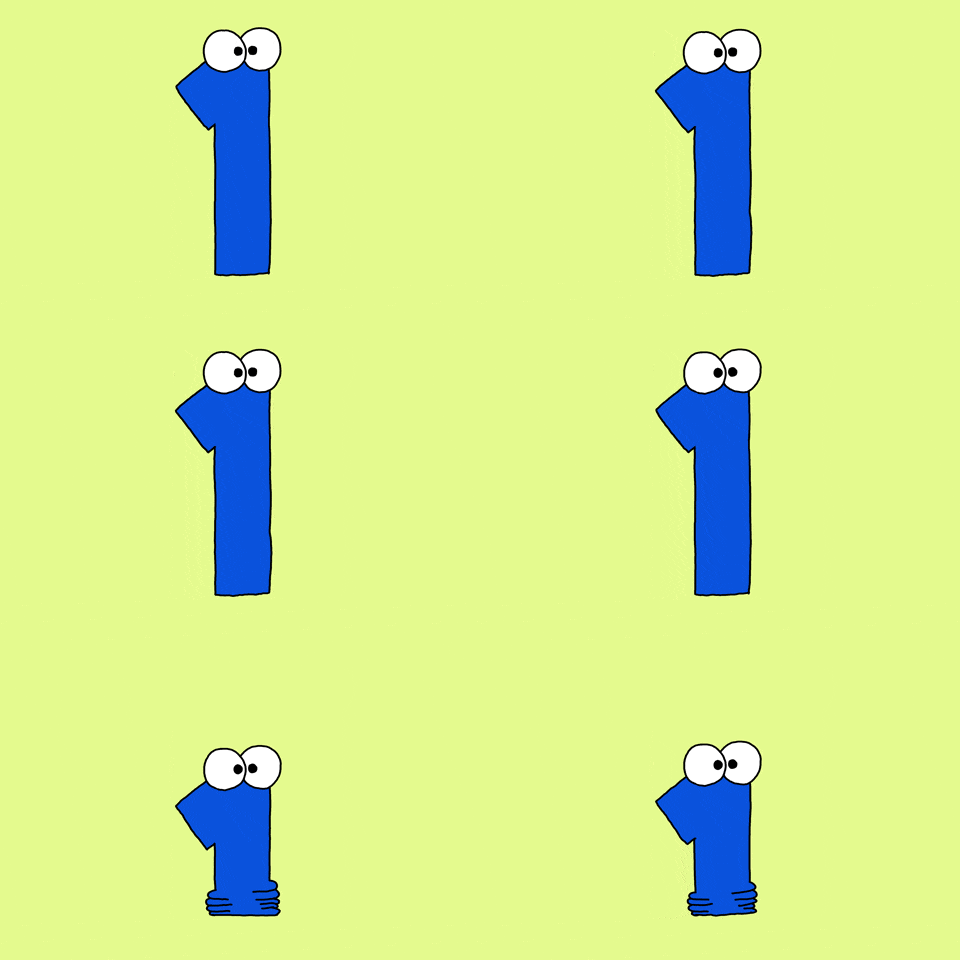
Inline styles
Classes, pseudo-classes, or attributes
!important rule
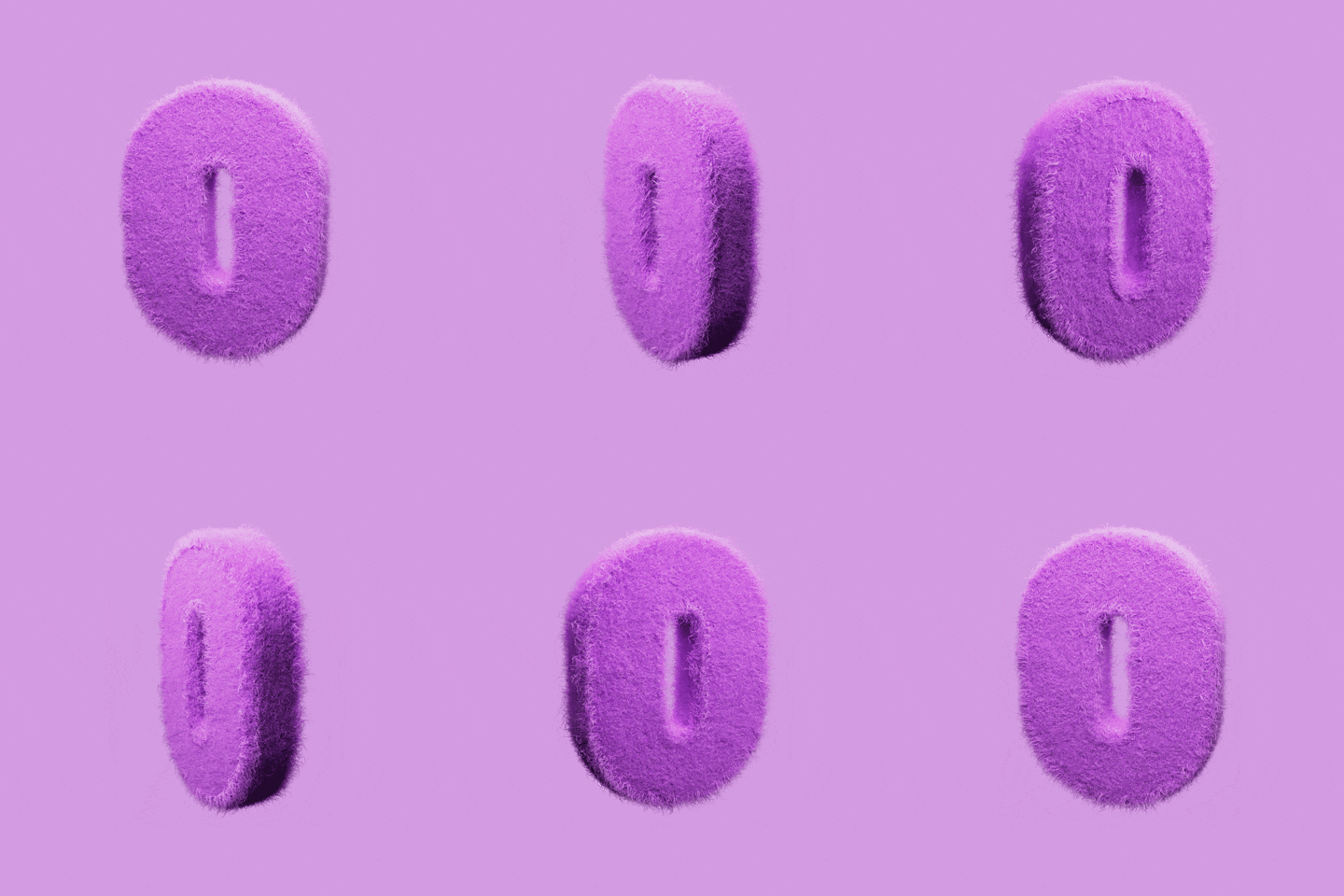



ID selectors
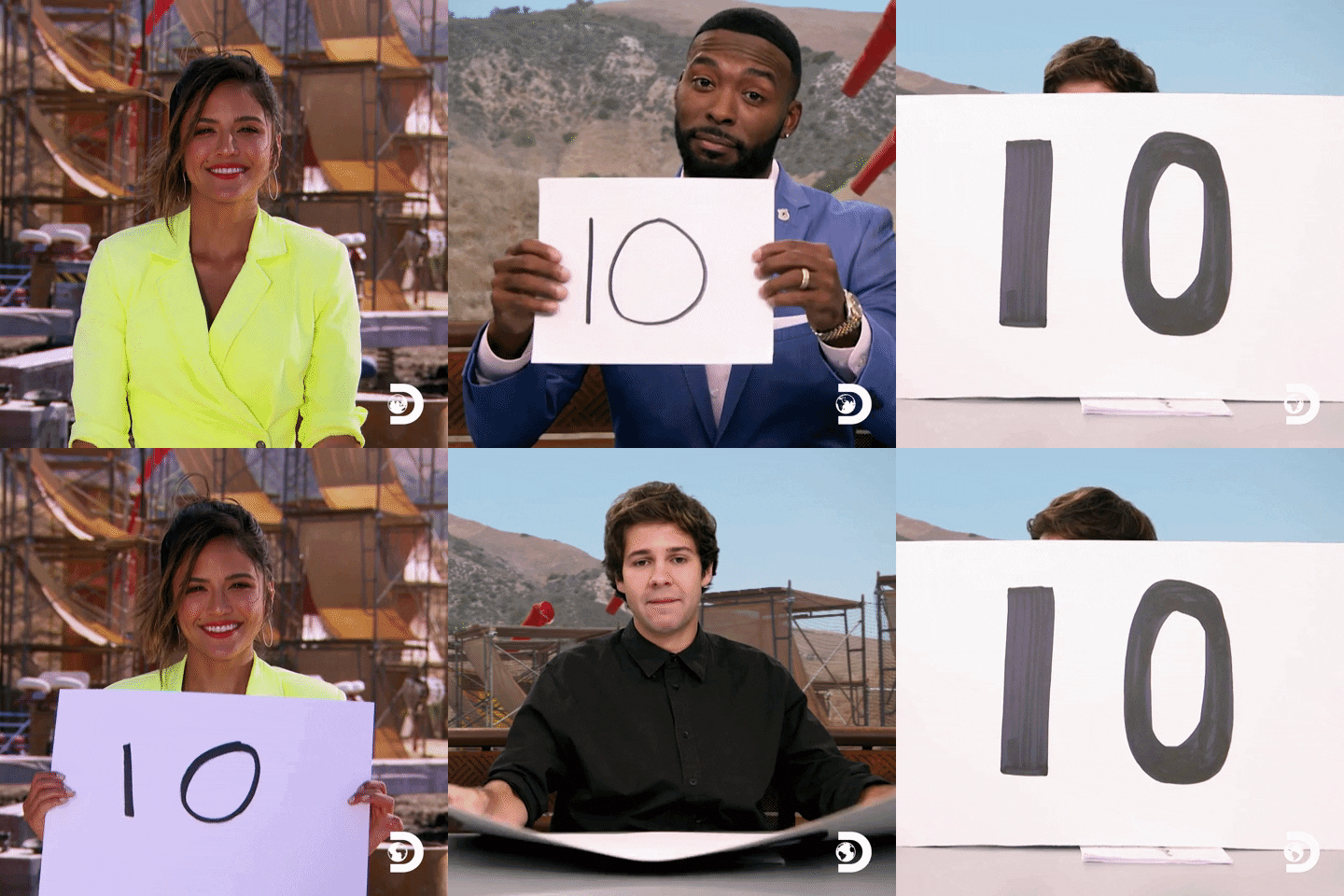
Specificity in CSS
In terms of CSS imports, the following order is applied:
Inline stye
Internal style

External style

Specificity in CSS
Who is winning?
Specificity in CSS
🎯 Activity: Work on your projects (30 min)
Basics of web design
Teacher Juan Romero Luis
Mar 24, 2025
Unit 4
Front-end layout
CSS3 (VII)
bit.ly/BWD24U4
One
Three
Two
Pop Quiz!!
bit.ly/BWD24U4
The box model
The box model
Content
Padding
Boroder
Margin
The box model
Content
Padding
Boroder
Margin
p {
width: 300px;
height: 200px;
padding: 20px;
border: 20px, solid, white;
margin: 20px;
}
The box model
<!DOCTYPE html>
<html lang="en-US">
  <head>
    <style>
      .box {
        width: 200px;
        height: 200px;
        border: 2px solid black;
        margin: 10px;
        padding: 20px;
        text-align: center;
      }
    </style>
  </head>
  <body>
    <div class="box">This is a box.</div>
  </body>
</html>
🎯 Step by step activity. Be quite and pay attention to your teacher.
The box model
Padding
Shortcut
div {
  padding-top: 50px;
  padding-right: 30px;
  padding-bottom: 50px;
  padding-left: 80px;
}
Regular
div {
  padding: 25px 50px 75px 100px;
}
The box model
Padding
The box model
Margin
Shortcut
div {
  margin-top: 20px;
  margin-right: 30px;
  margin-bottom: 20px;
  margin-left: 30px;
}
Regular
div {
  margin: 20px 30px 20px 30px;
}
The box model
Margin
Basics of web design
Teacher Juan Romero Luis
Mar 31, 2025
Unit 4
Front-end layout
CSS3 (VIII)
bit.ly/BWD24U4
Fonts in CSS
Border values
Shortcut
div {
  border-width: 5px;
  border-style: solid;
  border-color: red;
}
Regular
div {
  border: 5px solid red;
}
The box model
Border values
div {
  border-top: 5px solid red;
  border-right: 10px dotted green;
  border-bottom: 5px dashed blue;
  border-left: 10px double purple;
}
The box model
CSS height and width (values)
div {
    height: 100px;
    width: 50%;
}
|
auto |
The browser calculates the height. This is the default value. |
| length | Defines the height in px, cm, etc. |
| % | Defines the height in percent of the containing block |
| initial | Sets the height to its default value |
| inherit | The height will be inherited from its parent element |
The box model
CSS height and width (properties)
div {
    width: 100%;
    max-width: 900px;
}
| height | Sets the height of an element |
| max-height | Sets the maximum height of an element |
| max-width | Sets the maximum width of an element |
| min-height | Sets the minimum height of an element |
| min-width | Sets the minimum width of an element |
| width | Sets the width of an element |
Basics of web design
Teacher Juan Romero Luis
Apr 1, 2025
Unit 4
Front-end layout
CSS3 (IX)
bit.ly/BWD25U4
CSS units
CSS units
Absolute lengths
| cm | centimeters |
| mm | millimeters |
| in | inches (1in = 96px = 2.54cm) |
| px* | pixels (1px = 1/96th of 1in) |
| pt | points (1pt = 1/72 of 1in) |
| pc | picas (1pc = 12 pt) |
*Pixels (px) are relative to the viewing device. On low-dpi devices, 1px represents one device pixel (dot) of the display.
⚠️ Decimal number with period
In absolute lengths, the decimal number is represented by a point, not a comma.
CSS units
Relative lengths
👉
em
body {
  font-size: 16px;
}

div {
  font-size: 1.5em; /* 24px */
}
unit is relative to the font-size of its closest parent.
CSS units
Relative lengths
👉
rem
body {
  font-size: 16px; /* 1rem = 16px */
}

h1 {
  font-size: 2em; /* 2em = 2x16px = 32px */
}

p {
  font-size: 1em; /* 1em = 1x16px = 16px */
  line-height: 1.5rem; /* 1.5rem = 1.5x16px = 24px */
}
(root em) is also elative to the font-size, but unlike 'em', it's relative to the root, or the html element, not the parent.
CSS units
Relative lengths
👉
vw
div {
  width: 50vw; /* The div will take up 50% of the viewport's width. */
}
unit stands for viewport width. It's a relative unit that represents 1% of the width of the viewport.
⚠️ The viewport
The term 'viewport' refers to the size of the browser window.
CSS units
Relative lengths
👉
vh
div {
  height: 70vh; /* The div will take up 70% of the viewport's height. */
}
unit stands for viewport height. Similar to 'vw', it's a relative unit that represents 1% of the height of the viewport.
Document website structure
Document website structure
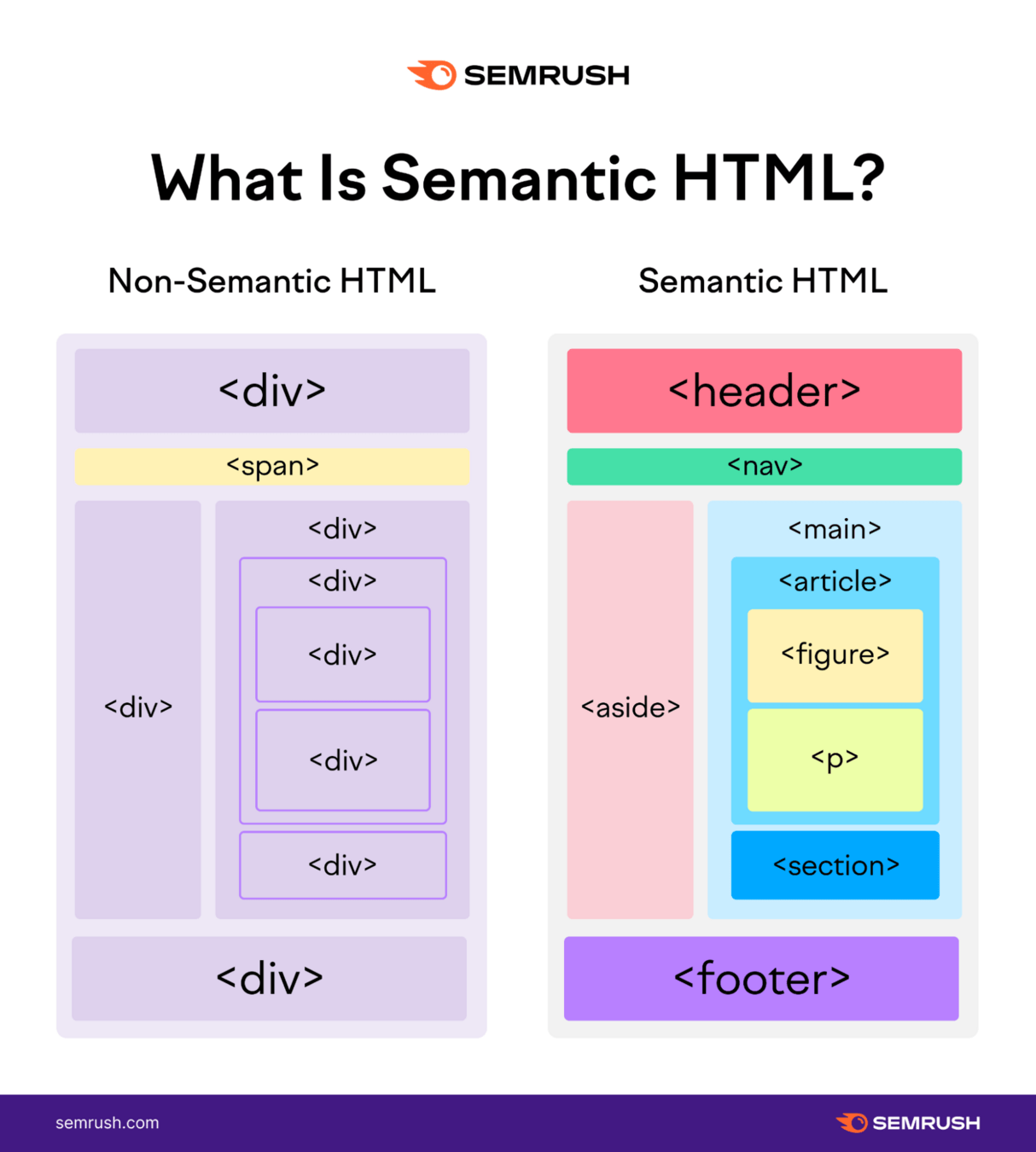
Document web structure
Header
is typically a large strip at the top of the page featuring a prominent heading, logo, and possibly a tagline.
<!DOCTYPE html>
<html lang="en-US">
  <head>
  </head>
  <body>
    <header>
      <h1>Header</h1>
    </header>
  </body>
Document web structure
Navigation Bar
links to the main sections of the site, usually represented by menu buttons or tabs. It does need to be in the header, it can be a separate component.
  <body>
    <header>
    	<nav>
          <ul>
            <li><a href="#">Home</a></li>
            <li><a href="#">Our team</a></li>
            <li><a href="#">Projects</a></li>
            <li><a href="#">Contact</a></li>
          </ul>
    	</nav>
    </header>
  </body>
Document web structure
Main content
is a large central area containing the unique content of a given webpage.
  <body>
    <header>
    	<nav>
          <ul>
            <li><a href="#">Home</a></li>
            <li><a href="#">Our team</a></li>
            <li><a href="#">Projects</a></li>
            <li><a href="#">Contact</a></li>
          </ul>
    	</nav>
    </header>
    <main>
      <section>
      	<h2> Content of the section </h2>
      </section>
    </main>
  </body>
⚠️ The main content is typically divided into various content subsections, represented by <article>, <section>, and <div> elements.
Document web structure
Sidebar
includes peripheral information, links, quotes, ads, etc., often contextually related to the main content.
  <body>
    <main>
      <section>
      	<h2> Content of the section </h2>
      </section>
      <aside>
     	 <ul>
            <li><a href="#">About us</a></li>
            <li><a href="#">Our team</a></li>
            <li><a href="#">Projects</a></li>
            <li><a href="#">Contact</a></li>
         </ul>
      </aside>
    </main>
  </body>
Document web structure
Footer
is a strip at the bottom of the page, usually containing fine print, copyright notices, or contact information.
  <body>
    <main>
		...
    </main>
    <footer>
          <p>©Copyright 2050 by nobody. All rights reversed.</p>
    </footer>
  </body>
Document website structure
Basics of web design
Teacher Juan Romero Luis
Apr 7, 2025
Unit 4
Front-end layout
CSS3 (X)
bit.ly/BWD24U4
One
Three
Two
PopQUiz!!
bit.ly/BWD24U4
Fonts in CSS
Fonts in CSS
link method
<head>
  <link href="URL" rel="stylesheet">
</head>
body {
  font-family: "Font name", sans-serif;
}
Fonts in CSS
@import method
/*CSS stylesheet*/
@import url('URL');

body {
  font-family: "Font family", sans-serif;
}
Fonts in CSS
Google Fonts