COSCUP 2026
Peter
2026/08/08
How to integrate Python, Groovy, PostgreSQL and NiFi to complete hardware factors (metrics) collection?

Slide

About me
-
Peter, GitHub
-
Active open source contributor
-
Speaker
-
COSCUP, MOPCON and so on
-
-
An Senior Engineer
-
DevOps
-
Back-end
-
System Architecture Researching
-
Web Application Security
-
PHP, Python and JavaScript
-
-
Industrial Technology Research Institute
-
Smart Grid Technology (2017~2021)
-
-
Institute for Information Industry
-
Database, Data platform architecture (2021~)
-

Outlines
-
What's NiFi? How to use NiFi to solve problems?
-
Hardware Factors (Metrics): Overview & Applications
-
Programmable NiFi Processors
-
Use Case 1: NiFi, PostgreSQL & Python Pipeline
-
Use Case 2: NiFi, PostgreSQL & Groovy Pipeline
-
Discussion & Improvements for use cases
-
Using the AI-Enablement for NiFi development
-
Discussion & Summary
What's NiFi?
-
Apache NiFi is developed by NSA
-
Since 2014, it's the Apache Top-Level Project
-
It's a Data Pipeline or Data Flow Control service
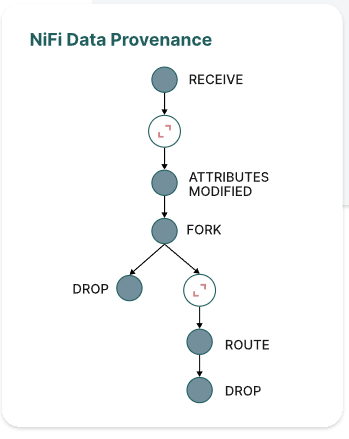

How to use NiFi to solve problems?
-
ETL (Extract, Transform, Load)
-
Connect sources and Targets
-
Transform Data Formats
-
Control flow states
Outlines
-
What's NiFi? How to use NiFi to solve problems?
-
Hardware Factors (Metrics): Overview & Applications
-
Programmable NiFi Processors
-
Use Case 1: NiFi, PostgreSQL & Python Pipeline
-
Use Case 2: NiFi, PostgreSQL & Groovy Pipeline
-
Discussion & Improvements for use cases
-
Using the AI-Enablement for NiFi development
-
Discussion & Summary
Hardware Factors (Metrics): Overview & Applications
-
Hardware Metrics
-
Operating System, NAS or VM
-
e.g. CPU, Memory, Network (Ping), Disk
-
-
Virtual Machine State (API)
-
VMware, Tanzu
-
-
Backup State (API)
-
NetBackup
-
-
Enterprise Storage Solutions (API)
-
HPE Storage
-
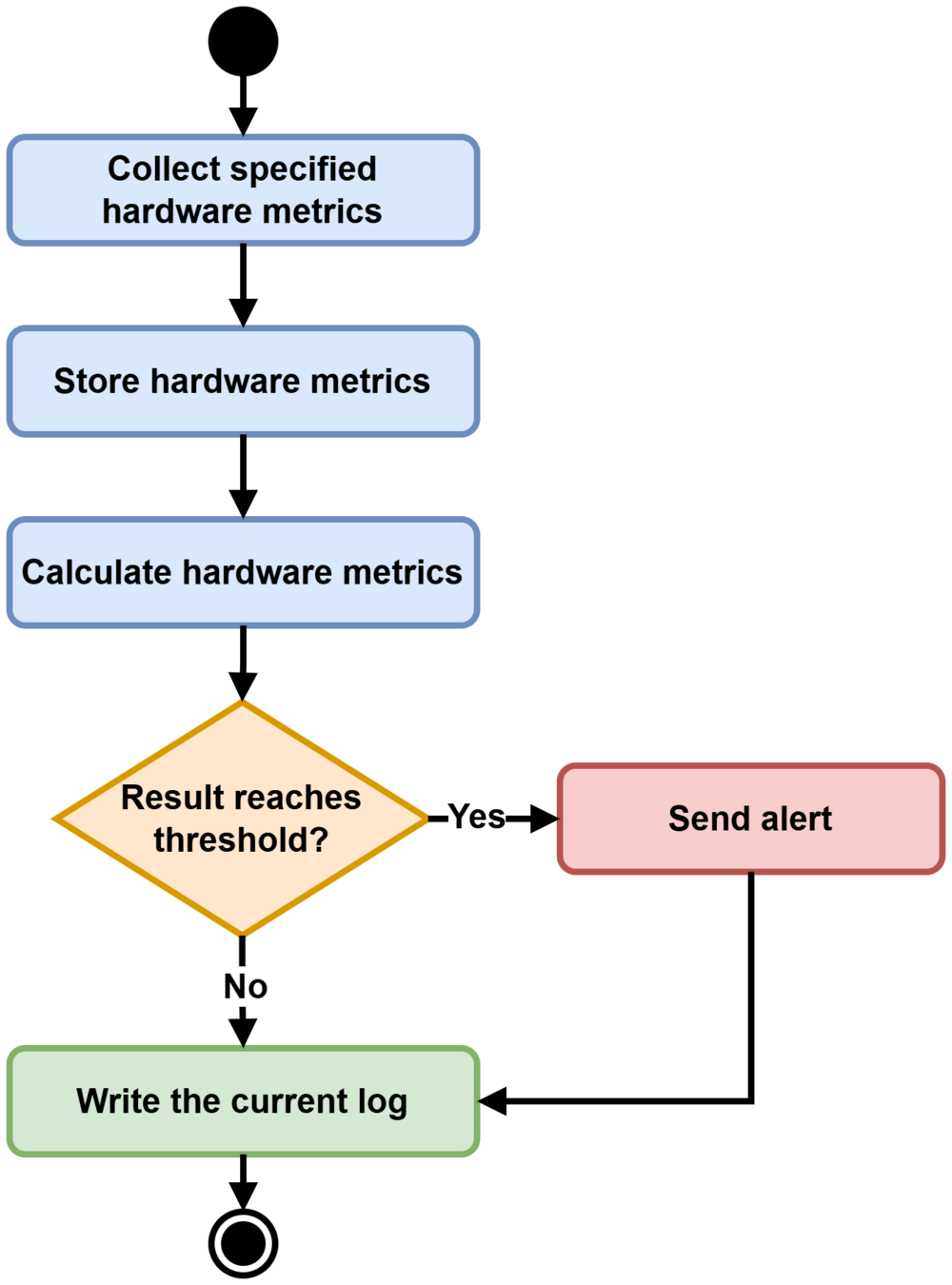
Collecting Hardware Metrics Process
Outlines
-
What's NiFi? How to use NiFi to solve problems?
-
Hardware Factors (Metrics): Overview & Applications
-
Programmable NiFi Processors
-
Use Case 1: NiFi, PostgreSQL & Python Pipeline
-
Use Case 2: NiFi, PostgreSQL & Groovy Pipeline
-
Discussion & Improvements for use cases
-
Using the AI-Enablement for NiFi development
-
Discussion & Summary
Programmable NiFi Processors
-
Using customized program to develop the NiFi processor
-
e.g. Python processor, Groovy or customized NiFi processor
-
-
When to use the programmable NiFi processor?
-
Tricky requirements. E.g. Using ICMP ping to collect network metric.
-
| Processor Name | Pros | Cons |
|---|---|---|
| ExecuteStreamCommand | Universal programming language | Performance |
| ExecuteGroovyScript | Easy and running script in JVM | Version Control Issue |
| Python Processor (NiFi 2.0+) | Completed CPython Support | Customized NiFi Image |
NiFi Python Processor Setup Example
-
Customized NiFi Image
-
Check nifi.properties
FROM apache/nifi:2.8.0

USER root
RUN apt-get update && \
    apt-get -y install iputils-ping python3 python3-pip && \
    PIP_BREAK_SYSTEM_PACKAGES=1 pip3 install pymongo pandas

USER nifi
#####################
# Python Extensions #
#####################
# Uncomment in order to enable Python Extensions.
nifi.python.command=python3
nifi.python.framework.source.directory=./python/framework
nifi.python.extensions.source.directory.default=/opt/nifi/nifi-current/python_extensions
nifi.python.working.directory=./work/python
nifi.python.max.processes=100
nifi.python.max.processes.per.extension.type=1NiFi Python Processor Setup Example
-
Create the PingHost.py (FlowFileSource V.S. FlowFileTransform)
-
docker compose cp PingHost.py nifi:/opt/nifi/nifi-current/python_extensions
import re
import json
import platform
import subprocess
from datetime import datetime, timezone

from nifiapi.flowfiletransform import FlowFileTransform, FlowFileTransformResult
from nifiapi.properties import PropertyDescriptor, StandardValidators, ExpressionLanguageScope


class PingHost(FlowFileTransform):
    # ↓↓↓ 關鍵:必須是 FlowFileTransform,不能是 FlowFileSource ↓↓↓
    class Java:
        implements = ['org.apache.nifi.python.processor.FlowFileTransform']

    class ProcessorDetails:
        version = '0.0.2-SNAPSHOT'
        description = '讀取 FlowFile 屬性中的 IP 與 ping 次數,執行 ping 後將結果以 JSON 輸出。'
        tags = ['ping', 'network', 'icmp', 'monitoring', 'python']
        dependencies = []
........
NiFi Python Processor Setup Example
-
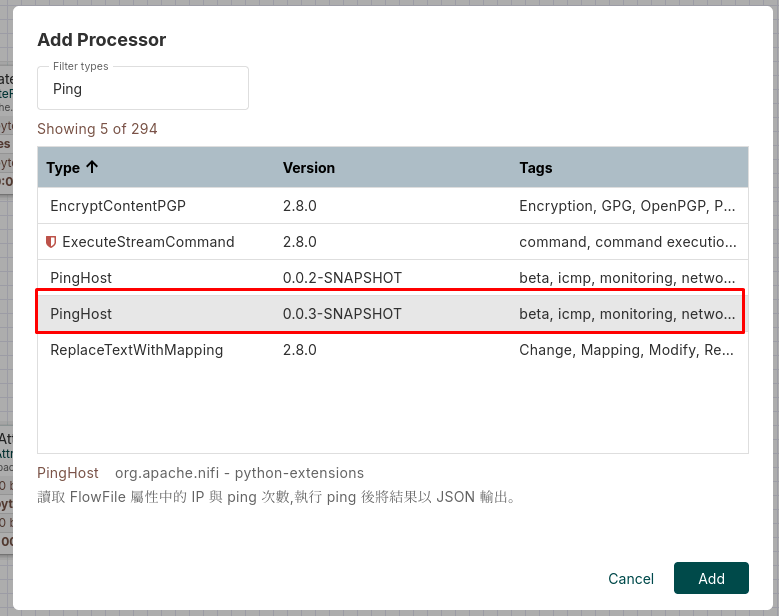
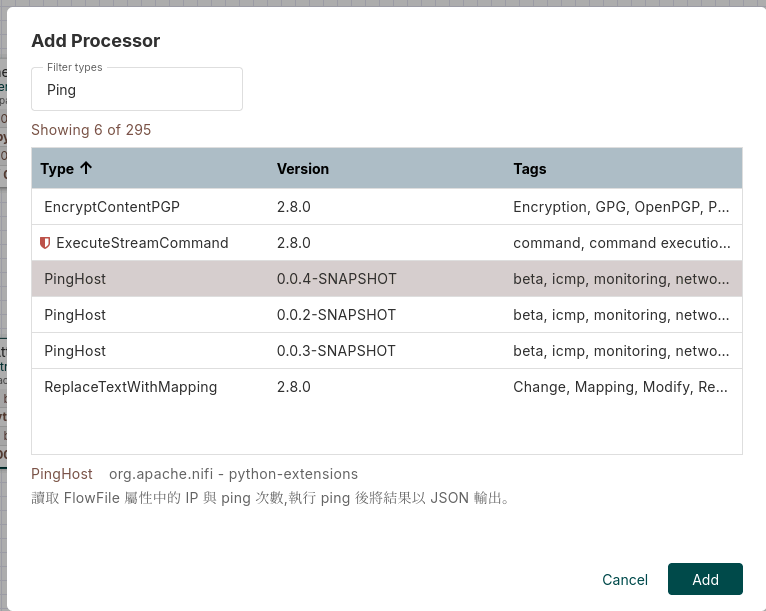
How to update the PingHost.py?
-
Overwrite the PingHost.py
-
docker compose cp PingHost.py nifi:/opt/nifi/nifi-current/python_extensions
-
docker compose exec nifi ls /opt/nifi/nifi-current/work/python/extensions/PingHost/
-
-
After waiting for 30~60 seconds,
-
NiFi will update and load new Python Processor under runtime
-
NiFi Python Processor Setup Example
-
How to troubleshoot the PingHost.py Processor?
-
'Processor' is invalid because initializing runtime environment for the Processor.
-
docker compose exec nifi cat /opt/nifi/nifi-current/logs/nifi-app.log | grep PingHost -A5
-
File "/opt/nifi/nifi-current/python_extensions/PingHost.py", line 33, in __init__
    name='Ping Count',
TypeError: FlowFileTransform.__init__() got an unexpected keyword argument 'jvm'
2026-08-06 16:00:36,020 ERROR [Initialize Python Processor d799e116-019f-1000-ffff-ffff89e658e6 (PingHost)] o.a.n.py4j.StandardPythonProcessorBridge Failed to load code for Python Processor d799e116-019f-1000-ffff-ffff89e658e6 (PingHost). Will try again in 600000 millis
py4j.Py4JException: An exception was raised by the Python Proxy. Return Message: Traceback (most recent call last):
  File "/opt/nifi/nifi-current/python/framework/py4j/java_gateway.py", line 2506, in _call_proxy
    return_value = getattr(self.pool[obj_id], method)(*params)
                   ^^^^^^^^^^^^^^^^^^^^^^^^^^^^^^^^^^^^^^^^^^^
  File "/opt/nifi/nifi-current/./python/framework/Controller.py", line 72, in createProcessor
Use Case 1 about NiFi Data Pipeline
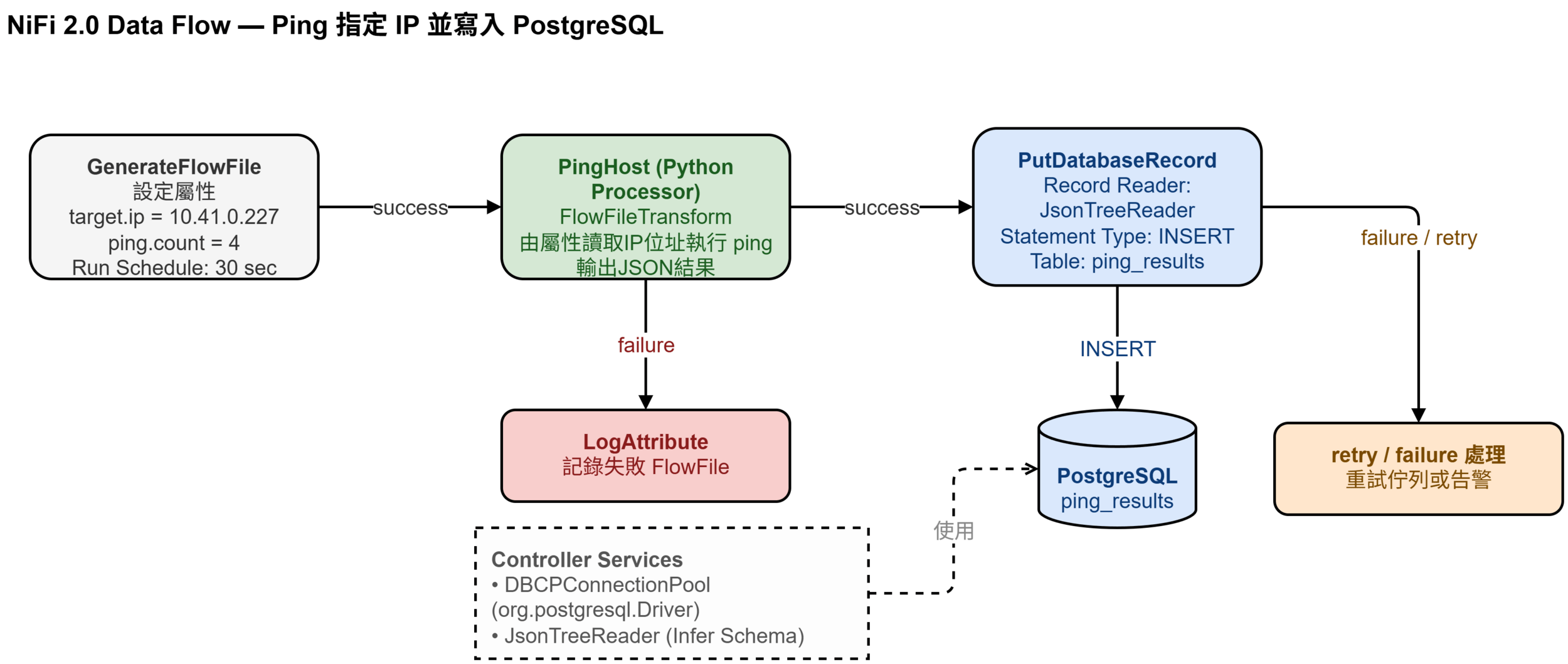
Use Case 1 about NiFi Data Pipeline
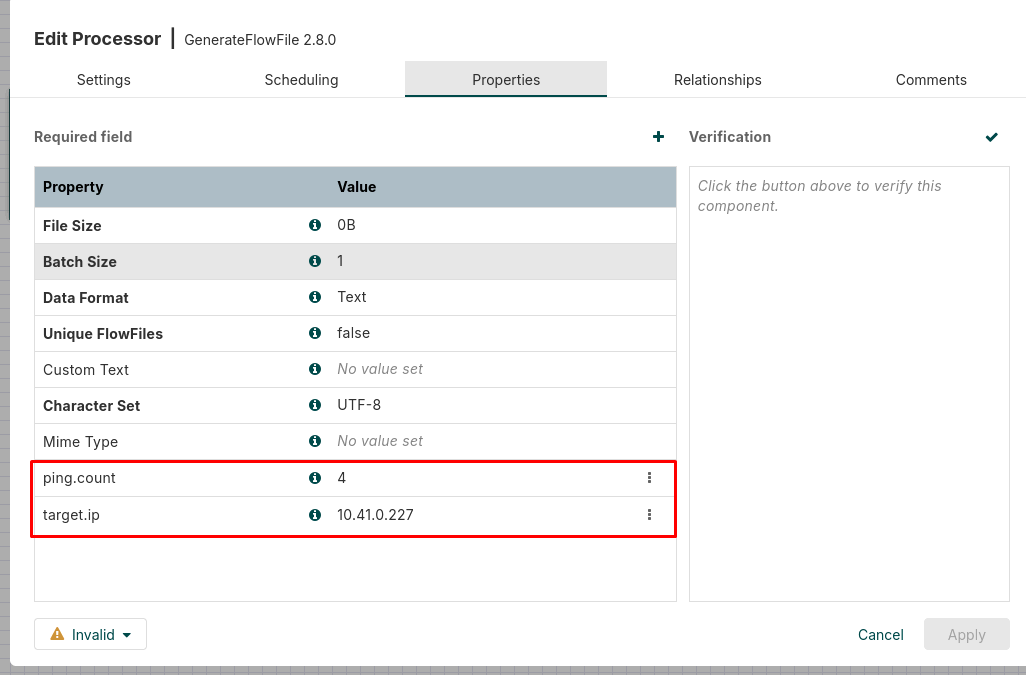
GenerateFlowFile
Use Case 1 about NiFi Data Pipeline
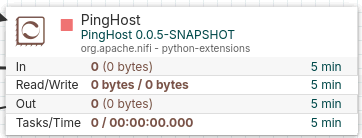
PingHost 0.05-SNAPSHOT
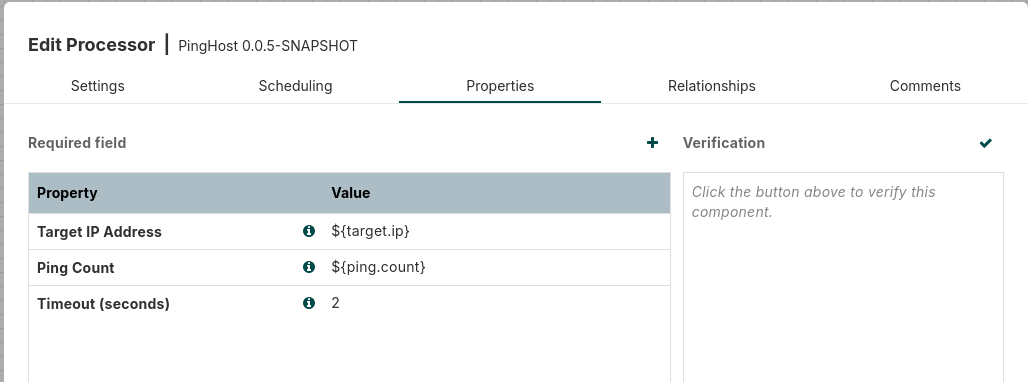
Use Case 1 about NiFi Data Pipeline
-
PutDatabaseRecord (1/2)
-
docker compose cp postgresql-42.7.13.jar nifi:/opt/nifi/nifi-current/
-
Configuring Controller Service
-
Database Driver Class Name: org.postgresql.Driver
-
jdbc:postgresql://<host>:<port>/<database_name>
-
Database Driver Locations
-
-
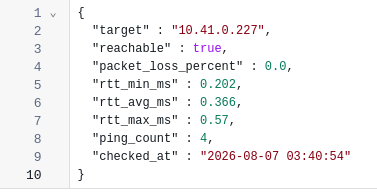
CREATE TABLE ping_results (
    id                   BIGSERIAL     PRIMARY KEY,
    target               VARCHAR(255)  NOT NULL,
    reachable            BOOLEAN       NOT NULL,
    packet_loss_percent  NUMERIC(5,2),
    rtt_min_ms           NUMERIC(10,3),
    rtt_avg_ms           NUMERIC(10,3),
    rtt_max_ms           NUMERIC(10,3),
    ping_count           INTEGER,
    checked_at           TIMESTAMPTZ
);

CREATE INDEX idx_ping_results_target      ON ping_results (target);
CREATE INDEX idx_ping_results_checked_at  ON ping_results (checked_at);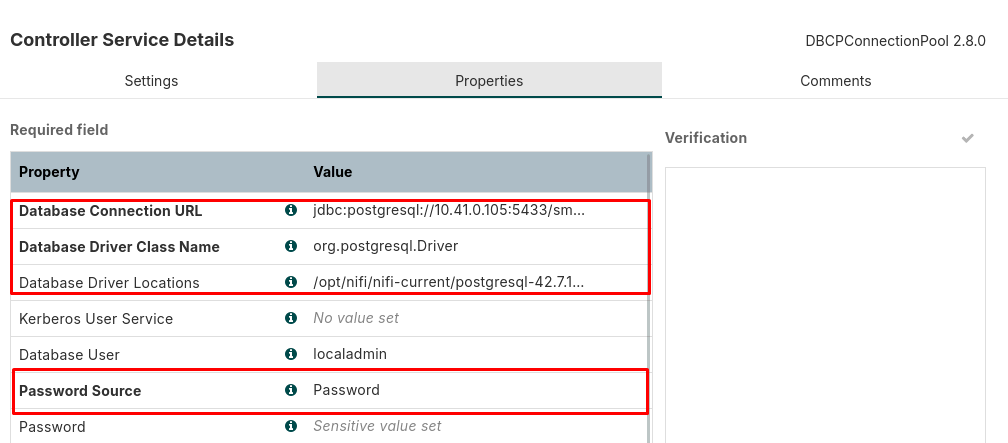
Use Case 1 about NiFi Data Pipeline
-
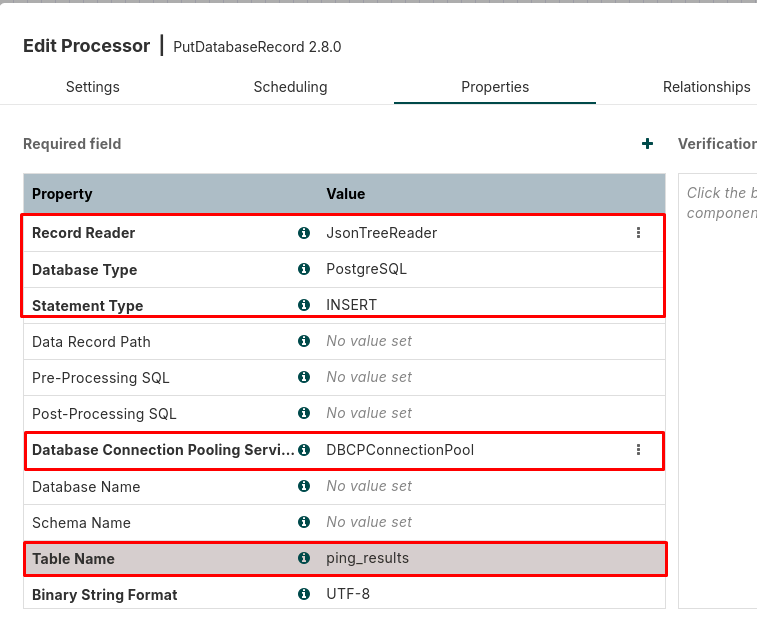
PutDatabaseRecord (2/2)
-
Recorder Reader, DatabaseType, StatementType, Specific Controller and Table Name
-
Enabling JsonTreeReader Service and Database Connection Pooling Service
-
Use Case 1 about NiFi Data Pipeline
-
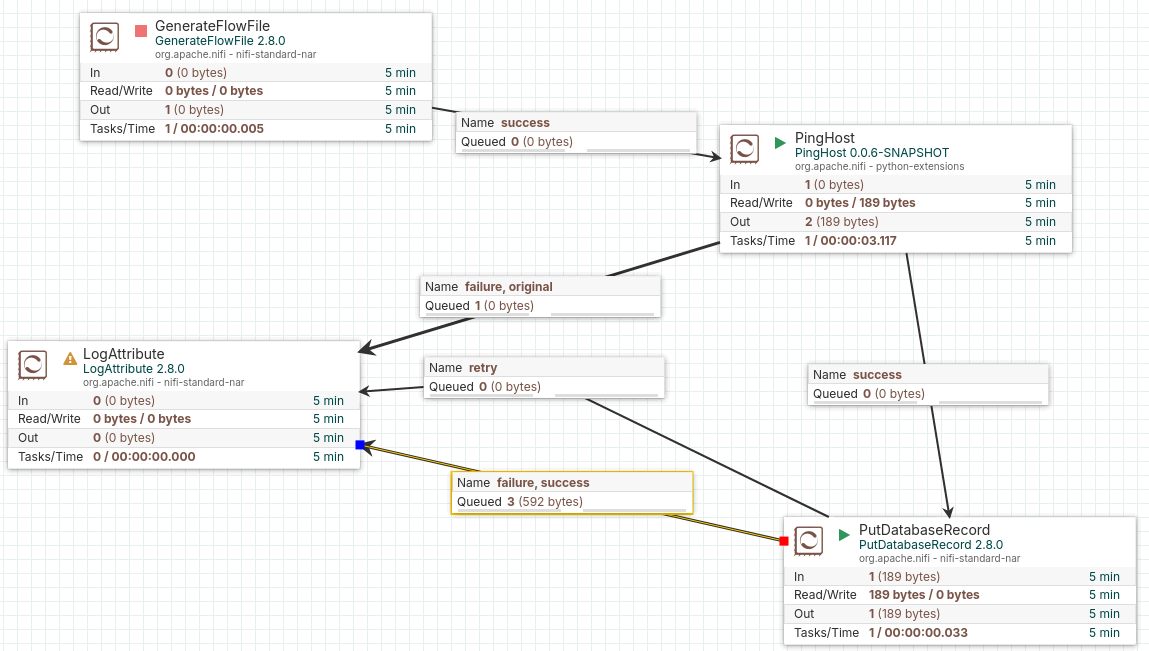
Final NiFi Data Pipeline
Use Case 1 about NiFi Data Pipeline
-
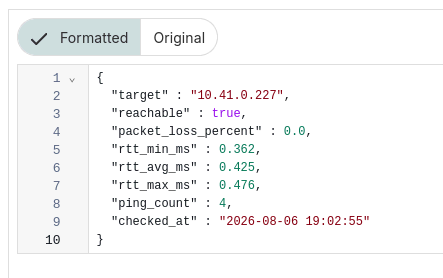
Final NiFi Data Pipeline (Run Once)

Use Case 2 about NiFi Data Pipeline
-
Difference
-
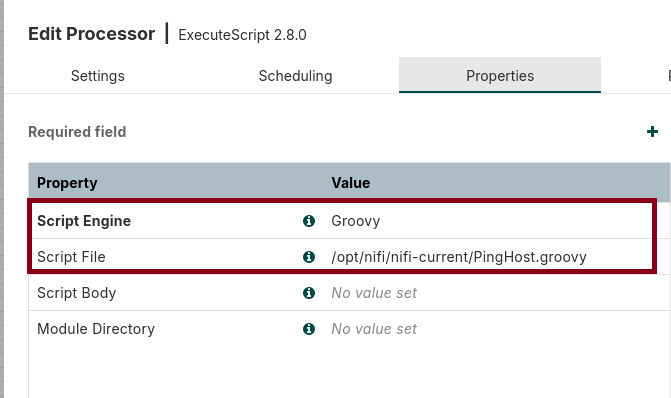
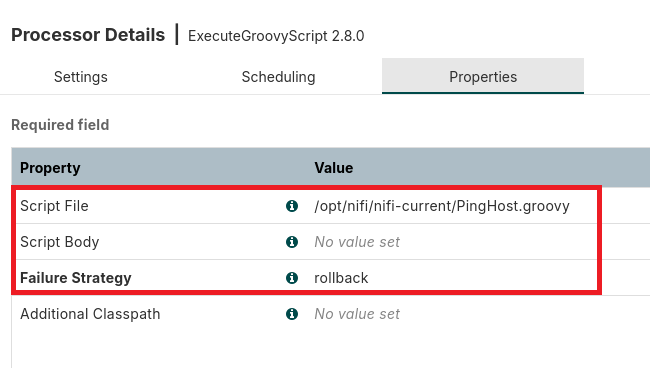
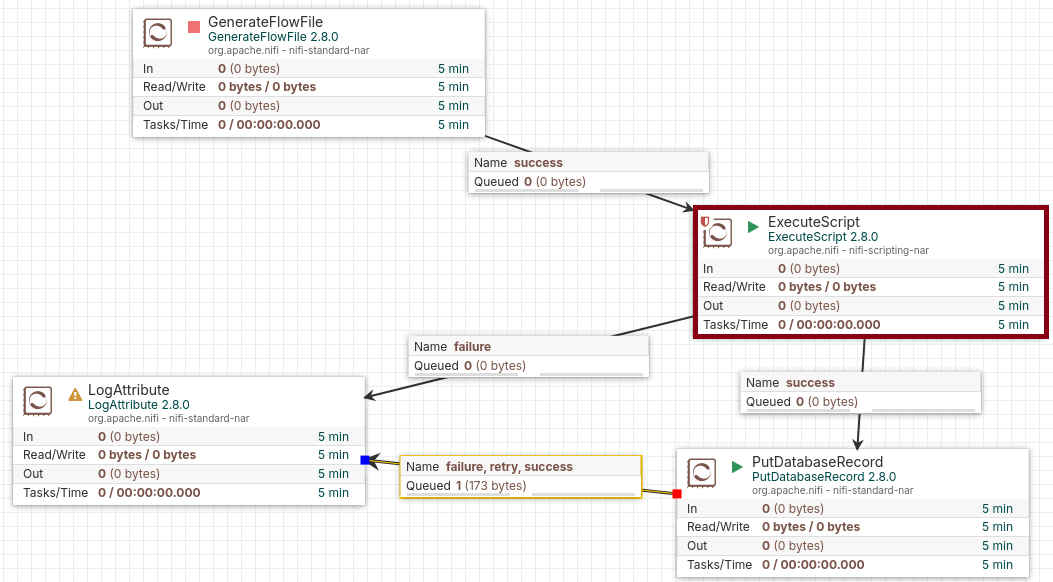
Replace the PingHost Processor with ExecuteGroovyScript or ExecuteScript
-
-
PingHost.groovy
-
ExecuteScript Processor Setting (Prerequisite)
-
docker compose cp PingHost.groovy nifi:/opt/nifi/nifi-current
-
Use Case 2 about NiFi Data Pipeline
-
Final NiFi Data Pipeline
Use Case 2 about NiFi Data Pipeline
-
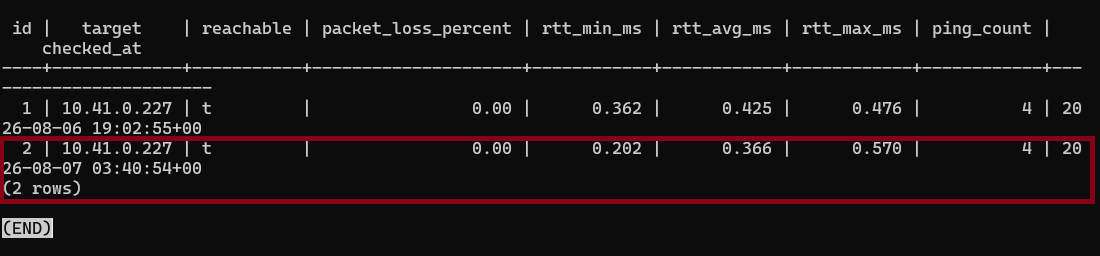
Final NiFi Data Pipeline (Run Once)
Discussion & Improvements for use cases
| Processor Name | Pros | Cons |
|---|---|---|
| ExecuteGroovyScript | Easy and running script in JVM | Version Control Issue |
| Python Processor (NiFi 2.0+) | Completed CPython Support | High Trouble Shooting |
Discussion for Active and Passive
-
Using the InvokeHTTP to retrieve data firstly.
-
Using the ConsumeAMQP, ConsumeMQTT or ConsumeKafka to retrieve data firstly.
| Retrieving Data Type | Pros | Cons |
|---|---|---|
| Active (polling or schedule) | Polling and schedule | Scaling and CPU usage |
| Passive (event-driven, IoT) | Throughput and low latency | Mainatining the Broker |
Outlines
-
What's NiFi? How to use NiFi to solve problems?
-
Hardware Factors (Metrics): Overview & Applications
-
Programmable NiFi Processors
-
Use Case 1: NiFi, PostgreSQL & Python Pipeline
-
Use Case 2: NiFi, PostgreSQL & Groovy Pipeline
-
Discussion & Improvements for use cases
-
Using the AI-Enablement for NiFi development
-
Discussion & Summary
Using the AI-Enablement for NiFi development
It's easy to do this!
-
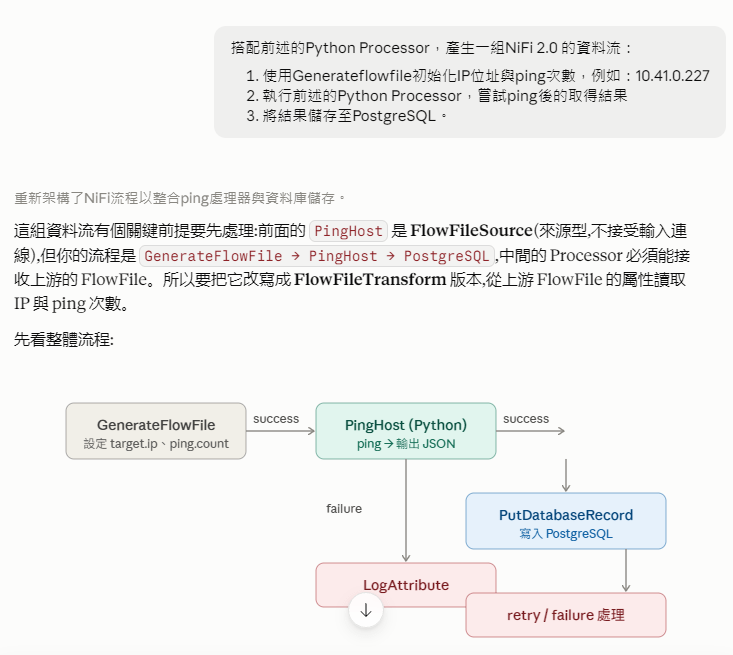
Using the Claude, Gemini or ChatGPT via the web browser to send the prompt
-
使用Generateflowfile初始化IP位址與ping次數,例如:10.41.0.227
-
執行前述的Python Processor,嘗試ping後的取得結果
-
將結果儲存至PostgreSQL
-
-
Using the Claude example
-
Advanced: Using the Claude Desktop or Antigravity
-
Modify/Create the NiFi Datapipelines automatically.
-
Outlines
-
What's NiFi? How to use NiFi to solve problems?
-
Hardware Factors (Metrics): Overview & Applications
-
Programmable NiFi Processors
-
Use Case 1: NiFi, PostgreSQL & Python Pipeline
-
Use Case 2: NiFi, PostgreSQL & Groovy Pipeline
-
Discussion & Improvements for use cases
-
Using the AI-Enablement for NiFi development
-
Discussion & Summary
Discussion & Summary
-
Use Cases about NiFi Data Pipelines
-
What about calculating hardware metrics and send alert?
-
Are these processes suitable for integration into a NiFi data pipelines?
-
It's up to complex logic or process
-
-
-
Do we need to develop the Collecting Data Service with NiFi?
-
It's up to the requirements or scenarios.
-
It's up to the collecting data mechanism or process.
-
-
When to use the NiFi?
-
It should consider using the NiFi to develop IoT Architecture to collect sensor data.
-
The routine data collecting progress.
-
The routine and event-driven data collecting progress.
-
References
-
NiFi Python Processor
-
NiFi Groovy Script