Stand der Technik bei KI-Coding-Tools
Kategorien, Funktionsweise und Workflows
Rainer Stropek | software architects
FOMO?
- All AI tools in this classroom put their pants on the same way
- LLM access matters = foundation
- Everything else? Just icing on the cake.
- Good context management is your success factor
- Like giving your AI assistant a map instead of just a destination
➡️ The better the map, the smoother the journey - Avoid "context rot", too much unrelevant info confuses the LLM
- Like giving your AI assistant a map instead of just a destination
- Give your LLM long-term memory
- Make knowledge explicit (e.g. AGENTS.md)
- Improve your toolset
- Define what "good" means through tools (e.g. linter)
- Fix broken tools, your LLM is not good in working around it
Use AI Without Fear!
Players
- Trust
- Vendors/providers see your code!
- Who will survive "AI Bubble"?
- Risk of smaller vendors disappearing
- But: Risk of large companies abandoning products
- Existing focus on certain vendor
- Focus on certain IDE
- Existing contractual relationships
- Governance/data sovereignty rules
- Ability to execute and innovate
- Funding
- Track record of innovations
Why Care About Players?
- IDE Vendors
- Examples: GitHub Copilot, JetBrains AI
- LLM Vendors
- Examples: Claude Code, Codex,
Mistral Code, Google Antigravity
- Examples: Claude Code, Codex,
- Cloud Vendors
- Examples: Kiro, Vercel v0
- AI-Focused "Startups"
- Examples: Cursor, Windsurf, Zed, Lovable
- OSS
- Examples: Kilo Code, OpenCode
Players
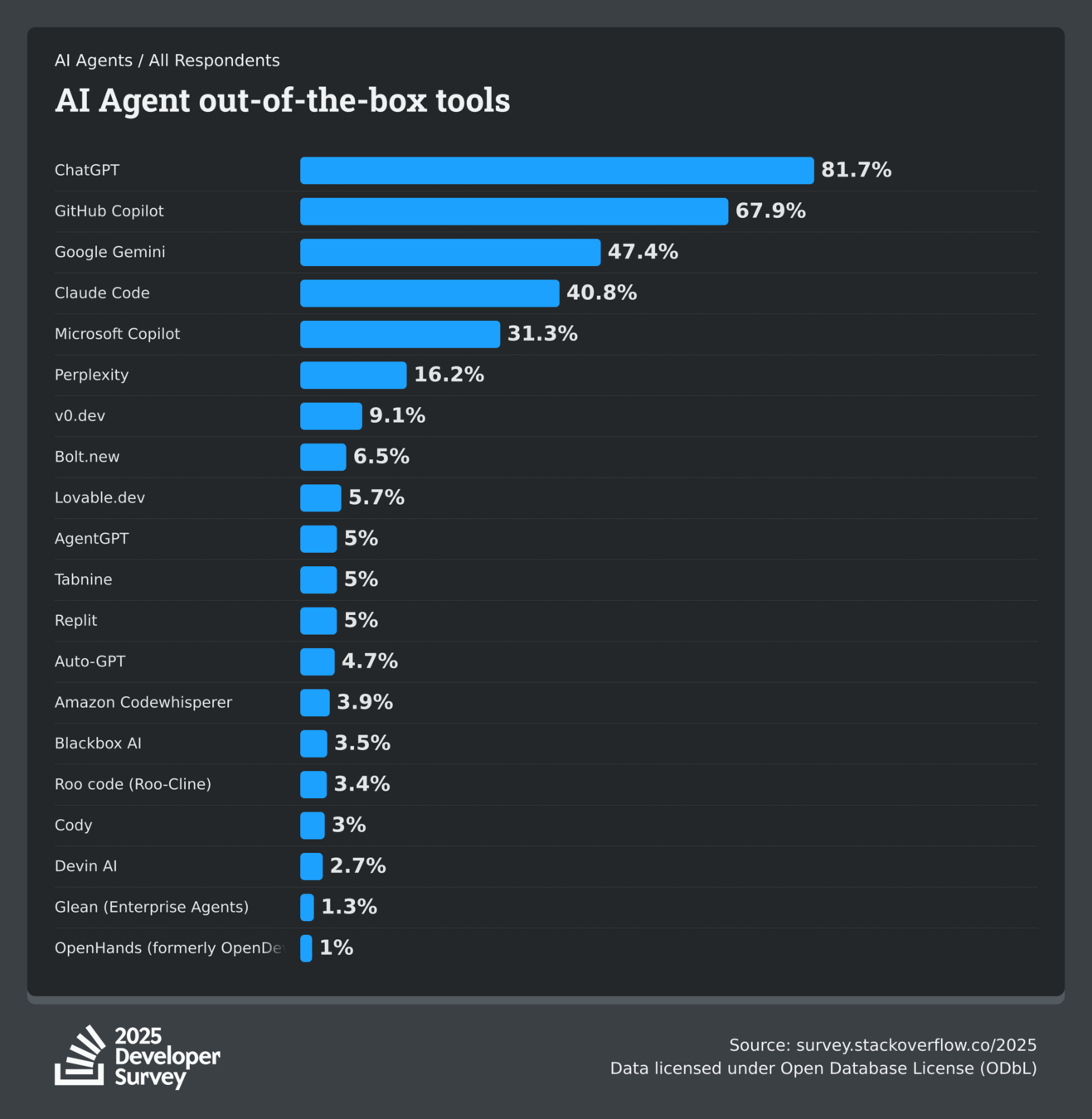
- Become AI-ready, independent of vendor
- Prefer tool-independent standards (e.g. AGENTS.md vs. copilot-instructions)
- Enable MCP servers (security, governance)
- Tool-independent prompting (e.g. skills)
- Do your tech homework (e.g. Git skills, avoid IDE dependencies)
- Work on governance/legal rules and contracts
- Establish processes for cost management and monitoring
- Enterprises
- Choose one/a few standard tools, available to all devs, mandatory trainings
- Allow justified exceptions and experiments!
- Foster exchange
- Internal and external
- Prompts, success stories, failures, pipelines/workflows
All Eggs in One Basket?
Pricing Models
-
Per Request (e.g. GH Copilot)
- Number of requests included
- Then: PAYG
-
Monthly Fee (e.g. Claude Code, Cursor)
- Blocked when limit is reached
- Then: Switch to token-based pricing PAYG or upgrade to larger plan
-
PAYG (e.g. Kilo Code, OpenCode)
- Buy through gateways/libraries
- Bring your own API key
-
Combination with Chat Bot (e.g. Claude, OpenAI)
- Shared limits for coding and bot
- Costs to run models locally (e.g. OSS Tools via Ollama)
Pricing Models (With Examples)
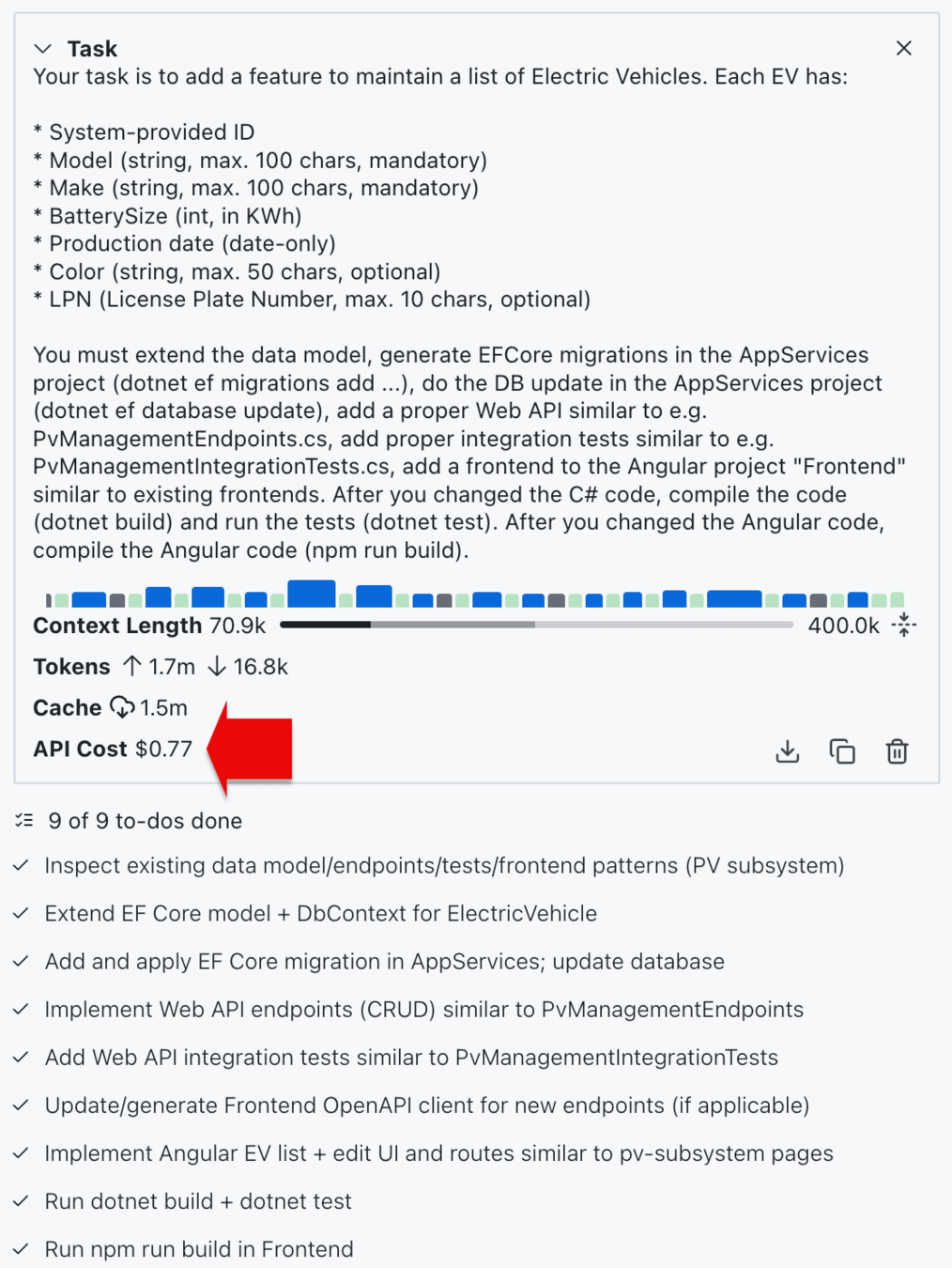
- PAYG can be expensive
- For regular use, token-based pricing
is (far) more expensive
- For regular use, token-based pricing
- You don't want to be blocked
- Option for PAYG if necessary
- Need a Credit Card for that?
It Does Make a Difference!
Frontends
-
Most larger tools offer different frontend
- IDE Extensions
- Examples: GH Copilot Extensions, Kilo Code, Claude Code Extensions
- AI-enhanced Editors
- Examples: Cursor, Windsurf, Zed, Google Antigravity, Kiro
- TUI/CLI Tools
- Examples: Claude Code, Codex, OpenCode, Kilo Code,
Cursor Agent CLI, Kimi Code
- Examples: Claude Code, Codex, OpenCode, Kilo Code,
- Browser-based Agents
- Examples: GH Coding Agent, Lovable, v0, Cursor
- Chat Bots (working with Apps)
- Examples: ChatGPT
Frontends
- Big differences in quality of frontends
- In one editor, across editors
- Forces some devs to work with multiple editors
- Code Completion vs. Agents
- AI Code Completion has a value, deeply integrated into editor
- Easy to build context
- Add current file, add current selection, etc.
- Verify code changes in graphical diff viewer
- Single change, consolidated view of all changes
- Selectively accept changes
- Git diff tools can help
Why Care About Frontends?
- Delegate large, well-defined requirements to AI?
- Well defined requirement (spec-driven development)?
- AI-ready-infrastructure?
- Ready to delegate larger work items to AI?
- ➡️ Frontend is less important
- Use AI as a pair-programming buddy?
- Unclear requirements, prototyping (vibe coding)?
- Manual steps regularly necessary?
- Using tech where AI is not great?
- ➡️ Frontend is very important
Future of AI Frontends
LLM Availability
- Limitation to one provider (e.g. Claude Code, OpenAI Codex)
- Workaround through compatible APIs (e.g. GLM-4.7 🔗)
- Curated list of LLMs (e.g. GH Copilot 🔗, Cursor 🔗)
- Selection of LLM providers 🔗
- Large selection of LLMs through abstractions/gateways
- Availability of local models
- OSS tools like Kilo Code and OpenCode
through e.g. Ollama, LM Studio, vLLM
- OSS tools like Kilo Code and OpenCode
LLM Availability
- LLMs really matter!
- Use tools that enable access to state-of-the-art LLMs
- Urge admins to enable new models
- Get to know your AI "coworkers"
- Use new models to get a feeling for them
- Have a set of test use cases to evaluate new models
LLM Availability
Recent Enhancements
Independence of Tools
- Add Function Tools to AI tools
- Does not extend LLM, extends AI tool
- ⚠️ Security implications
- More than just Function Tools
- Prompts, Resources, Sampling, etc.
- Limited in many tools
- MCP Registries
- Examples: GitHub, Docker, Azure
- Consider your own for security reasons
- Built-in tools vs. MCP
- Example: Claude Code Chrome Extension 🔗
Model Context Protocol
- Run agents in isolated Git Worktrees
- Built into some coding tools (e.g. Cursor, GH Copilot)
- Custom subagents
- Get their own context window
- Specialized settings/prompts
- Workflow features (e.g. handover from planning to build)
- Custom tool selection (e.g. GH Copilot)