Simplifying OLTP and Real-Time Analytics
Jeff Taylor

Fabric SQL Database
Jeff Taylor
Principal Data Consultant
Database Consulting, LLC

Super Hero Suit
https://dayofdata.org/jax - May 1-2, 2026
https://dayofdata.org/jax
May 1-2, 2026



AI Bulletproof DBA: Thriving with SQL Performance in the AI Era
Pinal Dave
Pre-con: Using AI to be your Data Engineering Partner
Andy Leonard, Stephen Leonard
Simplifying OLTP and Real-Time Analytics
Jeff Taylor
Fabric SQL Database
Introduction to Microsoft Fabric SQL Database
-
Overview: Developer-friendly transactional database based on Azure SQL Database.
-
Integration: Easily integrates with development frameworks and analytics.
-
Replication: Automatic data replication (mirroring) into OneLake for analytics.
- Performance: Intelligent performance features like automatic index creation.
Key Features of Microsoft Fabric SQL Database
-
OLTP Workloads: Home for OLTP workloads, easy to configure and manage. Most of the same features you know and use in SQL Server.
-
Analytics Setup: Automatically replicates (mirrors) data into OneLake in near real-time.
-
Development Tools: Supports SQL Server Management Studio (SSMS), Visual Studio Code, and a web-based editor in the Fabric portal.
-
Intelligent Performance: Features like automatic tuning and index creation.
- Ready for AI: RAG, Vectors, Embeddings, Vector Search
Analytical Endpoint
- Paired Endpoint: Each Fabric SQL database has a paired (mirrored) SQL analytics endpoint. (Available after web UI refresh)
- Reporting Queries: Run reporting queries against the OneLake copy of the data. No overhead on OLTP database.
- Access Methods: Accessible via the Fabric portal, SSMS, Visual Studio Code, PowerBI Desktop, and TDS (Tabular Data Stream).
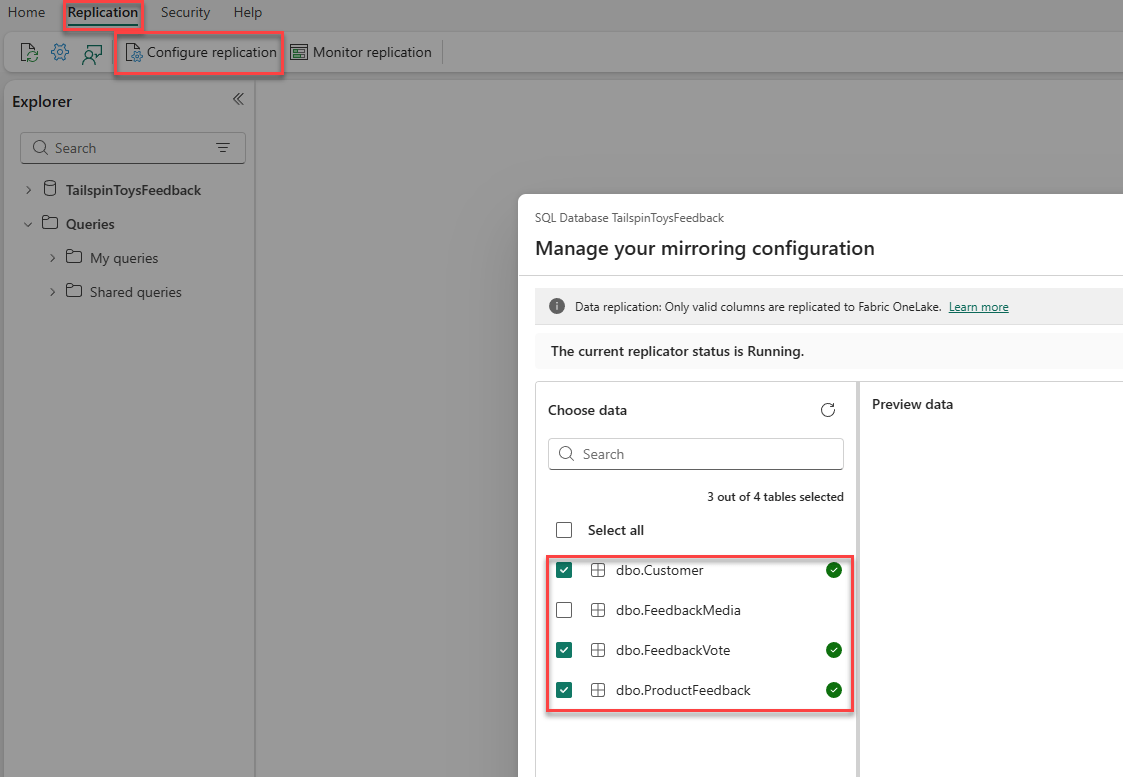
- Selective Mirroring/Replication: Now available! Rolling out region by region.
Analytical Endpoint
Connecting to the Database
-
Web-Based Editor: Use the web-based editor in the Fabric portal.
-
SSMS: Connect using SQL Server Management Studio, browse (SSMS 22) or direct.
-
Connection Strings: Provided for various tools, including ADO.NET, JDBC, ODBC, PHP, and Go.
-
Visual Studio: Connection string
- Visual Studio Code: MSSQL extension, connection string
Semantic Model
-
Custom Models: Ability to create multiple models from one database.
- Integration: Integrated with PowerBI for visualizations and analysis.
Cross-Database Queries
- Querying Across Databases: Write cross-database queries joining data from other SQL databases, mirrored databases, warehouses, and the SQL analytics endpoint.
Azure SQL vs. Fabric SQL Database
- Common Code Base: Both share a common code base with the latest stable version of the Microsoft SQL Database Engine.
Differences
- Always Encrypted: Supported in Azure SQL but not in Fabric SQL.
- Change Data Capture (CDC): Supported in Azure SQL but not in Fabric SQL.
- Elastic Pools: Available in Azure SQL but not in Fabric SQL.
- Provisioning Control: Detailed control in Azure SQL, autonomous management in Fabric SQL.
- Integration: Fabric SQL is fully integrated with other workloads in the Microsoft Fabric platform by default
- No EXECUTE AS: Supported in Azure SQL, not Fabric SQL
Azure SQL vs. Fabric SQL Database
- Full Text Search: Azure SQL third-party work breakers aren't supported, Fabric SQL is now supported as of this week (Fabcon/SQLCon 2026).
- SQL Users: Azure SQL Supports, Fabric SQL does not. (MFA, Service Principal only)
- Server-level roles: Azure Supports, Fabric SQL does not.
- TDE: Azure SQL supports, but Fabric SQL does not, but it uses storage encryption with service-managed keys. Customer-managed keys are now supported.
- Active geo-replication: Azure SQL, not Fabric SQL
- Common Code Base: Both share a common code base with the latest stable version of the Microsoft SQL Database Engine.
Differences
Azure SQL vs. Fabric SQL Database
Azure SQL Database
Fabric SQL Database
- Compute Tiers: Provisioned or serverless.
- Hardware Configurations: Gen5 (balanced), Fsv2 (compute optimized), DC (confidential computing).
- Elastic Pools: Yes.
- Maximum Resource Limits: Higher limits for vCores, DTUs, and storage.
- Compute Tiers: Serverless.
- Hardware Configurations: Latest configurations.
- Elastic Pools: No.
- Maximum Resource Limits: Lower limits compared to Azure SQL Database.
Azure SQL vs. Fabric SQL Database

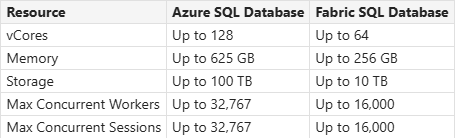
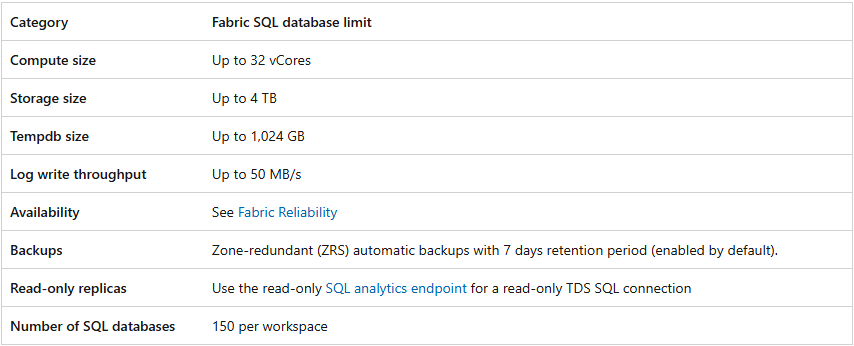
Memory 3GB per vCPU
Azure SQL vs. Fabric SQL Database Backups
Fabric SQL
- Full backups every week
- Differential backups every 12 hours
- Transaction log backups are approximately every 10 minutes
- Backups Zone-redundant (ZRS) automatic backups with 7 days retention period (enabled by default).
- Retention can be adjusted to 1-35 days
- Data Encrypted at rest
- First full backup is within 30 minutes of creation
Azure SQL
- Full backups every week.
- Differential backups every 12 or 24 hours.
- Transaction log backups are approximately every 10 minutes.
- Backups can be - Locally redundant storage (LRS), Zone-redundant storage (ZRS), or Geo-redundant storage (GRS) with a retention period of 7 days by default.
- Retention can be adjusted up to 10 years
- Database encryption with TDE, backups are encrypted at rest.
Azure SQL vs. Fabric SQL Database Backups
Limitations
- You cannot control the frequency of backups in SQL database in Fabric.
- You can only restore database backups from the live SQL databases.
- You can only restore database backups within the same workspace. Cross-workspace PITR is not supported.
- If you delete a workspace, all databases on that workspace are also deleted and can't be recovered.
- All backups are stored in a single region replicated across different Azure availability zones. There are no geo-replicated backups.
- Only short-term retention backups are supported. No long-term retention backups support.
- Backups can be restored only through Fabric portal. Currently, there's no REST API, Azure PowerShell, or Command Line Interface (CLI) commands enabled.
Azure SQL vs. Fabric SQL Database Restores
Limitations
- Retention of backups is seven days for a live database.
- Restoring backups from dropped databases isn't currently possible after the retention period of seven days.
- Cross-workspace restore isn't supported.
- Cross-region restore isn't supported.
- If you delete the database during the restore, the restore operation is canceled. You can't recover the data from the deleted database.
Source Control
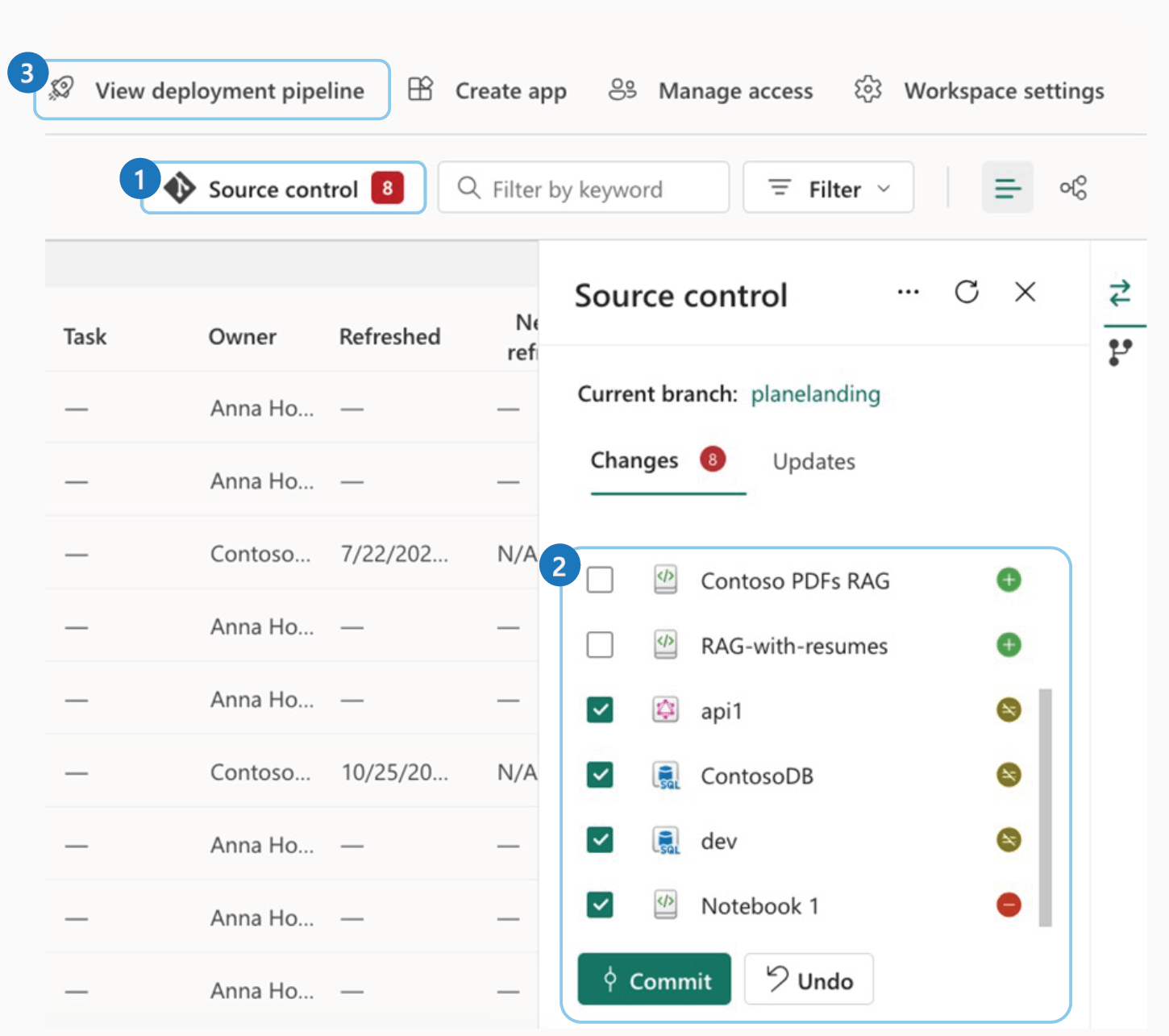
- Fabric SQL DB integrates with git
- Commit directly from Fabric web UI
- Enable Git integration in tenant settings
- Repo connection is at the workspace level
- Database must exist before committing
to source control
Fabric SQL Database
Mirroring APIs
-
Stop and Start Mirroring: Use API's to start and stop mirroring.
-
Fabric SQL: https://learn.microsoft.com/en-us/rest/api/fabric/sqldatabase/mirroring
-
Azure SQL: https://learn.microsoft.com/en-us/rest/api/fabric/mirroreddatabase/mirroring
Demo
Create a SQL database in the Fabric portal
Demo
Use SQL Analytics Endpoint
Demo
Connect to the Database - SSMS
Demo
Semantic Model
Best Use Cases
-
Reverse ETL: Have data available in near real-time for operational consumption, by applications or APIs.
-
Operational Data Store (ODS): near-real-time, integrated data store to consolidate multiple operational systems for reporting.
-
Translytical Applications: Perform both transactional and analytical workloads.
Microsoft's Recommendations
Resources
https://learn.microsoft.com/en-us/fabric/database/sql/overview
https://learn.microsoft.com/en-us/shows/data-exposed/sql-integration-with-microsoft-fabric-data-exposed
https://learn.microsoft.com/en-us/fabric/data-warehouse/tutorial-sql-cross-warehouse-query-editor
https://learn.microsoft.com/en-us/fabric/database/sql/mirroring-limitations
https://learn.microsoft.com/en-us/fabric/database/sql/limitations
https://learn.microsoft.com/en-us/rest/api/fabric/sqldatabase/mirroring
https://learn.microsoft.com/en-us/rest/api/fabric/mirroreddatabase/mirroring

Questions?
Thank you!
Jeff Taylor
Thank you for attending my session today.
If you have any additional questions, please don't hesitate to reach out.



How was the session?