Programming Digital Systems
Numerical Methods
David Mayerich
Scalable Tissue Imaging and Modeling (STIM) Laboratory
Department of Electrical and Computer Engineering
Cullen College of Engineering
University of Houston
David Mayerich
STIM Laboratory, University of Houston

C/C++ Development Tools
Compiling and linking
Using gcc, Visual Studio, and secure shell (SSH)
David Mayerich
STIM Laboratory, University of Houston
C/C++
David Mayerich
STIM Laboratory, University of Houston
executablelinker
object codecompiler
preprocessor
openglntdllkernel32msvcrtdynamic
librarieseigen3glmbooststatic
librariesglm.hiostreameigen3.hopengl.hheader
filessource codeCompilers
-
GNU Compiler collection (gcc/g++)
-
Clang/LLVM (clang/clang++)
-
Open source compiler on all major operating systems
-
Strong support for recent C/C++ language standards
-
-
Microsoft Visual C++ (msvc/cl)
-
Proprietary compiler only available for Windows
-
Poor support for C++ 26, decent support for C++ 23
-
Integrated UI/debugging tools
-
-
Intel oneAPI C++ Compiler (icpx/icx)
-
Proprietary compiler available for all major operating systems
-
Poor support for C++ 26, good support for C++ 23
-
Excellent benchmark/optimization performance, especially with their math libraries
-
David Mayerich
STIM Laboratory, University of Houston





Operating Systems - Recommendations
David Mayerich
STIM Laboratory, University of Houston
Visual C++, GNU, Clang, oneAPI
Visual Studio:
- Easy to install
- Provides good debugging and profiling tools
- Very hard to start a project from scratch
GNU C/C++
- More difficult to install (use MinGW)
- Need an IDE (CLion, Dev-C++)
Consider using VS with Intel's oneAPI compiler. Install VS (be sure to click C/C++), then oneAPI.
GNU, Xcode/Clang, oneAPI
GNU C/C++:
- Install using homebrew
- Very easy to start/use
- Select your IDE: CLion, VS Code, Code::Blocks, Eclipse
Xcode/Clang:
- Default compiler, uses Clang
- Can't use CUDA (uses Metal)
Recommend installing GNU because std::thread support is a little spotty. Can't use CUDA on your system so you'll have to use a server with GNU anyway.
GNU, Clang, oneAPI
GNU C/C++:
- Install via package manager
- Very easy to start/use
- Select your IDE: CLion, VS Code, Code::Blocks, Eclipse
Intel oneAPI:
- Installation will link GNU
- Generally better benchmarking performance
I prefer CLion with either GNU or oneAPI - usually GNU on workstations and oneAPI on servers.
Windows
macOS
Linux
Working with Good Source Code
David Mayerich
STIM Laboratory, University of Houston
source repository
- source code
- data
- documentation
- test code
- build scripts
source repository
- source code
- data
- documentation
- test code
- build scripts
build
executable
build directory
- Makefiles
- VS project
- data files
generate
pull
version control
(Git, Subversion)
local development system/workstation
Source Code Repository
-
myproject
-
CMakeLists.txt
-
src/
-
main_func.cpp
-
other-funcs.cpp
-
myproject.h
-
-
data/
-
image.jpg
-
spreadsheet.csv
-
-
docs/
-
Doxyfile
-
-
David Mayerich
STIM Laboratory, University of Houston
- Put everything needed to build your project from scratch in here
- Keep this directory structured
- Make your project easy to build
-
CMakeLists.txt- CMake script describes how to build the project -
Doxyfile- Doxygen script generates documentation
-
- Create a separate "build" directory that holds binary files
- You should be able to work from different computers by sharing ONLY the source repository
Build Systems
-
Compiler/Linker require:
-
source files to be compiled
-
header files for any external libraries
-
static library locations for linking
-
-
When multiple compilers are used (ex. C and CUDA)
-
source files are passed to a CUDA compiler nvcc
-
CUDA-related source is stripped and compiled into object code
-
remaining source is passed to the C/C++ compiler
-
all object code files are linked at the end
-
-
Anyway, this all gets very complicated and you shouldn't do it manually
David Mayerich
STIM Laboratory, University of Houston
Build Automation
-
Automation tools create a build system for your desired compiler and IDE
-
Find external libraries and header files
-
Pass the appropriate parameters to the compiler/linker
-
May also create an IDE
-
Multiple options
-
CMake has flaws but is the closest to an industry standard
David Mayerich
STIM Laboratory, University of Houston
Current Standards:



CMake - most popular, bad scripting
cmake.org
Premake - better scripting (Lua)
premake.github.io
Meson - fast for large projects
mesonbuild.com
CMake Scripts (CMakeLists.txt)
-
The
CMakeLists.txtfile is a script describing:-
what is required to build the project
-
how to build the project
-
what will be created as a result
-
-
The project will be created in the
builddirectory -
If anything goes wrong, you can always delete the build directory and re-run CMake
David Mayerich
STIM Laboratory, University of Houston
# specify the CMake version required
cmake_minimum_required(VERSION 3.0)

# create a name for this project
project(myproject)

# "glob" is a term for combining files
file(GLOB_RECURSE SOURCE src/*.cpp src/*.h)
file(GLOB_RECURSE DATA data/*)

# copy data files to the build directory
file(COPY ${DATA} DESTINATION .)

# create an executable from the source code
add_executable(myexe ${SOURCE})
Using CMake
-
Pull the repository:
git clone https://github.com/name/repo.git -
Create your build environment
-
from your source directory:
cmake -B /path/to/build -
from anywhere else:
cmake -B /path/to/build -S /path/to/source
-
-
Compile your project (depends on IDE/compiler)
-
Visual Studio: click "build"
-
GNU:
cd /path/to/build
make
-
David Mayerich
STIM Laboratory, University of Houston
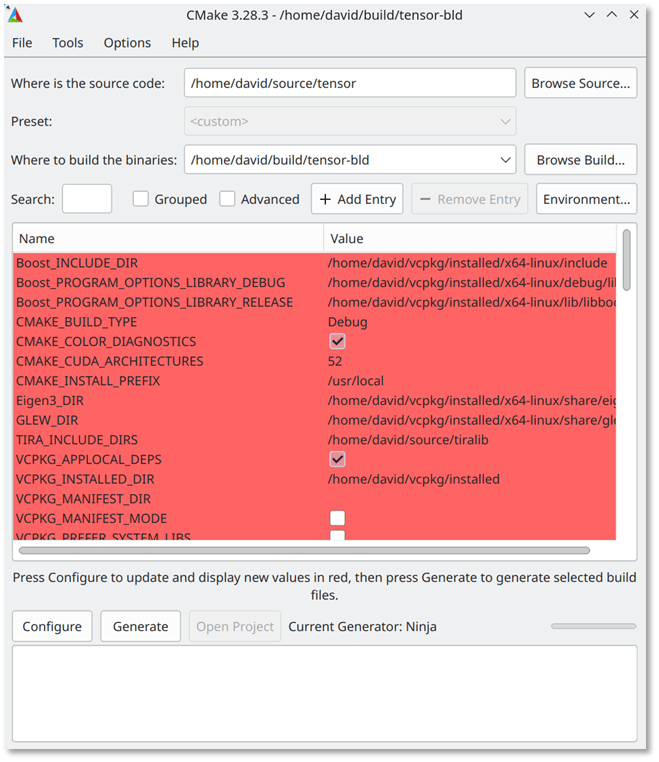
CMake GUI (cmake-gui)
C/C++
David Mayerich
STIM Laboratory, University of Houston
executablelinker
object codecompiler
preprocessor
openglntdllkernel32msvcrtdynamic
librarieseigen3glmbooststatic
librariesglm.hiostreameigen3.hopengl.hheader
filessource code
- Download libraries
- Compile them if necessary
- Tell the build system where to find them
Package Managers
-
Automate installing, updating, and removing software
-
This can include software like:
-
static and dynamic libraries
-
executable programs
-
source code and documentation
-
-
Linux package managers vary with distribution
-
aptitude (
apt), Red Hat (rpm),pacman, snapcraft (snap)
-
-
macOS:
homebrew
David Mayerich
STIM Laboratory, University of Houston
-
Windows doesn't have one BUT
-
vcpkgis cross-platform-
Downloads and builds libraries locally
-
Integrates with CMake
vcpkg
-
Clone
vcpkgas a Git repository:
git clone https://github.com/microsoft/vcpkg.git -
Run the build script (generates a vcpkg executable for your system)
cd vcpkg
./bootstrap-vcpkg.bat(Windows)
or
./bootstrap-vcpkg.sh(Linux, macOS) -
Install libraries
./vcpkg install glfw3
./vcpkg install glm
...
David Mayerich
STIM Laboratory, University of Houston
Development Tools Summary
-
Create a source repository
-
Organize your code using directories
-
-
Use a version tool (probably
git)-
Organize revisions, undo mistakes
-
Work on multiple updates
-
-
Make your repository redundant
-
Dropbox, GitHub, Syncthing, etc.
-
Easy to transfer code between computers
-
David Mayerich
STIM Laboratory, University of Houston
-
Create a CMakeLists.txt script
-
Generate the project
-
Edit source code
-
Compile/Run
-
Add libraries as needed

Data Types
Standards
Registers and Promotion
Integers and Overflow
David Mayerich
STIM Laboratory, University of Houston
Standards
-
Languages and data types are standardized
-
ISO: International Organization for Standardization
-
IEC: International Electrotechnical Commission
-
-
Most recent standards:
-
C23 (published ISO/IEC 9899:2024)
-
C++23 (published ISO/IEC 14882:2024)
-
C26 and C++26 are currently working drafts
-
-
Available standards depend on what compiler you're using
-
g++, Visual Studio, Clang, and Xcode all have good support for C++23
-
g++, Clang, and Xcode have some support for upcoming features in C++26
-
David Mayerich
STIM Laboratory, University of Houston
Specifying Data Types
-
All values are stored in memory as a series of binary bits
-
A processor has to know how to process a given set of bits
-
C/C++ is compiled directly into processor instructions, so variable types have to be known at compile time
-
Data types follow IOS and IEC standards:
David Mayerich
STIM Laboratory, University of Houston
Integer Types
-
char- smallest addressable unit
(minimum 8-bit) -
int- minimum 16 bits
(32-bit on most desktops) - can be specified as signed or unsigned
-
size_t- memory location
(64-bit on 64-bit systems)
Fractional Types
-
float- 32-bit decimal
IEEE 754 standard -
double- 64-bit decimal
IEEE 754 standard
Type Resolution (C/C++)
-
Operations between the same type returns a value of that type
-
All operations must be between the same data type
-
Operations attempted between different types result in promotion of the lowest
-
Different types can be enforced by casting
David Mayerich
STIM Laboratory, University of Houston
int a = 2;
int b = 3;
int c = a * b;			//c is 6
int d = b / a;			//d is 1, why?

int x = 2;
float y = 1.6;
float z = x & y;		//z is 3.2

float w = x * (int) y;	// w = 2
int k = x * y;			// k = 3
Promotion
-
In general, data types are promoted from less information to more information
-
Sometimes that's ambiguous: 64-bit integers are promoted to 32-bit floats
David Mayerich
STIM Laboratory, University of Houston
64-bit long double
64-bit double
32-bit float
64-bit unsigned long long
64-bit long long
32-bit unsigned long
32-bit long
32-bit unsigned int
32-bit int
16-bit short
16-bit unsigned short
8-bit char
Modulus Operation
-
Modulus (or mod) is a binary operator commonly used in numerical computing
-
The mod operation (% in C/C++) returns the remainder of a division:
David Mayerich
STIM Laboratory, University of Houston
int a = 15;
int b = 4;
int x = a % b;		// x is 3

int c = 3;
int y = a % c;		// y is 0
Limits of Integers
-
Allocated registers have specified bit limits
-
A char is usually 8 bits
-
signed char is limited to the range \([-128, 127]\)
-
unsigned char is limited to the range \([0, 255]\)
-
-
What happens when these limits are exceeded?
David Mayerich
STIM Laboratory, University of Houston
unsigned char b = 254;
unsigned char y = b + 5;	// wraps around to 3
							// 254 -> 255 -> 0 -> 1 -> 2 -> 3
signed char a = 127;
signed char x = a + 1;		// undefined
Overflow as a Modulus
-
An unsigned overflow is defined as "wrapping around"
-
This is a modulus operation based on the \(n\)-bit register size:
David Mayerich
STIM Laboratory, University of Houston
unsigned char b = 254;		// char is 8 bits
unsigned char y = b + 5;	// y = 3
							// 254 + 5 = 259
                            // 259 % 2^8
// 259 % 256 = 3-
This can be helpful since a modulus operation is slow
Memory Allocation
Stack vs. Heap
Dynamic Allocation
Multidimensional Arrays
David Mayerich
STIM Laboratory, University of Houston
Memory Allocation
-
stack vs. heap
-
A stack is a data structure that is very fast at removing stuff added last
-
Basic allocations happen on the stack:
David Mayerich
STIM Laboratory, University of Houston
int a = 12;
int b = 300;
float x = 3.14;
float y[3];

float* z = (float*) malloc(sizeof(float) * 3);
previous allocations
a = 12
b = 300
x = 3.14
y[0]
y[1]
y[2]
z*

z[0]
z[1]
z[2]
heap
Practical Stack vs. Heap Allocation
-
The stack is fast - resets with scope:
David Mayerich
STIM Laboratory, University of Houston
int N = 100;
float z = 0.0;
for(int i = 0; i < N; i++) {
	float x = sin( a[i] );
    float y = cos( b[i] );
    z = x * y;
}-
The stack has a limited size (stack overflow)
-
The heap is slower to allocate/free
previous allocations
N = 100
z = 0.0
i = 0
x
y

Dynamic Allocation
-
DO NOT use variables in static allocations:
-
Not supported in recent versions of the C standard
-
Can result in a stack overflow
-
David Mayerich
STIM Laboratory, University of Houston
-
DO use dynamic allocation:
int n;
scanf("size of array: %d", n);
float A[n];
float* A = (float*) malloc( n * sizeof(float));OR (using C++):
float* A = new float[n];Segmentation Faults
David Mayerich
STIM Laboratory, University of Houston
int N = 2000;
//.....
double* x;
x = (double*) malloc(N * sizeof(double));
x[2000] = 3.14159;		// possible segmentation fault
Heap Memory
Case 1 - allocation is contiguous in memory
Case 2 - allocation is not contiguous in memory
A[6] overwrites B[0]
(no error reported)
segmentation fault
A[0]
B[0]
A[0]
B[0]
Multidimensional Arrays
-
Stack allocation for 2D arrays:
David Mayerich
STIM Laboratory, University of Houston
-
Heap allocation for indirect addressing:
double A[20][20];
A[7][3] = 7.0 * 3.0;
int M = 20; int N = 20;
//.....
double** A;
A = (double**) malloc(M * sizeof(double*));
for(int i = 0; i < M; i++) {
A[i] = (double*) malloc(N * sizeof(double));
}
A[7][3] = 7.0 * 3.0;A[N][0]
A[N][1]
A[N][N-1]
A[1][0]
A[1][1]
A[1][N-1]
double*double**A
doubleMultidimensional Arrays
-
Indirect addressing is slower
-
requires following a pointer in the heap
-
difficult to cache
-
-
Heap allocation for direct addressing:
David Mayerich
STIM Laboratory, University of Houston
int M = 20;		int N = 20;
//.....
double* A;
A = (double*) malloc(M * N * sizeof(double*));
A[7 * N + 3] = 7.0 * 3.0;
integer math is fast
A
A[0]
A[1*M+0]
A[1*M+2]
A[(N-1)*M+0]
Higher Dimensions
-
Three dimensions \((x, y, z)\):
David Mayerich
STIM Laboratory, University of Houston
int X = 20;		int Y = 30;		int Z = 10;

float* A = (float*) malloc(X * Y * Z * sizeof(float));

// access (7, 8, 9):
A[9 * X * Y + 8 * X + 7] = 7.0f * 3.0f;
Discussion
-
I created a repository that should be a good starting point for programming projects using several useful libraries
https://github.com/STIM-Lab/helloworld -
This provides a good opportunity to make sure you have the tools available for development
-
Compile this code and run it on Tuxedo (tuxedo.ee.e.uh.edu)
-
I've heavily commented the code to explain what each step does (including the CMakeLists.txt script)
-
Upload a screenshot to Canvas when you get it working
David Mayerich
STIM Laboratory, University of Houston