Svelte:
the React killer
(?)

Milano Front-End
June 25, 2019



JavaScript and Python trainer
Valentino Gagliardi
I help people learning to code with remote and on-site workshops.
I write on my blog about JavaScript, Python, and Django.
It's that time again ...
- Svelte 3 core concepts
- Reactivity
- Conclusions and resources
The plan
Goal of this talk
- give you an overview of Svelte
- compare Svelte to other libraries
- spur an healthy discussion
1. The basics
Svelte is a library compiler ...
What is Svelte?
Borrows from React and Vue but it's quite unique.

Getting started
# create a new Svelte project
npx degit sveltejs/template links-app

# move into the project
cd links-app

# install deps and start the dev server
npm i

npm run dev
Svelte components
<!-- has .svelte extension -->

<script>
    let text = 'Default text'
</script>

<h1>{text}</h1>
Using components
<!-- Root component, App.svelte -->

<script>
    import H1 from './common/H1.svelte'
</script>

<H1/>
Declaring props
<script>
    // export makes "text" a prop
    export let text = 'Default text'
</script>

<h1>{text}</h1>
Passing props
<script>
    import H1 from './common/H1.svelte'
</script>

<H1 text="Passing some text"/>
Props as variables
<script>
    import H1 from './common/H1.svelte'
    let text = "Passing some text";
</script>

<H1 text={text}/>
Prop shorthand
<script>
    import H1 from './common/H1.svelte'
    let text = "Passing some text";
</script>

<H1 {text}/>
Spreading props
<script>
  // import your components here
  function handleChange() {
    console.log(`Do stuff!`);
  }
  const props = {
    id: "number",
    required: true,
    handleChange: handleChange
  };
</script>

<Form>
  <Input {...props} />
</Form>
Styling components
<script>
    export let text = 'Default text'
</script>

<style>
    /* scoped by default */
    h1 {
    color: blueviolet;
    }
</style>

<h1>{text}</h1>
Child components in React are passed through the "children" prop.
Child components
In Svelte we refer to children as slot. (Vue has the same concept).
Children in React
import React from "react";

function Form(props) {
  return <form onSubmit={props.onSubmit}>
        {props.children}
        </form>;
};

<Form onSubmit={handleSubmit}>
    <Input/>
    <Button/>
</Form>
Children in Svelte
<script>
    // some js
</script>

<form>
    <slot/>
</form>
Children in Svelte
<script>
    // import some other component if needed
    import Form from './common/Form.svelte'
</script>

<Form>
    <input type="text" placeholder="Your name">
    <input type="email" placeholder="tom@jones.com">
</Form>
2. Forms and events
Events in Svelte
<script>
    function handleSubmit(event){
        const { elements } = event.target;
        // do stuff with the elements
    }
</script>

<form on:submit={handleSubmit}>
    <slot/>
</form>- preventDefault
- stopPropagation
- once: runs the handler only once
Event modifiers
Events modifiers
<script>
    function handleSubmit(event){
        const { elements } = event.target;
        // do stuff with the elements
    }
</script>
<form on:submit={handleSubmit}>
<slot/>
</form><form on:submit|preventDefault={handleSubmit}>
<slot/>
</form>Controlled inputs
<script>
  export let required;
  // other props
  let searchTerm = "";
</script>

<input
  bind:value={searchTerm}
  type="search"
  {required} />
3. Reactivity
Why reactive?
More often than not your components need some computed value or derived state.
In Vue for example there is a computed property.
Computed in Vue
var vm = new Vue({
  el: '#example',
  data: {
    message: 'Hello'
  },
  computed: {
    reversedMessage: function () {
      return this.message.split('').reverse().join('')
    }
  }
})
Reactive declarations
<script>
  // import your components here
  let number = 0;
  function handleInputChange(event) {
    number = event.target.value;
  }
</script>

<Form>
  <Input id="number" handleChange={handleInputChange} />
  <!-- can I do better? -->
  <p>{number} multiplied by 2 is {number * 2}</p>
</Form>
<script>
  // import your components here
  let number = 0;
  // reactive declaration!
  $: multiplied = number * 2;
  function handleInputChange(event) {
    number = event.target.value;
  }
</script>

<Form>
  <Input id="number" handleChange={handleInputChange} />
  <p>{number} multiplied by 2 is {multiplied}</p>
</Form>
<script>
  // import your components here
  let number = 0;
  // will it work? (Spoiler: no)
  const multiplied = number * 2;
  function handleInputChange(event) {
    number = event.target.value;
  }
</script>

<Form>
  <Input id="number" handleChange={handleInputChange} />
  <p>{number} multiplied by 2 is {multiplied}</p>
</Form>
4. Fetching and rendering data
Fetching data
In React "there was" the good 'ol componentDidMount. In the hook era we have useEffect.
Svelte borrows from "classic" React with an onMount function.
Fetching data
<script>
  import { onMount } from "svelte";

  export let url = "";

  let data = [];

  onMount(async function getData() {
    const response = await fetch(url);
    data = await response.json();
  });
</script>
Lists in React
  const listItems = numbers.map((number) =>
    <li key={number.toString()}>
      {number}
    </li>
  );
React uses JSX which does not allow JavaScript statements except map and ternaries.
Lists in Svelte
<ul>
  {#each data as element}
    <li>
      <a href={element.url}>{element.title}</a>
    </li>
  {/each}
</ul>
Svelte has its conventions too, like the each block for rendering lists.
5. Wrapping up
Other goodies
- out of the box SSR
- built-in transitions
- built-in state management
So why Svelte 3?
- Svelte is not a dependency
- it surgically compiles to vanilla JS
- no virtual DOM
Why NOT Svelte 3?
- the ecosystem is still immature
- "I don't want to rewrite everything again"
- There's too much React out there
BUT REMEMBER ...
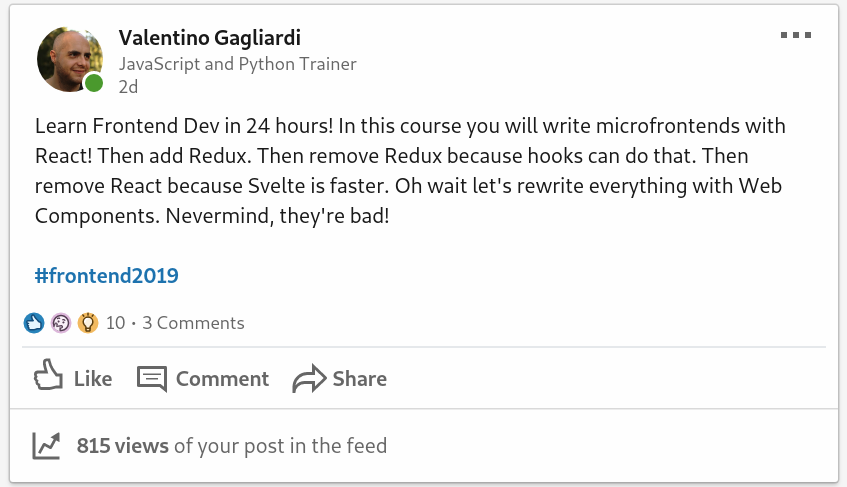
JavaScript is brutal
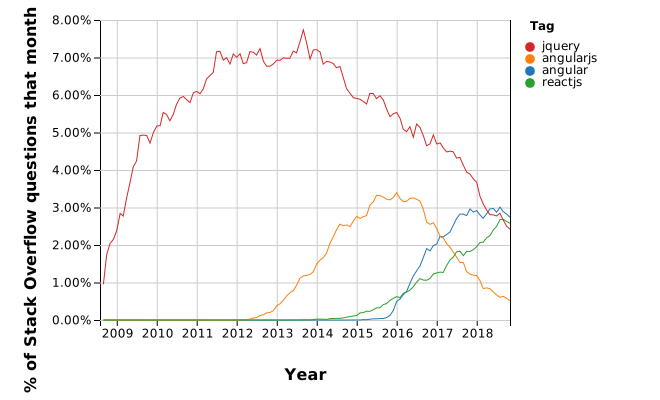
Source: https://bit.ly/2Dbarx0
Rule them all
Always keep learning the web platform and you will be able to master any JavaScript library coming next. (cit. Me)
Resources
@valentinogagliardi
Get in touch!

SLIDES
👇

@gagliardi_vale
