System related questions


Java Primitive Type
Integer, Short, Long, Byte, Boolean, Float, Double, Character
Why Wrapper class?
Consider HashSet<Integer>
int, short, long, byte, boolean, float, double, char
Object Class
The most Important class in Java
- toString()
- hashCode()
- equals()
- getClass()
- finalize()
- clone()
- wait(), notify(), notifyAll()
Object Class
hashCode() & equals()
- Integer a = 127, Integer b = 127, a == b ? a.equals(b) ?
- Integer a = new Integer(127), Integer b = new Integer(127), a == b ? a.equals(b) ?
- Integer a = 128, Integer b = 128, a == b ? a.equals(b) ?
- Similarly, String
Difference for String in Java and C++
Object Class
wait(), notify(), notifyAll()
Thread and Process: Similarity and Difference
- Thread is also known as lightweight process
- The typical difference is that threads within the same process run in a shared memory space, while processes run in separate memory spaces.
- Communication between multiple thread is easier as thread shares common address space, while in process we have to follow some specific communication technique for communication between two process.
Object Class
finalize()
- Garbage collection -> Java & C++
- final, finally, finalize()
- override and overload
Operating System Stack
Java and C++
Java Stack & Heap
- Only Primitive type is stored in Stack
- Primitive type: boolean, char, short, int, long, byte, float, double
- Objects will be created in Heap and the reference will be stored in Stack
- For Boolean, Character, Short, Integer, Long, Byte, Float and Double. They are not primitive types. They are Objects
- The data in Heap can be garbage collected
- Constant Pool and String Pool
Java Stack & Heap
-
Stack
-
stack memory is used only by one thread of execution
-
stack memory cannot be accessed by other threads
-
stack memory is short-lived
-
When stack is full, it throws StackOverFlowError
-
-
Heap
-
heap memory is used by all the parts of the application
-
objects stored in the heap are gloabally accessible
-
heap memory lives from the start till the end of application execution
-
When it is full, it throws OutOfMemoryError
-
C++ Stack & Heap
-
The memory a program uses is typically divided into a few different areas, called segments:
- code segment
- bss segment
- data segment
- heap
- call stack
- For heap, you can use malloc and calloc or new to dynamically get space to store data
- Remember to use free or delete the get the space back
C++ Stack & Heap
-
Stack
-
very fast access
-
don't have to explicitly de-allocate variables
-
space is managed efficiently by CPU, memory will not become fragmented local variables only
-
limit on stack size (OS-dependent)
-
variables cannot be resized
-
-
Heap
-
no limit on memory size but (relatively) slower access
-
no guaranteed efficient use of space, memory may become fragmented over time as blocks of memory are allocated, then freed
-
you must manage memory (you're in charge of allocating and freeing variables)
-
variables can be resized using realloc()
-
How Integer is stored in Memory
Integer -> 4 bytes -> 32 bits
Long -> 8 bytes -> 64 bits
Boolean/Char -> 1 byte
Two's complement
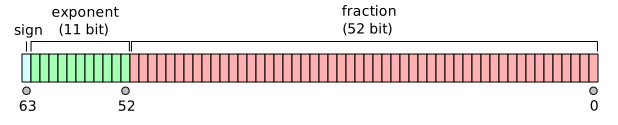
How double is stored in Memory
Cache
- a hardware or software component that stores data so that future requests for that data can be served faster
- the data stored in a cache might be the result of an earlier computation or a copy of data stored elsewhere.
- A cache hit occurs when the requested data can be found in a cache, while a cache miss occurs when it cannot.
Cache
Write back v.s. Write through
- Write-through: write is done synchronously both to the cache and to the backing store.
- Write-back (also called write-behind): initially, writing is done only to the cache. The write to the backing store is postponed until the modified content is about to be replaced by another cache block.
Cache
Write back v.s. Write through
-
The benefit of write-through to main memory is it simplifies the design of the computer system. With write-through, the main memory always has an up-to-date copy of the line. Main memory can always reply with the requested data.
-
If write-back is used and the data is in a processor cache, then that processor must stop main memory from replying to the read request, because the main memory might have a stale copy of the data. This is more complicated than write-through.