Opa & angularjs
by Adam Koprowski

who am I?
Adam Koprowski (Adam.Koprowski@gmail.com)
Opa developer turned technical evangelist
@MLstate (2009-2012)


Software engineer in test
@Google (2012-...)

In other words: expect code no theorems :)
why javascript?
ca. 1995
2004
2013
why not just javascript?
well...
- Syntax . . . . . . . . . . . . . . . . . . . . . . . . . . . . . . . . . . . . . . . . .
- Modularity . . . . . . . . . . . . . . . . . . . . . . . . . . . . . . . . . . . . . . . . . .
- Database . . . . . . . . . . . . . . . . . . . . . . . . . . . . . . . . . . . .
- Server-side code . . . . . . . . . . . . . . . . . . . . . . . . . . . . . . . .
- No types . . . . . . . . . . . . . . . . . . . . . . . . . . . . . . . . . . . . . . . .
- Asynchronous, single-threaded . . . . . . . . . . . . . . . yield, fibers
- Security . . . . . . . . . . . . . . . . . . . . . . . . . . . . . . . . . . . . . . . . . . . templating
- Low-levelness, cross-browser incompatibilities . . . . . libraries





~2009
~2011
~2009
~2009
~2012
OPA in a nutshell
Web apps re-imagined
client
⇔ server
⇔ database
- Complete language for web apps
- Static typing
syntax
Javascript-esque
function showTodoList(items) {
  mkSingleTodo = function(item) {
    <li>{item}</li>
  }
  #todos = <ul>{List.map(mkSingleTodo, items)}</>
}
✔ Familiarity
Coffeescript-esque (but: whitespace not significant)
showTodoList(items) =
  mkSingleTodo = item -> <li>{item}</li>
  #todos = <ul>{List.map(mkSingleTodo, items)}</>
✔ Conciseness
✘ Not supported anymore
modularity
Packages
package just.an.example // declaringimport stdlib.widgets.{button, bootstrap.*, dateprinter} // importing
Modules
module ModuleA {
  function foo() { … }
}
module ModuleB {
  private module InnerModule { … }
  function bar() { ModuleA.foo(); }
}
✔ Functors? Yes.
Problem #1
Too many moving parts
'one opa to rule them all'
Input:
Output:
| client | ⇔ | server | ⇔ | database |

|
|
|
✔ Consistent language for all parts of web apps...
✘ but somewhat esoteric.
✘ Debugging auto-generated JS.
database
Declaring:
type user = { int id, int age, string name }database example { user /me user /users[{id}] // id is the primary key }
Using:
/example/me/age++
minors = /example/users[age < 18]
users_segment = /example/users[age < 18 or age > 35;
                               skip 100; limit 50; order +age, -id]
✔ This extends type-safety to DB.
client/server separation
Auto-magical
#greeting = <div>You're visitor no. #{/mydb/counter}</>Q: DOM + DB? Where will this run? Client? Server?
A: Both
✔ Opa takes care of communication
… yet controllable
client function runInTheBrowser() { … }server function runOnTheBackend() { … }exposed function markAsClientsAccessible() { … }
✔ Code re-use (client-server)
✘ Performance tuning not always obvious
Problem #2
Mistakes too easy to make
… a puzzle break
-
You're a software developer in Java/C++/…
- You're writing a library of geometrical shapes.
- Goal: function to compute distance between two shapes.
- Start with: circle & square; assume functions to compute distance between any two given shapes readily available.
Ready… set… code!
Types to the rescue!
Extensible records
function getCenter(shape) {
  return shape.center;
}
circle = {center: {x: 10, y: 10}};
✔ getCenter(circle) = {x: 10, y: 10}
✔ getCenter({circle with color: "red"}) = {x: 10, y: 10}
✘ getCenter({name: "Joe"}) ↦ compilation error
✘ getCenter({centre: {x: 1, y: 1}}) ↦ compilation error
Type inference (structural typing)
function string toString({name: string, age: int, ...} person) {
  return "{person.name}, born in {2013 - person.age}";
}
personToString({name: "John Doe", age: 23}) = "John Doe, born in 1990"
✔ All benefits of static typing with little to no effort.
Types to the rescue! (2)
Extensible records … with variants
type point = {float x, float y}
type shape = {circle, point center} or {square, point ul, point dr};
function point getCenter(shape s) {
  match (s) {
    case ~{circle, center}: center
    case ~{square, ul, dr}: …
  }
}
✔ getCenter({circle, center: {x: 10., y: 10.}}) = {x: 10., y: 10.}
✔ getCenter({square, ul: {x: 1., y: 2.}, dr: {3., 4.}}) = {x: 2., y: 3.}
✘ getCenter({point, center: {x: 2., y: 13.}) ↦ compilation error
✘ getCenter({circle, center: {x: "zero", y: 1.}) ↦ compilation error
✔ Large class of errors caught at compilation time (NPE, …).
✔ Flexible enough to model HTML & CSS as types.
✔ Extends to the database.
types and security
Opa:
function page() {
  userInput = "<script type=\"text/javascript\">alert('Pwned!')</script>"
  <div>{userInput}</>
}
Server.start(Server.http, {title: "Test", page: page})
Javascript:
<div id="test">
<script type="text/javascript">
  //<![CDATA[
    document.getElementById('test').innerHTML =
      "<script type='text/javascript'>alert('Pwned!')</script>";
  //]]>
</script>
... back to the puzzle
Java:
abstract class Shape {
    public static double distance(Shape s1, Shape s2) { return s1.distanceTo(s2); }
    protected abstract double distanceTo(Shape s);
    abstract double distanceToCircle(Shape s);
    abstract double distanceToSquare(Shape s);
}
class Circle extends Shape {
    Point center;
    double radius;

    protected double distanceTo(Shape s) { return s.distanceToCircle(this); }
    protected double distanceToCircle(Shape s) { … }
    protected double distanceToSquare(Shape s) { … }
}
class Square extends Shape {
    Point ul;
    Point dr;

    protected double distanceTo(Shape s) { return s.distanceToSquare(this); }
    protected double distanceToCircle(Shape s) { … }
    protected double distanceToSquare(Shape s) { … }
}
Opa:
type shape = {circle, center: Point, radius: float}
          or {square, ul: Point, dr: Point}
function distance(shape s1, shape s2) {
  match (s1, s2) {
    case {s1={circle ...}, s2={square ...}}
    case {s1={square ...}, s2={circle ...}}: …
    case {s1={circle ...}, s2={circle ...}}: …
    case {s1={square ...}, s2={square ...}}: …
  }
}
puzzle: java
abstract class Shape {
  public static double distance(Shape s1, Shape s2) {
     return s1.distanceTo(s2);
  }
  protected abstract double distanceTo(Shape s);
  abstract double distanceToCircle(Shape s);
  abstract double distanceToSquare(Shape s);
}

class Circle extends Shape {
  Point center;
  double radius;

  protected double distanceTo(Shape s) {
      return s.distanceToCircle(this);
  }
  protected double distanceToCircle(Shape s) { … }
  protected double distanceToSquare(Shape s) { … }
}

class Square extends Shape {
  Point ul;
  Point dr;

  protected double distanceTo(Shape s) {
    return s.distanceToSquare(this);
  }
  protected double distanceToCircle(Shape s) { … }
  protected double distanceToSquare(Shape s) { … }
}
puzzle: opa
type shape = {circle, center: Point, radius: float}
          or {square, ul: Point, dr: Point}

function distance(shape s1, shape s2) {
  match (s1, s2) {
    case {s1={circle ...}, s2={square ...}}
    case {s1={square ...}, s2={circle ...}}: …
    case {s1={circle ...}, s2={circle ...}}: …
    case {s1={square ...}, s2={square ...}}: …
  }
}

Angularjs in a nutshell
HTML re-imagined
HTML
⇔ JavaScript
- No boilerplate
- Structure
- Testability
No boilerplate
data-binding
JS:
$scope.name = 'Bob';HTML:
<!-- 1-way data-binding -->
Hello, {{name}}
<!-- 2-way data-binding -->
Your name: <input ng-model="name" />
http://jsfiddle.net/koper/uMYbH/
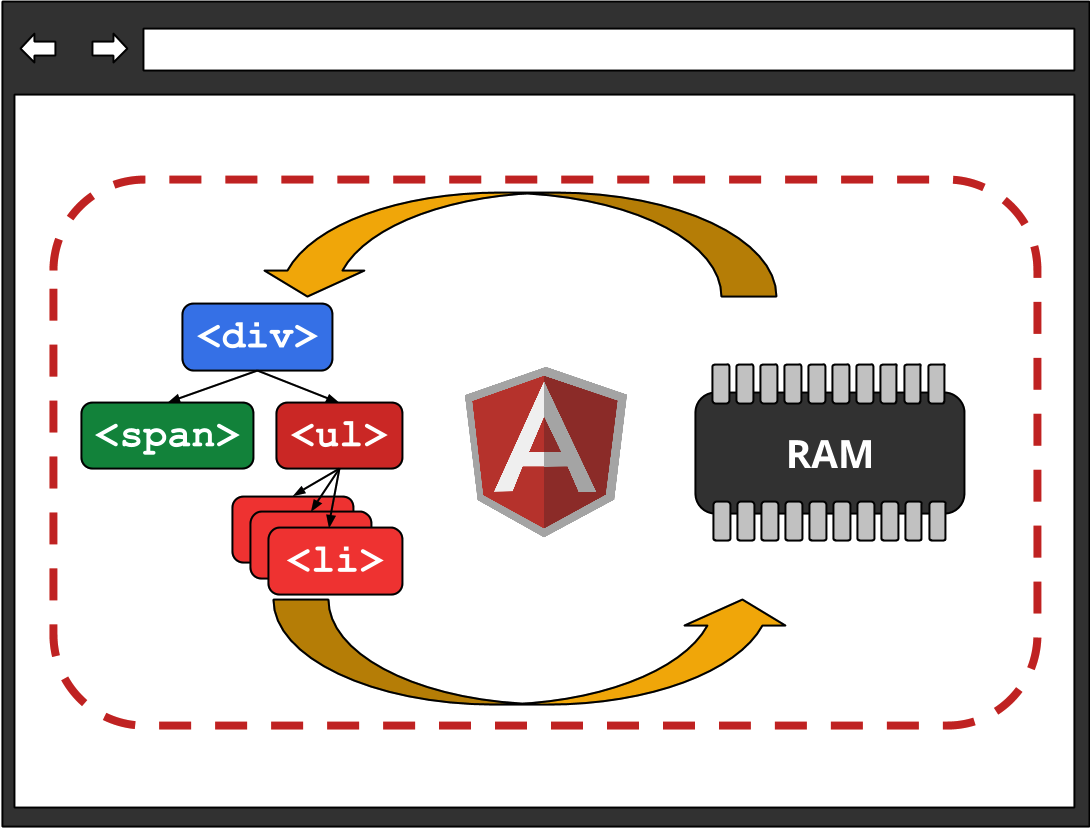
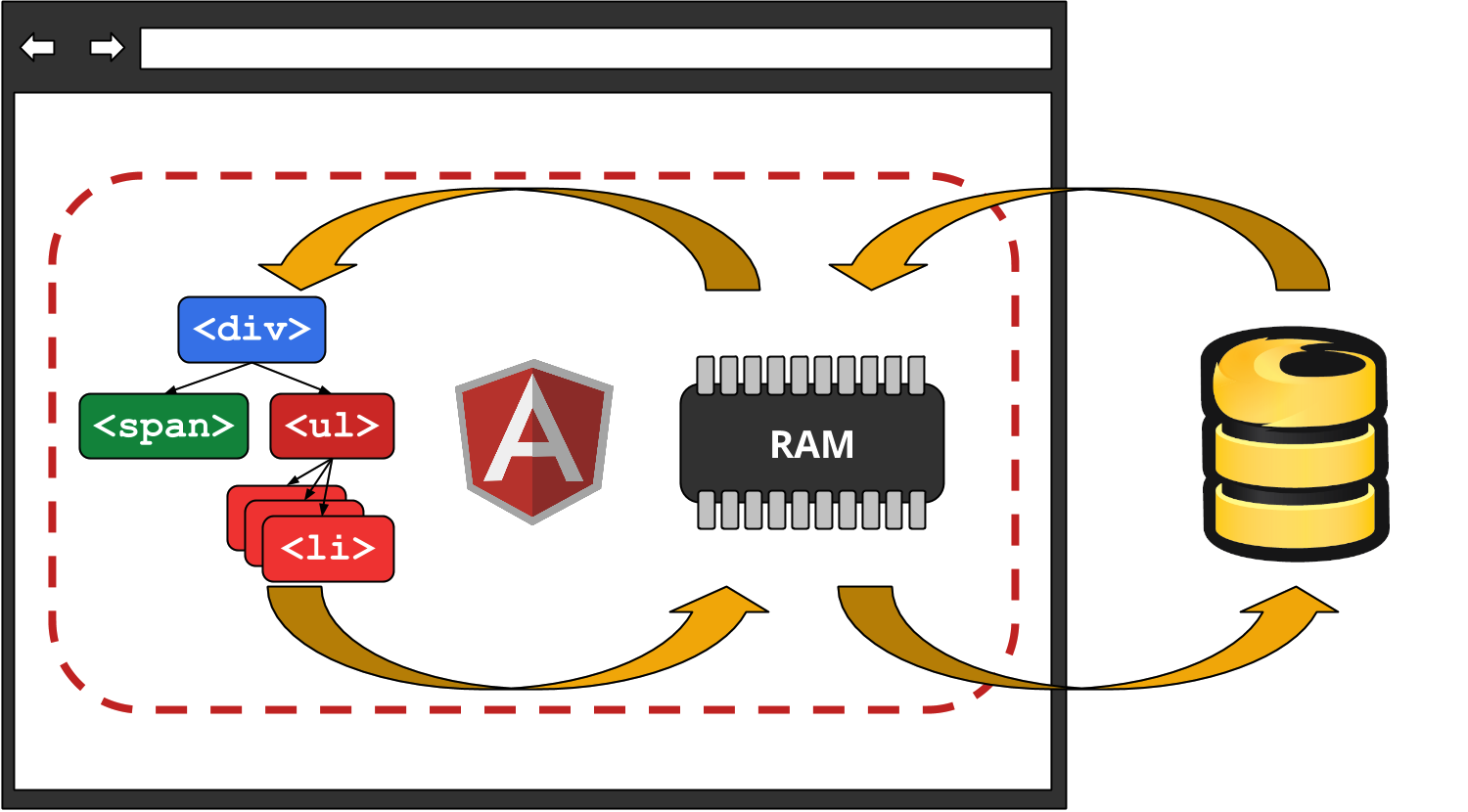
✔ Changes model ↔ view synchronized automatically.
2-way data binding
(with AngularJS)
3-way data binding
(with Firebase & AngularFire)
declarative markup
JS:
function ColorsCtrl($scope) {
  $scope.colors = ['blue', 'red', 'green'];
}
HTML:
<table ng-controller="ColorsCtrl">
    <tr><th>Color</th></tr>
    <tr ng-repeat="color in colors">
        <td ng-bind="color"></td>
    </tr>
</table>
http://jsfiddle.net/koper/Atf7U/
✔ No DOM manipulations!
declarative markup (ctd.)
JS:
function ColorsCtrl($scope) {
    $scope.colors = ['blue', 'red', 'green'];
    $scope.mkBackgroundColor = function(color) {
        return {'background-color': color};
    }
    $scope.duplicate = function(color) {
        $scope.colors.push(color);
    }
}
HTML:
<table ng-controller="ColorsCtrl">
    <tr><th>Color</th><th>Name</th></tr>
    <tr ng-repeat="color in colors">
        <td ng-style="mkBackgroundColor(color)"
            ng-click="duplicate(color)">
        </td>
        <td ng-bind="color"></td>
    </tr>
</table>Structure
MVC
MODEL:
[ { name: 'Apple Inc', price: 525.63 },
  { name: 'Facebook Inc', price: 49.42 },
  { name: 'Google Inc', price: 1024.95 } ];
VIEW:
<button ng-click="randomize()">Randomize</button>
<table>
    <tr><th>Name</th><th>Price</th></tr>
    <tr ng-repeat="company in companies">
        <td ng-bind="company.name"></td>
        <td ng-bind="company.price | currency"></td>
    </tr>
</table>
CONTROLLER:
function StocksCtrl($scope) {
    $scope.companies = StocksFetcher.get();
    $scope.randomize = function() { ... }
}reusable components
JS:
app.module('components', [])
    .directive('tabs', function() {
        // ...
    })
    .directive('pane', function() {
        // ...
    });
HTML:
<tabs ng-app="components">
    <pane title="Tab 1">Engaging content</pane>
    <pane title="Tab 2">Even more engaging content</pane>
</tabs>
http://jsfiddle.net/koper/WQPHz/
✔ Domain-specific markup
Testability
dependency injection
JS:
function FooService() { … }
module.service('Foo', FooService);
function BarController($window, $http, Foo) { … }
✔ Explicit dependencies ➦ easy mocks
Also:
✔ Models as POJOs ➦ easy logic testing
✔ DOM restricted to directives ➦ most tests DOM-free
there's more...
- Promises
- Services
- Animations
- Filters
- Forms
- Routes
- Restfullness
- i18n & L10n
resources

http://opalang.org http://angularjs.org
Special thanks for slides' ideas to:
Wes Alvaro, Brad Green, Anant Narayanan & Cedric Soulas