NAFEN
project

HTML5
HTML5
<div>
<div>
<div>
<div>
<div>
<div>
<div>
<div>
<nav>
<header>
<main>
<section>
<aside>
<footer>
<article>
HTML5
<a href="www.habitaclia.com"
target="_blank">Home</a>

<a href="#js-contact"
target="_self">Contactar</a>

<a href="#">Descartar</a>

<a href="javascript:void(0);">
    Compartir
</a>
<a href="www.habitaclia.com"
target="_blank">Home</a>
<a href="#js-contact" target="_self">
Contactar
</a>
<button type="button">Descartar</button>
<button type="button">Compartir</button>e.preventDefault();
HTML5
<html>
    <head>...</head>
    <body>
        <header>
            <nav>...</nav>
        </header>
        <main>
            <section class="summary">
                <h1>Title<h1>
                <article class="location">
                    <h4>Location description</h4>
                </article>
                <article id="js-feature-container">
                    <h4 class="hidden">Main features</h4>
                    <ul class="feature-container">
                        <li class="feature">
                            <strong>200</strong> m<sup>2</sup>
                        </li>
                    </ul>
                </article>
                <aside class="contact-top"></aside>
            </section>
            <section class="detail">
                <h2 class="hidden">Information detail</h2>
                <article>
                    <h3 id="js-detail-description-title">Detail description title</h3>
                    <p>...</p>
                </article>
            </section>
        </main>
        <footer>
            ...
        </footer>
    </body>
</html>
HTML5
https://validator.w3.org/#validate_by_input
W3C Markup Validator
https://developer.mozilla.org/en-US/docs/Web/HTML/Element
HTML elements description
ITCSS
ITCSS
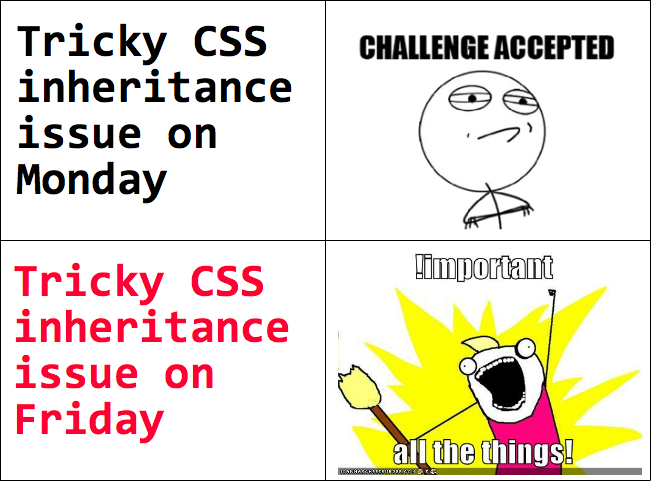
SPECIFICITY
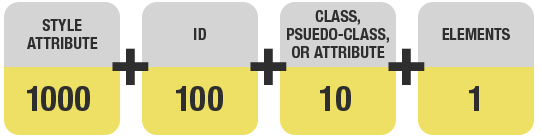
section.summary#js-summarystyle="color:blue;"ITCSS
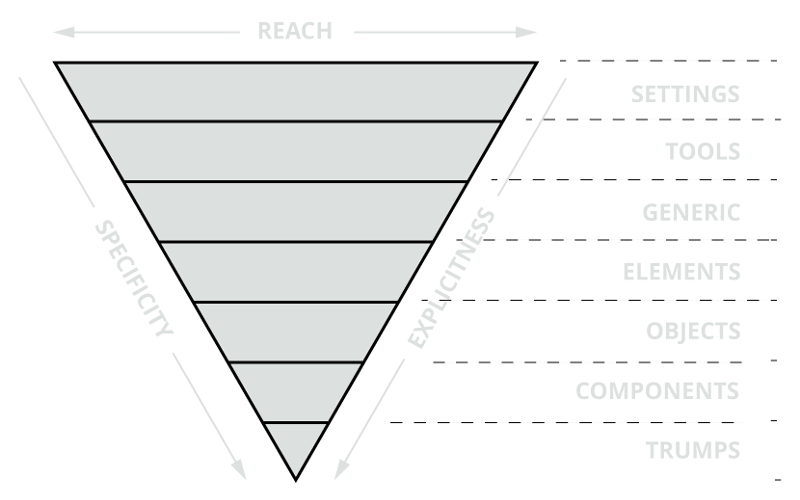
by Harry Roberts https://csswizardry.com/
ITCSS
by Harry Roberts https://csswizardry.com/
font, colors definitions
mixins and functions
normalize styles, box-sizing
HTML elements (h1, a, span...)
OOCSS
specific UI components
utilities and helper classes
ITCSS
// 1. Settings
@import '01_settings/colors';
@import '01_settings/globals';

// 2. Tools
@import '02_tools/mixins';
@import '02_tools/animations';

// 3. Generic
@import '03_generic/normalize';

// 4. Elements
@import '04_elements/base';
@import '04_elements/forms';

// 5. Objects
@import '05_objects/grid-responsive';
@import '05_objects/oocss';
@import '05_objects/fonts';

// 6. Components
@import '06_components/shared';
@import '06_components/buttons';
@import '06_components/forms';
@import '06_components/icon';
@import '06_components/header';
@import '06_components/detail';
@import '06_components/fleximages';
@import '06_components/home';
@import '06_components/similars';
@import '06_components/ads';
@import '06_components/live';
@import '06_components/footer';
@import '06_components/tooltipster';
@import '06_components/legacy';
@import '06_components/modallegacy';
@import '06_components/widemedia';
@import '06_components/elperiodico';

// 7.Utilities
@import '07_utilities/modifiers';
@import '07_utilities/print';
// 1. Settings
$hab-orange: #f60;
$hab-orange-hover: lighten($hab-orange, 10%);
$hab-orange-hover-dark: darken($hab-orange, 5%);
$font-family: 'Ubuntu', sans-serif, Arial, Helvetica;
$font-family-2: 'Molengo', sans-serif, Arial, Helvetica;// 2. Tools
@mixin truncate($truncation-boundary) {
max-width: $truncation-boundary;
white-space: nowrap;
overflow: hidden;
text-overflow: ellipsis;
}
@function z($name) {
@if index($z-indexes, $name) {
@return (length($z-indexes) - index($z-indexes, $name)) + 1;
} @else {
@warn 'There is no item "#{$name}" in this list; choose one of: #{$z-indexes}';
@return null;
}
}// 3. Generic
body {
margin: 0;
}
article, aside, details,
figcaption, figure, footer,
header, main, menu,
nav, section, summary {
display: block;
}// 4. Elements
h1{
font-size: $font-size-extralarge;
font-weight: $font-weight-light;
line-height: 1em;
margin: 1em 0 0.3em 0;
@include media($tablet, max) {
font-size: $font-size-large-s;
}
}
h2{
font-size: $font-size-large;
font-weight: $font-weight-light;
line-height: 1em;
margin: 1em 0;
@include media($tablet, max) {
font-size: $font-size-medium;
}
}// 5. Objects
.bg-orange{
background: $hab-orange;
}
.w-100{
width: 100%;
}
.hidden{
position:absolute;
left:-10000px;
top:auto;
width:1px;
height:1px;
overflow:hidden;
}// 6. Components
header {
@extend .no-select;
@include transition(transform 200ms ease-in-out);
z-index: z('header');
width: 100%;
height: 56px;
display: block;
position: fixed;
top: 0;
will-change: transform;
.max-1440{
padding: 0 16px;
}
}
.head-main {
z-index: z('header-main');
position: relative;
height: 56px;
display: inline-block;
font-size: $font-size-normal-s;
}// 7. Utilities
.hide-tablet{
@include media($tablet, max) {
display: none!important;
}
}
@media print {
.head-main{
display:none;
}
.head-second{
display:none;
}
}
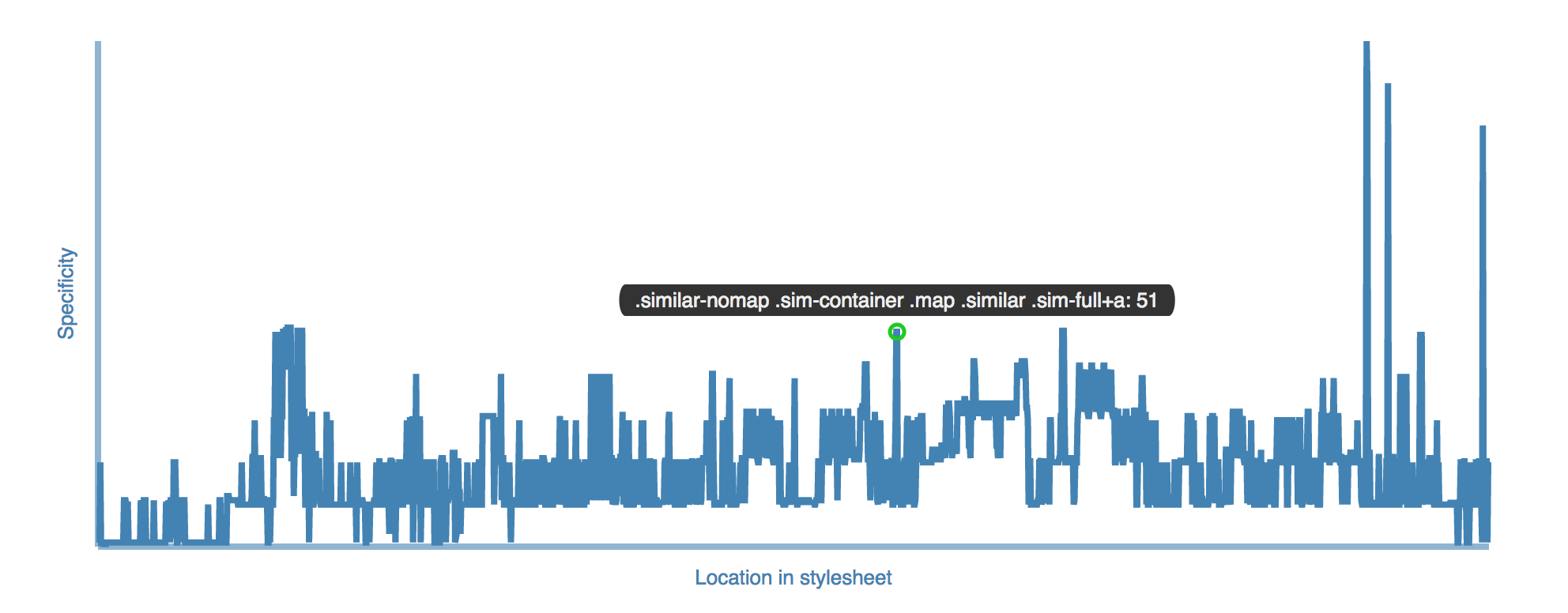
ITCSS
ITCSS
https://developer.mozilla.org/en-US/docs/Web/CSS/Specificity
Specificity explanation
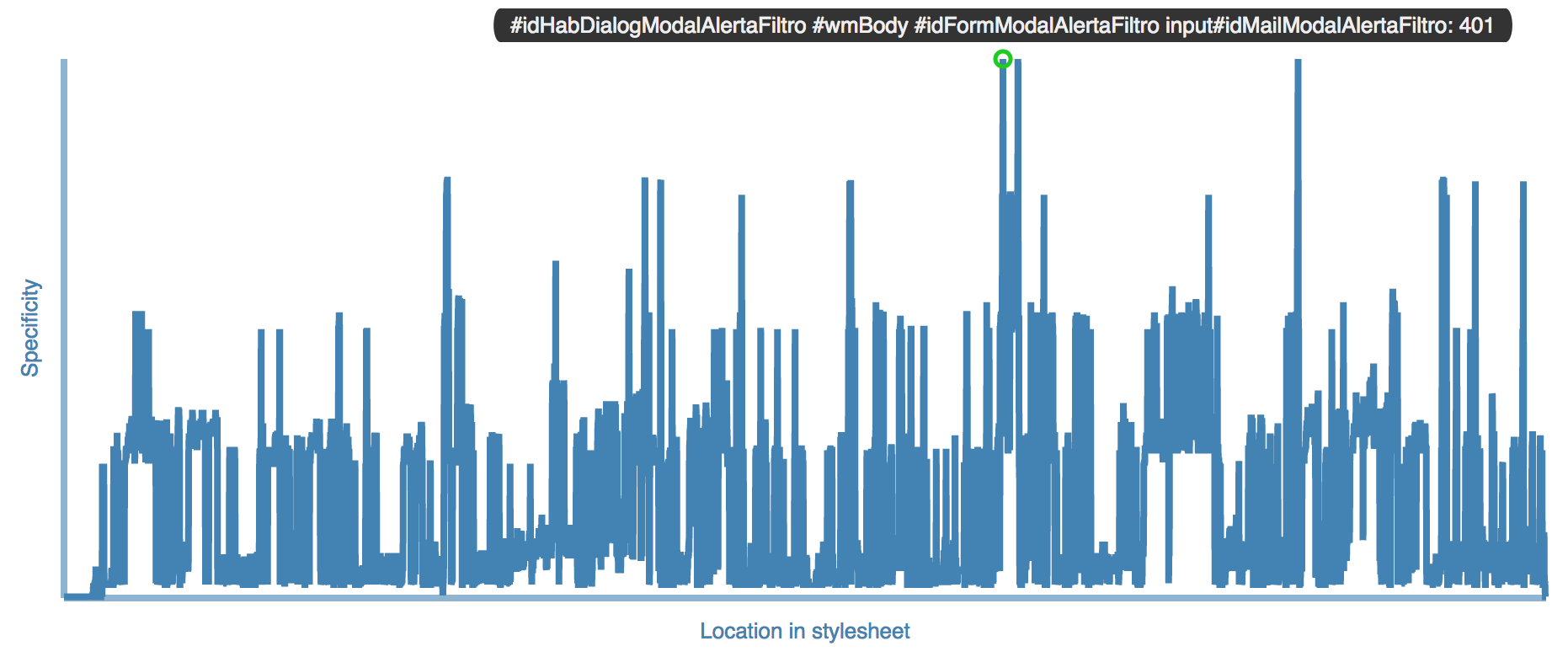
https://jonassebastianohlsson.com/specificity-graph/
Specificity Graph Generator
SASS
SASS
$hab-orange:  #f60;
$hab-orange-hover:  lighten($hab-orange, 10%);
$hab-orange-hover-dark:  darken($hab-orange, 5%);

.bg-orange{
    background: $hab-orange;
}
.bg-orange{
color: #ff6600;
}SASS
.button-underline{
    border-bottom: 3px solid transparent;
    border-radius: 0;

    &.active{
        border-bottom: 3px solid $hab-orange;
    }

    a{
        color:$white;
    }
}
.button-underline{
border-bottom: 3px solid transparent;
border-radius: 0;
}
.button-underline.active{
border-bottom: 3px solid #ff6600;
}
.button-underline a{
color: #fff;
}SASS
@mixin media($width, $type: min) {
  @media only screen and (#{$type}-width: $width) {
    @content;
  }
}

.button-underline{
    border-bottom: 3px solid transparent;

    @include media($tablet,min){
        &:hover{
            border-bottom: 3px solid $hab-orange;
        }
    }
}
.button-underline{
border-bottom: 3px solid transparent;
}
@media only screen and (min-width: 728px){
.button-underline:hover{
border-bottom: 3px solid $hab-orange;
}
}SASS
@function z($name) {
    @if index($z-indexes, $name) {
        @return (length($z-indexes) - index($z-indexes, $name)) + 1;
    } @else {
        @warn 'There is no item "#{$name}" in this list; choose one of: #{$z-indexes}';
        @return null;
    }
}
$z-indexes: ("modal","wide-share","wide-title","wide-over","wide-media","overlay","live","tooltip","nav-fixed","header-main","contact-top","header-second","header","menu","selectores","solicitud","favorite","main","cover");

.wide-media{
    z-index: z('wide-media');
}
.wide-media{
z-index: 15;
}SASS
what we won?
SASS
Less weight
SASS
Code simplification

SASS
Easy mantenance

SASS
Only 1 css

SASS


JavaScript
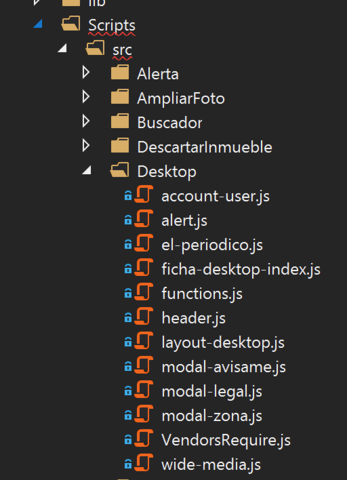
- Actualmente todos los scripts de www dentro de la carpeta Desktop
- Un bundle por página, además de Layout y Periodico
- Los bundles se definen en el gulpfile.js
JavaScript
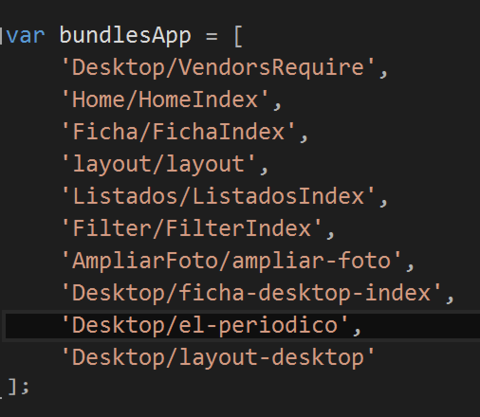
gulpfile.js
JavaScript

Como incluir un bundle en la vista
JavaScript
Ejemplo módulo: modulo-ejemplo.js
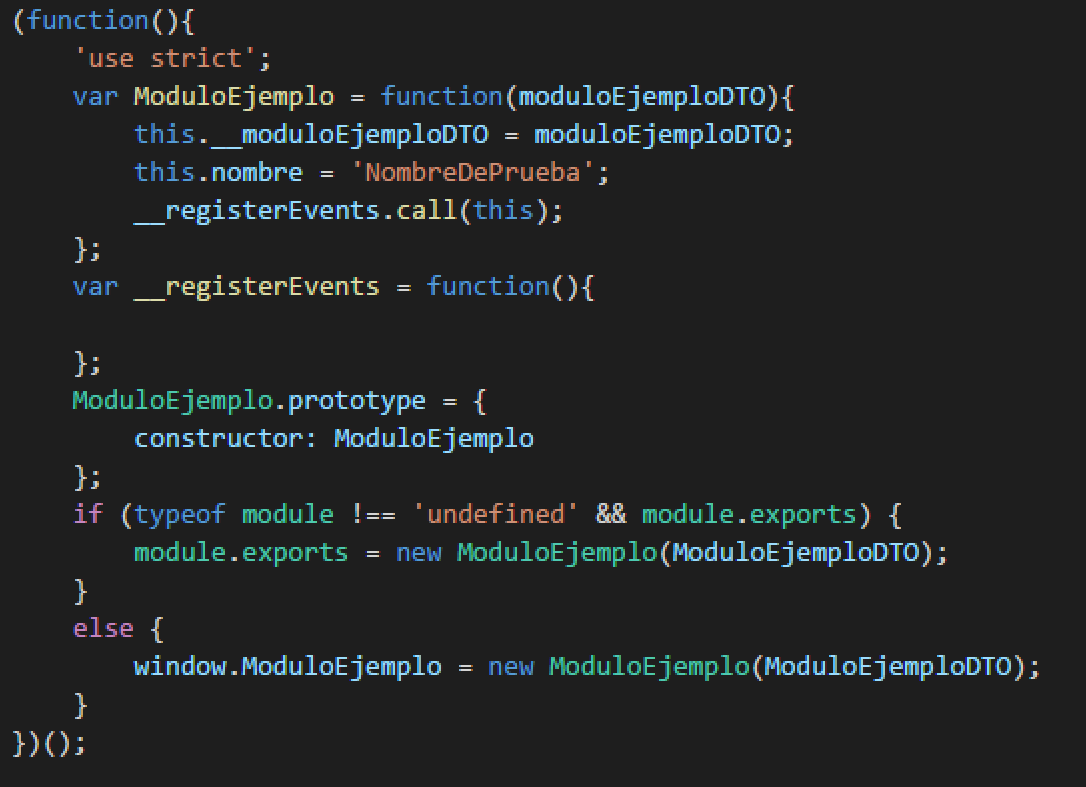
JavaScript
Ejemplo módulo: modulo-ejemplo.js
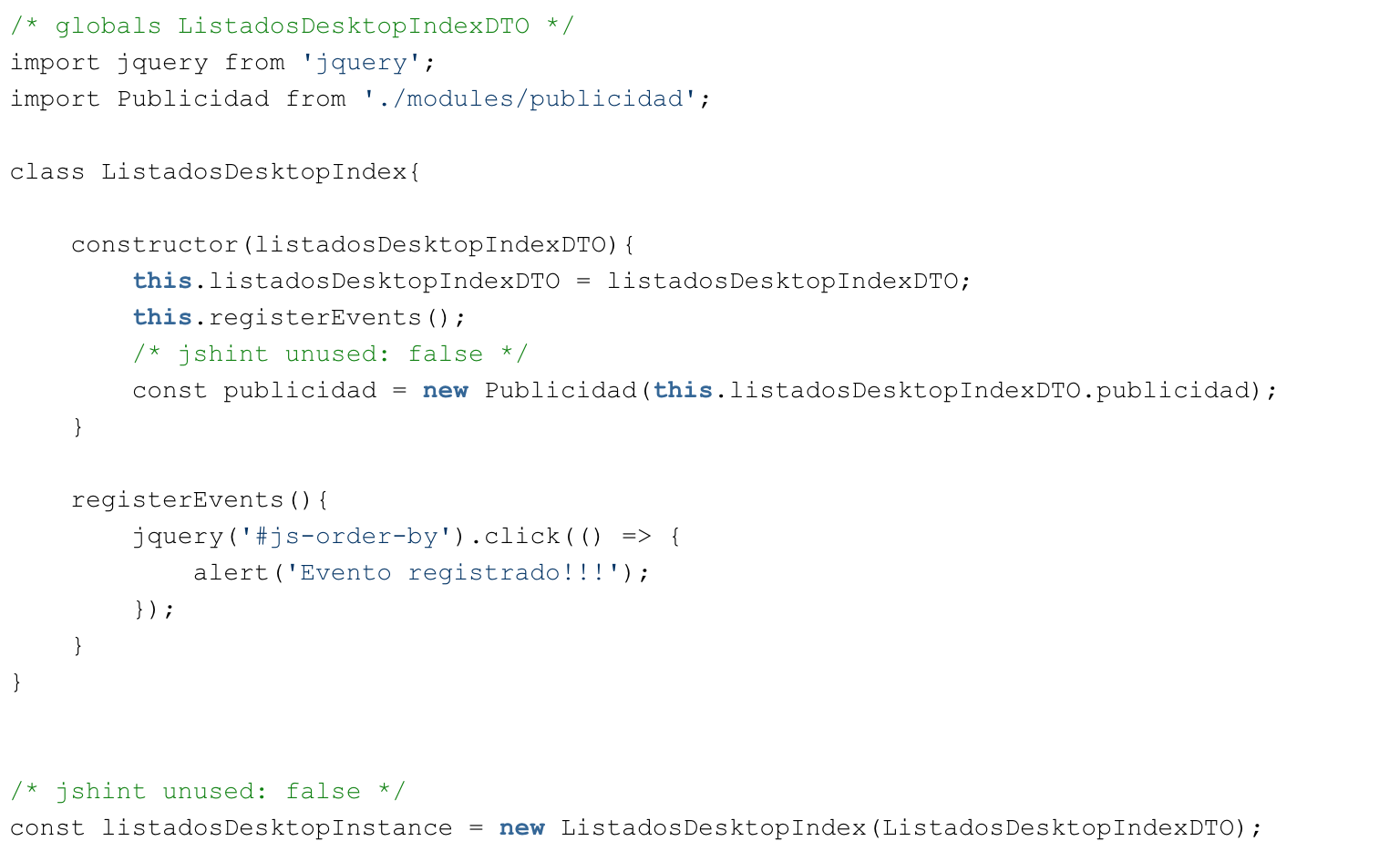
JavaScript
Ejemplo módulo: EjemploVista.cshtml
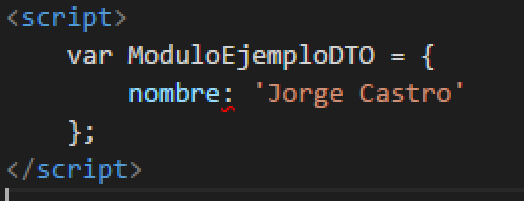
La definición de este objeto se debe hacer antes de la inclusión del script del módulo
JavaScript
Guía completa de estilo y buenas prácticas de JS en:
https://confluence.schibsted.io/pages/viewpage.action?pageId=45660974
SVG sprite
SVG sprite
Scalable Vector Graphics (SVG) is an XML-based vector image format for two-dimensional graphics with support for interactivity and animation. The SVG specification is an open standard developed by the World Wide Web Consortium (W3C) since 1999.
SVG sprite advantage
- Scalable (not lose quality)
- Vectorial (less weight)
- Make them animated
- Content can be crawled and indexable by Google
SVG sprite
<main id="ficha" class="w-100 curve-top pointer-events-none gtmproductdetail"  data-gtmname="comprar-vivienda-barcelona" data-gtmid="9368002482117-premium" data-gtmbrand="9368-1-Norvet" data-gtmcategory="comprar-vivienda/apartamento/barcelona/barcelones/barcelona" data-gtmvariant="eixample-sagrada_familia" >
    <section id="js-fav" class="fav pointer-events-none">
        <div class="ellipse-container">
            <svg role="img" title="curve" class="ellipse" viewBox="0 0 640 28.9" preserveAspectRatio="none">
                <use xlink:href="//www.habitaclia.com/dotnet/content/icon/dist/src_504911268000000000.svg#ico-curve" />
            </svg>
        </div>
        <div class="fav-div w-100 bg-white">
            <div class="max-1440">
                <h2 class="hidden">Favorito y comentario</h2>
            </div>
        </div>
        <div class="fav-heart bg-white pointer-events-all">
            <a id="linkFavorito" class="fav-heart-link abs-center addfavimg jq-tooltip tooltipstered" href="https://www.habitaclia.com/hab_usuarios/ajax/favoritos.asp?Source=i&codEmp=9368&codOfi=1&codInm=2482117&lang=E&clave=B0E3WBSY&Action=addAlInm" rel="nofollow" title="Añadir favorito">
                <div class="abs-center ">
                    <svg class="ico abs-center ico-fav" role="presentation">
                        <use xlink:href="//www.habitaclia.com/dotnet/content/icon/dist/src_504911268000000000.svg#ico-heart-02" />
                    </svg>
                </div>
                Añadir a favoritos
            </a>
        </div>
    </section>
Results
Charge view complete
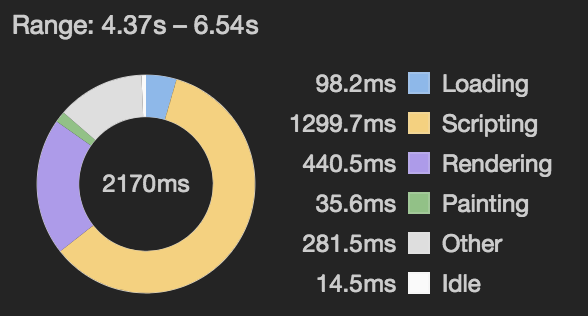
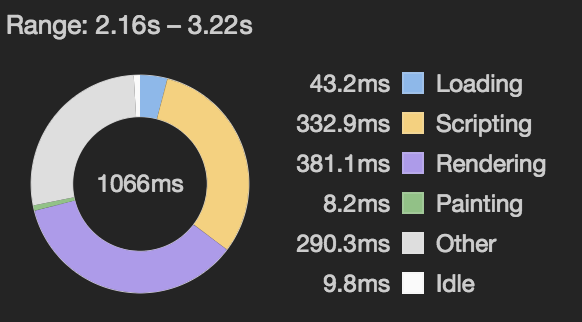
OLD vs NEW (first time)
Charge view complete
OLD vs NEW (second time)
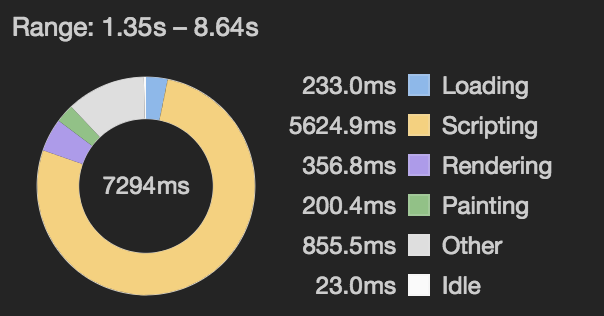
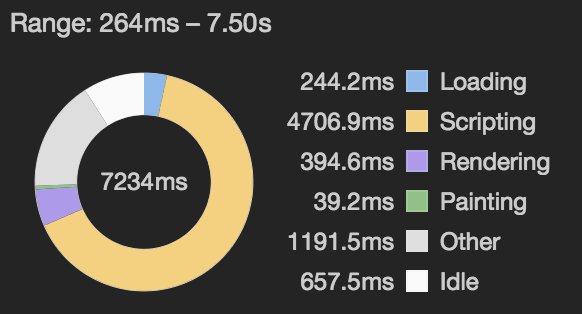
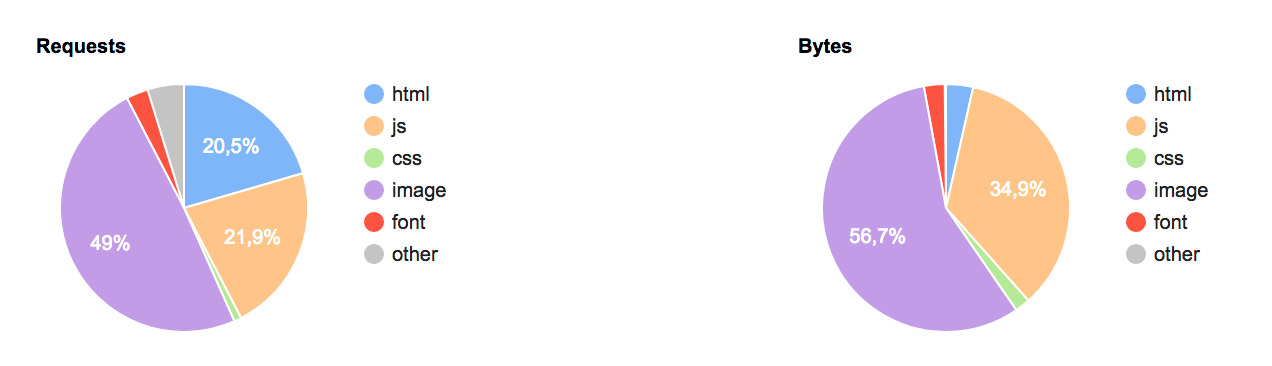
Pagespeed Test
OLD vs NEW


Pagespeed Test
OLD vs NEW
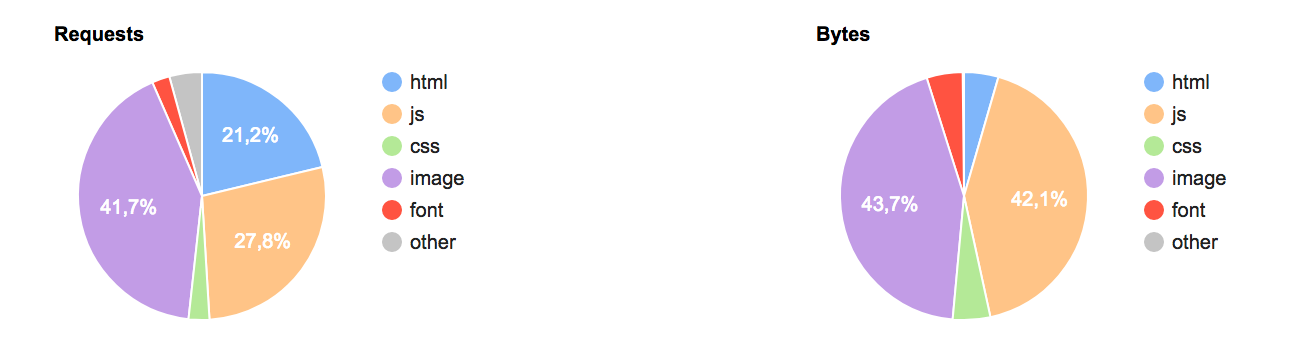
...and Analytics?
A mite increase of leads paring Product Details View with Leads (+0,10%)
7/06/2017 - 12/06/2017
8/06/2016 - 13/06/2016
NAFEN
project