Despaghettifying your front-end with

What is Angular?
A framework for single-page web apps
Model-View-Whatever in the browser
Structured, but not restrictive
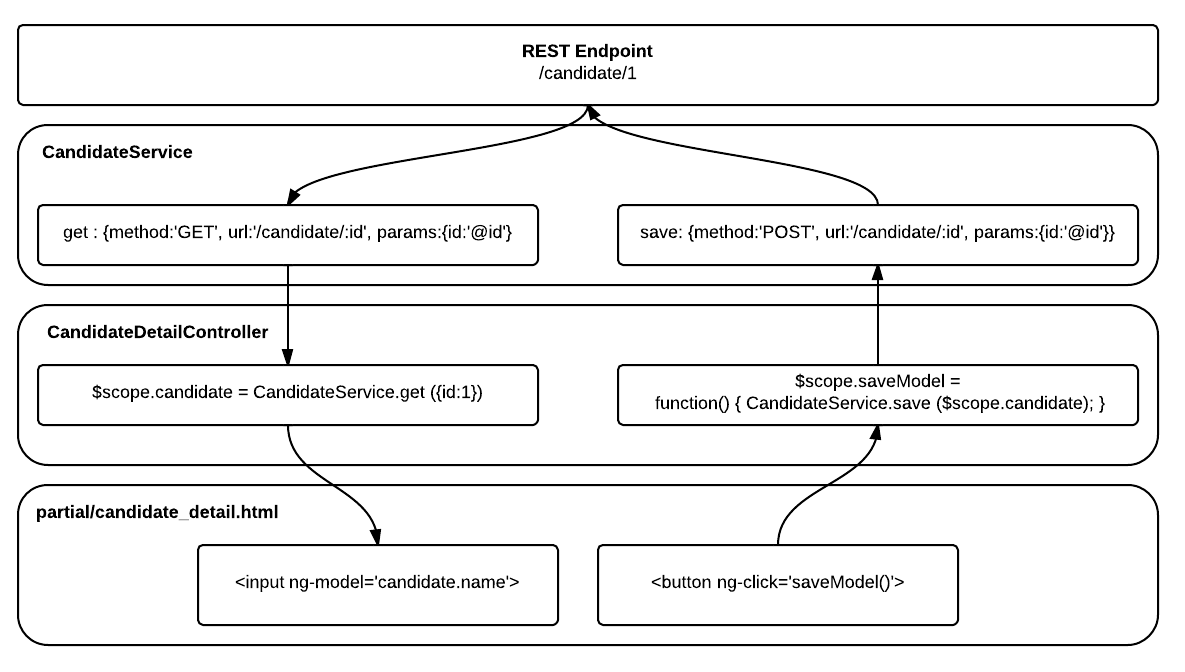
services
Singleton factories which can store global state
Can also produce models based on REST endpoints
$http and $resource provide abstract
wrapper for HTTP queries
 pas3Services.factory('CandidateSelf', ['$resource',  function($resource){
     return $resource('/candidate', {}, {
         details: { method :'GET', url:'/candidate/me' },
         instances: { method : 'GET', url:'/instance/mine', isArray:true},
         assign: {
                   method: 'POST',
                   url:'/candidate/me/assign/:test_id',
                   params:{test_id:'@test_id'}
                 }
     });
     return Candidate;
  }]);
Controllers
Attached to a segment of HTML code
Setup the $scope, the collection of variables
visible to the template
Setup the $scope, the collection of variables
visible to the template
Variables changes in $scope are
automatically applied to the template
pas3Controllers.controller('CandidateDashController', [ '$scope', 'CandidateSelf',function($scope, CandidateSelf){ $scope.instances = CandidateSelf.instances();$scope.candidate = CandidateSelf.details(); }]);
Templates
HTML fragments (partials),
which can use custom directives
Directives can be attributes or whole tags
Attributes usually prefixed with "ng-"
Data Binding
One-way with {{variable}}
Two-way with ng-model on a form element
ng-repeat iterates over an array of models
<div class='row' > <div ng-repeat="instance in instances"> <h2> <a href='#/instances/{{instance.instance_id}}'>{{instance.test_name}}</a> <small>{{instance.status}}</small> </h2> </div> <input type="text" ng-model="candidate.name" /></div>
filtering
When binding a list, you can filter elements
You can also sort and format dates, currency and strings
<div ng-repeat="element in array | filter:{active:true} | orderBy:'name'">{{element.name}}</div>
Conditional directives
Whole elements can be conditionally included
Classes and styles can be applied conditionally
<p ng-if='instance.status=="Creating"'>Text</p> <p ng-class="{somestyle:instance.enabled}">Enabled</p>Form validation
required directive can be used for text inputs or selects
Form elements automatically get a class based on state:
ng-valid, ng-invalid, ng-pristine, ng-dirty
Elements also have boolean attributes,
an $error string, and the form has $invalid
<form role="form" ng-submit="login()" name="loginForm"><div ng-show="loginForm.email.$dirty && loginForm.email.$invalid">Invalid:<span ng-show="loginForm.email.$error.required">Tell us your email.</span></div> <input id="email" ng-model="user.email" required></input> <input id="password" type='password' ng-model="user.password" required></input> <button class="btn btn-primary" type='submit' ng-disabled="loginForm.$invalid">Login</button> </form>
In more detail...
Dependency Injection
Required resources are specified as arguments
Resources must be registered
Minification leads to [ 'arg', 'arg', function(arg, arg){}]
var pas3Controllers = angular.module('pas3Controllers', ['pas3Services']);

pas3Controllers.controller('NavBarController', ['$scope', '$http', '$location', 'CurrentCandidate',
    function($scope, $http, $location, CurrentCandidate){
       $scope.role = CurrentCandidate.candidate.roles;
       $scope.$on('CurrentCandidate.loggedIn', function(candidate){
           $scope.role = CurrentCandidate.candidate.roles;
           $scope.loggedIn = CurrentCandidate.candidate.loggedIn;
       });
    }]);
multiple Views
One view is not very interesting
Specify multiple templates and controllers
with a routing script
with a routing script
Provides deep-linking: URLs reflect the current view
pas3App.config(['$routeProvider', function ($routeProvider){ $routeProvider .when('/candidates', { 'templateUrl':'partials/candidate_list.html', 'controller':'CandidateListController', }).when('/candidates/new', { 'templateUrl':'partials/candidate_create.html', 'controller':'CandidateCreateController', }).when('/candidates/:email', { 'templateUrl':'partials/candidate_detail.html', 'controller':'CandidateDetailController', }).when('/candidates/:email/assign', { 'templateUrl':'partials/candidate_assign.html', 'controller':'CandidateAssignController', });}]);
<html lang="en" ng-app="PAS3"> <body> <div class="navbar navbar-default" ng-controller="NavBarController">Nav code </div><div ng-view class="container"></div> </body> </html>
 pas3Controllers.controller('CandidateDetailController', ['$routeParams',
    function($routeParams){
        $scope.email = $routeParams.email;
    }]);
Custom Directives
Allow you to define custom HTML attributes
Or define custom HTML tags
These bind to a controller and a partial
 pas3Controllers.directive('modalConfirm', function(){
    return {
        restrict: 'E',
        scope: {
          'show': '=',
          'confirm': '&onConfirm'
        },
        controller: ['$scope', function($scope){
            $scope.hideModal = function(){
               $scope.show = false;
            };
            $scope.conf=  function(){
                $scope.confirm();
                $scope.show = false;
            };
        }],
        transclude:true,
        templateUrl: 'partials/lightbox.html'
    };
});
<div class='ng-modal' ng-show='show'>
<div class='ng-modal-overlay' ng-click='hideModal()'></div>
<div class='ng-modal-dialog' ng-style='dialogStyle'>
<div class='ng-modal-dialog-content' ng-transclude></div>
<button class="btn btn-primary pull-right" ng-click='conf()'>Confirm</button>
<button class="btn pull-right" ng-click='hideModal()'>Cancel</button>
</div>
</div>Digest Cycle
The scope's $digest method handles binding
Handled automatically when you use $ methods
You can manually $apply, or $watch an expression
// Using $apply() for non-Angular callbacksvar fr = new FileReader();fr.onload = function (e){$scope.message = "Uploading ...";$scope.$apply();}// Using $watch to handle updates. Could also use ng-change directive$scope.set = "";$scope.$watch('set', updateList);
$rootScope
$rootScope is the root of all scopes (duh!)
All other scopes inherit from it
$broadcast
Allows you to emit an event which is picked up
by every child scope
$scope.$listen receives broadcasts and triggers
some action
some action