Testing with Cypress
Goals
Non-goals
Pros and cons of different approaches
How to use Cypress and commonly used APIs
Proposals on testing approaches
Any solution specific to our applications
What we'll cover
How to run Cypress, interact with the page, and assert on expected behavior
Aliasing, and control flow of Cypress
Debugging Cypress tests
Network interception and fixtures
Commands and plugins
What is Cypress?
It's a testing tool that allows you to test UI in a real browser environment, not JSDOM.
There are many ways to test UI with Cypress, each has it's own pros and cons.
A declarative testing syntax that feels similar to @testing-library/react
By default runs against a single domain, most likely your local server
Writing tests
File Structure
/integration
  test.tsx
/plugins
  index.ts
/fixtures
  data.json
/support
  index.ts

cypress.json
Tests live in the integration folder
describe('My First Test', () => {
  it('should allow a user to open a modal', () => {
    cy.visit('https://local.disneyplus.com:3000/');

    cy.get('#foo').click();

    cy.contains('Click me').should('exist')
  })
})
test.tsx
Getting elements
Interacting with elements
cy.get('#foo')
cy.contains('Click me')
cy.getByTestId('create-modal')
cy.get().click()
cy.get().type('Hello world');
cy.get().blur()
cy.get().focus()Key takeaway:
Cypress commands are chainable
cy.get('#foo')
  .click()
  .its('text')
  .should('include','loading')
Wait...chainable...getting by CSS selector...🤔
cy.get('#foo').click();$('#foo').click()Cypress actually uses jQuery under the hood to query and interact with the DOM

You can actually see this if you add a ".then" to your chain and inspect the argument.
cy.get('#foo').then($el => {
  console.log($el)
})
Whoa, what's that ".then" do we need to await on everything? What is async?
Key takeaway:
Assume that most Cypress commands are async
Cypress automatically handles retries, timeouts, and more. Cypress commands run asynchronously, from top to bottom.
cy.get('#foo')

cy.get('#bar')

cy.get('#baz')
Cypress has it's own queuing system which is kind of like promises.
const foo = await cy.get('#foo');Even though commands are async, don't await them
This will not result in what you expect for many commands. Cypress has a lot of magic in how it's asynchronous code works.
describe('My First Test', () => {
  it('should allow a user to open a modal', () => {
    cy.visit('https://local.disneyplus.com:3000/');

    const tableRowText = await cy.contains('table tr')
      .first()
      .invoke('text')

    cy.contains('Delete first row').click();

    cy.contains(tableRow).should('not.exist');

  })
})
What about stored values?
const tableRowText = await cy.contains('table tr')
                             .first()
                             .invoke('text')
Awaiting on cypress commands will not work as expected
describe('My First Test', () => {
  it('should allow a user to open a modal', () => {
    cy.visit('https://local.disneyplus.com:3000/');

    cy.contains('table tr')
      .first()
      .invoke('text')
      .then((tableRowText) => {
        cy.contains('Delete first row').click();

        cy.contains('@tableRowText').should('not.exist');
      })
  })
})
Solved by chaining with .then
Potential for callback hell
describe('My First Test', () => {
  it('should allow a user to open a modal', () => {
    cy.visit('https://local.disneyplus.com:3000/');

    cy.contains('table tr')
      .first()
      .invoke('text').as('tableRowText')

    cy.contains('Delete first row').click();

    cy.contains('@tableRowText').should('not.exist');

  })
})
Solved by aliasing
Aliasing helps keep tests flat and easy to read
.should('include', '/login');
.should('not.exist');
.should('be.visible');
.should('be.disabled').and('have.value', 'Loading...')
Assertions are based on Chai
Assertions are chainable as well!
What we've learned so far
There are multiple ways to query the DOM for an element, built on jQuery but has some logic on top.
Cypress commands are chainable and asynchronous
Cypress assertions are based on Chai matchers
What about debugging?
describe('My First Test', () => {
  it('should allow a user to open a modal', () => {
    cy.visit('https://local.disneyplus.com:3000/');

    cy.contains('table tr')
      .first()
      .invoke('text').as('tableRowText')

    debugger

    cy.contains('Delete first row').click();

    cy.contains('@tableRowText').should('not.exist');

  })
})
Don't use debugger within the test's scope
Because commands are asynchronous, there is no guarantee the code above the debugger.
describe('My First Test', () => {
  it('should allow a user to open a modal', () => {
    cy.visit('https://local.disneyplus.com:3000/');

    cy.contains('table tr')
      .first()
      .invoke('text')
      .as('tableRowText')
      .then(foo => {
        debugger
      })

    cy.contains('Delete first row').click();

    cy.contains('@tableRowText').should('not.exist');

  })
})
You can use a debugger inside .then
describe('My First Test', () => {
  it('should allow a user to open a modal', () => {
    cy.visit('https://local.disneyplus.com:3000/');

    cy.contains('table tr')
      .first()
      .invoke('text')
      .as('tableRowText')
      .debug()

    cy.contains('Delete first row').click();

    cy.contains('@tableRowText').should('not.exist');

  })
})
.debug() is the shorthand
describe('My First Test', () => {
  it('should allow a user to open a modal', () => {
    cy.visit('https://local.disneyplus.com:3000/');

    cy.contains('table tr')
      .first()
      .invoke('text')
      .as('tableRowText')

    cy.pause();

    cy.contains('Delete first row').click();

    cy.contains('@tableRowText').should('not.exist');

  })
})
.pause() is also super handy
Use your devtools

Clicking on any command within the runner will output it's context and subject to the console
What does using Cypress look like?
Live demo

Let's get to the cool stuff

You can create custom commands that run on the client
Cypress.Commands.add('getByTestId', (testId) => {
  return cy.get(`[data-testid=${testId}]`)
})
Custom commands live in the support folder
/integration
  test.tsx
/plugins
  index.ts
/fixtures
  data.json
/support
  index.ts

cypress.json
You can think of support as similar to a setup file in Jest, it is called before any test is run
How do you handle setup, teardown, or processes that can't run on the client?
Plugins
Cypress exposes a way to hook into the node process within tests and execute code that cannot be run on the client
Plugins
Running an npm script
Writing to disk
Making a request to an API that cannot be made on the client
Seeding a database
Plugins
/integration
  test.tsx
/plugins
  index.ts
/fixtures
  data.json
/support
  index.ts

cypress.json
Plugins
module.exports = (on, config) => {
  on('task', {
    log: (message) => {
      console.log(message)

      //...whatever you want to do

      return null
    }
  })
}
plugins/index.ts
Plugins
cy.task('log', 'This will be output to the terminal')
integration/test.ts
Plugins
Processes must end, they cannot be long-lived
Tasks have longer timeout times than normal Cypress commands
Tests can only browse a single domain within a test, plugins do not have this limitation.
Fixtures
JSON data that's easily imported into your tests
Good for static data that you end up repeating a lot, think of it like constants for static data
Use cases could be login information, common titles, mocked data.
Fixtures
/integration
  test.tsx
/plugins
  index.ts
/fixtures
  data.json
/support
  index.ts

cypress.json
Fixtures
{
  "username": "scooby.doo@gmail.com",
  "password": "password123",
}
{
"data": {
"paymentMethods": [
{"id": "123"},
{"id": "456"},
]
}
}Fixtures
{
  "username": "scooby.doo@gmail.com",
  "password": "password123",
}
cy.fixture('credentials').as('credentials')
cy.get('@credentials').then((credentials) => {
console.log(credentials.username)
})integration/test.ts
Networking and Mocking
One of the most PITA things about E2E testing and something that Cypress does incredibly well
cy.intercept()
Client makes request
Should Cypress intercept request?
Server responds to request
Mocked data
Real
data
cy.intercept()
cy.intercept('POST', 'http://example.com/widgets', {
  statusCode: 200,
  body: 'it worked!'
})
cy.intercept('POST', '/graphql', (req) => {
if (req.body.operationName.includes('ListPosts')) {
req.alias = 'gqlListPostsQuery'
}
})
cy.intercept()

Testing strategies
When mocking network requests you are taking on liability for making sure your mocks stay in sync with the services you are trying to call
I mentioned that by default Cypress runs against a domain that is most likely your local server.
Getting something running means bootstrapping all the data needed to load your entire app.
You can use Cypress for unit tests
@testing/library-cypress
Native component-level unit testing (experimental)

Testing strategies
Application-level testing
Component-level testing
Mocking
No mocking
Highest degree of confidence, highest amount of maintenance, non-deterministic
Lowest degree of confidence, lowest amount of maintenance, deterministic
Medium degree of confidence, medium amount of maintenance, deterministic
Medium degree of confidence, medium amount of maintenance, non-deterministic
Which method should you use?

Fun tid-bits
Cypress automatically comes with common testing utilities
lodash, Blob, jQuery, minimatch, moment, Promise, and sinon are all attached to the Cypress global
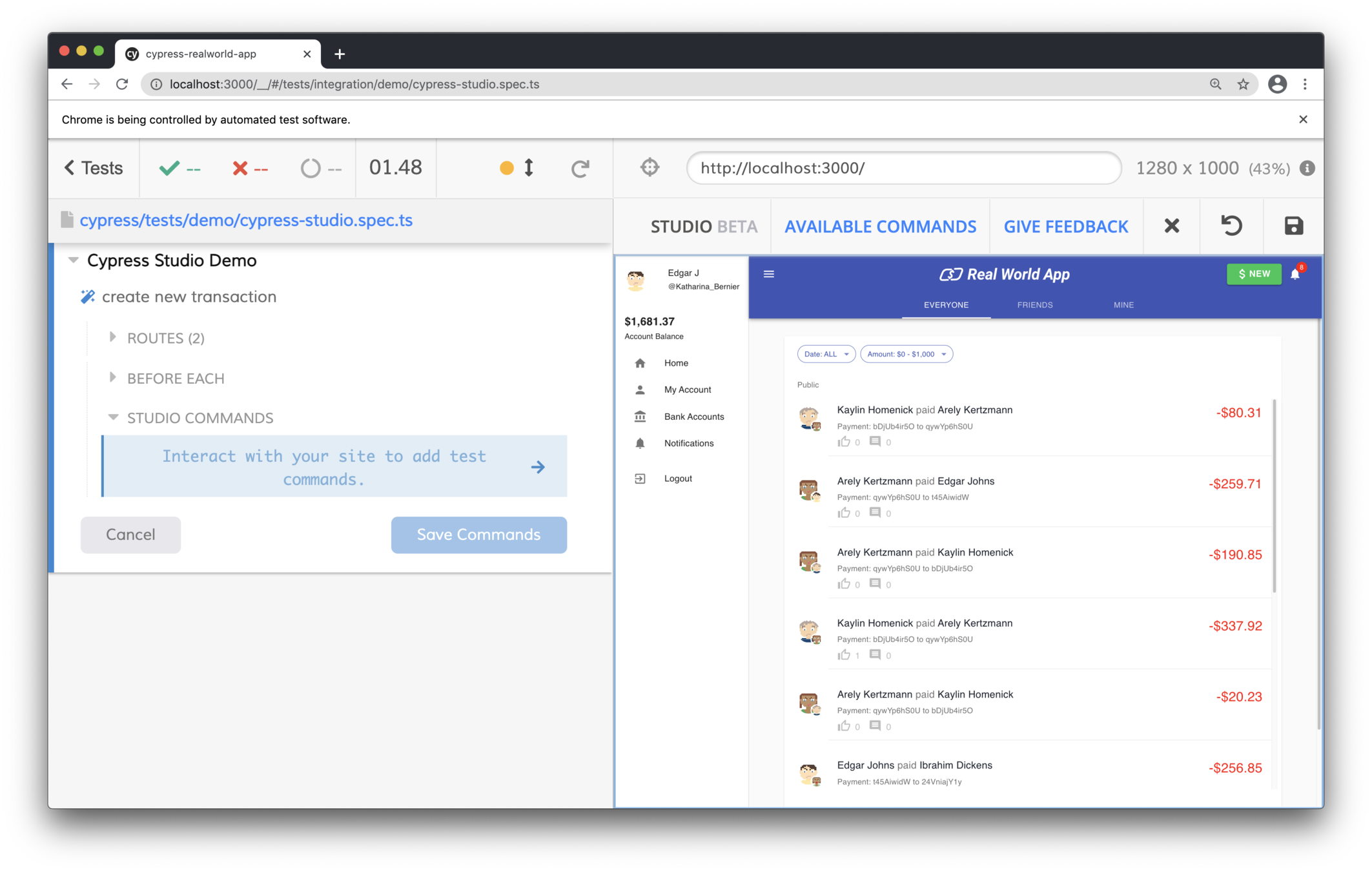
Cypress is building a UI for writing tests
There are many ways to test the same UI, you need to choose the right strategy that gives you enough confidence to ship and meet deadlines.
Thanks!
Questions?