Functional JavaScript
Writing functional code with an OOP background.

Disclaimer
My career has been heavy in JavaScript. I won't always have the answers to how things tie back to Ruby but I'm always happy help.
Ask questions as we go along. If something is confusing let me know because questions help me calibrate this talk to be for all skill levels.
What is functional programming?
Common functional patterns in JavaScript
Grouping business logic with functions + composition vs classes + inheritance.
What is functional programming?
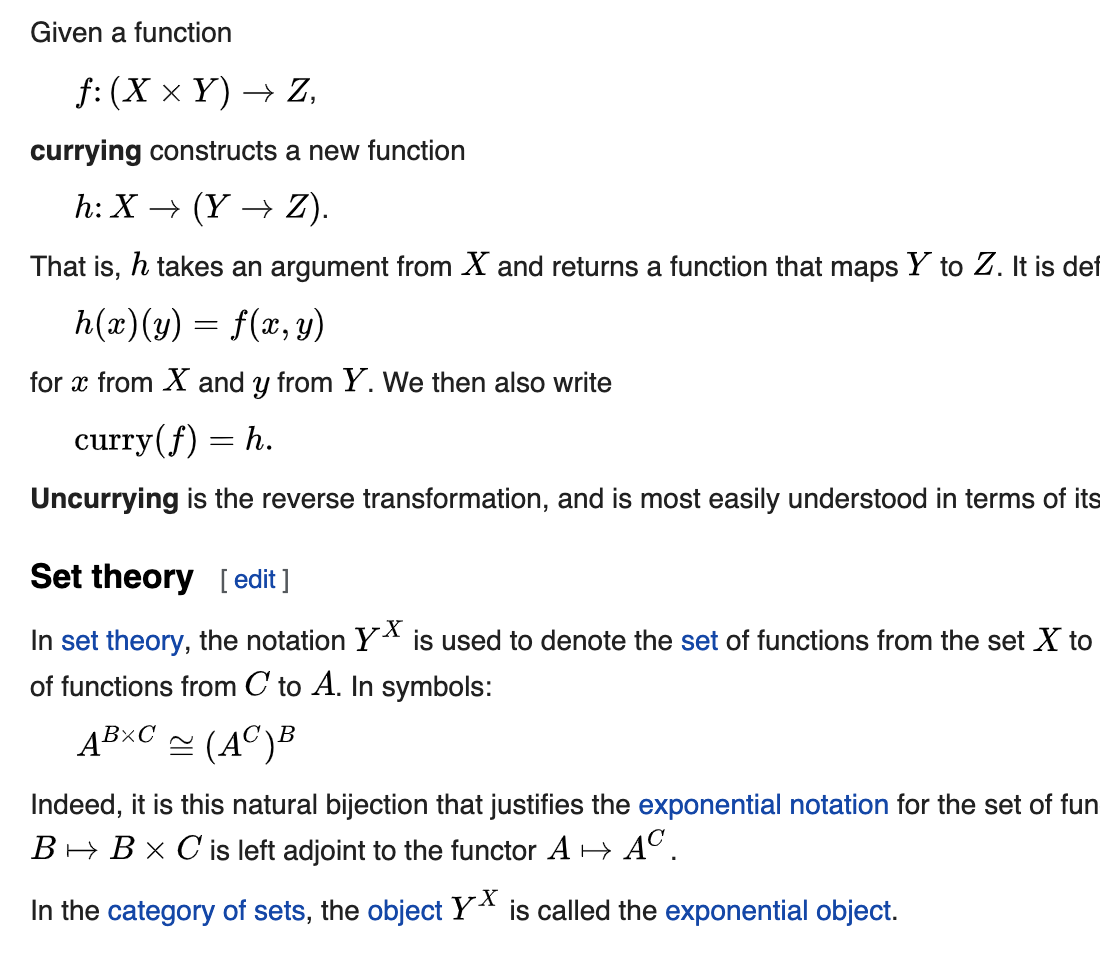

Limiting the number of side effects that a block of code performs.
Breaking your code down into smaller chunks and putting it all together like Lego blocks.
A focus on the behavior of your code rather than the data that flows through it.
What is a function?
function
input
output
plusOne
1
2
const greet = (name) => {
  console.log(`Hello, I'm ${name}!`)
}
const greet = (name) => {
  console.log(`Hello, I'm ${name}!`)
}

greet('Bob');
// Hello, I'm Bob
JavaScript Execution
The best functions are small and only do one thing. The single responsibility principle makes it super easy to test functions.
function foo () {
  console.log('Hello!');
}

const foo = function () {
  console.log('Hello!');
}

const foo = () => {
  console.log('Hello!');
}
There are many ways to write a function but for clarity I'm going to write all functions as arrow functions.
Functions can be passed around through variables or returned from other functions just like any other value.
var foo = () => {};

var foo = () => {
  return () => {};
};
Scope
Anything inside a function cannot be accessed or "seen" from outside the function. However, every function has access to all outer scopes.
Scope is the only thing that makes things "private"
const greet = () => {
  var greeting = 'hello';

  console.log(greeting);
};

greet();
What will this show?
"hello"var greeting = 'hello';
const greet = () => {
console.log(greeting);
};
greet();What will this show?
"hello"const greet = () => {
var greeting = 'hello';
};
console.log(greeting);What will this show?
undefinedLet's start with what we know
Company X comes to you and tells you that they need you to program a simple robot. This robot needs to do four things.
Give the robot a name. "Bob"
Say farewell to a user. "Goodbye"
Keep track of the number of times it has greeted a user.
"I've greeted 2 times"
Greet the user with the robot's name. "Hello, I'm Bob"
Robot
greet
farewell
=
How do we group related logic in other languages?
getGreetCount
class Robot {
}
class Robot {
  constructor(robotName) {
    this.robotName = robotName;
  }
}
class Robot {
  constructor(robotName) {
    this.robotName = robotName;
  }

  greet(personName) {
    console.log(
      `Hello ${personName}, I'm ${this.robotName}`
    );
  }
}
class Robot {
  constructor(robotName) {
    this.robotName = robotName;
  }

  greet(personName) {
    console.log(
      `Hello ${personName}, I'm ${this.robotName}`
    );
  }

  farewell() {
    console.log('Goodbye!');
  }
}
class Robot {
  constructor(robotName) {
    this.robotName = robotName;
    this.greetCount = 0;
  }

  greet(personName) {
    console.log(
      `Hello ${personName}, I'm ${this.robotName}`
    );
    this.greetCount = this.greetCount + 1;
  }

  farewell() {
    console.log('Goodbye!');
  }

  getGreetCount() {
    console.log(
      `I've greeted ${this.greetCount} times.`
    );
  }
}
const myRobot = new Robot('Bob');

myRobot.greet('Alec');
// Hello Alec, I'm Bob.

myRobot.farewell();
// Goodbye!

myRobot.getGreetCount()
// I've greeted 1 times.
Company X has a brilliant idea. They want to build a robot dog. It has all the same characteristics as a robot except with the ability to bark.
How do we normally do this with classes?
class RoboDog extends Robot {
}
class RoboDog extends Robot {
constructor(robotName) {
super(robotName);
}
}
class RoboDog extends Robot {
  constructor(robotName) {
    super(robotName);
  }

  bark () {
    console.log('woof');
  }
}
Inheritance
const myRoboDog = new RoboDog('Rover');

myRoboDog.greet('Alec');
// Hello Alec, I'm Rover.

myRoboDog.farewell();
// Goodbye!

myRoboDog.getGreetCount();
// I've greeted 1 times.

myRoboDog.bark();
// woof
Your company releases the proprietary Robot and RoboDog API to the world. Everyone is free to extend your Robot class to make all kinds of new robots!
A few months later your company decides to rename the variable within the Robot function from "greetCount" to just "count".
class Robot {
  constructor(robotName) {
    this.robotName = robotName;
    this.greetCount = 0;
  }
  ...
class Robot {
constructor(robotName) {
this.robotName = robotName;
this.count = 0;
}
...You publish the changes to NPM and the next day you get 100 new issues saying that you broke code relying on that count variable.
What you thought was a private implementation detail is breaking everything, why?
const myRobot = new Robot('Bob');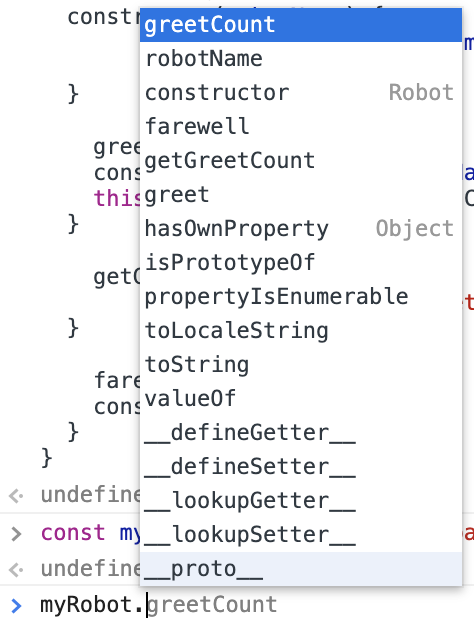
There is no such thing as private instance variables or methods on a JavaScript class.
How can we hide implementation details from a consumer?
How do we make things "private" in JavaScript?
Functional Patterns
class Robot {
  constructor(robotName) {
    this.robotName = robotName;
    this.greetCount = 0;
  }

  greet(personName) {
    console.log(
      `Hello ${personName}, I'm ${this.robotName}`
    );
    this.greetCount = this.greetCount + 1;
  }

  farewell() {
    console.log('Goodbye!');
  }

  getGreetCount() {
    console.log(
      `I've greeted ${this.greetCount} times.`
    );
  }
}
Your boss says that you need to make the implementation details of robotName and greetCount private.
Instead of writing a class that you can extend with inheritance let's try to write a series of functions that you can compose together to create an almost identical API.
We're going to start by building the MVP then build on from there.
Again, if you have any questions please feel free to ask.
const greet = createRobot('Bob');

greet();

// Hello, I'm Bob.
Whenever I think of writing models, clients, or groupings of related business logic, I prefix the instantiation function with "create".
const greet = createRobot('Bob');

greet();

// Hello, I'm Bob.
const createRobot = (robotName) => {
return () => {
}
};
const greet = createRobot('Bob');
greet();
// Hello, I'm Bob!const createRobot = (robotName) => {
};
const greet = createRobot('Bob');
greet();
// Hello, I'm Bob!const createRobot = (robotName) => {
return () => {
console.log(`Hello, I'm ${robotName}!`);
}
};
const greet = createRobot('Bob');
greet();
// Hello, I'm Bob!const createRobot = (robotName) => {
return () => {
console.log(`Hello, I'm ${robotName}!`);
}
};
const greet = createRobot('Bob');
greet();
// Hello, I'm Bob!Higher-Order Function
Higher-Order Function
Functions that operate on other functions, either by taking them as arguments or by returning them
const createTrackingClient = (hostUrl) => {
return (eventData) => {
return axios.post(hostUrl, eventData);
}
}Client Initialization
$('button').on('click', () => {});jQuery
function Button () {
return <button>Hello</button>;
}
export default withState('counter', 'setCounter', 0)(Button);Higher-Order Components - React
The previous class implementation allowed the robot to be personalized and greet the user by name.
const createRobot = (robotName) => {
  return () => {
    console.log(`Hello, I'm ${robotName}!`);
  }
};

const greet = createRobot('Bob');

greet();

// Hello, I'm Bob!
const createRobot = (robotName) => {
return () => {
console.log(
`Hello, I'm ${robotName}!`
);
}
};
const greet = createRobot('Bob', 'Alec');
greet();
// Hello, I'm Bob!const createRobot = (robotName, personName) => {
return () => {
console.log(
`Hello ${personName}, I'm ${robotName}!`
);
}
};
const greet = createRobot('Bob', 'Alec');
greet();
// Hello Alec, I'm Bob!Implementation 1
Pass both names on creation
const createRobot = (robotName) => {
  return () => {
    console.log(
      `Hello, I'm ${robotName}!`
    );
  }
};

const greet = createRobot('Bob');

greet('Alec');

// Hello Alec, I'm Bob!
const createRobot = (robotName) => {
return (personName) => {
console.log(
`Hello ${personName}, I'm ${robotName}!`
);
}
};
const greet = createRobot('Bob');
greet('Alec');
// Hello Alec, I'm Bob!Implementation 2
Pass robot name on creation, pass person name on greet
const createRobot = (robotName) => {
return (personName) => {
console.log(
`Hello ${personName}, I'm ${robotName}!`
);
}
};Currying
Currying
Taking a function that would take in multiple arguments and instead spreading them into multiple functions that only take one argument.
const createAdder = (numberOne) => {
return (numberTwo) => {
numberOne + numberTwo;
}
};
const addOne = createAdder(1);
addOne(2);const add = (numberOne, numberTwo) => {
return numberOne + numberTwo;
};
add(1,2);Right now our createRobot function only returns the greet function, we need to add more functionality related to a robot. Let's add the farewell method.
How do we group similar functionality using our current pattern?
What JavaScript data structure helps us group similar functionality by key?
const createRobot = (robotName) => {
  return (personName) => {
    console.log(
      `Hello ${personName}, I'm ${robotName}!`
    );
  }
};

const greet = createRobot('Bob');

greet('Alec');

// Hello Alec, I'm Bob!;const createRobot = (robotName) => {
return {
greet: (personName) => {
console.log(
`Hello ${personName}, I'm ${robotName}!`
);
}
}
};
const greet = createRobot('Bob');
greet('Alec');
// Hello Alec, I'm Bob!;const createRobot = (robotName) => {
return {
greet: (personName) => {
console.log(
`Hello ${personName}, I'm ${robotName}!`
);
},
farewell: () => {
console.log('Goodbye!')
}
}
};
const myRobot = createRobot('Bob');

myRobot.greet('Alec');
// Hello Alec, I'm Bob!;
myRobot.farewell();
// Goodbye!const createRobot = (robotName) => {
return {
greet: (personName) => {
console.log(
`Hello ${personName}, I'm ${robotName}!`
);
},
farewell: () => {
console.log('Goodbye!')
}
}
};
const greet = createRobot('Bob');
greet('Alec');
// Hello Alec, I'm Bob!;const myRobot = createRobot('Bob');
myRobot.greet('Alec');
// Hello Alec, I'm Bob!;const myRobot = new Robot('Bob');
myRobot.greet('Alec');
// Hello Alec, I'm Bob.Let's implement our final functionality for the robot, getGreetCount.
const createRobot = (robotName) => {
  return {
    greet: (personName) => {
      console.log(
        `Hello ${personName}, I'm ${robotName}!`
      );
    },
    farewell: () => {
      console.log('Goodbye!')
    }
  }
};
const createRobot = (robotName) => {
return {
greet: (personName) => {
console.log(
`Hello ${personName}, I'm ${robotName}!`
);
},
getGreetCount: () => {
},
farewell: () => {
console.log('Goodbye!')
}
}
};const createRobot = (robotName) => {
return {
greet: (personName) => {
console.log(
`Hello ${personName}, I'm ${robotName}!`
);
},
getGreetCount: () => {
console.log(`I've greeted ${greetCount} times.`);
},
farewell: () => {
console.log('Goodbye!')
}
}
};const createRobot = (robotName) => {
let greetCount = 0;
return {
greet: (personName) => {
console.log(
`Hello ${personName}, I'm ${robotName}!`
);
},
getGreetCount: () => {
console.log(`I've greeted ${greetCount} times.`);
},
farewell: () => {
console.log('Goodbye!')
}
}
};const createRobot = (robotName) => {
let greetCount = 0;
return {
greet: (personName) => {
console.log(
`Hello ${personName}, I'm ${robotName}!`
);
greetCount = greetCount + 1;
},
getGreetCount: () => {
console.log(`I've greeted ${greetCount} times.`);
},
farewell: () => {
console.log('Goodbye!')
}
}
};const createRobot = (robotName) => {
let greetCount = 0;
return {
greet: (personName) => {
console.log(
`Hello ${personName}, I'm ${robotName}!`
);
greetCount = greetCount + 1;
},
getGreetCount: () => {
console.log(`I've greeted ${greetCount} times.`);
},
farewell: () => {
console.log('Goodbye!')
}
}
};
const myRobot = createRobot('Bob');
myRobot.greet('Alec');
// Hello Alec, I'm Bob.
myRobot.greet('Alec');
// Hello Alec, I'm Bob.
myRobot.getGreetCount();
// I've greeted 2 times.const myRobotOne = createRobot('Bob');
const myRobotTwo = createRobot('Jennifer');
myRobotOne.greet('Alec');
myRobotOne.getGreetCount();
// I've greeted 1 times.
myRobotTwo.greet('Alec');
myRobotTwo.greet('Alec');
myRobotTwo.getGreetCount();
// I've greeted 2 times.const createRobot = (robotName) => {
let greetCount = 0;
return {
greet: (personName) => {
...
greetCount = greetCount + 1;
},
getGreetCount: () => {
console.log(`I've greeted ${greetCount} times.`);
},
...
}
};
const myRobotOne = createRobot('Bob')
const myRobotTwo = createRobot('Jennifer');
myRobotOne.greet('Alec');
myRobotOne.greet('Alec');
myRobotTwo.greet('Alec')
0
0
1
2
1
const createRobot = (robotName) => {
let greetCount = 0;
return {
greet: (personName) => {
...
greetCount = greetCount + 1;
},
getGreetCount: () => {
console.log(`I've greeted ${greetCount} times.`);
},
...
}
};
const myRobotOne = createRobot('Bob')
const myRobotTwo = createRobot('Jennifer');
myRobotOne.greet('Alec');
myRobotOne.greet('Alec');
myRobotTwo.greet('Alec')
Closure
A closure is a function that holds onto, or "closes over", variables within it's scope even after code execution has moved out of that block as long as a reference remains to those variables.
Instances of stateful React components are closures.
We finished our Robot but how would we extend it to make the RoboDog?
const createRobot = (robotName) => {
let greetCount = 0;
return {
...
farewell: () => {
console.log('Goodbye!')
}
}
};const createRobot = (robotName) => {
let greetCount = 0;
return {
...
farewell: () => {
console.log('Goodbye!')
}
}
};
const createRoboDog = (robotName) => {
return {
...createRobot(robotName),
}
};const createRobot = (robotName) => {
let greetCount = 0;
return {
...
farewell: () => {
console.log('Goodbye!')
}
}
};
const createRoboDog = (robotName) => {
return {
...createRobot(robotName),
bark: () => {
console.log('woof');
}
}
};const createRobot = (robotName) => {
let greetCount = 0;
return {
...
farewell: () => {
console.log('Goodbye!')
}
}
};
const createRoboDog = (robotName) => {
return {
...createRobot(robotName),
bark: () => {
console.log('woof');
}
}
};
const myRoboDog = createRoboDog('Rover');
myRoboDog.bark();
// woof
myRoboDog.farewell();
// Goodbye!We have full feature parity but we can take it one step further.
Functional programming is trying to break down your code into small pieces based on what it does, not what it's modeling.
RoboDog has a hard dependency on Robot.
const createRobot = (robotName) => {
  let greetCount = 0;

  return {
    greet: (personName) => {
      console.log(
        `Hello ${personName}, I'm ${robotName}!`
      );
      greetCount = greetCount + 1;
    },
    getGreetCount: () => {
      console.log(`I've greeted ${greetCount} times.`);
    },
    farewell: () => {
      console.log('Goodbye!')
    }
  }
};
const fareweller = () => {
return {
farewell: () => {
console.log('Goodbye!');
}
}
};
const createRobot = (robotName) => {
let greetCount = 0;
return {
greet: (personName) => {
console.log(
`Hello ${personName}, I'm ${robotName}!`
);
greetCount = greetCount + 1;
},
getGreetCount: () => {
console.log(`I've greeted ${greetCount} times.`);
}
}
};const fareweller = () => {
return {
farewell: () => {
console.log('Goodbye!');
}
}
};
const greeter = (nameToGreet) => {
};
const createRobot = (robotName) => {
let greetCount = 0;
return {
greet: (personName) => {
console.log(
`Hello ${personName}, I'm ${robotName}!`
);
greetCount = greetCount + 1;
},
getGreetCount: () => {
console.log(`I've greeted ${greetCount} times.`);
}
}
};const fareweller = () => {
return {
farewell: () => {
console.log('Goodbye!');
}
}
};
const greeter = (nameToGreet) => {
let greetCount = 0;
return {
greet: (personName) => {
console.log(
`Hello ${personName}, I'm ${nameToGreet}!`
);
greetCount = greetCount + 1;
},
getGreetCount: () => {
console.log(`I've greeted ${greetCount} times.`);
}
}
};
const createRobot = (robotName) => {
};const fareweller = () => {
};
const createRobot = (robotName) => {
  let greetCount = 0;

  return {
    greet: (personName) => {
      console.log(
        `Hello ${personName}, I'm ${robotName}!`
      );
      greetCount = greetCount + 1;
    },
    getGreetCount: () => {
      console.log(`I've greeted ${greetCount} times.`);
    },
    farewell: () => {
      console.log('Goodbye!')
    }
  }
};
const fareweller = () => {
return {
farewell: () => {
console.log('Goodbye!');
}
}
};
const greeter = (nameToGreet) => {
let greetCount = 0;
return {
greet: (personName) => {
console.log(
`Hello ${personName}, I'm ${nameToGreet}!`
);
greetCount = greetCount + 1;
},
getGreetCount: () => {
console.log(`I've greeted ${greetCount} times.`);
}
}
};
const createRobot = (robotName) => {
return {
...fareweller(),
...greeter(robotName)
}
};const woofer = () => {
return {
bark: () => {
console.log('woof');
}
}
}
const createRoboDog = (dogName) => {
return {
...greeter(dogName),
...fareweller(),
...woofer()
}
};Composition
Writing JavaScript in a functional way helps separate implementation from interface.
Why isn't there privacy in JavaScript classes?
class Robot {
  constructor(robotName) {
    this.robotName = robotName;
    this.greetCount = 0;
  }

  greet(personName) {
    console.log(
      `Hello ${personName}, I'm ${this.robotName}`
    );
    this.greetCount = this.greetCount + 1;
  }

  farewell() {
    console.log('Goodbye!');
  }

  getGreetCount() {
    console.log(
      `I've greeted ${this.greetCount} times.`
    );
  }
}
console.log(typeof Robot)"function"console.log(new Robot('Bob'));"object"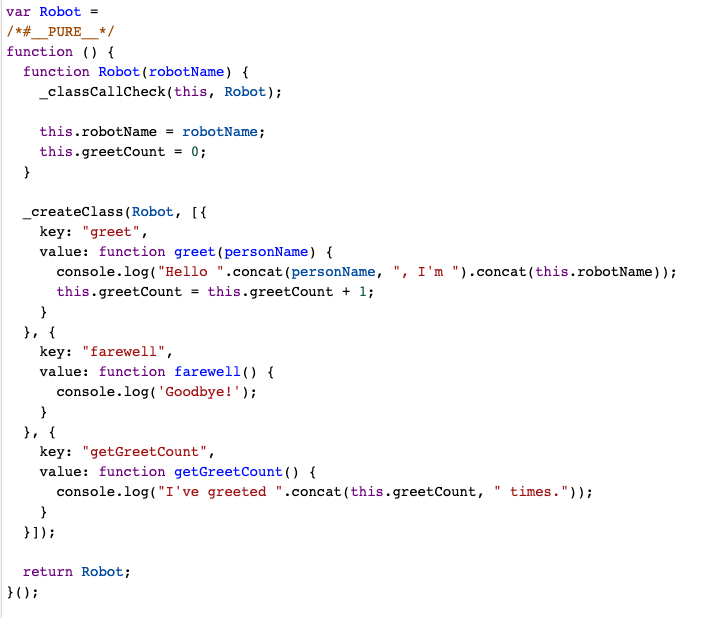
When would we actually want to use functions vs classes?
When it's in your best interest to abstract implementation details away from your consumers.
When you're coding for something that is guided by behavior rather than directly tied to a data model.
Classes when working on data models on the backend. Many JavaScript libraries that interact with a database rely heavily classes.
When you're working with libraries or on the front end where reusability of behavior is important.
Are there any examples in our codebase?
const createTracker = (
  eventDictionary: IEventDictionary,
  {
    apiUrl,
    trackingId,
    transformRequest = graphqlTransformer,
    ssr = false,
  } = {}
) => {
  validateEventDictionary(eventDictionary);

  const usedApiUrl = apiUrl || getTrackingEndpoint();
  let usedTrackingId = trackingId || uuid();

  return {
    setTrackingId: (newTrackingId: string): void => {
      usedTrackingId = newTrackingId;
    },

    track: (
      eventName: string,
      properties?: ITrackedProperty
    ): Promise<boolean> => {
      ...
    },
  };
};

export default createTracker;
Hopefully you can use some of these patterns to create abstractions in your own code. If you ever have questions, I'm always available.