Data mapping and filtering
for loop
- for
- for of
- for in
const arr = [10, 20, 30, 40, 50]

for(let i = 0; i < arr.length; i++) {
    console.log(arr[i])
}
const arr = [10, 20, 30, 40, 50]

for(let element of arr) {
    console.log(element)
}
const obj = {
    property_1: '1',
    property_2: '2',
    property_3: '3'
}

for(let key in obj) {
    console.log(`Key: ${key} -> value: ${obj[key]}`)
}
Array
Array.prototype
- join
- push
- pop
- shift
- unshift
- splice
- slice
- concat
- indexOf, lastIndexOf
- includes
- forEach
- find, findIndex
- filter
- map
- sort
- reverse
- reduce, reduceRight
- some, every
- fill
- Mutation methods
- Non-mutating methods
- Iteration methods
- Searching methods
- Reduce
Mutation methods
- push( element1[, ...[, elementN]] ) -> return array length
- pop() -> return last element from array
- shift() -> return first element from array, undefined from empty array
- unshift( element1[, ...[, elementN]] ) -> return array length
-
splice(start[, deleteCount[, item1[, item2[, ...]]]])
-> return array of deleted elements
-
reverse()
-
fill(value[, start[, end]])
Mutation methods
- sort( [callback] )
const numbers = [5, 3, 4, 1, 2]

const sortedNumbers = numbers.sort()
console.log(sortedNumbers)              -> [1, 2, 3, 4, 5]

// !!!!

console.log(sortedNumbers === numbers)  -> true
console.log(numbers)                    -> [1, 2, 3, 4, 5]

// !!!!
Mutation methods (sort part 2)
const numbers = [5, 3, 4, 10, 2]

const callback = (a, b) => (a - b)
const sortedNumbers = numbers.sort(callback)

console.log(sortedNumbers) -> [2, 3, 4, 5, 10]
const numbers = [5, 3, 4, 10, 2]

const sortedNumbers = numbers.sort()
console.log(sortedNumbers)

-> [10, 2, 3, 4, 5]
callback return:
- > 0 -> a > b
- = 0 -> a = b
- < 0 -> a < b
Non-mutating methods
- join( [separatot] ) -> return string
split( [separator] ) -> return array
-
slice([begin[, end]]) -> return array of elements from [begin, end)
-
concat([value1[, value2[, ...[, valueN]]]])
Iteration methods
- forEach( callback )
- filter( callback ) -> return new array
callback(
element,
index,
array
)
- map( callback ) -> return new array
Searching methods
- indexOf( searchElement [, fromIndex] )
-> return
index of the first founded element
-1 if element doesn't exist - lastIndexOf( searchElement)
- includes( searchElement [, fromIndex] ) -> return true/false
- find( callback ) -> first matched element
- findIndex( callback ) -> index of first matched element
- some( callback ) -> return true/false
- every( callback ) -> return true/false
callback(
element,
index,
array
)
Reduce method
- reduce( callback, initialValue )
callback(
accumulator
element,
index,
array
)
const numbers = [1, 2, 3, 4, 5]
let callsNumber = 0

const callback = (acc, element, index, array) => {
    callsNumber++
    return acc + element
}
const result = numbers.reduce(callback, 0)

console.log(result)         -> 15
console.log(callsNumber)    -> 5


callsNumber = 0

const result = numbers.reduce(callback)

console.log(result)         -> 15
console.log(callsNumber)    -> 4
Array destructuring
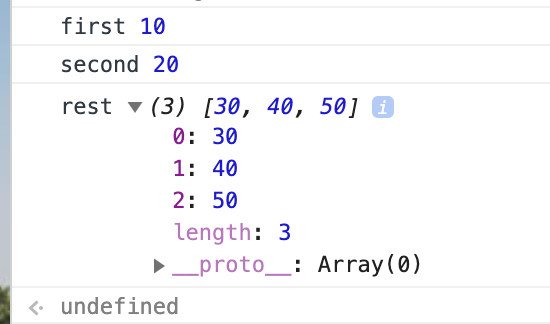
const arr = [10, 20, 30, 40, 50]

const [first, second, ...rest] = arr

console.log('first', first)
console.log('second', second)
console.log('rest', rest)
const [first = 'defaul first', second = 'default second'] = []
console.log('first: ', first)
console.log('second: ', second)
Object
Object.prototype
- Object.keys( obj )
- Object.values( obj )
- Object.entries( obj )
const obj = {
    'key1': 1,
    'key2': 2,
    'key3': 3
}

console.log( Object.keys(obj) )        -> ["key1", "key2", "key3"]
console.log( Object.values(obj) )      -> [1, 2, 3]
console.log( Object.entries(obj) )     -> [['key1', 1], ['key2', 2], ['key3', 3]]
Check that object empty
const obj1 = {}
const obj2 = {
    el: '1'
}

const isEmptyObj = (obj) => {
    return Object.keys(obj).length === 0
}

console.log( isEmptyObj(obj1) )        -> true
console.log( isEmptyObj(obj2) )        -> false
const key1 = { el: 1 }
const key2 = { el: 2 }
const obj = {
[key1]: 'key1 property',
[key2]: 'key2 property'
}
console.log( obj[key1] ) -> ???const key1 = { el: 1 }
const key2 = { el: 2 }
const obj = {
[key1]: 'key1 property',
[key2]: 'key2 property'
}
console.log( obj[key1] ) -> 'key2 property'Map is a collection of keyed data items, just like an Object. But the main difference is that Map allows keys of any type.
- new Map() – creates the map.
- map.set(key, value) – stores the value by the key.
- map.get(key) – returns the value by the key, undefined if key doesn’t exist in map.
- map.has(key) – returns true if the key exists, false otherwise.
- map.delete(key) – removes the value by the key.
- map.clear() – removes everything from the map.
- map.size – returns the current element count.
A Set is a special type collection – “set of values” (without keys), where each value may occur only once.
- new Set(iterable) – creates the set, and if an iterable object is provided (usually an array), copies values from it into the set.
- set.add(value) – adds a value, returns the set itself.
- set.delete(value) – removes the value, returns true if value existed at the moment of the call, otherwise false.
- set.has(value) – returns true if the value exists in the set, otherwise false.
- set.clear() – removes everything from the set.
- set.size – is the elements count.
We can loop over a set either with for..of or using forEach
const arr = [1, 2, 3, 1]

const set = new Set(arr)
const uniqArr = new Array(...set)

console.log(arr)        -> [1, 2, 3, 1]
console.log(uniqArr)    -> [1, 2, 3]