What's new in Koha?
Alex Buckley
Agenda
- Collaboration and development
- What to expect when your Koha has a major upgrade
- Why do we do major Koha upgrades?
- What's new in Koha 24.11?
- What's new in Koha 24.05 (highlights)?
- Contributing to Koha
- Q&A
Collaboration and development
As an open source project, Koha depends on a community to maintain it. Koha releases work like this:
Major release
Every six months the Koha community releases a big update, a new Koha version containing bug/security fixes, new features and enhancements.
Minor release
Every month the Koha community releases a small update to existing Koha versions, containing important bug and security fixes.
What to expect when your Koha has a major upgrade
- [During the upgrade] Koha will be in maintenance mode (not usable).
- [After the upgrade] Koha will look much the same!
- You might see some layout changes
- The Koha community has a principle of 'least surprises' so: New features/major changes go in turned off.
- If you want to use them, you need to explicitly enable them!
Why do we do major Koha upgrades?
- Major upgrades aren't just for accessing new features / enhancements. They are critical for getting:
- Security fixes
- Efficiency fixes
- Accessibility fixes
- Most Koha versions are maintained by the community. So they receive important bug and security fixes for up to 2 years.
- We want to always keep our partner libraries on a supported, secure version.
Have a play with Koha 24.11
- OPAC: https://demo.mykoha.co.nz/
- Staff client: https://demo-intra.mykoha.co.nz/
Username: staff Password: staff1
Koha 24.11
-
10 new features
-
184 enhancements
-
647 bug and security fixes
What's new in Koha 24.11?
- [Acq] Automated MARC record ordering process - 34355
- [Cat] OAI harvester - 35659
- [Cat] Amend MARC modification templates so control fields can be copied to subfields - 36515
- [Circ] Add bookable option to item types - 35906
- [Circ] Add bookings to collect circulation report - 33736
- [Circ] Add turn-around periods around bookings - 34440
- [MARC] Simplify MARC21 fast add framework - 36055
- [Notices] We should notify an assignee when they are assigned a ticket - 36758
What's new in Koha 24.11?
- [Notices] Add the option to 'Reset to default' in the notices editor - 36815
- [OPAC] Add 'cite' option to detail page in OPAC - 14670
- [Patrons] Add a preferred_name field to patrons - 28633
- [Patrons] Force password change for new patrons entered by staff - 33462
- [Patrons] Add guarantee to patron categories with category type 'Staff' - 36169
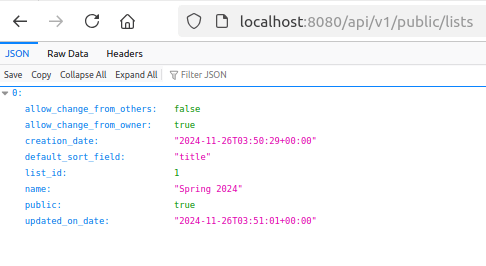
- [Rest API] Add public routes for lists - 28965
- [Searching] Add option to create a shareable link for item searches - 14322
Automated MARC record ordering process - [34355]
- Automate your acquisitions workflows!
- If your library uploads MARC files then you can now automatically create the baskets and order lines in the Acquisitions module, using your uploaded MARC files.
- This new feature can be mostly configured by librarians, but you do need to contact a Koha support vendor to schedule a cronjob.
Automated MARC record ordering process - [34355]
1. Enable the MarcOrderingAutomation syspref (good example of a new feature turned off by default)
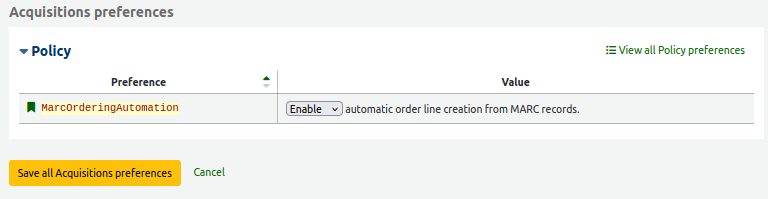
Automated MARC record ordering process - [34355]
2. Define mappings in your Koha system preferences
- MarcFieldsToOrder syspref
- MarcItemFieldsToOrder syspref
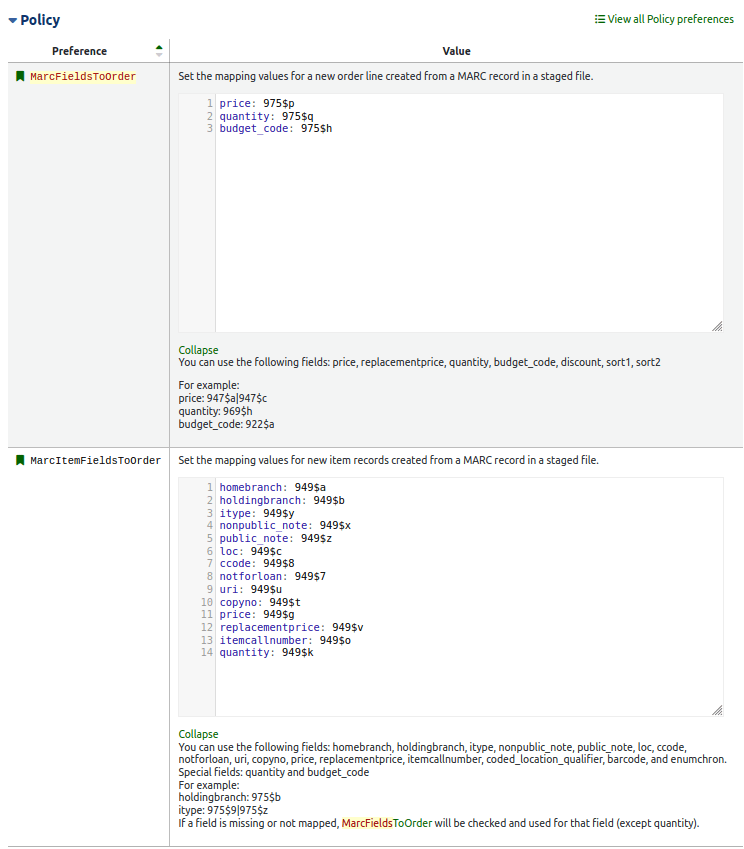
Automated MARC record ordering process - [34355]
3. Navigate to Administration > Acquisition parameters > MARC order accounts
4. Create a new MARC order account
Automated MARC record ordering process - [34355]
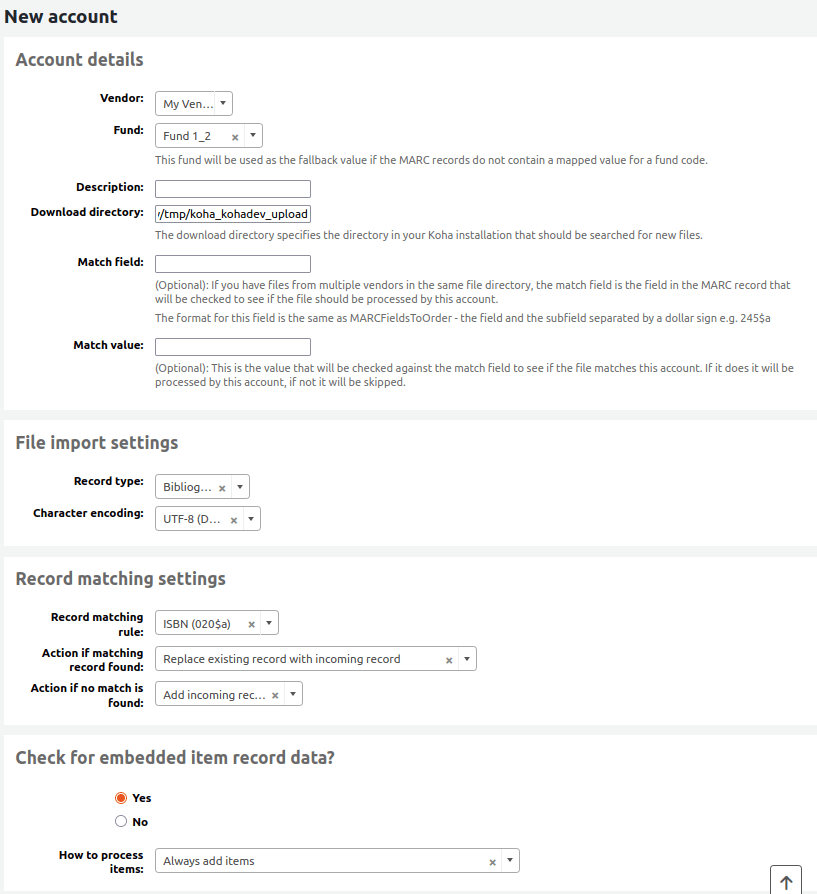
Automated MARC record ordering process - [34355]
When creating a new MARC order account
- Select a vendor and fund for Koha to use when auto creating orderlines
- Define a download directory - usually /var/lib/koha/<instancename>/tmp/koha_<instancename>_upload
- Set 'Check for embedded item record data?' to 'yes'
Automated MARC record ordering process - [34355]
5) Navigate to Cataloguing > Stage records for import
6) Upload a MARC file - you don't need to stage the file

Automated MARC record ordering process - [34355]
7) Ask your Koha support vendor to schedule the new marc_ordering_process.pl cronjob to run on a regular basis
8) After the cronjob has finished running navigate to your vendor in the acquisitions module. See a new basket has been added.
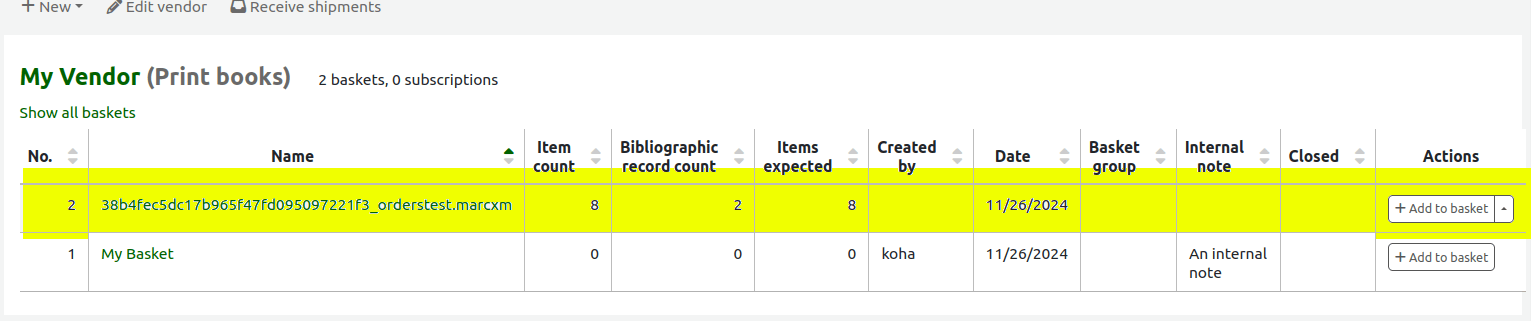
Automated MARC record ordering process - [34355]
9) Click on the new basket name to view all orderlines
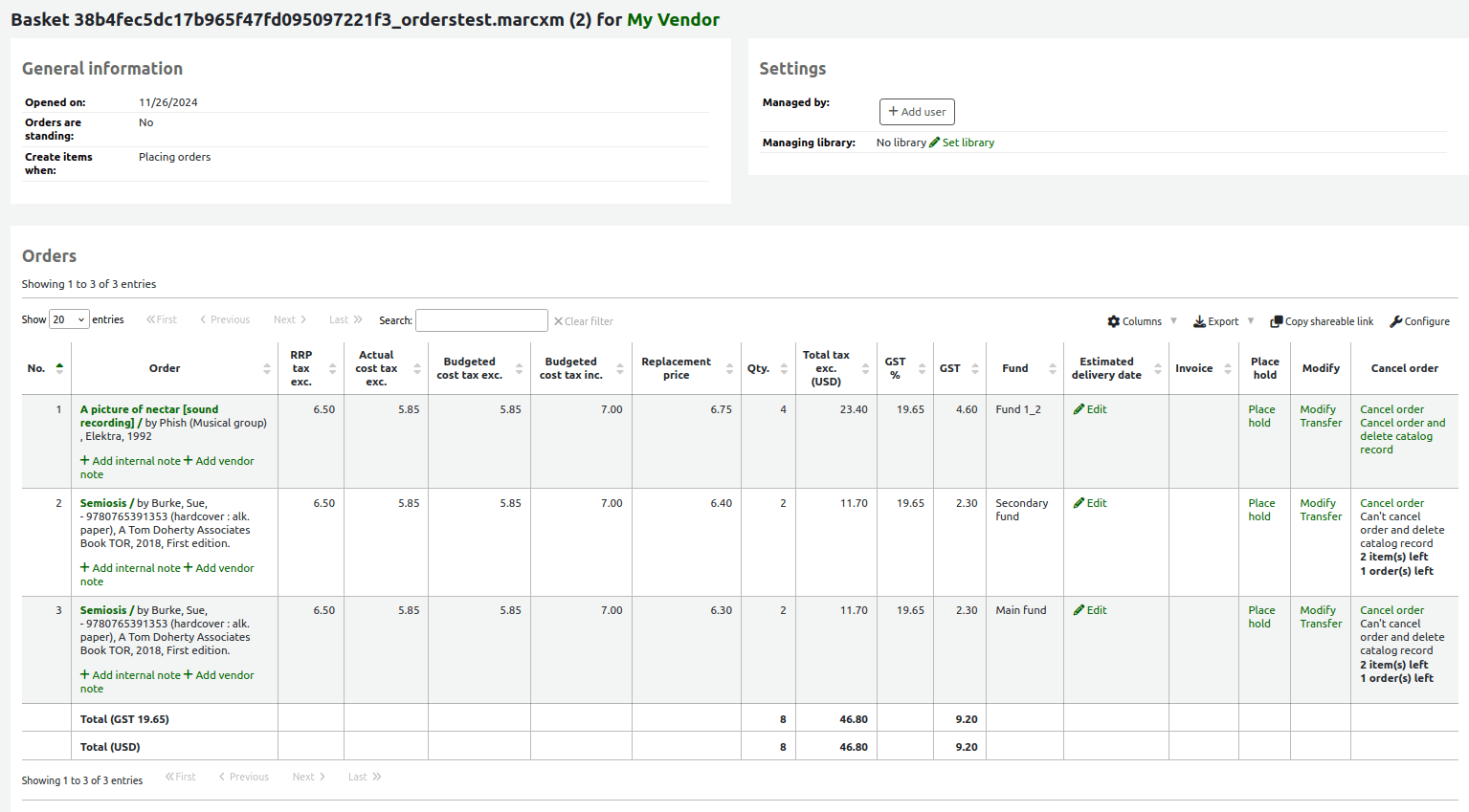
OAI harvester - [35659]
- Until 24.11 Koha was harvestable by other systems, but you couldn't harvest into Koha from other systems
- Now you can:
1) Define an OAI repository in the Administration module.
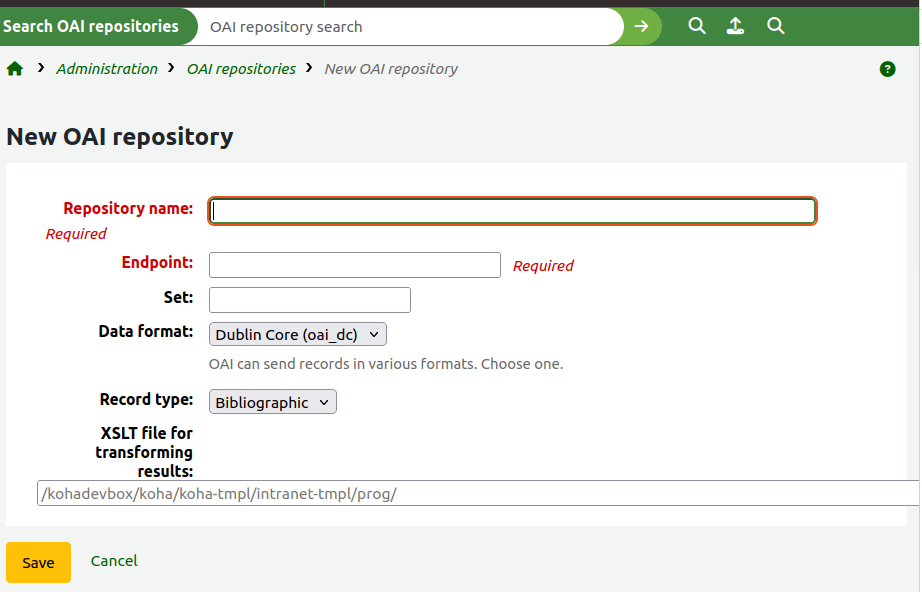
OAI harvester - [35659]
2) Ask your Koha support vendor to schedule the new harvest_oai.pl cronjob to run at a regular interval
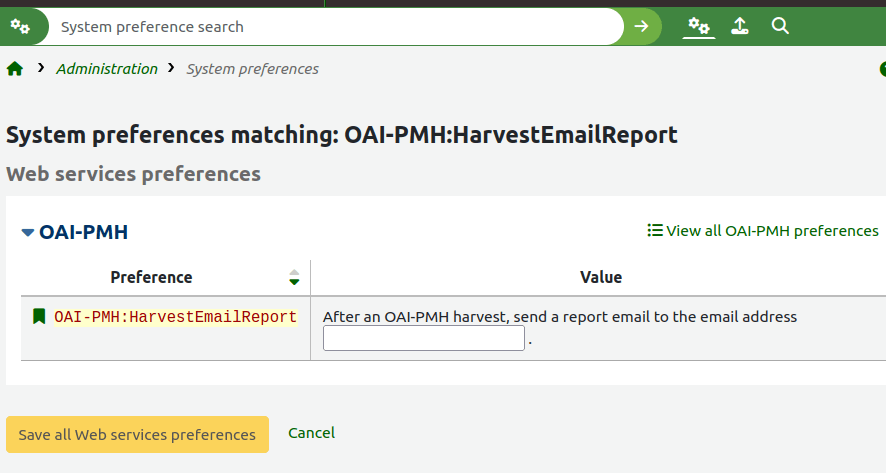
3) To be notified about the harvests, save your email address in the new OAI-PMH:HarvestEmailReport syspref
OAI harvester - [35659]
In what situations can this new feature be used?
- Harvest content from repository systems (for example DSpace) into Koha
Amend MARC modification templates so control fields can be copied to subfields - [36515]
Sponsored by: SCIS, Education Services Australia.
- Control fields are MARC fields less than 10 - learn more here
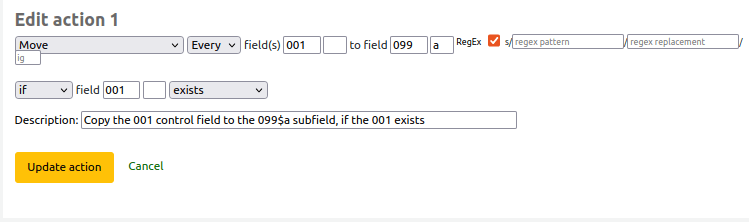
- It's now possible to batch edit and copy control fields using MARC modification templates
- For example, copy 001 control field to 099$a subfield
Add bookable option on itemtypes - [35906]
Since Koha 23.11, librarians have been able to individually edit item records and make those items bookable.
Reminder: Making an item bookable means a librarian can set the item aside for a borrower between two dates in the future. Similar to a reserve, except bookings are for dates in the future.
Use cases:
- Setting aside items for a book club
- Setting aside items for a course
Add bookable option on itemtypes - [35906]
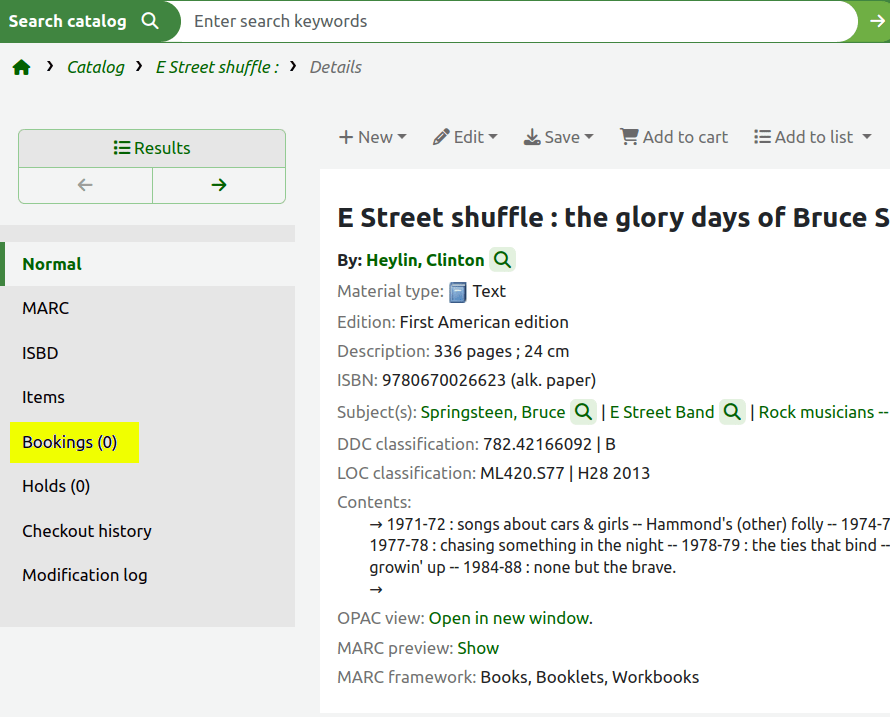
- Time saving enhancement! You can now batch set items as bookable, at the item type level.
- When editing an item type you will see a new 'Bookable' checkbox.

Add bookable option on itemtypes - [35906]
- Any biblios with items of your configured item type will now have a bookings link showing on the staff client
Add bookings to collect circulation report - [33736]
- View all the bookings waiting to be picked up at:
Circulation > Holds and bookings > Bookings to collect

Add turn-around periods around bookings - [34440]
Configure a turn-around period at the start, and end, of every item booking.
This allows time for the library to action things in between bookings.
For example:
- Branch transfer of the item
- Repair and maintenance of the item
Add turn-around periods around bookings - [34440]
- Set a global rule in Default checkout, hold and return policy

- Go to Administration > Members and circulation > Circulation and fine rules
Add turn-around periods around bookings - [34440]
- Set an item type specific rule in 'Default holds and bookings policies by item type'

Add turn-around periods around bookings - [34440]
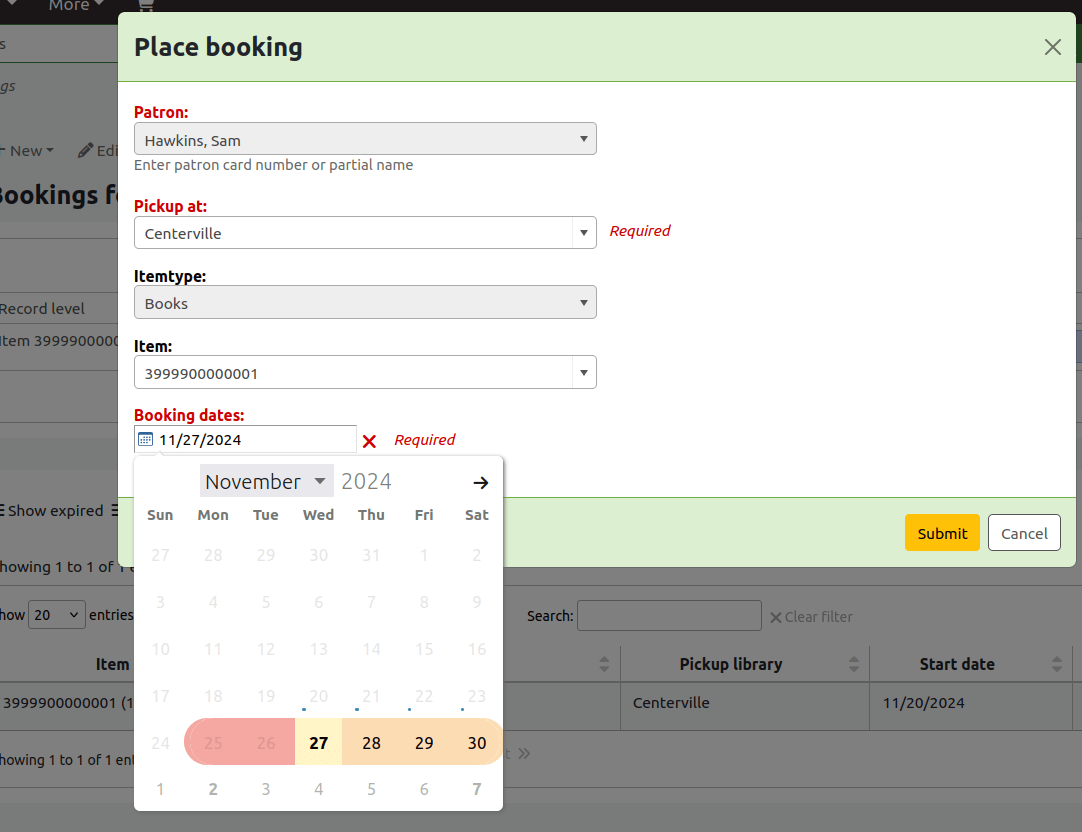
Turn-around periods are now visible in the calendar when librarians place a booking
Simplify MARC21 fast add framework - [36055]
- The FA (Fast Add) bibliographic framework has been growing larger every Koha release.
- The community has reviewed it and stripped out redundant MARC fields and subfields.
- Look here to see what MARC changes have been made.
We should notify an assignee when they are assigned a ticket - [36758]
- Catalogue concerns feature enables staff and library users to report problems with catalogue records.
- In 24.05 the Koha community added a basic ticket management system to Koha.
- Librarians had to regularly check a webpage to see if they had been allocated a catalogue concern ticket to fix.
We should notify an assignee when they are assigned a ticket - [36758]
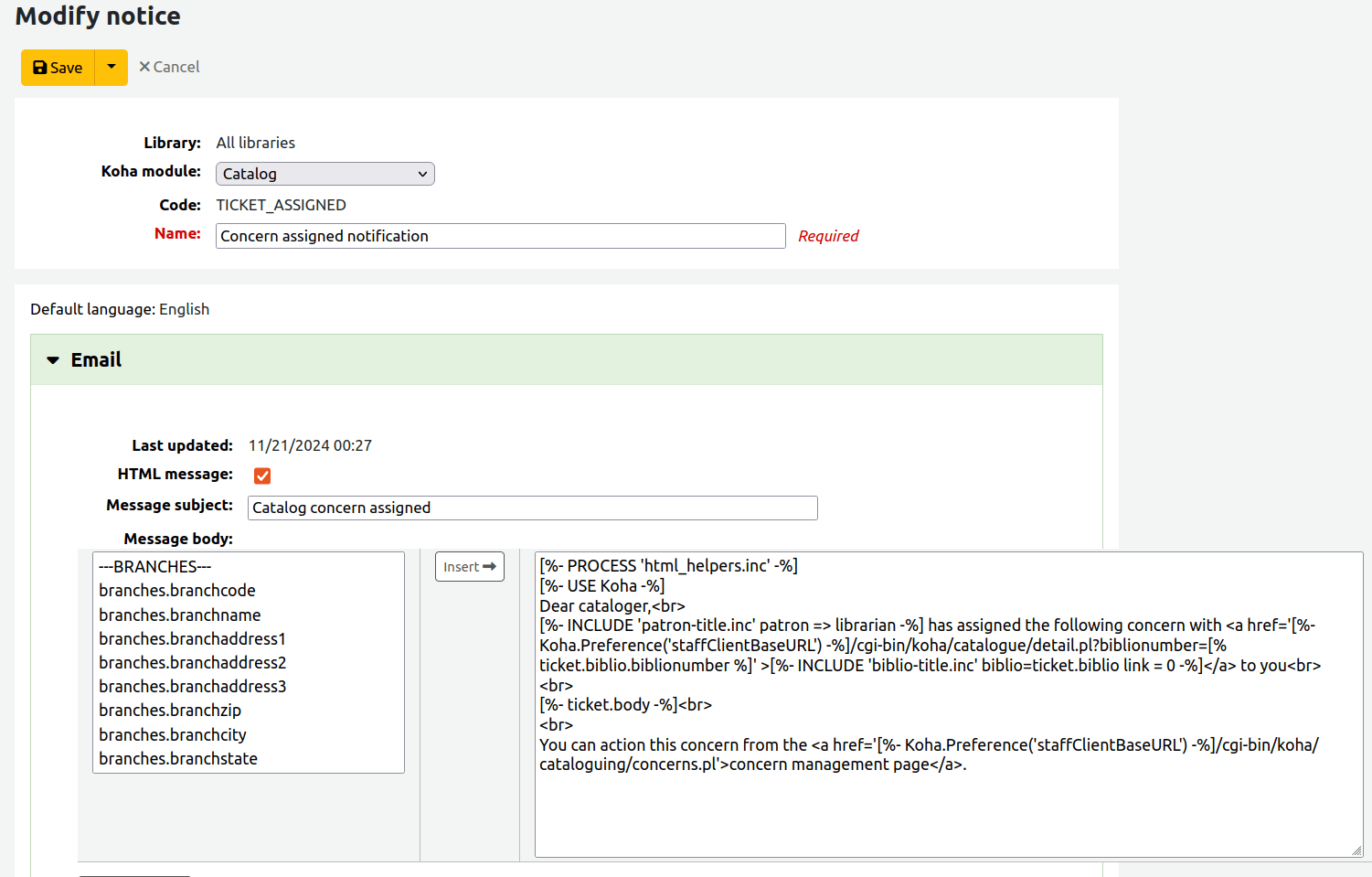
- Library staff can now receive a notification
Add the option to 'Reset to default' in the notices editor - [36815]
Does your library have old customised Koha notices?
- If yes you might want to reset them back to standard Koha notice text
- Benefit: You will receive enhancements to the notice content from the upstream Koha project
Add the option to 'Reset to default' in the notices editor - [36815]
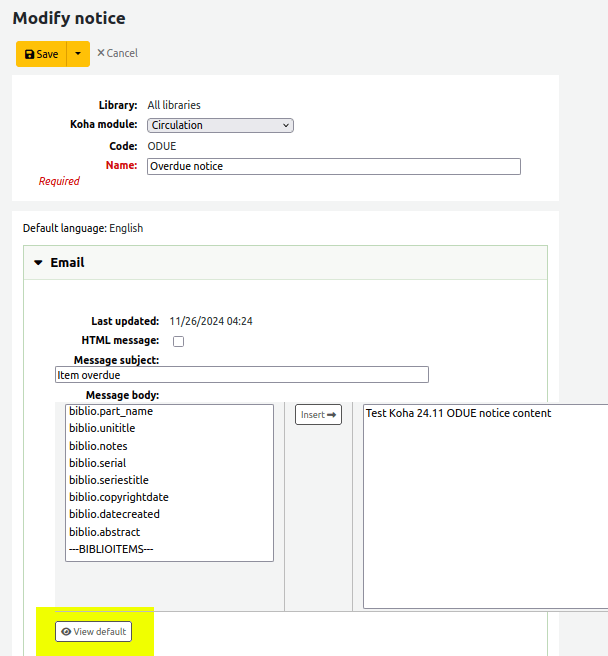
- There is a new 'View default' button highlighted yellow
Add the option to 'Reset to default' in the notices editor - [36815]
- Use the standard (uncustomised) content by clicking on 'Copy to template'
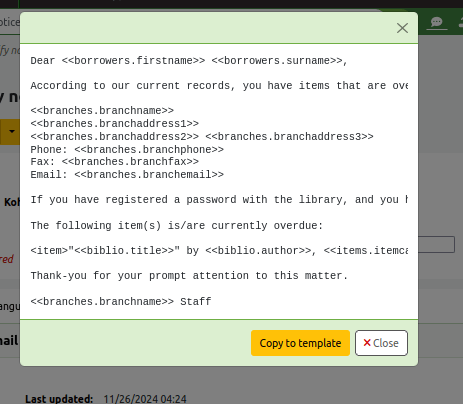
Add the option to 'Reset to default' in the notices editor - [36815]
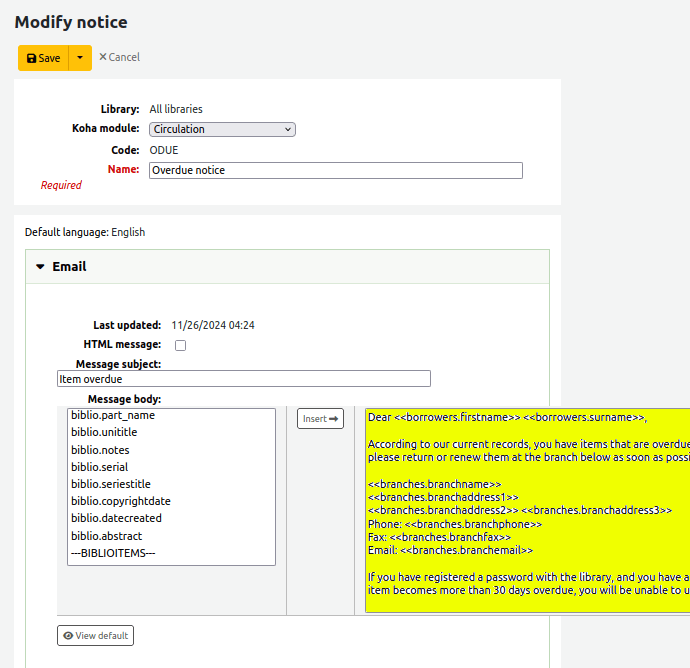
- Standard content has overwritten the custom content.
Add 'cite' option to detail page in OPAC - [14670]
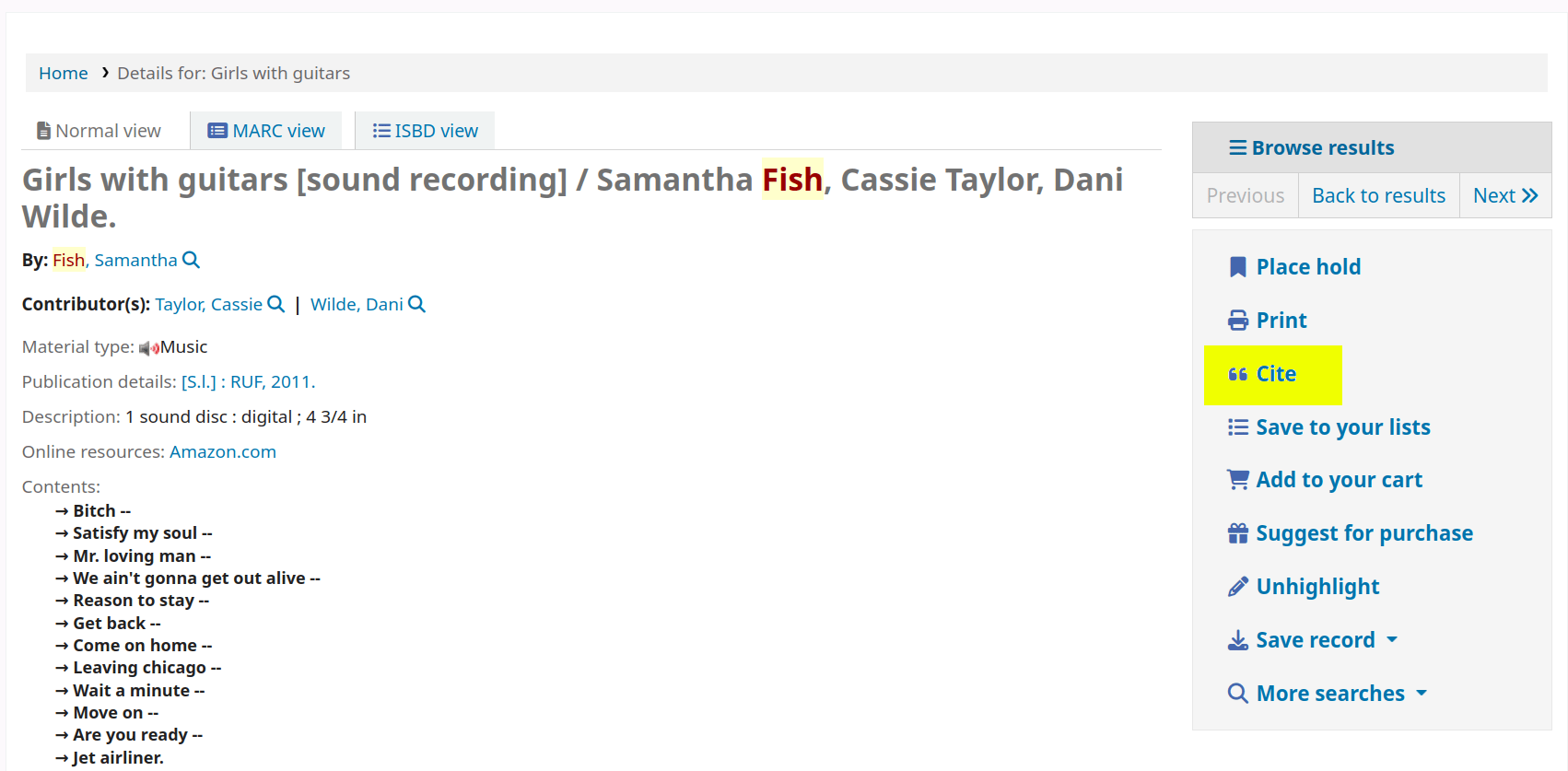
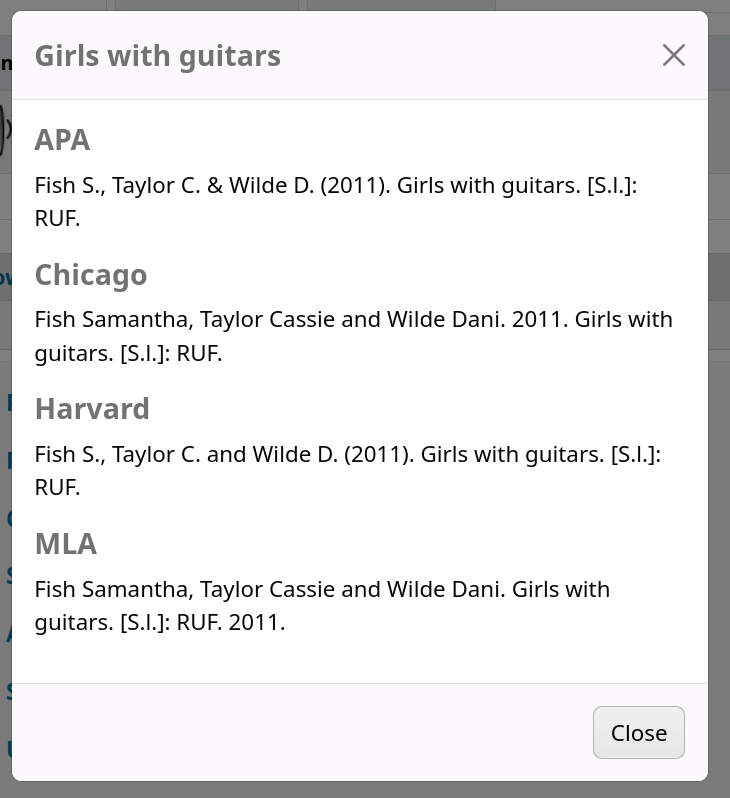
- Automatic citations in 4 different formats
- New 'Cite' link on biblio detail page on OPAC
Add 'cite' option to detail page in OPAC - [14670]
Loads a popup with:
- APA
- Chicago
- Havard
- MLA
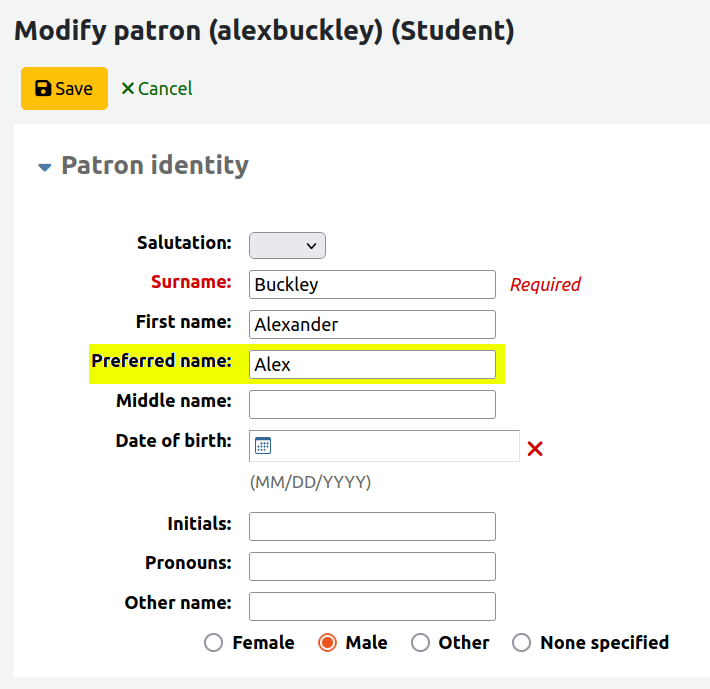
Add a preferred_name field to patrons - [28633]
- You can now save and display library users' preferred name in Koha
- There is a new preferred name text field when you edit a patron account
Add a preferred_name field to patrons - [28633]
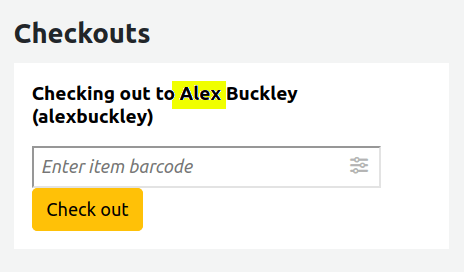
Add a preferred_name field to patrons - [28633]
Koha will prioritise displaying the preferred name through all interfaces
Force password change for new patrons entered by staff - [33462]
- You can now force library users whose password was manually set by a librarian to reset their password upon first Koha login.
- Helpful security enhancement!
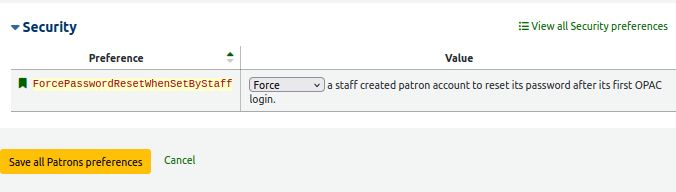
Force password change for new patrons entered by staff - [33462]
1) Set the ForcePasswordResetWhenSetByStaff to 'Force'. This is a global setting
2) Also make sure to enable the EnableExpiredPasswordReset syspref - so OPAC users can reset their own password
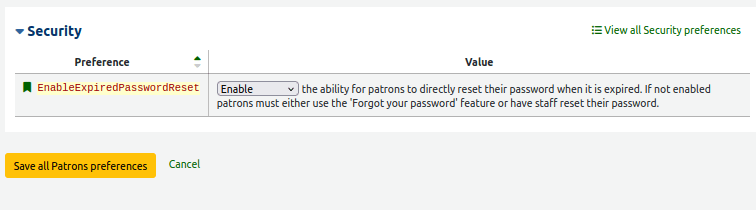
Force password change for new patrons entered by staff - [33462]
3) When a patron tries to log into the OPAC for the first time, they will see a message like this:
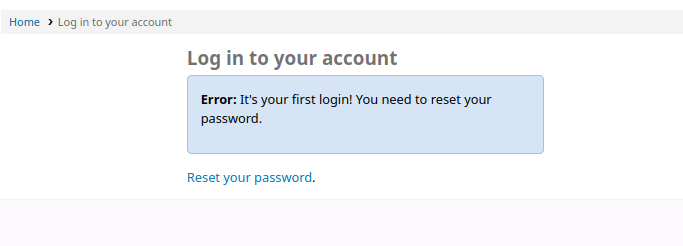
Force password change for new patrons entered by staff - [33462]
Granular control over which patron categories are forced to reset their password on first login:
1) Navigate to: Administration > Members and circulation > Member categories
2) Edit a category
3) Change the 'Force new patron password reset' dropdown to match the global syspref setting, or something different!

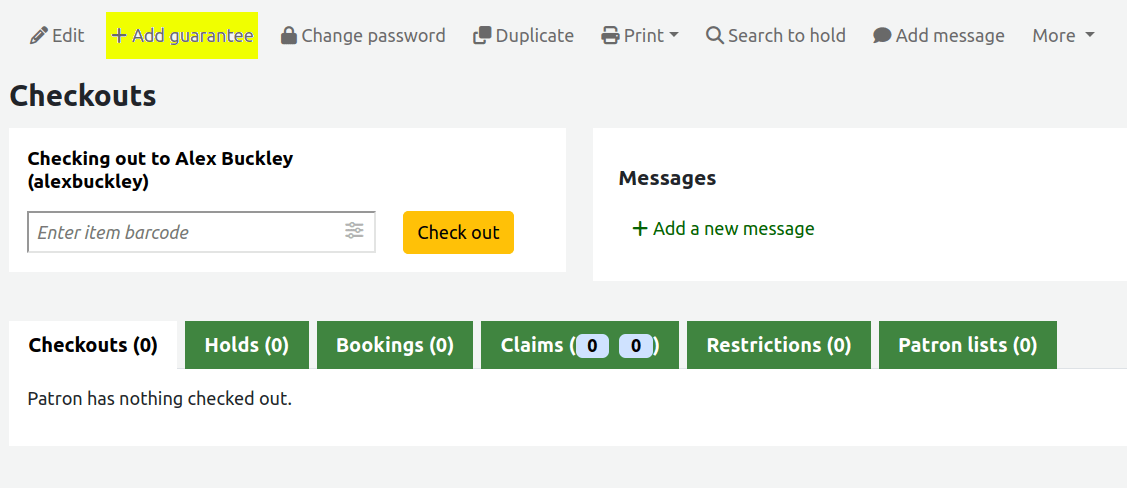
Add guarantee to patron categories with category type 'Staff' - [36169]
- Add children as guarantees to library staff accounts
Add public routes for lists - [28965]
- REST API endpoints for fetching public lists
Add option to create a shareable link for item searches - [14322]
- There's now a truncated shareable link on the staff client item search
- This share link is available in other tables as well!!

Koha 24.05 (highlights)
-
9 new features
-
239 enhancements
-
529 bug and security fixes
What's new in Koha 24.05?
-
[Circ] Overnight checkouts taking into account opening and closing hours
-
[Circ] Place multiple item-level holds at once for the same record
- [Searching] Add option to NOT redirect to result when search returns only one record
- [MARC data support] Deduping authorities script (dedup_authorities.pl)
- [OPAC] Display author information for researchers
- [Patrons] Copy permissions from one user to another
- [Reports] Report runtime parameter enhancements
What's new in Koha 24.05?
- [Notices] Send notices using several email addresses
- [Notices] Customise the format of notices when they are printed
Overnight checkouts taking into account opening and closing hours [6796]

Sponsored by Auckland University of Technology (AUT)
This enhancement enables libraries to configure how Koha should handle library opening hours when calculating the due time of high-circulation items (like hourly loans)
Overnight checkouts taking into account opening and closing hours [6796]
Sponsored by Auckland University of Technology (AUT)
New ConsiderLibraryHoursInCirculation syspref can be set to:
- 'Do not consider the library's opening hours'
- 'Shorten the loan period..' = library close time
- 'Extend the loan period...' = library open time
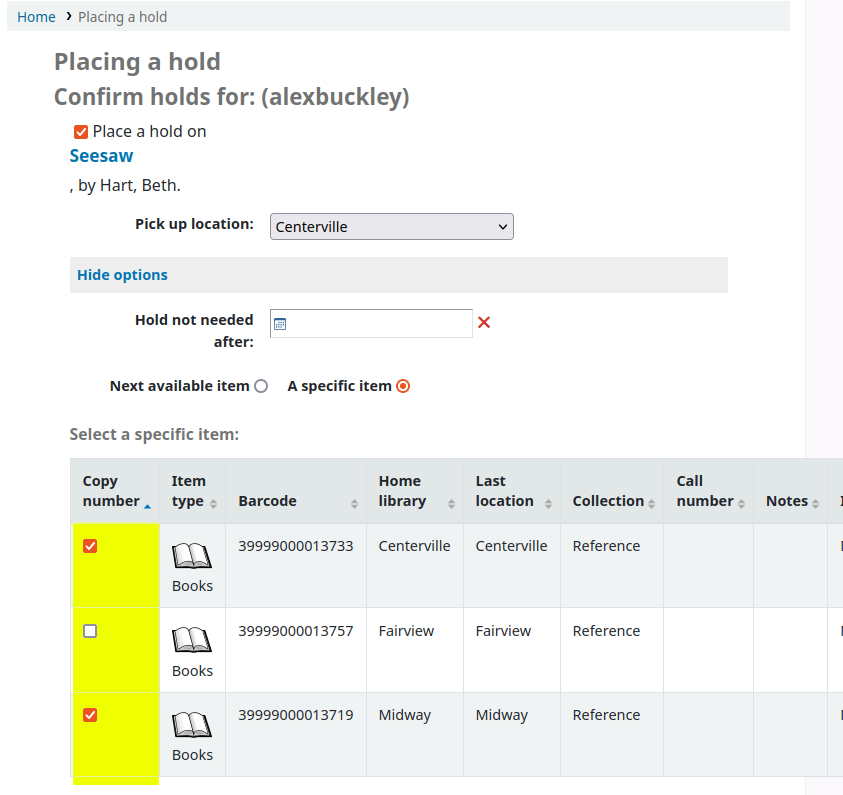
Place multiple item-level holds at once for the same record [15565]
Enable the new DisplayMultiItemHolds syspref to let OPAC and staff client users place multiple item-level holds on a title.
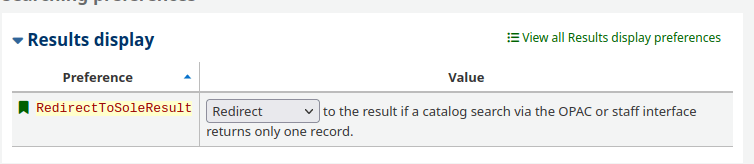
Add option to NOT redirect to result when search returns only one record [35728]
Enable the new RedirectToSoleResult syspref to make Koha load the record detail page of a singular search result
This system preference control both OPAC and staff client behaviour.
Sponsored by Educational Services Australia (SCIS)
Deduping authorities script (dedup_authorities.pl) [13706]
New script which your Koha support partner can configure to run regularly on your Koha server.
It identifies duplicate authority records and you can choose which to remove. The options are:
- Keep most recent of the duplicates
- Keep the duplicate linked to the most biblio records
- Keep the duplicate if it has a PPN (UNIMARC only)
Deduping authorities script (dedup_authorities.pl) [13706]
Configure it further:
Limit which authorities you search for duplicates in using a SQL limiter. e.g. --where="datecreated > '2023-12-31'" to only search for duplicates in authorities created in 2024
Display author information for researchers [29948]
Configure the new OPACAuthorIdentifiersAndInformation syspref to collate different author/contributor subfields in one place
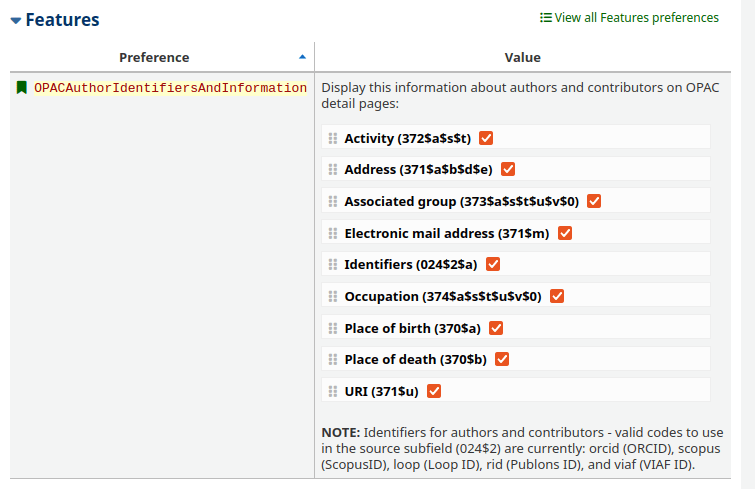
Display author information for researchers [29948]
New 'Author information' tab on OPAC record detail page
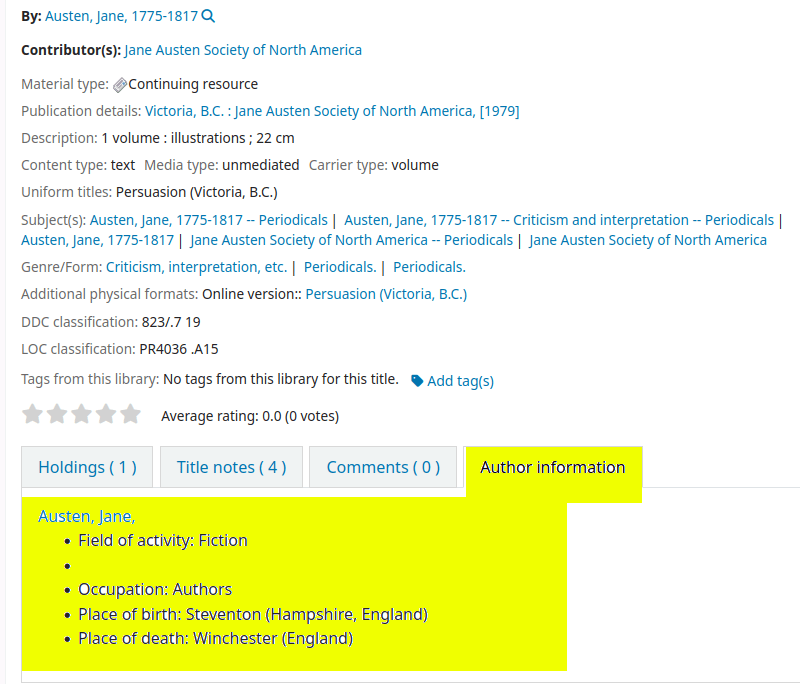
Display author information for researchers [29948]
New 'Author information' section on OPAC authority detail page

Copy permission from one user to another [30623]
- Administering Koha staff patron accounts can take a lot of time.
- This time-saving enhancement lets you copy patron permissions from one account to another!

Report runtime parameter enhancements
Including a runtime parameter in your Koha SQL reports enable you to populate a drop-down containing Koha data whenever you run a report.
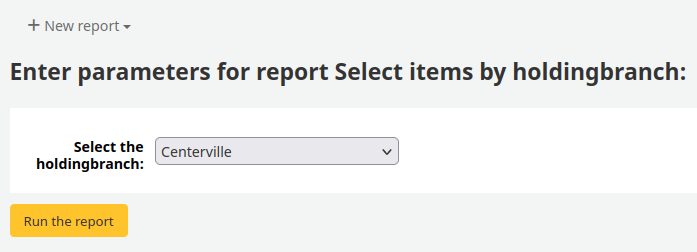
WHERE <<Select the holdingbranch|branches>>
Runtime parameter modal should provide option of ':all' [35856]
This enhancement adds an 'Include option for all' radio-button when you add a runtime parameter to your SQL report
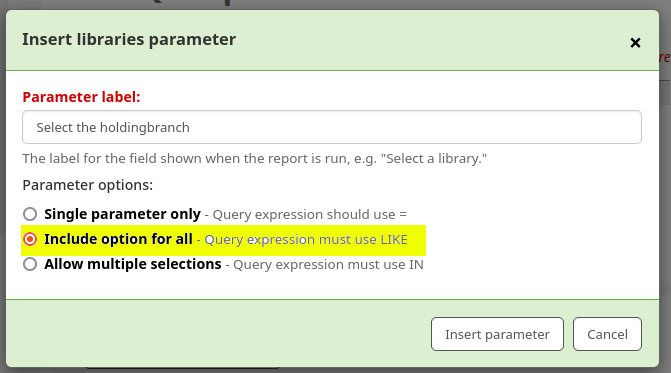
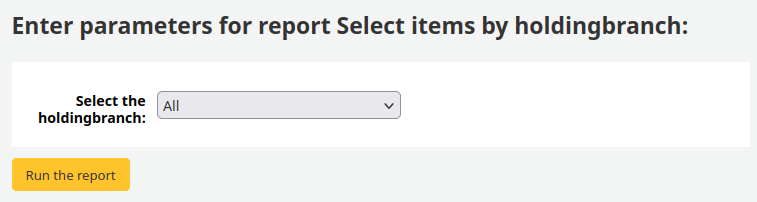
Runtime parameter modal should provide option of ':all' [35856]
Rather than running the report one-by-one for every runtime parameter option this enhancement adds an 'All' option to the dropdown
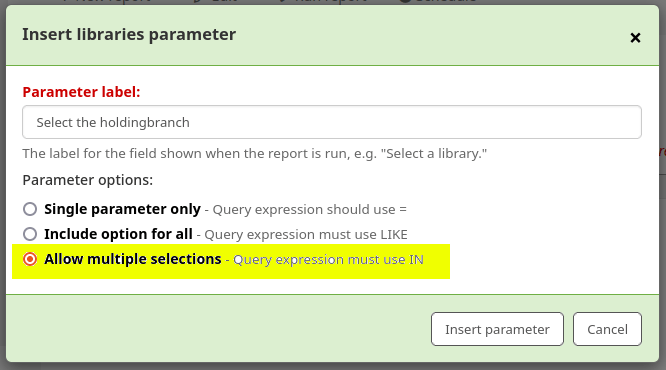
Multiple selections for parameters used in the IN function [35746]
This enhancement adds a 'Allow multiple selections' radio-button when you add a runtime parameter to your SQL report
Multiple selections for parameters used in the IN function [35746]
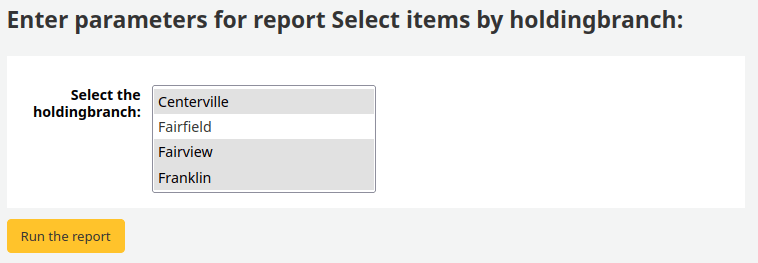
The dropdown has changed to a selectable list. You can now choose to run your report for multiple runtime options at once!
Send notices using several email addresses [12802]
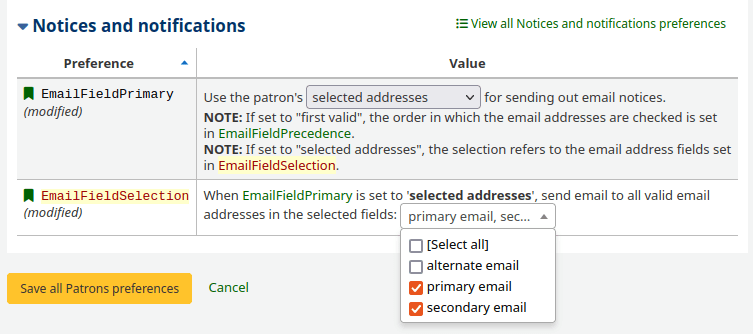
- Choose a singular patron email field to receive Koha notices in the EmailFieldPrimary syspref.
- If you set it to 'selected addresses' then it will check the EmailFieldSelection syspref where you can define multiple patron email fields
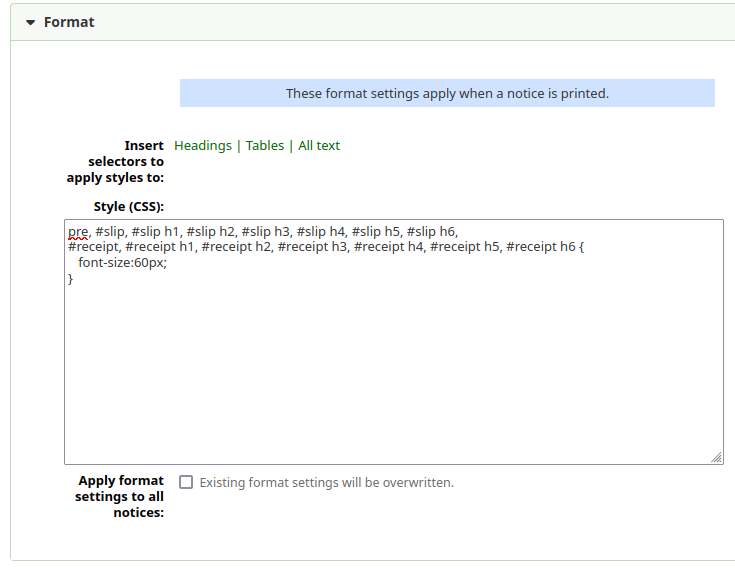
Customise the format of notices where they are printed [33478]
Sponsored by the Colorado Library Consortium
- Use the new 'Format' expandable tab when editing your notices and slips to add custom CSS rules
- You could add CSS for font sizes, margins, letter heads and logos
- Helpful selector insert links enable you to ensure you are adding CSS rules to the correct elements in the print notices
Customise the format of notices where they are printed [33478]
Sponsored by the Colorado Library Consortium
Contributing to Koha
Thank you for coming!
Contact us:
koha-support@catalyst.net.nz
More about Koha with Catalyst:
https://www.catalyst.net.nz/our-solutions/libraries-collections-and-archives