{Objects}
[Arrays]
Function(s){}
Alex Dajani
JavaScript Evangelist
Maker Square
slides: http://bit.ly/1BH0GOx
exercises: bit.ly/js102-exercises
Who is this for?
2-6mos experience learning JavaScript
Completed JS tutorial like Codecademy, CodeSchool, Khan Academy, or Bloc.io
Want to solidify fundamentals
Looking for more practice
Interested in getting into MakerSquare
@AlexDajani

Part 1
Review and solidify core JS principles with project.
Part 2
Get started with functional methods.
After
Use foundation to grow as a JS engineer.


@AlexDajani
Objects
{}
OVERVIEW
- Property Access
- Bracket Notation
- Dot Notation
- Dot vs Bracket
- Nested Objects
- Object Literals
- Iteration
@AlexDajani
var box = {};Data
@AlexDajani
var box = {};

box.material = "cardboard";
Assignment w/ Dots
When are some other times you have seen dots in JS?
var box =
{"material" : "cardboard"}
@AlexDajani
var box = {};

box.material = "cardboard";

box.material; //??
Assignment w/ Dots
var box =
{"material" : "cardboard"}
@AlexDajani
var box = {};

box.material = "cardboard";

var cb = box.material;
Access w/ Dots
var box =
{"material" : "cardboard"}
@AlexDajani
Access w/ Dots
box =
{"material" : "cardboard"}
var box = {};

box.material = "cardboard";

var cb = box.material;

cb; //??

box.material = "titanium";

cb; //??
box =
{"material" : "titanium"}
cb = "cardboard"
@AlexDajani
var box = {};

box.material = "cardboard";

box.material; //"cardboard"

box.size; //??
Access and Assignment
var box =
{"material" : "cardboard"}
@AlexDajani
var box = {};

box["material"] = "cardboard";

box.material; //??
Brackets
var box =
{"material" : "cardboard"}
@AlexDajani
var box = {};

box["material"] = "cardboard";

box["material"]; //??
Brackets
var box =
{"material" : "cardboard"}
@AlexDajani
var box = {};

box["material"] = "cardboard";


var key = "material";

box[key]; //??
Variables
@AlexDajani
var box = {};

box["material"] = "cardboard";

var func = function(){
 return "material";
};

box[func()]; //??
Expressions
@AlexDajani
var box = {};


box['material'] = "cardboard";

var key = 'material';


box['key']; //??
var box = {};
box['material'] = "cardboard";
var key = 'material';
box['key']; //undefined
box.key; //??
var box = {};


box['material'] = "cardboard";

var key = 'material';


box['key']; //undefined
box.key; //undefined
var box = {};
box['material'] = "cardboard";
var key = 'material';
box['key']; //undefined
box.key; //undefined
box[key]; //??
var box = {};


box['material'] = "cardboard";

var key = 'material';


box['key']; //undefined
box.key; //undefined
box[key]; //"cardboard"
Do's && Don'ts
@AlexDajani
var box = {};

box['material'] = "cardboard";
box[0] = 'meow';
box['^&*'] = "testing 123";

var test = box['^&*'];
non-valid characters
box =
{"material" : "cardboard",
 "0" : "meow",
 "^&*" : "testing 123"
}
@AlexDajani
THE RULES
DOTS
strings
Brackets
"strings
"quotes required
"weird characters
variables
numbers
numbers
quotations
weird characters
expressions
expressions
@AlexDajani
Storing Data
var box = {};

box["material"] = "cardboard";

box["size"] = {
  "height": 2,
  "width": 80
};

box.area = function(){
  return box.size.height * box.size.width;
};
@AlexDajani
Style: Bracket vs. Dots
@AlexDajani
var box = {};

box['size'] = 9;

box['~/ [."4'] = 'meow';


box['size']; // 9

box['~/ [."4']; // 'meow'
Object Literals
var box = { box['size'] = 9; box['~/ [."4'] = 'meow';};box['size']; // 9 box['~/ [."4']; // 'meow'
var box = {};box['size']= 9;box['~/ [."4']= 'meow';box['size']; // 9 box['~/ [."4']; // 'meow'
var box = { 'size' = 9; '~/ [."4' = 'meow';};box['size']; // 9 box['~/ [."4']; // 'meow'
var box = { 'size' : 9, '~/ [."4' : 'meow';};box['size']; // 9 box['~/ [."4']; // 'meow'
var box = { 'size' : 9, '~/ [."4' : 'meow'};box['size']; // 9 box['~/ [."4']; // 'meow'
@AlexDajani
Iteration
var box = {};

box['material'] = "cardboard";
box[0] = 'meow';
box['^&*'] = "testing 123";


for(var key in box){
  console.log(key); //??
}
@AlexDajani
var box = {};

box['material'] = "cardboard";
box[0] = 'meow';
box['^&*'] = "testing 123";


for(var key in box){
  console.log(box[key]); //??
}
Iteration
@AlexDajani
Exercise Time
@AlexDajani
What is an object?
What is the difference between dot and bracket notation?
When can you only use brackets and not dot?
When can you only use dot notation and not bracket?
How do you add a property with a key that contains special characters?
How do you add a property with a key that is stored in a variable?
How do you add a property whose key and value are stored in different variables?
How do you access an object that is inside another object?
How do you create an object that is nested inside another object?
How do we loop through objects to access the values?

Arrays
[]
Overview
- Arrays vs Objects
- Access && Assignment
- Native Methods && Properties
- Iteration
@AlexDajani
Arrays vs Objects
@AlexDajani
var box = [];

box[0] = true;
box[1] = 'meow';
box.push({'hello' : 'goodbye'});


var i = 0;

box[i]; // ??
box[1];
box.pop() //??
Access and Assignment
[true, 'meow', {'hello' : 'goodbye'}]
index# 0 1 2
{0 : 'meow', 'size' : 9 }
@AlexDajani
var box = {};

box['size'] = 9;

box['0'] = 'meow';


box['size']; // 9

box[0]; // 'meow'
Access and Assignment
var box = [];

box['size'] = 9;

box['0'] = 'meow';


box['size']; // ??

box[0]; // ??
['meow']
index # 0
{0 : 'meow', 'size' : 9 }
@AlexDajani
var box = [];

box['size'] = 9;

box['0'] = 'meow';


box.size; // ??

box[0]; // ??
Access and Assignment
['meow']
index # 0
{0 : 'meow', 'size' : 9 }
@AlexDajani
The Rules Don't Change!
var box = [];

box['size'] = 9;

box['0'] = 'meow';


box.size; // ??

box.0; // ??
Access and Assignment
['meow']
index # 0
{0 : 'meow', 'size' : 9 }
@AlexDajani
var box = [];

box['size'] = 9;

box['0'] = 'meow';

for(var k in box){

  console.log(k); // ??

}
Iteration
['meow']
index # 0
{0 : 'meow', 'size' : 9 }
@AlexDajani
var box = [];

box['size'] = 9;

box['0'] = 'meow';


for(var k in box){

  console.log(box.k); // ??

}
Iteration
['meow']
index # 0
{0 : 'meow', 'size' : 9 }
@AlexDajani
var box = [];

box['size'] = 9;

box['0'] = 'meow';

for(var k in box){
  console.log(box[k]); //??

}
Iteration
['meow']
index # 0
{0 : 'meow', 'size' : 9 }
@AlexDajani
var box = [];

box['size'] = 9;
box['0'] = 'meow';
box.push('Whoohoo!');

for(var k in box){
  console.log(box[k]);
}

for(var i = 0; i < box.length; i++){

  console.log(i); //??

}
Iteration
['meow', 'Whoohooo!']
index # 0 1
{0 : 'meow', 1 : 'Whoohooo!', 'size' : 9 }
@AlexDajani
var box = [];

box['size'] = 9;
box['0'] = 'meow';
box.push('Whoohoo!');


for(var i = 0; i < box.length; i++){

  console.log(box.i); //??

}
Iteration
['meow', 'Whoohooo!']
index # 0 1
{0 : 'meow', 1 : 'Whoohooo!', 'size' : 9 }
@AlexDajani
var box = [];

box['size'] = 9;
box['0'] = 'meow';
box.push('Whoohoo!');


for(var i = 0; i < box.length; i++){

  console.log(box[i]); //??

}
Iteration
['meow', 'Whoohooo!']
index # 0 1
{0 : 'meow', 1 : 'Whoohooo!', 'size' : 9 }
@AlexDajani
var box = [];

box['size'] = true;

box['0'] = 'meow';


box.length; //??
Native Properties
['meow']
index # 0
{0 : 'meow', 'size' : 9 }
@AlexDajani
var box = [];

box['0'] = 'meow';
box[3] = {'babyBox': true};


box['length']; //??
Native Properties
@AlexDajani
var box = [];


box['0'] = 'meow';

box[3] = {'babyBox': true};


box[length]; //??
Native Properties
@AlexDajani
var box = [];

box['0'] = 'meow';
box[1] = 'Whoohooo!';
box[3] = {'babyBox': true};


box[box.length]; //??
Native Properties
@AlexDajani
var box = [];

box['size'] = 9;
box['0'] = 'meow';
box[1] = 'Whoohooo!';


box[box.length - 1]; //??
Native Properties
['meow', 'Whoohooo!']
index # 0 1
{0 : 'meow', 1 : 'Whoohooo!', 'size' : 9 }
@AlexDajani
var box = [];

box['0'] = 'meow';
box[1] = 'Whoohooo!';


box[box.length - 1]; //??
Native Methods
['meow', 'Whoohooo!']
index # 0 1
{0 : 'meow', 1: 'Whoohooo!'}
@AlexDajani
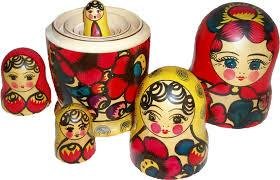
var box = {};

box.innerBox = {};
Nesting
var box =
{"innerBox" : {}}
@AlexDajani
var box = {};

box['innerBox'] = {};
Nesting
var box =
{"innerBox" : {}}
@AlexDajani
var box = {};

box['innerBox'] = {};

box['innerBox']['full'] = true;
Nesting
var box =
{"innerBox" : {
    full: true
  }
}
@AlexDajani
var box = {};

box['innerBox'] = {};

box['innerBox'].full = true;
Nesting
var box =
{"innerBox" : {
    full: true
  }
}
@AlexDajani
var box = {};

box.innerBox = {};

box.innerBox.full = true;


box.innerBox; //??
Nesting
var box =
{"innerBox" : {
    full: true
  }
}
@AlexDajani
var box = {};

box.innerBox = {};

box.innerBox.full = true;


var myInnerBox = box.innerBox;

myInnerBox; //??
Nesting
var box =
{"innerBox" : {
    full: true
  }
}
@AlexDajani
var box = {};

box.innerBox = {};

box.innerBox.babyBox = {};


box.innerBox['babyBox']; //??

box.innerBox['babyBox'].says = "What's up!?";
Nesting
var box =
{"innerBox" : {
    babyBox : {
      says: "What's up!?"
    }
  }
}
@AlexDajani
var box = {};

box['innerBox'] = {};
box['innerBox'].full = true;


box[innerBox]['height'] = 10;


box[innerBox2].full = false;
Nesting
@AlexDajani
Exercise Time
@AlexDajani
What do you use to loop through an array?
What are some different methods of adding values to an array?
What are some special properties about arrays that are different from objects?
What are some ways to access values in your array?
When would you use an array over an object?
Functions
function(){}
Overview
- Anatomy
@AlexDajani
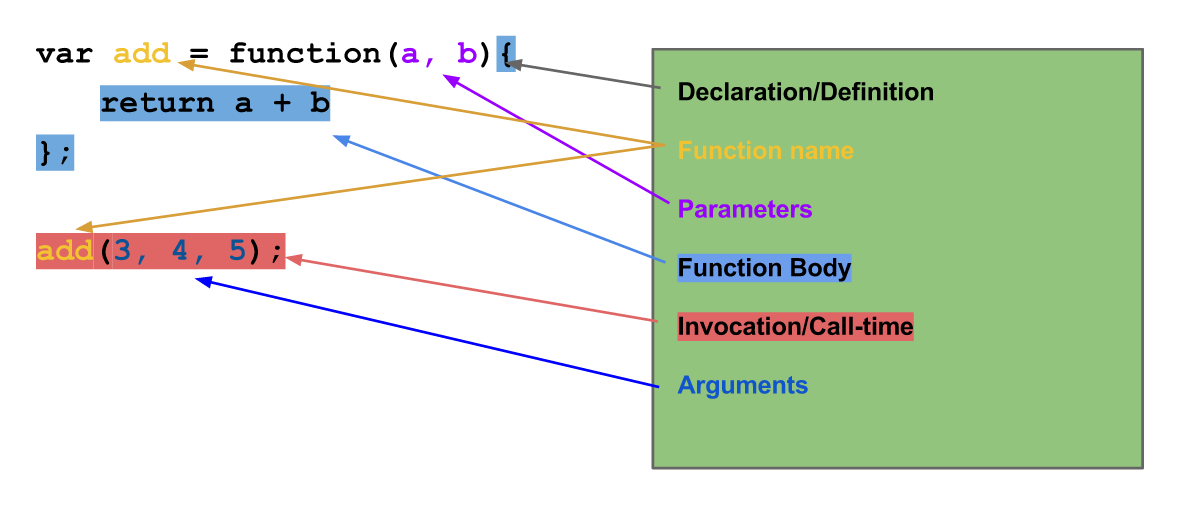
Anatomy
@AlexDajani
Definition
var nameImprover = function (name, adj) {
  return 'Col ' + name + ' Mc' + adj + ' pants';
};

$('body').hide();

myArr.forEach(function(val){ console.log(val);});

$('button').on('click', function(){
  console.log('Don\'t press my buttons!');
});
@AlexDajani
Name
var nameImprover = function (name, adj) {
  return 'Col ' + name + ' Mc' + adj + ' pants';
};

$('body').hide();

myArr.forEach(function(val){ console.log(val);});

$('button').on('click', function(){
  console.log('Don\'t press my buttons!');
});
@AlexDajani
Body
var nameImprover = function (name, adj) {
  return 'Col ' + name + ' Mc' + adj + ' pants';
};

$('body').hide();

myArr.forEach(function(val){ console.log(val);});

$('button').on('click', function(){
  console.log('Don\'t press my buttons!');
});
@AlexDajani
Invocation/Call-time
var nameImprover = function (name, adj) {
  return 'Col ' + name + ' Mc' + adj + ' pants';
};

$('body').hide();

myArr.forEach(function(val){ console.log(val);});

$('button').on('click', function(){
  console.log('Don\'t press my buttons!');
});
@AlexDajani
Arguments/Parameters
var nameImprover = function (name, adj) {
  return 'Col ' + name + ' Mc' + adj + ' pants';
};

$('body').hide();

myArr.forEach(function(val){ console.log(val);});

$('button').on('click', function(){
  console.log('Don\'t press my buttons!');
});
@AlexDajani
return/side effects
var nameImprover = function (name, adj) {
  return 'Col ' + name + ' Mc' + adj + ' pants';
};

$('body').hide();

myArr.forEach(function(val){ console.log(val);});

$('button').on('click', function(){
  console.log('Don\'t press my buttons!');
});
@AlexDajani
Quick Review
var add = function(a, b){
     return a + b;
};
add(3, 4, 5); // ??

add(4, 10, 3); //13?
@AlexDajani
arguments Keyword
var add = function(a, b){
    console.log(arguments); //logs [3,10,5]
 	return a + b;
};
add(3, 10, 5); //13
@AlexDajani
arguments Keyword
var add = function(a, b){
    console.log(arguments); //logs [3,10,5]
 	return a + b;
};
add(3, 10, 5); //18??
@AlexDajani
array-like object
var add = function(a, b){
  arguments.slice(0,1) //ERROR!!
  return a + b;
};
add(3, 10, 5);
@AlexDajani
P.S. Functions are Objects!
var add = function(a, b){
 	return a + b;
};
add.example = 'testing 123!';
@AlexDajani
Exercise time
@AlexDajani
Questions
@AlexDajani
function AnimalMaker(name) {
  return {
    speak: function () {
      console.log("my name is ", name);
    }
  };
};

var animalNames = ['Sheep', 'Liger', 'Big Bird'];
Constructors
@AlexDajani
function AnimalMaker(name) {
  return {
    speak: function () {
      console.log("my name is ", name);
    }
  };
};

var animalNames = ['Sheep', 'Liger', 'Big Bird'];

var farm = [];
Looping
@AlexDajani
function AnimalMaker(name) {
  return {
    speak: function () {
      console.log("my name is ", name);
    }
  };
};

var animalNames = ['Sheep', 'Liger', 'Big Bird'];

var farm = [];

for(var i = 0; i < animalNames.length; i++){
  var animal = AnimalMaker(animalNames[i])
  farm.push(animal);
}
Looping
@AlexDajani
function AnimalMaker(name) {
  return {
    speak: function () {
      console.log("my name is ", name);
    }
  };
};

var animalNames = ['', '', ''];
var farm = [];

for(var i = 0; i < animalNames.length; i++){

  farm.push(AnimalMaker(animalNames[i]));
  //prev 2 lines condensed onto one
}
Looping
@AlexDajani
function AnimalMaker(name) {
  return {
    speak: function () {
      console.log("my name is ", name);
    }
  };
};

var animalNames = ['Sheep', 'Liger', 'Big Bird'];

var farm = [];

for(var i = 0; i < animalNames.length; i++){
  farm.push(AnimalMaker(animalNames[i]));
}

for(var j = 0; j < farm.length; j++){
  farm[j].speak()
}
Looping
@AlexDajani
Exercises
Scope
Overview
- Local
- Global
- Nested Scopes
- Precedence
- Block Scope
@AlexDajani
Local Scope
var func = function(){
  var local = true;
};

console.log(local);
@AlexDajani
var x = 'global!';var x = 'global!';
//inside a function
function encapsulate(){
z = 'global here, too!';
}var x = 'global!';
//inside a function
function encapsulate(){
z = 'global here, too!';
window.y = 'also global!';
}
Global Scope
@AlexDajani
Parent vs Child Scope
var g = 'global';

function blender(fruit) {
  var b = fruit;
  var y = 'yogurt';

  function bs() {
    alert( b + ' and ' + y + ' makes ' + b + ' swirl');
  }
  bs();
}

blender('blueberry');
@AlexDajani
Privacy
var g = 'global';

function blender(fruit) {
  var b = fruit;
  var y = 'yogurt';

  function bs() {
    alert( b + ' and ' + y + ' makes ' + b + ' swirl');
  }
  bs();
}

blender('blueberry');
@AlexDajani
creating scopes
@AlexDajani
Precedence
var g = "global";

function go() {
  var l = "local";
  var g = "in here!";
  alert(g + " inside go");
}

go();
alert(g + " outside go");
@AlexDajani
Block Scope
var inBlock = false;

for(var i = 0; i < 5; i++){
  var inBlock = true;
};

if(inBlock){
  console.log('Is there block scope? ' + !inBlock);
}
@AlexDajani
Exercise Time
@AlexDajani
Questions
@AlexDajani
Part 1
is
complete!
Live Classes Monthly
Check Dates here