Login con Firebase

¿Qué es Firebase?
Una plataforma que proporciona a los developers muchas herramientas con las que trabajar:
- iOS, Android, Web, Unity, C++
- Realtime Database
- Authentication
- Cloud Storage
- ...
Añadir Firebase a un proyecto
En Android Studio
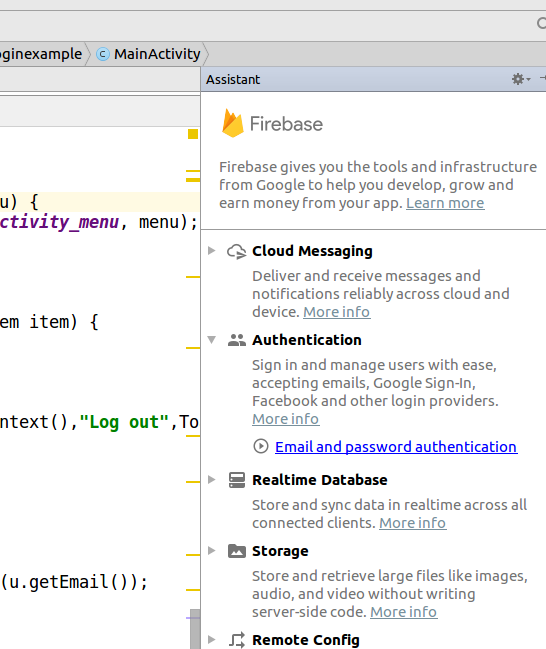
Tools -> Firebase
Iniciamos sesión con nuestros credenciales y creamos el proyecto en Firebase
Seguiremos los pasos y esto nos creará el código para añadir las dependencias de Firebase
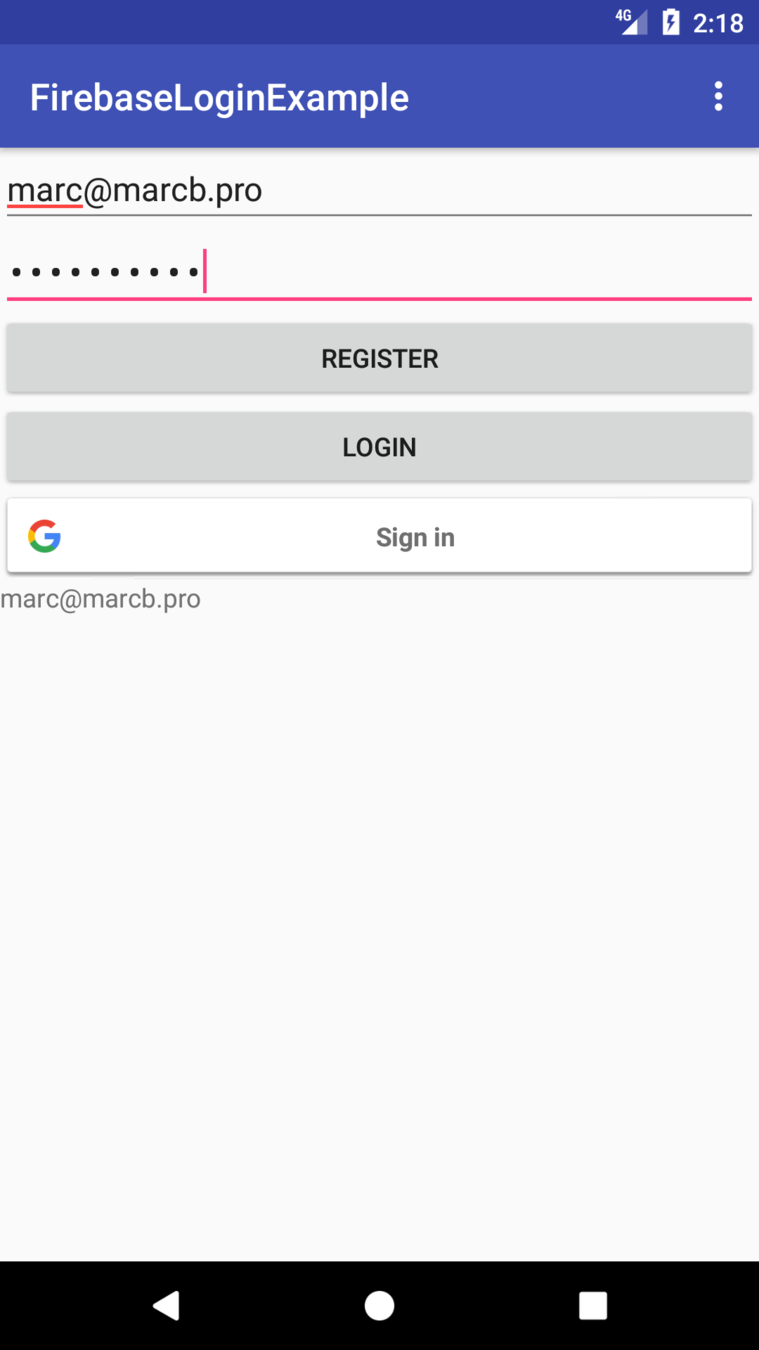
Login con email y password
public class MainActivity extends AppCompatActivity implements View.OnClickListener{

    private final static String TAG = "_MAIN_";

    private FirebaseAuth mAuth;
    private FirebaseAuth.AuthStateListener mAuthListener;

    private EditText usernameEditText;
    private EditText passwordEditText;
    private Button registerButton;
    private Button loginButton;
    private TextView userInfoDisplay;

    @Override
    protected void onCreate(Bundle savedInstanceState) {
        super.onCreate(savedInstanceState);
        setContentView(R.layout.activity_main);

        initFirebaseAuth();

        initUIComponents();
    }

    ...

}
MainActivty.java
private void initUIComponents() {

        usernameEditText =
            (EditText) findViewById(R.id.username);
        passwordEditText =
            (EditText) findViewById(R.id.password);
        registerButton =
            (Button) findViewById(R.id.register);
        loginButton =
            (Button) findViewById(R.id.login);
        userInfoDisplay =
            (TextView) findViewById(R.id.userInfoDisplay);

        registerButton.setOnClickListener(this);
        loginButton.setOnClickListener(this);

    }
private void initFirebaseAuth() {
//Install Firebase
//https://firebase.google.com/docs/android/setup
mAuth = FirebaseAuth.getInstance();
mAuthListener = new FirebaseAuth.AuthStateListener() {
@Override
public void onAuthStateChanged(@NonNull FirebaseAuth firebaseAuth) {
FirebaseUser user = firebaseAuth.getCurrentUser();
if(user != null){
Log.d(TAG, "onAuthStateChanged:signed_in:" + user.getUid());
updateUI();
}
else{
Log.d(TAG, "onAuthStateChanged:signed_out");
userInfoDisplay.setText("No user");
}
}
};
}
Inicialización de Firebase
@Override
protected void onStart() {
    super.onStart();
    mAuth.addAuthStateListener(mAuthListener);
    FirebaseUser u = mAuth.getCurrentUser();
    updateUI();

}

@Override
protected void onStop() {
    super.onStop();
    if (mAuthListener != null){
        mAuth.removeAuthStateListener(mAuthListener);
    }
}
Activity onStart y onStop
@Override
public void onClick(View v) {

    String email = usernameEditText.getText().toString();
    String password = passwordEditText.getText().toString();

    switch (v.getId()){
        case R.id.register:
            registerUser(email, password);
            break;
        case R.id.login:
            loginUser(email,password);
            break;
    }
}
onClick de los botones
private void loginUser(String email, String password){
//https://firebase.google.com/docs/auth/android/start/
mAuth.signInWithEmailAndPassword(email, password)
        .addOnCompleteListener(this, new OnCompleteListener<AuthResult>() {
            @Override
            public void onComplete(@NonNull Task<AuthResult> task) {
                if (task.isSuccessful()) {
                    // Sign in success, update UI with the signed-in user's information
                    Log.d(TAG, "signInWithEmail:success");
                    FirebaseUser user = mAuth.getCurrentUser();
                    updateUI();
                } else {
                    // If sign in fails, display a message to the user.
                    Log.w(TAG, "signInWithEmail:failure", task.getException());
                    Toast.makeText(MainActivity.this, "Authentication failed.",
                            Toast.LENGTH_SHORT).show();
                }

            }
        });
}
Login
private void registerUser(String email, String password){
//https://firebase.google.com/docs/auth/android/start/
mAuth.createUserWithEmailAndPassword(email, password)
    .addOnCompleteListener(this, new OnCompleteListener<AuthResult>() {
        @Override
        public void onComplete(@NonNull Task<AuthResult> task) {
            if (task.isSuccessful()) {
                // Sign in success, update UI with the signed-in user's information
                Log.d(TAG, "createUserWithEmail:success");
                FirebaseUser user = mAuth.getCurrentUser();
                updateUI();
            } else {
                // If sign in fails, display a message to the user.
                Log.w(TAG, "createUserWithEmail:failure", task.getException());
                Toast.makeText(MainActivity.this, "Authentication failed.",
                        Toast.LENGTH_SHORT).show();
            }
        }
    });
}
Registrar
@Override
public boolean onCreateOptionsMenu(Menu menu) {
    getMenuInflater().inflate(R.menu.main_activity_menu, menu);
    return true;
}

@Override
public boolean onOptionsItemSelected(MenuItem item) {
    switch (item.getItemId()){
        case R.id.menu_item_logout:
            mAuth.signOut();
            Toast.makeText(getApplicationContext(),"Log out",Toast.LENGTH_SHORT).show();
            break;
    }
    return true;
}

private void updateUI(){
    FirebaseUser u= mAuth.getCurrentUser();
    if (u != null ) userInfoDisplay.setText(u.getEmail());
}
Otras funciones
Login con Google Account
Añadimos el siguiente código
public class MainActivity
    extends AppCompatActivity
    implements View.OnClickListener{

    ...
    private static final int RC_SIGN_IN = 9001;
    ...

    private GoogleApiClient mGoogleApiClient;
    private SignInButton mSignInButton;
    ...
startActivityForResult
Nuevo elemento en la UI
@Override
protected void onCreate(Bundle savedInstanceState) {
    ...
    initGoogleLogin();
}

private void initUIComponents() {
	...
    mSignInButton =
        (SignInButton) findViewById(R.id.sign_in_button);
	...
    mSignInButton.setOnClickListener(this);

}
InitGoogleLogin
private void initGoogleLogin(){

    //https://developers.google.com/identity/sign-in/android/sign-in

    GoogleSignInOptions gso =
        new GoogleSignInOptions.Builder(GoogleSignInOptions.DEFAULT_SIGN_IN)
            .requestIdToken(getString(R.string.default_web_client_id))
            .requestEmail()
            .build();

    // Build a GoogleApiClient with access to the Google Sign-In API and the
    // options specified by gso.
    mGoogleApiClient = new GoogleApiClient.Builder(this)
            .enableAutoManage(this, new GoogleApiClient.OnConnectionFailedListener() {
                @Override
                public void onConnectionFailed(@NonNull ConnectionResult connectionResult) {
                    Toast.makeText(getApplicationContext(),"Connection failed",Toast.LENGTH_LONG).show();
                }
            })
            .addApi(Auth.GOOGLE_SIGN_IN_API, gso)
            .build();

}
OnClickView y signInGoogle
@Override
public void onClick(View v) {
    ...
    switch (v.getId()){
        ...
        case R.id.sign_in_button:
            signInGoogle();
            break;
    }
}

private void signInGoogle(){
    Intent signInIntent
        = Auth.GoogleSignInApi.getSignInIntent(mGoogleApiClient);
    startActivityForResult(signInIntent, RC_SIGN_IN);
}
onActivityResult
@Override
protected void onActivityResult(int requestCode, int resultCode, Intent data) {
    super.onActivityResult(requestCode, resultCode, data);

    // Result returned from launching the Intent from GoogleSignInApi.getSignInIntent(...);
    if (requestCode == RC_SIGN_IN) {
        GoogleSignInResult result =
            Auth.GoogleSignInApi.getSignInResultFromIntent(data);
        handleSignInResult(result);
    }
}
handleSignInResult
private void handleSignInResult(GoogleSignInResult result) {
    Log.d(TAG, "handleSignInResult:" + result.isSuccess());
    if (result.isSuccess()) {
        // Signed in successfully, show authenticated UI.
        GoogleSignInAccount acct = result.getSignInAccount();
        firebaseAuthWithGoogle(acct);
        updateUI();
    } else {
        // Signed out, show unauthenticated UI.
    }
}
firebaseAuthWithGoogle
private void firebaseAuthWithGoogle(GoogleSignInAccount acct) {
    //https://firebase.google.com/docs/auth/android/google-signin?utm_source=studio
    Log.d(TAG, "firebaseAuthWithGoogle:" + acct.getId());

    AuthCredential credential = GoogleAuthProvider.getCredential(acct.getIdToken(), null);
    mAuth.signInWithCredential(credential)
        .addOnCompleteListener(this, new OnCompleteListener<AuthResult>() {
            @Override
            public void onComplete(@NonNull Task<AuthResult> task) {
                if (task.isSuccessful()) {
                    // Sign in success, update UI with the signed-in user's information
                    Log.d(TAG, "signInWithCredential:success");
                    FirebaseUser user = mAuth.getCurrentUser();
                    updateUI();
                } else {
                    // If sign in fails, display a message to the user.
                    Log.w(TAG, "signInWithCredential:failure", task.getException());
                    Toast.makeText(MainActivity.this, "Authentication failed.",
                            Toast.LENGTH_SHORT).show();
                }
            }
        });
}