G12_C9
Introduction to Flappy Bird Game through OOPs




| Activity No. | Slide no | Topic | Time |
|---|---|---|---|
| TA | 4-11 | Last class revision + quiz | 8 min |
| 12-15 | Game features to be added | 2 mins | |
| 16-17 | TA1 | 4 mins | |
| 18-19 | TA2 | 4 mins | |
| 20-21 | TA3 | 4 mins | |
| 22 | TA4 | 4 mins | |
| SA | 23-24 | Student Activity | 4 mins |
| 25 | Student Activity Solution | 2 mins | |
| Wrap-up | 26-29 | Wrap Up Quiz | 3 mins |
| SAA | 30-31 | Student Additional Activity 1 | 2 mins |
| 32-33 | Student Additional Activity 2 | 2 mins |
CLASS STRUCTURE
| Slide no | Topic |
|---|---|
| 22 | Teacher Activity Solution |
| 25 | Student Activity Solution |
| 31 | Student Additional Activity Solution 1 |
| 33 | Student Additional Activity Solution 2 |
FOR PREPERATION & REFERENCE
Prerequisites
FOR STUDENTS
-
Computer with Internet connection.
-
Spyder IDE installed.
-
"pygame" package installed.
FOR TEACHER
-
Computer with Internet connection.
-
Latest browser installed.
-
"pygame" package installed.
-
Spyder IDE installed.


Which of the following options is associated with objects?
A
State
Behaviour
Output
Q.1
B
C
D
State and Behaviour
We learned in "Bullet Firing" class that when an object changes its position, its "State and Behavior" changes. So the correct answer is D.

Which function is used to set the equal frequency of the frames?
A
C
B
frame()
time()
tick()
Q.2
C
tick()
The "tick()" function is used to set the frame/ second in the game. You can use this like "clock.tick(30)", where a clock is an object created by "time.Clock()".

D
clock()


Today, we are going to learn:

1. Concept of Object-Oriented Programming.
2. Dictionary in python.
3. Game creation by applying OOP's.

Concepts in Object Oriented Programming
Constructor
Encapsulation
Objects
Classes
In a car manufacturing company, an engineer creates the blueprint of a car
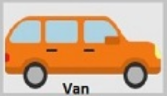
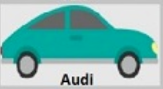

OBJECTS
CLASS

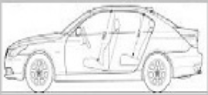
Encapsulation
- It is the process of binding properties with methods.
- Here, in this example, we bound the property "Stop" with "Break()", "Speed" with "accelerator()", and "Fuel consumption" with "Engine".
Stop
Break()
Speed
accelerator()
Properties
Method
Fuel consumption
Engine()
Syntax for classes in Python
class <ClassName>:

  variableName1,variableName2

   def fun1(self):
      ______________
      ______________
      ______________

   def fun2(self):
      _____________
      _____________
      _____________
class Car:

    engineCapacity=10
    maxSpeed=200

    def enginepower(self):
        print('Engine Capacity is ',self.engineCapacity)

    def accelerator(self):
         print("Maximum speed of Car",self.maxSpeed)

mycar=Car()

mycar.enginepower()

mycar.accelerator()
Teacher Activity 1: Create a Class and its object
Output

Importance of "self" keyword in object-oriented programming
class car:

    def car_color(self,color):

        self.color=color

    def car_cost(self,cost):

        self.cost=cost

    def car_speed(self,speed):

        self.speed=speed
Sports Car:
- Green color
- $Y
- 500 Kph
Van Car:
- White color
- $X
- 100 Kph
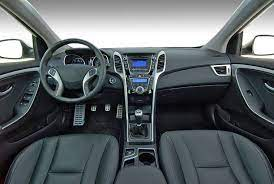
Role of a "constructor" in a python class

Default interior
customized interior
- In Python and any other object-oriented programming language, the role of a constructor is to assign values to instances of variables that the object will need whenever it starts.
Syntax of a Constructor in python
class <name_of_the_class>:

    <variable_name_1>=_____________
    <variable_name_2>=_____________

    def __init__(self,<variable_name_1>,<variable_name_2>):
        self.<variable_name_1>=<variable_name_1>
        self.<variable_name_2>=<variable_name_2>

    def <function_1>(self):
       _____________________

    def <function_2>(self):
       _____________________
Teacher Activity 2: Constructor in python
class Car:

    engineCapacity=10
    maxSpeed=200

    def __init__(self,capacity,speed):
        self.engineCapacity=capacity
        self.maxSpeed=speed

    def enginepower(self):
        print('Engine Capacity is ',self.engineCapacity)

    def accelerator(self):
         print("Maximum speed of Car",self.maxSpeed)

mycar=Car(30,150)

mycar.enginepower()

mycar.accelerator()
Output

Teacher Activity 3 template: https://bit.ly/36OzJNZ
Creating the game screen

- Import pygame
- Initialize pygame
- Create the screen
- Set screen caption
- Create the game loop
- Finish the game
init()import display.set_mode()display.set_caption()while True:pygame.quit()
Steps to be followed:

Let's begin by creating the basic game screen.
Solution link for Teacher Activity 3: https://bit.ly/36PjmRf

Output for Teacher Activity 3

GREAT!

John is trying to understand meaning of the phrase, "stroke of genius". Suggest him from where he can get the correct meaning of this phrase.
Syntax for Dictionary in Python
<name_of_dictionary> = {'<key1>': '<value1>', '<key2>': <value2>}

print(<name_of_dictionary>['<value1>'])

print(<name_of_dictionary>.get('<value2>'))- Built-in data type in Python.
- It is an ordered collection of data-values
- Dictionary holds "key:value" pairs
images={}
images["bg1"] = pygame.image.load("D:/Flappy for AI/bg1.png").convert_alpha()
images["base"] = pygame.image.load("D:/Flappy for AI/base.png").convert_alpha()
Teacher Activity 4 template: https://bit.ly/3BzHllM
Teacher Activity-4: Adding background to the game window using a dictionary
Teacher Activity 4 solution: https://bit.ly/3xTR8kp
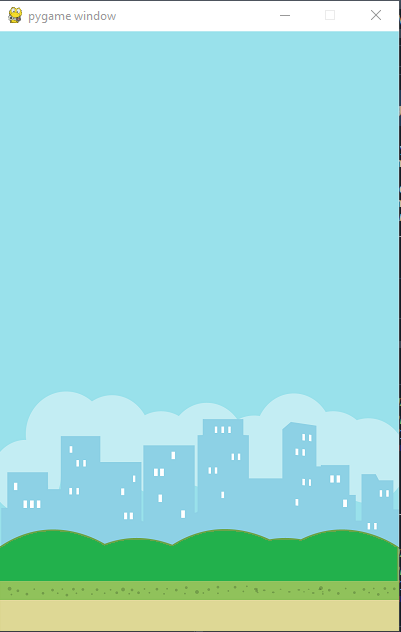
Output Teacher Activity-4

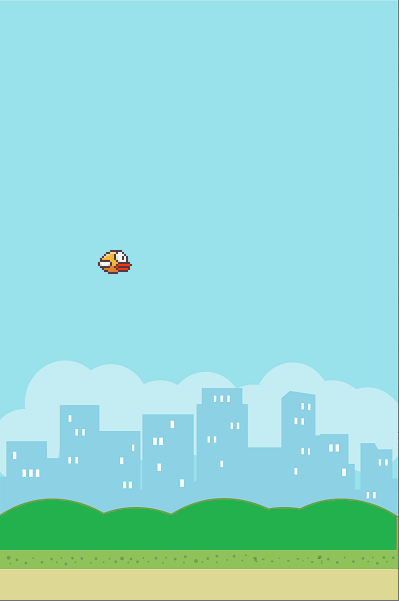
Student Activity-1: Adding an image of flappy bird to the game window using a dictionary
Hints:
- Create an entry into the dictionary for flapy bird's image
- use screen.blit() function, to position the flappy bird image at (100,250)
Template link: https://bit.ly/2V1i9na
Which of the following is valid symbol for dictionary in python?
Q.1
A
B
[]
A
The correct answer is option A
C
D
my_dictionary = {'name': 'Martin', 'age': 16}my_dictionary = ['name': 'Martin', 'age': 16]my_dictionary = "'name': 'Martin', 'age': 16"my_dictionary = ('name': 'Martin', 'age': 16)What would be the output of the following code:
Q.2
A
C
B
10
10 20
"John":10
D
Error in code.
A
10
dictionary_name={"John": 10, "maria":20}
print(dictionary_name["John"])
The correct answer is A.
The print() statement is used to print the value which is stored in the key named "John"

B

ADDITIONAL ACTIVITY - 1
This is Additional Activity 1
This is Student Activity
To get the following output, fill in the blanks in the template link provided.
Template Link : https://bit.ly/3kGQX8i
B
ADDITIONAL ACTIVITY - 2
Hello, my name is JohnTemplate Link : https://bit.ly/3rn63kF
To get the following output, fill in the blanks in the template link provided.


Links Table
| ACTIVITY NUMBER | ACTIVITY NAME | LINKS |
|---|---|---|
| Teacher Activity 1 | Game features to be added | |
| Teacher Activity Solution | All Teacher Activity Solution | |
| Student Activity | Print "Game Over" | |
| Student Activity Solution | Print "Game Over" | |
| AA1 | pow function | |
| AA1 Solution | pow function solution | |
| AA 2 | Print Score | |
| AA2 Solution | Print Score solution |