Rules Engine
Agenda
- The Rules Structure
- Precedence and why it matters
- Deployment: How to implement and what to expect
- Where are rules executed
- The Commercials
- Limitations
The structure or a rule
IF
Action/Feature
And IF
Action/Feature
Else IF
Action/Feature
Example:
IF: AS number is
Action: Deny (403)
Precedence
Why use it?
- Allows the ordering of rules!
- Why should a rule be ordered?
Deployment
Rules are input into the portal. A human review process is required to enable a rule. Once reviewed the rule is committed.
Committed rules take one hour to propagate. A notification can be enabled in the portal. Notification on rule approval or denial arrive via SMTP (Email).


When working on behalf of a customer I input my EdgeCast email using the + alias feature. If working for Sony, I may use crasor+RE-SONY@edgecast.com.
Notification is useful as not all rules are approved. Configuring notifications can save time by keeping you up to date on the approval or denial of your submissions.
Applying rules
A typical ADN rule
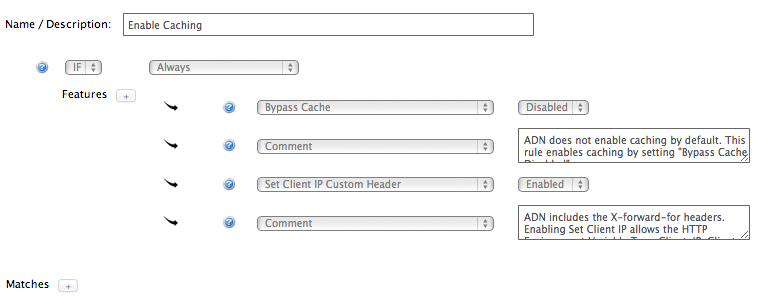
Applying Rules
Redirect everything to HTTPS if request is made over HTTP
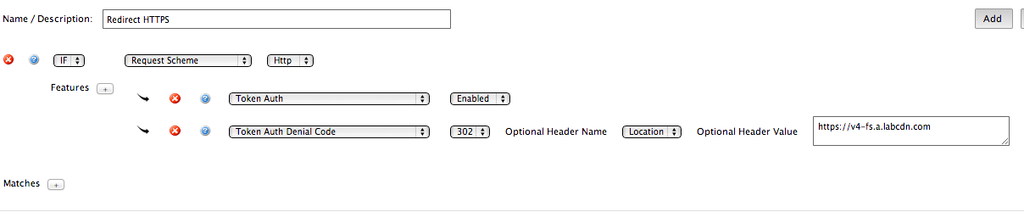
Where are rules applied
What do applied rules effect
Rules are applied on the Edge.
Rules can take actions on inbound requests:
Identify AS number, Identify CNAME, Identify request type
Rules can apply to internal behavior:
Force Internal Max-Age, Bypass cache
Rules can apply to external behavior:
Cache-Control headers to the client, Modify client response header
Rules can take actions on content:
Applying cache-control headers
Applying special behavior for origins
Applying special behavior for CNAMES
The commercials
How do we sell Rules Engine
Rules are sold in packs of Ten.
-
Some customers have a set amount of free rules that can be implemented by the NOC or Account Management.
If a customer uses more then Ten rules. The customer may incur charges for a new Ten pack of rules.
Nested rule sets do not apply to the rule counts.
Limitations
Rules engine does not allow for complex regular expressions. If a rule requires RegEx, Professional Services time may apply.
Backend configurations. IE: Folder rewrites can be applied by Tier 2.
LUA. Edge Based logic does not fall under Rules engine control.
Complex regular Expression
Example client request:
A customer may want to search the URL for strings that should be translated to the origin request.
/cfg/foo=bar1&bar2=foo1&Name=EdgeCast-ClientID
IF the customer wanted a Regular Expression to match and strip so that the request to the origin only contained cfg/EdgeCast-ClientID
Backend Configurations
Customer may request that specific directories look to different origins or locations.
LUA
Example:
LUA setting a country code in the request header to origin:
Allowing the EC edge to follow origin redirects