CMSC389L
Week 2
AWS + S3
February 2, 2018
Recap
- Review Syllabus (what are these worksheets???)
- Piazza
- Codelab 1, due yesterday 11:59PM
- Codelab 2, to be released by Saturday
- For hackathons, interviews, and university-approved excuses, provide documentation and turn in the following week
- Office Hours
AWS Concepts

AWS Concepts
-
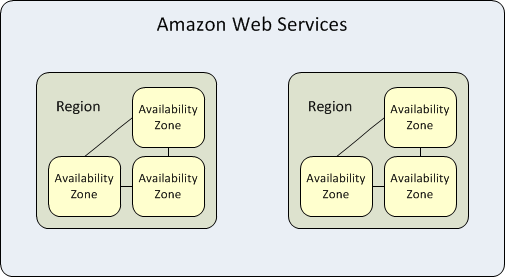
Availability Zones (AZs) are individual isolated locations
- Each AZ consists of multiple interconnected datacenters
-
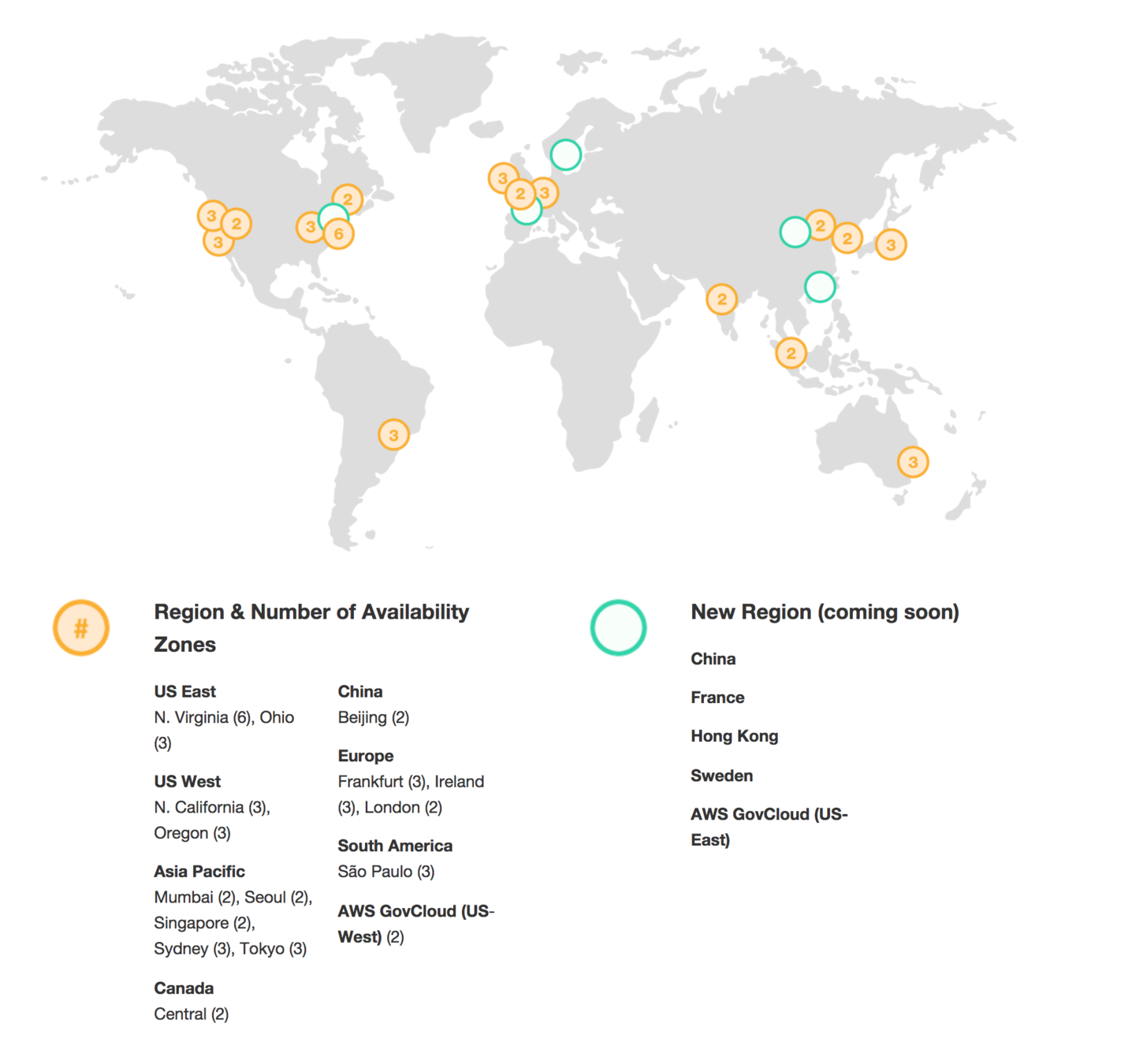
Regions are geographically-distributed groups of 2+ AZs
- us-east-1 is Northern Virginia
S3

S3
- Simple Storage Service (S3): Key-value store for object storage at scale
- Object Storage: Any sequence of bytes (photos, videos, source code, ...)
-
Durability: 99.999999999%
- Replicated across data centers and AZs
- Features: ACLs, Metadata, Versioning, Encryption, ...
When to use S3?
-
S3: Think "file storage"
- Support for large files, up to 5TB
- Integration with CloudFront CDN
- Support for archiving data (to Glacier)
- examples: website static content (HTML/CSS/etc.), log files
-
Databases: Think "queryable data"
- DBMS guarantees
- Faster read/writes
- Index support
- Limits on value size (f.e., 400Kb for DynamoDB)
- examples: user profile data, credentials
S3: Case Study
- Mapbox:
- Used by Airbnb, Strava, Washington Post, etc.
- 100M miles of telemetry data / day
- 250M users, 11 countries, 10 regions
- Petabytes of map and imagery data
- Rendered at 60FPS
- Globally distributed with CloudFront

S3 Concepts
-
Object: Fundamental entity in S3
- Consists of object data + metadata
-
Metadata: name-value pairs that describe the object
- date last modified, content-type, etc.
-
Bucket: Container for objects stored in S3
- Bucket name must be globally unique
- Can store unlimited objects
-
Key: Unique identifier within a bucket
- 1-1 relationship between buckets and keys
S3 Operations
Common Operations:
- Create Bucket: Creates a bucket in a specified region
- Write Object: Stores data at a given key, either by creating or overwriting
- Read Object: Returns an object, given a key
- Delete Object: Deletes an object, given a key
- List Keys: Lists all keys under a given prefix
S3 Guarantees
-
Atomic: Reads to a previously updated object will return either the updated object or the previous object. Never partial or corrupted data.
-
Eventual Consistency: Update and delete operations are not available until fully replicated.
- For new keys, reads have read-after-write consistency
-
Eventual Consistency: Update and delete operations are not available until fully replicated.
- No Locks: Clients are responsible for implementing locks to prevent simultaneous updates
S3 Storage Types
- Frequently Accessed
-
Standard (default)
- 99.999999999% durability, 99.99% availability
- Most expensive storage class
-
Reduced Redundancy Storage (S3-RRS)
- Reduced durability (99.99%)
-
Standard (default)
- Infrequently Accessed
-
Infrequently Accessed (S3-IA)
- Reduced availability (99.9%) + retrieval fee
-
Glacier
- No real-time access, access is on the scale of minutes to hours
-
Infrequently Accessed (S3-IA)
S3 Features
- Versioning: If enabled, S3 stores all versions of a file
- Bucket Policies: Use policies to specify which services can access a bucket or key prefix
- Cross-Region Replication: Easily enable automatic data replication to other regions
- Lifecycle Management: Configurable rules based on object age. Supports transitioning and expiration
- Built-in Monitoring: via CloudWatch (GetRequests, BucketSizeBytes, 4xxErrors, FirstByteLatency, etc.)
S3 Costs
- Storage
- Standard: $0.023 / GB-month
- IA: $0.0125 / GB-month
- Glacier: $0.004 / GB-month
- Data Transfer
- Into S3: Free
- Out of S3 to:
- us-east-1: $0.010 / GB-month
- Internet: $0.090 / GB-month
-
Request Fee:
- Writes: $0.05 / 10k requests
- Reads: $0.004 / 10k requests
Worksheet: S3
Complete today's worksheet on S3.
Closing Notes
- Codelab 2 parts 1 and 2 -- due Thursday, February 15th
- Start early so you can get help if you need it
- You have everything you need to complete part 1 (S3) now
- Join Piazza
- Turn in your worksheets