Lodash

Goals
Primary goals
- Get familiar with
- the documentation
- the ways to use lodash
- its main operators
- Discover the possibilities
- Avoid reinventing the wheel
- Understand the advantage of
- picking operators on demand
- iteratee first operators
- chains
Secondary goals
Doc
- all the operators
- examples
- lodash library loaded globally -> you can do some tests directly in the console
- details about the iteratee first versions, but the main doc is already sufficient
Facts
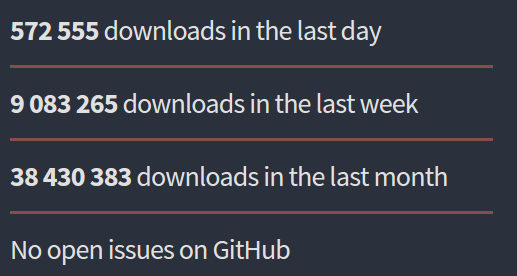
Github

npms
npm
Native map x 9,512 ops/sec ±1.19% (90 runs sampled)
Lodash map x 69,592 ops/sec ±0.90% (90 runs sampled)
Lodash fp map x 293,734 ops/sec ±1.26% (87 runs sampled)
{
const iteratee = n => n*2;
const nativeMap = data => data.map(iteratee);
const lodashMap = data => _.map(data, iteratee);
const lodashFpMap = fp.map(iteratee);
suite
.add('Native map', () => nativeMap)
.add('Lodash map', () => lodashMap(data))
.add('Lodash fp map', () => lodashFpMap(data));
}Benchmark
The code
The results (node v7.5.0 on my machine)
And the basic loops ?
For loop map x 250,870 ops/sec ±0.98% (91 runs sampled)
While map x 373,204 ops/sec ±1.11% (89 runs sampled)
How to install
Install
npm i -SE lodashThe whole library
npm i -SE lodash.mapOnly the map function
How to require
data first operators
const map = require('lodash').map;const map = require('lodash/map');const _ = require('lodash');const map = require('lodash.map');iteratee first OPERATORS
const fMap = require('lodash/fp').map;const fMap = require('lodash/fp/map');const fp = require('lodash/fp');How to use it
Data-first
const _ = require('lodash');

const iteratee = n => n * 2;
const input = [1, 2, 3];

const output = _.map(input, iteratee);

output.should.deep.equal([2, 4, 6]);
_.map(input, iteratee);The code sample
What you should look at
Iteratee-first & curried
const fp = require('lodash/fp');

const iteratee = n => n * 2;
const input = [1, 2, 3];

const multiplyBy2 = fp.map(iteratee);

const output = multiplyBy2(input);

output.should.deep.equal([2, 4, 6]);
const myMap = fp.map(iteratee);
myMap(input);The code sample
What you should look at
Via a wrapper
const _ = require('lodash');
const iteratee = n => n * 2;
const input = [1, 2, 3];
const lazyOutput = _.chain(input)
.map(iteratee);
lazyOutput.value() // iterator only executed here !!
.should.deep.equal([2, 4, 6]);_.chain(input)
.map(iteratee)
.value();The code sample
What you should look at
_.map(input, iteratee);- you call "map" each time
- "iteratee" is executed instantly
const myMap = fp.map(iteratee);
myMap(input);- you call "map" once
- "iteratee" is called when calling the bound mapper
_.chain()
    .map(iteratee)
    [otherOperator](otherIteratee)
    .plant(input)
.value();- you call "map" each time
- "iteratee" is executed when calling "value"
_.chain(input)
    .map(iteratee)
    [otherOperator](otherIteratee)
    .value();
equivalent to
Operator naming logic
Operator naming Logic
*By operators
Based on some value extraction -> iteratee provides a property getter or name to pick.
*With operators
Based on some value comparison -> iteratee provides a way to compare elements.
OPERATOR NAMING LOGIC
*In operators
Process only enumerable properties.
*Own operators
Process only enumerable properties owned by the provided object.
OPERATOR NAMING LOGIC
*Deep operators
Process the input recursively till leaves.
*Depth operators
Process the input recursively till a leaf is met or the provided depth is reached.
OPERATOR NAMING LOGIC
*Index operators
Get only the index in an Array where the condition is met.
*Key operators
Get only the key in an Object where the condition is met.
*Last operators
Search for the last occurrence where the condition is met. Basically by traversing in the reverse order.
OPERATOR NAMING LOGIC
*Right operators
Invert the logic in term of order.
Logs
Warning about lazy evaluation with nodejs
- logging a chain will call its `valueOf` method which is an alias for `value`, thus executing the chain !
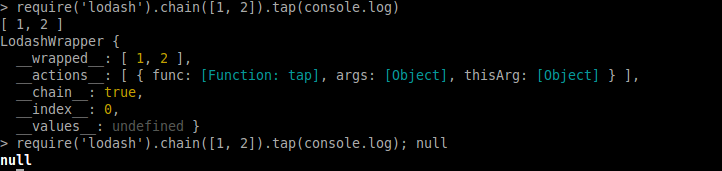
Log the chain itself
To log a chain's wrapped value at a given position,
- use the operator "tap"
Log a chain's intermediate wrapped values
Additional considerations
Not reinventing the wheel leads to
- less bugs
- less code (so less tests)
- faster execution
- faster implementation
Stop reinventing the wheel
In FP world,
- wrap = "extend"
- unwrap = "extract"
- wrapped structure = "comonad"
Have a look at fantasy-land project for further details.

Related algebraic structures
Warning about _() vs _.chain()
- `_()` = implicit chain
- `_.chain()` = explicit chain
Some methods of an implicit chain will return the value thus executing the chain !
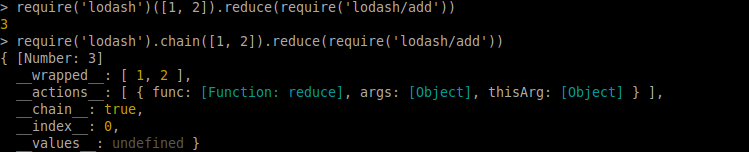
It's recommended to avoid implicit chaining !
Implicit v.s. explicit chaining
Difference between
- creating a new function body which wraps another one
- calling a higher order function like lodash's ones to create this new function
Both create a new function, but
- the one created with lodash does not need to compile a new function body, since the higher order function's body is compiled once and for all
Reuse of compiled code
Iteratee arguments
- data-first operators -> iteratee called with (value, key, index, array)
- iteratee-first operators -> iteratee called with (value) only
Unary iteratee with iteratee-first operators
You may think Promise chains and lodash chains look the same.
It's partially true because both
- wrap some value
- compose registered functions
- execute registered functions when subscribing to the result
Comparison with promises
But it differs because
- each `then` call is actually both a composition and a subscription to the result
- Promises accept the registered function to return either a value or a Promise, while lodash chains does not unwrap subchains
Data operators
The following samples illustrate the use of lodash operators to write more expressive code when working with data, basically collections (Array, Object).
Sample 1
const f = input => {
    const output = [];

    input.forEach(n => {
        output.push(n * 2);
    });

    return output;
};
What does this code ?
const f = fp.map(n => n * 2);const f = input => {
const output = [];
input.forEach(n => {
output.push(n * 2);
});
return output;
};const f = input => input.map(n => n * 2);Let's improve this
Sample 2
const m = input => {
    const output = {};

    for (let prop in input) {
        if (input.hasOwnProperty(prop)) {
            ouput[prop] = input[prop] * 2;
        }
    }

    return output;
};
What does this code ?
const m = input => {
    const output = {};

    for (let prop in input) {
        if (input.hasOwnProperty(prop)) {
            ouput[prop] = input[prop] * 2;
        }
    }

    return output;
};
const m = input => _.mapValues(input, n => n * 2);const m = fp.mapValues(n => n * 2);Sample 3
const g = input => {
    const output = [];

    input.forEach(item => {
        output = output.concat(item.values);
    });

    return output;
};
What does this code ?
const g = input => input
    .reduce((mem, item) => {
        mem = mem.concat(item.values);
        return mem;
    }, []);
const g = input => {
const output = [];
input.forEach(item => {
output = output.concat(item.values);
});
return output;
};const g = fp.flatMap('values');const g = input => _.flatMap(input, 'values');Let's improve this
Sample 4
const g = ([in1, in2, in3]) => {
    return {
        a: in1,
        b: in2,
        c: in3
    };
};
What does this code ?
const z = ([in1, in2, in3]) => {
    return {
        a: in1,
        b: in2,
        c: in3
    };
};
Let's improve this
const z = keys => (input) => {
    const output = {};

    keys.forEach((key, index) => {
        output[key] = input[index];
    };

    return output;
})(['a', 'b', 'c']);
const z = input => _.zipObject(['a', 'b', 'c'], input);const z = fp.zipObject(['a', 'b', 'c']);Sample 5
const h = (in1, in2) => {
    const out = [];

    in1.forEach(item1 => {
        let match;
        in2.forEach(item2 => {
            if (item1.id === item2.id) {
                match = item1;
            }
        });
        if (match) {
            out.push(match);
        }
    });

    return out;
};
What does this code ?
const h = (in1, in2) => {
    const out = [];

    in1.forEach(item1 => {
        let match;
        in2.forEach(item2 => {
            if (item1.id === item2.id) {
                match = item1;
            }
        });
        if (match) {
            out.push(match);
        }
    });

    return out;
};
const h = (in1, in2) => {
const out = [];
in1.forEach(item1 => {
if (in2.find(item2 => item1.id === item2.id)) {
out.push(item1);
}
});
return out;
};First, let's fix the loop waste
const h = (in1, in2) => {
    const out = [];

    in1.forEach(item1 => {
        if (in2.find(item2 => item1.id === item2.id)) {
            out.push(item1);
        }
    });

    return out;
};const h = (in1, in2) => in1.reduce((mem, item1) => {
if (in2.find(item2 => item1.id === item2.id) {
mem.push(item1);
}
return mem;
}, []);const h = (in1, in2) => _.intersectionBy(in1, in2,
(item1, item2) => item1.id === item2.id
);const h = fp.intersectionBy('id');const h = (in1, in2) => _.intersectionBy(in1, in2, 'id');Let's improve this
Sample 6
const m = input => {
    const output = {};

    input.forEach(item => {
        if (output[item.weekday]) {
            output[item.weekday].push(item);
        } else {
            output[item.weekday] = [item);
        }
    });

    return output;
};
What does this code ?
const m = input => {
    const output = {};

    input.forEach(item => {
        if (output[item.weekday]) {
            output[item.weekday].push(item);
        } else {
            output[item.weekday] = [item);
        }
    });

    return output;
};
const m = input => _.groupBy(input, 'weekday');const m = fp.groupBy('weekday');Let's improve this
Sample 7
const d = input => {
    const output = {};

    ouput.a = input.a || {};
    ouput.a.b = input.a ? input.a.b : 1;
    ouput.a.c = input.a ? input.a.c : 2;

    return output;
};
What does this code ?
const d = input => {
    const output = {};

    ouput.a = input.a || {};
    ouput.a.b = input.a ? input.a.b : 1;
    ouput.a.c = input.a ? input.a.c : 2;

    return output;
};
const d = input => _.defaultsDeep(input, { a: { b: 1, c: 2 } });const d = fp.defaultsDeep({ a: { b: 1, c: 2 } });Let's improve this
Also see ...
Other operators you'll like
countBy, groupBy, orderBy, sortBy, keyBy
chunk, flatten, compact, concat, difference, intersection, union, uniq
zip, unzip, zipObject
defaults, extend
find, get, has, set
invert, mapValues, merge, omit, pick, transform, values
clone
See the documentation.
Function operators
The following samples illustrate the use of lodash operators to write more expressive code when working with functions.
Sample 1
const sumArgs = (...args) => args.reduce(_.add);

sumArgs(1, 2, 3); // 6
You have this function
const sumNumbers = numbers => sumArgs(...numbers);

sumNumbers([1, 2, 3]); // 6
const sumNumbers = _.spread(sumArgs);
sumNumbers([1, 2, 3]); // 6You may spread args yourself
Or transform the function with _.spread
const sumArgs = _.rest(sumArgs);

sumArgs(1, 2, 3); // 6
Conversely, _.rest does the opposite
Sample 2
const compareNormalizedThings = (thingA, thingB) => /* ... */;You have this function
const compareAppleAndOrange = (apple, orange) => compareNormalizedThings(
    normalizeApple(apple),
    normalizeOrange(orange)
);
const compareAppleAndOrange = _.overArgs(
compareNormalizedThings,
[normalizeApple, normalizeOrange]
);You may normalize args yourself
Or transform the function with _.overArgs
Sample 3
To prevent new function creation, you can memoize it
_.memoize(getValuesByWeekday);const getValuesByWeekday = weekday => _.flow(
fp.filter({ weekday }),
fp.flatMap('values')
);const getValuesByWeekday = weekday => input => {
const filtered = input.filter(item => item.weekday === weekday);
return _.flatMap(filtered, 'values');
};You have this function
You can explicitly say it's a function composition
Sample 4
Or you could ask for help to lodash
_.curry(f);const curriedF = weekday => f(weekday, input);const f = (weekday, input) => { /* ... */ }You have this function, you can't change its signature
You could do it yourself
You want to have the same signature as before
const f = weekday => input => { /* ... */ }Sample 5
const t = function(...args) {
    clearTimeout(t.timeoutIndex);
    timeoutIndex = setTimeout(() => {
        /* do something here with `this` and `args` */
    }, 200);
};
What does this code ?
Lodash has an operator for that
const t = _.debounce(function(...args) {
    /* do something here with `this` and `args` */
}, 200);
ALSO SEE ...
Other operators you'll like
ary, unary
bind, curry, partial, flip, overArgs
once, after, before
memoize
throttle, debounce, defer,
flow
See the documentation.
string operators
The following samples could illustrate the use of lodash functions to write more expressive code when working with strings.
Have a look at the possibilities starting from the doc for string operators.