Node RED

Balthasar Hofer
Vorweg: Account auf https://render.com erstellen
Anwendungsbereiche
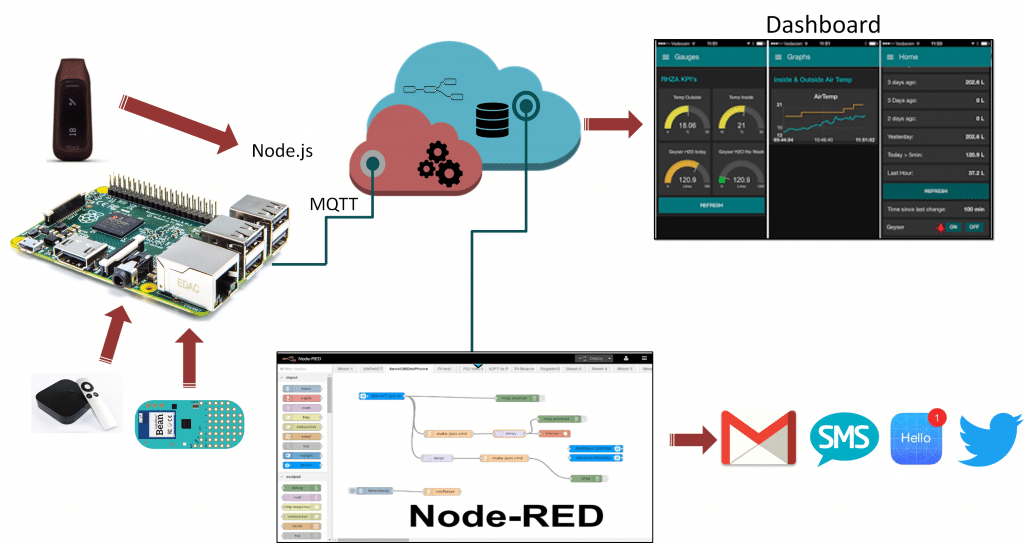
API Abfragen


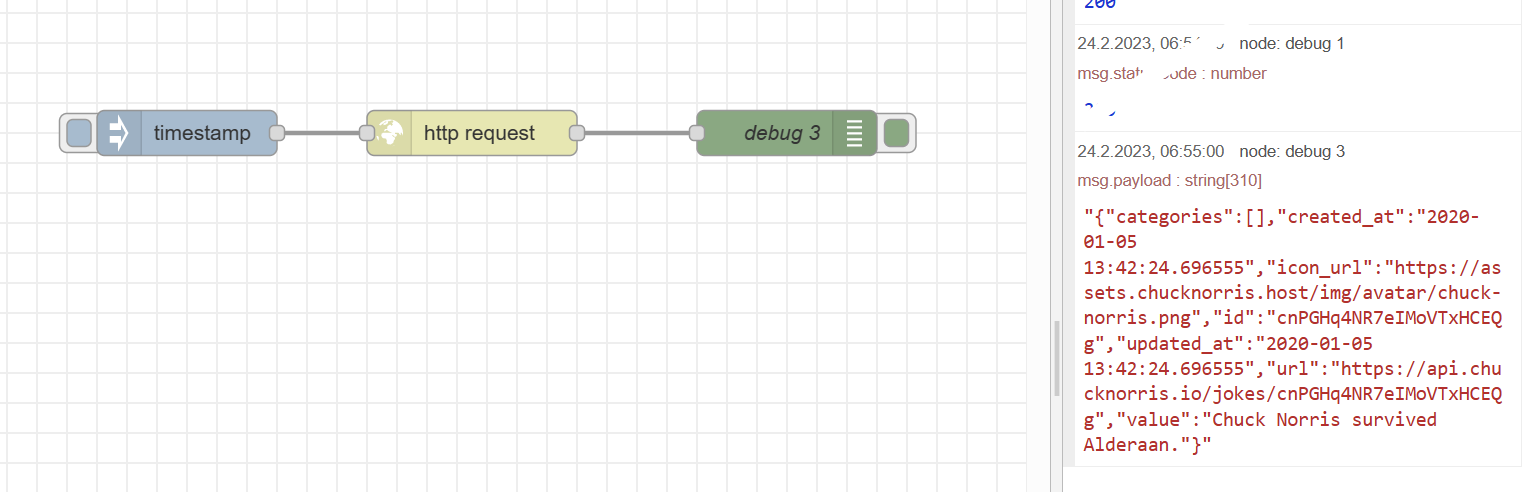
- Erstellen Sie einen neuen Flow
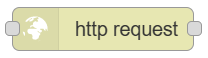
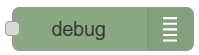
- Fügen Sie 3 Knoten hinzu:
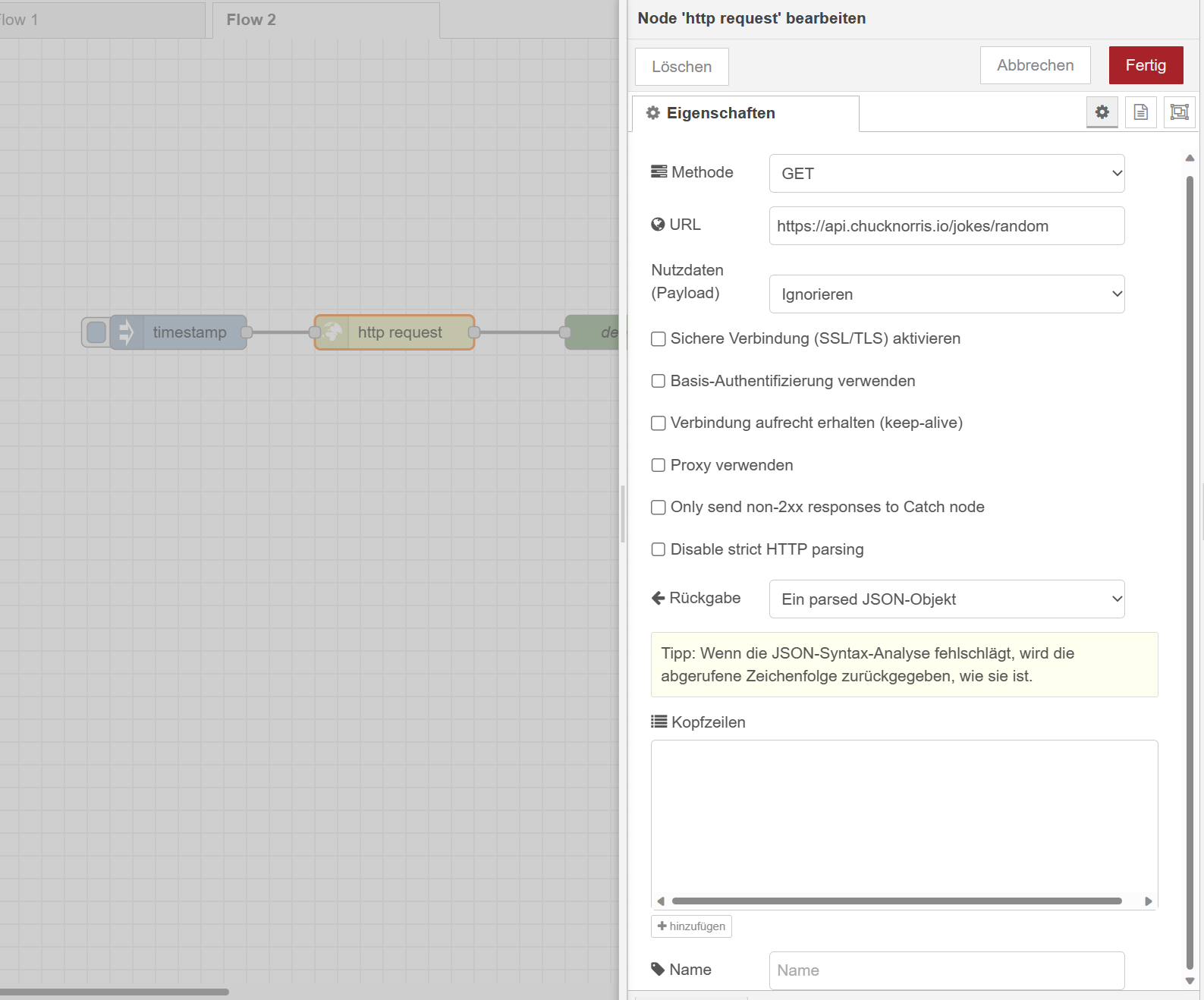
- Doppelklicken des HTTP Requests
- als URL die ChuckNorris API eintragen
- Deploy...

API Abfragen
Im Debug-Fenster sehen Sie roten Text angezeigt
👉 Antwort ist im Format JSON (JavaScriptObjectNotation)
👉 Wir können die Antwort als JSON einlesen, dann können wir die einzelnen Felder abgreifen
API Abfragen
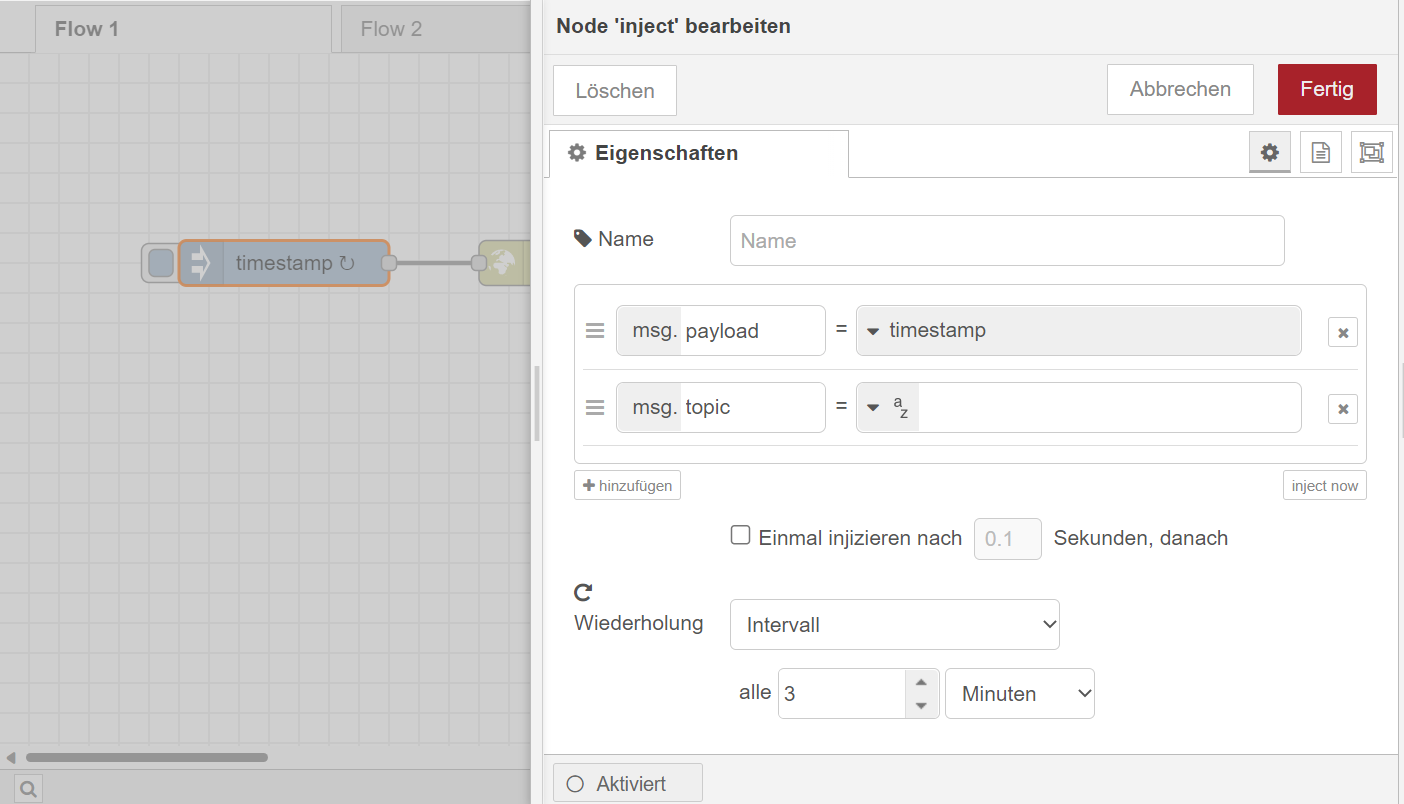
Basics
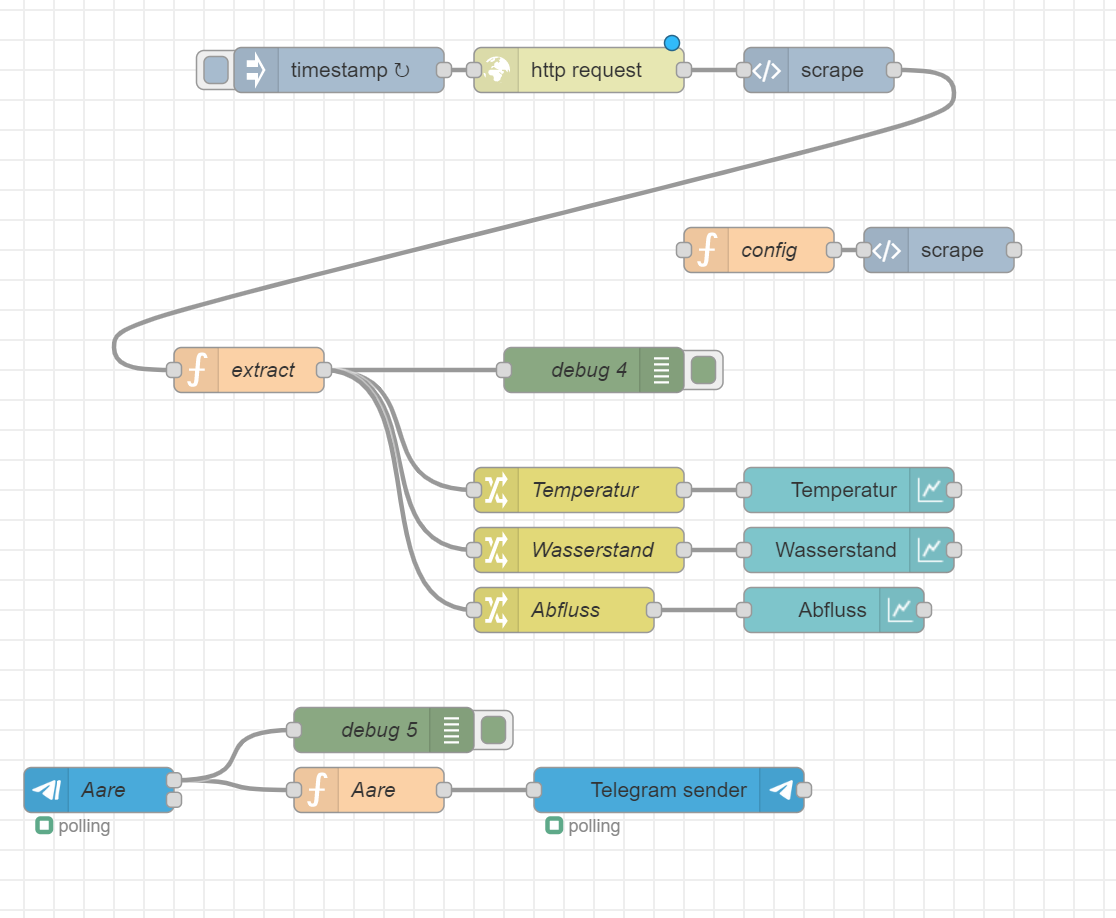
Ein Flow mit mehreren Nodes
{
    /* Zwischen Nodes werden Nachrichten
    *  weitergegeben.  */
	payload: 'Hallo Welt'
}
Eigenschaften Bearbeiten
Ausgabe: Debug Node
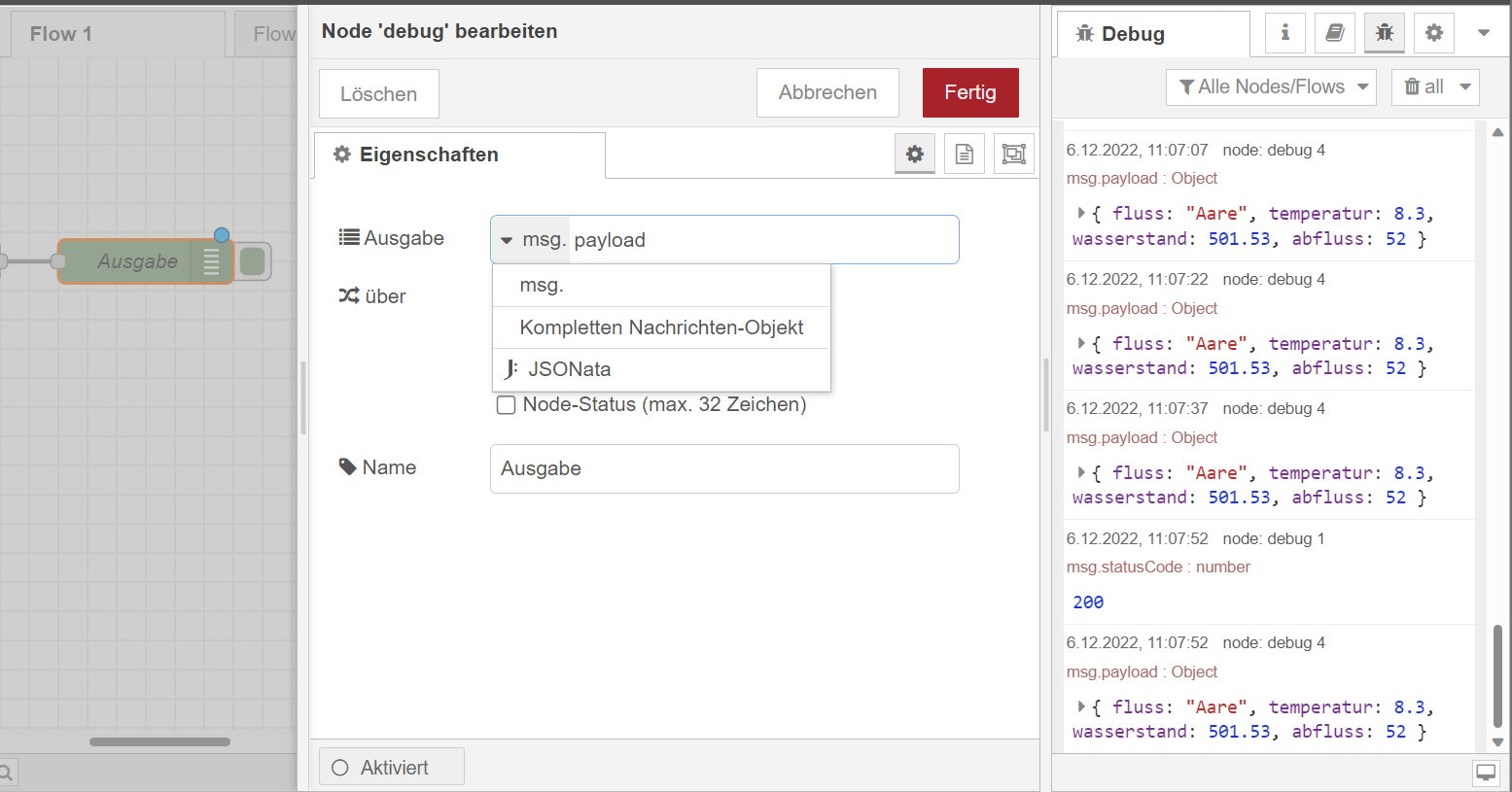
Nachrichten Bearbeiten
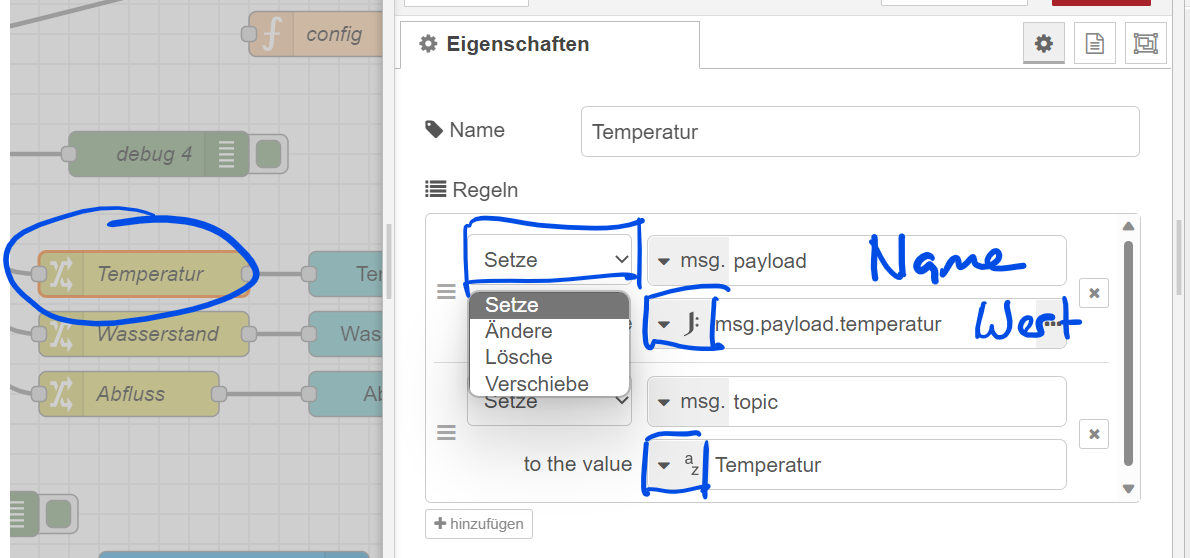
Funktion > Change
Nachrichten Bearbeiten
Funktion > function
Plain Javascript Function

// "msg" ist in jedem JS-Node vorhanden
const data = {
    time: Date.now(),
    fluss: msg.payload.fluss.toUpperCase(),
    temperatur: Number.parseFloat(msg.payload.data[2])
}

msg.payload = data;

return msg;
Dokumente im Internet: HTML
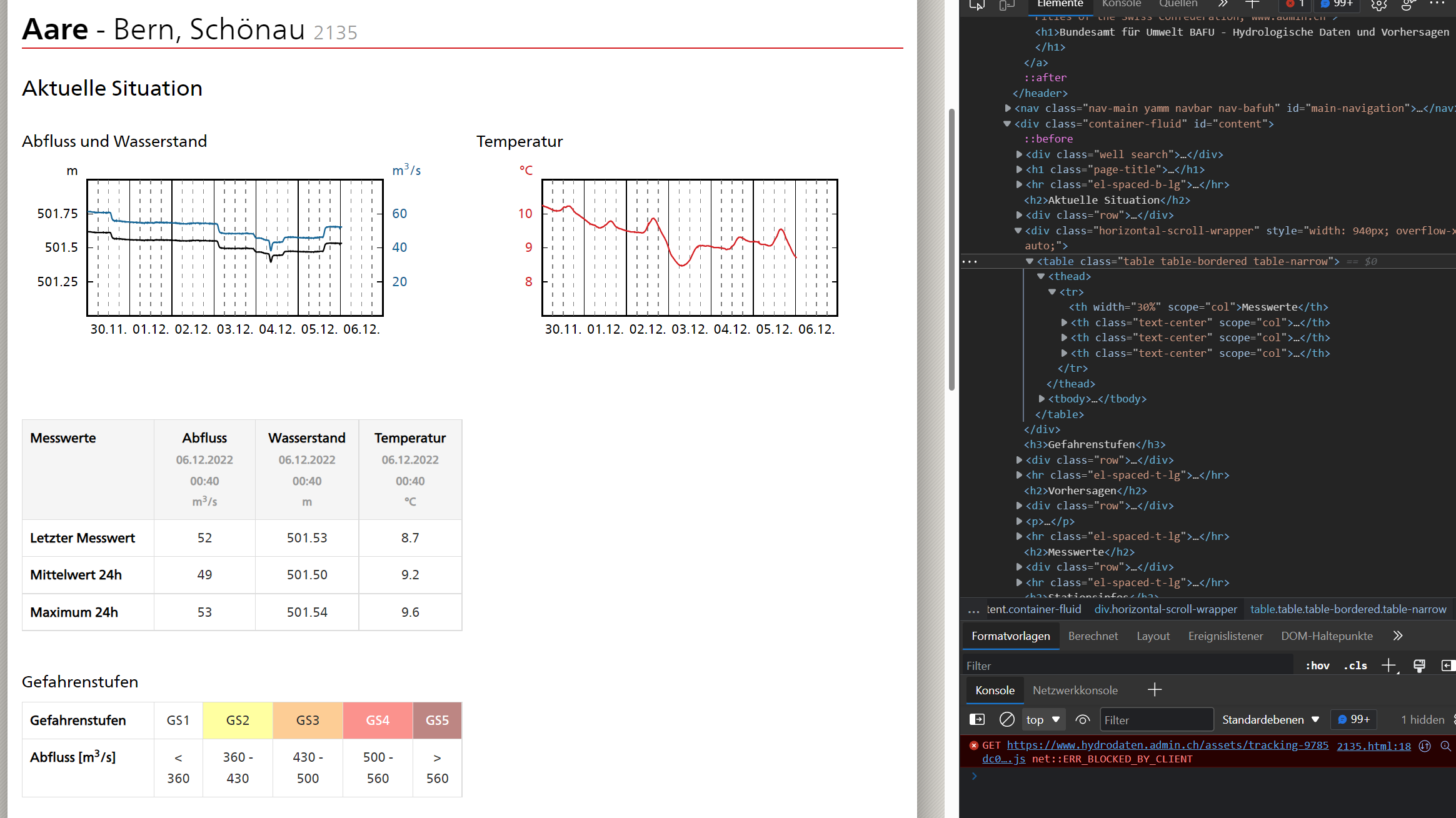
https://www.hydrodaten.admin.ch/de/2135.html
F12
oder
Einstellungen > Weitere Tools > Entwicklungstools
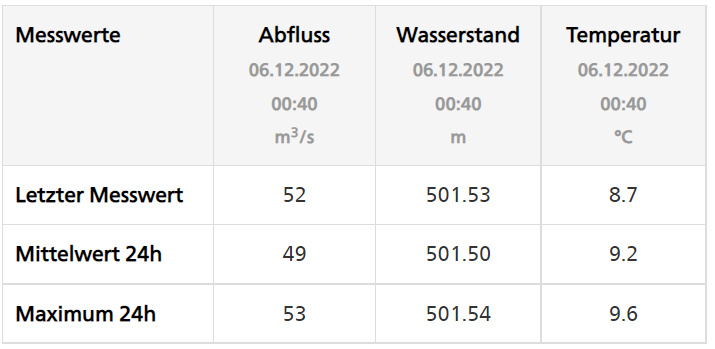
<table class="table">
  <tbody>
    <tr>
      <th scope="row">Letzter Messwert</th>
      <td class="text-center">52</td>
      <td class="text-center">501.53</td>
      <td class="text-center">8.7</td>
    </tr>
  </tbody>
</table>
Dokumente im Internet: HTML
document.querySelector('table td'){
"fluss": "h1 strong",
"wasser": {
"listItem": "#content table td"
}
}Dokumente im Internet: HTML
document.querySelector('table td')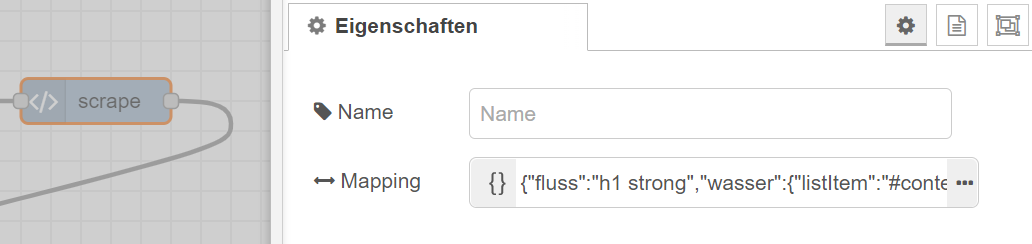
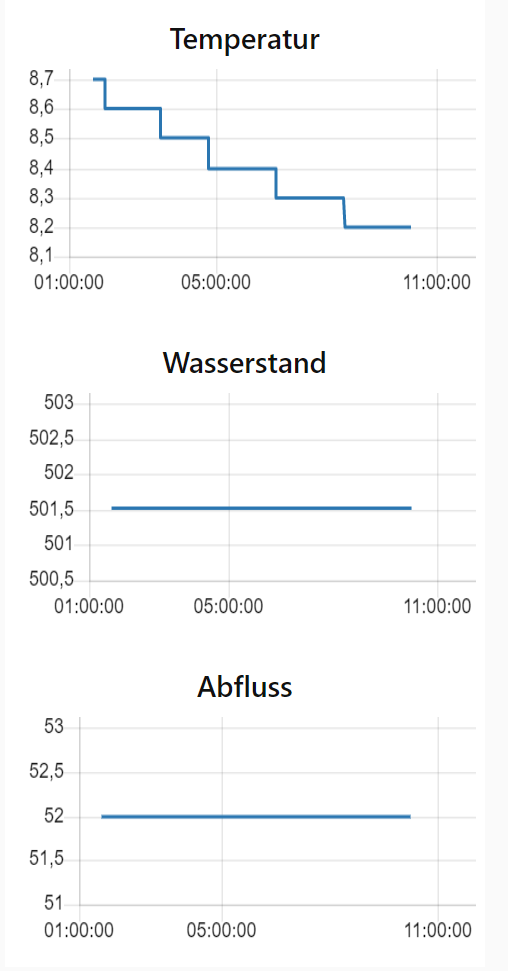

Dashboard
msg.topic = 'Temperatur'
msg.payload = 8.2

return msg;
https://node-red.onrender.com/ui

/help
/newbot
Telegram
Aktuell die simpelste Konfiguration...
→ neuer Chatbot erstellen
Name muss mit "bot" enden
→ eigene Chat-ID abfragen
Name muss mit "bot" enden
/start
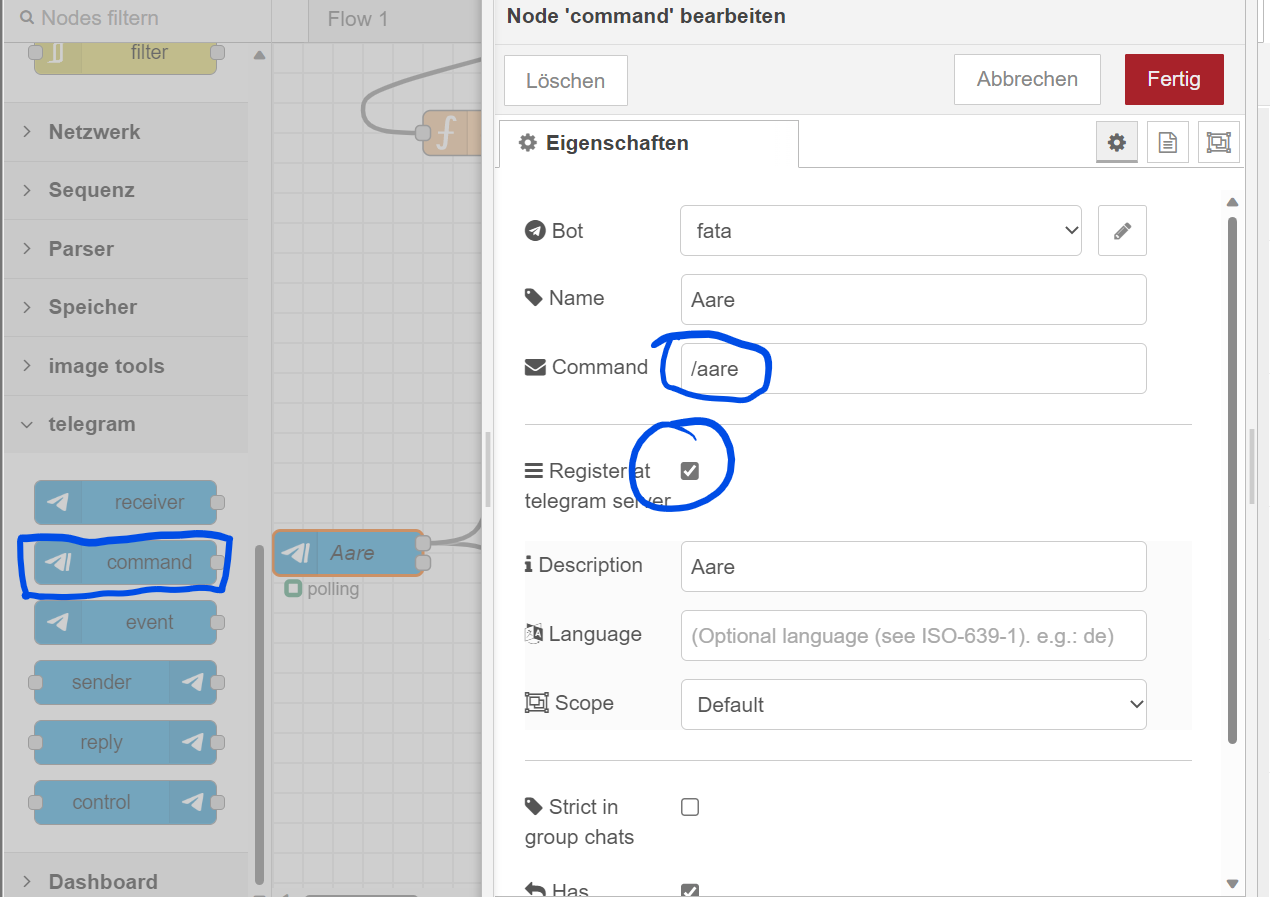
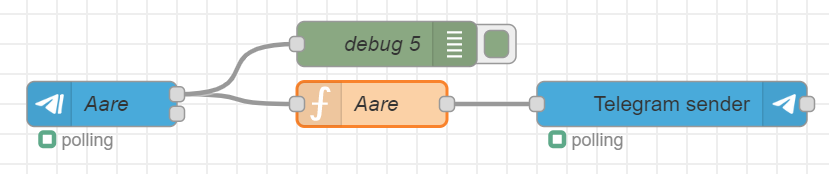
Telegram Command
const temperatur = msg.payload.scrapped.wasser[2];
const wasserstand = msg.payload.scrapped.wasser[1];
const abfluss = msg.payload.scrapped.wasser[0]

msg.payload = {
    fluss: msg.payload.scrapped.fluss,
    temperatur: temperatur,
    wasserstand: wasserstand,
    abfluss: abfluss
}
/* im flow als state speichern */
flow.set('Aare', msg.payload);

return msg;
Die zuletzt abgefragte Temperatur abfragen

msg.payload.type = 'message';
/* den letzten State wieder holen */
const aare = flow.get('Aare');
msg.payload.content = JSON.stringify(aare);
msg.payload.chatId = 9999999999;
return msg;
Die zuletzt abgefragte Temperatur abfragen
[
    {
        "id": "3fc70412f62a6de8",
        "type": "tab",
        "label": "Wasserbot",
        "disabled": false,
        "info": "",
        "env": []
    },
    {
        "id": "fb9b0c1b17366974",
        "type": "inject",
        "z": "3fc70412f62a6de8",
        "name": "",
        "props": [
            {
                "p": "payload"
            },
            {
                "p": "topic",
                "vt": "str"
            }
        ],
        "repeat": "15",
        "crontab": "",
        "once": false,
        "onceDelay": 0.1,
        "topic": "",
        "payload": "",
        "payloadType": "date",
        "x": 250,
        "y": 140,
        "wires": [
            [
                "815fae1221aa1f33"
            ]
        ]
    },
    {
        "id": "815fae1221aa1f33",
        "type": "http request",
        "z": "3fc70412f62a6de8",
        "name": "",
        "method": "GET",
        "ret": "txt",
        "paytoqs": "ignore",
        "url": "https://www.hydrodaten.admin.ch/de/2135.html",
        "tls": "",
        "persist": false,
        "proxy": "",
        "insecureHTTPParser": false,
        "authType": "",
        "senderr": false,
        "headers": [],
        "x": 410,
        "y": 140,
        "wires": [
            [
                "812c2ba83a0cd65c"
            ]
        ]
    },
    {
        "id": "8845852f45cd0606",
        "type": "debug",
        "z": "3fc70412f62a6de8",
        "name": "Debug Scrape",
        "active": true,
        "tosidebar": true,
        "console": false,
        "tostatus": false,
        "complete": "payload",
        "targetType": "msg",
        "statusVal": "",
        "statusType": "auto",
        "x": 440,
        "y": 260,
        "wires": []
    },
    {
        "id": "812c2ba83a0cd65c",
        "type": "scrape",
        "z": "3fc70412f62a6de8",
        "name": "",
        "mapping": "{\"fluss\":\"h1 strong\",\"wasser\":{\"listItem\":\"#content table td\"}}",
        "x": 570,
        "y": 140,
        "wires": [
            [
                "f530a7d8dc64d60b"
            ]
        ]
    },
    {
        "id": "f530a7d8dc64d60b",
        "type": "function",
        "z": "3fc70412f62a6de8",
        "name": "extract",
        "func": "const temperatur = msg.payload.scrapped.wasser[2];\nconst wasserstand = msg.payload.scrapped.wasser[1];\nconst abfluss = msg.payload.scrapped.wasser[0]\n\nmsg.payload = {\n    fluss: msg.payload.scrapped.fluss,\n    temperatur: temperatur,\n    wasserstand: wasserstand,\n    abfluss: abfluss\n}\n/* im flow als state speichern */\nflow.set('Aare', msg.payload);\n\nreturn msg;",
        "outputs": 1,
        "noerr": 0,
        "initialize": "// Der Code hier wird ausgeführt,\n// wenn der Node gestartet wird\nflow.set('Aare', {})",
        "finalize": "",
        "libs": [],
        "x": 250,
        "y": 260,
        "wires": [
            [
                "cfbda2c70bc4f2d4",
                "8845852f45cd0606",
                "723e45e9a3503dbb",
                "0f57828dc752b02e"
            ]
        ]
    },
    {
        "id": "6d2122136319e6a3",
        "type": "ui_chart",
        "z": "3fc70412f62a6de8",
        "name": "",
        "group": "8b26fab51daa72db",
        "order": 0,
        "width": 0,
        "height": 0,
        "label": "Temperatur",
        "chartType": "line",
        "legend": "false",
        "xformat": "HH:mm:ss",
        "interpolate": "linear",
        "nodata": "",
        "dot": false,
        "ymin": "",
        "ymax": "",
        "removeOlder": 1,
        "removeOlderPoints": "",
        "removeOlderUnit": "86400",
        "cutout": 0,
        "useOneColor": false,
        "useUTC": false,
        "colors": [
            "#1f77b4",
            "#aec7e8",
            "#ff7f0e",
            "#2ca02c",
            "#98df8a",
            "#d62728",
            "#ff9896",
            "#9467bd",
            "#c5b0d5"
        ],
        "outputs": 1,
        "useDifferentColor": false,
        "className": "",
        "x": 610,
        "y": 320,
        "wires": [
            []
        ]
    },
    {
        "id": "cfbda2c70bc4f2d4",
        "type": "change",
        "z": "3fc70412f62a6de8",
        "name": "Temperatur",
        "rules": [
            {
                "t": "set",
                "p": "payload",
                "pt": "msg",
                "to": "msg.payload.temperatur",
                "tot": "jsonata"
            },
            {
                "t": "set",
                "p": "topic",
                "pt": "msg",
                "to": "Temperatur",
                "tot": "str"
            }
        ],
        "action": "",
        "property": "",
        "from": "",
        "to": "",
        "reg": false,
        "x": 430,
        "y": 320,
        "wires": [
            [
                "6d2122136319e6a3"
            ]
        ]
    },
    {
        "id": "fc215cddfa992356",
        "type": "ui_chart",
        "z": "3fc70412f62a6de8",
        "name": "",
        "group": "8b26fab51daa72db",
        "order": 0,
        "width": 0,
        "height": 0,
        "label": "Wasserstand",
        "chartType": "line",
        "legend": "false",
        "xformat": "HH:mm:ss",
        "interpolate": "linear",
        "nodata": "",
        "dot": false,
        "ymin": "",
        "ymax": "",
        "removeOlder": 1,
        "removeOlderPoints": "",
        "removeOlderUnit": "86400",
        "cutout": 0,
        "useOneColor": false,
        "useUTC": false,
        "colors": [
            "#1f77b4",
            "#aec7e8",
            "#ff7f0e",
            "#2ca02c",
            "#98df8a",
            "#d62728",
            "#ff9896",
            "#9467bd",
            "#c5b0d5"
        ],
        "outputs": 1,
        "useDifferentColor": false,
        "className": "",
        "x": 610,
        "y": 360,
        "wires": [
            []
        ]
    },
    {
        "id": "723e45e9a3503dbb",
        "type": "change",
        "z": "3fc70412f62a6de8",
        "name": "Wasserstand",
        "rules": [
            {
                "t": "set",
                "p": "payload",
                "pt": "msg",
                "to": "msg.payload.wasserstand",
                "tot": "jsonata"
            },
            {
                "t": "set",
                "p": "topic",
                "pt": "msg",
                "to": "Wasserstand",
                "tot": "str"
            }
        ],
        "action": "",
        "property": "",
        "from": "",
        "to": "",
        "reg": false,
        "x": 430,
        "y": 360,
        "wires": [
            [
                "fc215cddfa992356"
            ]
        ]
    },
    {
        "id": "225a76a607dd1f51",
        "type": "ui_chart",
        "z": "3fc70412f62a6de8",
        "name": "",
        "group": "8b26fab51daa72db",
        "order": 0,
        "width": 0,
        "height": 0,
        "label": "Abfluss",
        "chartType": "line",
        "legend": "false",
        "xformat": "HH:mm:ss",
        "interpolate": "linear",
        "nodata": "",
        "dot": false,
        "ymin": "",
        "ymax": "",
        "removeOlder": 1,
        "removeOlderPoints": "",
        "removeOlderUnit": "86400",
        "cutout": 0,
        "useOneColor": false,
        "useUTC": false,
        "colors": [
            "#1f77b4",
            "#aec7e8",
            "#ff7f0e",
            "#2ca02c",
            "#98df8a",
            "#d62728",
            "#ff9896",
            "#9467bd",
            "#c5b0d5"
        ],
        "outputs": 1,
        "useDifferentColor": false,
        "className": "",
        "x": 600,
        "y": 400,
        "wires": [
            []
        ]
    },
    {
        "id": "0f57828dc752b02e",
        "type": "change",
        "z": "3fc70412f62a6de8",
        "name": "Abfluss",
        "rules": [
            {
                "t": "set",
                "p": "payload",
                "pt": "msg",
                "to": "msg.payload.abfluss",
                "tot": "jsonata"
            },
            {
                "t": "set",
                "p": "topic",
                "pt": "msg",
                "to": "Abfluss",
                "tot": "str"
            }
        ],
        "action": "",
        "property": "",
        "from": "",
        "to": "",
        "reg": false,
        "x": 420,
        "y": 400,
        "wires": [
            [
                "225a76a607dd1f51"
            ]
        ]
    },
    {
        "id": "78a2bde059edc5be",
        "type": "telegram command",
        "z": "3fc70412f62a6de8",
        "name": "Aare",
        "command": "/aare",
        "description": "Aare",
        "registercommand": true,
        "language": "",
        "scope": "default",
        "bot": "d7e389ca7c8d82d4",
        "strict": false,
        "hasresponse": true,
        "useregex": false,
        "removeregexcommand": false,
        "outputs": 2,
        "x": 210,
        "y": 520,
        "wires": [
            [
                "af3d801ae7c0e34e",
                "08717ffbaf57bed3"
            ],
            []
        ]
    },
    {
        "id": "af3d801ae7c0e34e",
        "type": "function",
        "z": "3fc70412f62a6de8",
        "name": "Aare",
        "func": "msg.payload.type = 'message';\nconst aare = flow.get('Aare');\nmsg.payload.content = JSON.stringify(aare);\nmsg.payload.chatId = 99999999;\nreturn msg;",
        "outputs": 1,
        "noerr": 0,
        "initialize": "",
        "finalize": "",
        "libs": [],
        "x": 390,
        "y": 520,
        "wires": [
            [
                "a1be1d73aeaf6b6a"
            ]
        ]
    },
    {
        "id": "a1be1d73aeaf6b6a",
        "type": "telegram sender",
        "z": "3fc70412f62a6de8",
        "name": "",
        "bot": "d7e389ca7c8d82d4",
        "haserroroutput": false,
        "outputs": 1,
        "x": 590,
        "y": 520,
        "wires": [
            []
        ]
    },
    {
        "id": "08717ffbaf57bed3",
        "type": "debug",
        "z": "3fc70412f62a6de8",
        "name": "Debug Telegram",
        "active": true,
        "tosidebar": true,
        "console": false,
        "tostatus": false,
        "complete": "payload",
        "targetType": "msg",
        "statusVal": "",
        "statusType": "auto",
        "x": 420,
        "y": 480,
        "wires": []
    },
    {
        "id": "8b26fab51daa72db",
        "type": "ui_group",
        "name": "Standard",
        "tab": "152f68bd903e15a5",
        "order": 1,
        "disp": true,
        "width": "6",
        "collapse": false,
        "className": ""
    },
    {
        "id": "d7e389ca7c8d82d4",
        "type": "telegram bot",
        "botname": "fata",
        "usernames": "",
        "chatids": "",
        "baseapiurl": "",
        "updatemode": "polling",
        "pollinterval": "1000",
        "usesocks": false,
        "sockshost": "",
        "socksprotocol": "socks5",
        "socksport": "6667",
        "socksusername": "anonymous",
        "sockspassword": "",
        "bothost": "",
        "botpath": "",
        "localbotport": "8443",
        "publicbotport": "8443",
        "privatekey": "",
        "certificate": "",
        "useselfsignedcertificate": false,
        "sslterminated": false,
        "verboselogging": false
    },
    {
        "id": "152f68bd903e15a5",
        "type": "ui_tab",
        "name": "Home",
        "icon": "dashboard",
        "disabled": false,
        "hidden": false
    }
]
Code: Kann über Menü > Import eingefügt werden
Troubleshooting:
Render.com...
(1) Render ist kostenlos... weil es sich nach 15 Minuten ohne Request in einen Schlafmodus versetzt...
Lösung: Ein Flow, der alle 5 Minuten einen Request auf die eigene Domain macht
(2) Render bietet für 3 Monate eine kostenlose PG-Datenbank (danach wird sie gelöscht). Wer eine kostenlose Variante möchte: https://github.com/lebalz/node-red-render-no-db --> DB Connection String auf http://elephantsql.com konfigurieren
(3) Node-Red ist nicht mehr erreichbar: über render.com den letzten commit neu deployen