Develop in a hostile environment
Home sweet home
- My own Javascript
- My own libraries
- My own HTML/XHTML version
- My own DOM
- My own CSS
- My own users
- My own domain
- My own server
- My own performances
- My own browser usages
- My own deployment
- ...



You're not at home
Your code will be executed somewhere and you don't know where, how, who, ...

The war zone
- We have no libraries.
- Or all libraries.
- Using XHTML 1.0 or HTML 5
- All users use Chrome, last version
- Or IE8, don't remember
- Naaa, they use mobile devices
- They disable javascript. Sometimes
- $ is our custom library fyi, it's a great name
- And we use mixpanel, google analytics, akismet, zopim, ...
- DON'T BREAK OUR WEBSITE PLS



(function () {
while(1) { alert('You can't stop me'); }
})()
Never assume
window can contains ANYTHING: embed your own libraries.
Loading 32th jQuery
You can make many things with a small library. See http://microjs.com/
Async
Load your script asynchronously to avoid JS errors from others.
Closure everything
Never expose your code in parent scopes. Never access parent scopes. You're alone.
You know nothing JS
You don't know if the DOM is loaded, if the element exists, if your container is absolute or static
ES5 isn't fully supported
You don't know if your in V8, Chakra or SpiderMonkey.
IE still exists
Yep.
<!DOCTYPE YOLO>
HTML 5 ? Hipster.
All websites aren't in HTML 5
<!DOCTYPE HTML PUBLIC "-//W3C//DTD HTML 4.01 Transitional//EN"
  "http://www.w3.org/TR/html4/loose.dtd">
<!DOCTYPE html PUBLIC "-//W3C//DTD XHTML 1.0 Transitional//EN"
"http://www.w3.org/TR/xhtml1/DTD/xhtml1-transitional.dtd">from houra.fr
from alcampo.es
Ich speak español.
IE still exists
Yep.
/* I'm on top of the world */
z-index: 2147483647;
.main is... not so unique
Don't use class with a generic name. It's already used.
This is the solution !important
This is not !important
One column, 900 classes
Don't use CSS framework like Bootstrap. You won't use everything.
Responsive
Some people use their phone to browse the web. Trust me.
PNG ? SVG ? fonts ?
SVG are not well supported below IE9. PNG are heavy. Fonts are less maintenable. Pick one.
IE still exists
Yep.
I believe I pre-flight !
I believe I can touch this f**** json
JSONP is a hack
And it will disappears when IE 9 will die
//
Serve your content as http AND https
Fonts need CORS also
Only for copyright reason...
IE still exists
Yep.

Bundle ftw

Think module
- A module is a content
- Each module has specifications :
- ES6, React, Coffee Script, ...
- SCSS, LESS, CSS, ...
- Image, fonts, ...
- The result is a bundle (of module)
JS or assets = module
Webpack allows you to import assets like a module
import myStyle from './productList.scss';Loaders
module: {
    loaders: [
      { test: /\.coffee$/, loader: 'coffee' },
      { test: /\.js$/, loader: 'babel' }
      {
        test: /\.scss$/,
        loader: 'style!css?modules' +
          '!sass?outputStyle=expanded'
      },

    ]
A loader tells to Webpack how to handle module types
Simple example
var mymodule = require('./mymodule');var styles = require('./styles.scss');
module.exports = function () {
alert('Hello world !');
};entrypoint.js
mymodule.js
entrypoint.js
mymodule.js
styles.scss
mybundle.js
One or multiple bundles
entrypoint.js
vendors.js
main.js
ie.main.js
vendors.js
Bundles
Support standard
Webpack handles AMD and CommonJS modules
import jQuery from 'jquery';

jQuery('#myDiv').css('background', 'pink');
Create :local CSS
You can create random class names to avoid inheritance
:local(.productList) {
  background: blue;
}
import classNames from './productList.scss';
...
<div className={classNames.productList}></div>.we2g652qmsck67as8lf0sa {
background: blue;
}Javascript
CSS
Result
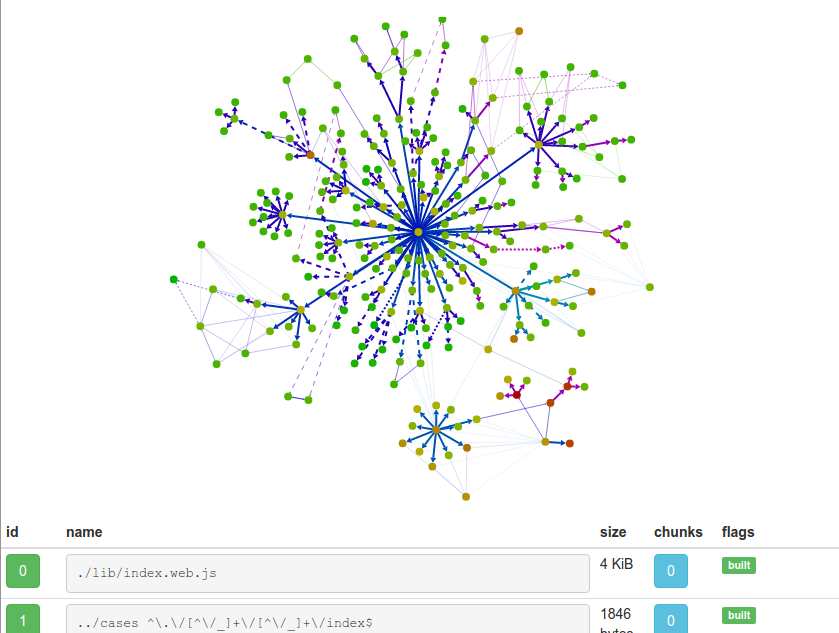
<div class="we2g652qmsck67as8lf0sa"></div>Dependencies visualization
And many other stuff
- Create font from SVGs
- Remove console.log
- Handles font-awesome inclusion
- ...
What can we solve with webpack ?
- CSS isolation
- Javascript isolation
- Browser or language specific bundle
- Dependencies
Thank you for your attention