There's no place like 127.0.0.1
Brian Retterer
IRC: lamarus
brianretterer.com
@bretterer
bretterer@gmail.com
Who Am I?
- WordPress Developer
- Laravel Developer
- Sound Designer
- Potter
- Animal Lover
@bretterer
bretterer@gmail.com
There's no place like 127.0.0.1
@bretterer
bretterer@gmail.com
There's no place like 127.0.0.1
There are better places than 127.0.0.1
@bretterer
bretterer@gmail.com
What you will need:
-
Understanding of GIT
- Composer
- Vagrant
- Homestead
- Envoy Task Runner
- A Server to deploy to
- Beer
@bretterer
bretterer@gmail.com

http://vagrantup.com
Vagrant is a tool to make development
environments easy.
It runs on Virtual Box (which is free) to
build linux boxes to develop in.
@bretterer
bretterer@gmail.com
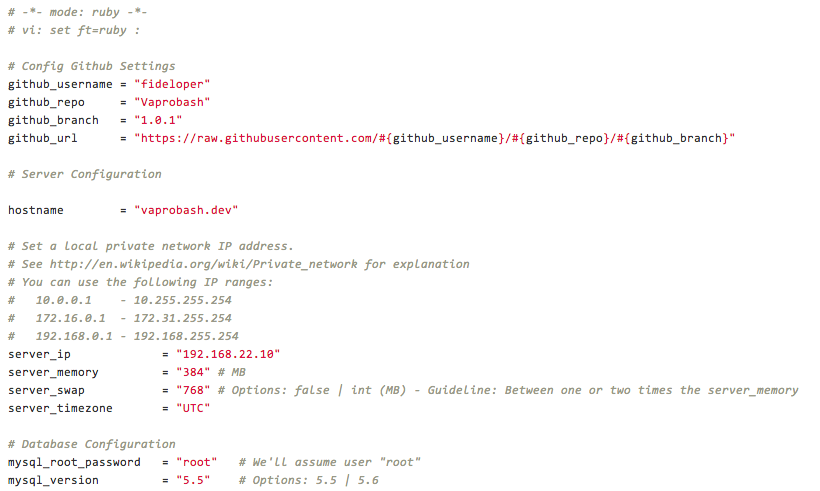
Vaprobash
https://github.com/fideloper/Vaprobash
Vagrant Provision Bash Scripts
@bretterer
bretterer@gmail.com
Vagrant Commands
http://docs.vagrantup.com/v2/cli/
vagrant up: Turn on Vagrant Instance
vagrant halt: Turn off Vagrant Instance
vagrant ssh: SSH into Vagrant Instance
vagrant provision: Build the Vagrant Instance configuration
@bretterer
bretterer@gmail.com
http://laravel.com/docs/homestead
https://github.com/laravel/homestead
@bretterer
bretterer@gmail.com
Setup
Modify Homestead.yaml file
Edit your Hosts File
@bretterer
bretterer@gmail.com

http://laravel.com/docs/ssh
https://github.com/laravel/envoy
@bretterer
bretterer@gmail.com
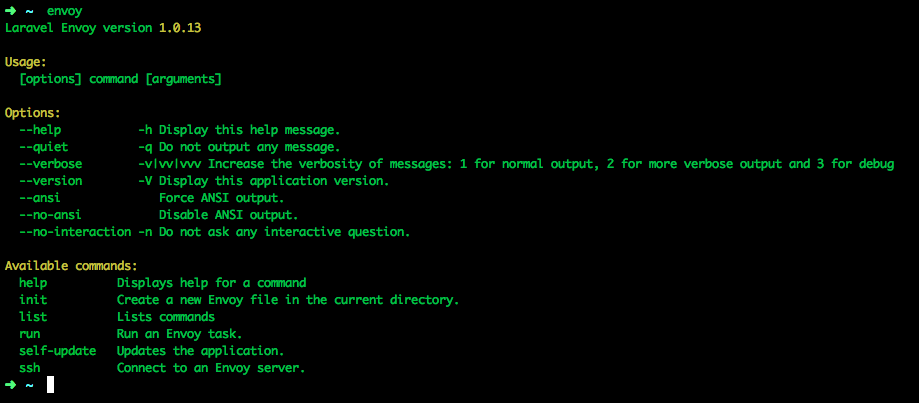
Composer Global Install
composer global require "laravel/envoy=~1.0"This will give you access to `envoy`
from your command line
@bretterer
bretterer@gmail.com
envoy.blade.php
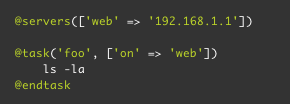
This uses SSH to connect to your server
and then run the commands.
@bretterer
bretterer@gmail.com
DEMO TIME!
@bretterer
bretterer@gmail.com
Questions?
@bretterer
bretterer@gmail.com