CS2106 Tutorial 6
Clarification on zombie processes
- All children will be "zombies" for at least a few CPU cycles
- When discussing zombie processes we only care about those whose process description remains indefinitely in the process table.
- An orphaned process will have its entry cleaned up eventually, hence not considered a zombie process, even if it takes a while for it to happen.
Q1. Definitions
- Platter
- Track
- Cylinder
- Sector
- Block
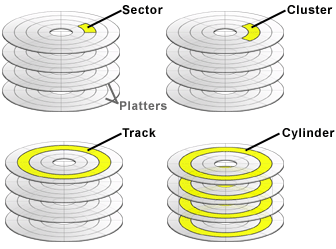
Block vs Cluster
- What ext2 calls blocks, FAT calls clusters; the concept is the same.
- Make sure you identify the correct term.
512GiB disk drive with 1024 byte sectors
4096 byte blocks
8192 byte blocks
16384 byte blocks
512 \text{GiB} = 512 \times 1024 \times 1024 \text{KiB} = 536,870,912 \text{KiB}
134,217,728 blocks
67,108,864 blocks
33,554,432 blocks
Large block size
- OS has fewer blocks to manage.
- Less metadata overhead for the entire disk.
Small block size
- Reduced internal fragmentation.
Q2. Access Time
| Switch time | Choose the correct side of the correct platter (and sometimes the correct head) |
| Seek time | Move the arm to the correct track |
| Rotational delay | Rotate the desired block under the arm |
| Transfer delay | Time taken to read/write the data |
| Switch time | Negligible |
| Seek time | 15ms on average |
| Data throughput | 50 Mbps (1M = 1000K, and bps is bits per second) |
| Block size | 32,768 bytes |
| Rotational speed | 7200 rpm |
Rotational delay: 4.2ms
7200 \text{rpm} = 7200/60 \text{rps} = 120 \text{rps}
120^{-1}\times 0.5 = 0.00417s
Transfer delay: 5.2ms
\frac{32768\times 8}{50\times1000\times1000}=0.0052s
Total: 0 + 15 + 4.2 + 5.2 = 24.4ms
Q3. What happens when the code is executed
#include <stdio.h>

int main()
{
    FILE *fp = fopen(“hello.txt”, “w”);
    fprintf(fp, “Hello world!\n”);
    fclose(fp);
}
- fopen
- write content
- close file
-
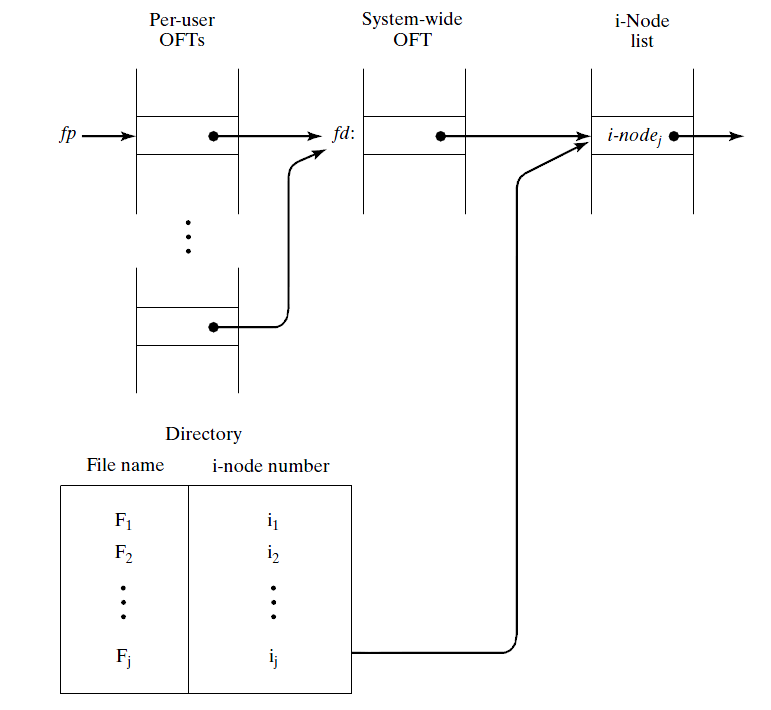
fopen creates a new entry in the per-user OFT
-
Allocates read/write buffer with the entry.
-
Calls low-level open operation.
-
fopen
- OS creates file
- OS opens file
- write content
- close file
- OS searches in the file list of the current directory for "hello.txt".
- Doesn't exist. Check to see that correct permission is set to create files.
- Checks the disk bitmap for available blocks and allocate the blocks for the new file.
- Allocate an inode and populate the content.
- Add the inode number into the directory with the name "hello.txt".
- fopen
- OS creates file
- OS opens file
- write content
- close file
- Creates a new entry in the system-wide OFT (unless the file is already open).
- The private OFT now points to this entry in the system OFT.
- fopen returns to the caller a pointer fp to the private OFT entry, which is stored in the FILE structure.
-
fopen
- OS creates file
- OS opens file
- write content
- close file
- The fprintf writes "Hello world!\n" into the file's buffer.
- The buffer will be "flushed" when
- buffer is full
- program exits
- stream is closed
- on a newline only if it is line buffered
- explicitly called
- The buffer will be "flushed" when
- In this case, it is not immediately flushed.
- fopen
- OS creates file
- OS opens file
- write content
- close file
- Flush the buffer
- OS checks inode to figure out where on the disk should the data be stored.
- Block address is translated into its physical location (platter, surface, cylinder, sector)
- Send command to the drive controller to transfer the data to that location.
- Entries in the OFT are removed.
- fopen
- OS creates file
- OS opens file
- write content
- close file