Scalable Vector Graphics(SVG)
Darren
Outline
-
What is SVG?
-
Why SVGs?
-
How to create an svg image?
Outline
-
Animation (SMIL)
-
Set
-
Animate
-
AnimateTransform
-
AnimateMotion
-
Outline
-
Limitations
-
How to overcome the limitations?
-
Q&A
What is SVG?
SVG is an XML-based vector image format for two-dimensional graphics with support for interactivity and animation.
<?xml version="1.0" encoding="utf-8"?>
<!-- Generator: Adobe Illustrator 18.0.0, SVG Export Plug-In . SVG Version: 6.00 Build 0)  -->
<!DOCTYPE svg PUBLIC "-//W3C//DTD SVG 1.1//EN" "http://www.w3.org/Graphics/SVG/1.1/DTD/svg11.dtd">
<svg version="1.1" xmlns="http://www.w3.org/2000/svg" xmlns:xlink="http://www.w3.org/1999/xlink" x="0px" y="0px" viewBox="0 0 64 64" enable-background="new 0 0 64 64" xml:space="preserve">
<circle
id="my-circle"
r="10"
cx="32"
cy="32"
fill="orange"
/>
</svg>
Why SVGs?
-
Scalable & Resolution-Independent (Retina display)
-
Very good browser support ???
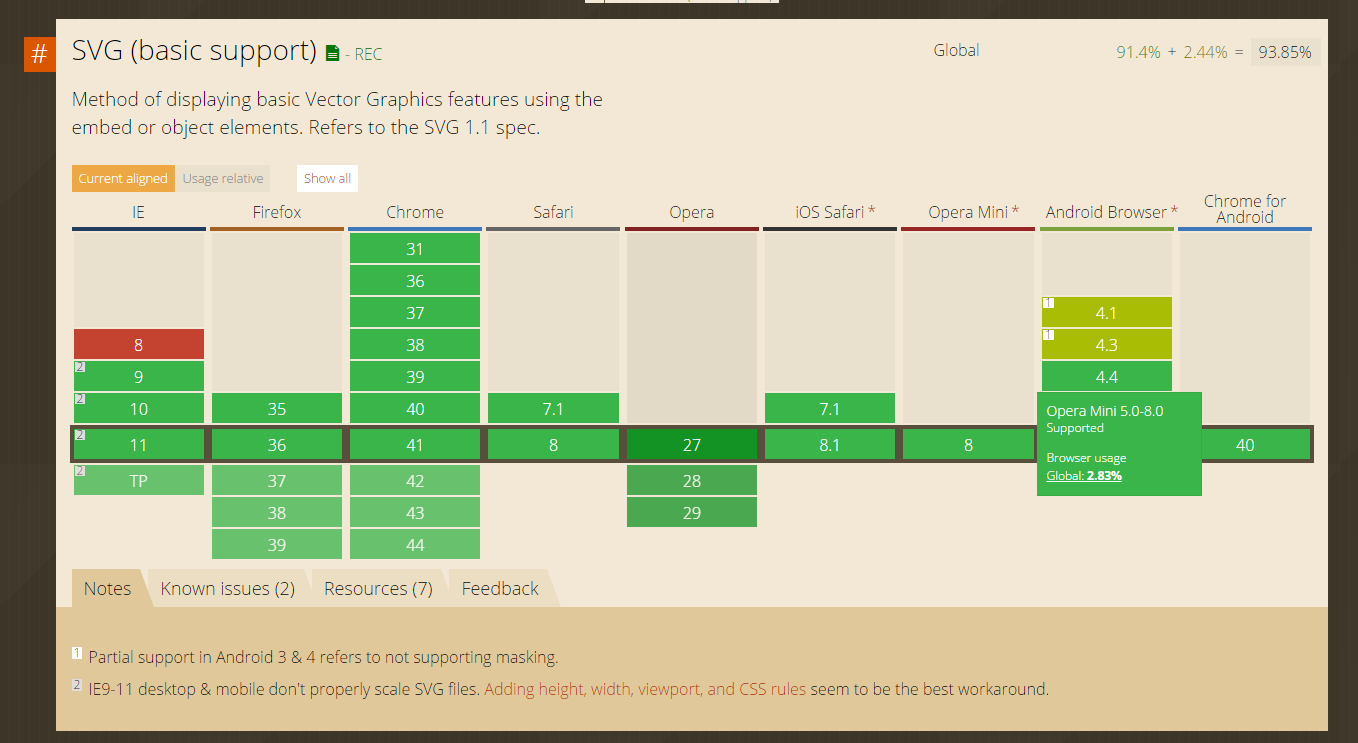
Why SVGs?
-
Accessible (for blind user)
-
Smaller file sizes than JPEG and/or PNG
-
Built-in graphics effects
-
Interactive & styleable
How to create an svg image?
It is not your business!!
Please contact

Animation
-
Animate
-
AnimateTransform
-
Set
-
AnimateMotion
Animation
-
Animate
-
AnimateTransform
-
Set
-
AnimateMotion
Animate
<circle id="my-circle" r="10" cx="10" cy="10" fill="orange" />

<animate
xlink:href="#my-circle"
attributeName="cx"
from="10"
to="30"
dur="1s"
fill="freeze" />

Animation
-
Animate
-
AnimateTransform
-
Set
-
AnimateMotion
AnimateTransform
-
Translate
-
Rotate
-
Scale
-
Skew
-
Matrix
Translate
<circle id="my-circle" r="10" cx="32" cy="32" fill="orange" />

<animateTransform
    xlink:href="#my-circle"
    attributeName="transform"
    type="translate"
    from="0 0"
    to="30 -10"
    begin="0s"
    dur="1s"
    repeatCount="indefinite"
/>
Rotate
<rect x="2" y="7" fill="#050101" width="12" height="2">
	<animateTransform
	 attributeName="transform"
	 type="rotate"
	 from="0 8 8"
	 to="360 8 8"
	 dur="1s"
	 fill="freeze"
	 repeatCount="indefinite"/>
</rect>

Scale
<circle id="my-circle" r="10" cx="10" cy="10" fill="orange" />

  <animateTransform
      xlink:href="#my-circle"
      attributeName="transform"
      type="scale"
      from="1 1"
      to="2 1"
      begin="0s"
      dur="1s"
      repeatCount="indefinite"
  />
Skew
<circle id="my-circle" r="10" cx="32" cy="32" fill="orange" />

  <animateTransform
    xlink:href="#my-circle"
    attributeName="transform"
    type="skewX"
    from="0"
    to="20"
    begin="0s"
    dur="1s"
    repeatCount="indefinite"
  />
Animation
-
Animate
-
AnimateTransform
-
Set
-
AnimateMotion
Set
<circle id="my-circle" r="10" cx="32" cy="32" fill="orange" />
<circle id="my-circle" r="10" cx="32" cy="32" fill="none" stroke="white" />

<set
	xlink:href="#my-circle"
	attributeName="cx"
	begin="1s"
	to="60"
/>
Animation
-
Animate
-
AnimateTransform
-
Set
-
AnimateMotion
AnimateMotion
<path d="M10,50 q60,50 100,0 q60,-50 100,0" stroke="purple" fill="none"> </path>>
<rect x="0" y="0" width="20" height="5" fill="orange">
    <animateMotion
    path="M10,50 q60,50 100,0 q60,-50 100,0"
    begin="0s"
    dur="10s"
    repeatCount="indefinite"
    rotate="auto"
    />
</rect>
Some Requests From
Download

Download
<g id="Arrow">
	<path fill="orange" fill-rule="evenodd" clip-rule="evenodd" d="M19,9l-7,7L5,9h4V2h6v7H19z"/>
	 <animateTransform
	 id="down"
	 attributeName="transform"
	 begin="0s"
	 type="translate"
	 values="0,0;0,2;0,0"
	 dur="1s"
	 fill="freeze"
	 repeatCount="indefinite"/>
</g>
<g id="Bottom">
	<path fill="orange" fill-rule="evenodd" clip-rule="evenodd" d="M2,17h3v2h14v-2h3v5H2V17z"/>
</g>
Loading

<set
id="right" attributeName="x" begin="0s;up.end" from="1" to="10"
dur="0.15s" fill="freeze"/>
<set
id="down" attributeName="y" begin="right.end" from="1" to="10"
dur="0.15s" fill="freeze" />
<set
id="left" attributeName="x" begin="down.end" from="10" to="1"
dur="0.15s" fill="freeze" />
<set
id="up" attributeName="y" begin="left.end" from="10" to="1"
dur="0.15s" fill="freeze" />
Play/Stop

<path fill="orange" d="M 18.741071,52 31.30178,42.531655 45.258928,31.887987 18.741071,12 z">
<animate
attributeName="d"
values="m 12.5,52 39,0 0,-40 -39,0 z;M 18.741071,52 31.30178,42.531655 45.258928,31.887987 18.741071,12 z"
dur="1.5s"
fill="freeze"
repeatCount="indefinite"
/>
</path>
Limitation
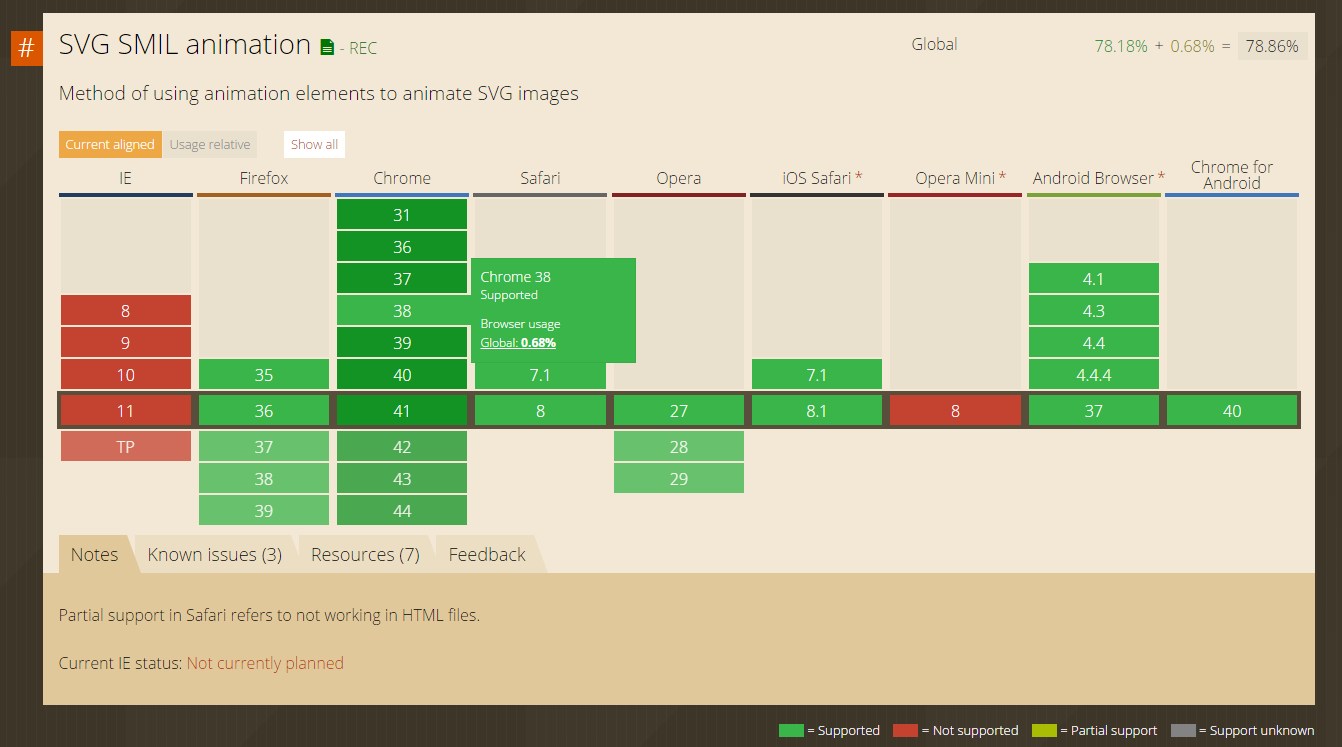
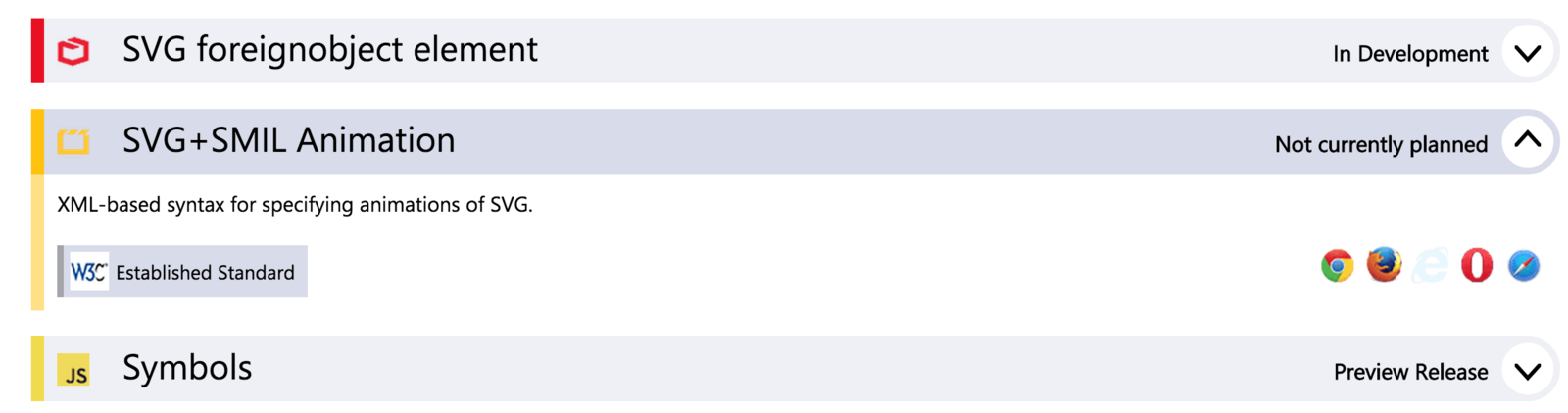
Snap
The JavaScript SVG library for the modern web.
Snap
var icon = document.getElementById('icon');
var clickHandler = function() {
	var s = Snap("#volumn");
	s.select('path:nth-child(1)').animate({
		transform: "t0 0 s1 32 32",
		opacity: 1
	}, 500, mina.easein());
	s.select('path:nth-child(2)').animate({
		transform: "t0 0 s1 32 32",
		opacity: 1
	}, 1000, mina.easeout());
	s.select('path:nth-child(3)').animate({
		transform: "t0 0 s1 32 32",
		opacity: 1
	}, 1500, mina.backin());
};
icon.addEventListener('click', clickHandler);
A Look Back
-
What is SVG
-
Why SVGS
-
Animate(SMIL)
-
Animate
-
AnimateTransform
-
AnimateMotion
-
Set
-
-
Snap