Backend 後端


講師 - 呂家睿
- 建中資訊38屆學術長+副社
- 玩雀魂
- 頭像是應急食品
- 被電爛
- 有問題歡迎來問我啊

- Fastapi
- Qt(C++)
- 數學好難
- 一點點sandbox
- Machine Learning
- discord bot
- 打開電腦
學術力

FastAPI - Intro
FastAPI
FastAPI是一個Python的後端框架
- 很快(node.js, Go等級)
- 寫起來比較快
- 好學
- 它是python
什麼是後端 backend?



後端
前端
使用者
FastAPI
其他常見的Python後端框架還有 Flask 跟 Django
| 學習難度 | 速度 | 資料確認 | |
|---|---|---|---|
| FastAPI | 簡單,但要學額外的東西 | 很快 | 內建+自動 |
| Django | 它有自己一套體系 | 慢 | 內建 |
| Flask | 簡單 | 中間 | 需要插件 |



FastAPI - Setup
Step 0
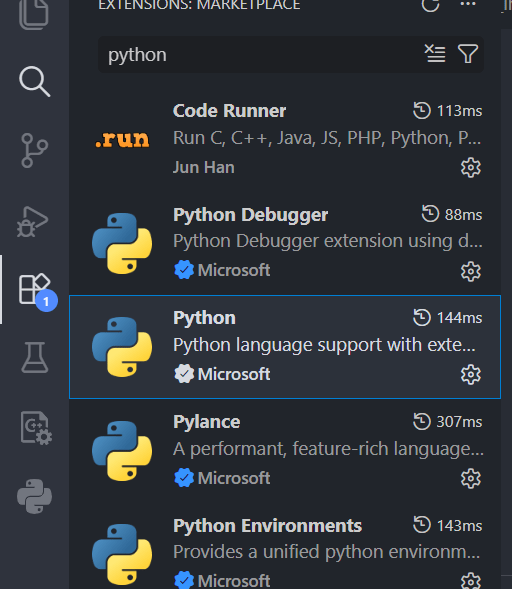
首先我們需要裝一個可以用python的IDE或code editor,這堂課我們會用VS code
1. 如果你沒有vscode點這裡安裝
2. 如果你沒有python點這裡安裝


3. 在vscode裡裝好python
Step 1 - uv
在開始裝fastAPI之前,我們要先裝"uv"(非必須)
- 一個管理專案和套件的工具
- 他很快
- 他很方便(all in one)

1. 安裝uv
powershell -ExecutionPolicy ByPass -c "irm https://astral.sh/uv/install.ps1 | iex"

curl -LsSf https://astral.sh/uv/install.sh | sh
windows
mac & linux
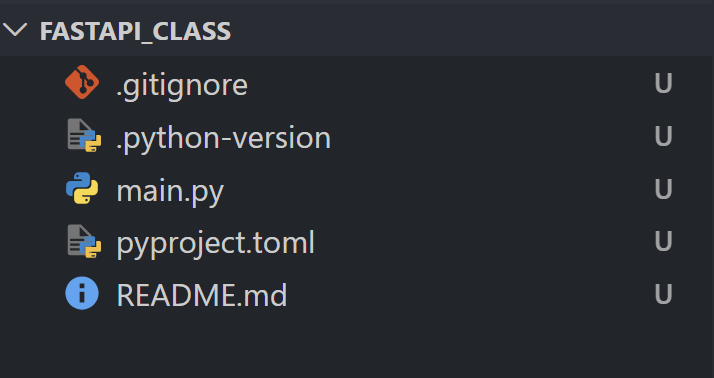
2. 用vscode開一個資料夾,並打開終端機
uv init開啟一個uv專案
如果在家寫fastAPI不想用uv可以參考fastAPI官網
Step 2 - 套件
裝完uv之後,我們就可以把開始裝需要的套件
現在先裝這幾個:
uv add fastapi["standard"]
uv add fastapi-users["sqlalchemy"]
uv add aiosqlite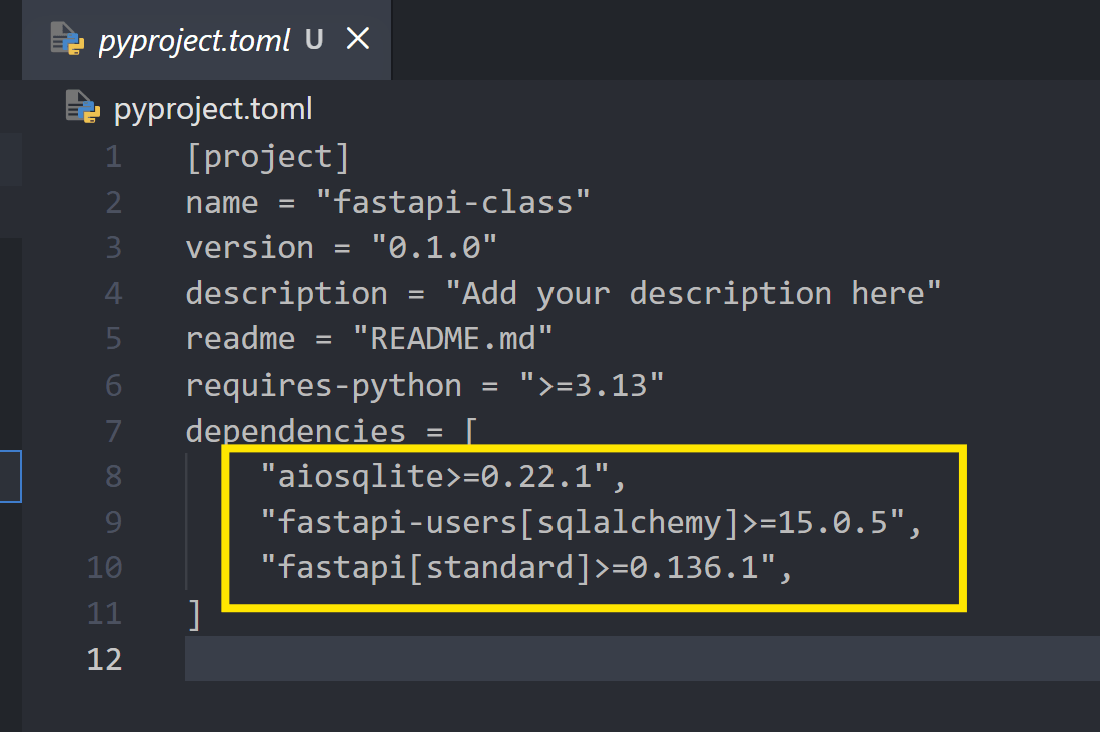
FastAPI - Basic
Hello World
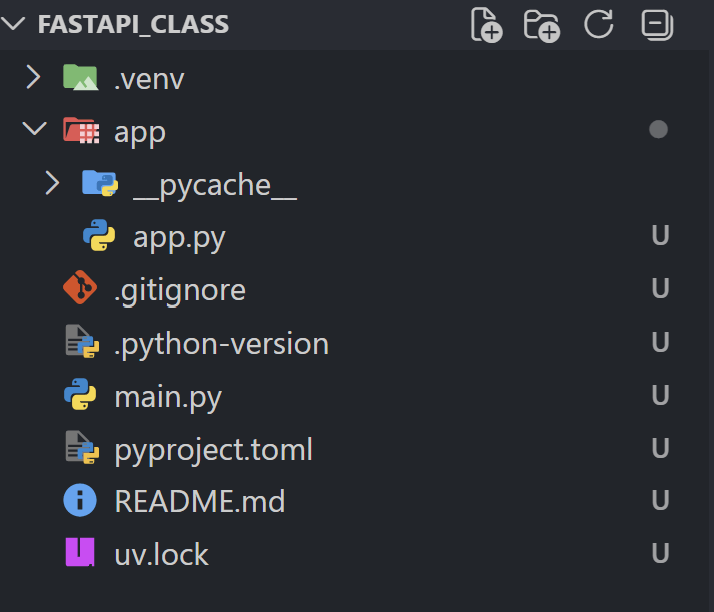
首先我們開一個資料夾app,然後在裡面開一個app.py
from fastapi import FastAPI

app = FastAPI()


@app.get("/")
async def root():
    return {"message": "Hello World"}
app.py
main.py
import uvicorn


if __name__ == "__main__":
    uvicorn.run(app = "app.app:app", reload = True)
跑動程式
1. 老樣子,三角形
2. uv run ./main.py
Hello World

ctrl + 左鍵點擊就會打開那個連結
在網址後面加 "/docs"就會有一個比較好看的介面

或者你也可以加"/redoc"
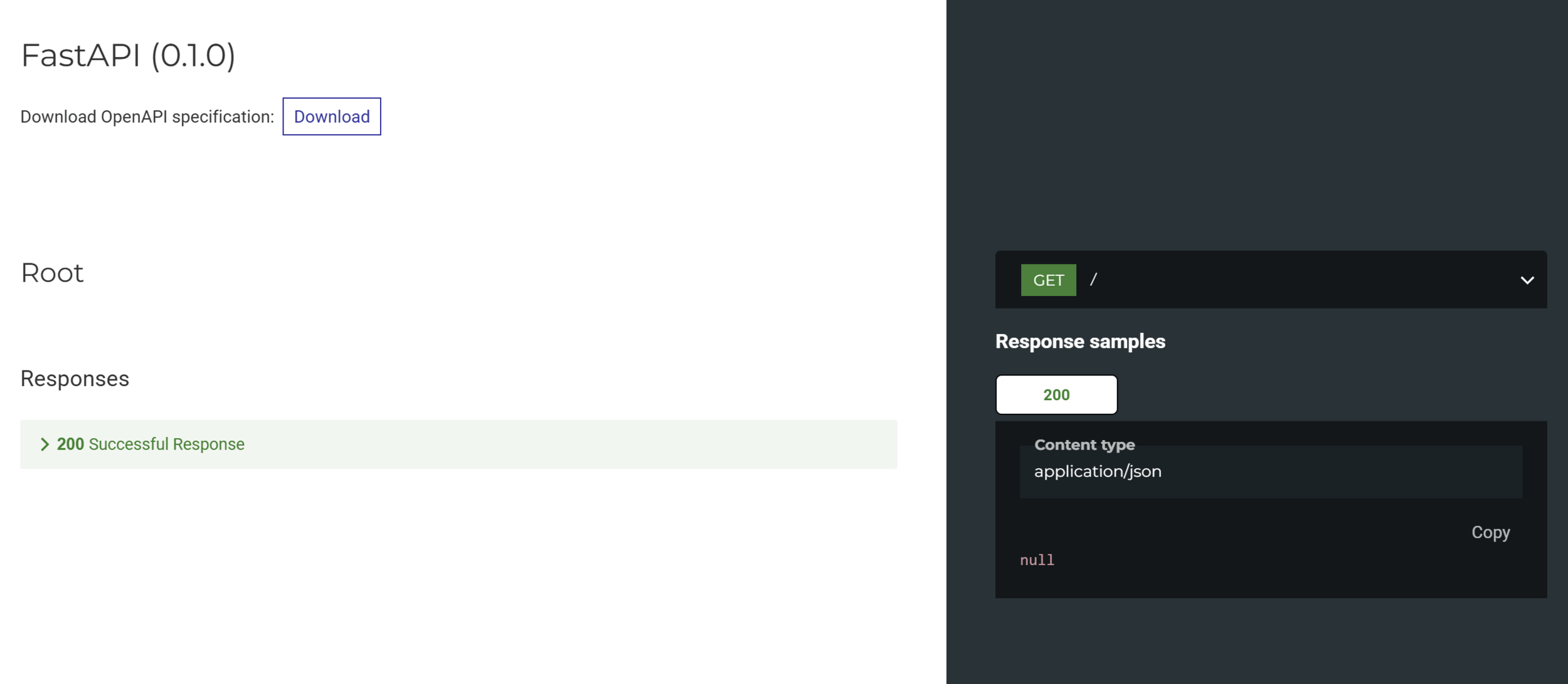
Hello World
所以我們剛剛做了什麼?
import uvicorn


if __name__ == "__main__":
    uvicorn.run(app = "app.app:app", reload = True)
main.py

一個很快的輕量python ASGI伺服器

gunicorn
app = FastAPI()
熱重載 hot reload
Hello World
所以我們剛剛做了什麼?
from fastapi import FastAPI

app = FastAPI()


@app.get("/")
async def root():
    return {"message": "Hello World"}
app.py
async 非同步 vs sync 同步
路徑操作
路徑操作函式
Hello World
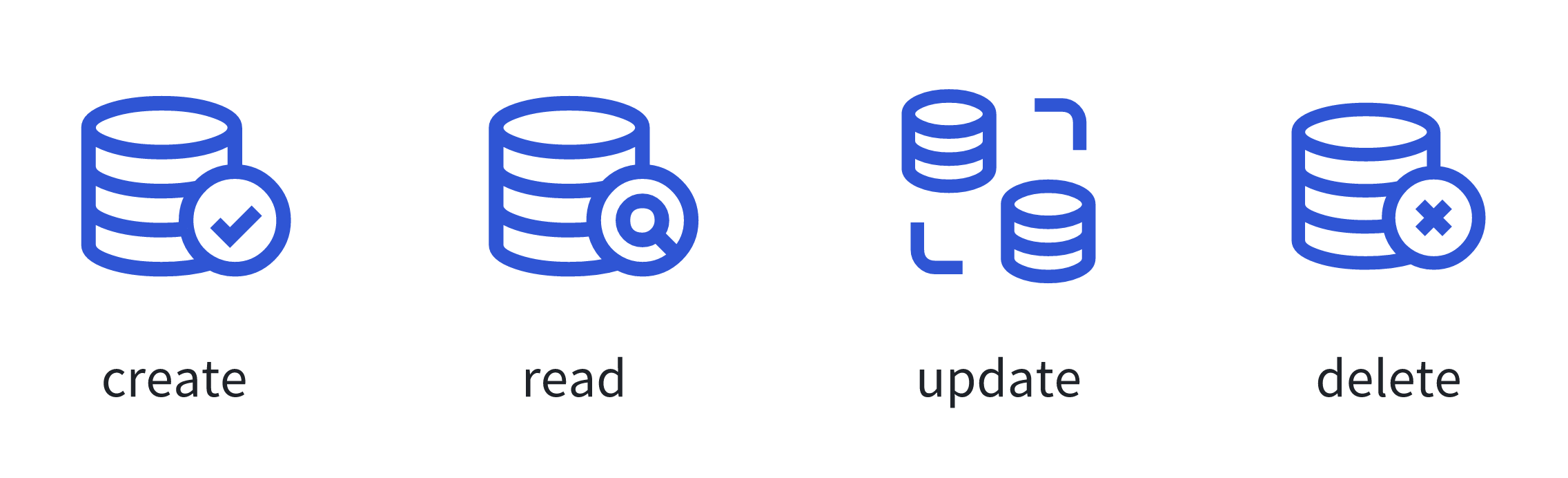
HTTP 請求方法
get - 取得資料(Read)
post - 創建資料(Create)
put - 更新資料(Update)
delete - 刪除資料
CRUD
還有其他比較少用的
head, connect, options, trace, patch
Hello World
HTTP 回應狀態碼
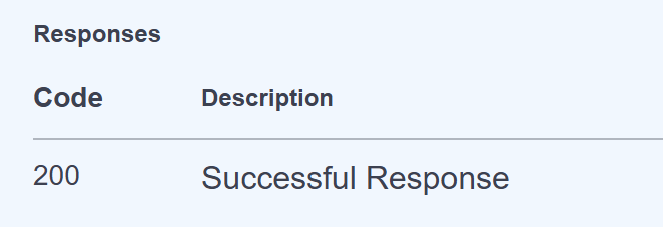
常見的回應碼:
- 2XX : 成功
- 4XX : 用戶端錯誤
- 5XX : 伺服器錯誤

FastAPI -
Path & Query
Path
從前面舉的例子中,我們有提到路徑。
路徑是後端一個很重要的概念,善用路徑有很多好處:
1. 你知道你在寫什麼
2. 方便加功能
3. 分析、分散流量

Path Parameter
Path parameter 路徑參數是路徑裡面的變數
@app.get("/order/{amount}")
async def get_pizza(amount):
    return f"You ordered {amount} pizza(s), and that would be {amount *399}$"
路徑的地方大括號裡面加參數名稱
函式裡面也要
現在我們可以在amount隨機打一個值,他會依據參數做回應
可以在開始跑程式之後去比方說 127.0.0.1:8000/order/2
也可以在剛剛介紹的/docs介面操作
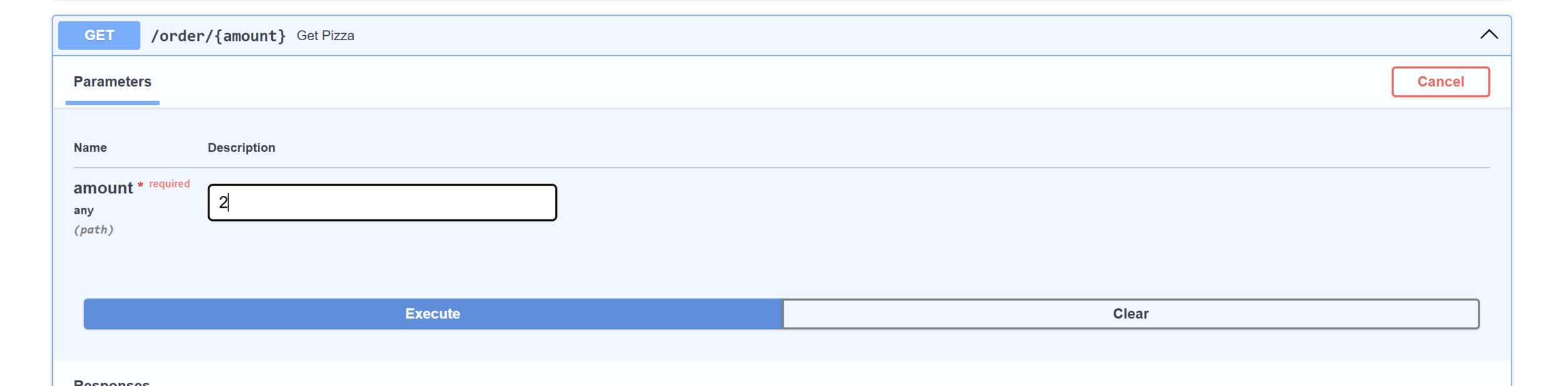
Path Parameter
然後你就會發現怪怪的

這是因為FastAPI並不知道你傳進去的參數要怎麼處理,所以他預設當作是字串
@app.get("/order/{amount}")
async def get_pizza(amount: int):
    return f"You ordered {amount} pizza(s), and that would be {amount *399}$"
在參數後面加上:資料型別就可以了

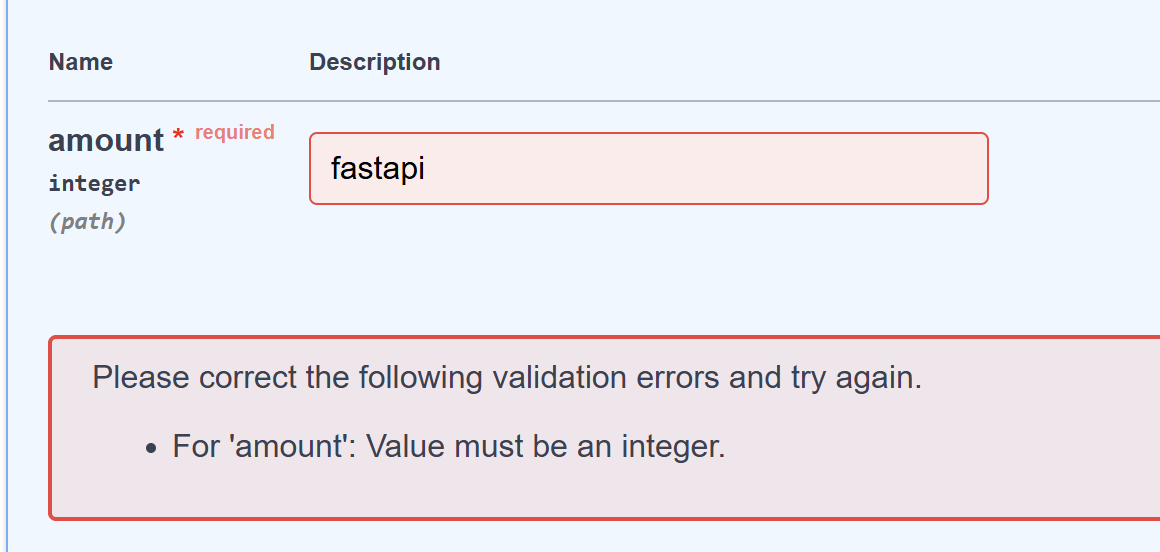
amount = 2
amount = fastapi


Query Parameter
Query parameter 查詢參數也是一個路徑裡的參數
在FastAPI中函式裡的非path變數會自動歸類為query
@app.get("/orders")
async def get_pizza(flavor: str, size: str):
    my_pizza = {"flavor": flavor, "size": size}
    return my_pizza
一樣可以用/docs或者手動去
http://127.0.0.1:8000/orders?flavor={flavor}&size={size}
@app.get("/orders")
async def get_pizza(flavor: str | None = None, size: str = "big"):
    if flavor:
        my_pizza = {"flavor": flavor, "size": size}
    else:
        my_pizza = {"size":size}
    return my_pizza
也可以加預設值
你也可以讓query是非必須的

Path vs Query
Path 跟 Query 聽起來非常的像,他們差在哪裡?
| Path | Query | |
|---|---|---|
| 必填? | 必填 | 選填 |
| 使用時機 | 確定的具體資源 ex: 類別、ID | 篩選、排序 |

當然兩者也可以一起用
練習題 - 1
你是一個咖啡廳裡的員工,平常上班都在摸魚
沒想到今天一來上班老闆就叫他幫忙寫一個菜單的篩選功能!請依照以下要求寫出一個查找品項功能:
1. 要有path 參數"category"
2. 要有query 參數 "is_iced" &"max_price"
3. is_iced預設值是 False, max_price預設值是70
4. 回傳內容是符合使用者輸入的三個參數的品項
menu = [
    {"name": "Americano", "category": "cafe", "is_iced": False, "price": 50},
    {"name": "Iced Americano", "category": "cafe", "is_iced": True, "price": 50},
    {"name": "Latte", "category": "cafe", "is_iced": False, "price": 60},
    {"name": "Iced Latte", "category": "cafe", "is_iced": True, "price": 60},
    {"name": "Mocha", "category": "cafe", "is_iced": False, "price": 75},
    {"name": "Matcha Latte", "category": "tea", "is_iced": False, "price": 70},
    {"name": "Iced Matcha", "category": "tea", "is_iced": True, "price": 70},
    {"name": "Oolong Tea", "category": "tea", "is_iced": False, "price": 40},
    {"name": "Iced Peach Tea", "category": "tea", "is_iced": True, "price": 45},
    {"name": "Mango Smoothie", "category": "smoothie", "is_iced": True, "price": 90},
]
菜單直接拿去用
練習題 - 1 解答
@app.get("/menu/{category}")
async def find_wanted_item(
    category: str,
    is_iced: bool = False,
    max_price: int = 70
):
    match_items = []
    for i in menu:
        if i["category"] == category and i["is_iced"] == is_iced and i["price"] <= max_price:
            match_items.append(i["name"])
    return match_items
Annotated註解,可以幫我們的query和path參數作補充或者做限制
from typing import Annotated
from fastapi import Query


@app.get("/find_pizza")
async def get_pizza(
    flavor: Annotated[str, Query(max_length = 50)],
    size: str = "big",
    price: Annotated[int, Query(ge = 0)] = 399
):
    my_pizza = {
        "flavor": flavor,
        "size": size,
        "price": price
    }
    return my_pizza
記得import
你可以用Query給你的查詢參數加上限制
Annotated
max_length是限制字串的長度
ge 是指greater equal大於等於
@app.get("/find_pizza2")
async def find_pizza2(
    flavor: str = Query(max_length=50, default = "mushroom")
):
    return flavor
其實你也可以不要用Annotated但不是那麼建議

一個比較完整的code展示到底可以加那些東西
Annotated
@app.get("/items/{item_id}")
async def read_items(
    item_id: Annotated[
        int,
        Path(
            title = "ID of item",
            ge = 0,
            le = 1000
        )
    ],
    q: Annotated[
        str | None,
        Query(
            alias="item-query",
            title="Query string",
            description="Query string for the items to search for",
            min_length=3,
            max_length=50,
            pattern="^fixedquery$",
            deprecated=True,
        ),
    ] = None,
):
    results = {"items": [{"item_id": "Foo"}, {"item_id": "Bar"}]}
    if q:
        results.update({"q": q})
    return results
regex
練習題 - 2
上次完成老闆的查找品項功能後,老闆覺得不錯,但是客人有時候會加一些奇怪的參數,請你幫忙把參數加上限制讓使用者不能亂用。
限制如下:
1. category 最長15個字元
2. max_price 只接受1-200的範圍
3. 給max_price加上一段文字簡單描述它的功能
菜單直接沿用上一題的
額外挑戰: 要求max_price參數須以"$"做結尾
練習題 - 2 解答
app.get("/menu_better/{category}")
async def find_wanted_item(
    category: Annotated[str, Path(max_length = 15)],
    is_iced: bool = False,
    max_price: Annotated[
        int,
        Query(
            ge = 1,
            le = 200,
            description="Filter by price. Must end with a dollar sign (e.g., '50$'). Price range: 1-200"
        )
    ] = 70
):
    match_items = []
    for i in menu:
        if i["category"] == category and i["is_iced"] == is_iced and i["price"] <= int(max_price[:-1]):
            match_items.append(i["name"])
    return match_items
沒有加挑戰
練習題 - 2 解答
@app.get("/menu_better/{category}")
async def find_wanted_item(
    category: Annotated[str, Path(max_length = 15)],
    is_iced: bool = False,
    max_price: Annotated[
        str,
        Query(
            pattern="^\d+\$$",
            description="Filter by price. Must end with a dollar sign (e.g., '50$'). Price range: 1-200"
        )
        ] = "70$"
):
    if int(max_price[:-1]) > 200 or int(max_price[:-1]) < 1:
        return "Out of price range for max_price parameter"
    match_items = []
    for i in menu:
        if i["category"] == category and i["is_iced"] == is_iced and i["price"] <= int(max_price[:-1]):
            match_items.append(i["name"])
    return match_items
有加挑戰
FastAPI -Body
Request Body
所以前面我們都在幹嘛?
我們在"取得"資料,現在我們要來教怎麼"存"資料
資料型態可以很複雜,前面我們"取得"資料可以用url,但是用url"存"資料很明顯有點不明智,所以我們會用body來完成這項工作

url

body
Pydantic

再傳送資料的時候我們需要確定有對的格式
FastAPI的解決方法是用Pydantic
Pydantic可以幹嘛?
- Type checking
- Data Conversion
- Automatic Error Generation
- Type hint
- FASTTTT
Pydantic
from pydantic import BaseModel
class NewPizza(BaseModel):
    special_name: str | None = None
    flavor: str
    price: int
    size: str = "12 inch"
首先我們要創建一個資料結構的藍圖(又稱Schema)
作法是創建一個class然後讓他繼承pydantic的BaseModel
裡面放資料名稱和型別,一樣可以有預設值
JS Frameworks: Zod & Joi
Django REST framework: serializer
Java Spring Boot: DTO
其他框架的方法
Post
pizza_list = []
@app.post("/pizzas")
async def create_pizza(pizza: NewPizza):
    my_pizza = pizza.model_dump()
    pizza_id = len(pizza_list) + 1
    my_pizza["id"] = pizza_id
    pizza_list.append(my_pizza)
    return my_pizza
接下來我們開始寫創建資料的函式
把傳進去的資料以字典形式取出來
再寫一個檢查有沒有更新到pizza_list
@app.get("/pizzas")
async def get_all_pizzas():
    return pizza_list
之後我們會用database但現在我們先用list
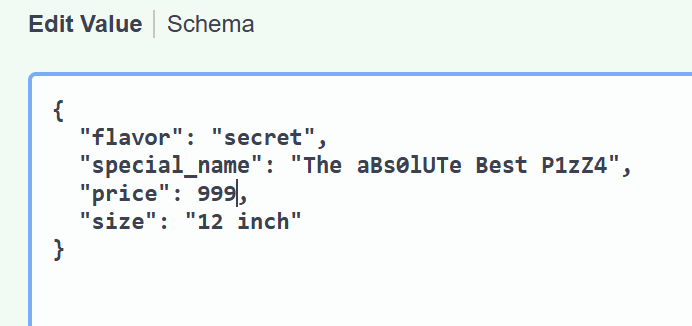
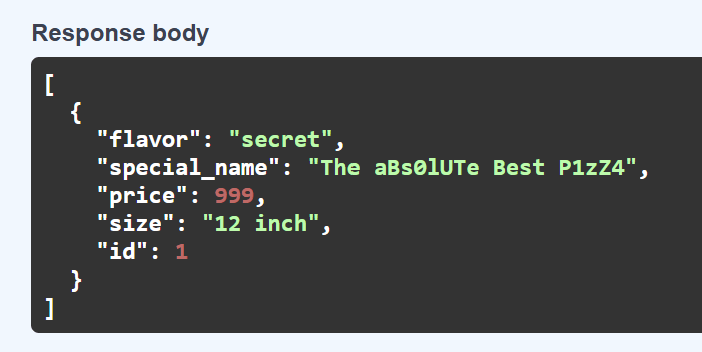
也可以配合Path& Query
@app.put("/pizzas/{id}")
async def update_pizza(id: int, pizza: NewPizza):
    for index, current_pizza in enumerate(pizza_list):
        if current_pizza["id"] == id:
            updated_pizza = pizza.model_dump()
            updated_pizza["id"] = id
            pizza_list[index] = updated_pizza

            return updated_pizza
    return "pizza not found"
除了post之外,put也時常搭配body
找到id對的pizza然後把他更新
練習題 - 3
半夜三點,老闆忽然打電話叫你幫他的點餐系統加一個功能。他覺得菜單只能手動更新太麻煩了,於是打算讓你寫一段程式讓他可以加入新的品項或者更新品項。
建議參考前面的範例
1. 寫一個NewDrink class
2. 寫一個put 函式
3. 寫一個post 函式
練習題 - 3 解答
class NewDrink(BaseModel):
    name: str
    category: str
    is_iced: bool
    price: int

@app.post("/menu_better")
async def create_drink(drink: NewDrink):
    new_drink = drink.model_dump()
    menu.append(new_drink)
    return new_drink

@app.put("/menu_better/{name}")
async def update_drink(name: str, drink: NewDrink):
    for index, current_drink in enumerate(menu):
        if current_drink["name"] == name:
            updated_drink = drink.model_dump()
            menu[index] = updated_drink

            return updated_drink
    return "drink not found"
Fields
就像我們可以為Path跟Query參數加上限制一樣,我們也可以用Fields幫我們的pydantic模型加上限制或補充
from pydantic import Field
class NewPizza(BaseModel):
    flavor: str
    special_name: str | None = Field(
        default = None,
        max_length = 20,
        description = "A cooler name for the pizza"
    )
    price: int = Field(
        default = 399,
        ge = 0,
        description = "price must be postivie"
    )
    size: str = "12 inch"
Nested Models
我們也可以做出更複雜的pydantic model,其中一個方法是在model裡面塞一個model,這種方法稱作Nested Models
class Image(BaseModel):
    name: str
    url: str

class NewPizza(BaseModel):
    flavor: str
    special_name: str | None = Field(
        default = None,
        max_length = 20,
        description = "A cooler name for the pizza"
    )
    price: int = Field(
        default = 399,
        ge = 0,
        description = "price must be postivie"
    )
    size: str = "12 inch"
    image: Image | None = None
Example Datas
@app.post("/pizzas_with_example")
async def create_pizza_with_example(
    pizza: Annotated[
        NewPizza,
        Body(
            examples = [
                    {
                        "flavor": "mushroom",
                        "price": 499
                    }
                ]
            )
        ]
    ):
    my_pizza = pizza.model_dump()
    pizza_id = len(pizza_list) + 1
    my_pizza["id"] = pizza_id
    pizza_list.append(my_pizza)
    return my_pizza
Body同樣可以配上Annotated,並且我們可以使用examples來呈現範例
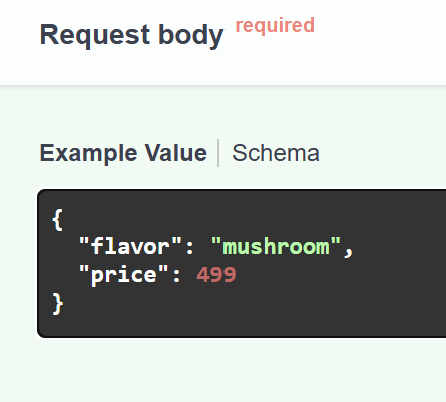
Example Datas
@app.post("pizza_with_multiple_examples")
async def create_pizza_with_multiple_examples(
    pizza: Annotated[
        NewPizza,
        Body(
            openapi_examples = {
                "normal": {
                    "value": {
                        "flavor": "mushroom",
                        "price": 499
                    }
                },
                "complete": {
                    "value":{
                        "flavor": "margheritta",
                        "special_name": "The Classic",
                        "price": 399,
                        "size": "16 inch",
                        "image": {
                            "name": "pizza",
                            "url": "https://cdn.loveandlemons.com/wp-content/uploads/2023/07/margherita-pizza-recipe.jpg"
                        }
                    }
                },
                "invalid":{
                    "value":{
                        "flavor": 299,
                        "price": "three hundred ninety nine"
                    }
                }
            }
        )
    ]
):
    my_pizza = pizza.model_dump()
    pizza_id = len(pizza_list) + 1
    my_pizza["id"] = pizza_id
    pizza_list.append(my_pizza)
    return my_pizza
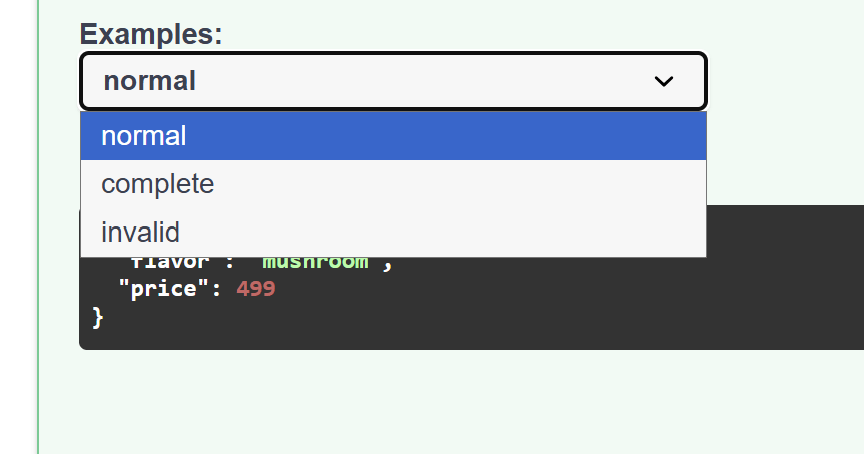
雖然說我們可以放不只一個example,/docs介面並不支援
如果想要更多example的話我們得用openapi_examples
每個example都是一個字典
練習題 - 4
老闆發現新增商品的操作有點困難他看不懂,於是又叫可憐的你幫忙加上簡易的防呆機制。除此之外他還想要幫商品都加上照片,請你幫剛剛的程式加上這些功能:
1. 在NewDrink class裡面加上image欄位
2. 幫post 函式加上多個example
3. 幫NewDrink class裡的name, category加上長度<20的限制,price加上>0的限制
練習題 - 4 解答
lass Image(BaseModel):
    name: str
    url: str

class NewDrink2(BaseModel):
    name: str = Field(max_length = 20)
    category: str = Field(max_length = 20)
    is_iced: bool
    price: int = Field(ge = 1)
    image: Image | None = None

@app.post("/menu_better_with_example/")
async def create_drink(
    drink: Annotated[
        NewDrink2,
        Body(
            openapi_examples ={
                "normal":{
                    "value":{
                        "name": "four season spring",
                        "category": "tea",
                        "is_iced": True,
                        "price": 50,
                        "image": {
                            "name": "just a picture",
                            "url": "https://i1.sndcdn.com/artworks-000101694590-cuxerh-t500x500.jpg"
                        }
                    }
                },
                "invalid":{
                    "value":{
                        "name": 231293801289,
                        "is_iced": "yes",
                        "price": "fifty"
                    }
                }
            }
        )
    ]
):
    new_drink = drink.model_dump()
    menu.append(new_drink)
    return new_drink
model_config
在使用pydantic models的時候我們很常會在最後面加上model_config以達到一些補充功能
from pydantic import ConfigDict

class NewDrink(BaseModel):
    name: str = Field(max_length = 20)
    category: str = Field(max_length = 20)
    is_iced: bool
    price: int = Field(ge = 1)
    image: Image | None

    model_config = ConfigDict(
        extra = "forbid",
        str_strip_whitespace = True,
        json_schema_extra = {
            "example": {
                "name": "Caramel Macchiato",
                "category": "cafe",
                "is_iced": True,
                "price": 70
            }
        }
    )
輸入資料必須跟要求嚴格相同
會把結尾空白去掉
通用範例
FastAPI -Router
Router


app = FastAPI()
router = APIRouter()
Router
使用router可以把app依據功能或性質拆成很多小的app
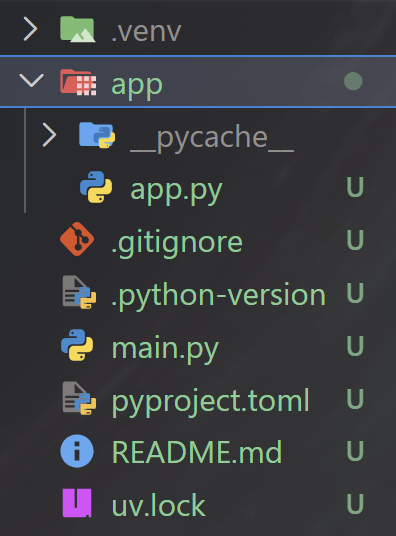
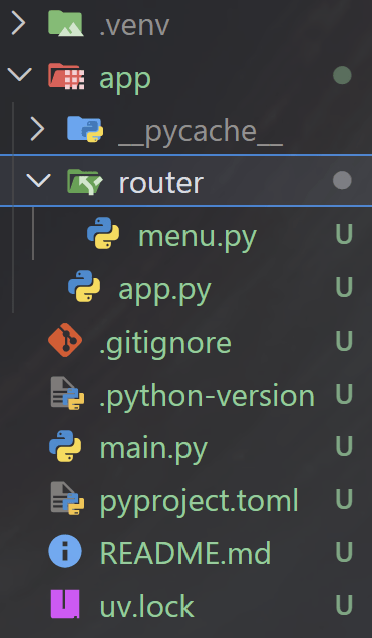
Step 1:
Router
Step 2: app.py
from app.routers import menu
app = FastAPI()
app.include_router(menu.router)
Step 3: menu.py
from fastapi import APIRouter, Path, Query, Body
from pydantic import BaseModel, Field
from typing import Annotated

router = APIRouter()

menu = [
    {"name": "Americano", "category": "cafe", "is_iced": False, "price": 50},
    {"name": "Iced Americano", "category": "cafe", "is_iced": True, "price": 50},
    {"name": "Latte", "category": "cafe", "is_iced": False, "price": 60},
    {"name": "Iced Latte", "category": "cafe", "is_iced": True, "price": 60},
    {"name": "Mocha", "category": "cafe", "is_iced": False, "price": 75},
    {"name": "Matcha Latte", "category": "tea", "is_iced": False, "price": 70},
    {"name": "Iced Matcha", "category": "tea", "is_iced": True, "price": 70},
    {"name": "Oolong Tea", "category": "tea", "is_iced": False, "price": 40},
    {"name": "Iced Peach Tea", "category": "tea", "is_iced": True, "price": 45},
    {"name": "Mango Smoothie", "category": "smoothie", "is_iced": True, "price": 90},
]

class Image(BaseModel):
    name: str
    url: str

class NewDrink(BaseModel):
    name: str = Field(max_length = 20)
    category: str = Field(max_length = 20)
    is_iced: bool
    price: int = Field(ge = 1)
    image: Image | None

@router.get("/menu/{category}")
async def find_wanted_item(
    category: Annotated[str, Path(max_length = 15, description = "The category to search for")],
    is_iced: bool = False,
    max_price: Annotated[
        str,
        Query(
            pattern="^\d+\$$",
            description="Filter by price. Must end with a dollar sign (e.g., '50$'). Price range: 1-200")
        ] = "70$"
):
    if int(max_price[:-1]) > 200 or int(max_price[:-1]) < 1:
        return "Out of price range for max_price parameter"
    match_items = []
    for i in menu:
        if i["category"] == category and i["is_iced"] == is_iced and i["price"] <= int(max_price[:-1]):
            match_items.append(i["name"])
    return match_items

@router.post("/menu/")
async def create_drink(
    drink: Annotated[
        NewDrink,
        Body(
            openapi_examples ={
                "normal":{
                    "value":{
                        "name": "four season spring",
                        "category": "tea",
                        "is_iced": True,
                        "price": 50
                    }
                },
                "invalid":{
                    "value":{
                        "name": 231293801289,
                        "is_iced": "yes",
                        "price": "fifty"
                    }
                }
            }
        )
    ]
):
    new_drink = drink.model_dump()
    menu.append(new_drink)
    return new_drink


@router.put("menu/{name}")
async def update_drink(name: str, drink: NewDrink):
    for index, current_drink in enumerate(menu):
        if current_drink["name"] == name:
            updated_drink = drink.model_dump()
            updated_drink["id"] = id
            menu[index] = updated_drink

            return updated_drink
    return "drink not found"
記得把裝飾器從@app改成@router
這裡我把前面那個練習題的東西搬過來了,你們也可以幫其他的endpoint做分類
Prefix & Tags
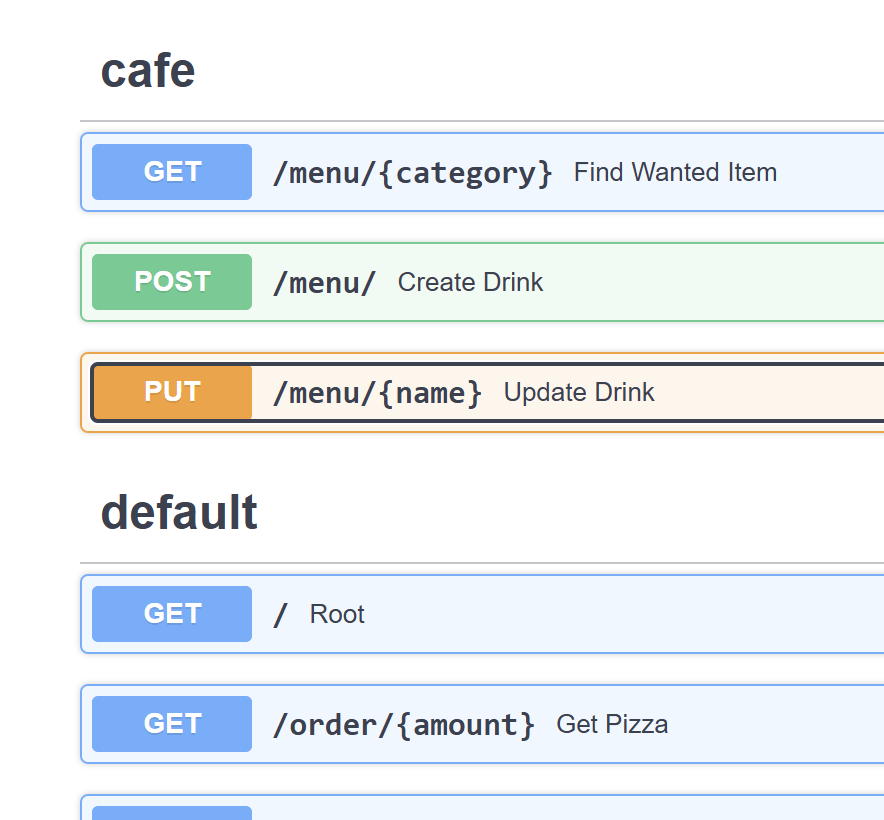
有時候我們路徑的重複度很高,我們可以用router裡的prefix功能來讓人生變輕鬆
現在我們寫的endpoint越來越多了,有點眼花,這時候我們需要tags來給endpoint打標籤,讓我們可以明確知道什麼東西在哪裡
router = APIRouter(
    prefix = "/menu",
    tags = ["cafe"]
)
還有一個dependencies之後解鎖
Database

SQLite
這次我們用的database是SQLite
- 輕量級
- 無須伺服器
- 零配置

不過要重頭開始學SQL語言有點太累了,所以我們這次用sql alchemy,用python就可以處理database
SQL Alchemy
這個看起來很可怕的東西算是起手式
不過我們只要寫一次就不用裡他了
from collections.abc import AsyncGenerator
from sqlalchemy.ext.asyncio import create_async_engine, async_sessionmaker, AsyncSession

SQLALCHEMY_DATABASE_URL = "sqlite+aiosqlite:///./test.db"

engine = create_async_engine(SQLALCHEMY_DATABASE_URL, echo = True)
async_session_local = async_sessionmaker(engine, expire_on_commit = False)

async def get_async_session() -> AsyncGenerator[AsyncSession, None]:
    async with async_session_local() as session:
        yield session
你要把你的db創建的位置,這裡是./test.db
先取得一個engine
session creator
取得session
session就是app跟database之間的橋樑
engine比較是處理SQL底層的東西
session是讓你用python處理SQL的東西
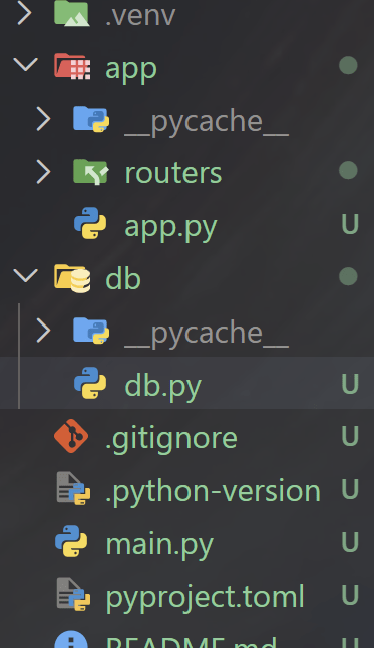
Tables
在SQL database裡面,資料是以"Table表格"的形式儲存的,我們可以依照自己的需求創建Table
from sqlalchemy.orm import DeclarativeBase

class Base(DeclarativeBase):
    pass

async def create_db_and_tables():
    async with engine.begin() as conn:
        await conn.run_sync(Base.metadata.create_all)
table的基本藍圖,我們創建的table都會繼承這個
連接到database檔案
from contextlib import asynccontextmanager
from db.db import create_db_and_tables

@asynccontextmanager
async def lifespan(app: FastAPI):
    await create_db_and_tables()
    yield

app = FastAPI(lifespan=lifespan)
db.py
app.py
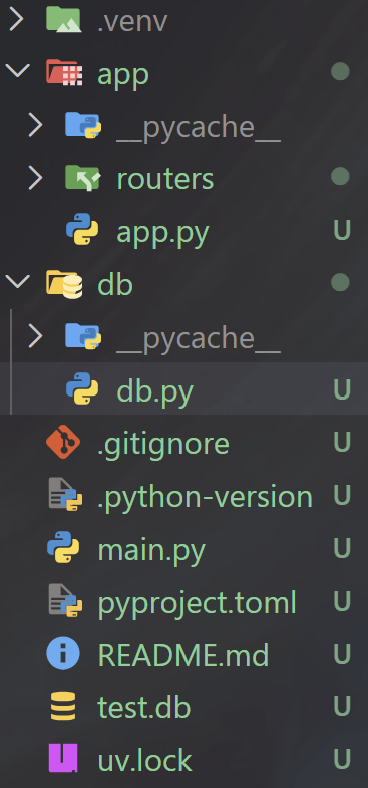
Tables
現在我們來創建一個table,這裡在db.py旁邊開一個models.py存放,當然你要直接放在db.py也可以
from sqlalchemy import Column, Integer, String, Boolean
from db.db import Base

class Pizza(Base):
    __tablename__ = "pizza"

    id = Column(Integer, primary_key = True, index = True)
    flavor = Column(String, index = True)
    price = Column(Integer)
    size = Column(String)
專用的類別
index可以讓他查找比較快
primary_key = True表示每個id都會是獨特的
from sqlalchemy.orm import Mapped, mapped_column
class Pizza(Base):
    __tablename__ = "pizza"

    id:     Mapped[int] = mapped_column(primary_key = True, index = True)
    flavor: Mapped[str] = mapped_column(index = True)
    price:  Mapped[int]
    size:   Mapped[str]
這是一個比較現代的寫法,建議這樣寫
Storing Data
from fastapi import Depends
from db.db import get_async_session
from sqlalchemy.ext.asyncio import AsyncSession
from db.models import Pizza


@app.post("/pizza_with_db")
async def create_pizza(
    pizza: NewPizza,
    session: AsyncSession = Depends(get_async_session)
):
    new_pizza = Pizza(
        flavor = pizza.flavor,
        price = pizza.price,
        size = pizza.size,
    )
    session.add(new_pizza)
    await session.commit()
    await session.refresh(new_pizza)

    return new_pizza
session.add 加進入暫存空間
session.commit
把暫存存進database
session.refresh
存db裡取出
創建一個session
這邊是寫在app.py,你們可依照自己的分類
Storing Data
from fastapi import Depends
from db.db import get_async_session
from sqlalchemy.ext.asyncio import AsyncSession
from db.models import Pizza


@app.post("/pizza_with_db")
async def create_pizza(
    pizza: NewPizza,
    session: AsyncSession = Depends(get_async_session)
):
    new_pizza = Pizza(
        flavor = pizza.flavor,
        price = pizza.price,
        size = pizza.size,
    )
    session.add(new_pizza)
    await session.commit()
    await session.refresh(new_pizza)

    return new_pizza
session.add 加進入暫存空間
session.commit
把暫存存進database
session.refresh
存db裡取出
創建一個session
這邊是寫在app.py,你們可依照自己的分類
Depends
async def common_parameters(q: str | None = None, skip: int = 0, limit: int = 100):
    return {"q": q, "skip": skip, "limit": limit}


@app.get("/items/")
async def read_items(commons: Annotated[dict, Depends(common_parameters)]):
    return commons
Depends可以讓你"依靠"另外一個函式,他可以把這個函式包進來放在參數
@app.post("/pizza_with_db")
async def create_pizza(
    pizza: NewPizza,
    session: AsyncSession = Depends(get_async_session)
):
Storing Data
看剛剛的程式我們會發現我們在app.py裡面import了很多db的東西,這不是一個很好的事,久而久之我們程式會變得非常亂
把code整理乾淨是一個很重要的事情,漸漸地你們會需要用到,可以參考這裡
Fetching Data
現在我們可以存資料了要怎麼取資料?
@app.get("/pizza_with_db/{pizza_id}")
async def get_pizza(
    pizza_id: int,
    session: AsyncSession = Depends(get_async_session)
):
    result = await session.execute(select(Pizza).where(Pizza.id == pizza_id))
    pizza = result.scalar_one_or_none()

    if not pizza:
        return "post not found"

    return pizza
取出來的東西會是一個包裝起來的tuple不能直接用,我們會需要用一些函式把包裝拆掉
也可以用多個判斷依據查資料,要用","隔開
SQL Injection
聽說你們昨天學了SQL Injection,所以我現在這個會被Inject嗎?
基本上按照我剛剛寫得那樣不會,sqlalchemy挺安全的
唯一可能會出問題就是你用string寫Raw SQL
malicious_query = text(f"SELECT * FROM drinks WHERE name = '{user_input}'")
result = await db.execute(malicious_query)
query = select(DrinkDB).where(DrinkDB.name == user_input)
result = await db.execute(query)練習題 - 5
現在咖啡廳越來越多人來了,老闆覺得用list存菜單並不是很正式,所以決定叫你改成使用database。請把剛剛的endpoint改成存database存取資料
from fastapi import APIRouter, Path, Query, Body
from pydantic import BaseModel, Field, ConfigDict
from typing import Annotated

router = APIRouter(
    prefix = "/menu",
    tags = ["cafe"]
)

menu = [
    {"name": "Americano", "category": "cafe", "is_iced": False, "price": 50},
    {"name": "Iced Americano", "category": "cafe", "is_iced": True, "price": 50},
    {"name": "Latte", "category": "cafe", "is_iced": False, "price": 60},
    {"name": "Iced Latte", "category": "cafe", "is_iced": True, "price": 60},
    {"name": "Mocha", "category": "cafe", "is_iced": False, "price": 75},
    {"name": "Matcha Latte", "category": "tea", "is_iced": False, "price": 70},
    {"name": "Iced Matcha", "category": "tea", "is_iced": True, "price": 70},
    {"name": "Oolong Tea", "category": "tea", "is_iced": False, "price": 40},
    {"name": "Iced Peach Tea", "category": "tea", "is_iced": True, "price": 45},
    {"name": "Mango Smoothie", "category": "smoothie", "is_iced": True, "price": 90},
]

class Image(BaseModel):
    name: str
    url: str

class NewDrink(BaseModel):
    name: str = Field(max_length = 20)
    category: str = Field(max_length = 20)
    is_iced: bool
    price: int = Field(ge = 1)
    image: Image | None

    model_config = ConfigDict(
        extra = "forbid",
        str_strip_whitespace = True,
        json_schema_extra = {
            "example": {
                "name": "Caramel Macchiato",
                "category": "cafe",
                "is_iced": True,
                "price": 70
            }
        }
    )

@router.get("/{category}")
async def find_wanted_item(
    category: Annotated[str, Path(max_length = 15, description = "The category to search for")],
    is_iced: bool = False,
    max_price: Annotated[
        str,
        Query(
            pattern="^\d+\$$",
            description="Filter by price. Must end with a dollar sign (e.g., '50$'). Price range: 1-200")
        ] = "70$"
):
    if int(max_price[:-1]) > 200 or int(max_price[:-1]) < 1:
        return "Out of price range for max_price parameter"
    match_items = []
    for i in menu:
        if i["category"] == category and i["is_iced"] == is_iced and i["price"] <= int(max_price[:-1]):
            match_items.append(i["name"])
    return match_items

@router.post("/")
async def create_drink(
    drink: Annotated[
        NewDrink,
        Body(
            openapi_examples ={
                "normal":{
                    "value":{
                        "name": "four season spring",
                        "category": "tea",
                        "is_iced": True,
                        "price": 50
                    }
                },
                "invalid":{
                    "value":{
                        "name": 231293801289,
                        "is_iced": "yes",
                        "price": "fifty"
                    }
                }
            }
        )
    ]
):
    new_drink = drink.model_dump()
    menu.append(new_drink)
    return new_drink


@router.put("/{name}")
async def update_drink(name: str, drink: NewDrink):
    for index, current_drink in enumerate(menu):
        if current_drink["name"] == name:
            updated_drink = drink.model_dump()
            updated_drink["id"] = id
            menu[index] = updated_drink

            return updated_drink
    return "drink not found"
可以直接抄這個menu.py
Image可以先忽略它,當然如果你們做完了要挑戰也行
練習題 - 5 解答
from fastapi import APIRouter, Path, Query, Body
from pydantic import BaseModel, Field, ConfigDict
from typing import Annotated

router = APIRouter(
    prefix = "/menu",
    tags = ["cafe"]
)

menu = [
    {"name": "Americano", "category": "cafe", "is_iced": False, "price": 50},
    {"name": "Iced Americano", "category": "cafe", "is_iced": True, "price": 50},
    {"name": "Latte", "category": "cafe", "is_iced": False, "price": 60},
    {"name": "Iced Latte", "category": "cafe", "is_iced": True, "price": 60},
    {"name": "Mocha", "category": "cafe", "is_iced": False, "price": 75},
    {"name": "Matcha Latte", "category": "tea", "is_iced": False, "price": 70},
    {"name": "Iced Matcha", "category": "tea", "is_iced": True, "price": 70},
    {"name": "Oolong Tea", "category": "tea", "is_iced": False, "price": 40},
    {"name": "Iced Peach Tea", "category": "tea", "is_iced": True, "price": 45},
    {"name": "Mango Smoothie", "category": "smoothie", "is_iced": True, "price": 90},
]

class Image(BaseModel):
    name: str
    url: str

class NewDrink(BaseModel):
    name: str = Field(max_length = 20)
    category: str = Field(max_length = 20)
    is_iced: bool
    price: int = Field(ge = 1)
    image: Image | None

    model_config = ConfigDict(
        extra = "forbid",
        str_strip_whitespace = True,
        json_schema_extra = {
            "example": {
                "name": "Caramel Macchiato",
                "category": "cafe",
                "is_iced": True,
                "price": 70
            }
        }
    )

@router.get("/{category}")
async def find_wanted_item(
    category: Annotated[str, Path(max_length = 15, description = "The category to search for")],
    is_iced: bool = False,
    max_price: Annotated[
        str,
        Query(
            pattern="^\d+\$$",
            description="Filter by price. Must end with a dollar sign (e.g., '50$'). Price range: 1-200")
        ] = "70$"
):
    if int(max_price[:-1]) > 200 or int(max_price[:-1]) < 1:
        return "Out of price range for max_price parameter"
    match_items = []
    for i in menu:
        if i["category"] == category and i["is_iced"] == is_iced and i["price"] <= int(max_price[:-1]):
            match_items.append(i["name"])
    return match_items

@router.post("/")
async def create_drink(
    drink: Annotated[
        NewDrink,
        Body(
            openapi_examples ={
                "normal":{
                    "value":{
                        "name": "four season spring",
                        "category": "tea",
                        "is_iced": True,
                        "price": 50
                    }
                },
                "invalid":{
                    "value":{
                        "name": 231293801289,
                        "is_iced": "yes",
                        "price": "fifty"
                    }
                }
            }
        )
    ]
):
    new_drink = drink.model_dump()
    menu.append(new_drink)
    return new_drink


@router.put("/{name}")
async def update_drink(name: str, drink: NewDrink):
    for index, current_drink in enumerate(menu):
        if current_drink["name"] == name:
            updated_drink = drink.model_dump()
            updated_drink["id"] = id
            menu[index] = updated_drink

            return updated_drink
    return "drink not found"
Auth
Authentication

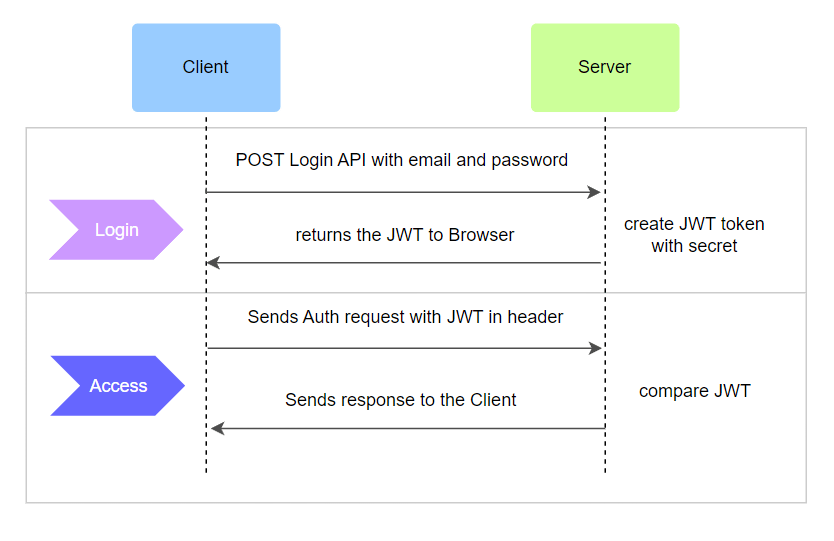
這個範圍的東西有點多,然後坦白講Auth跟我們前面講的東西比起來或許有點跳級,聽起來覺得有點籠統是正常的
User Table
在搞定登入系統前我們需要在db裡加入存使用者資料的地方
from fastapi_users.db import SQLAlchemyUserDatabase, SQLAlchemyBaseUserTableUUID
from sqlalchemy import ForeignKey
from sqlalchemy.orm import relationship
import uuid
from fastapi import Depends
from sqlalchemy.ext.asyncio import AsyncSession
from db.db import get_async_session


class User(SQLAlchemyBaseUserTableUUID, Base):
    pizzas = relationship("Pizza", back_populates = "creator")

class Pizza(Base):
    __tablename__ = "pizza"

    id:     Mapped[int] = mapped_column(primary_key = True, index = True)
    creator_id: Mapped[uuid.UUID] = mapped_column(ForeignKey("user.id"), nullable = False)
    flavor: Mapped[str] = mapped_column(index = True)
    price:  Mapped[int]
    size:   Mapped[str]

    creator = relationship("User", back_populates = "pizzas")

 async def get_user_db(session: AsyncSession = Depends(get_async_session)):
    yield SQLAlchemyUserDatabase(session, User)
這裡我們直接用fastapi內建的table
relationship跟ForeignKey可以把兩個table連在一起
JWT 的一堆複雜東西
開一個user.py,我們在做一些Auth東西
import uuid
from fastapi import Depends
from fastapi_users import BaseUserManager, FastAPIUsers, UUIDIDMixin, models
from fastapi_users.authentication import (
    AuthenticationBackend,
    BearerTransport,
    JWTStrategy
)
from fastapi_users.db import SQLAlchemyUserDatabase
from db.models import User, get_user_db
要import一堆東西
JWT 的一堆複雜東西
開一個user.py,我們在做一些Auth東西
SECRET = "fiasjdihuhagur932u841ij"

class UserManager(UUIDIDMixin, BaseUserManager[User, uuid.UUID]):
    reset_password_token_secret = SECRET
    verification_token_secret = SECRET


async def get_user_manager(user_db: SQLAlchemyUserDatabase = Depends(get_user_db)):
    yield UserManager(user_db)

bearer_transport = BearerTransport(tokenUrl = "auth/jwt/login")

def get_jwt_strategy():
    return JWTStrategy(secret = SECRET, lifetime_seconds = 3600)

auth_backend  = AuthenticationBackend(
    name = "jwt",
    transport = bearer_transport,
    get_strategy = get_jwt_strategy
)

fastapi_users = FastAPIUsers[User, uuid.UUID](get_user_manager, [auth_backend])
current_active_user = fastapi_users.current_user(active = True)
這是我隨便打的token,這邊偷懶直接放
做專案的時候記得要用.env
規範你一些User Auth Token的生成
在/auth/jwt/login這個地方發token
取得一個 JWT strategry object
創建 auth backend
連接起來
現在我們要把剛剛寫的東西連接到app.py
from user import auth_backend, current_active_user, fastapi_users
from fastapi_users import schemas
import uuid
from db.models import User

class UserRead(schemas.BaseUser[uuid.UUID]):
    pass

class UserCreate(schemas.BaseUserCreate):
    pass

class UserUpdate(schemas.BaseUserUpdate):
    pass

app.include_router(fastapi_users.get_auth_router(auth_backend), prefix = "/auth/jwt", tags = ["auth"])
app.include_router(fastapi_users.get_register_router(UserRead, UserCreate), prefix = "/auth", tags = ["auth"])
app.include_router(fastapi_users.get_reset_password_router(), prefix = "/auth", tags = ["auth"])
app.include_router(fastapi_users.get_verify_router(UserRead), prefix = "/auth", tags = ["auth"])
app.include_router(fastapi_users.get_users_router(UserRead, UserUpdate), prefix = "/users", tags = ["users"])
創建使用者系統的登入、註冊、改密碼、驗證...
使用者讀、寫、創建時使用的模型
概念跟我們之前用的Pizza, Drink模型是一樣的
這裡我們直接繼承fastapi_users提供的schema
當然裡面還可以加更多欄位
把User系統結合endpoint
現在我們要把剛剛寫的東西連接到app.py
@app.post("/pizza_with_db")
async def create_pizza(
    pizza: NewPizza,
    session: AsyncSession = Depends(get_async_session),
    user: User = Depends(current_active_user)
):
    new_pizza = Pizza(
        creator_id = user.id,
        flavor = pizza.flavor,
        price = pizza.price,
        size = pizza.size,
    )
    session.add(new_pizza)
    await session.commit()
    await session.refresh(new_pizza)

    return new_pizza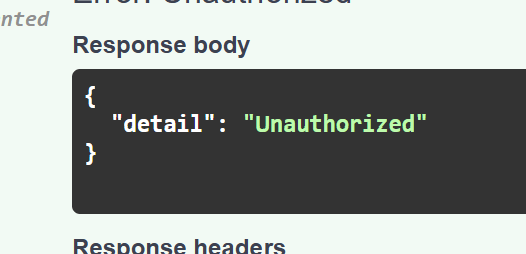
沒登入的話就會顯示:
下課!!!!!