Nuxt.js: isomorphic Vue.js made easy, fast and fun
http://bit.ly/ijs-nuxt
Follow the talk on your screen!
Who am I?
David Guijarro
Web Chapter Lead at
SHARE NOW (formerly car2go)
Get in touch!
david.guijarro@share-now.com
twitter.com/davguij
What is ?

- Opinionated Web framework
- Built on top of Vue.js
- Component-based
- Single file components (SFC's)
What is ?
- Codeless SSR & static site generation 🎉
- Codeless routing
- Codeless state management
- More codeless stuff...
- Works out of the box, but still configurable!
When to use it?
- Public websites
- Fast first meaningful paint
- SEO
- Fully-transactional webapps


How to use it?
Content
Database, API...
Middleware
Transform
Cache
Nuxt.js
Browser
Android
iOS
Super cool device
Let's do this! 💪
Start the project! 🚀
- Choose your UI framework
- Choose your server-side framework
- Choose your testing framework
- Insta PWA
- Linting
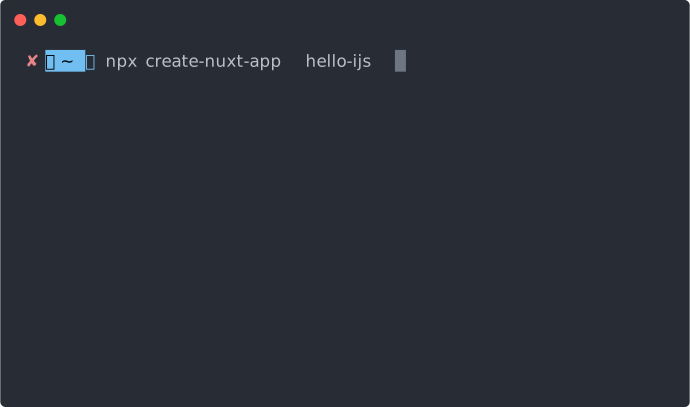
Building a new page
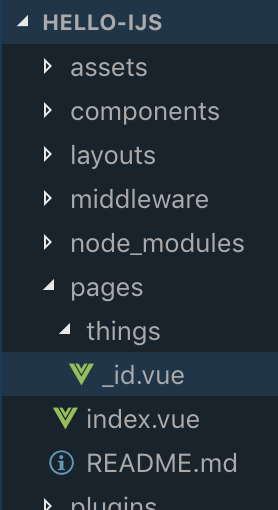
Page === route
/pages/*.vue ➠ 🧙♂️ ➠ routes
/pages/**/*.vue ➠ 🧙♂️ ➠ nested routes
_id.vue ➠ 🧙♂️ ➠ this.$route.params.id
Linking to new page
<nuxt-link to="/somewhere">Go somewhere</nuxt-link>Comes with a surprise...
Codeless link prefetching!
Making the new page dynamic
Grab dynamic path parameters with
this.$route.params
// returns object with parameters
Use them directly in your markup
<h3>Selected language: {{$route.params.language}}</h3>Making the new page dynamic
Use the asyncData lifecycle method and the path parameters to decide what to render on page initialization
const languages = new Map();
languages.set('english', 'Hello, iJS London 2019! So glad to be here!');

export default {
    asyncData({params}) {
        return {translatedGreeting: languages.get(params.language)};
    }
}
⚠️
- "this" cannot be used inside "asyncData()" because the component is not yet instantiated
- "asyncData()" is only available in "pages", not in child components
Custom <head>'s
nuxt.config.js
export default {
  // ...
  head: {
    titleTemplate: 'This is the global title',
    meta: [{
      hid: 'description',
      name: 'description',
      content: 'This is the global description'
    }]
  }
  // ...
}
export default {
head() {
return {
title: 'Title for this page only',
meta: [{
hid: 'description',
name: 'description',
content: 'Description for this page only'
}]
};
}
}Component override
More <head> goodies
- Child components head() can override parents'
- Avoided duplication thanks to 'hid' property
- Any <head> element can be programmatically set
- Canonical links
- <html>'s "lang" attribute
- Injected <script> tags...
- <noscript>
Let's get interactive
Client-side hydration
Hydration refers to the client-side process during which the static HTML sent by the server turns it into dynamic DOM that can react to client-side data changes.
Static HTML ➠ Interactive SPA
Typical usecase
Server
Client
- Markup and styling for first visited page
- Interactivity on first visited page (including navigation)
- Content for next pages
"window" is undefined 😱
- Remember: same codebase for server and client
- No window object or browser APIs in Node.js
<no-ssr placeholder="Loading...">
  <!-- this component will only be rendered on client-side -->
  <awesome-component />
</no-ssr>
// nuxt.config.js
export default {
plugins: [
{ src: '~/plugins/both-sides.js' },
{ src: '~/plugins/client-only.js', mode: 'client' },
{ src: '~/plugins/server-only.js', mode: 'server' }
]
}
export default {
  methods: {
    clientOnlyMethod() {
      if (process.client) {
        window.something();
      }
      return;
    }
  }
}
{Experiment 💡} Lazy hydration
Goal: improve time-to-interactive
- Several different "presentational" components in one page
- Decide which ones to hydrate
- Decide hydration order
- Webpack code splitting + dynamic imports ❤️
npm i vue-lazy-hydrationState management
- index.js ➠ 🧙♂️ ➠ root module
- other JS files ➠ 🧙♂️ ➠ namespaced modules
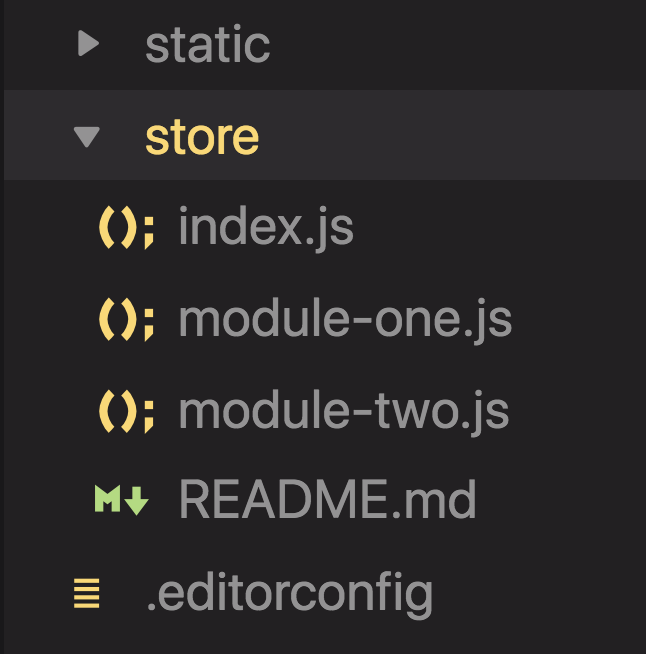
⚠️ index.js is mandatory!
- "fetch()" dispatches actions on server side
- "asyncData()" is still useful for non-store, initial actions
- Both can be used at the same time
- Only in "pages", not in child components
asyncData() ➠ fetch()
⚠️ "this" cannot be used inside neither "asyncData()" nor "fetch()" because the component is not yet instantiated
- Lifecycle method, only available inside "/store/index.js"
- Populates the store once when server starts
- Useful for loading configs, translations...
nuxtServerInit()
export const actions = {
  async nuxtServerInit({ dispatch }) {
    await dispatch('config/fetch');
  }
};
Awesome! What else?
nuxt.config.js
- Sensible defaults (convention over configuration)...
- ... but everything is configurable
- env vars
- router config
- source directory 🧐
- global styles
- ...
Modules
- Easily extend functionality
- Both official and community-maintained
- Find desired module
- "npm-install" it
- Add it to "modules" in nuxt.config.js
- Enjoy!
http requests
- Browsers can make library-less http requests, but Node.js servers can't (*)
- @nuxt/http
- Wraps ky-universal, which wraps ky
- @nuxtjs/axios
- Wraps axios
- "create-nuxt-app" ➠ 🧙♂️
http requests (part 2)
- Cross-domain requests only work on server-side running code
- on asyncData() or fetch(), only on first page load
- Solution?
// nuxt.config.js

module.exports = {
  modules: ['@nuxtjs/axios', '@nuxtjs/proxy'],
  proxy: {
    '/api': {
      target: 'http://example.com',
      pathRewrite: {
        '^/api': '/',
      },
    },
  },
};
Some more very cool modules
- @nuxtjs/pwa
- create-nuxt-app 🧙♂️
- @nuxtjs/auth
- @nuxtjs/component-cache
- v-for lists!
- @nuxtjs/google-tag-manager
- @nuxtjs/ngrok
- Expose localhost
Layouts
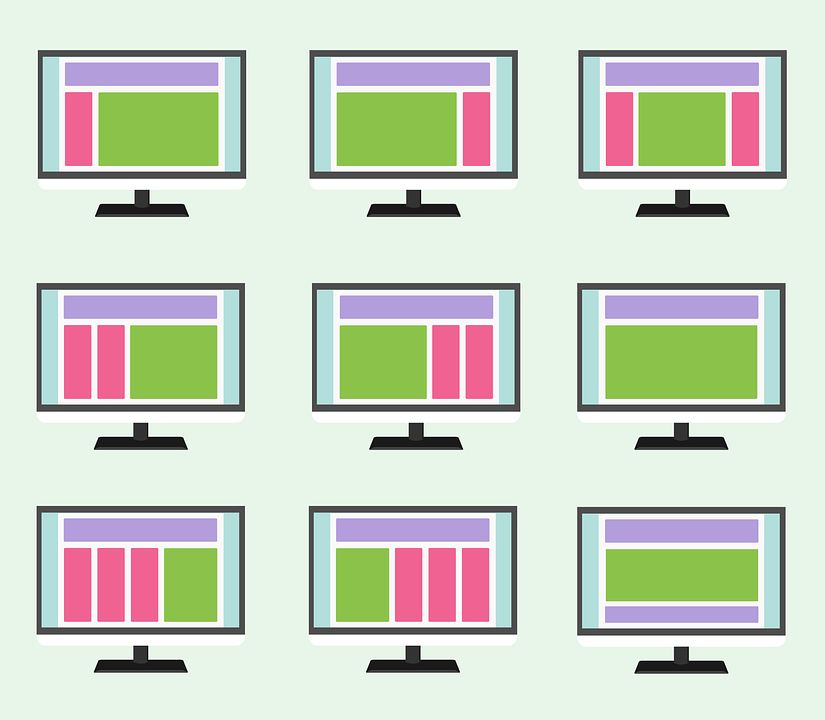
Layouts
- Page "skeleton"
- Header, footer, logo, grid...
- "default" one
- Can be multiple
- Need <nuxt /> to render page
- Page can define which one to use
Building custom layouts
default.vue
<template>
  <div>
    <header>
      <h1>Welcome</h1>
    </header>
    <main>
      <nuxt/>
    </main>
  </div>
</template>
with-header.vue
<template>
  <nuxt />
</template>
with-sidebar.vue
<template>
  <div>
    <main>
      <nuxt/>
    </main>
    <aside>
      <my-sidebar />
    </aside>
  </div>
</template>
Asigning custom layouts
one-page.vue
export default {
  layout: 'with-header'
  // ...
}
export default {
  layout: 'with-sidebar'
  // ...
}
another-page.vue
💁♂️ If no "layout" property, "default" is assumed
For free
but still customizable!
Loading indicator
// nuxt.config.js

export default {
  loading: '~/components/loading.vue'
}
Error pages
// pages/error.vue

<template>
  <div class="container">
    <h1 v-if="error.statusCode === 404">Page not found</h1>
    <h1 v-else>An error occurred</h1>
    <nuxt-link to="/">Home page</nuxt-link>
  </div>
</template>

<script>
export default {
  props: ['error'],
}
</script>
Navigation transitions
👇
Thank you! 🙏 💜
Get in touch!
david.guijarro@share-now.com
twitter.com/davguij

https://slides.com/davguij/ijs-nuxtjs