jQuery
Let's control our webpage!
Presentor: Flower, YoYo
Date: 2018-11-29
Link: https://goo.gl/7zntkd
What would we do today?
Notes
更厲害的!
Remember JS?
大家應該都忘了吧Q
來幫大家複習個:
http://slides.com/jerryshey/javascript
However...
該怎麼讓網頁上的東西(element)動起來呢?
1. 先選取那個element,也可以是一個group
2. 想對它做什麼事
>///<
Some example
If we write in vanilla.js
(也就是沒有使用任何套件、框架、函式庫的js)
1. select by tag (multiple)
document.getElementsByTagName("p")
3. select by id (single)
document.getElementById("super")
2. select by class (multiple)
document.getElementsByClassName("super")
QAQ
The only powerful I found
1. select by selector (single)
document.querySelector('<selector>')
2. select by selector (multiple)
document.querySelectorAll('<selector>')
Still too long to memorize
We DO need a candy
jQuery
What is jQuery?
A JavaScript Library, it simplifies the mentioned queries.
Furthermore, it extends some basic function of JavaScript.
Hands On
啊! selector 都忘了
Usage
$('<selector>')
1. select an element
Usage
$('<selector>').methodName();
2. After selecting an element, you'll need to deal with it.
What action we would like to do?
add, update, delete, traversal
Add
$('<parent_element>').append(<child_element>);
$('<child_element>').appendTo(<parent_element>);
Child is added to the parent
Parent adds child
Update
$('<input_selector>').val(<value>);
$('<selector>').html(<everything>);
$('<selector>').text('<plain_text>');
Only for tag <input>, <textarea>, and so on.
The common usage
Delete
$('<selector>').remove();
It's easy, just call
Traversal
$('<parent_selector>').find('<child_selector>');
$('<parent_selector>').children('<child_selector>');
$('<child_selector>').parent('<parent_selector>');
$('<child_selector>').parents('<parent_selector>');
$('<selector>').siblings('<brother_selector>');
Find children (children找兒女,find會一直找到曾曾...孫)
Find parents (parent找父母,parents會一直找到曾祖...父母)
Find siblings (找兄弟姊妹平輩)
How to include JQuery?
// 給個範例?
<script src="//code.jquery.com/jquery-3.1.1.min.js"></script>
Let's go!
Part II
Demo
Simple Notelist
HTML Skeleton
<div id="main">
  <div class="form">
    <div class="field">
      <input type="text" name="work" id="input-note" placeholder="Please enter something..."/>
      <button id="btn-add">Submit</button>
    </div>
  </div>
  <div id="note-list">
    <div class="item" id="note-template">
      <span class="text">我是一個範例的note</span>
      <span class="action">
        <button class="btn-edit">edit</button>
        <button class="btn-delete">delete</button>
      </span>
    </div>
  </div>
</div>
CSS
body {
  background: #ccc;
}

#main {
  width: 400px;
}

#note-template {
  /*display: none;*/
}

.form .field {
  display: flex;
  width: 100%;
}

.form .field input {
  display: flex;
  width: 100%;
}

.item {
  position: relative;
  margin-bottom: 4px;
  min-height: 24px;
  max-height: 24px;
}

.item .text {
  position: absolute;
  height: 40px;
  line-height: 40px;
  top: 0;
  left: 0;
  bottom: 0;
  padding: 0 5px;
}

.item .action {
  position: absolute;
  top: 5px;
  right: 0;
  bottom: 0;
}
Get "Ready"
$(document).ready(function() {
  /*
    When code start to execute from here, it indicates that every HTML element is ready.
    That is, you can manipulate them as your expect.

    Therefore, you should write down your code here this time and almost time.

    Such as click events of buttons, manipulating elements,
    activating plugins and so on.

  */
});
Append a new note - step 1
// Bind the click event to addButton
$("#btn-add").click(function() {
  submit();
});

// After clicking the button, it should submit.
function submit() {
  // 1. Get the value of input
  var note = $("#input-note").val();

  // 2. if the value is blank, it should not be used;
  if (note === '') {
    alert("Please type something...");
    return;
  }

  // 3. Append the note
  appendNote(note);

  // 4. Reset the input
  clearInput();
}
function appendNote(note) {
// First, print out the note we are going to append.
console.log("new note: ", note);
/*
Second, we are going to create a note element.
Since there is a template already,
we can clone it and use it without recreating;
however, don't forget to remove "id", because the attribute "id" should be unique.
*/
var newNote = $("#note-template").clone().removeAttr("id");
// Third, find the "text" part and modify its value
newNote.find(".text").text(note);
}Append a new note - step 2
  function appendNote(note) {
    var newNote = $("#note-template").clone().removeAttr("id");
    newNote.find(".text").text(note);

    // At this time, we append a new note to the list ^_^.
    newNote.appendTo("#note-list");
    // Or you can use $("#note-list").append(newNote);
  }
Append a new note - step 3
  function appendNote(note) {
    var newNote = $("#note-template").clone().removeAttr("id");
    newNote.find(".text").text(note);

    /*
      However, we missed some function, "edit" and "delete".
      First, bind the click event to both buttons.
    */
    newNote.find(".action .btn-edit").click(function() {
      // The keyword 'this' indicates the element which triggers the function.
      console.log("this: ", this);
      modifyNote(this);
    });
    newNote.find(".action .btn-delete").click(function() {
      deleteNote(this);
    });

    newNote.appendTo("#note-list");
  }
Append a new note - step 4
// A basic function with name (具名函數)
function sayHi() {
  return "Hi";
}
sayHi();

// Basic function definition
// A anonymous function (匿名函數)
var sayHi = function() {
return "Hi";
}
$("#btn").click(sayHi);
// One common use for anonymous functions is as arguments to other function.Extra: JS function
  function modifyNote(target) {
    // "target" is from the 'this' of click callback

    // Show a popup and ask you to enter a new value.
    var new_note_text = prompt();

    // If there is text, assign it to the note text.
    if (new_note_text != "") {
      $(target).parents(".item").find(".text").text(???);
    }
  }
Modify a existed note
  function deleteNote(target) {
    $(target).parents(".item").remove();
  }
Delete a existed note
 function clearInput() {
   // Try it.
 }
Reset Input
  // And some convenience, bind the keypress event to input
  $("#input-note").keypress(function(e) {
    var keycode = e.keyCode;
    // The number 13 represents the "enter" on your keyboard!!
    if (keycode == 13) {
      submit();
    }
  })
Make append easily
Too plain? Let's make it beautiful!
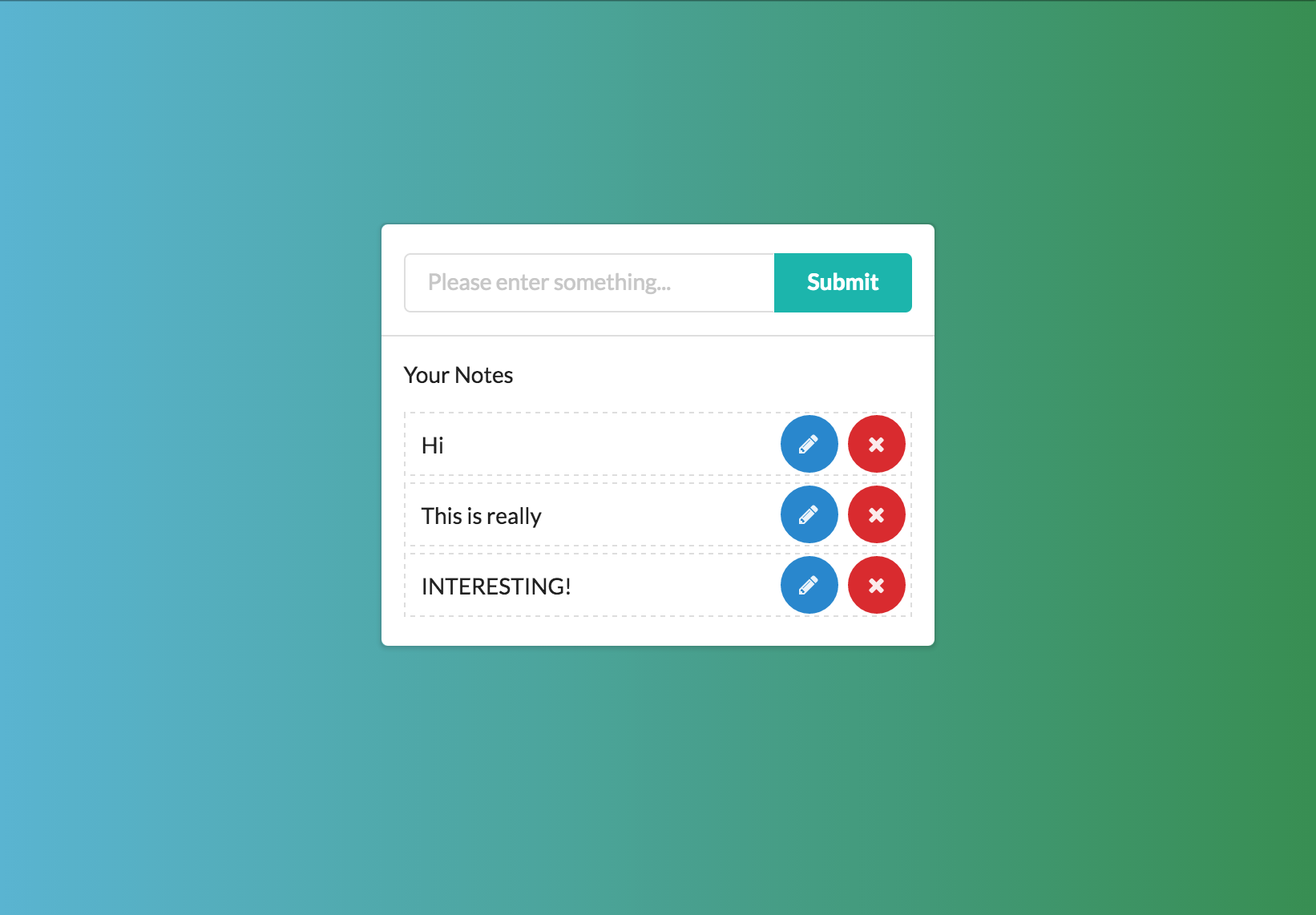
A Notelist with Semantic UI
UI framework

UI framework
RWD-support UI framework
RWD: Responsive Web Design 響應式設計
UI Framework:
AWD: Adaptive Web Design 適應式設計
套用制式的排版、網格、元件、樣式,以幫助開發者快速構築畫面
Grid System
A modern web layout solution
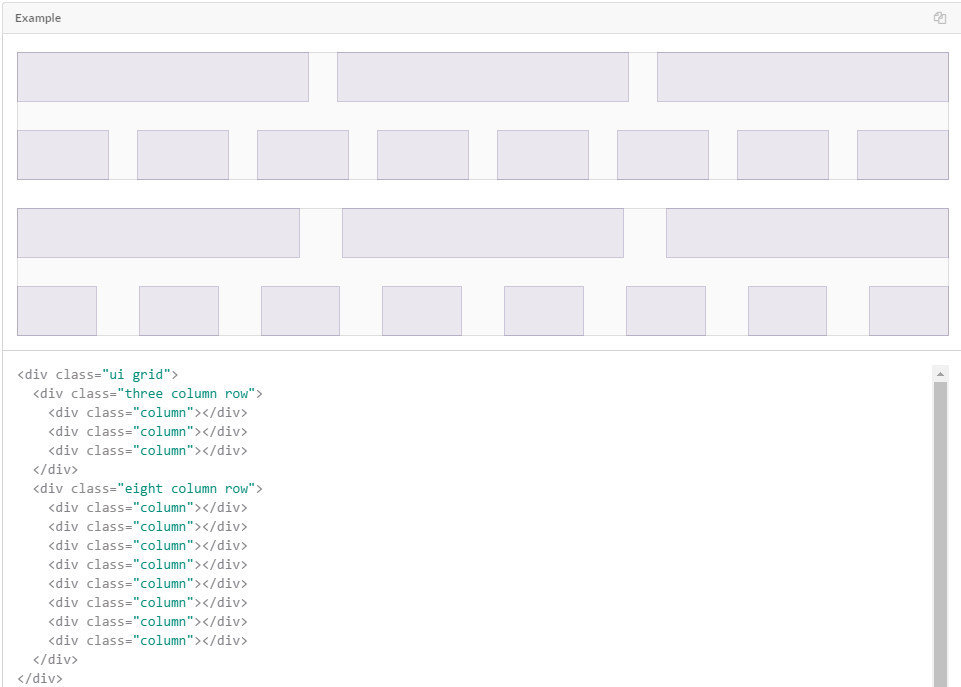
Split page into grid blocks in rows.
Then you may deal with your layout without mess pain.
Breakpoints
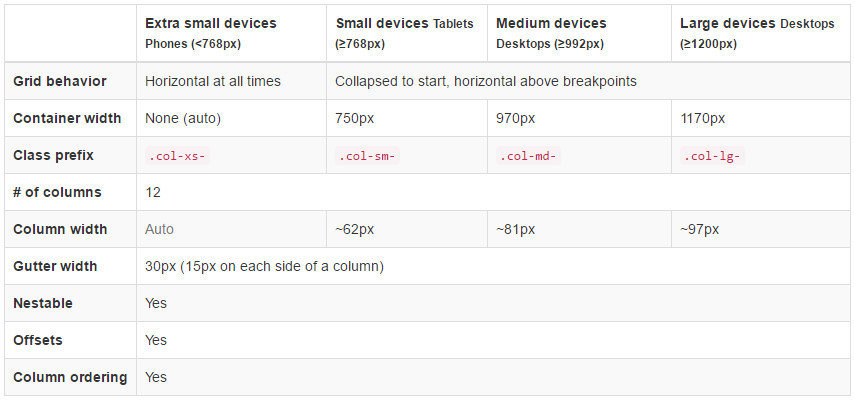
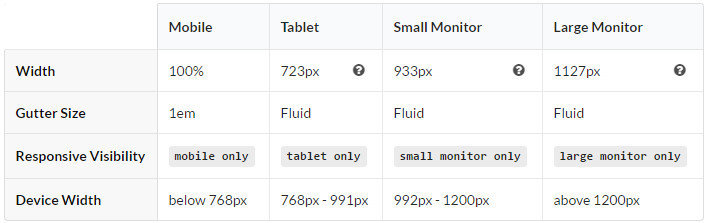
Bootstrap
Semantic
HTML Skeleton
<div class="ui stackable grid container">
  <div class="ui four wide column"></div>
  <div class="ui eight wide column">
    <div class="ui segments">
      <div class="ui segment form">
        <div class="field">
          <label for="work"></label>
          <div class="ui action input">
            <input type="text" name="work" id="input-note" placeholder="Please enter something..."/>
            <div type="submit" class="ui teal submit button btn-submit">Submit</div>
          </div>
        </div>
      </div>
      <div class="ui segment">
        <div id="note-list"></div>
      </div>
    </div>
  </div>
  <div class="ui four wide column"></div>
</div>

<div class="item" id="note-template">
  <div class="text">我是一個範例的item</div>
  <div class="action">
    <div class="ui circular blue icon button btn-edit">
      <i class="write icon"></i>
    </div>
    <div class="ui circular red icon button btn-delete">
      <i class="remove icon"></i>
    </div>
  </div>
</div>
CSS
html, body {
  height: 100%;
}

body {
  background: linear-gradient(to left, #348F50 , #56B4D3);
  /* Use "display: flex" to align it */
}

#note-template {
  display: none;
  opacity: 0;
}

#note-list .item {
  /* Use "display: flex" to align it */
  position: relative;
  margin-bottom: 4px;
  height: 40px;
  border: 1px dashed #ddd;
  opacity: 1;
  animation: fadeIn .65s;
  -webkit-animation: fadeIn .65s;
}

.item .text {
  height: 40px;
  line-height: 40px;
  padding: 0 10px;
}

@keyframes fadeIn {
  0% {
    opacity: 0;
  }
  100% {
    opacity: 1;
  }
}